

Open the Profile Menu
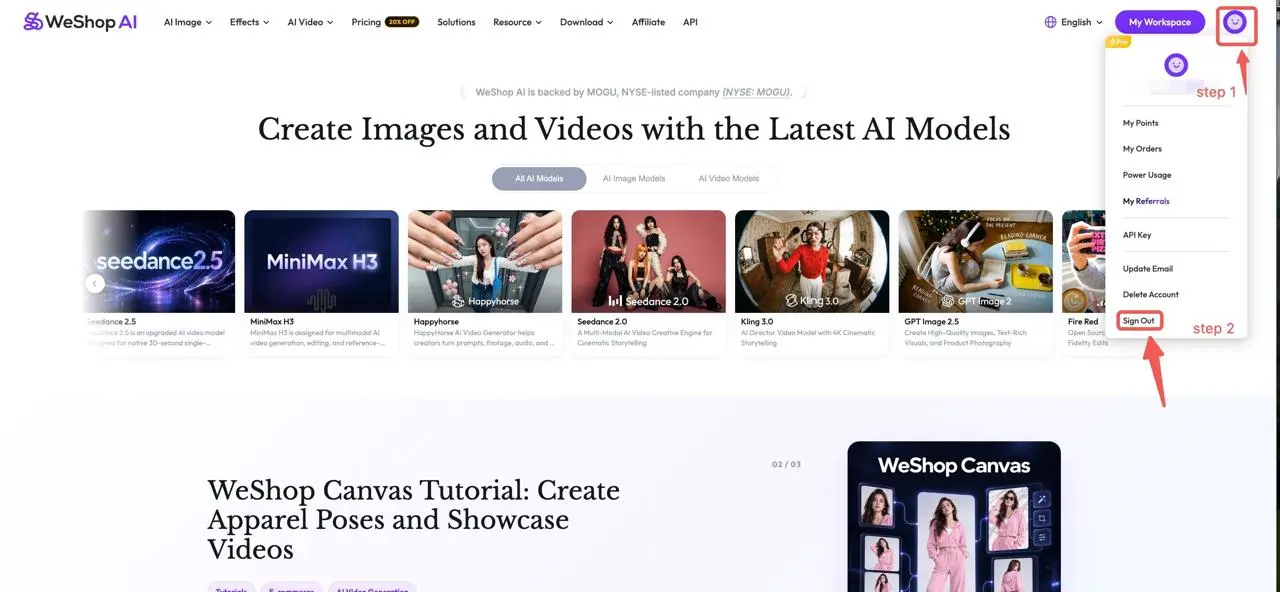
Sign in to WeShop AI on the website. Find your profile avatar in the upper-right corner, beside My Workspace, and click it to open the account menu.
Select Sign Out
Choose Sign Out at the bottom of the account menu. The button is labelled Sign Out in the website interface shown below.
Check That You Are Signed Out
Wait for the website to update and check the sign-in state. Use Sign In when you want to access your account again. If you also use WeShop AI in another browser or on another device, check the sign-in state there separately.
If You Cannot Find the Option
Check that you have opened the profile avatar rather than the language menu. In the menu shown above, Sign Out is below Delete Account. Menu layout may differ by device.
If the button does not respond, follow Troubleshoot Generation and Website Issues, or email hi@weshop.ai with your browser, device, and a screenshot of the issue.