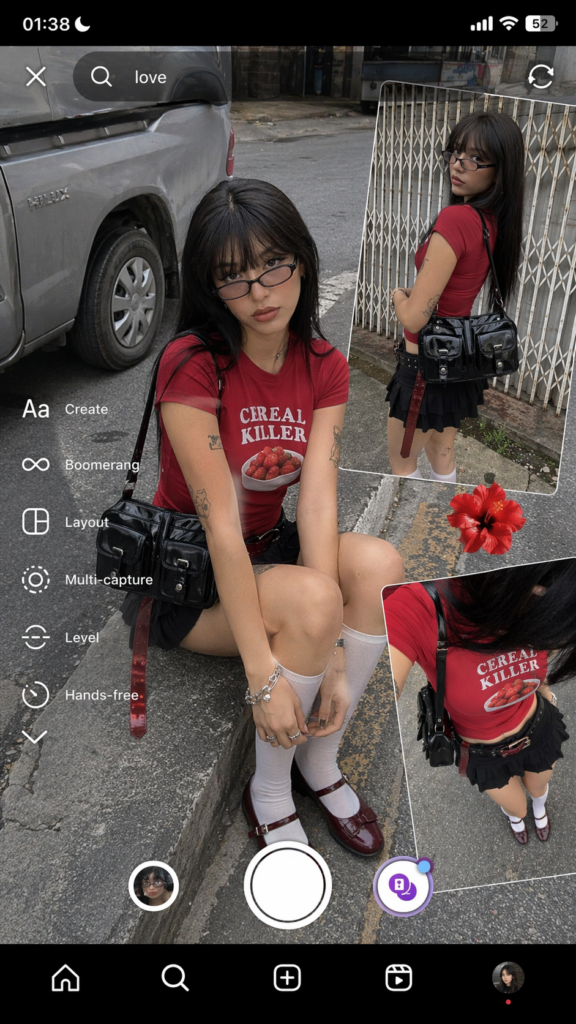
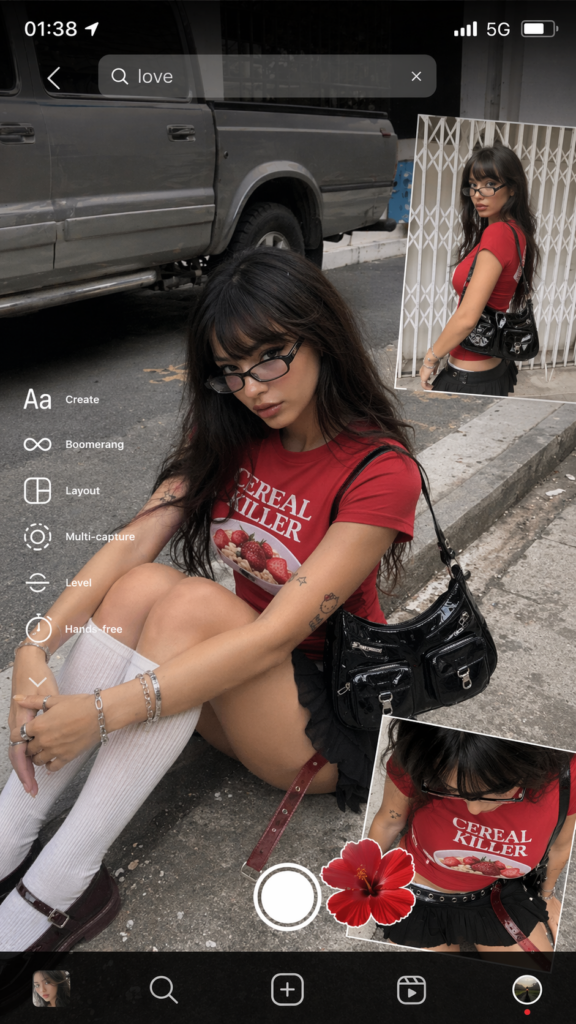
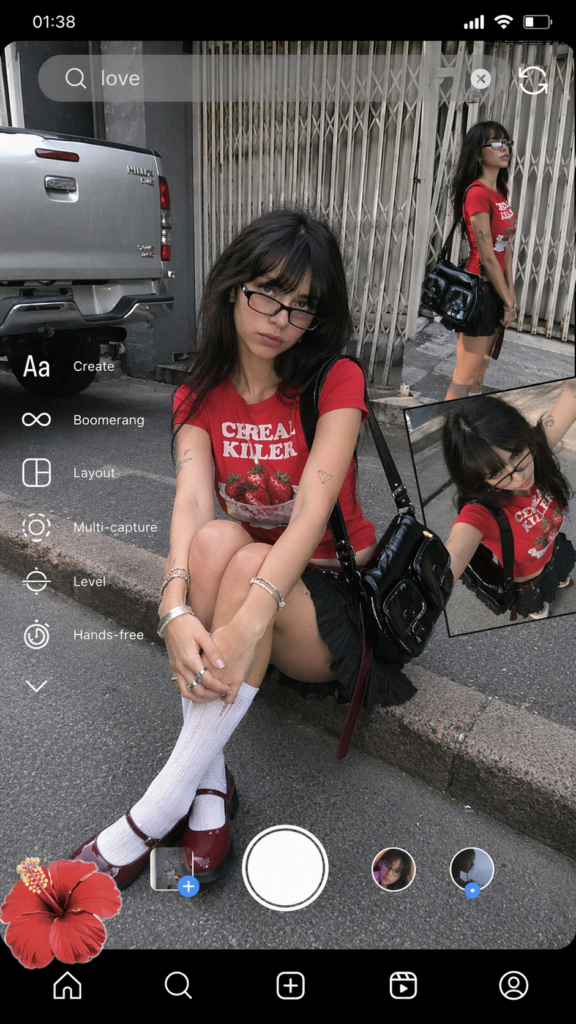
Recently on social media, those Y2K millennium-style street film photos with Instagram UI and Polaroid puzzle effects have been incredibly popular! Do you also want to have a super cool photo with a strong sense of story, as if captured on an old phone on the street at 1 a.m.?
Actually, there’s no need to search for complex street scenes, nor do you need a dedicated photographer or post-production typesetting. In today’s tutorial, I’ll show you how to use a powerful online AI image generation tool. Simply by “copying + pasting” an extremely hardcore magic command, you can automatically generate a “IG-style screenshot collage” with unparalleled texture and high realism within 5 minutes. Are you ready? Let’s get started!
Preparation / Required Tools
Before you begin, please ensure you have prepared the following “magic props”:
- Main Tool: A computer or mobile phone (using a computer browser is recommended for a better view).
- AI Image Generation Platform:(This is an AI tool with extremely high fidelity to prompts and excels at handling complex scenarios).
- Magic Formula: The advanced English prompt provided in this article.
Detailed Step-by-Step Guide
Step 1: Open the workbench and familiarize yourself with the interface
First, click to access the WeShop AI Image Generation Page. After entering the page, you will see a very intuitive input box.
- Operation Action: Locate the **”Prompt Input Box”** at the center or bottom of the page. If there are parameter setting options (such as image ratio), please set it to portrait 9:16, as we need to simulate the visual effect of a mobile phone screen.
[🖼️ Image Display Location 1: Place a screenshot of the WeShop AI interface here, with the “input box” and “ratio setting area” marked with red boxes]
Step 2: Enter “Magic Command”
This is the most crucial step! I have already transformed the complex scene descriptions in the original social media post into logically rigorous English prompts that are most easily understandable by AI. These prompts include details such as character outfits, realistic skin texture (no excessive skin smoothing), street environment, and most importantly – Instagram UI overlay effect .
- Operation Action: Please copy and paste the pure English instruction in the box below completely into the input box of WeShop AI:
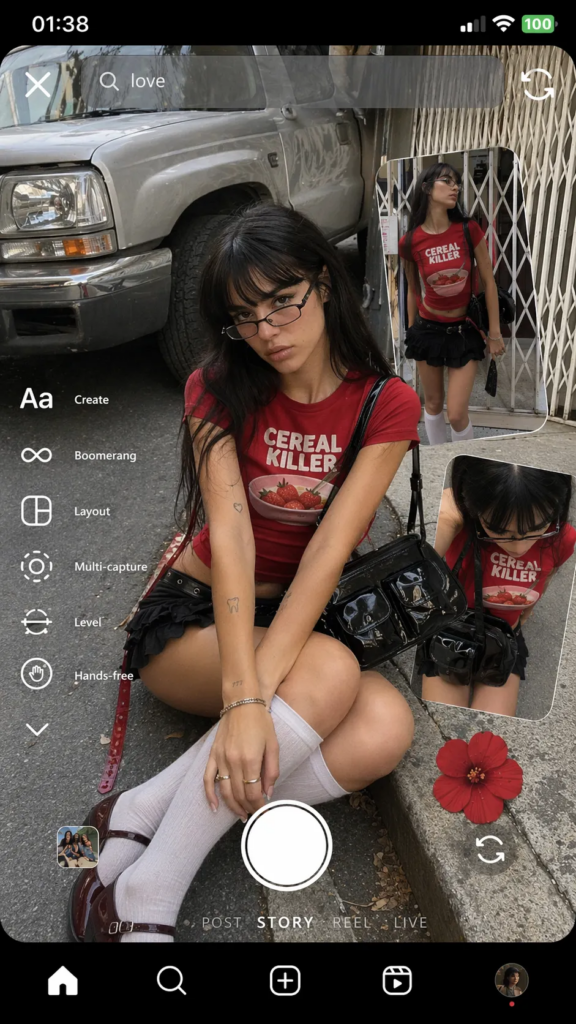
a candid smartphone screenshot collage of a young woman seated on a curb, with extra cutout panels of herself layered like an Instagram camera UI. She wears a vivid red CEREAL KILLER T‑shirt with a strawberry bowl graphic, a low-rise black ruffled mini skirt, white knee‑high socks, and dark burgundy Mary Janes. Long dark hair with blunt bangs; narrow rectangular glasses slightly low on the nose; silver bracelets and simple rings. A glossy black shoulder bag with two front pockets crosses her side, plus a thin black belt and a translucent deep‑red strap that hangs.

Skin: light neutral‑warm tone. Visible areas include face, neck, forearms and upper arms (small tattoos), a tiny midriff/hip sliver, and upper thighs/knees between skirt hem and socks. The skin reads velvety‑matte and warm to the touch, with a gentle natural sheen on the knees and subtle pores on the cheeks. Keep it real, not airbrushed.

Main pose: sitting on the curb, legs folded in, torso leaning slightly forward, hands near the shins; calm, cool gaze at camera with a soft pout. Inserts show a standing side profile and a dynamic overhead crop.

Environment: urban street. In the main frame a silver pickup truck sits to her left on grey asphalt; another panel shows a white metal accordion gate. Overcast/open‑shade daylight—soft, low‑contrast wrap; no flash. Keep smartphone‑deep DOF so the truck and gate stay readable.

Framing and style: vertical 9:16. Slight wide‑lens feel (about 24–28 mm). Minimal grain, crisp edges. Leave the UI overlays in-frame: top status bar at 01:38, a search bar with “love,” the left-edge menu (Create, Boomerang, Layout, Multi‑capture, Level, Hands‑free), a bottom site‑style nav bar, and a red flower sticker. Preserve the text direction (do not mirror).

Vibe: cool, playful Y2K street sensibility; authentic casual capture with mild tilt and flyaways. Let it feel like a memory—“It was 1:38am and the city was grey; the strawberries stayed red.”

Hard requirements: keep the red strawberry tee, the long dark hair with bangs, the narrow glasses, the ruffled mini skirt, the white knee socks, the glossy black multi‑pocket bag, the curbside seated main pose, the urban truck/gate backdrop, and the visible UI collage. Avoid studio polish, heavy bokeh, HDR glow, wrong hair/top/bag, or exaggerated curves.
[🖼️ Image Display Location 2: Place a screenshot here showing the input box filled with the above English code, with details possibly magnified locally]
💡 Tips / Pitfall Avoidance Guide: This prompt contains a hard requirement (Hard requirements), namely “not airbrushed” and “keep the UI interface”. Never cut paragraphs out of laziness, as this is precisely the secret to the photo’s “real sense of breathing”!
Step 3: Click Generate and Effect Preview
After confirming the parameter as 9:16 ratio , take a deep breath and get ready to witness the miracle.
- Operation: Click the “Generate” button next to the input box. Wait for about a dozen seconds, and the AI will render an image for you.
You’ll find that the image not only perfectly recreates the millennium-style girl wearing the red “CEREAL KILLER” T-shirt, but even generates the Instagram feature menu on the left (such as Boomerang, Layout), the search bar at the top, and the time status bar reading “01:38” all at once, with the overall layout resembling a real mobile phone screenshot collage!
[🖼️ Image Display Position 3: Place here the final high-definition masterpiece with a strong Y2K style and IG UI interface, serving as the ultimate showcase]
Advanced Techniques / Frequently Asked Questions (FAQ)
After mastering basic generation, you can try adding your own creativity. Here are a few frequently asked questions and advanced gameplay methods:
- Q: Why do the English letters (UI interface) in the generated photos sometimes have spelling mistakes or garbled characters?
- A: Currently, the vast majority of large AI painting models still have a chance of producing letter deformation or garbled text when dealing with very tiny text. This is a common phenomenon. Advanced Tips: When encountering this situation, you can click “Regenerate” in the tool and roll the image a few more times, or after generating a satisfactory image, use the built-in photo editing software on your phone or Meitu Xiuxiu to paste a cute Emoji (such as a strawberry 🍓) over the garbled text, which will instead give it a more casual Y2K aesthetic!
- Q: Can I exchange the red T-shirt for a different color or style?
- A: Absolutely! In the prompt for Step 2, find
a vivid red CEREAL KILLER T‑shirtand replace it with the clothing item you want. For example, replace it withan oversized black vintage band tee(loose black vintage band T-shirt), and the AI will perform intelligent replacement according to your instructions while still retaining the background layout and UI.
- A: Absolutely! In the prompt for Step 2, find
By following these simple three steps, a Y2K millennium-style social media collage full of storytelling and free from the “obvious AI flavor” is completed! This combination of “photo set + UI interface” not only has strong visual impact but is also the current traffic code for attracting views.
What are you waiting for? Open WeShop AI now, copy the command, and give it a try! If you encounter any interesting effects during the generation process, or have trouble figuring out how to modify English prompts, feel free to leave a message in the comments section and share your results/questions with me! I will answer them one by one!
Go to WeShop AI For Exploration: