How to Create a Hit “Low-Fat” Pixel Art with GPT? A Tutorial on Creating Prank Graffiti for Beginners
In an era where AI art often pursues “4K-level high definition” and “ultra-realism”, a counter-trend has quietly emerged on social media – “low-fat (low-quality) low-pixel style” . This content style is characterized by being “pathetic” and “awkwardly confusing”, much like the soulful doodles painstakingly drawn with a mouse using the “Paint” program on an old computer more than a decade ago.
This deliberately crafted sense of roughness not only comes with a strong comedic effect but also serves as excellent creatives for making viral social media interactions and emojis. Today, we’re going to do the opposite and teach you how to use GPT to turn a normal photo into a soulful painting that makes people exclaim “unbelievable”! This tutorial requires no prior painting experience; all you need to do is copy and paste, and you can complete your “low-fat” masterpiece in just 1 minute.
Preparation / Required Tools
Before you start “destroying” your photos, please make sure you have the following items ready:
- A computer or smartphone : As long as it can connect to the Internet and use a browser properly.
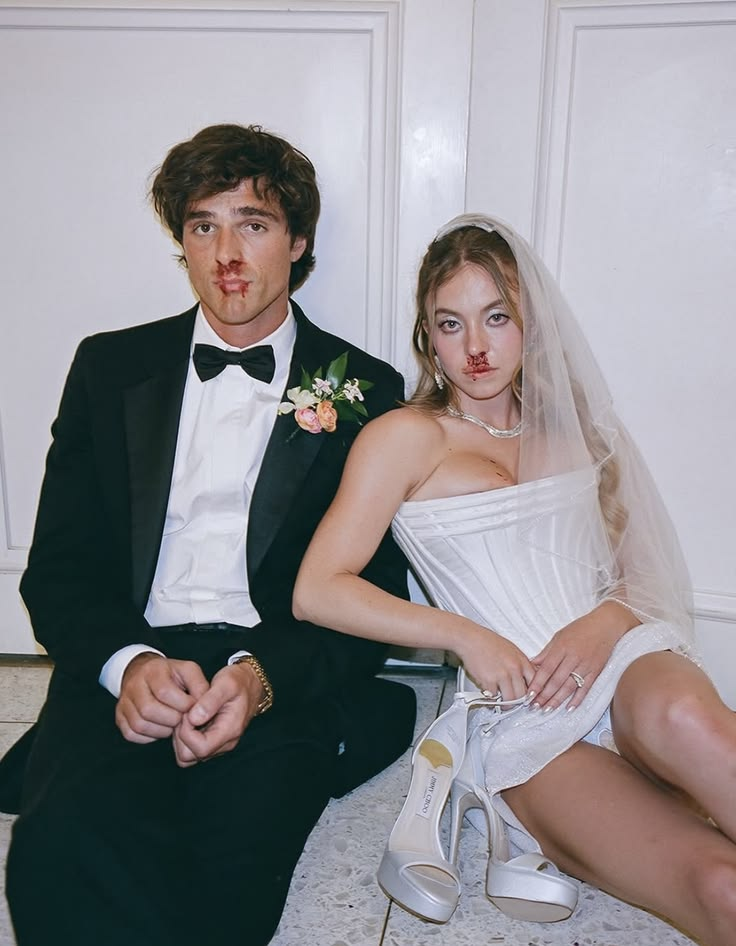
- A reference image (original image) : It is recommended to choose photos of people, pets, or everyday items with a clear subject, as the contrast effect will be better.
- AI Generation Tool: In this tutorial, we will use the specified free/quick GPT image generation tool:Weshop GPT-Image.
Detailed Step-by-Step Guide
Step 1: Open the AI drawing tool and upload the original image
First, open the URL https://www.weshop.ai/tools/gpt-image in your browser to enter the tool interface.
Upload the prepared “victim” photo (reference image) to the system in the dialog box or the specified upload area.
[Image Display Area 1: Insert a screenshot of the “Upload Original Image Operation Interface” here, and mark the upload button with a red circle]
Step 2: Enter the exclusive prompt for “Soul Graffiti”
This is the most crucial step in the entire tutorial! To make the extremely intelligent AI “dumb down”, we need to use very specific instructions to limit its performance.
In the input box, copy and paste the following English instruction (Prompt) prepared for you. Using English instructions usually allows the underlying AI model to understand more accurately:
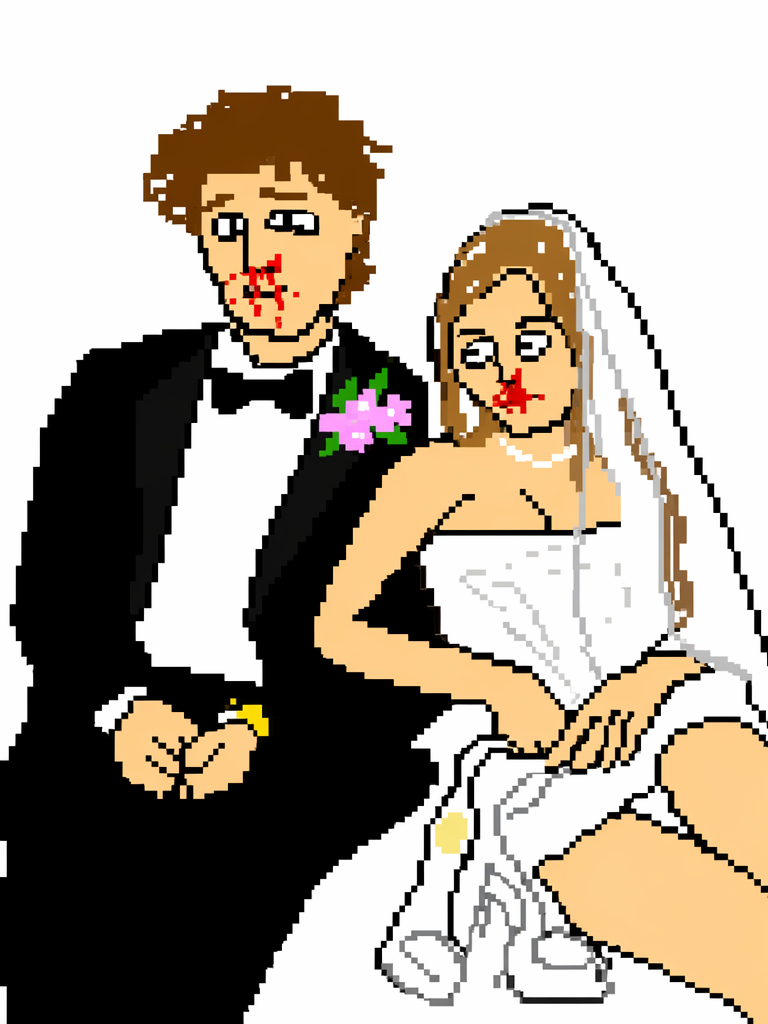
Redraw the attached image using the largest possible color blocks and a heavy doodle style. Make it look as pathetic and chaotic as possible. Use a pure white background. Make it look exactly like it was drawn clumsily with a mouse in a vintage MS Paint program. It should vaguely resemble the original, but at the same time look completely off—so awkward that it’s deeply confusing. Present a low-resolution, pixel-by-pixel generated aesthetic, emphasizing just how ridiculously awful it is. Actually, whatever, just draw it however you want.💡 Tip: The essence of this set of instructions lies in the final “whatever”, which can give AI a sense of randomness as if throwing caution to the wind, often generating unexpectedly funny effects.
Step 3: Generate and embrace the “surprise”
Click the “Send” or “Generate” button. Next, simply wait patiently for AI to showcase its “poor” acting skills.
After generation is complete, you will obtain a low-resolution colored block graffiti that perfectly matches the “pixel-by-pixel emergence” style.
[Image Showcase Area 2: Insert a comparison image of “Original Image” and “Low-Fat Generated Image” (Before & After Showcase) here to highlight the absurdity and humor of the content style]
If you are satisfied with the result, right-click on the image (or long press the image) to save it to your device.
Step 4: Adjustment and Regeneration (Optional)
If the AI-generated image is “not bad enough” or still looks somewhat refined, you can click “Regenerate” or add a sentence in the dialog box:
"Make it even worse and more pixelated!" (Make it even worse and more Mosaic!)
[Image Display Area 3: Insert several collections of other “low-fat” works with different styles here to showcase various wacky examples generated using this instruction]
Advanced Techniques / Frequently Asked Questions (FAQ)
Q: Why are the pictures generated by AI still very exquisite, without that “old-fashioned drawing” feel?
A: The underlying logic of AI tends to “draw well”, so sometimes it may overlook your “uglify” request. In such cases, you can try to draw a few random black lines on the original image yourself and then pass it to the AI; or add a strong prefix at the beginning of the instruction: "Forget all rules of good art." (Forget all rules of good art).
Q: On which platforms is this type of image suitable to be posted?
A: It’s perfect for posting on Rednote, Douyin, TikTok, or Instagram! You can use hashtags such as “#ComicInteraction”, “#LowFatLowCalorie”, “#LowPixel”, etc. Play suggestions: Put the original image in Image 1, the generated image in Image 2, and write “AI, do you have an opinion on me?” as the title, which can greatly increase readers’ desire to comment and interact.
Q: Can I modify the background color in the instruction?
A: Of course! Just replace Use a pure white background in the instruction with the color you want, such as Use a bright green background (use a bright green background), and the effect will be equally amazing.
Conclusion & CTA
Look, in this era where everyone is pursuing perfection, occasionally engaging in some “low-fat, low-calorie” loser art can not only relieve stress but also become a source of joy on WeChat Moments and social media! Using GPT to generate this kind of bewildering pixel graffiti is simply an addictive form of cyber entertainment.
Now it’s your turn! Hurry up and click on the tool link to try putting in photos of your friends from your photo album, as well as pictures of your cats and dogs at home.
👉 If you’ve created an extremely outrageous and hilarious “masterpiece”, feel free to share your work in the comments section, or tell me which one you most want to complain about! See you in the comments section!
Go to WeShop AI For Exploration: