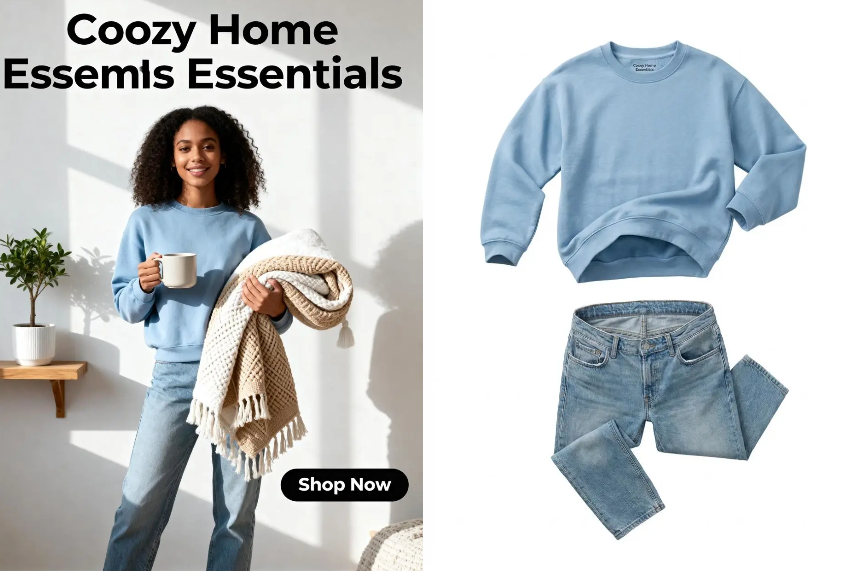
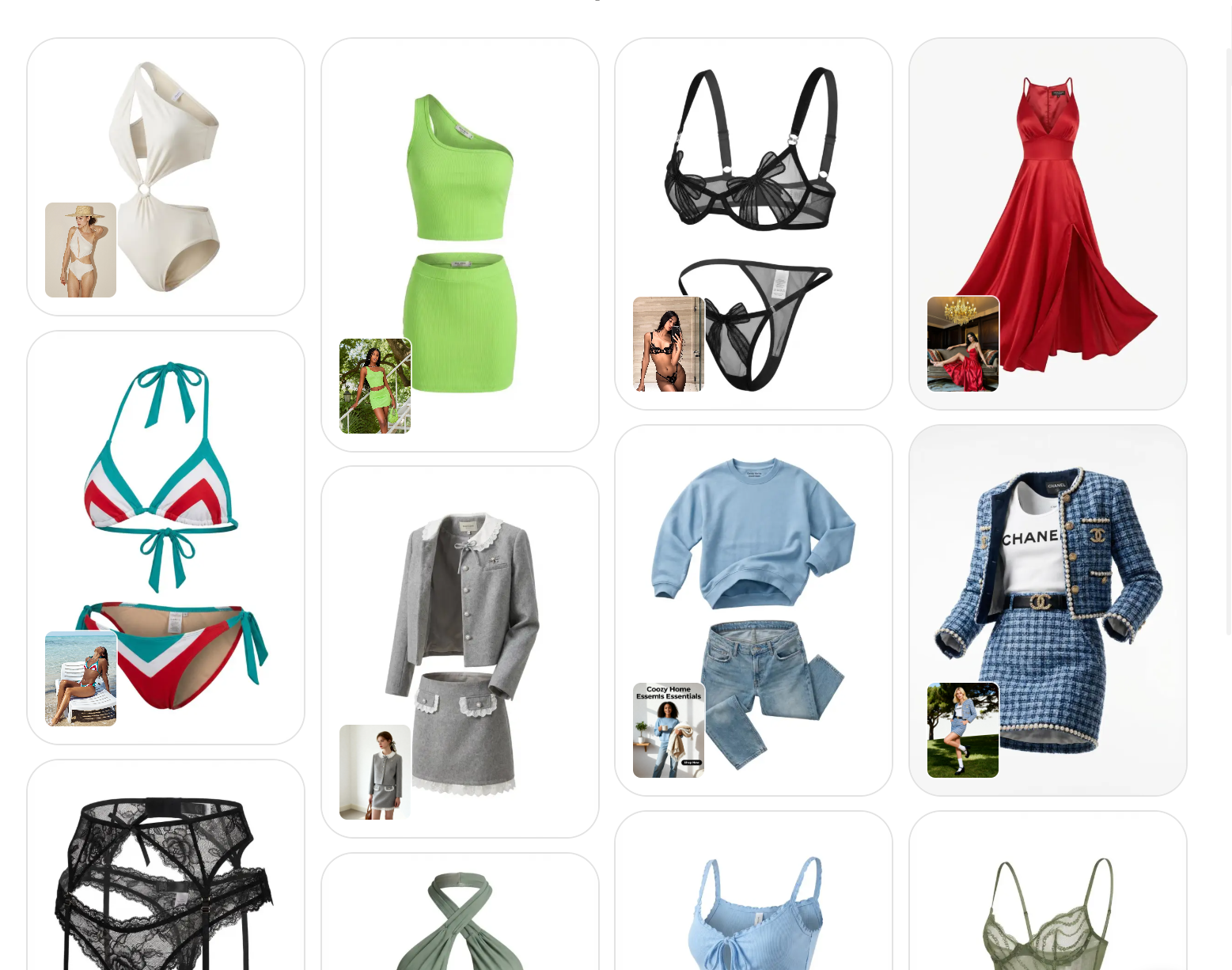
In the hyper-competitive world of e-commerce, visual representation isn’t just a part of the marketing strategy—it is the marketing strategy. For fashion brands and online retailers, the “Ghost Mannequin” effect (also known as the “Invisible Man” or “Hollow Man” effect) has long been the gold standard for showcasing apparel. Today, WeShop AI has introduced a game-changing tool that leverages generative artificial intelligence to democratize high-end product photography. This blog post explores the depths of the AI ghost mannequin generator by WeShop, detailing how it works, why it is essential for your business, and how you can master it.
What is the AI Ghost Mannequin Generator?
At its core, the AI ghost mannequin generator is a sophisticated cloud-based tool designed to automate the creation of “hollow” garment images. Instead of manually stitching together two separate photos (the front of the shirt on a mannequin and a second photo of the inside neck area), the AI analyzes the garment’s structure and intelligently “fills in” the missing parts.
WeShop’s tool specifically focuses on removing the mannequin or model from the original image while maintaining the natural folds, shadows, and textures of the fabric. It uses advanced computer vision to understand the physics of clothing, ensuring that the final result looks three-dimensional and realistic, rather than a flat, edited cut-out.
Why You Should Switch to an AI Ghost Mannequin Generator
1. Massive Cost Reduction
Traditional ghost mannequin photography involves hiring a photographer, renting a studio, purchasing expensive modular mannequins, and paying for professional retouching. By using an AI ghost mannequin generator, you bypass nearly all of these overheads. You can take a basic photo of your product on a standard mannequin—or even a person—and let the AI handle the complex reconstruction.
2. Unmatched Efficiency and Speed
In the fast-fashion era, time-to-market is everything. Manual retouching for a single garment can take anywhere from 20 to 60 minutes for a skilled editor. With the WeShop AI ghost mannequin generator, the process is reduced to seconds. This allows brands to upload hundreds of SKUs in the time it used to take to edit a single collection.
3. Consistency Across the Catalog
One of the biggest challenges in e-commerce is maintaining a uniform look. Different lighting or different editors can lead to a disjointed website. The AI ghost mannequin generator ensures that every image follows the same structural logic and lighting patterns, creating a professional, cohesive browsing experience for your customers.
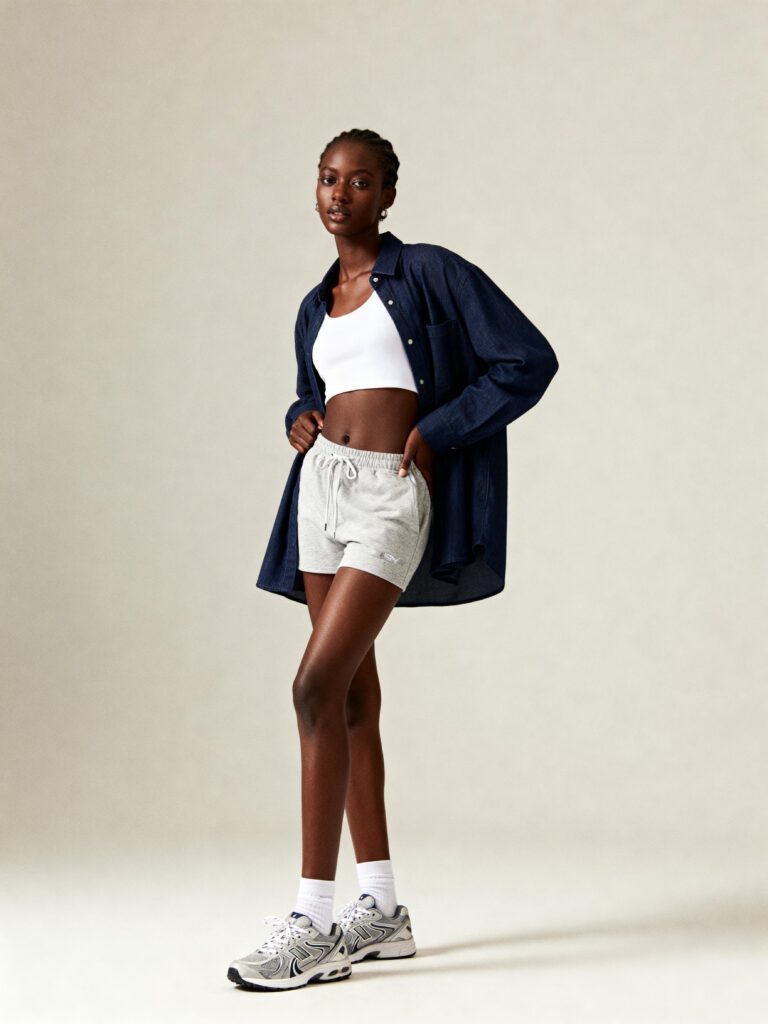
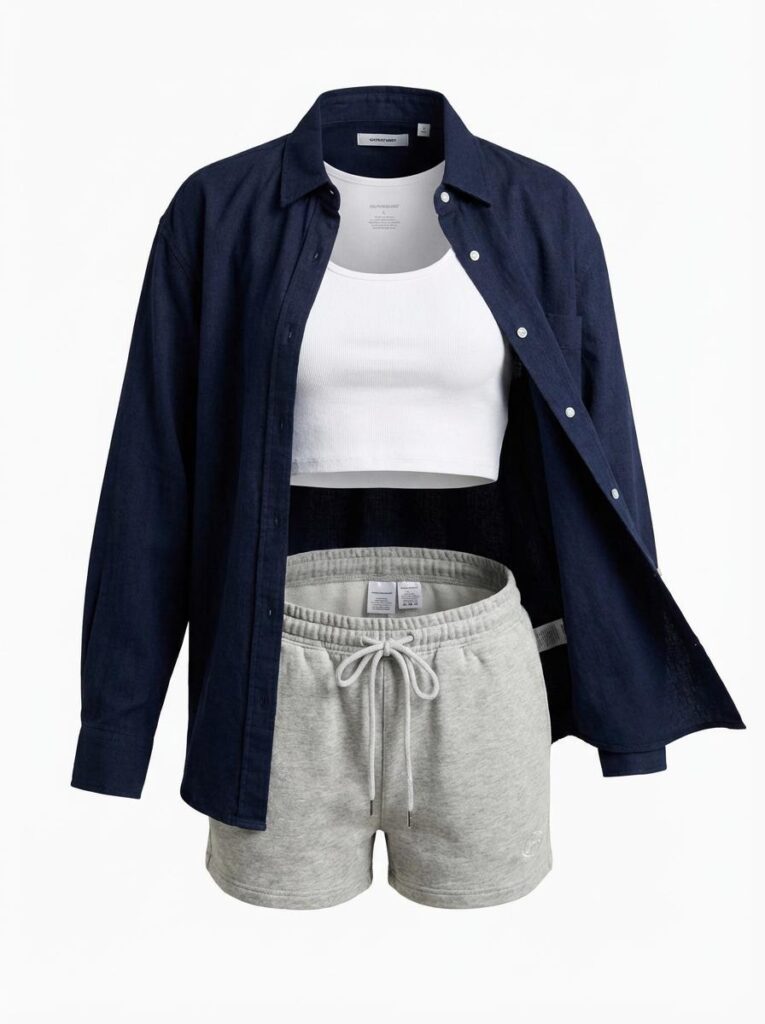
Key Features of WeShop’s AI Ghost Mannequin Generator
To truly appreciate the tool, one must look at the specific features that set it apart from basic background removers:
Intelligent Fabric Reconstruction: Unlike basic AI, WeShop’s AI ghost mannequin generator understands how fabric drapes. If a mannequin’s arm is removed, the AI realistically recreates the side of the torso that was hidden.
Neck-Joint Creation: This is the “holy grail” of ghost mannequin photography. The AI generates the back-inside of the garment (the collar and brand tag area) seamlessly.
Texture Preservation: The tool is careful not to “smooth out” the garment into a plastic-looking object. It retains the natural grain of denim, the softness of cotton, and the sheen of silk.
Bulk Processing: For enterprise users, the ability to process multiple images simultaneously makes the AI ghost mannequin generator an indispensable part of the workflow.
Step-by-Step Guide: Mastering the WeShop AI Ghost Mannequin Generator
Experiencing the WeShop platform is remarkably intuitive. Here is a deep dive into how to get the most out of the AI ghost mannequin generator.
Step 1: Image Uploading
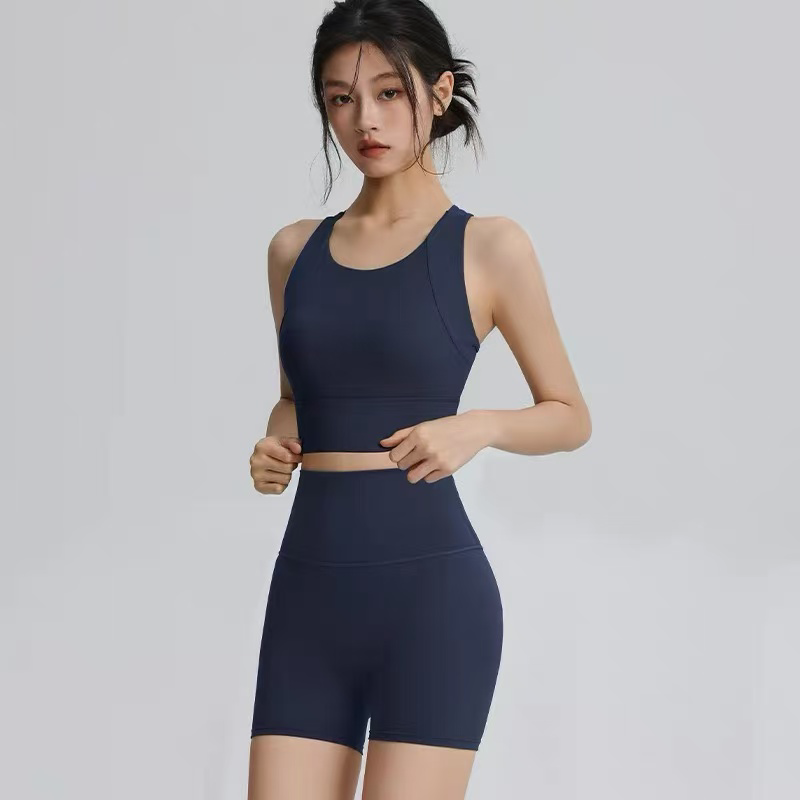
Upload a high-resolution photo of a person or a standard mannequin wearing the garment. Ensure the clothing is well-fitted and the lighting is clear to help the AI understand the fabric’s structure.
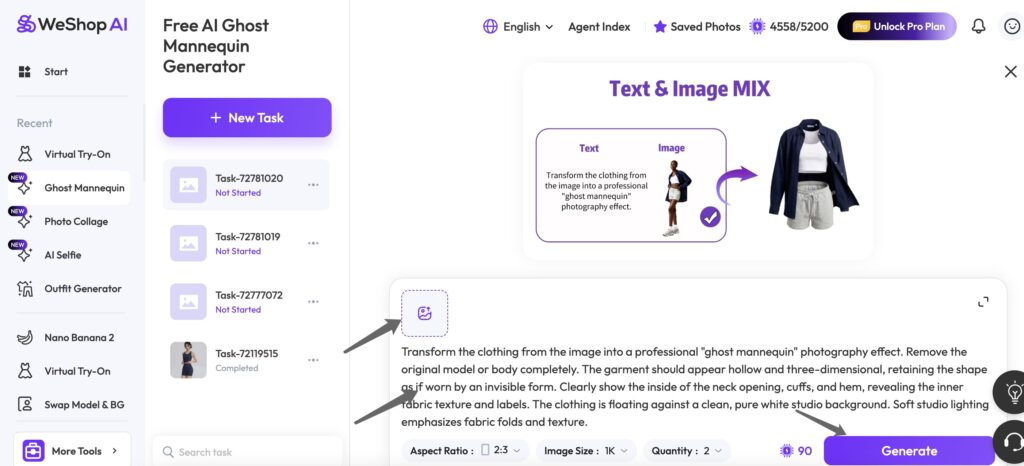
Step 2: Configure Generation Settings
Before generating, select your preferred parameters.
- Quantity: The number of variations you want to produce(Different quantity will need different credits).
- Quality: Higher resolution or “ultra” modes require more processing power.
- Aspect Ratio: Choose between Portrait (3:4), Square (1:1), or Landscape (16:9).
Step 3: Use the “Ghost” Command by WeShop AI
We automatically provide you with these prompts or you can generate other prompts with our AI agents to ensure the AI removes the model while maintaining the 3D shape:
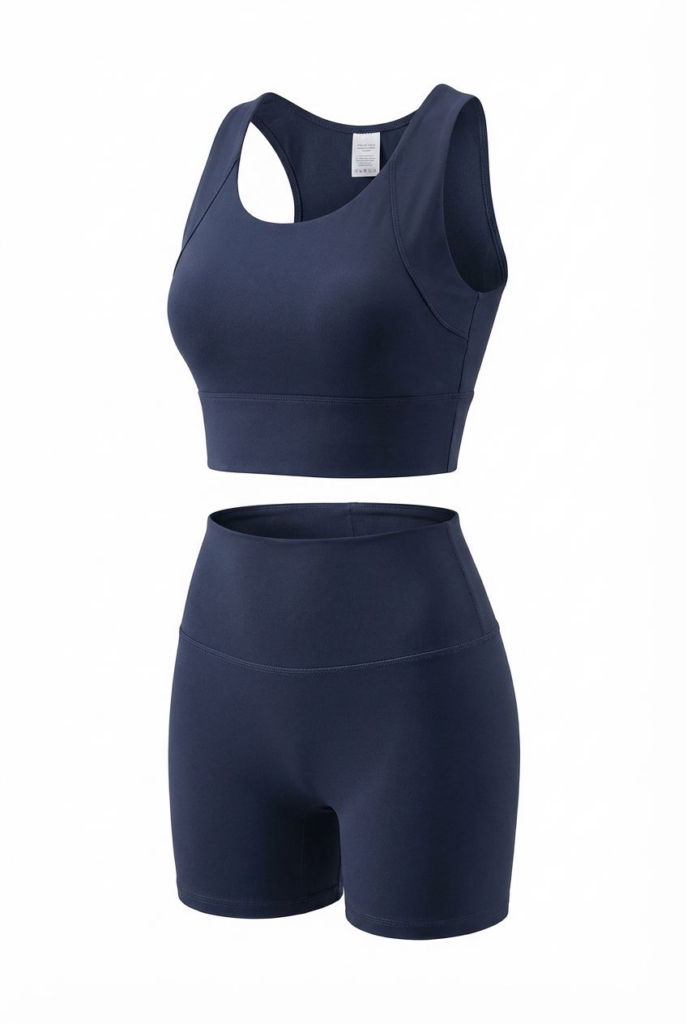
“Transform the clothing from the image into a professional ‘ghost mannequin’ photography effect. Remove the original model or body completely. The garment should appear hollow and three-dimensional, retaining the shape as if worn by an invisible form. Clearly show the inside of the neck opening, cuffs, and hem, revealing the inner fabric texture and labels. The clothing is floating against a clean, pure white studio background. Soft studio lighting emphasizes fabric folds and texture.”
Step 4: Generate & Export
Click the Generate button. The AI will process the textures and “fill in” the missing parts (like the inner collar) to create a hollow, floating effect. Once finished, download your professional e-commerce assets.
The Future of Fashion is AI-Driven
The transition from manual labor to artificial intelligence in fashion photography is no longer a luxury—it is a necessity for scalability. The AI ghost mannequin generator by WeShop AI provides a bridge between high-cost professional photography and the need for high-volume content.
By integrating this tool into your workflow, you aren’t just saving money; you are reclaiming time to focus on what matters: growing your brand and designing great products. Whether you are a solo Etsy seller or a global fashion house, the AI ghost mannequin generator is the key to a more efficient, professional, and profitable online presence.
Experience the difference today and give your garments the “invisible” touch that makes them stand out in a crowded digital marketplace.
FAQ: Everything You Need to Know About the AI Ghost Mannequin Generator
Does the AI ghost mannequin generator work for all types of clothing?
Yes, the AI ghost mannequin generator is highly versatile. It works exceptionally well for tops, jackets, dresses, and hoodies. For more complex items like sheer fabrics or highly intricate lace, the AI still performs remarkably well, though high-contrast lighting in the original photo helps the AI distinguish between the mannequin and the garment.
Can I use photos of a real person instead of a mannequin?
Absolutely. One of the best features of WeShop’s AI ghost mannequin generator is its ability to remove a human model and replace the occupied space with the garment’s internal details. This is often easier for small businesses who may not own professional mannequins.
Is the quality high enough for professional e-commerce platforms?
Yes. The output from the AI ghost mannequin generator is designed specifically to meet the high-resolution requirements of platforms like Amazon, eBay, Shopify, and Instagram Shop. The images are crisp, professional, and free of the “jagged edges” often seen with manual cropping.
Do I need to be a Photoshop expert to use the AI ghost mannequin generator?
Not at all. The platform is designed for business owners and marketing managers, not just graphic designers. The “one-click” philosophy behind WeShop means that the AI does the heavy lifting, requiring no prior technical knowledge of image editing.
Is there a free version of the AI ghost mannequin generator?
WeShop offers a free trial or “free-to-try” credits for users to experience the power of the AI ghost mannequin generator. This allows you to test the quality with your own products before committing to a subscription plan.
How does this improve my SEO and conversion rates?
Search engines and marketplaces prioritize high-quality, clean images. Furthermore, the “ghost mannequin” look is proven to increase conversion rates because it provides a clear, undistracted view of the product’s fit. By using the AI ghost mannequin generator, you ensure your products look premium, which builds trust with potential buyers.