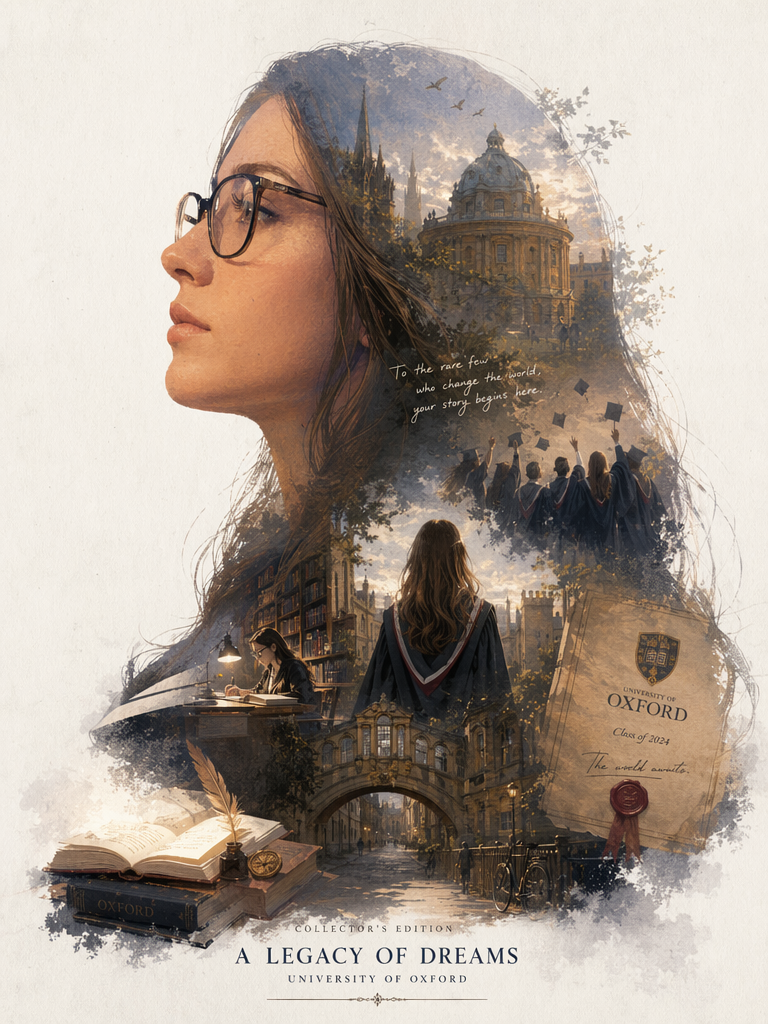
As graduation season approaches, apart from the traditional practice of donning academic gowns and taking photos on campus, have you ever considered having a personalized “epic narrative” graduation poster? The recently viral “silhouette contour fill-style” double exposure poster on social media, with its cinematic texture and dreamy watercolor style, has instantly made countless graduation photos (especially the high-level commemorative photos of master’s and doctoral students) stand out.
This tutorial is exactly what you’ve been searching for the free entry to the AI instruction tutorial for creating university posters ! Whether you’re a newbie with no photo editing experience or an efficiency enthusiast eager to quickly generate images, simply follow this 5-minute comprehensive guide, copy and paste the English instructions I’ve prepared for you, and you can instantly create a graduation poster that will amaze your friends on WeChat Moments.
Preparation / Required Tools
Before we start casting AI magic, we need to prepare the following two simple “ingredients”:
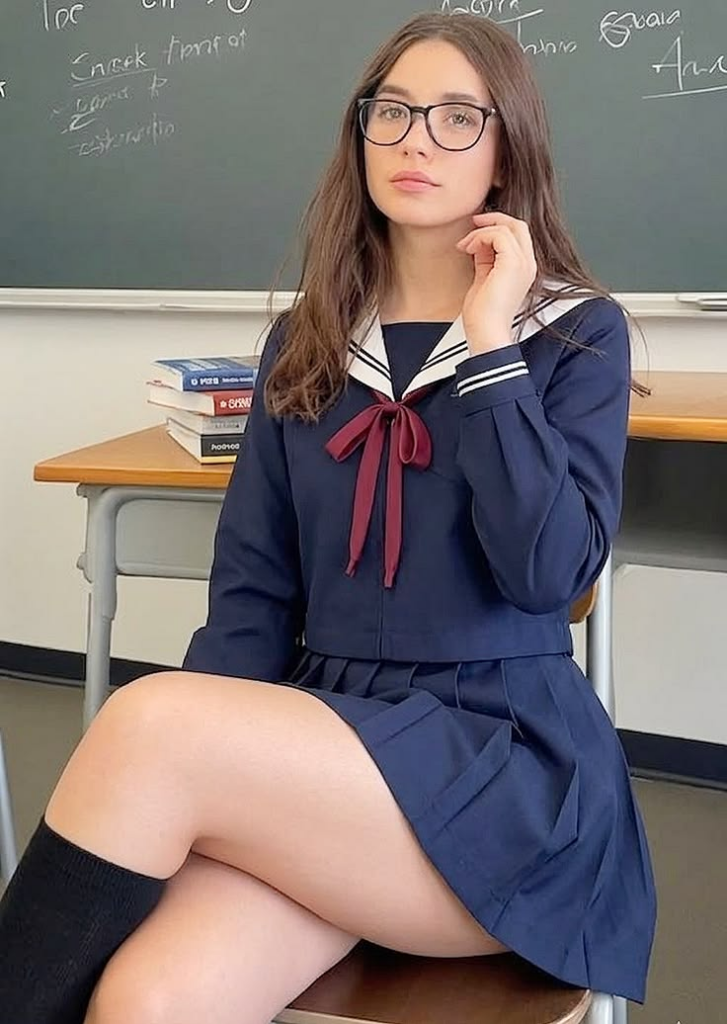
- A clear profile photo of the individual: Since we will be creating a “profile silhouette” effect, please select a half-body or headshot with a clear side profile and a relatively clean background.
- AI Generation Tools: We will use online generation tools that are magic-free and easy to use.
- Direct Link: https://www.weshop.ai/tools/gpt-image
- Magic Instruction (Prompt): The English version has been prepared for you in the following steps and can be directly copied.
Detailed Step-by-Step Guide
Step 1: Go to the tool page and upload your portrait photo
First, open the tool link provided above in your browser. After entering the page, you will see an intuitive operation panel. Locate the image upload area (usually a box with a “+” sign or the word “Upload”), click on it, and upload the profile photo you have prepared in advance to the system.
[📸 Image Display: Please place a screenshot of the tool interface here, mark the location of the “Upload Image” button with a red circle, and place an excellent “original side face image” as an example next to it]
Step 2: Copy and modify the exclusive English magic command
The original social media posts circulated Chinese requirements, but to enable underlying AI (such as Midjourney or DALL-E 3) to understand this complex art style more accurately, using English instructions will multiply the effectiveness .
Please copy the following optimized English prompt (Prompt) I’ve prepared for you , and paste it into the **Text Input Box (Prompt Box)** on the tool page:
Copy & Paste:
Automatically generate a collector’s edition epic narrative poster based on my portrait. (Theme: Graduation. A giant silhouette of my side profile serves as the outer contour. Inside the silhouette, naturally grow a complete worldview, iconic scenes, character relationships, symbolic elements, key architecture, creatures, props, and atmosphere most fitting for a campus graduation theme).
The overall look is not a basic collage, but a high-end silhouette-fill narrative composition with double-exposure associations, leaning towards a blend of cinematic poster and dreamy watercolor illustration. Soft atmospheric perspective, light mist transitions, paper grain texture, dry brush edges and brushstrokes, large areas of negative space (white space), restrained and premium layout. It should feel quiet, grand, sacred, nostalgic, poetic, and legendary.
Style, color, scenes, and textures should automatically adapt to the graduation theme. All elements must be strongly tied to the theme, instantly recognizable, not messy, no forced collages, no templated backgrounds, and no cheap fantasy materials. If there is text, use English. My university is University of Oxford.
💡 Tips / Customization Guide:
Carefully read the last sentence of the instructions. Please make sure to replace the bolded University of Oxford with the full English name of your own alma mater (e.g., Tsinghua University or New York University), so that the AI will automatically incorporate the iconic buildings or element atmosphere of your alma mater into your silhouette!
[📸 Image Display: Please place a screenshot here showing the state of pasting the English instruction into the tool’s text box, and use an arrow to point to the place where the university name needs to be modified]
Step 3: Generate and save your personal poster with one click
After confirming that the photo has been uploaded and the instruction (after correcting the university name) has been filled in, click the **”Generate”** button on the page.
Next, simply wait patiently for a few dozen seconds, and the AI will read your facial contour, seamlessly integrating the grand campus scenery and youthful memories into your profile silhouette in the artistic forms of watercolor and double exposure.
After seeing a satisfactory work, click the Download/Save icon below the image to save this stunning high-definition poster to your phone or computer.
Advanced Techniques / Frequently Asked Questions (FAQ)
Q1: Why do the images I generate feel like “forced collages” and lack naturalness?
A: This is usually because the background of the uploaded original image is too complex , or the side profile is not clear enough . It is recommended to replace it with a side profile photo taken against a solid-color background or a side profile photo wearing a graduation cap, so that the recognition of the outer contour will be more accurate, and the “internal growth within the silhouette” effect will also be more advanced.
Q2: Can I change the theme from “graduation” to something else?
A: Absolutely! This is the charm of “content reuse”. You only need to change Theme: Graduation (Theme: Graduation) to Theme: Cyberpunk city (Cyberpunk City) or Theme: Enchanted forest (Enchanted Forest) in the English instructions, and remove the final university name, then you can get an epic personal poster with a completely different style.
Q3: Why isn’t the specific school gate shown in the generated image?
A: The generation of AI has a certain degree of randomness and artistic abstraction. If you strongly request a specific building to appear, you can add the specific building name after the university name at the end of the instruction, for example: My university is [Your University], please include the iconic [English name of the landmark building].
Without having to go to an expensive photography studio or master complex Photoshop techniques, simply through a few precise English instructions and a useful AI tool, each of us can become the “poster designer” of our own youth. This gptimage2 tool makes creating commemorative photos with a high-end texture easier than ever before.
Try it now! Capture your graduation moments in the most special way, or create a highly artistic personal avatar for yourself. If you encounter any issues regarding instruction modification or tool usage during the operation, feel free to leave a message in the comment section and let me know.
Don’t forget to post your “epic graduation poster” in the comments section so we can all admire your exclusive masterpiece!
Go to WeShop AI For Exploration: