

An AI Marketing Video Generator can help a good product get more attention. Shoppers move fast through social feeds, ads, and product pages. A clear photo can show what a product looks like. However, a short video can show how it works and why people may want it.
You do not need a large studio to start. A product image, short description, or simple idea can be enough. The tool can turn these basic materials into a complete marketing video.
Still, movement alone is not the goal. Each scene should make the product easier to notice, understand, and remember.
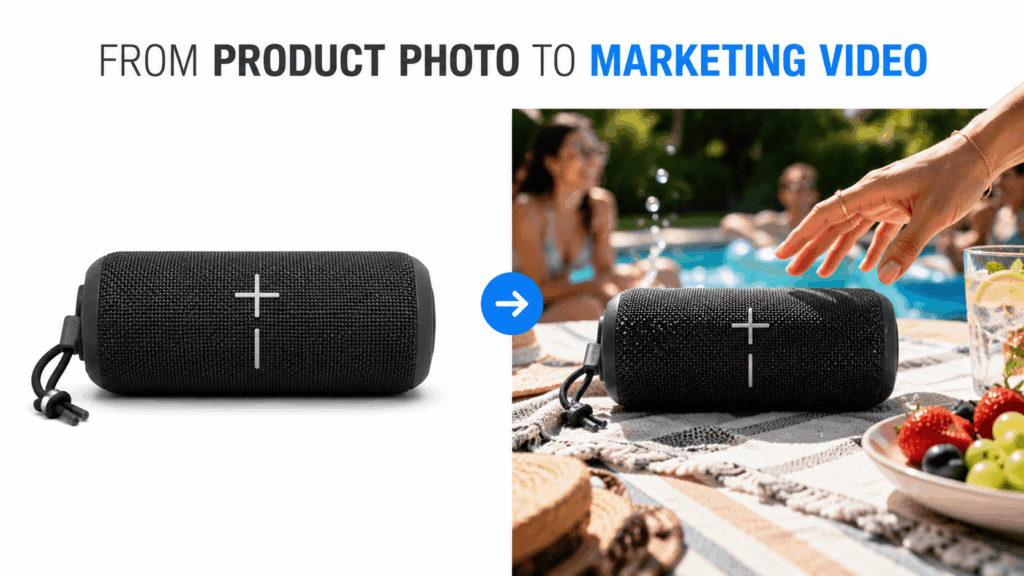
Why Good Products Still Get Scrolled Past
Even a useful product can disappear in a busy feed. Many shoppers scroll away before they learn what it can do.
Static images show color, shape, and packaging well. Yet they may not explain how the product works. The main benefit can also be easy to miss.
Consider a travel bag. One photo can show its design. A video can show its storage space, laptop pocket, and suitcase strap.
The same is true for beauty products. A studio photo may show a nice bottle. By contrast, a short video can show the texture, use, and mood.
Strong content should do more than display an item. It should help shoppers picture that item in their own lives.
What an AI Marketing Video Generator Can Add
An AI Marketing Video Generator can turn basic product details into a clear visual story. It can bring together product shots, captions, key benefits, and a final call to action.
As a result, one product image can support several types of content. It may become a launch video, a social clip, a short ad, or a feature video.
Turn Product Details Into a Clear Message
A product page may contain a lot of information. However, a short video should not repeat every detail.
Instead, focus on a few simple questions:
- What is the product?
- Who is it for?
- What problem does it solve?
- Why is it useful?
- What should the viewer do next?
This structure keeps the message clear. It also helps viewers understand the product faster.
Add Captions That Work Without Sound
Many people watch short videos without sound. For that reason, captions should be easy to read.
Long lines are not needed. Short phrases often work better on a phone screen.
Useful examples include:
- READY FOR EVERY TRIP
- SMALL SIZE, BIG SOUND
- MADE FOR BUSY MORNINGS
- EASY TO CARRY
- ONE BAG FOR WORK AND TRAVEL
Good captions support the video without hiding the product.
Show the Product in a Real Situation
Real settings help shoppers understand where a product belongs.
A portable speaker can appear in a living room, beside a pool, or at a picnic. A coffee machine may look best in a bright kitchen. Meanwhile, a backpack can appear at school, work, or the airport.
The product stays the same. Still, each setting gives people a new reason to want it.
Highlight One Product Advantage at a Time
Trying to show every feature can make a short video feel crowded.
A bag may have strong fabric, many pockets, soft straps, and a laptop section. Putting all these points into 15 seconds may weaken the message.
Choose one main benefit for each video instead.
A travel video can focus on easy packing. A work video may show laptop storage. An everyday version can highlight comfort.
This approach gives each scene a clear purpose. It also makes the product easier to remember.
Fashion and Accessories
Fashion videos should show fit, movement, fabric, and style.
Do not keep the item still in the center of the frame. Instead, show it while someone walks, turns, or moves through a real place.
Close-up shots can also reveal stitching, texture, and small design details.
Beauty and Skincare
Beauty videos work well with texture shots, clean close-ups, and simple routines.
Soft light can make the package feel more premium. Natural hand movements can also make the scene feel real.
For example, a serum may appear in a bright morning bathroom. A perfume bottle may fit better in an elegant room.
Electronics
Electronics should appear while solving a simple need.
A small speaker can bring energy to a quiet room. A desk lamp can improve a dark workspace. Wireless headphones may support travel, exercise, or focused work.
Whenever possible, show the benefit on screen. Do not rely only on text.
Build a Short Video People Can Understand Fast
An AI Marketing Video Generator works best with a simple idea. You do not need a long script or a complex story.
A short video can follow three easy steps.
Start With an Attention-Grabbing Moment
Open with the product or a clear problem.
For example, show a messy travel bag first. Then, reveal a better-organized backpack.
Another video may begin with a dull desk. A stylish lamp can then change the whole space.
This type of opening creates interest right away.
Show the Main Product Benefit
Next, show how the product improves the situation.
Perhaps the backpack keeps every item in place. A lamp may make the desk feel warmer and easier to use. A skincare product can become part of a calm morning routine.
Let the scene prove the benefit. Visual proof is often stronger than a long line of text.
End With a Simple Action
Finish with a clear next step.
Useful CTAs include:
- DISCOVER MORE
- SHOP THE COLLECTION
- SEE IT IN ACTION
- FIND YOUR STYLE
- TRY IT TODAY
The final line should match the rest of the video. It should not feel like a random message added at the end.
One Product Can Attract Different Audiences
Different customers may want the same product for different reasons.
A backpack can attract travelers, students, and office workers. Yet each group may care about a different benefit.
Travelers may want easy packing. Students may need room for books and devices. Office workers may care more about laptop safety and a clean design.
An AI Marketing Video Generator can create several video directions from the same product image. Therefore, brands do not have to use one general message for everyone.
Create a Travel Version
Place the product beside a suitcase or inside an airport.
The main message can focus on light weight, useful storage, or easy packing. This makes the product more relevant to travelers.
Create a Work Version
Show the same item during a city commute or inside an office.
Laptop storage, comfort, and a smart look may become the key points. As a result, the video feels more useful to office workers.
Create an Everyday Version
Use familiar places such as a café, park, home, or local street.
This version can focus on comfort and simple daily use. The setting does not need to be dramatic.
Across all three videos, the product stays the same. Only the reason to want it changes.
How to Use an AI Marketing Video Generator
Creating a marketing video does not need to be hard. A few clear choices are enough.
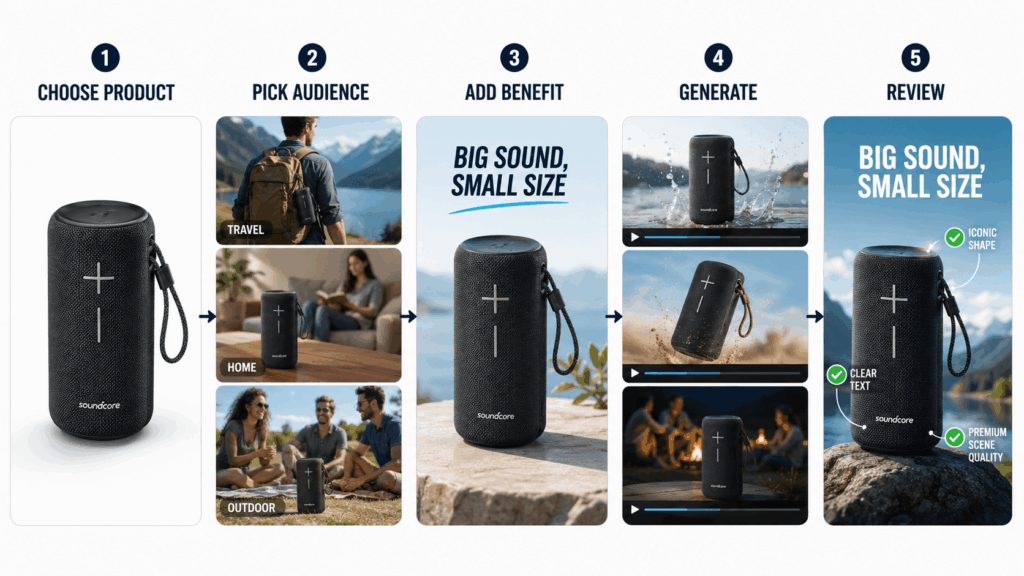
Step 1: Choose a Clear Product Image
Start with a photo that clearly shows the shape, color, logo, and main details.
A simple background can help. Blurry or heavily cropped images may make the result less clear.
Step 2: Choose the Target Viewer
Decide who should care about the video.
Your audience may include travelers, students, busy parents, beauty shoppers, or people who work from home.
A clear audience helps you choose the right scene and message.
Step 3: Add One Main Selling Point
Pick one clear benefit.
Avoid vague phrases such as “high-quality and stylish.” Instead, use a more direct line:
- Keeps your desk organized
- Fits work and weekend travel
- Feels comfortable all day
- Brings strong sound in a small size
- Makes morning routines easier
A clear benefit gives the video a stronger direction.
Step 4: Describe the Video Style
Choose a style that fits the product.
Electronics may work well in a clean product ad. Beauty products may look better in a soft lifestyle scene.
You can also add a setting, mood, camera move, or format. Still, keep the request simple.
Step 5: Generate and Review
Once the video is ready, check the product carefully.
Look at its shape, color, label, logo, and visible text. Make sure these details still look right.
Next, check the message. The main benefit should be easy to understand.
Step 6: Prepare It for the Right Channel
Vertical videos work well on Reels, TikTok, and Shorts.
Square videos suit many social posts. Widescreen videos can fit landing pages and presentations.
The format may change. However, the main product message should stay clear.
Easy Ways to Make Marketing Videos More Attractive
Small changes can improve a video quickly.
First, show the product early. Viewers should know what the video is about within a few seconds.
Next, choose a setting that supports the product. A travel bag belongs in a travel scene. A desk lamp should appear in a workspace.
Movement should also explain something. A bag can open. A bottle can turn. A lamp can switch on.
Random camera motion may look smooth. Yet it does not always show a real benefit.
Captions should stay short as well. One clear line is often better than several lines of small text.
Finally, use a strong final product shot. A clean ending can leave a better impression than a busy scene.
Who Can Benefit From an AI Marketing Video Generator?
An AI Marketing Video Generator can help many types of users.
Ecommerce sellers can turn product photos into social and listing videos. Small brands can create new content without planning a full shoot each time.
Social media creators can make short clips for regular posts. Marketing teams can also test new audiences and selling points.
Freelancers and agencies may use the tool to build early video ideas for clients. This helps them show more options without starting from zero.
Why an AI Marketing Video Generator Makes Promotion Easier
Traditional video work can take time. Brands may need a location, camera crew, editor, and several rounds of changes.
By contrast, an AI Marketing Video Generator can start with the product materials a brand already has.
The tool does not need to replace every photo shoot. Instead, it offers a faster way to create regular marketing content.
Brands can try new scenes without planning a full production. They can also test different product benefits before choosing the best one.
Most importantly, one product image can support more than one post.
Make the Product Easier to Want
A strong marketing video does not need a complex story. It needs a clear product, a clear benefit, and a reason to keep watching.
With an AI Marketing Video Generator, brands can turn simple product content into more active videos. Real-life scenes show where the product fits. Different versions can also reach different audiences.
A product photo shows what a brand sells.
A marketing video shows why people may want it.
Go to WeShop AI For Exploration:


