

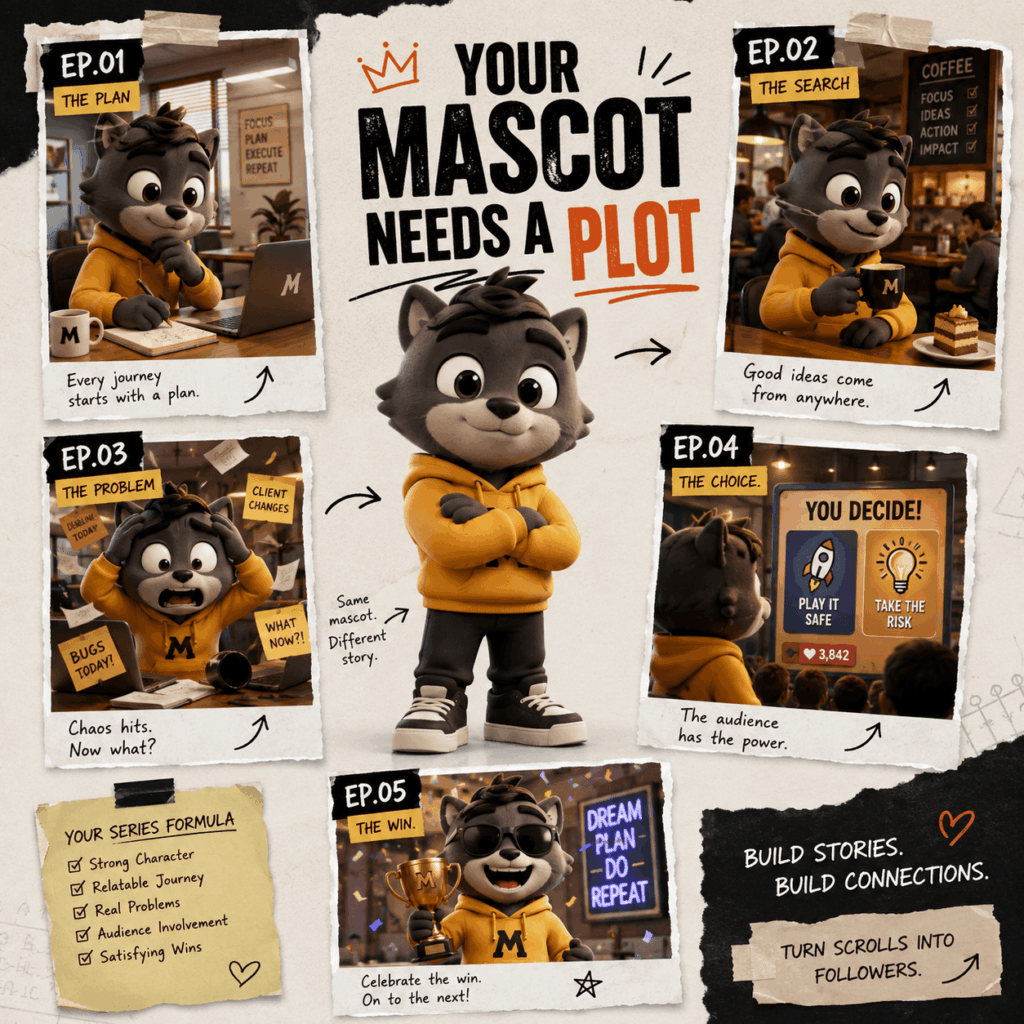
Social feeds are full of polished cartoon characters. They look bright, lively, and ready for attention. However, many disappear after one post. People may enjoy the animation, but they have no reason to remember the character. A 3D Cartoon AI Video can look impressive. Still, a beautiful video alone cannot build a loyal audience.
The stronger idea is to create a character people want to see again.
Therefore, do not begin with this question:
How can I animate this image?
Instead, ask:
What can this character do every week?
A clear role can create new stories. A simple flaw can create funny problems. Meanwhile, an unfinished plot gives viewers a reason to return.
With the right plan, one 3D Cartoon AI Video can become the first episode of a much larger series.
Why One-Off 3D Cartoon AI Video Clips Are Easy to Forget
A strong visual style can stop the scroll. However, it rarely earns a follow on its own.
For example, a cartoon character may dance, wave, or walk through a colorful scene. The movement may look smooth. Yet once the video ends, there is nothing left to think about.
The character has no goal. It faces no clear problem. More importantly, there is no reason to watch another episode.
A memorable character often needs four basic elements:
- A clear role
- A strong desire
- One useful flaw
- A problem that can return
Imagine a coffee bean mascot called Beanie. He believes he can solve every morning problem. Unfortunately, his confidence is much greater than his skill.
This flaw can create many stories. For instance, Beanie could repair the office coffee machine. He could also lead a meeting or test a new drink. In another episode, he might give terrible work advice.
Now, Beanie is more than a cute design. He has a purpose in the feed.
Give Your 3D Cartoon AI Video Character a Clear Role
Before generating a 3D Cartoon AI Video, decide what the character does for viewers.
This role does not need to be a real job. Instead, it should give the character a clear reason to appear in new videos.
Choose a Role That Creates New Episodes
Your character could be:
- An overconfident brand intern
- A mascot who reviews new products
- A tiny explorer inside everyday objects
- A shop assistant who misunderstands every request
- A dramatic expert on ordinary problems
- A character who replies to viewer comments
Each idea can support several episodes. Therefore, choose a role that naturally creates new situations.
“A cute cat wearing sunglasses” is only a visual idea.
By contrast, “a confident cat who gives terrible fashion advice” is a full content format.
The second idea gives the character something to do. It also tells viewers what they can expect next.
Add One Simple Character Flaw
Perfect characters are often hard to write. Flawed characters, however, create stories more easily.
Perhaps your mascot is impatient. Maybe it is too serious or easily distracted. It might also believe that every idea is brilliant.
Keep the flaw simple. Then, let it cause one small problem in each episode.
At the same time, keep the character likable. The goal is not to make it annoying. Instead, give it a weakness that viewers can quickly understand.
Plan a 3D Cartoon AI Video Series Before You Generate
Many creators make one video first. After that, they search for another idea. As a result, the character may change from post to post.
Its clothing may look different. Its personality may also shift. Soon, the videos feel like separate tests instead of one series.
A better method is to plan five episodes before production begins.
For Beanie, the first season could follow this structure.
Episode 1: Introduce the Character
Beanie promises to improve everyone’s morning. Meanwhile, the office coffee machine starts making strange sounds.
Episode 2: Reveal the Flaw
Next, Beanie creates his “perfect” coffee recipe. Unfortunately, the cup becomes far too large for the office.
Episode 3: Make the Problem Bigger
Beanie drinks too much coffee. Then, he gives a very intense speech. Soon, the whole office begins moving at double speed.
Episode 4: Invite the Audience In
Viewers choose Beanie’s next job. For example, the options could be barista, manager, or delivery driver.
Episode 5: Deliver the Payoff
Finally, Beanie wins Employee of the Month. However, nobody knows what he actually did.
Each episode has one clear idea. In addition, each ending leaves room for another story.
This structure is easy to follow. Viewers quickly learn the character, the joke, and the style of the series.
Build Clear Scenes for a Better 3D Cartoon AI Video
Once the series is planned, production becomes easier.
A 3D Cartoon AI Video can begin with a reference image, a character idea, or a short scene description. You can then guide the character’s face, movement, speech, lighting, and camera angle.
However, more instructions do not always create better results. Each shot should focus on one main action.
Start With a Stable Character Reference
Use the same reference image whenever possible. Also, write down the details that must remain the same.
Check these features:
- Body shape
- Face shape
- Main colors
- Clothing
- Accessories
- Eye style
- Character size
Beanie’s visual description could be:
A small oval coffee bean character with a warm brown surface, round glasses, an orange hoodie, short arms and legs, expressive eyebrows, and a cheerful 3D cartoon style.
Use these details in every prompt. As a result, the character is more likely to remain familiar in each episode.
Direct One Action at a Time
Do not ask the character to do too much in one shot.
For example, avoid asking it to run, speak, spin, change clothes, and react to an explosion at the same time.
Instead, divide the scene into smaller moments:
- Beanie enters the office.
- He notices the broken machine.
- He gives a confident smile.
- The machine starts to shake.
- Beanie slowly looks at the camera.
These actions are simple. Therefore, they are easier to control.
Simple actions can also improve the joke. For instance, a slow look at the camera may be funnier than a large explosion.
Design the 3D Cartoon AI Video for Vertical Screens
For TikTok, Instagram Reels, and YouTube Shorts, place the main action near the center.
Also, leave enough room for subtitles. However, do not make the character too small.
Close-up shots can work well too. A nervous smile or raised eyebrow may communicate more than a busy background.
Meanwhile, avoid placing important details near the edge of the frame. Platform buttons and captions may cover them.
Keep Every 3D Cartoon AI Video Character Consistent
A long prompt cannot replace a clear character plan.
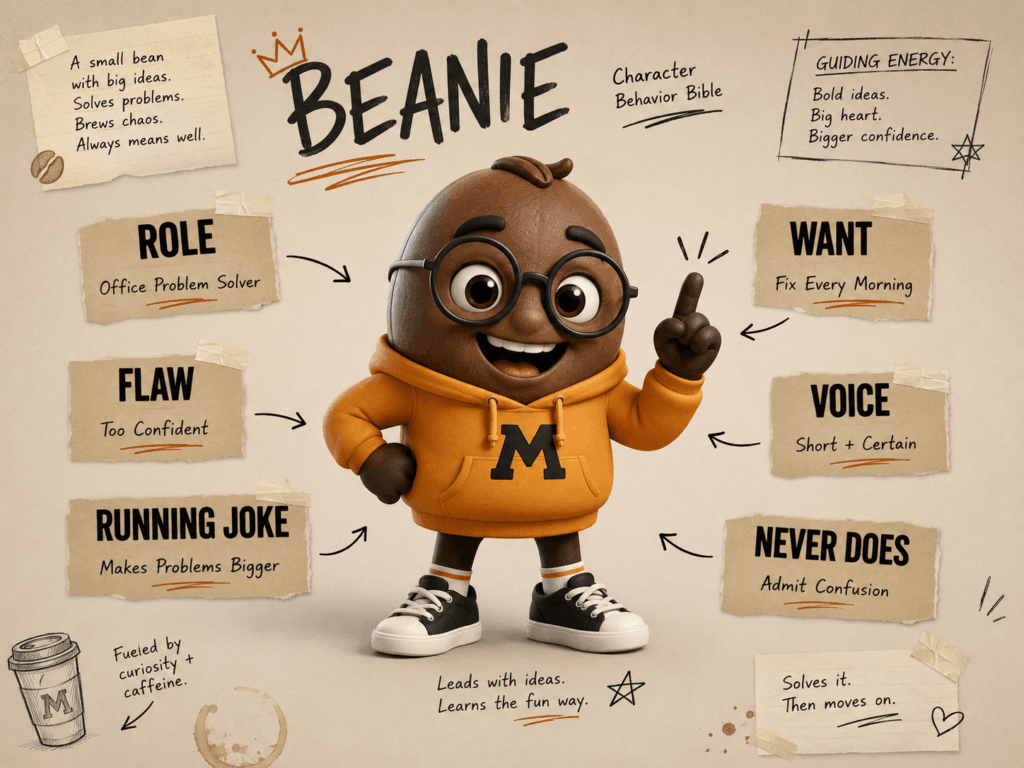
Therefore, create a short character bible before making several episodes.
Include these details:
Visual identity: What must stay the same?
Main desire: What does the character always want?
Core flaw: What causes problems?
Voice: How does the character speak?
Running joke: What idea can return?
Boundaries: What would the character never do?
For example, Beanie speaks in short and confident lines. He never admits that he is confused. In addition, he treats every small task like a major mission.
These rules make writing easier. More importantly, they keep the character familiar when the location or story changes.
Before publishing each 3D Cartoon AI Video, compare it with the earlier episodes. Check the face, clothing, colors, body shape, voice, and behavior.
The scene can change. Still, the character should feel like the same person.
How to Avoid the Empty AI Cartoon Look
Fast production can be useful. However, speed should not replace good ideas.
Several common mistakes can make a cartoon video feel random or forgettable.
Do Not Treat Random Motion as a Story
Movement alone is not a plot.
Instead, each action should show personality, create a problem, or move the story forward.
Keep the Character’s Personality Stable
A shy character should not become fearless for no reason. Otherwise, viewers may not understand who the character is.
The setting can change. Still, the main personality should remain familiar.
Build an Original Character
A famous character may bring quick attention. However, an original mascot gives you more freedom.
It can develop its own voice, jokes, and story. Over time, it may also become part of your brand identity.
Leave Space for Pauses
Not every second needs movement.
Sometimes, a short silence creates the best moment. Therefore, let the character pause when the joke needs more space.
Review Before Publishing
Do not publish every generated result.
First, check the face, hands, clothes, background, movement, voice, and timing. Then, improve any weak scenes.
The goal is not to post as many videos as possible. Instead, each episode should feel like part of the same cartoon world.
Turn One 3D Cartoon AI Video Into a Content System
Once the character feels stable, one story can create several types of content.
For example, the mascot can appear in:
- Main story episodes
- Reaction clips
- Product introductions
- Comment replies
- Seasonal specials
- Short channel intros
- Character tests
- Audience voting posts
Therefore, a 3D Cartoon AI Video does not need to remain a single post.
One scene can become a teaser. Another moment can become a reaction clip. Meanwhile, a character quote can become a square social post.
A stable character builds recognition. A clear role creates new ideas. Short episodes also make production easier to manage.
Together, these parts form a content system. They no longer feel like a group of random clips.
Final Thoughts on Building a 3D Cartoon AI Video Series
A beautiful character may earn the first view. However, personality gives people a reason to return.
Before making your next 3D Cartoon AI Video, give the character a role. Then, add one flaw and one clear problem. Finally, plan a short series instead of one separate animation.
The strongest cartoon content does not depend on endless action. Instead, it gives viewers a character they can recognize and a story they want to follow.
The main question is no longer:
Can this character move?
Instead, ask:
What happens to this character next?
Go to WeShop AI For Exploration:


