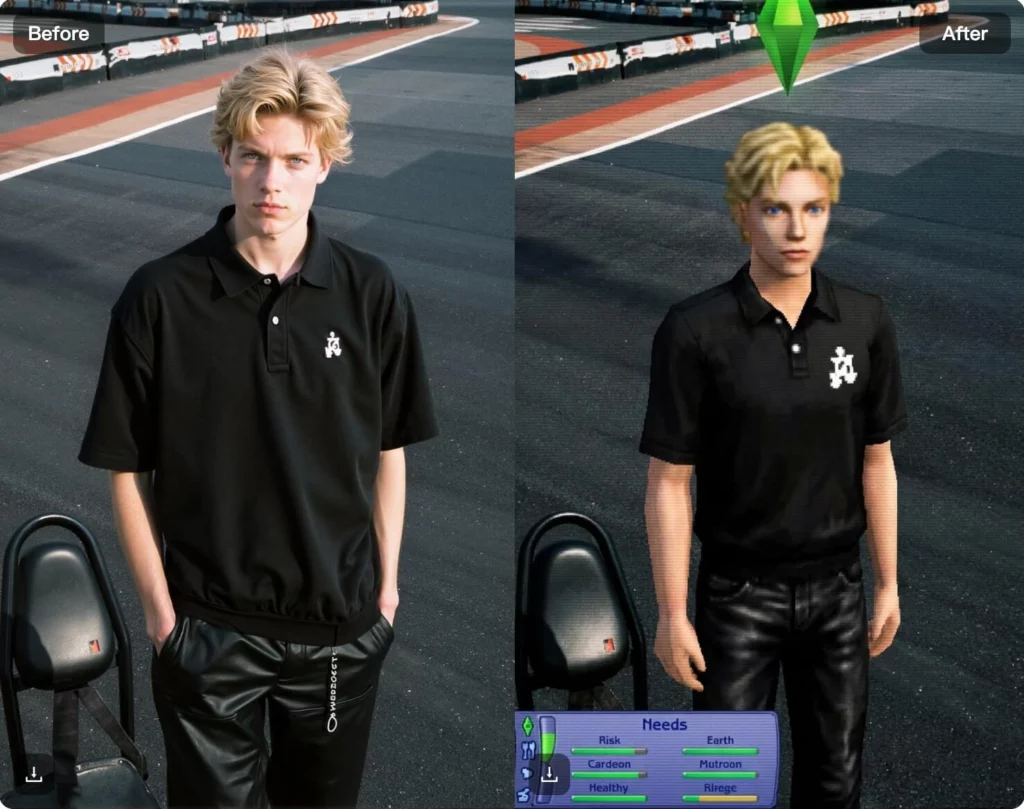
The PS2 aesthetic has made a strong comeback online. From gaming-inspired profile pictures to retro social media content, the low-poly textures and classic lighting of PlayStation 2–era visuals are instantly recognizable. Creators are using this style to tap into gaming nostalgia and stand out in crowded feeds. With WeShop AI’s PS2 Filter, transforming photos into PS2-style game characters is simple.
By uploading an image, the AI recreates the iconic PS2 look with retro textures, lighting, and character proportions. Whether you’re creating nostalgic content, experimenting with digital art, or just having fun, the PS2 Filter lets you turn modern photos into classic game-inspired visuals in seconds.
In this guide, I’ll walk you through how to use the PS2 Filter and explore the most popular ways people are using it today.
What Is the PS2 Filter AI?
The PS2 Filter AI is an AI-powered visual tool in WeShop AI that transforms photos into PlayStation 2–style game characters. By analyzing your image, the AI recreates the classic PS2 aesthetic using low-poly textures, retro lighting, and simplified character details.
Instead of manually editing photos or building 3D models, you can upload an image and instantly get a PS2-inspired result. The filter captures the look and feel of early 2000s console games while keeping the original pose, expression, and overall composition.
The PS2 Filter AI is commonly used for retro gaming content, profile pictures, digital art experiments, moodboards, and playful creative projects. It’s designed for visual exploration and nostalgia, making it easy to turn modern photos into classic game-style characters without technical skills.
How to use PS Filter AI
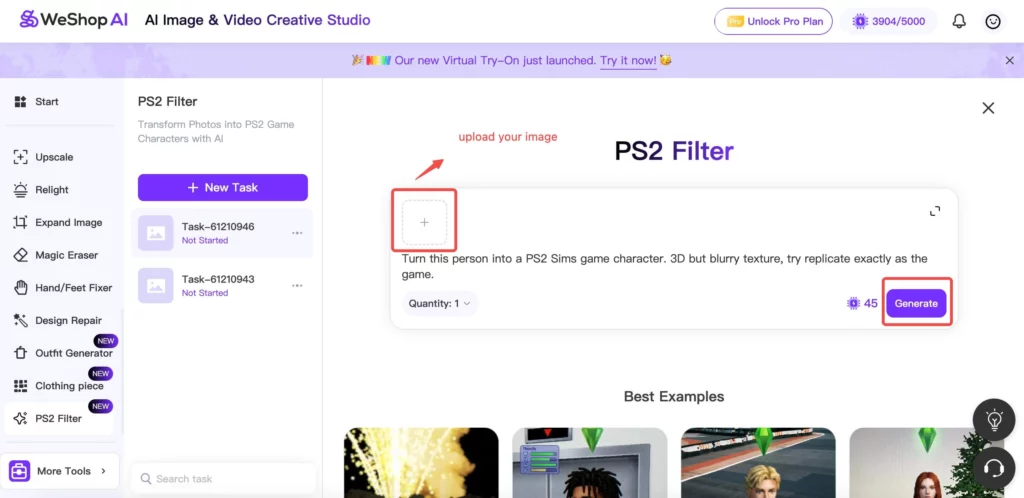
Turning a photo into a PS2-style game character with WeShop AI’s PS2 Filter is quick and easy. You don’t need any editing or 3D skills.
Step 1: Upload Your Photo
First, upload a clear photo of the person or pet you want to transform. Images with good lighting and a visible face usually produce the best PS2-style results.
Step 2: Apply the PS2 Filter
Next, click the PS2 Filter generator button. The AI automatically analyzes your image and applies low-poly textures, retro lighting, and classic console-style details inspired by PlayStation 2 games.
Step 3: Generate the PS2 Character
Click generate, and the AI creates a PS2-style version of your photo. The pose and expression stay recognizable, while the visual style shifts to a nostalgic game character look.
Step 4: Adjust and Try Again
If you want a slightly different result, you can generate again or try another photo. Small changes often lead to new variations with different retro vibes.
Step 5: Download and Share
Once you’re happy with the result, download the image. You can use it for profile pictures, social media posts, digital art, or just for fun.
Popular PS2 Filter Use Cases
The PS2 Filter AI is widely used for creative, nostalgic, and social content. Here are some of the most popular ways people are using it today:
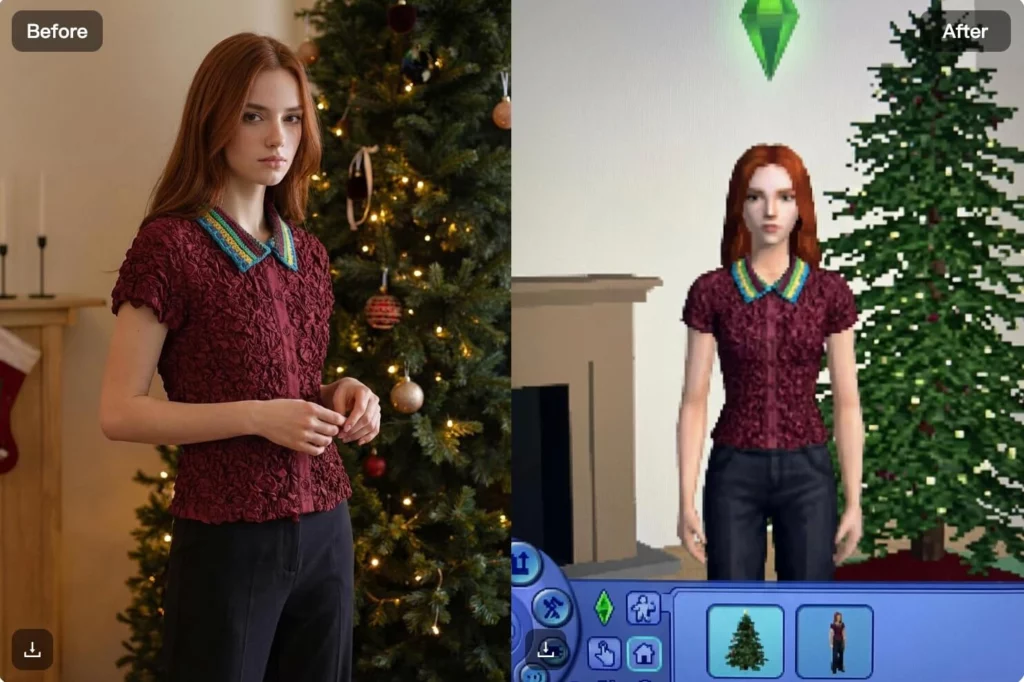
Gaming-Inspired Profile Pictures
Many users turn their photos into PS2-style avatars for profile images. The retro game look adds personality and instantly stands out on social platforms.
Retro Social Media Content
Creators use the PS2 filter to generate eye-catching posts for Instagram, TikTok, and Shorts. The nostalgic aesthetic helps content grab attention in fast-moving feeds.
Digital Art and Creative Experiments
Artists explore the PS2 style as a form of digital art. By transforming modern photos into low-poly characters, they experiment with early-2000s gaming visuals without manual modeling.
Moodboards and Visual Concepts
Designers use PS2-style images to test retro concepts and build moodboards. This makes it easier to explore visual directions inspired by classic video games.
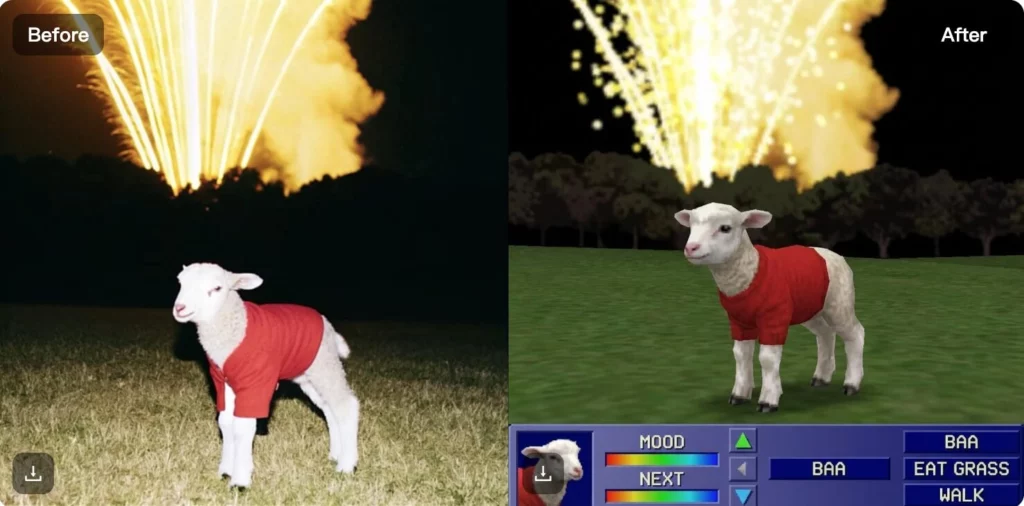
Pet Photos with a PS2 Twist
Some users also apply the PS2 filter to pet photos, turning them into playful game-style characters. These images are often shared just for fun or as creative collectibles.
Overall, the PS2 Filter AI works best for content that embraces nostalgia, creativity, and visual experimentation.
Tips for Getting Better PS2-Style Results
A few simple choices can help you get more authentic and nostalgic results when using the PS2 Filter AI.
- Use clear, front-facing photos
Images with good lighting and visible facial features help the AI recreate classic PS2 character details more accurately. - Keep the background simple
Clean or uncluttered backgrounds make the retro textures and lighting stand out better. - Choose photos with strong expressions or poses
The PS2 style works best when the original pose is clear and expressive. - Experiment with different photos
Trying multiple images often produces different PS2-style variations, each with its own retro vibe. - Embrace the low-poly look
The charm of PS2 visuals comes from simplified details and nostalgic textures, not realism.
By following these tips, you can create PS2-style characters that feel closer to classic PlayStation-era games and retro digital art.
Conclusion
The PS2 Filter AI offers a simple way to turn modern photos into nostalgic, game-inspired characters. By recreating the iconic PlayStation 2 look with retro textures and lighting, it helps creators explore a style that’s instantly recognizable and fun.
Whether you’re creating profile pictures, social media content, or experimenting with digital art, the PS2 Filter makes it easy to achieve a classic gaming aesthetic without technical skills. If you’re looking to add a retro twist to your visuals, this tool is a quick and creative place to start.