Intro
The first time I used Dzine AI, I did not care much about whether the image looked “impressive.”
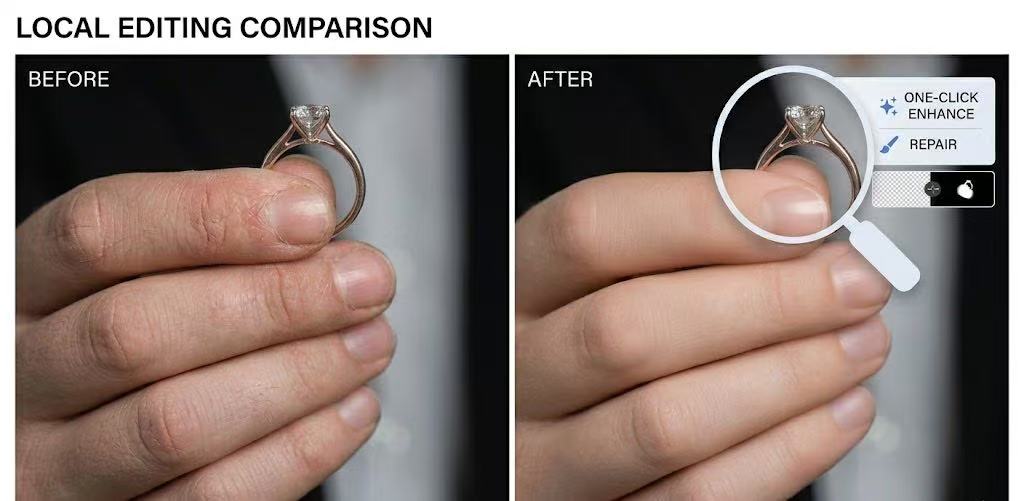
What stood out was something more practical: I was no longer restarting everything just because one detail felt off. Instead of treating the image as a finished output, Dzine makes it feel like something you can keep working on. That is a meaningful shift, especially in a workflow where small fixes often matter more than dramatic generations. Dzine’s own product pages reinforce that positioning by emphasizing controllable editing, prompt-based changes, local edits, object removal, background swaps, and even video-oriented tools in the same ecosystem.
That is also why this review should not read like a standard feature list. Dzine is not just another image generator competing on one-shot output. It is trying to be a production workspace, with image creation, image editing, video generation, lip sync, and design-like adjustment all living in one place.
Dzine AI Is Not Competing on the Usual Terms
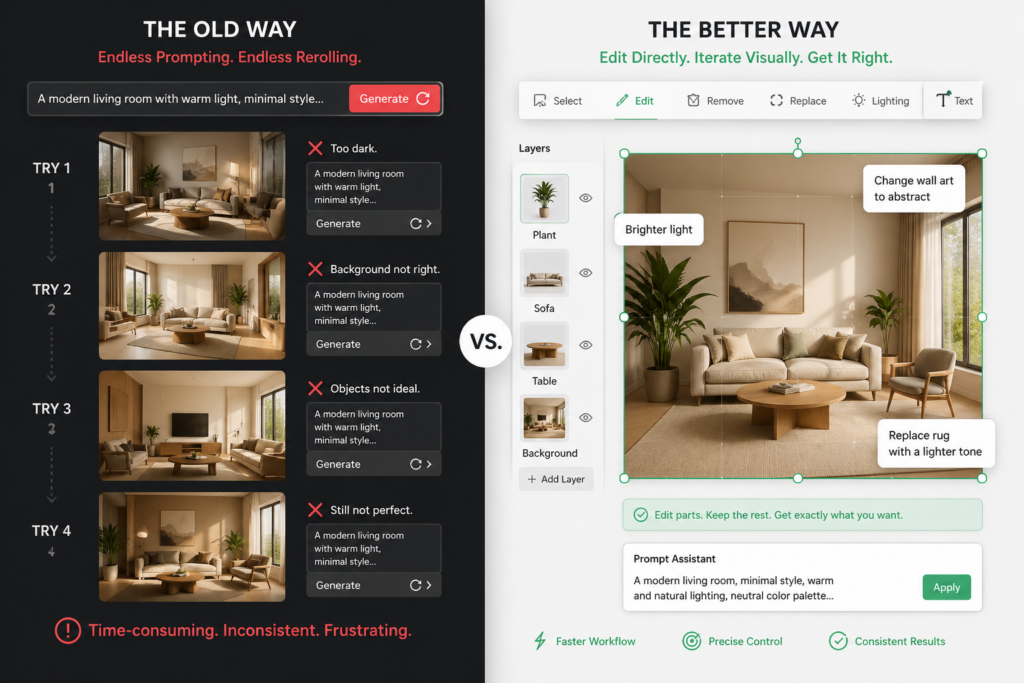
Most AI image tools compete on the same promise: make something prettier, faster, or more cinematic.
Dzine is aiming at a different problem. It wants to help people keep editing after the first result appears. The official site repeatedly describes it as “controllable” and frames its image editor around direct changes such as adding or removing objects, changing text in images, swapping backgrounds, adjusting lighting, and reshaping poses. That is a very different promise from a pure text-to-image tool.
This matters because most real work is not a single generation. Most work is revision. A product image needs a different background. A character needs a more consistent pose. A client asks for “just one more change,” and that one change turns into five. Dzine’s value is that it tries to make those adjustments feel native instead of painful.
When Generation Stops Being the Hard Part
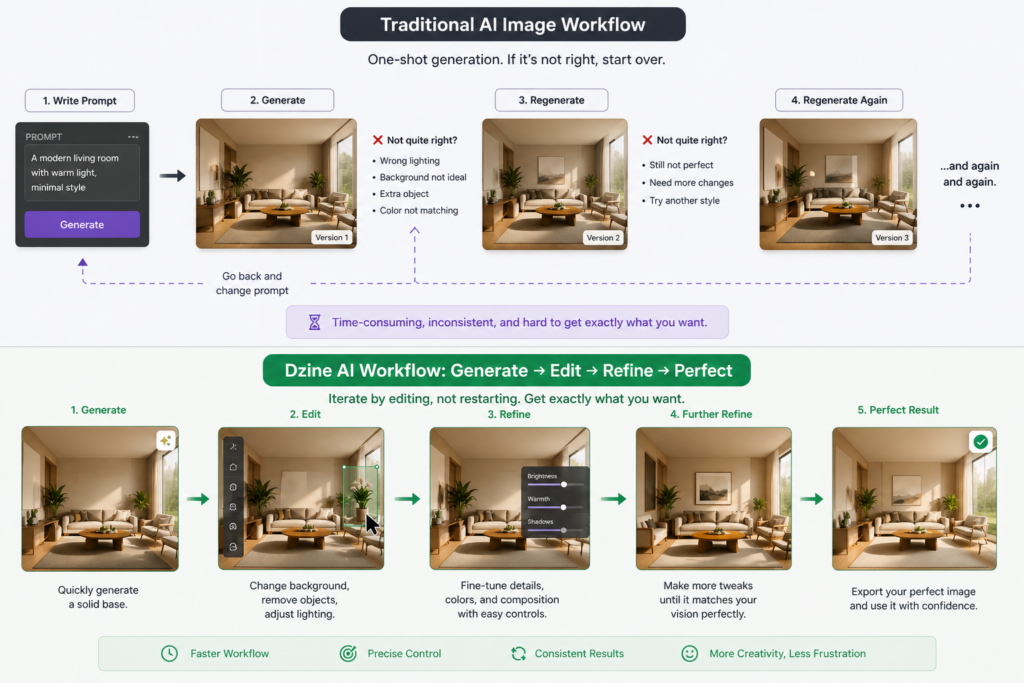
At a certain point, generating images is no longer the bottleneck.
The bottleneck becomes everything around the image: composition, cropping, resizing, consistency, background changes, local corrections, and repurposing one asset into another format. Dzine’s AI Image Editor is built around exactly those problems, with support for localized edits, erasing backgrounds, removing watermarks, swapping objects, and even changing text inside an image.
That is why the tool makes sense for people who are not just making “pretty pictures.” It is more useful when output must be usable. A book illustration that needs a resized subject. A product shot that needs a cleaner background. A marketing asset that needs one region changed without breaking the whole image. Those are the moments where a control-first tool feels different from a prompt-first tool.
The practical test that matters most
If you are evaluating Dzine seriously, do not start by asking whether it can make a stunning image.
Start by asking whether it can save time on revisions.
That is where the tool’s real value shows up. If a platform lets you keep the subject, adjust the scene, and fix specific details without rebuilding everything from scratch, it is solving a production problem rather than a novelty problem. Dzine’s own descriptions of prompt editing and local edits point directly in that direction.
The Moment Dzine Starts to Click
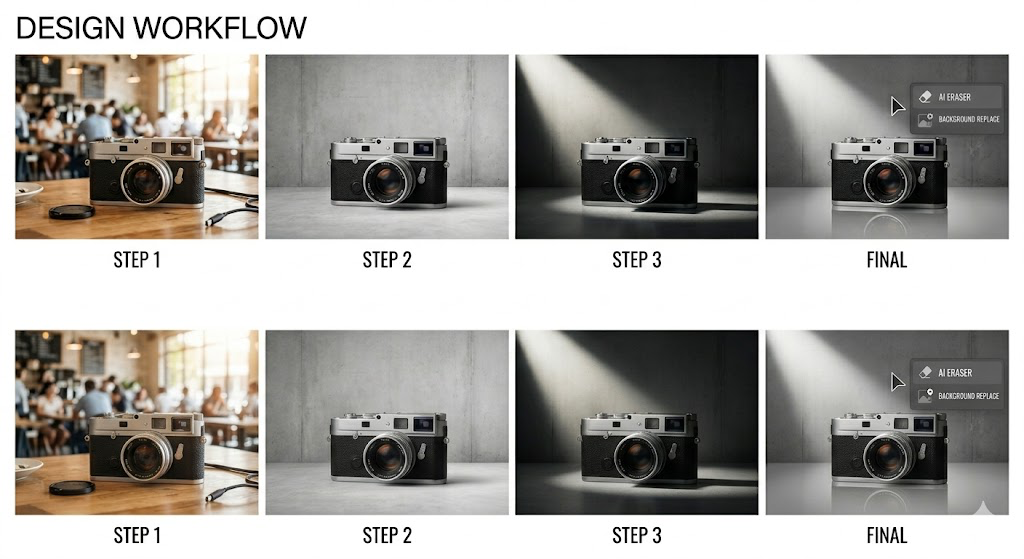
Dzine usually makes sense in small, specific moments.
You only want to change one color.
You want to keep the subject but replace the setting.
You need a variation, not a brand-new image.
You want to adjust a piece of text in the image without redesigning the whole thing.
Those are not glamorous demos, but they are the kind of work that fills real client projects. The product pages explicitly highlight chat-style editing, text-in-image changes, generative fill, AI watermark removal, and magic eraser-type cleanup. That combination makes Dzine feel less like a single generator and more like an editing layer on top of generation.
What this means in practice
Instead of thinking “How do I generate again?” you start thinking “How do I fix this part only?”
That sounds minor, but it changes the pace of creative work. A tool that helps you preserve what already works while adjusting what does not is often more useful than a tool that keeps giving you fresh variations with the same underlying problems. That is the clearest difference Dzine is trying to sell.
Dzine’s Bigger Ambition: One Workspace, Not One Feature
Dzine is not only about image editing.
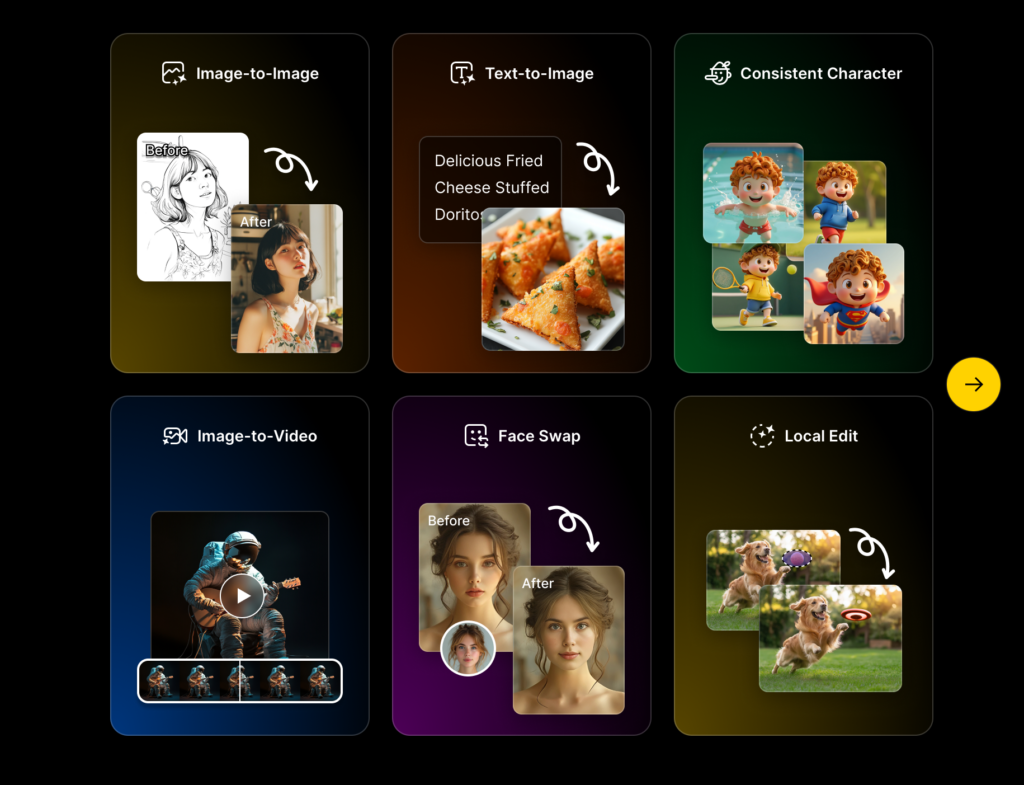
Its official navigation and product pages show a much wider stack: AI image generation, image-to-image, generative fill, consistent character, 2D-to-3D conversion, image-to-3D model, video generation, video-to-video, image-to-video, reference-to-video, animation video, TikTok video generation, lip sync, dialogue generation, podcast generation, and talking avatars.
That scale is impressive, but it also changes how you should judge the product. The question is no longer “Can it do one thing?” The question is whether the whole environment feels coherent enough to use repeatedly. A platform with many modules can be powerful, but only if the transitions between tasks do not feel clumsy. Dzine’s pitch is clearly that it wants to be the place where ideas turn into images, images turn into videos, and videos keep getting refined inside the same system.
Why this matters for creators
For creators who work across formats, this is a real advantage. One project may need a static visual, then a motion version, then a talking avatar, then a lip-synced clip. Dzine’s own site frames those as connected tasks rather than separate jobs, which makes the product feel more like a production environment than a single-purpose app.
What Real Users Are Saying
The best way to understand Dzine is to look at the way users describe it in public.
On Reddit, one user said they had been using Dzine for POD designs and that the results were “pretty solid.” That is useful because it is not a hype-heavy artistic compliment. It is a practical verdict on whether the output is usable in a commercial workflow.
In another Dzine-related Reddit discussion, a user asked for help resizing a selected area in a book illustration because the image overall was good, but one part of the composition felt off. That kind of comment is valuable because it shows the exact kind of friction Dzine is trying to address: the image is close, but the user still needs finer control over a specific region.
A different Reddit comment described Dzine as an “all in one package” for visuals, mentioning image, video, and lip sync in the same workflow. That matches the product’s current positioning very closely and explains why some users see it as a practical stack rather than a novelty tool.
Pricing, Credits, and What the Free Tier Actually Means
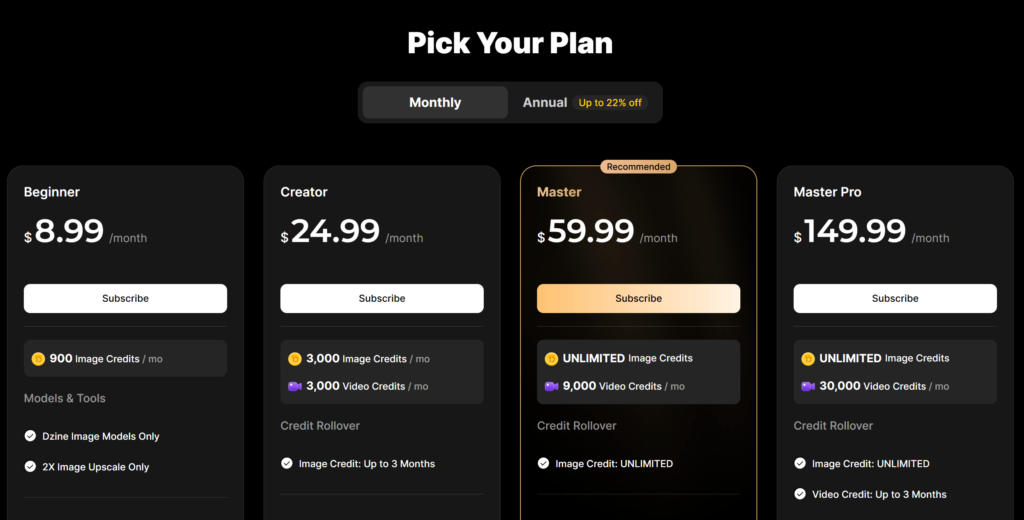
Dzine’s pricing page currently shows four subscription tiers: Beginner at $8.99/month, Creator at $24.99/month, Master at $59.99/month, and Master Pro at $149.99/month. The same page also shows image credits, video credits, rollover rules, and access differences such as private generation, commercial use, asset storage, concurrent jobs, and larger model access on higher plans.
The FAQ adds that Dzine offers a 7-day free trial, 100 free credits on registration, and 32 free image credits refreshed daily. It also states that images generated on free plans are public and may appear in the community feed, while private generation is available for subscribed accounts. That detail matters a lot for creators who care about confidentiality or client work.
This is where the product becomes more serious than many casual AI tools. Pricing is not just about cost. It is about workflow limits, privacy, and whether you can use the service for real projects without exposing your work by default.
Where Dzine Still Falls Short
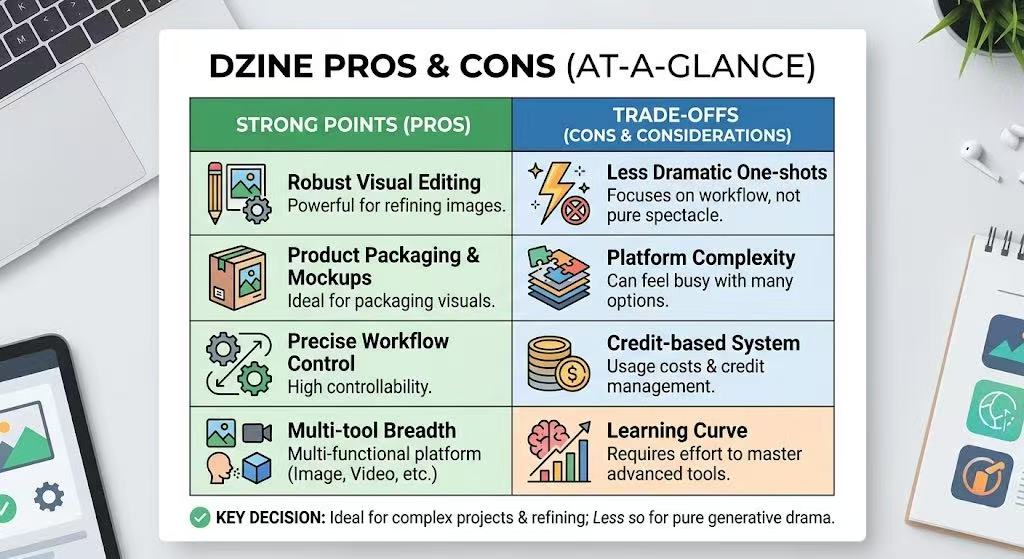
Dzine is strong when the task is editing, repurposing, or packaging visuals. It is less convincing if your only benchmark is the most dramatic one-shot image generation experience.
That is not a flaw by itself. It is a positioning choice. But it means the tool may feel less exciting to users who mainly want spectacle rather than workflow. The official material also makes clear that some of its value comes from breadth: image, video, lip sync, filter systems, 3D, and a large set of model options. Breadth is useful, but it can also make a platform feel busy if you do not actually need all of it.
There is also a practical tradeoff in any credit-based creative system: once users begin working seriously, they care less about a flashy demo and more about whether their credits, access level, and privacy settings fit the way they produce. Dzine’s own plan structure and rollover rules make that tradeoff visible rather than hidden.
Who Dzine AI Is Actually For
Dzine AI is not built for everyone.
It makes the most sense for people who revise often, repurpose assets across formats, or need to keep a visual project moving without restarting from scratch. That includes marketers, indie creators, e-commerce sellers, visual storytellers, and teams that move between image and video work. Dzine’s public examples and tool stack point strongly toward those use cases rather than toward purely experimental image generation.
It is less ideal for someone who only wants a quick visual surprise and does not care about editing depth, privacy controls, or multi-format production. In other words, Dzine is closer to a working studio than a novelty generator.
Final Verdict
Dzine AI is not trying to win the image generation race.
It is trying to change what happens after the first image appears.
That is the real reason it stands out. The product is built around controllability, not just output. It treats editing as a first-class step, not an afterthought. And once you think in that direction, Dzine starts to make a lot more sense.
For creators who care about iteration, practical control, and turning one asset into many usable variations, Dzine is interesting for the right reasons. For users who only want spectacle, it may feel less thrilling. Either way, it is a more serious tool than its “AI image generator” label initially suggests.
Go to WeShop AI For Exploration: