

Introduction
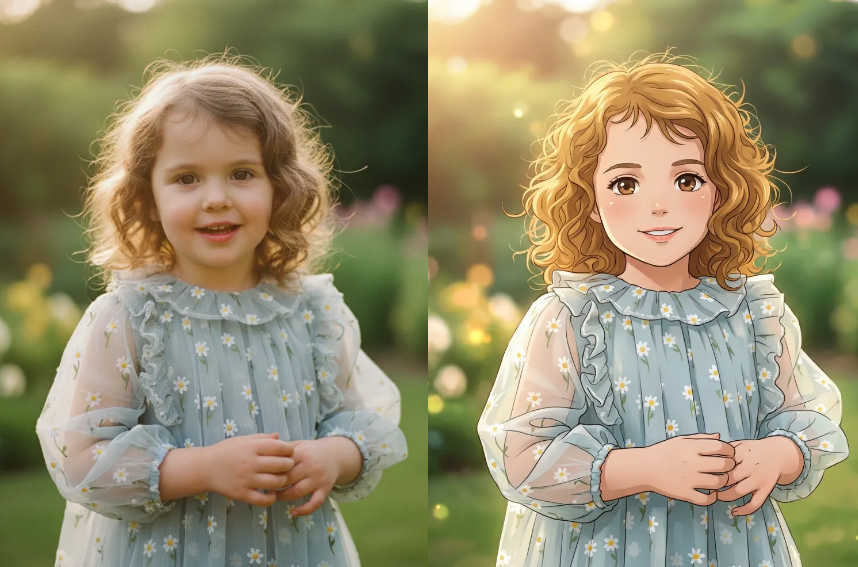
A good anime-style image can do a lot with very little.It can turn a normal selfie into something expressive, make a profile picture stand out instantly, or give your content a completely different vibe. That is exactly why AI Photo to Anime Converter tools are exploding right now.
But here is the catch: most tools look similar at first glance.
The real difference shows up in how fast you get results, how easy it feels, and whether you actually want to use the output.
So instead of listing everything, let’s go straight to the tools that are actually worth your time.
Top AI Photo to Anime Converter Tools to Try
1. 👉 WeShop AI Anime Image Converter
If you want the fastest, lowest-friction experience, start here.
WeShop AI is built for one thing: turning your photo into anime art in seconds, directly in your browser. No downloads, no setup, no learning curve.
What makes it stand out is how clean the process feels. You upload an image, and the tool handles the rest. It is especially good for selfies, portraits, and quick avatar creation.
Even better, it offers free credits and no mandatory sign-up, which removes the biggest barrier most users hesitate on.
Best for: first-time users, quick results, zero-friction workflows
2. Canva Photo to Anime Converter
Canva is the safe choice if you are already using it for design. The anime feature is easy to access and integrates smoothly with other editing tools.
However, it feels more like an add-on rather than a dedicated anime tool.
Best for: Canva users who want everything in one place
3. Fotor Photo to Anime Converter
Fotor shines when it comes to style variety. You can choose between multiple anime looks like Chibi, manga, sketch, and more.
That said, more options can sometimes slow down decision-making.
Best for: users who want to experiment with multiple styles
4. Media.io Photo to Anime Converter
Media.io focuses on accessibility. It works across devices and does not require downloads.
It is simple, but the output consistency can vary depending on the image.
Best for: quick casual conversions
5. Pixelbin Photo to Anime Converter
Pixelbin is more technical in positioning, with a focus on secure processing and clean output.
It is a solid option, but less “fun-first” compared to others.
Best for: users who care about privacy and structure
6. Drawever Photo to Anime Converter
Drawever gives more control over styles and intensity, which is great if you want to tweak results.
However, it feels slightly more “tool-like” than instant.
Best for: users who want more control over output
Quick Comparison: Which One Should You Pick?
| Tool | Best For | Key Advantage | Limitation |
|---|---|---|---|
| WeShop AI | Fastest experience | No sign-up + browser-based | Fewer manual controls |
| Canva | Ecosystem users | All-in-one design | Not anime-focused |
| Fotor | Style variety | Multiple anime styles | Slightly heavier workflow |
| Media.io | Accessibility | Works everywhere | Less consistent results |
| Pixelbin | Privacy-focused | Secure processing | Less engaging UX |
| Drawever | Customization | Style control | Slower flow |
So… Which AI Photo to Anime Converter Is Actually Worth Using?
If you just want a clean answer:
👉 Go with WeShop AI Anime Image Converter first.
Here is why:
It removes friction.
It gives you a result fast.
And it does not ask you to commit before you even see the output.
That combination matters more than extra features most of the time.
If you later want more control or style variation, you can explore tools like Fotor or Drawever. But for most users, starting simple is the better move.


Final Thoughts
The rise of AI Photo to Anime Converter tools is not just about technology.
It is about how people create now.
Fast. Visual. Low effort. Instantly shareable.
And in that context, tools like WeShop AI are not just “another option”—they are closer to what users actually want: something that works immediately, without friction.


Ready to explore more? Discover our full suite of innovative AI-powered tools to elevate your lifestyle and professional creativity:
