












Nano Banana 2.1 Sketch to Render: Create a Photorealistic Architecture Visual
Turn an architectural line sketch into daylight and blue-hour renders with Nano Banana 2.1 while preserving the camera, massing, openings, and pool.
Turning an architectural sketch into a render is easy if the only goal is a beautiful image. The harder test is whether the model quietly redesigns the building—moving windows, changing massing, removing a balcony, or shifting the camera while it adds realistic materials.
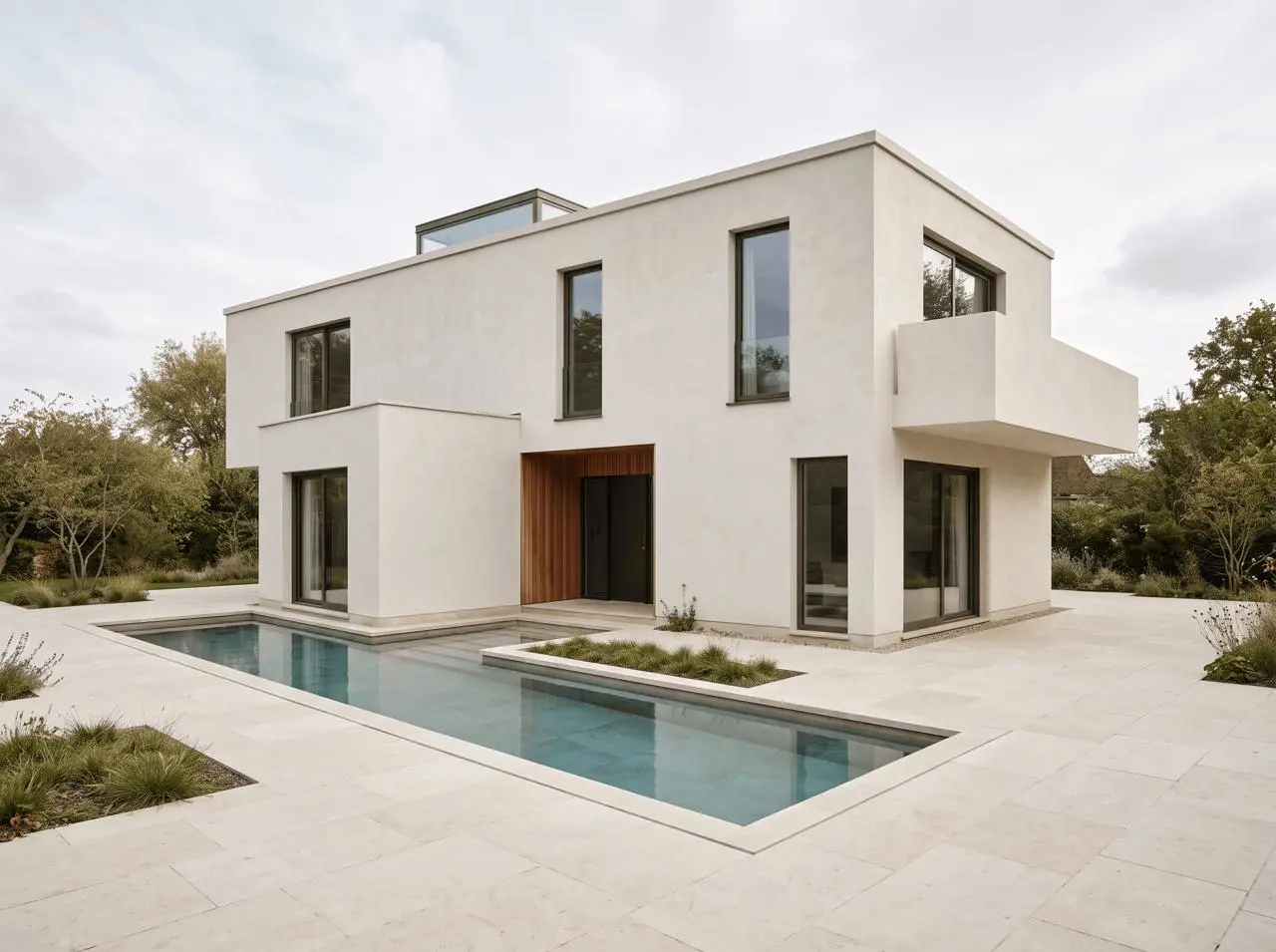
We tested Nano Banana 2.1 with an original two-story courtyard-house sketch. The daylight result preserved the main composition, roof, raised skylight, recessed entrance, right-side cantilevered volume, and L-shaped pool. A second edit changed only the time of day and retained the same building. Some opening proportions and balcony details were still reinterpreted, so this is a concept-visualization workflow—not a substitute for CAD, BIM, or construction documentation.
Tested workflow
One line sketch → one daylight visualization → one lighting-only refinement. All three images were generated with Nano Banana 2.1 at 4:3 and 2K in the WeShop web generator on October 19, 2026.
What this sketch-to-render test asked the model to preserve
We first created an original architectural sketch so the test would not depend on a real client project or copyrighted plan. The sketch deliberately included design anchors that are easy to audit:
- a fixed three-quarter exterior camera;
- asymmetrical two-story massing;
- a flat roof with a raised rectangular skylight;
- a recessed central entrance;
- a cantilevered upper-right balcony volume;
- tall, narrow window openings across the front and right elevations;
- an L-shaped reflecting pool in the foreground.
| Setting | Value |
|---|---|
| Tool | WeShop Nano Banana |
| Model | Nano Banana 2.1 |
| Aspect ratio | 4:3 |
| Image size | 2K |
| Quantity | 1 per generation |
| Delivered dimensions | 2400 × 1792 |
Google describes Gemini Nano Banana 2.1 as its latest high-efficiency image-generation and conversational-editing model, with improvements to visual quality, prompt adherence, and multi-turn consistency. This article tests one narrower job through the WeShop interface: architectural sketch-to-render conversion.
Step 1: prepare a sketch with readable structure
The input does not need construction-document detail, but its hierarchy should be unambiguous. Keep wall edges, openings, rooflines, balconies, and site features readable. Excessive shading, labels, arrows, or collage elements can make it harder to distinguish building geometry from annotation.
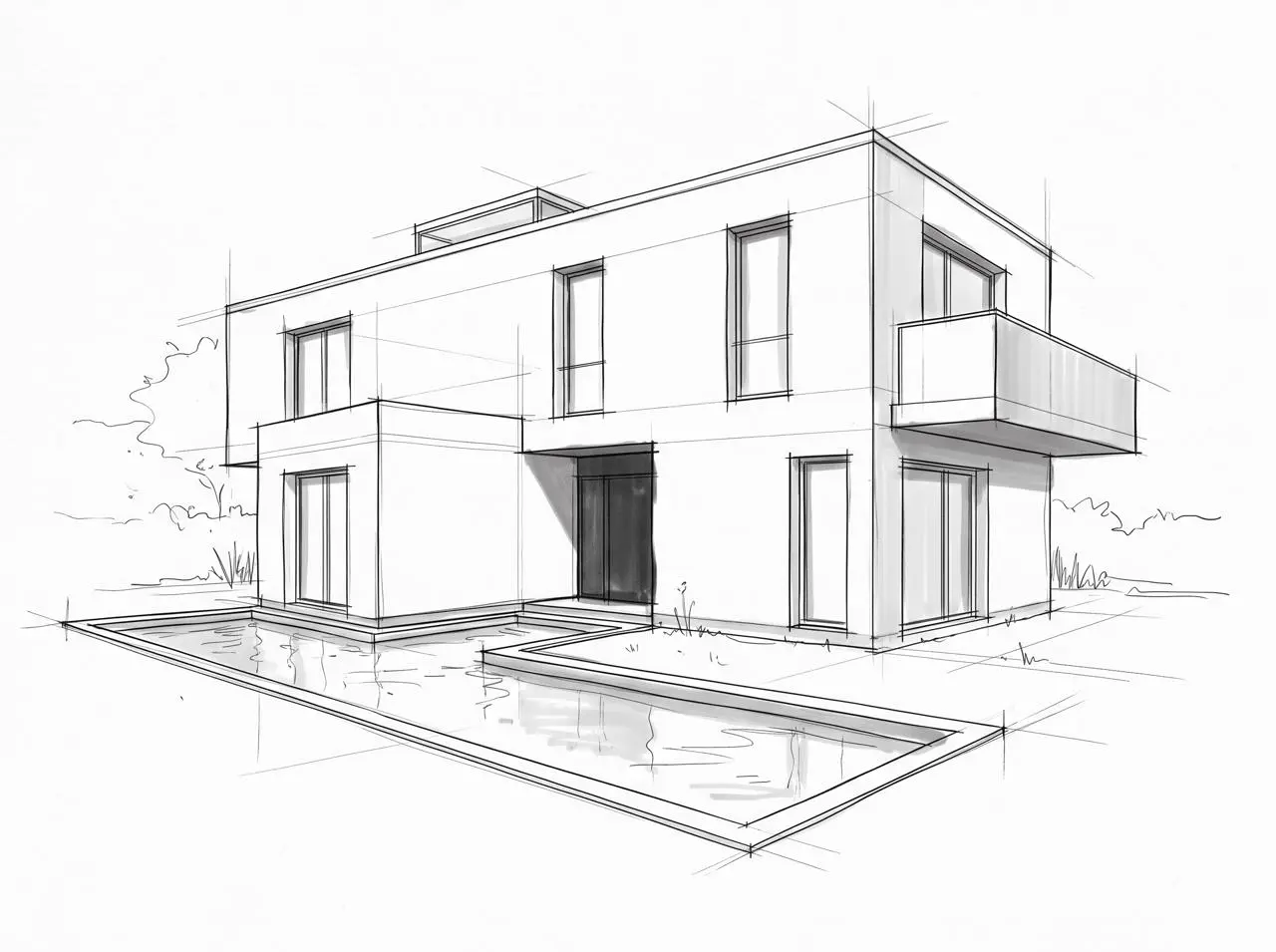
The source sketch was itself generated for this test. That makes it suitable as reproducible evidence, but it is not an architectural plan and carries no dimensional or construction information.
Step 2: write a conversion brief plus a preservation list
“Make this photorealistic” gives the model too many design decisions. A more controlled prompt separates four jobs: identify the base image, name the deliverable, define materials and light, and lock the geometry that must survive.
The preservation list matters more than a long style description. It tells the model which parts are design constraints rather than visual inspiration. For a broader prompting framework, see the Nano Banana 2.1 Prompt Guide.
Daylight result: the primary massing survived
The daylight result reads as a plausible architectural photograph rather than a colored sketch. It introduced off-white plaster, cedar at the entrance, dark window frames, limestone paving, water, planting, and overcast daylight without overwhelming the building.
You can try it directly using the tool on the right.
What stayed aligned
- The camera height and three-quarter view stayed close to the sketch.
- The primary two-story volumes and flat roof remained in the same visual arrangement.
- The raised skylight, dark recessed entrance, right-side cantilever, and L-shaped pool survived the conversion.
- The material palette followed the brief without adding people, cars, furniture, or text.
What changed
This was not pixel-level colorization. Some window proportions became wider or narrower, and the balcony parapet and opening were interpreted more freely than the line sketch. The overall design is recognizably the same, but a detail-by-detail overlay would not match.
That distinction is important: a convincing render can still be an inaccurate representation. Review every opening, edge, and site element instead of judging only the atmosphere.
Step 3: refine one variable at a time
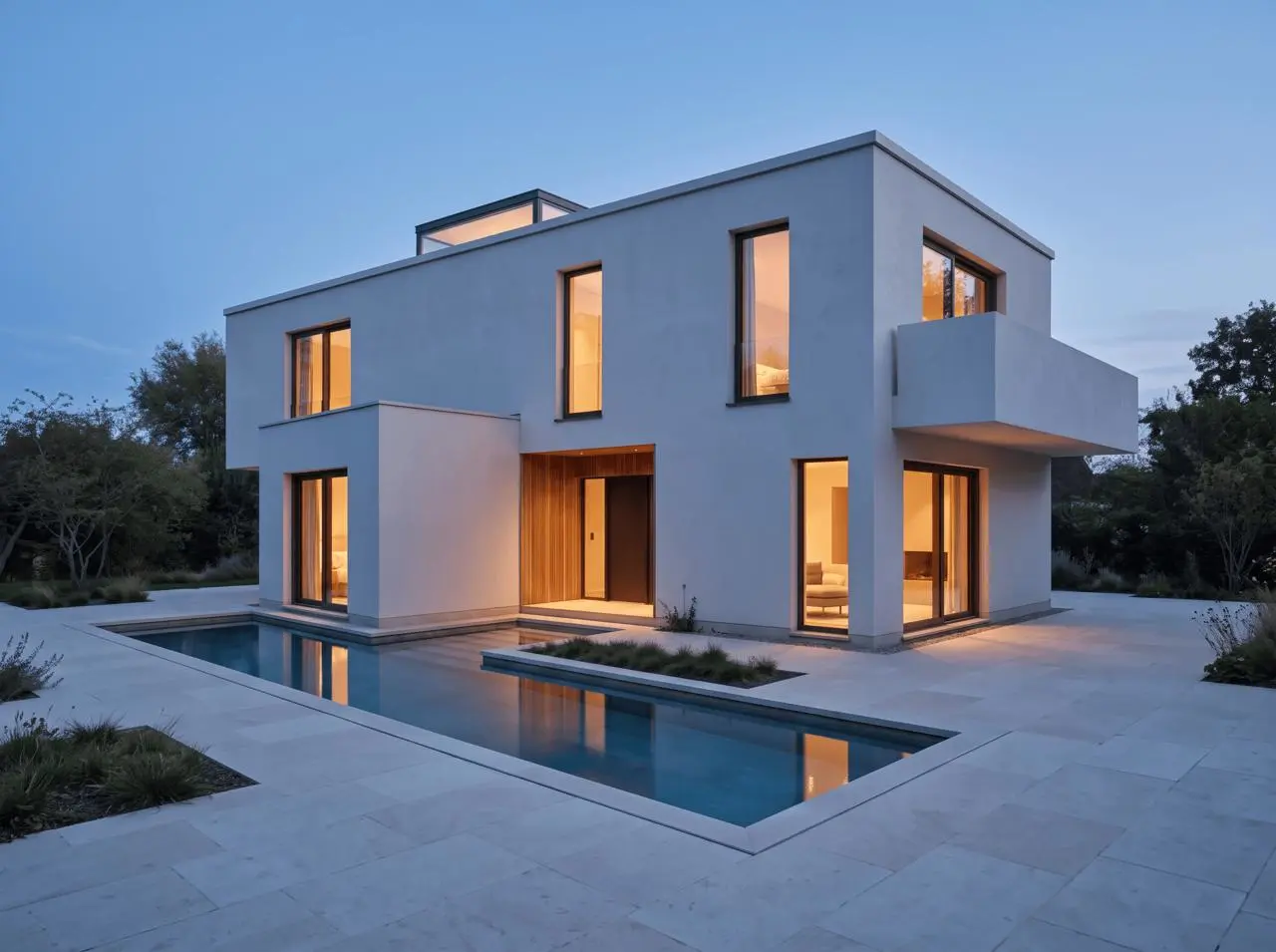
Once the geometry was acceptable, we used the daylight render as the next input and changed only the lighting. The prompt asked for blue hour, warm interior illumination, and subtle pool reflections while explicitly locking the building and site.
You can try it directly using the tool on the right.
The second edit is the stronger continuity test. It preserved the daylight render's composition while changing the blue sky, warm window light, entrance glow, and pool reflections. When a first render is structurally acceptable, changing one variable is safer than rewriting the full architectural brief.
A reusable Nano Banana 2.1 architecture prompt formula
Use this order for future sketch-to-render work:
- Base-image role: state that the uploaded sketch controls structure and composition.
- Deliverable: name the finished image, such as a daylight exterior visualization.
- Preservation anchors: list camera, massing, openings, roof, entrance, balcony, and site geometry.
- Material and light: describe only the finishes and atmosphere you need.
- Exclusions: prohibit additions, deletions, movement, resizing, text, and unrelated props.
For a localized change after the first render, name one target and one desired change, then repeat the most important preservation anchors. The same principle appears in our test of editing one object without changing the rest.
Common reasons sketch-to-render attempts drift
- The prompt describes style but not geometry. “Warm minimalist house” does not identify which parts must remain.
- Annotations compete with the drawing. Labels and arrows can be treated as visual content.
- Too many variables change together. New materials, landscaping, weather, camera, and structure in one edit make failures hard to diagnose.
- The result is judged only by realism. A polished image can hide a moved opening or altered overhang.
- No before-and-after audit is performed. Compare the sketch and output at the same scale before approving the render.
When to return to CAD, BIM, or a controlled 3D workflow
Nano Banana 2.1 is useful for concept exploration, material directions, lighting studies, early presentations, and design conversations. It is not the right source of truth for dimensions, code compliance, structural decisions, construction details, material quantities, or documentation.
The practical conclusion from this test is narrower than “one-click architecture.” With a readable sketch, a concrete preservation list, and one-variable refinements, Nano Banana 2.1 can produce a fast and visually coherent architecture concept. Keep the original drawing beside every result, and treat any geometry the model invents as a proposal—not a fact.
Try the sketch-to-render workflow
Open the WeShop Nano Banana generator, upload a clear architectural sketch, and start with the preservation anchors before adding materials and light.
Open WeShop Nano Banana