












Nano Banana 2.1 Prompt Guide: A 6-Part Formula for More Controllable Images
Learn a tested six-part Nano Banana 2.1 prompt formula through a weak-vs-strong comparison, an exact grid, an environmental portrait, and reusable templates.
Short prompts do not automatically produce bad images. They do, however, leave the most important visual decisions to the model. A phrase like “dreamy and cinematic” can result in an attractive frame while still missing the composition, count, camera, or restraint you actually need.
We tested Nano Banana 2.1 in the WeShop web generator with one controlled weak-versus-strong pair, then applied the same structure to an exact icon grid and an environmental portrait. The goal was not to find a magic incantation. It was to build a reusable visual brief.
Tested takeaway
Start with the deliverable, then define the subject, spatial layout, camera, light, and exclusions. In our tests, this six-part brief gave Nano Banana 2.1 fewer decisions to improvise and made the result much easier to audit.
Why short prompts leave too much to chance
Our baseline prompt was intentionally vague:
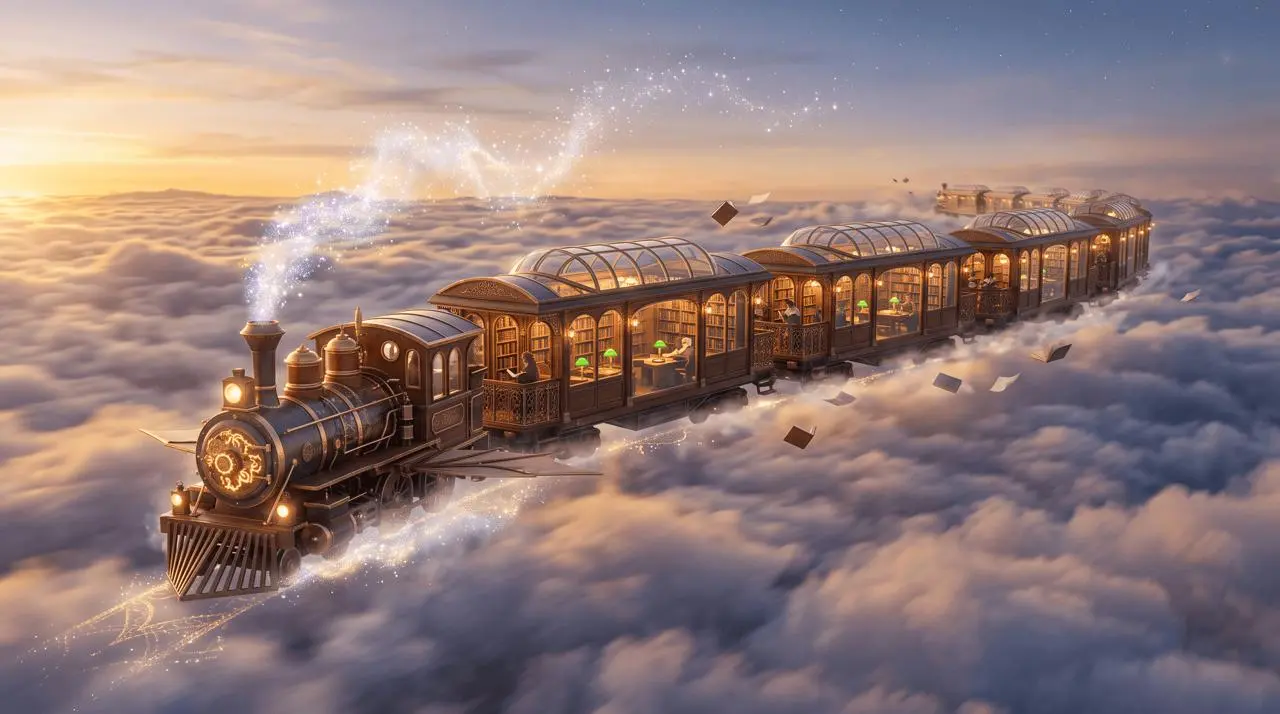
The image is visually appealing. The problem is authorship: the model chose the train design, camera, action, palette, supporting objects, and even the visual logic of how it floats. If any of those choices mattered to the project, the prompt did not communicate them.
Use a six-part Nano Banana 2.1 prompt formula
A controllable text-to-image prompt can be written as a compact design brief:
- Deliverable: name the finished thing—editorial image, environmental portrait, icon sheet, diagram, poster, or storyboard.
- Subject: identify the main subject, its count, identity, action, and important attributes.
- Environment: describe the setting and assign important elements to visible zones.
- Camera and composition: state the view, lens feel, subject position, crop, horizon, and negative space.
- Light and finish: describe the source, direction, color temperature, materials, and visual treatment.
- Constraints: prohibit unwanted text, extra objects, duplicates, logos, watermarks, or stylistic drift.
Use this fill-in version:
Create a finished [format and aspect ratio] of [subject and count] [action].
Place [main subject] in [position] and [supporting elements] in [positions].
Use [camera/view/lens], [crop], and [negative-space or reading-order instruction].
Light the scene with [source, direction, and color temperature].
Render it in [visual style, material, and finish].
No [specific unwanted elements, text, duplicates, logos, or watermark].
This is a checklist, not a requirement to write six separate lines. Natural sentences work well as long as every instruction has one clear job.
Weak vs strong: control the same library-train idea
We kept the concept and changed the prompt structure:
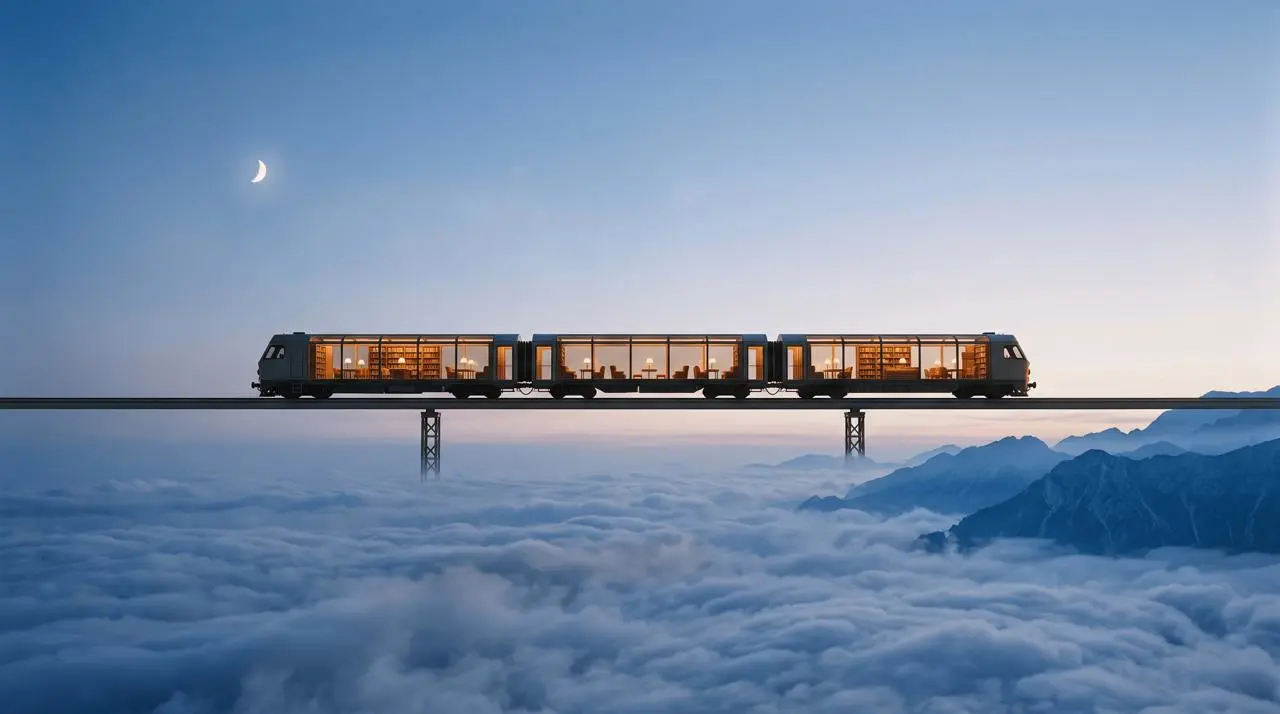
The stronger prompt does more than add detail. It assigns responsibility. “Middle third,” “upper-left,” and “lower-right” define a layout; “exactly one” defines the subject unit; the light description defines contrast; and the exclusions remove the most obvious fantasy flourishes from the baseline.
Because each prompt was run once, this is an observed comparison—not a success-rate claim. Use the formula to reduce ambiguity, then judge the actual output against the brief.
Scenario prompt 1: an exact 3-by-3 icon grid
Counts and grids should be written as explicit structure, not implied by a list.
Create a finished square icon sheet containing exactly nine imaginary astronomical instruments in an even 3-by-3 grid. Give every cell the same size, equal margins, and a centered object: brass moon compass, glass comet jar, folded star map, miniature radio telescope, meteorite balance scale, aurora prism, pocket planetarium, eclipse clock, and crystal spectroscope. Use one consistent flat-vector style, navy outlines, muted lavender and pale gold fills, warm ivory background, and soft paper texture. Keep every object fully inside its cell. No labels, letters, numbers, borders between cells, extra objects, logos, or watermark.
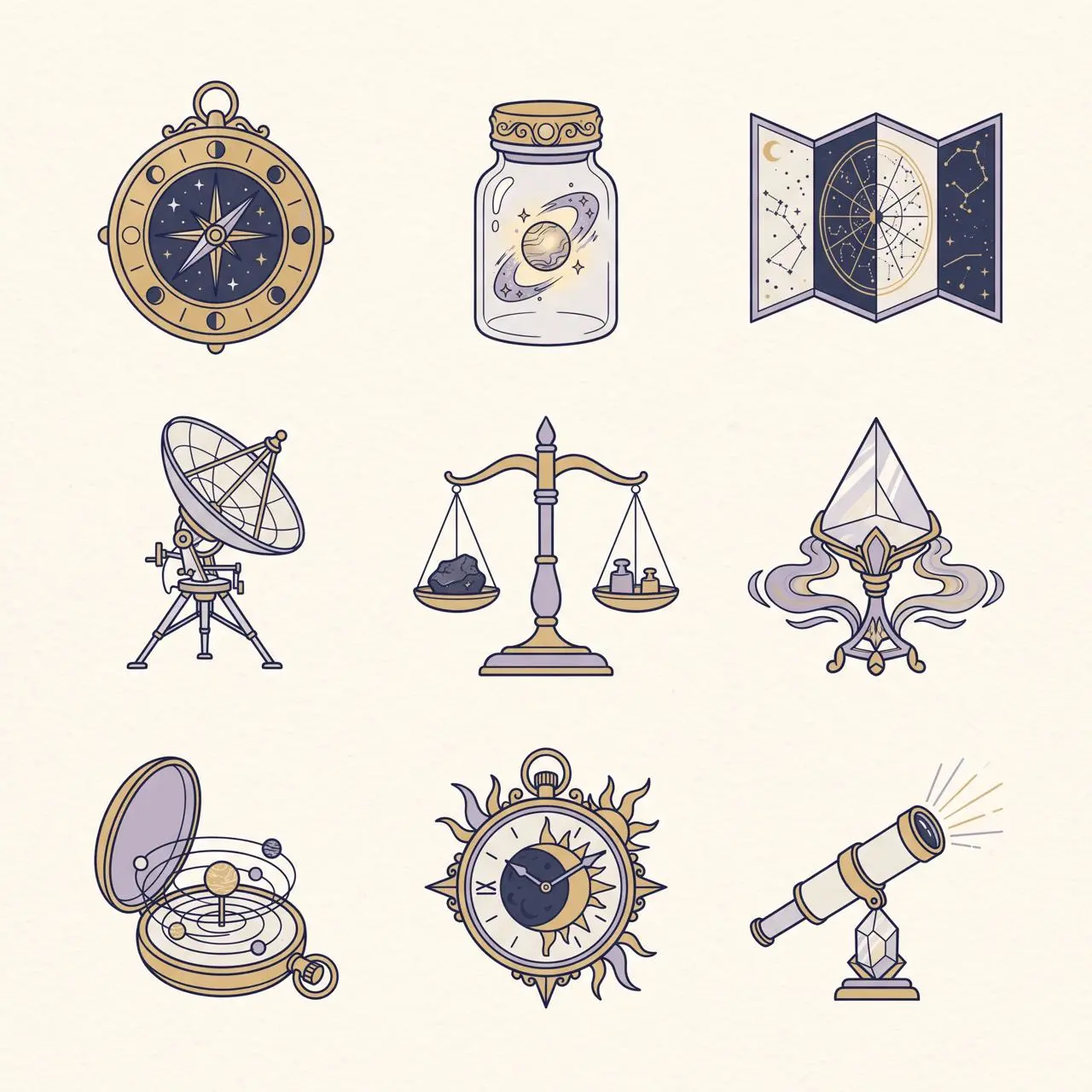
Why this prompt works as a template: it names the deliverable, repeats the count in words and grid dimensions, lists every cell's content, defines shared styling, and prevents extra text.
Scenario prompt 2: an environmental portrait with spatial roles
For a photograph, replace grid logic with foreground, subject, and background roles.
Create a finished 4:5 environmental portrait of one botanist-astronaut cataloging a luminous blue fern inside a lunar greenhouse at night. The person stands in the left third, seen from knees up, wearing a practical white exploration suit with a clear helmet held under one arm. The fern is the sharp foreground subject on the right, while curved glass walls reveal the gray lunar surface and a small Earth low on the horizon. Shoot at eye level with a 50mm lens and moderate depth of field. Use cool moonlight from the right, soft amber work lights from the left, realistic skin and fabric texture, restrained blue-and-amber color grading, and a quiet documentary mood. No extra people, no flags, no readable labels, no fantasy magic particles, no logos, no watermark.
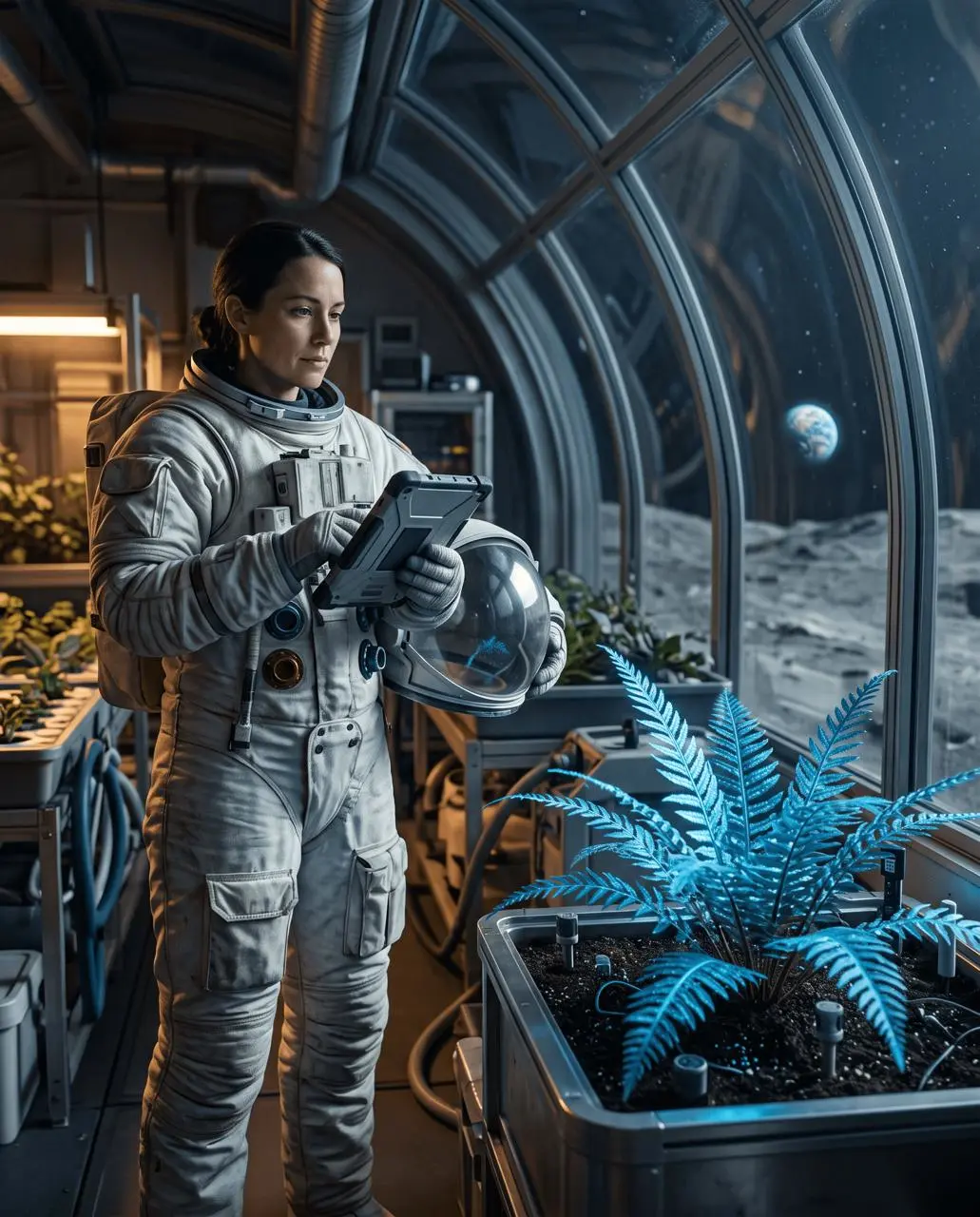
The crop miss is useful. A detailed prompt can make a result easier to direct, but it does not guarantee that every phrase is followed equally. Prioritize the constraints that matter most, and inspect those first.
Adapt the formula for reference images and edits
When images are attached, add a seventh component: reference roles. Call each input by number and say what it controls.
Reference image 1 defines the person's identity and facial features.
Reference image 2 defines the coat design and fabric.
Reference image 3 defines the location and color palette.
Keep the face from image 1 and the coat details from image 2; do not blend identities or invent logos.
For a local edit, shorten the scene description and emphasize the one requested action plus the keep list. The separate Nano Banana 2.1 precise image editing guide tests recoloring, moving, and replacing one object while auditing the rest of the frame.
Five prompt mistakes to avoid
- Style pile without a deliverable: “cinematic, dreamy, premium” does not say what you are making.
- Elements without positions: naming a subject, moon, and mountains does not establish a composition.
- Counts hidden inside prose: repeat critical counts in the structure, such as “exactly nine” and “3-by-3.”
- Generic negative prompts: “no mistakes” is less actionable than “no extra people, text, duplicate objects, logos, or watermark.”
- No output audit: a detailed prompt is not proof of compliance. Check count, location, crop, text, identity, and exclusions in the generated image.
A practical prompt library
Editorial concept image
Create a finished [aspect ratio] editorial image of [one main subject] [action] in [environment]. Place the subject in [zone] with [supporting element] in [zone]. Use [camera and crop], [light direction and temperature], and [material or finishing style]. Preserve [important visual anchor]. No [extra objects, text, logos, or watermark].
Exact collection or grid
Create a finished [aspect ratio] sheet containing exactly [count] [objects] in an even [rows]-by-[columns] grid. Give every cell equal size and margins, with one centered object per cell. Use one consistent [style and palette]. Keep every object fully inside its cell. No labels, extra objects, borders, logos, or watermark.
Environmental portrait
Create a finished [aspect ratio] environmental portrait of one [person and role] [action] in [location]. Put the person in [zone] and the key object in [foreground/background zone]. Shoot from [height] with a [lens] and [crop]. Use [key light] and [fill or practical light], realistic [skin/fabric/material detail], and a [mood] finish. No extra people, readable labels, logos, or watermark.
Multi-reference composition
Image 1 is the identity reference. Image 2 is the wardrobe reference. Image 3 is the environment reference. Create [deliverable] showing the person from image 1 wearing the exact garment from image 2 in the setting from image 3. Keep [identity anchors], [garment anchors], and [environment anchors]. Use [composition and light]. Do not blend identities, alter the garment design, add logos, or introduce extra people.
One-change edit
Edit only [target]: [one action]. Preserve [target properties] and keep [scene anchors] unchanged. Leave [old position or neighboring area] clean with no duplicate, ghost, or residue. Do not add, remove, move, or restyle anything else. No text, logos, or watermark.
Turn prompts into a repeatable review process
The best Nano Banana 2.1 prompt is not the longest one. It is the shortest brief that makes the important decisions explicit.
Write the deliverable first. Define the subject and count. Assign elements to space. Specify the camera and light. End with concrete exclusions. After generation, compare the image against those same six fields and revise only the constraint that failed.
Run your next structured prompt in the WeShop Nano Banana generator, then use the prompt as the acceptance checklist for the result.