












How to Edit One Object Without Changing the Rest with Nano Banana 2.1
Test three local edits in Nano Banana 2.1—recoloring, moving, and replacing one object—while checking the rest of the frame for drift.
Changing one object in an AI image sounds simple until the edit quietly redraws the book, shifts the cup, changes the crop, or adds an extra flower. The real task is not only making the requested change; it is controlling collateral change everywhere else.
We tested Nano Banana 2.1 on one deliberately auditable still life. The same source image was used for three independent edits: recolor a vase, move a book, and replace three flowers. All three edits understood the main instruction. None should be treated as a pixel-locked patch.
Tested conclusion
Nano Banana 2.1 can isolate the requested object at a semantic level, but the surrounding frame may still be regenerated. Write one-action prompts, lock the most important anchors, and audit the entire image—not only the edited object.
Build a scene that makes collateral changes visible
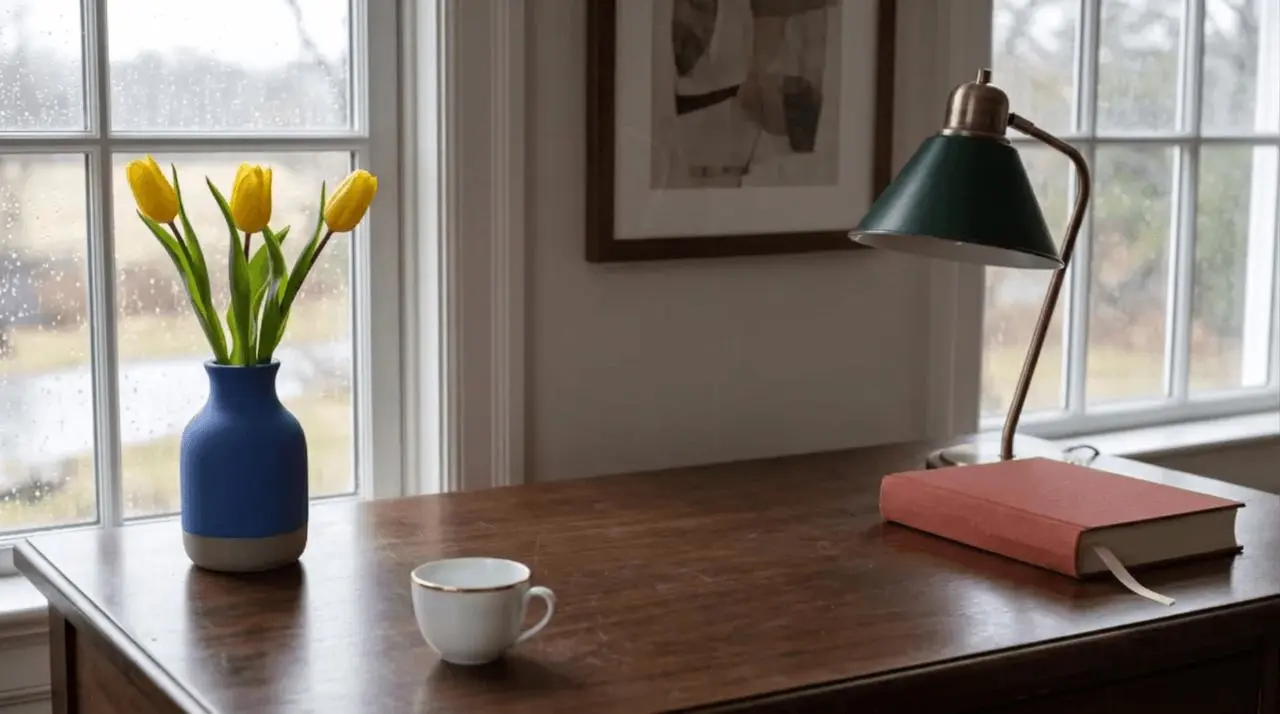
Our source image separates six visual anchors: a cobalt-blue vase, exactly three yellow tulips, a brick-red book with a cream ribbon, a white cup with a gold rim, a brass lamp with a dark green shade, and a rainy window with one framed print.
This is a better editing test than a minimal object on a blank background. If the model shifts the crop, changes a color, moves an object, or alters the count, the drift is easy to see.
| Setting | Base image | Three edits |
|---|---|---|
| Tool | WeShop Nano Banana | WeShop Nano Banana |
| Model | Nano Banana 2.1 | Nano Banana 2.1 |
| Input | Text prompt | The same base image + one edit prompt |
| Aspect ratio | 16:9 | Auto |
| Image size | 2K | 1K |
| Quantity | 1 | 1 per test |
| Delivered dimensions | 2752 × 1536 | 1375 × 768 |

Use a six-part local edit prompt
A useful local-edit prompt does more than say “change only this.” It gives the model a compact visual contract:
- Target: identify one object unambiguously.
- Action: ask for one change—recolor, move, or replace.
- Target locks: state which properties of that object must remain.
- Scene locks: name the high-value objects and composition anchors to preserve.
- Cleanup rule: prohibit duplicates, ghosts, residue, and additions.
- Exclusions: remove text, logos, or watermarks when they are not part of the task.
This structure does not turn a generative model into a deterministic photo editor. It does make the requested edit easier to evaluate and the failure easier to diagnose.
Test 1: recolor one object

The requested semantic edit passed. The preservation clause did not freeze every pixel. This makes recoloring useful for concept exploration and visual iteration, but a production workflow should compare the output against the source before replacing an approved asset.
Test 2: move one object and clear its old position
Moving an object is harder than changing its color because the model must solve two areas: place the object in a new location and reconstruct the surface underneath its old location.
The cleanup phrase mattered here: it described both the desired destination and the condition of the old location. “Move the book right” alone leaves the model more freedom to copy instead of move, or to leave a soft remnant behind.
Test 3: replace counted content inside a preserved container

This is the clearest failure in the set. The model followed the category-level replacement but missed an explicit quantity constraint. If the exact count is business-critical, regenerate or use a second editing pass that targets the extra flower alone. Do not approve the image just because the overall replacement looks convincing.
Compare the three edits at two levels
| Edit | Target-level result | Frame-level result | Verdict |
|---|---|---|---|
| Recolor vase | Correct coral color; shape remains recognizable | Book, cup, spacing, and crop drift slightly | Good for iteration; audit before production |
| Move book | Book moved right; old center is clean; no duplicate | Minor redraw across the scene | Strongest of the three tests |
| Replace flowers | Tulips become white calla lilies; vase preserved | Four flowers instead of three, plus small global drift | Visually plausible but fails exact count |
The distinction matters. “The edit worked” can mean the target changed correctly, while “the image stayed the same” is a separate and stricter claim.
A practical approval checklist
Review the output in this order:
- Target: Did the requested action happen to the correct object?
- Count: Are there exactly as many objects, flowers, fingers, labels, or repeated elements as required?
- Old location: After a move or removal, is the previous area clean?
- Identity: Did shape, material, color anchors, and distinctive details remain?
- Neighbors: Did nearby objects shift, merge, or change scale?
- Frame: Did crop, perspective, lighting, depth of field, or background geometry drift?
- Output size: Did the edit return at the resolution your downstream workflow needs?
For high-stakes brand assets, legal text, exact product geometry, or layouts that must align pixel-for-pixel, keep a masked editing or compositing step in the workflow. Generative preservation is best treated as strong visual continuity, not mathematical identity.
The practical takeaway
Nano Banana 2.1 handled all three local instructions well enough to produce believable edits. The book move was the cleanest result, the vase recolor was convincing but changed unrelated details, and the flower replacement missed the exact count.
The strongest prompt is not the longest one. Name one target, request one action, lock a few visible anchors, describe cleanup at the old location, and audit the whole frame. That produces a controlled creative workflow while keeping the model's generative nature visible.
Try the same pattern in the WeShop Nano Banana generator with an image whose important objects are easy to count and compare.