












Nano Banana 2.1 Review: Strong Prompt Control, Imperfect Precision
An evidence-led Nano Banana 2.1 review covering prompt control, exact layouts, local image editing, observed failures, and the workflows it fits best.
Nano Banana 2.1 is most interesting when the question moves beyond “Can it make an attractive image?” The more useful questions are whether it can follow a specific visual brief, preserve structure through a complicated composition, and change one part of an existing image without quietly changing the rest.
We tested those behaviors in the WeShop web generator using structured text-to-image prompts, an exact grid, an environmental portrait, and local image edits. The short verdict: Nano Banana 2.1 showed strong prompt control and produced convincing finished images, but it still behaves like a generative model—not a pixel-locked editing tool. Counts, crops, and untouched areas need human review.
Quick verdict
Best for: creators who can express a scene as a structured visual brief and review the result. Watch for: exact counts, camera crops, and small changes outside an edited area.
How we tested Nano Banana 2.1
All outputs were created with Nano Banana 2.1 in the WeShop Nano Banana generator. Text-to-image tests used one output at 2K in 16:9, 1:1, or 4:5. Image-editing tests used the same source image, one output, automatic aspect ratio, and 1K.
We judged five things: spatial prompt adherence, exact object count, camera crop, requested exclusions, and collateral changes during editing. Each prompt was run once, so the results below are observations—not a success-rate or consistency claim.
Google's model card describes Nano Banana 2.1 as an image-generation and editing model in the Gemini 3 family, based on Gemini 3.6 Flash. The card covers text-to-image, general editing, stylization, character and object editing, multi-image work, and multi-turn use. Our verdict is narrower: it is based on the WeShop outputs shown here.
Test 1: a complex composition followed the visual brief
The first prompt assigned every major element a visible role. It asked for one glass-walled library train across the middle third, a crescent moon in the upper-left, blue mountains in the lower-right, cool dawn outside, warm light inside, and no flying books or magic particles.

Verdict: spatial instructions were a clear strength in this test. The model did not merely include the requested ingredients; it arranged them into the requested reading order.
Test 2: an exact 3-by-3 grid passed
The second test asked for exactly nine imaginary astronomical instruments in an even 3-by-3 grid, with one centered object per cell, one visual style, and no labels.

Verdict: this is useful evidence for icon sheets, visual inventories, and structured concept boards. It is still one successful run, not proof that every counting task will pass.
Test 3: the scene worked, but the portrait crop missed
The portrait prompt placed one botanist-astronaut in the left third, a luminous blue fern in the right foreground, and Earth beyond the greenhouse. It also requested a knees-up crop.
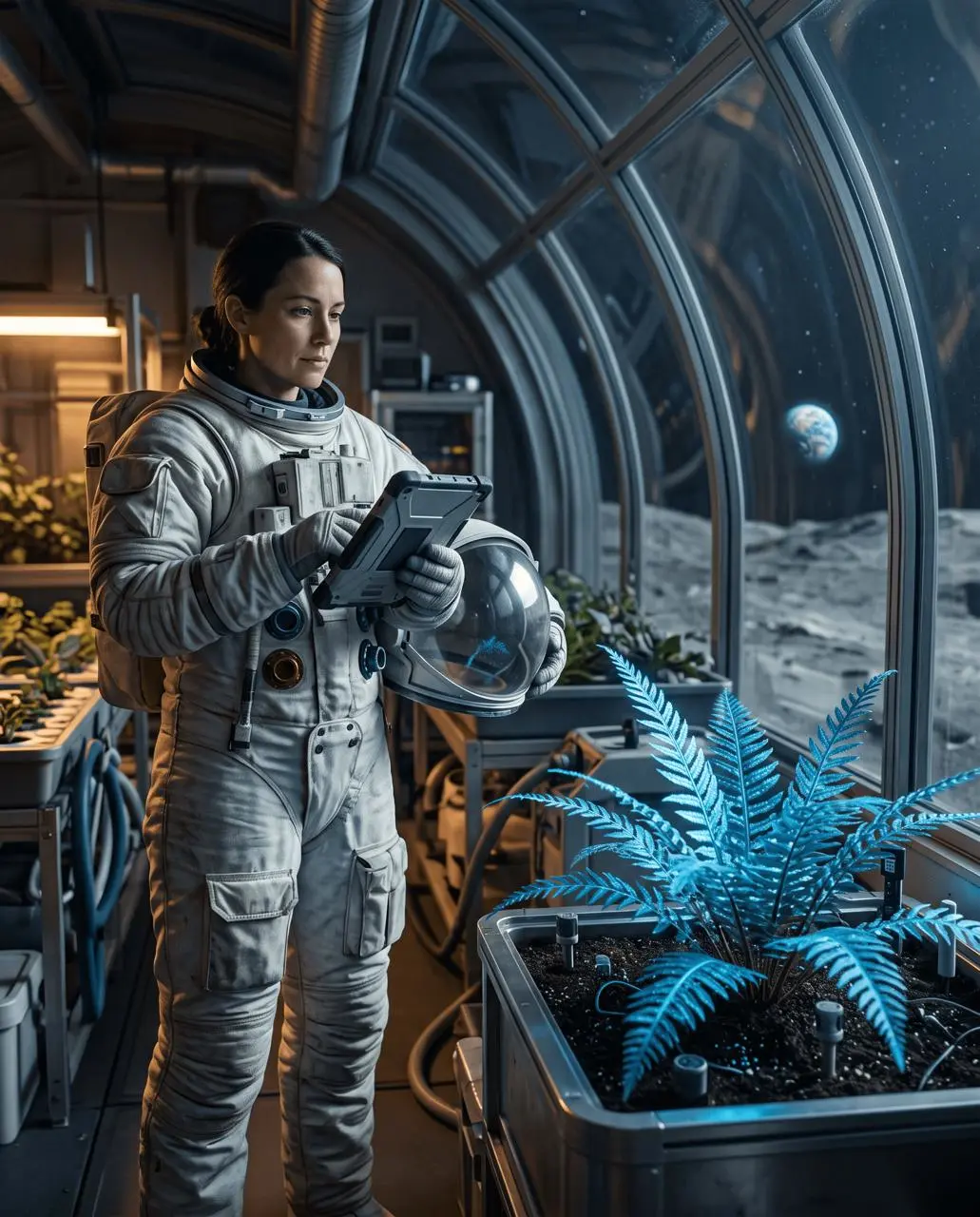
Verdict: Nano Banana 2.1 can coordinate several scene roles, but a convincing overall image can hide a missed camera constraint. Crop and lens instructions still need item-by-item QA.
Test 4: local edits were convincing, not pixel-locked
We then used one still life as a fixed editing source. The first edit asked the model to move the same red book from the center of the desk to the area beneath the lamp, leave the old position clean, and preserve everything else.

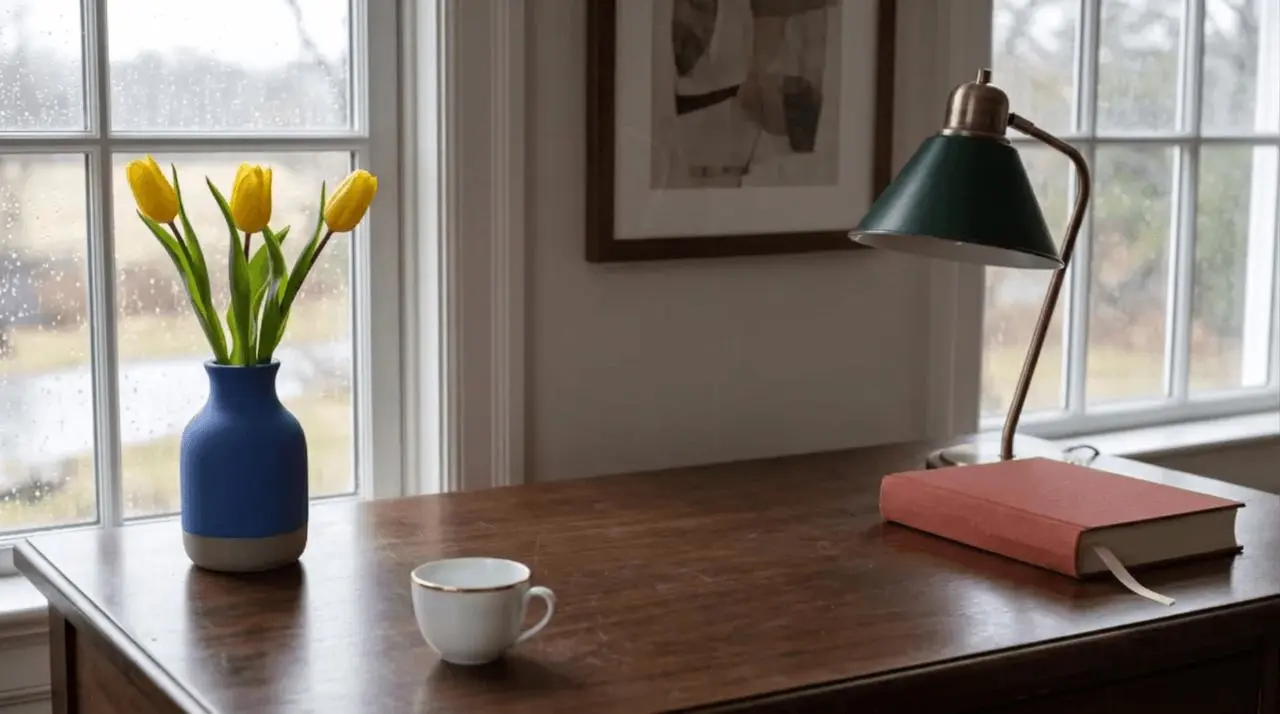
The second edit requested exactly three white calla lilies in place of exactly three yellow tulips while preserving the blue vase and the rest of the scene.

Verdict: semantic edits such as “move” and “replace” were useful, but preservation was approximate. Exact quantity and frame-level identity cannot be assumed.
Nano Banana 2.1 strengths from these tests
- Structured prompt adherence: explicit positions, lighting roles, and exclusions translated into readable compositions.
- Finished visual quality: the outputs look intentionally art-directed rather than like loose ingredient lists.
- Layout control: the 3-by-3 test maintained count, spacing, and shared style in one run.
- Semantic editing: moving and replacing objects produced plausible, usable results quickly.
- Broad creative range: the same workflow handled editorial fantasy, flat-vector assets, a photographic portrait, and a realistic still life.
Where Nano Banana 2.1 still needs review
- Pixel-level preservation: “Keep everything else unchanged” did not freeze the source image.
- Exact counts: the flower replacement produced four flowers instead of three.
- Camera crop: the portrait framed more of the body than requested.
- Repeatability: one output per prompt cannot establish consistency across repeated runs.
- Production approval: text, logos, packaging details, legal copy, and exact SKUs should be checked or finished in a dedicated design tool.
Who should use it
Nano Banana 2.1 is a strong fit for editorial concepts, social visuals, icon collections, storyboard frames, campaign exploration, and fast semantic edits. In those workflows, the ability to translate a detailed brief into a polished image matters more than deterministic pixels.
It is a weaker fit as the only tool for locked brand assets, exact product details, regulated copy, precise object counts, or any workflow where an unrequested shift is unacceptable. Use it upstream for generation and ideation, then add human review or conventional design tools before final delivery.
Final verdict
Nano Banana 2.1 is a capable visual-brief executor. Give it explicit subjects, positions, camera choices, lighting, and exclusions, and it can produce coherent images with strong art direction. It is not an unattended production pipeline, and it is not a pixel-locked image editor.
If your workflow accepts controlled generative variation—and you review counts, crops, text, and untouched regions—it is worth using. For the full prompt structure, read the Nano Banana 2.1 Prompt Guide. For a step-by-step editing workflow, see How to Edit One Object Without Changing the Rest.
Run a structured brief in the WeShop Nano Banana generator, then judge the result against the same brief before approving it.