












Restore and Colorize Old Photos with Nano Banana 2.1
A tested Nano Banana 2.1 workflow for repairing tears, scratches, fading, and color while preserving people and historical character.
Restoring an old family photograph is not the same as creating a new portrait. The goal is to repair damage while preserving the people, pose, clothing, location, and historical character of the source. Colorization adds another challenge: plausible color is still an interpretation, not a recovered fact.
We tested Nano Banana 2.1 on a synthetic 1948-style family photograph created for this tutorial. The source contained one grandmother, two children, a large lower-left tear, scratches, dust, faded contrast, and a worn border. The restoration removed the main tear and most surface damage, improved facial detail, and added restrained color while keeping all three people, their poses, the porch, and the original framing.
Important limitation
AI can invent detail while repairing missing pixels. Keep the original scan, treat color as a creative interpretation, and do not use an AI restoration as historical or forensic evidence.
Start with the best scan you can make
Before using an AI model, capture the photograph carefully:
- Scan at high resolution or photograph it straight-on in even light.
- Keep the complete border and damaged areas in frame.
- Avoid reflections, aggressive phone filters, and perspective distortion.
- Save an untouched archival copy before making any edits.
- If the photograph is physically fragile or valuable, consult a conservator rather than cleaning or flattening it yourself.
A clean scan gives the model more real information and reduces the amount it must invent.
The damaged photo used in this test
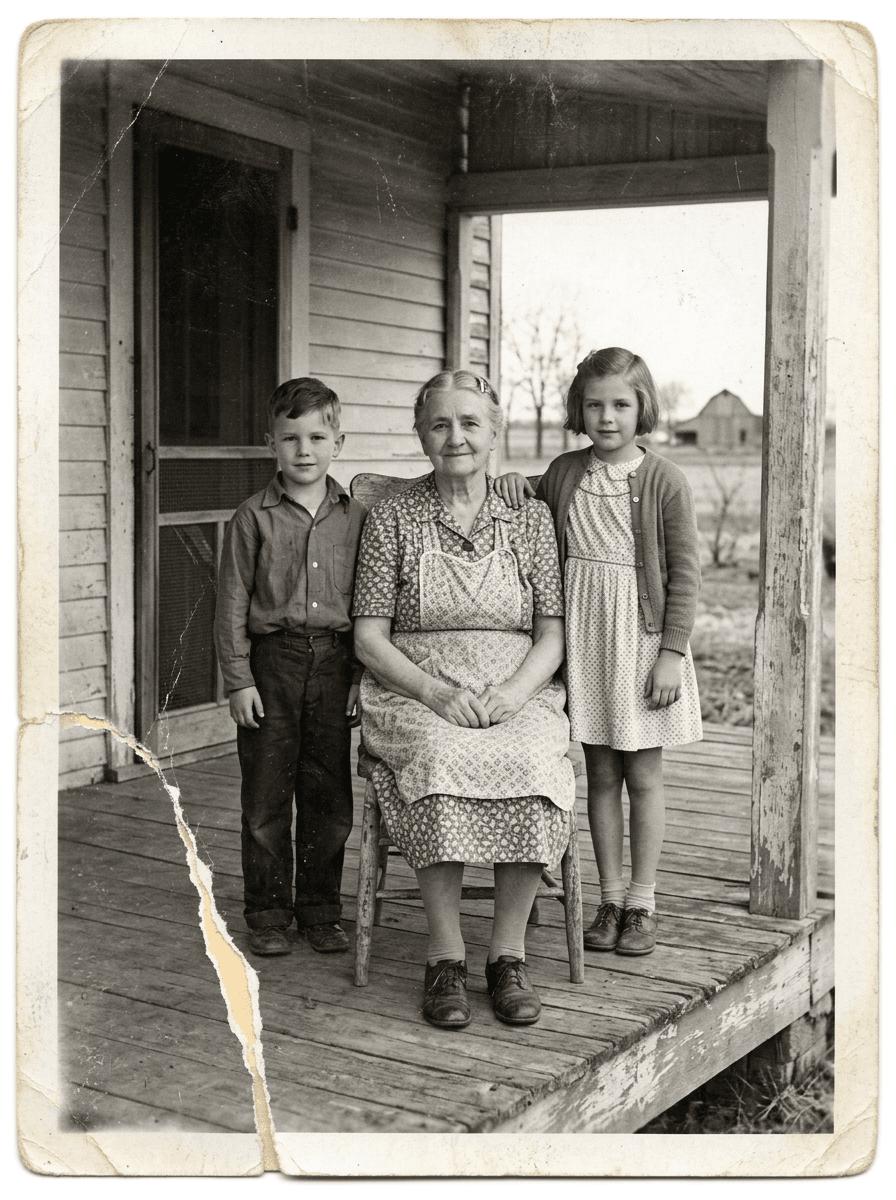
The preservation anchors were easy to audit: person count, relative positions, facial identity, hands, clothing shapes, chair, door, porch posts, farmhouse, and full border.
The restoration and colorization prompt
The prompt separates three jobs: repair, color direction, and preservation. “Make it look new” would be much less controlled because it encourages smoothing, modern color grading, and facial reinterpretation.
The restored result
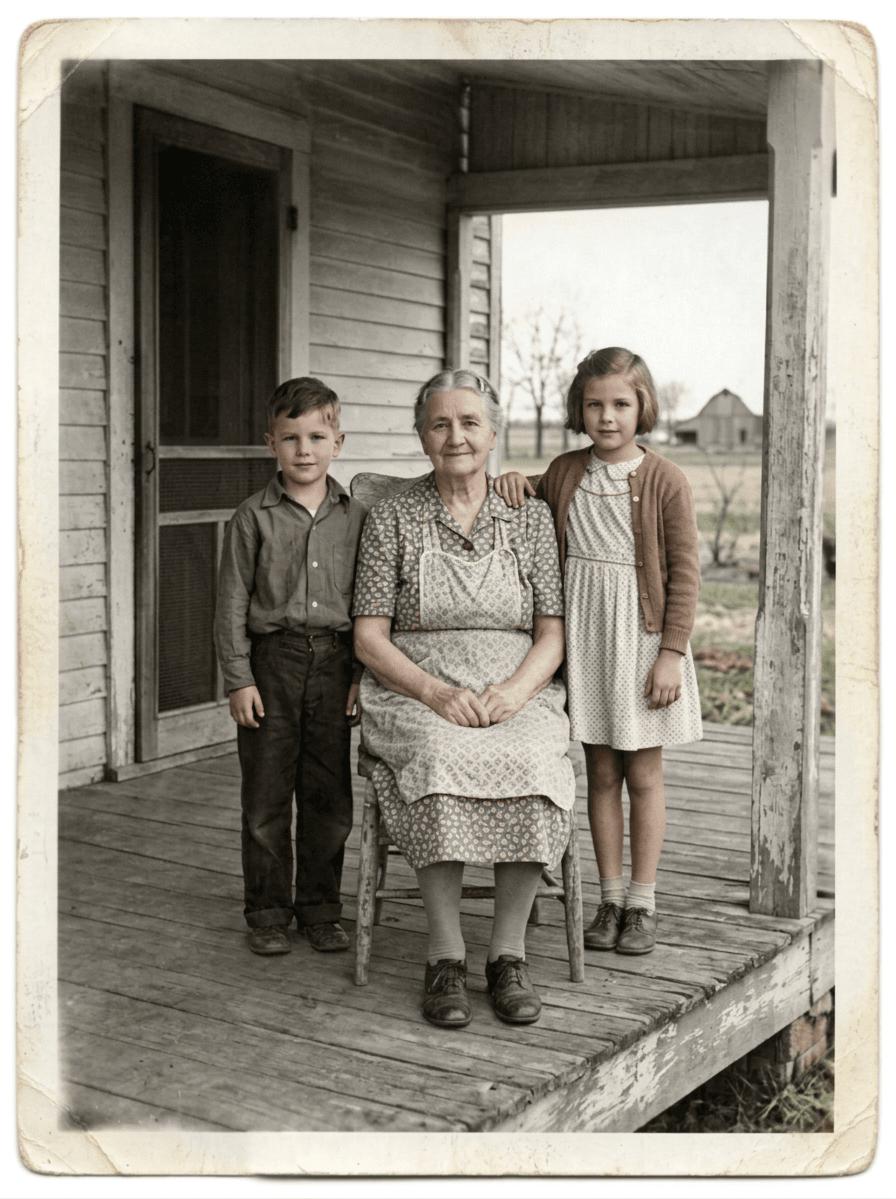
The model avoided the common failure of turning an archival portrait into a glossy modern photograph. It also preserved the girl’s hand on the grandmother’s shoulder and the seated hand positions—small relational details that are easy to lose.
A safer two-pass restoration workflow
For a real photograph, consider separating restoration from colorization.
Pass 1: repair only
Ask for dust, scratches, tears, exposure, and contrast to be repaired while keeping the image black and white. Compare faces, hands, clothing seams, jewelry, and background objects with the original.
Pass 2: restrained colorization
Use the approved repaired image as the source. Request subdued, historically plausible colors and state that color is interpretive. If the family knows a dress or uniform color, include that evidence explicitly.
This split makes it easier to identify whether a problem came from reconstruction or from colorization.
Copyable prompt template
What to inspect after restoration
- Identity: eye spacing, nose and mouth shape, hairline, age, and expression.
- Hands and limbs: number of fingers, hand placement, and body geometry.
- Clothing: collars, buttons, patterns, medals, uniforms, and hems.
- Relationships: who touches whom and where each person stands or sits.
- Architecture and objects: doors, furniture, signs, vehicles, and tools.
- Frame integrity: original crop, borders, aspect ratio, and missing corners.
- Color plausibility: skin tones, white balance, and any historically documented colors.
View the original and restoration side by side at 100% zoom. A result can feel emotionally convincing while quietly changing identity or material evidence.
When to keep the photo black and white
Colorization is optional. Keep the restored image monochrome when color would imply false certainty, when the original aesthetic matters, or when the photo is used in historical documentation. You can also deliver two versions: a repaired archival monochrome and a clearly labeled color interpretation.
Final takeaway
Nano Banana 2.1 produced a convincing repair in this synthetic test, including strong identity and scene preservation. The right prompt treats restoration as constrained reconstruction, not unrestricted enhancement. Preserve the original file, name the locked details, review at full size, and disclose that any generated color is interpretive.
For a broader controlled-editing workflow, see How to Edit One Object Without Changing the Rest. For prompt construction, read the Nano Banana 2.1 Prompt Guide.