मॉडलछवि मॉडलNano Banana Pro — एआई इमेज जनरेटर और एडिटर
NANO BANANA PRO से इमेज बनाएँ
Nano Banana Pro — एआई इमेज जनरेटर और एडिटर
Nano Banana Pro, Google का Gemini 3 Pro Image मॉडल है, जो चित्र बनाने और संपादित करने के काम आता है। टेक्स्ट से पोस्टर, जानकारी वाले लेआउट और कैरेक्टर शीट बनाएं या उत्पादों और लोगों के चित्र संपादित करने के लिए संदर्भ अपलोड करें। WeShop में 1K, 2K और 4K आउटपुट विकल्प मिलते हैं।
तीन अलग काम देखें: चार दृश्यों वाली किरदार शीट, मौसम और पहनावे का लेआउट तथा स्नीकर्स फ़ोटो का एडिट। हर केस में उसका वास्तविक अंग्रेज़ी प्रॉम्प्ट और परिणाम है; जहाँ संदर्भ इस्तेमाल हुए हैं, वे दिखाए गए हैं। मौसम की ग्राफ़िक डिज़ाइन अवधारणा है, मौजूदा मौसम का पूर्वानुमान नहीं।
चार दृश्यों वाली किरदार स्टाइलिंग शीट
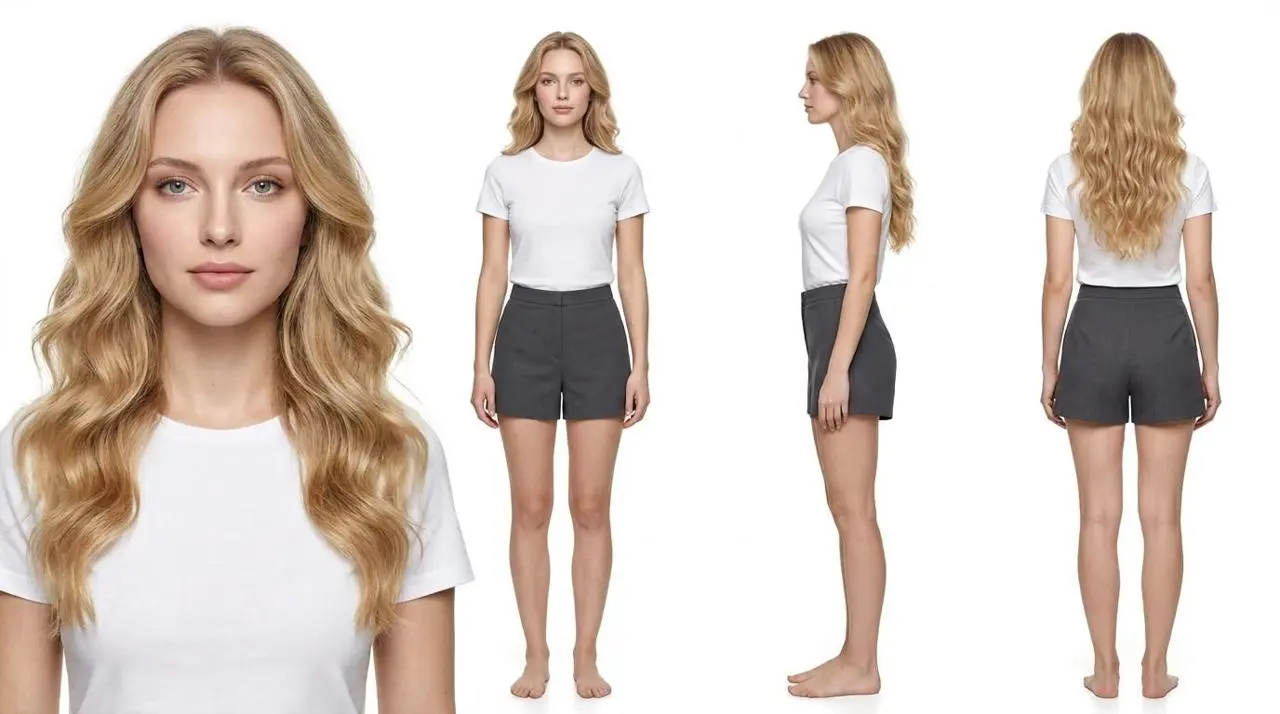
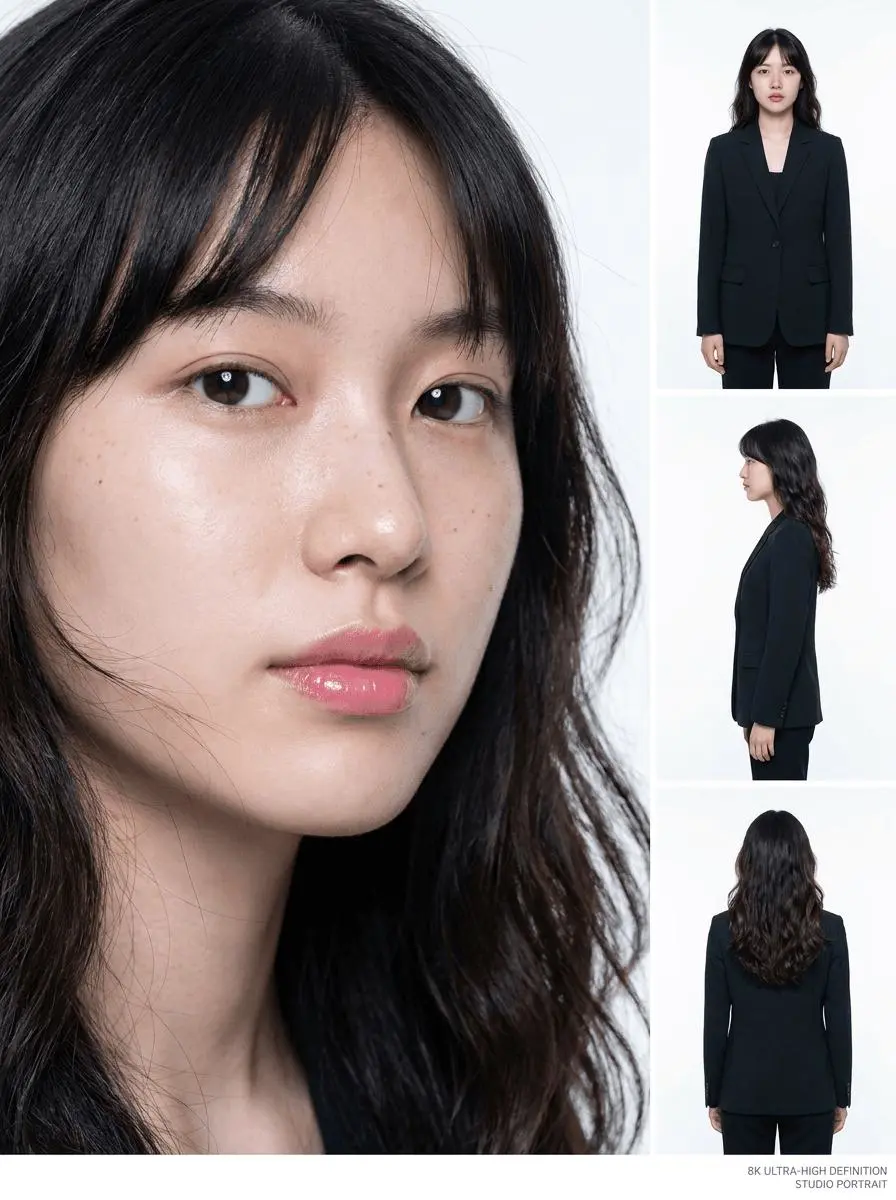
केवल टेक्स्ट से बनी कैरेक्टर शीट में पोर्ट्रेट, सामने, बगल और पीछे के दृश्य साथ हैं। सभी में सुनहरे बाल, सफेद टी-शर्ट और गहरे स्लेटी शॉर्ट्स हैं। इस उदाहरण में 1K सेटिंग चुनी गई थी; प्रॉम्प्ट में लिखा “4K” आउटपुट आकार की सेटिंग को नहीं बदलता।
16:9 horizontal aspect ratio, 4K ultra-high definition, photorealistic photography, seamless pure-white background, and professional fashion studio lighting. Create a four-view character styling sheet.
Arrange the four views from left to right as follows: a large head-and-shoulders close-up, a full-body front view, a full-body left-side profile, and a full-body back view. Every view must show the same adult female model, with completely consistent facial features, hairstyle, skin tone, body proportions, and clothing details. Each full-body view must show the complete figure from the top of the head to the soles of the feet, without cropping or overlapping. The model should stand naturally in a neutral presentation pose.
The subject is a young European or North American female model, approximately 20–25 years old, with a tall, slender, naturally balanced figure, long limbs, and relaxed posture. She has an oval face, soft and refined facial contours, clear and expressive eyes, naturally light-colored irises, a defined yet natural nose bridge, and soft dusty-pink lips. Her expression is calm and peaceful, with a clear, gentle, non-aggressive gaze. Her overall presence should feel clean, relaxed, warm, and contemporary.
She has voluminous, long blonde hair styled in large, soft waves. The hair is a natural warm blonde with realistic tonal variation, dimension, and shine. It falls naturally over her shoulders and down her back, with a few lightweight strands framing her face. She wears no hair accessories. The length, curl pattern, parting, and color of her hair must remain identical in all four views.
Her makeup is fresh, sheer, and natural: subtle light-brown eye makeup, softly defined eyes with minimal eyeliner, individually visible eyelashes, a gentle pink blush, and hydrated natural-looking lips. Preserve authentic skin texture, visible pores, minor imperfections, and natural variations in skin tone. The complexion should appear clean and luminous without excessive smoothing, plastic-looking skin, or exaggerated influencer-style makeup.
Outfit: a minimalist solid-color fitted short-sleeve T-shirt paired with simple high-waisted shorts. The T-shirt is made from soft, fine cotton with a clean silhouette that follows the body without appearing overly tight. The shorts have a minimal, tailored design and an appropriate length that clearly shows the waistline and natural leg proportions. Use a white T-shirt with black or dark-gray shorts. Do not include patterns, prints, text, brand logos, elaborate pockets, or decorative details. The model is barefoot and wears no jewelry, hat, belt, or accessories.
Keep the subjects centered and evenly spaced in a clean, structured layout. The composition should feel full while maintaining enough separation between each view. Use a seamless pure-white background with no horizon line, scenery, furniture, props, text, or borders. Apply soft, even professional studio lighting that clearly reveals facial features, clothing construction, and fabric texture. Include only subtle, natural shadows beneath the feet.
The final image should resemble a premium commercial fashion portrait and a professional model styling reference sheet, featuring photorealistic detail, accurate anatomy, authentic skin texture, clearly defined individual hair strands, and rich fabric details. Identity consistency across all four views is essential.
Avoid: inconsistent identities, different faces, changes in hairstyle or body proportions, inconsistent clothing colors or designs, excessive skin smoothing, plastic skin, cartoon or anime aesthetics, exaggerated curves, distorted anatomy, extra limbs, missing hands or feet, cropped full-body views, overlapping figures, complicated poses, colored backgrounds, text, logos, and watermarks.
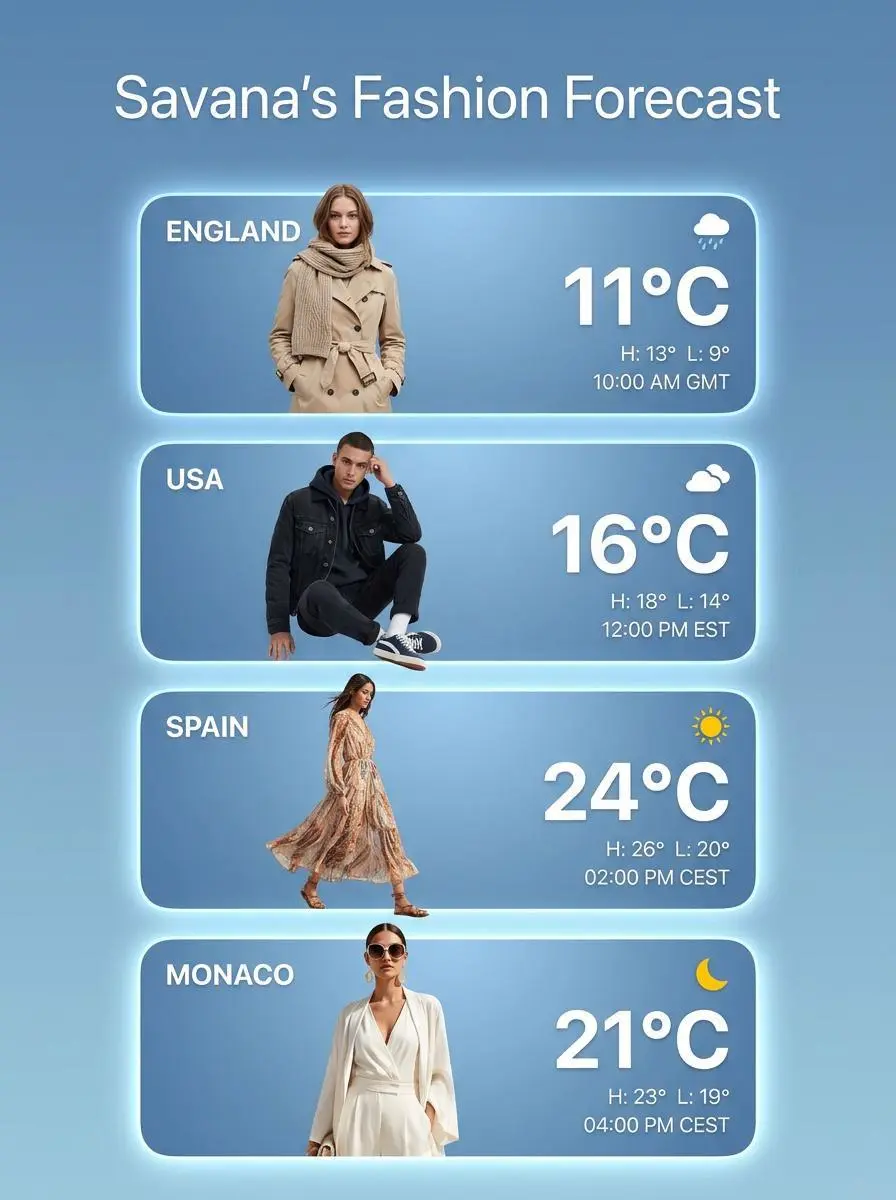
अवधारणा पोस्टर में दोहराए कार्डों पर फ़ैशन आकृतियाँ, जगहों के नाम, आइकन और तापमान हैं। लेआउट और टेक्स्ट की प्राथमिकता जाँचें; मौसम के दिखाए आँकड़े उदाहरणात्मक हैं, मौजूदा पूर्वानुमान नहीं।
The third image combines weather app design with fashion styling in a sleek promotional poster. The background is a soft gradient blue, and the title at the top reads “Savana’s Fashion Forecast.” Below it are four large rounded weather cards stacked vertically, each representing a different country: England, USA, Spain, and Monaco. Each card displays a model dressed in an outfit that matches the mood of the location and temperature, along with time and weather data. The temperature numbers are large and bold, while the high and low temperatures are shown in smaller text. The styling varies from soft layering and neutral coats to darker denim and streetwear-inspired looks. The design feels polished, trendy, and lifestyle-oriented, as if it is promoting clothing choices based on climate. It merges fashion editorial imagery with modern app-style UI in a visually smooth and commercial way.
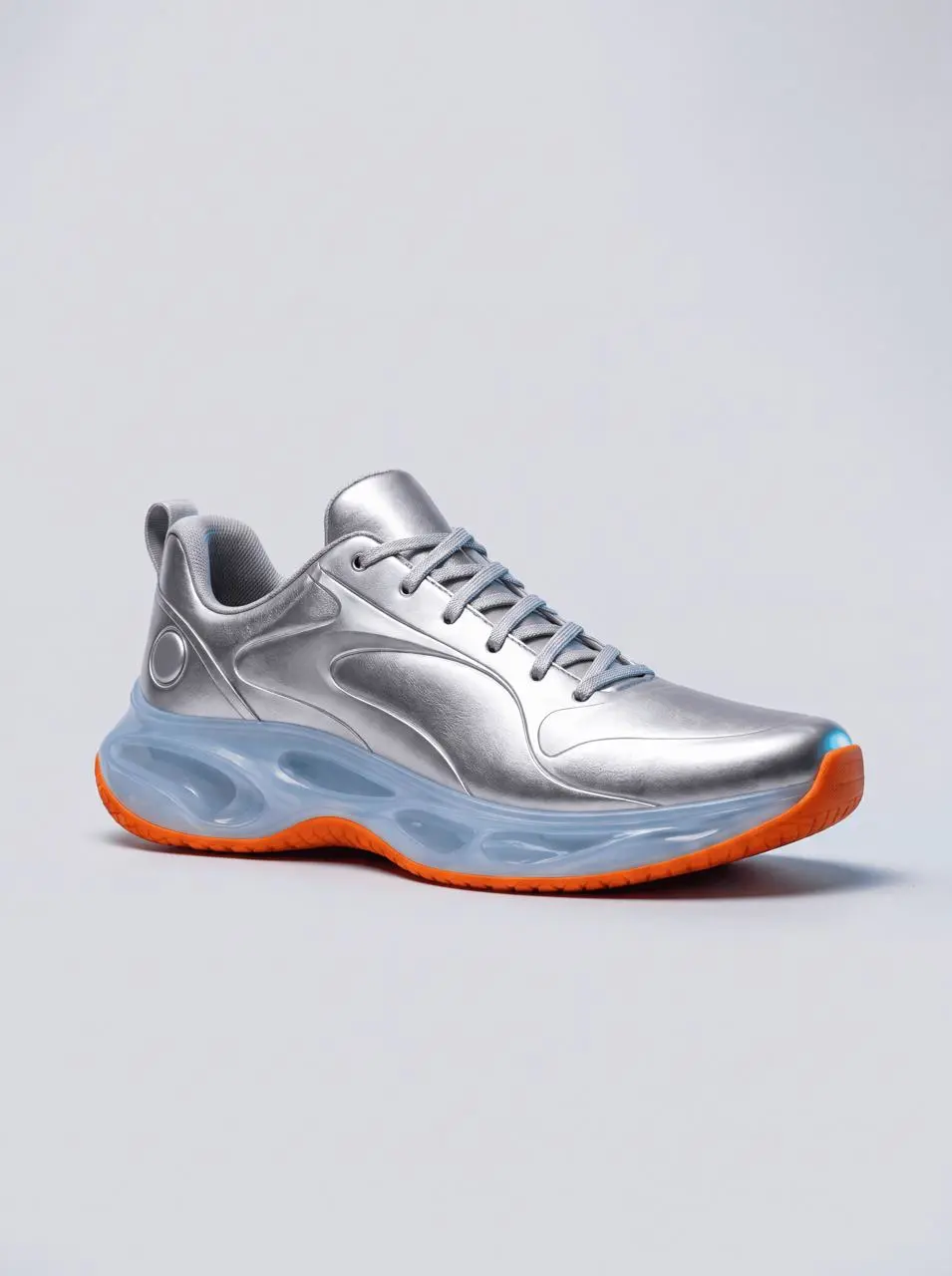
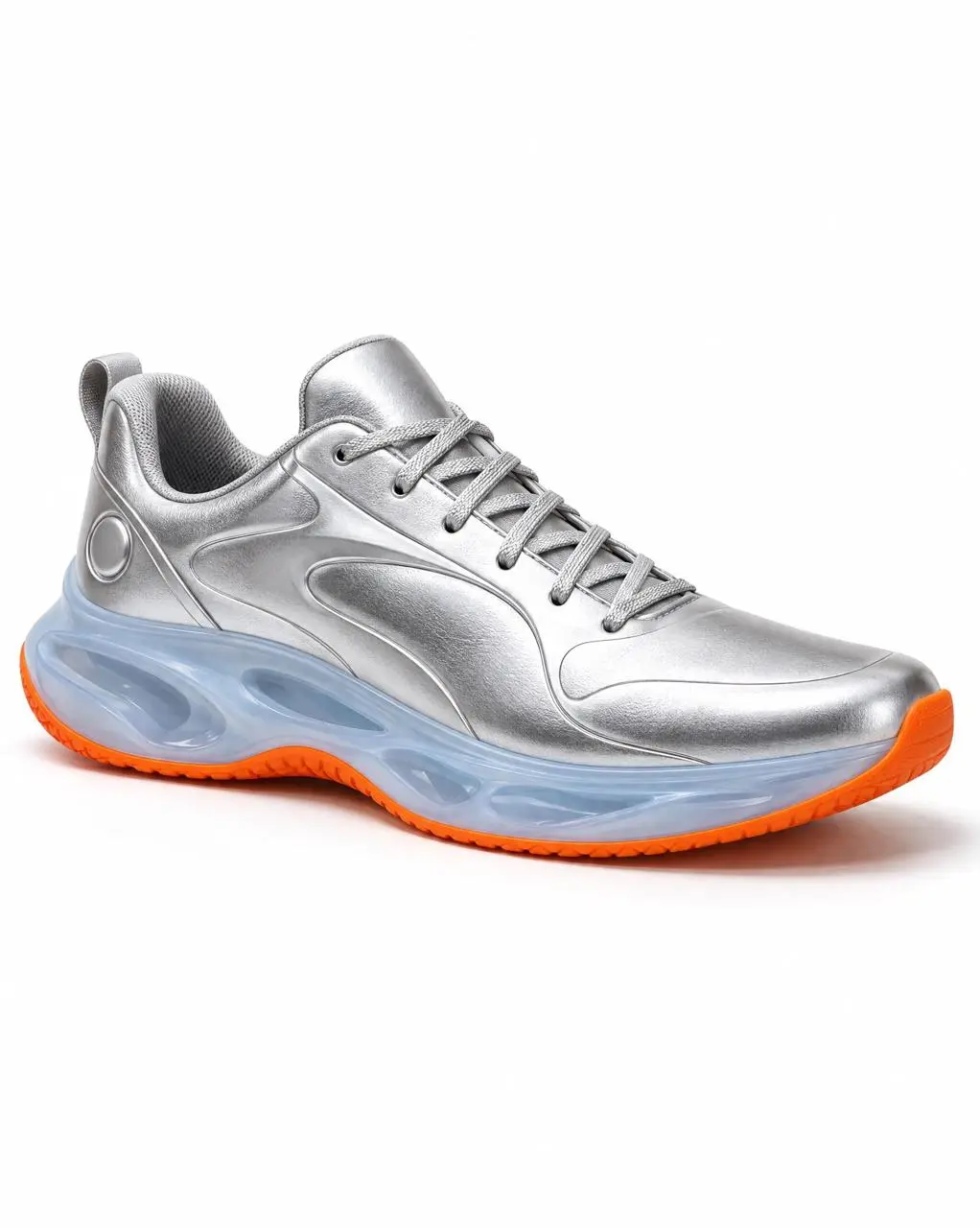
दिया गया स्नीकर्स चाँदी के पैनल, लेस, नीले पारदर्शी सोल और नारंगी सजावट वाली स्टूडियो उत्पाद इमेज को दिशा देता है। नरम और किनारे की रोशनी सामग्री दिखाती हैं। काम में 4K सेटिंग इस्तेमाल हुई; मूल परिणाम 3584 × 4800 पिक्सेल है।
Use image 1 as the sole product reference. Create a high-resolution vertical 3:4 studio product photograph of the same sneaker, preserving the silver upper, silver laces, translucent ice-blue sculpted midsole, orange outsole, circular heel detail, and right-facing three-quarter orientation. Place exactly one sneaker on a pale-gray seamless studio surface. Use a large soft light from the upper left and a narrow cool rim light to show the metallic texture, translucent material, and contact shadow. Keep the complete shoe visible with breathing room around it. Do not redesign the product, change its colors, add text or logos, add another shoe, add a border, or add a watermark.
Nano Banana Pro को Gemini 3 Pro Image भी कहते हैं। यह Google का इमेज जनरेशन और एडिटिंग मॉडल है। टेक्स्ट वाले लेआउट, उत्पाद मॉकअप और संदर्भ आधारित कंपोज़िशन के लिए इसे चुन सकते हैं। मुख्य नियंत्रण इमेज पर हैं: शब्द, विषय का रूप, रोशनी, फ़्रेमिंग और स्टाइल। डिज़ाइन इस्तेमाल करने से पहले बने विवरण जाँचें।
पढ़ने योग्य टेक्स्ट वाले पोस्टर और ग्राफ़िक
पोस्टर या सूचना ग्राफ़िक के लिए शीर्षक, सहायक शब्द और उनकी जगह बताएँ। Google कई भाषाओं में टेक्स्ट रेंडरिंग दर्ज करता है; वर्तनी और अनुवाद फिर भी जाँचना ज़रूरी है। मौसम-पहनावे का उदाहरण दोहराए लेबल और नियोजित लेआउट दिखाता है।
पहचानने योग्य लोग और उत्पाद
किसी व्यक्ति का रूप या उत्पाद का डिज़ाइन तय करने के लिए संदर्भ अपलोड करें। जूते के संपादन में स्टूडियो की रोशनी बदलते हुए चांदी जैसे पैनल, नीला सोल और नारंगी हिस्से बने रहते हैं। उपयोग से पहले चेहरे, कपड़े, उत्पाद की रूपरेखा और छोटी बारीकियों की मूल चित्र से तुलना करें।
रोशनी, फ़्रेमिंग और दृश्य स्टाइल
कैमरे का कोण, प्रकाश की दिशा, रंग और सामग्री बताएं। जूते के प्रॉम्प्ट में धातु जैसी ऊपरी सतह और पारदर्शी-से सोल को दिखाने के लिए ऊपर बाईं ओर से मुलायम रोशनी और ठंडी किनारी रोशनी मांगी गई है। परिणाम में आकार, फीते और सामग्री की बारीकियां जाँचें।
1K, 2K और 4K आउटपुट चुनें
WeShop इस Pro विकल्प के लिए 1K, 2K और 4K देता है। फ़ॉर्म में आकार और आस्पेक्ट रेशियो चुनें। स्नीकर्स काम में 4K सेटिंग से 3584 × 4800 का मूल परिणाम मिला; पेज का छोटा प्रीव्यू मूल फ़ाइल नहीं है।
बनाने के तरीके
टेक्स्ट से बनाएँ या संदर्भ इमेज एडिट करें
नई कंपोज़िशन के लिए टेक्स्ट से शुरू करें। मौजूदा व्यक्ति, उत्पाद, पहनावा या दृश्य इमेज को दिशा दे तो संदर्भ जोड़ें।
विवरण से नई इमेज बनाएँ
फ़ोटो अपलोड किए बिना विषय, परिवेश, कंपोज़िशन और दृश्य स्टाइल बताएँ। किरदार शीट और मौसम-पहनावे की ग्राफ़िक सिर्फ़ टेक्स्ट वाले अनुरोध दिखाती हैं।
फ़ोटो एडिट करें या संदर्भ मिलाएँ
संपादन के लिए आवश्यक चित्र अपलोड करें। बताएं कि हर चित्र व्यक्ति, पोशाक, उत्पाद या दृश्य में से क्या प्रदान करता है और बदलावों को बनाए रखने वाली बारीकियों से अलग लिखें। कई चित्रों के लिए स्पष्ट भूमिकाएं दें, जैसे “चित्र 1 व्यक्ति के लिए है; चित्र 2 पोशाक के लिए है।”
प्रॉम्प्ट गाइड
Nano Banana Pro के लिए प्रॉम्प्ट कैसे लिखें
Google की Pro प्रॉम्प्ट गाइड स्पष्ट विषय, कंपोज़िशन, परिवेश, स्टाइल और खास एडिट निर्देश सुझाती है। WeShop के ये छह केस दिखाते हैं कि खास चुनाव वास्तविक प्रॉम्प्ट और परिणाम में कैसे आते हैं। कॉपी करने वाला टेक्स्ट हर केस का वास्तविक अंग्रेज़ी प्रॉम्प्ट है।
स्टाइल के दिखने वाले निशान बताएँ
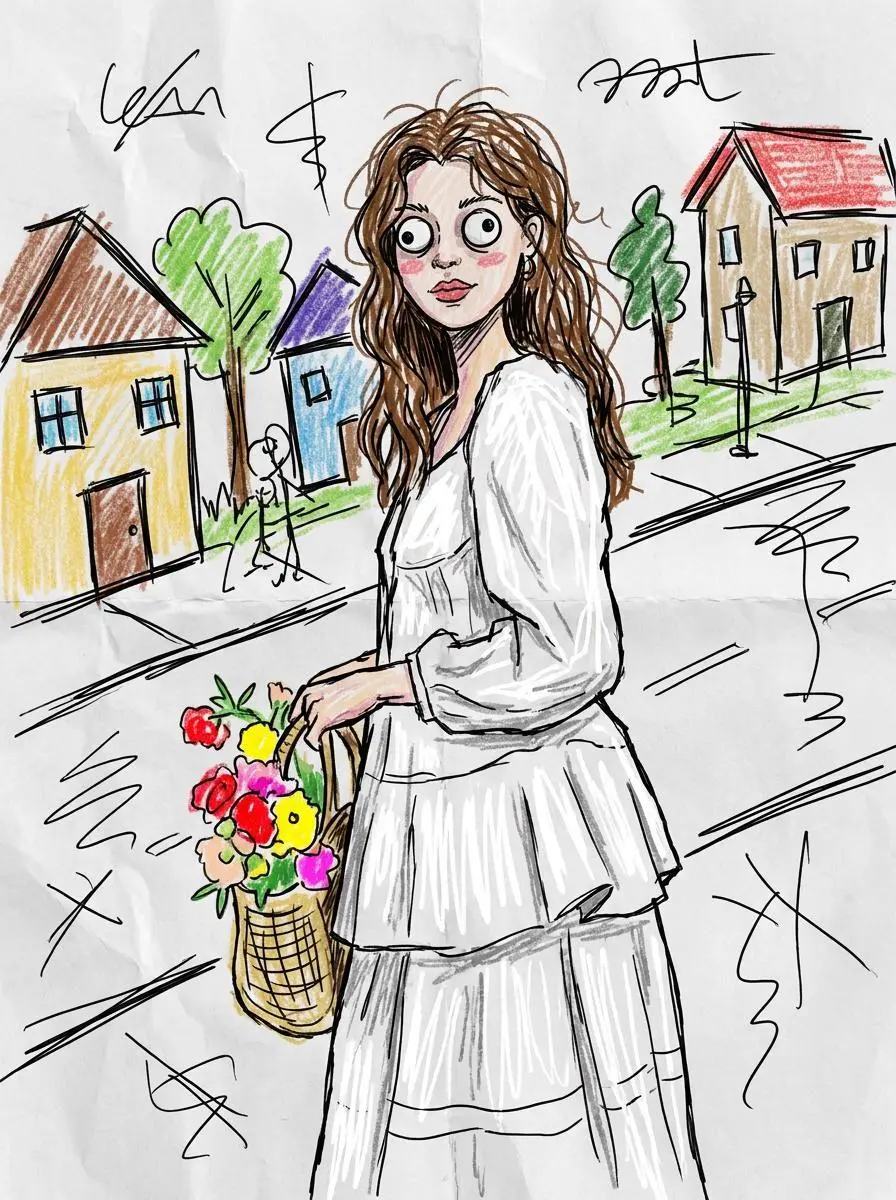
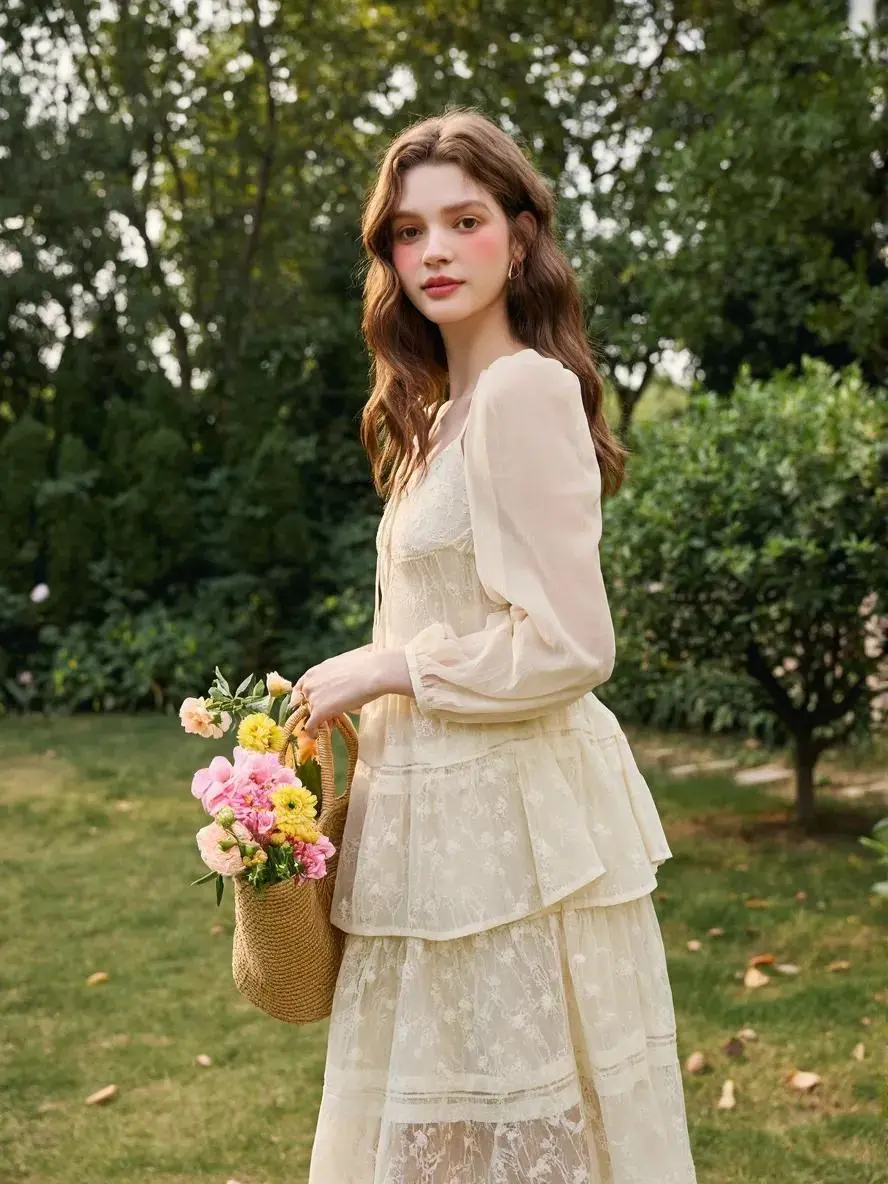
सिर्फ़ स्टाइल का नाम देने के बजाय दिखने वाली रेखाओं से ड्रॉइंग का रूप तय करें। इस उदाहरण में: “uneven coloring and visible strokes”। मूल पोर्ट्रेट को डूडल की खुरदरी रेखाओं, सरल आकृतियों और असमान रंग से मिलाएँ।
urn this photo into a funny ugly doodle drawing. Make it look like: a quick sketch using a cheap marker or crayon messy, rough, childlike style bad perspective and awkward proportions slightly exaggerated facial features Add: simple cartoon background (like buildings, trees, street) random sketchy lines and details uneven coloring and visible strokes Style: looks like a lazy drawing, not polished humorous and a bit stupid-looking meme-like, casual, internet style Do NOT: make it realistic
संदर्भ और लेआउट को अलग भूमिकाएँ दें
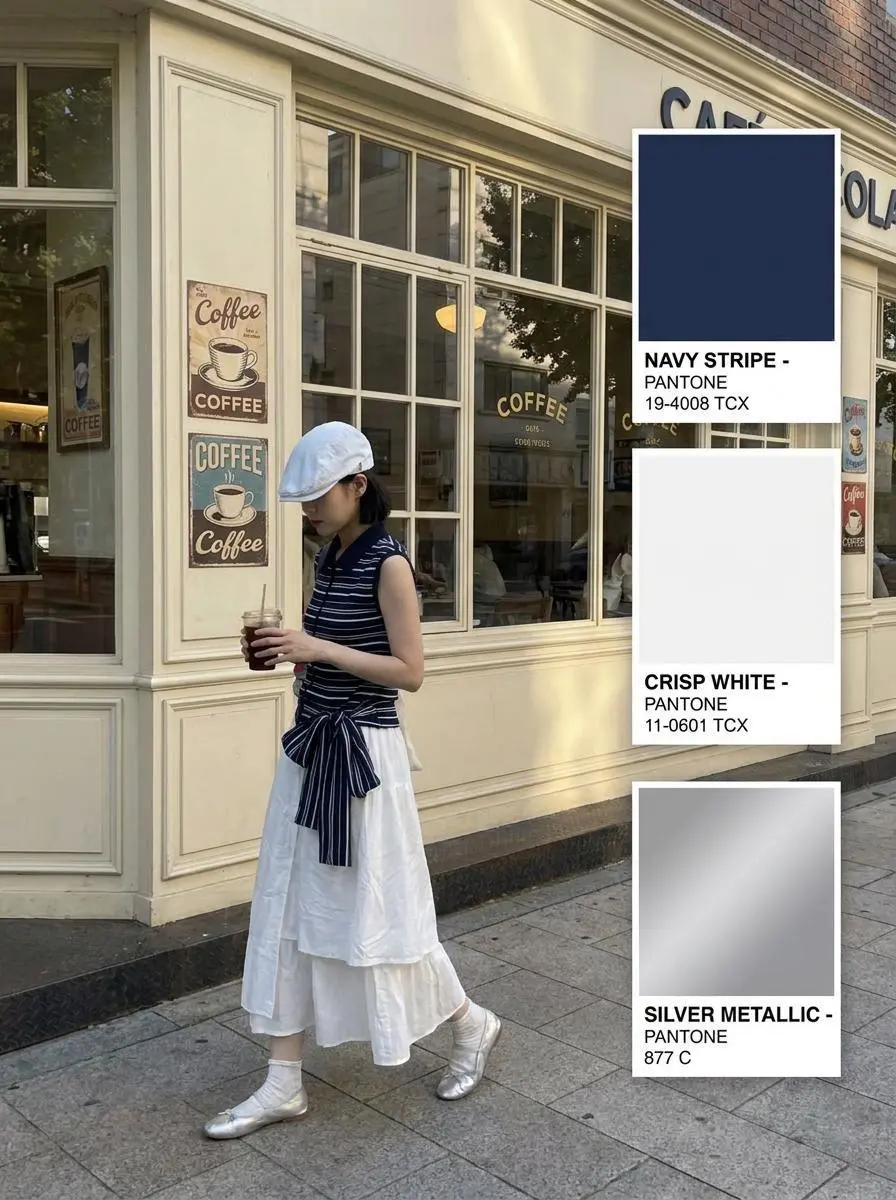
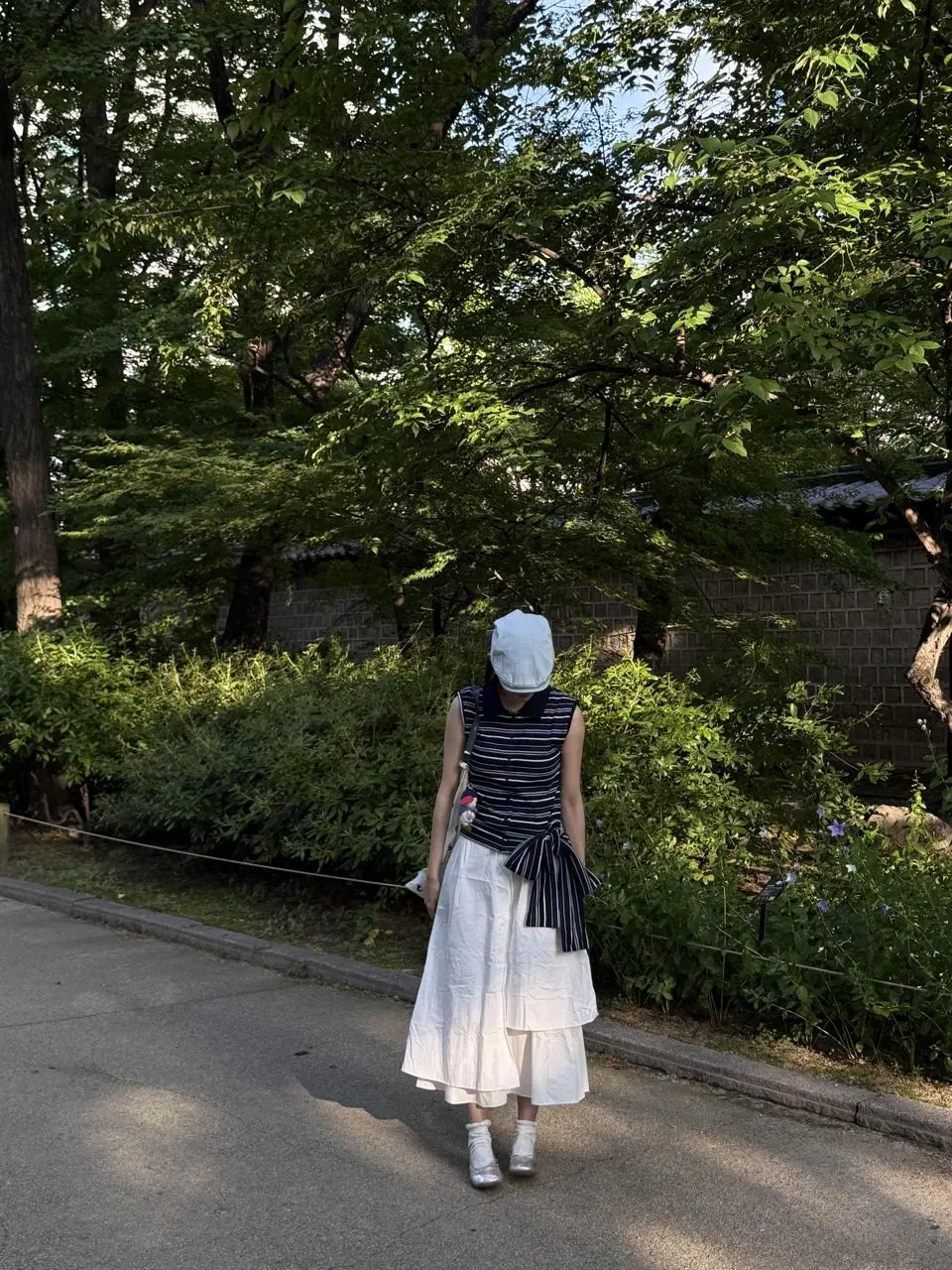
बताएँ कि संदर्भ क्या देता है, फिर विषय और ग्राफ़िक तत्वों की जगह तय करें। इस उदाहरण में: “model on the left two-thirds of the image, vertical color palette cards on the right one-third.” बचे पहनावे और अलग पैलेट कॉलम को जाँचें; प्रॉम्प्ट उनकी भूमिकाएँ अलग तय करता है।
Create a Pinterest-style street fashion color palette editorial using the 【uploaded model and outfit】
Preserve the uploaded outfit details accurately, including colors, textures, accessories, shoes, bag, hairstyle, and overall styling. The model should be walking casually in side profile or slightly from behind, holding an iced coffee or small drink, creating a natural candid street photo feeling.
Scene: vintage café exterior, cream or beige storefront, large coffee shop windows, retro coffee posters, warm urban sidewalk, subtle European street atmosphere.
Composition: model on the left two-thirds of the image, vertical color palette cards on the right one-third.
Color cards: add three Pantone-style rectangular color cards stacked vertically on the right side, using the main colors extracted from the uploaded outfit. Each card should include a large color block and simple black Pantone-style label text underneath.
Mood: cozy coffee-shop aesthetic, casual streetwear, soft daylight, warm muted tones, Pinterest fashion color analysis, editorial layout, realistic photography.
High-resolution, natural lighting, realistic fabric texture, clean graphic design, modern fashion magazine composition.
क्या रखना और क्या बदलना है, अलग बताएँ
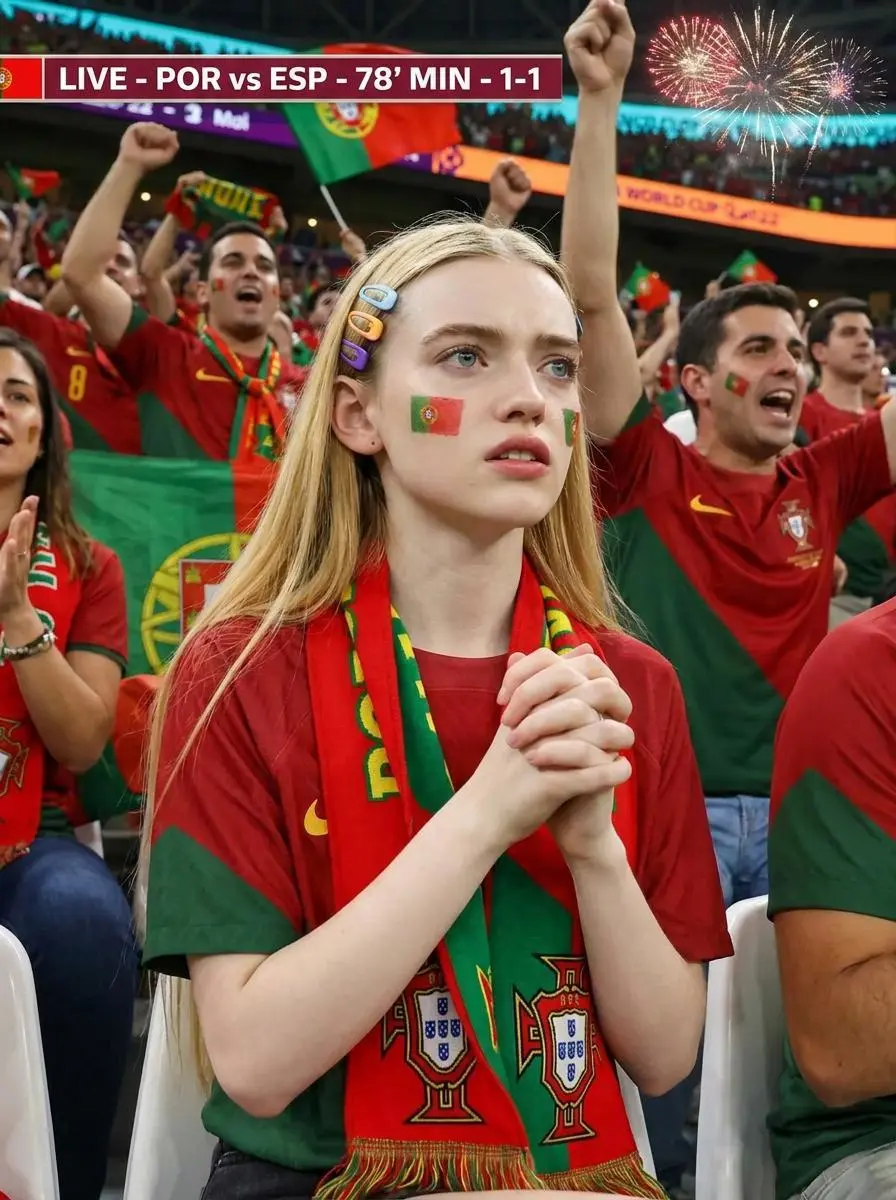
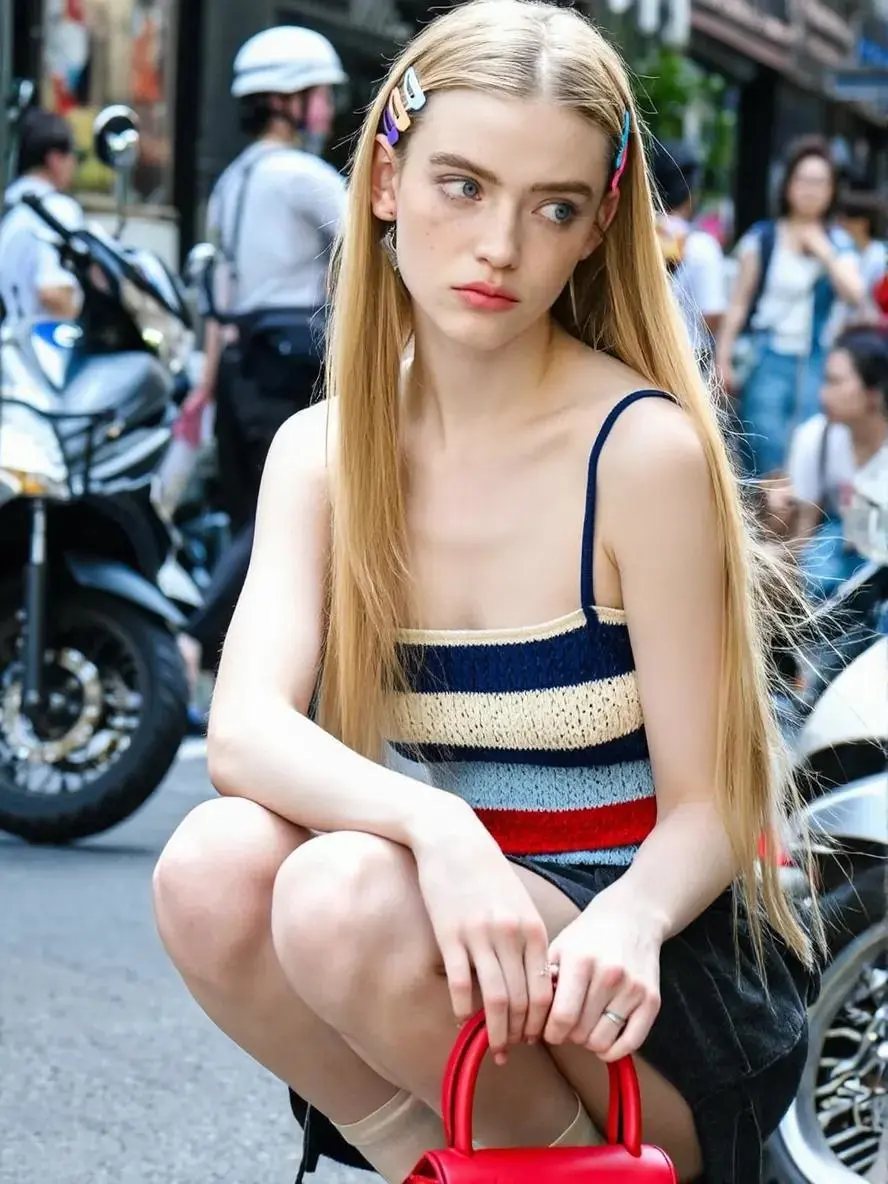
नए कपड़े और परिवेश बताने से पहले पहचान के बचाने वाले विवरण बताएँ। इस उदाहरण में: “retain facial features and identifiable characteristics.” पोर्ट्रेट को स्टेडियम परिणाम से मिलाएँ और जोड़ी गई जर्सी तथा भीड़ से चेहरा अलग जाँचें। प्रसारण की ग्राफ़िक काल्पनिक डिज़ाइन है।
Based on uploaded portrait photos, retain facial features and identifiable characteristics. Create a character positioned in the stands of a World Cup match, portraying a dedicated fan attentively watching the game. The character wears a [Portugal] home jersey, a support scarf around their neck, and has subtle national team paint on their cheeks. The camera angle is a close-up from a TV broadcast or a candid shot from the stands, showing the character seated, focused, slightly tense, or expectant. The background is a large stadium stand with densely packed fans, surrounding spectators also wearing the national team's colors. The scene includes realistic scoreboards, match times, broadcast subtitles, "LIVE" signs, bright lighting, fireworks, cheering sticks, banners, and a vibrant match atmosphere. The overall effect resembles a high-quality, attractive fan suddenly captured during a World Cup broadcast.
Do not include brand logos.
रंग को खास वस्तुओं से जोड़ें
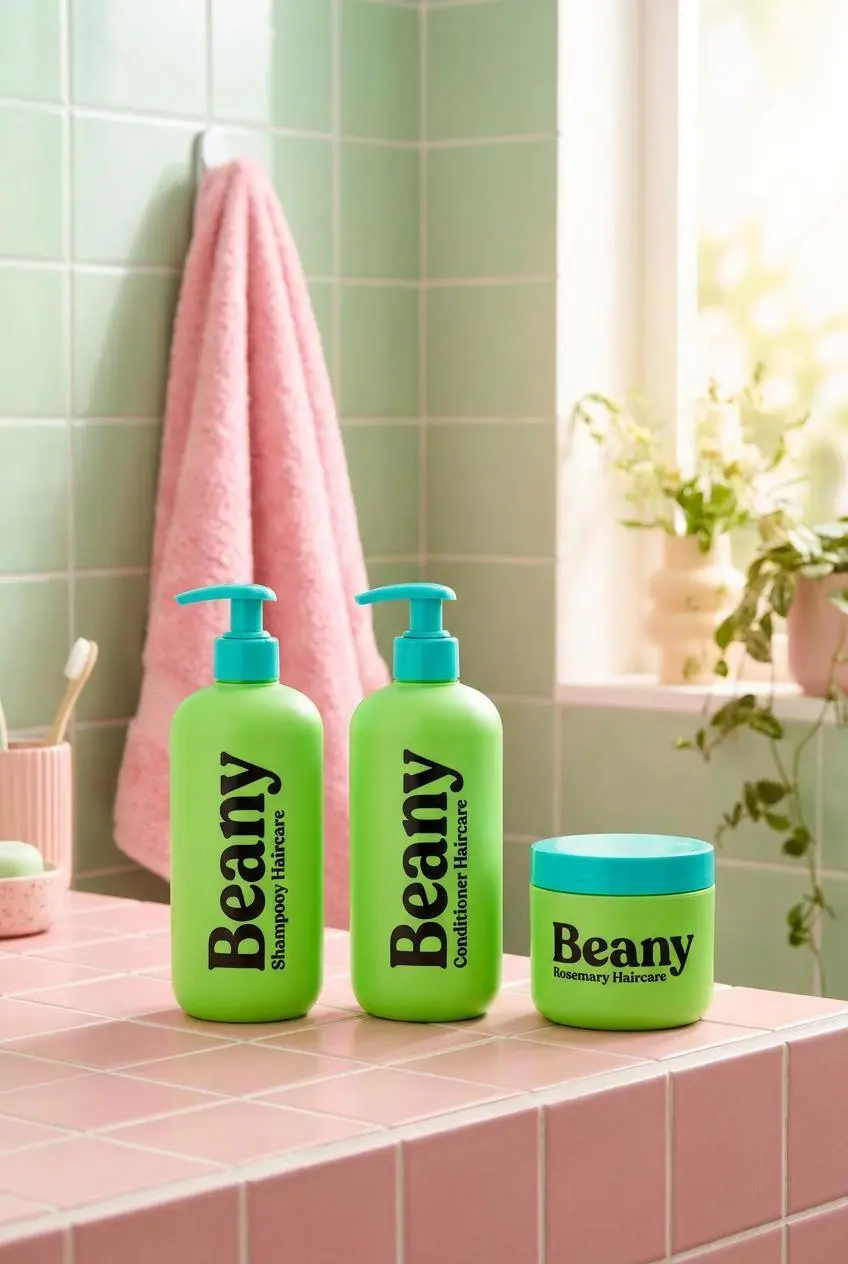
नामित सतहों को रंग दें और अक्षरों का विवरण अलग रखें। इस उदाहरण में: “bold black typography with turquoise pumps and caps”। हरे कंटेनर, गुलाबी टाइल, फ़िरोज़ी पंप और ढक्कन तथा पैकेजिंग का विपरीत रंग वाला टेक्स्ट जाँचें।
A playful bathroom product display featuring three bright green Beany rosemary haircare products on a pink tiled counter. The background includes pale green wall tiles, a pink towel, and a soft window detail. The product packaging uses bold black typography with turquoise pumps and caps, creating a fun retro color contrast. The image feels youthful, colorful, fresh, and suitable for haircare or shower routine advertising.
दिखाने वाले विवरण की फ़्रेमिंग करें
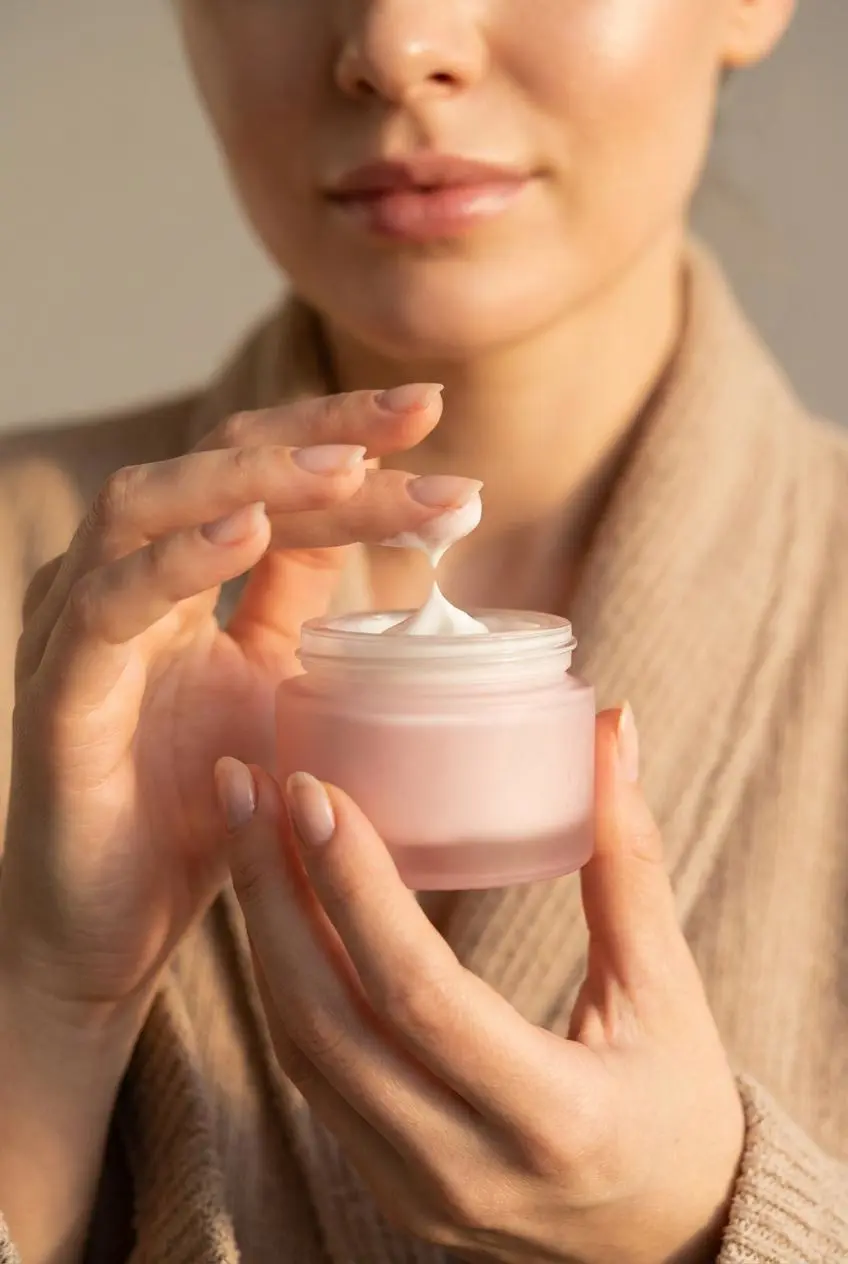
सामग्री की बारीकी पर फोकस रखें और पृष्ठभूमि को नरम दिखाने के लिए कहें। यहां “forming a soft peak of product texture” उंगलियों और डिब्बे के बीच उठती सफेद क्रीम के रूप में दिखता है। पीछे चेहरे का निचला हिस्सा हल्का धुंधला है।
A close-up skincare texture shot showing a model holding a pink jar of face cream. Her hand lifts a small amount of white cream between two fingers, forming a soft peak of product texture. The background focuses on the lower face and skin, softly blurred to keep attention on the cream. The image feels intimate, sensual, moisturizing, and premium, with warm nude tones and soft lighting.
शब्द और उनकी प्राथमिकता बताएँ
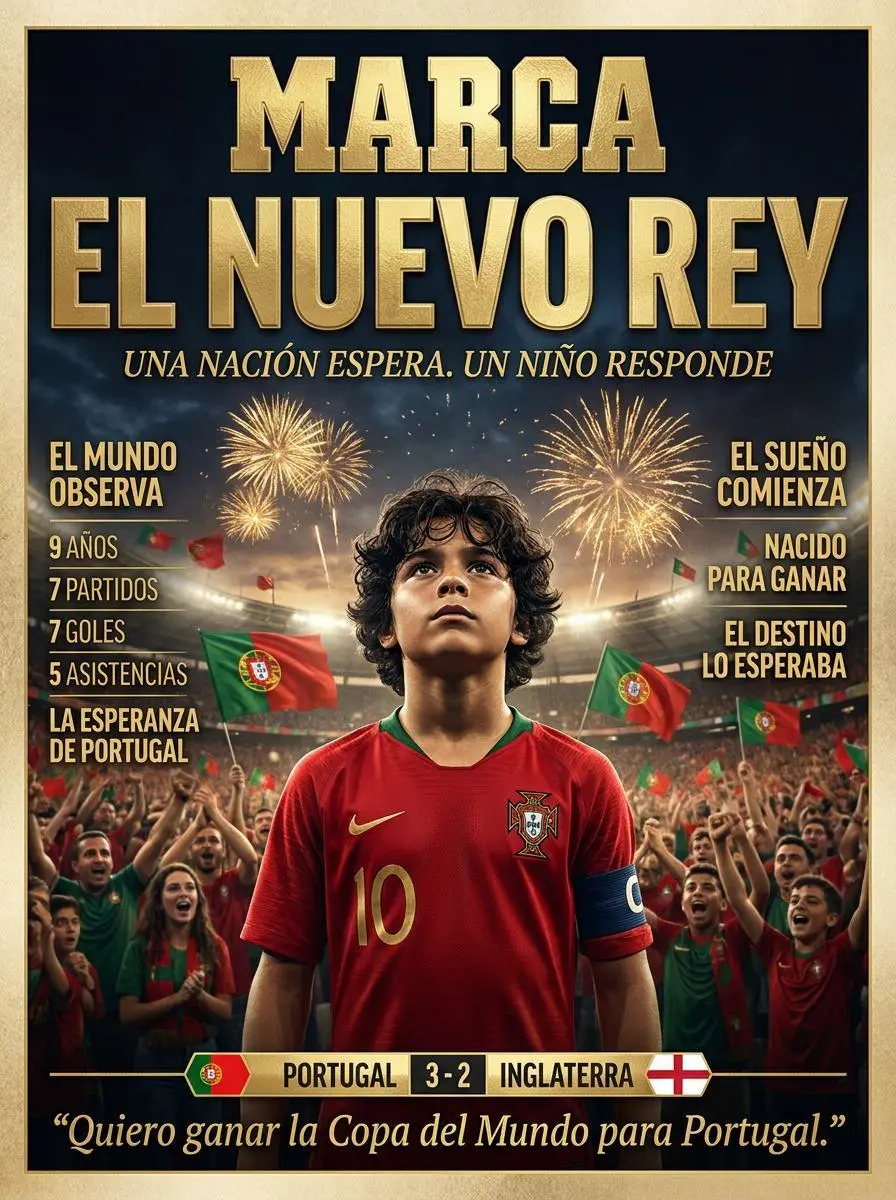
किसी भाषा में कवर बनाते समय सही शब्द और उनका महत्व-क्रम बताएं। इस उदाहरण में “EL NUEVO REY” मुख्य शीर्षक है, किनारों पर टेक्स्ट कॉलम और नीचे स्कोरबोर्ड है। छोटे अक्षर, किरदार की बारीकियां और ब्रांड चिह्न जाँचें; कहानी और स्कोर काल्पनिक हैं।
World Cup 2026 newspaper cover, Spanish sports newspaper, luxury editorial design.
Massive headline:
EL NUEVO REY
Subheadline:
UNA NACIÓN ESPERA. UN NIÑO RESPONDE.
Center cover:
10 year old Portuguese football prodigy boy, dark curly hair, Portugal national team red number 10 jersey, captain armband.
Portuguese flags.
Golden fireworks.
Packed stadium.
Left column:
EL MUNDO OBSERVA
9 AÑOS
7 PARTIDOS
7 GOLES
5 ASISTENCIAS
LA ESPERANZA DE PORTUGAL
Right column:
EL SUEÑO COMIENZA
NACIDO PARA GANAR
EL DESTINO LO ESPERABA
Bottom scoreboard:
PORTUGAL 3-2 INGLATERRA
Bottom quote:
"Quiero ganar la Copa del Mundo para Portugal."
premium newspaper cover, gold typography, photorealistic, sports documentary poster, masterpiece.realistic, editorial design, masterpiece, 8K.
इस्तेमाल कैसे करें
Nano Banana Pro का इस्तेमाल कैसे शुरू करें
पृष्ठ के ऊपर दिए जनरेटर में प्रॉम्प्ट लिखें, जरूरत हो तो संदर्भ जोड़ें और उपलब्ध सेटिंग देखें। आप किसी उदाहरण का प्रॉम्प्ट कॉपी करके उसका विषय, लिखावट और दृश्य भी बदल सकते हैं।
नई इमेज बताएँ या अपने संदर्भ अपलोड करें
नई इमेज के लिए लिखित विवरण दें। एडिट के लिए इस्तेमाल होने वाली इमेज अपलोड करें और हर संदर्भ की भूमिका समझाएँ। केस अपनाते समय उसके विषय विवरण और संदर्भ भूमिकाओं को अपने अनुसार बदलें।
फ़ॉर्मैट चुनें और पॉइंट जाँचें
ज़रूरी शब्द और लेआउट बताएँ, फिर फ़ॉर्म में दिए आस्पेक्ट रेशियो, आउटपुट आकार और संख्या चुनें। जनरेट करने से पहले दिखाए गए पॉइंट और अपने प्लान में मॉडल की पहुँच जाँचें।
जनरेट करें, परिणाम खोलें और जाँचें
जनरेट करके परिणाम का कार्यक्षेत्र खोलें। टेक्स्ट, चेहरे और उत्पाद विवरण को अपने विवरण तथा संदर्भों से मिलाएँ। रेज़ोल्यूशन जाँचने के लिए मूल फ़ाइल देखें; दोबारा कोशिश के लिए विवरण या संदर्भ बदलें।
Nano Banana कैरेक्टर शीट ट्यूटोरियल
Nano Banana कैरेक्टर शीट ट्यूटोरियल
क्लोज़-अप, फ्रंट, साइड और बैक व्यू के साथ एक सुसंगत चार-व्यू AI कॉमिक ड्रामा नायिका शीट बनाने के लिए WeShop Nano Banana का उपयोग करना सीखें।
चित्र बनाने और संदर्भ संपादन के लिए मूल Nano Banana, विस्तृत डिज़ाइन के लिए Pro, कुशल Flash कार्यप्रवाह के लिए Nano Banana 2 और पाठ, लेआउट तथा दृश्य निरंतरता में सुधार के लिए 2.1 की तुलना करें। नीचे इनपुट और आउटपुट सेटिंग देखें।
पहलू
Nano Banana
Nano Banana Pro
Nano Banana 2
Nano Banana 2.1
मॉडल की भूमिका
मूल Gemini 2.5 Flash Image से निर्माण और एडिटिंग
विस्तृत डिज़ाइन और रचनात्मक नियंत्रण के लिए Gemini 3 Pro Image
कुशल निर्माण और एडिटिंग के लिए Gemini 3.1 Flash Image
लेआउट और दृश्य निरंतरता के लिए Nano Banana 2.1 अपडेट
पेज के लिए सूचीबद्ध इनपुट
अपनी संदर्भ फ़ोटो से शुरू करें; लिखित विवरण से बनाएँ
नया डिज़ाइन बनाएँ; संदर्भ विषय इस्तेमाल करें
अपनी संदर्भ फ़ोटो से शुरू करें; लिखित विवरण से बनाएँ
अपनी संदर्भ फ़ोटो से शुरू करें; लिखित विवरण से बनाएँ
हाँ। Nano Banana Pro, Google के Gemini 3 Pro Image का नाम है। यह इमेज जनरेशन और एडिटिंग मॉडल है; Nano Banana और Nano Banana 2 अलग मॉडल हैं।
Nano Banana Pro किस काम आता है?
Google, Pro को पेशेवर सामग्री निर्माण और रचनात्मक नियंत्रण के लिए पेश करता है। इस पेज पर वास्तविक WeShop केस में किरदार शीट, सूचना लेआउट और संदर्भ आधारित उत्पाद फ़ोटो हैं। अपने काम से मिलता-जुलता केस चुनें।
क्या टेक्स्ट से इमेज बना सकते हैं या मौजूदा फ़ोटो एडिट कर सकते हैं?
दोनों समर्थित हैं। नई इमेज के लिए लिखित विवरण से शुरू करें या फ़ोटो अपलोड करके एडिट बताएँ। सिर्फ़ टेक्स्ट वाले अनुरोध में संदर्भ इमेज ज़रूरी नहीं है।
क्या कई संदर्भ इमेज इस्तेमाल कर सकते हैं?
हां। अपलोड करने के बाद हर संदर्भ का काम बताएं: व्यक्ति, पोशाक, उत्पाद या दृश्य। अपलोड नियंत्रण में दिखाई गई वर्तमान चित्र सीमा का पालन करें और केवल काम के लिए जरूरी स्पष्ट संदर्भ इस्तेमाल करें।
क्या Nano Banana Pro इमेज के अंदर टेक्स्ट और दूसरी भाषाएँ लिख सकता है?
Google टेक्स्ट रेंडरिंग और स्थानीय डिज़ाइन दर्ज करता है। चाही गई शब्दावली और जगह दें, फिर आउटपुट की वर्तनी और अनुवाद जाँचें। मौसम का उदाहरण डिज़ाइन किया लेआउट दिखाता है, सत्यापित मौजूदा मौसम डेटा नहीं।
क्या WeShop में Nano Banana Pro का 4K विकल्प है?
मौजूदा WeShop Pro फ़ॉर्म में 1K, 2K और 4K हैं। जनरेट करने से पहले आउटपुट आकार चुनें। हमारे स्नीकर्स केस में 4K सेटिंग इस्तेमाल हुई और 3584 × 4800 का मूल आउटपुट मिला; वेबसाइट प्रीव्यू छोटा हो सकता है।
क्या एडिट में व्यक्ति या उत्पाद बिल्कुल बिना बदलाव के रहेगा?
संदर्भ विषय की पहचान बनाने में मदद कर सकते हैं, लेकिन हूबहू संरक्षण की गारंटी नहीं है। स्नीकर्स केस में मुख्य रंग और डिज़ाइन संकेत पहचानने योग्य हैं, जबकि कुछ ज्यामिति और विवरण अलग हैं। परिणाम को मूल इमेज से मिलाएँ।
Nano Banana Pro का प्रॉम्प्ट कैसे लिखें?
विषय, कंपोज़िशन, परिवेश और स्टाइल बताएँ। एडिट में क्या बदले और क्या बचे, यह लिखें; हर संदर्भ को भूमिका दें। गाइड के छह केस में पूरे वास्तविक प्रॉम्प्ट को उसके इनपुट और आउटपुट के साथ देखें।
Nano Banana Pro चुनें या Nano Banana 2?
विस्तृत डिज़ाइन निर्देश, अधिक टेक्स्ट वाले लेआउट और उत्पाद मॉकअप के लिए Pro पर विचार करें। बार-बार बदलाव या अतिरिक्त 1:4, 4:1, 1:8 और 8:1 अनुपात के लिए Nano Banana 2 पर विचार कर सकते हैं। दोनों चित्र निर्माण और संदर्भ संपादन का समर्थन करते हैं; काम और उपलब्ध विकल्पों के अनुसार चुनें।
क्या WeShop पर Nano Banana Pro मुफ़्त है?
WeShop के वर्तमान मुफ्त ट्रायल में Nano Banana Pro शामिल नहीं है। शुरू करने से पहले मूल्य पृष्ठ और अपने खाते में प्लान की पहुंच व पॉइंट जाँचें। Google Gemini की सदस्यता और कोटा, WeShop के प्लान से अलग हैं।
Nano Banana Pro में एक जनरेशन का कितना शुल्क है?
सेटिंग और चित्रों की संख्या चुनने के बाद WeShop जनरेटर में दिखने वाला अनुमानित पॉइंट खर्च देखें। मॉडल की पहुंच और उपलब्ध पॉइंट के लिए वर्तमान मूल्य पृष्ठ तथा अपना खाता जाँचें।
परिणाम में कौन-सी सीमाएँ जाँचें?
Google छोटे चेहरों, बारीक दृश्य विवरण, वर्तनी, तथ्य, अनुवाद और जटिल एडिट में बची समस्याएँ बताता है। इस्तेमाल से पहले असली आउटपुट जाँचें; विस्तृत प्रॉम्प्ट या बड़ा आउटपुट आकार अपने-आप सटीकता सिद्ध नहीं करता।