मॉडलछवि मॉडलNano Banana 2 AI इमेज जनरेटर
NANO BANANA 2 इमेज मॉडल

Nano Banana 2 AI इमेज जनरेटर

Nano Banana 2, Google का Gemini 3.1 Flash Image मॉडल है, जो कुशल इमेज जनरेशन और बातचीत के ज़रिए एडिटिंग के लिए है।

nano2
NANO BANANA 2 के उदाहरण

Nano Banana 2 की इमेज के उदाहरण

Nano Banana 2 को रेफ़रेंस किरदार के अलग रूप और भाव; स्कूटर वाला फ़ैशन पोर्ट्रेट; रेफ़रेंस के आधार पर परफ़्यूम की फ़ोटो के ज़रिए देखें। हर सहेजा गया उदाहरण अपना वास्तविक प्रॉम्प्ट और उपलब्ध इनपुट रखता है। अपने विषय के लिए अनुरोध बदलने से पहले परिणाम जाँचें।

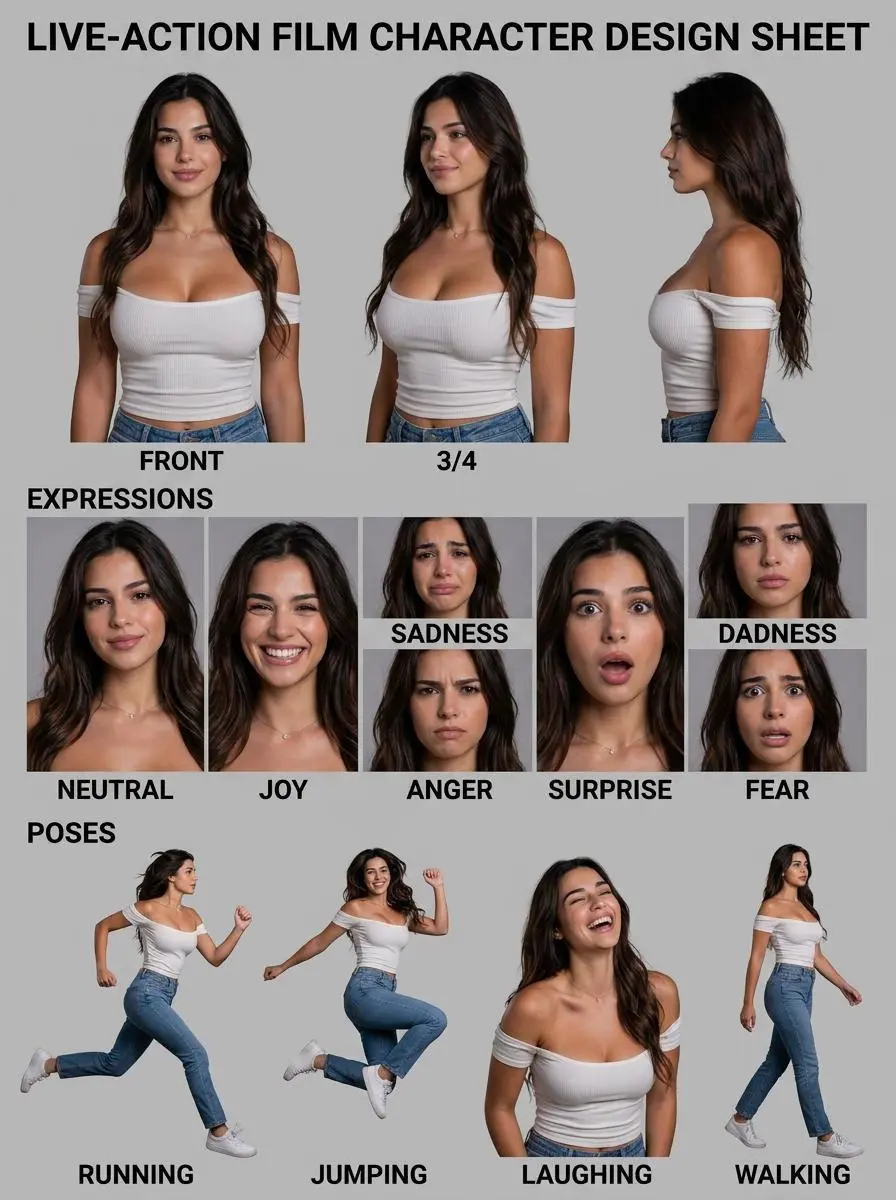
WeShop का परिणाम: अलग-अलग मुद्राओं और भावों में दिखाई गई महिला…
संदर्भ 1

रेफ़रेंस किरदार के अलग रूप और भाव

व्यक्ति के रेफ़रेंस से कैरेक्टर शीट बनाएँ और एक इमेज में अलग-अलग मुद्राएँ और भाव रखें।

Please create a detailed character design sheet based on the person in this photograph. As this will be used for a live-action film, please ensure it is not produced as stylized artwork. It must include the following three character elements. Please delete the original image of the person upon completion. Character multi-angle (three-view) turnaround sheet Expression sheet showing basic emotional states: joy, sadness, anger, surprise, fear and neutral Pose sheet showing typical actions: e.g., the character running, jumping, laughing and jumping *Note: The word "jumping" appears twice in the original text, which may be a typo. If it is intended to refer to different actions, common alternatives include "walking", "sitting" or "gesturing".
इस संकेत का प्रयोग करें
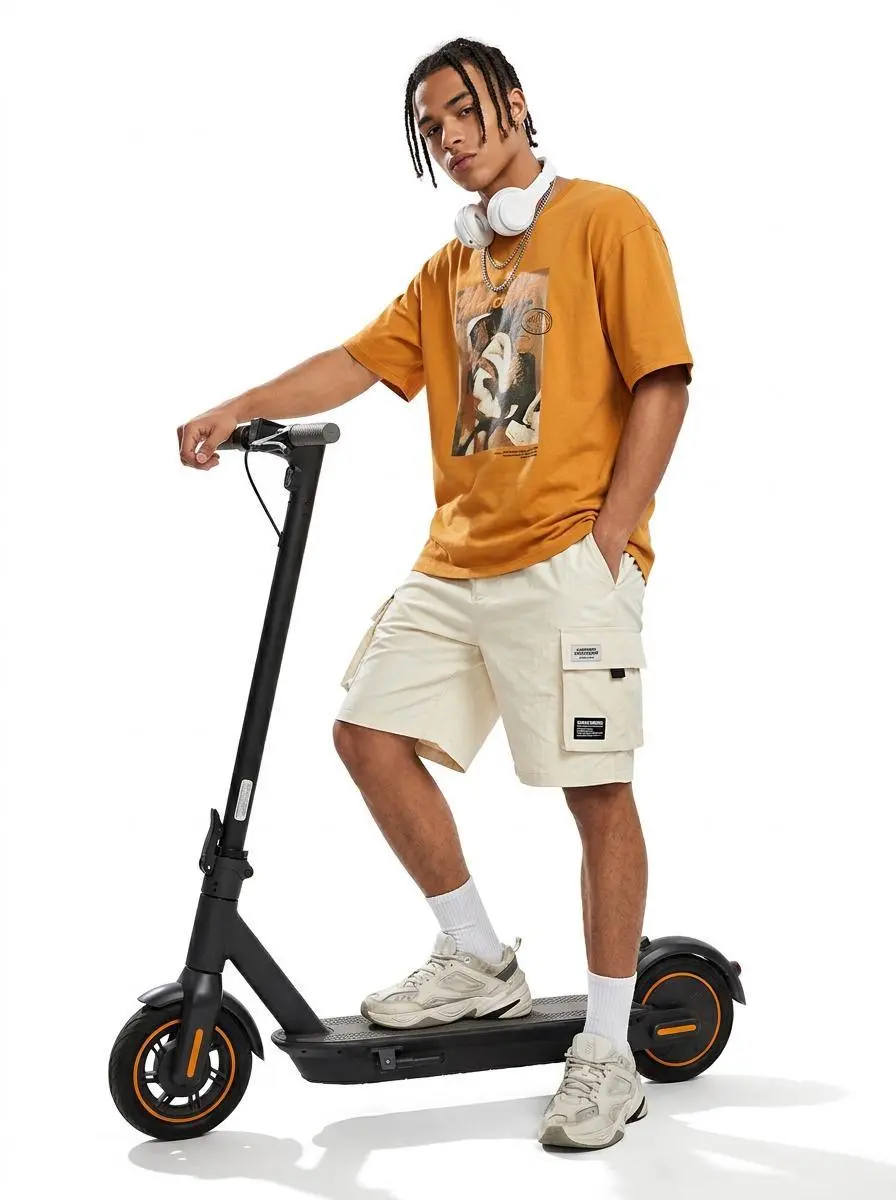
WeShop का परिणाम: इलेक्ट्रिक स्कूटर के साथ आत्मविश्वास से खड़ा पुरुष…

स्कूटर वाला फ़ैशन पोर्ट्रेट

लिखित दृश्य ब्रीफ़ से व्यक्ति और इलेक्ट्रिक स्कूटर वाला फ़ैशन दृश्य बनाएँ।

{ "image_settings": { "aspect_ratio": "3:4", "resolution": "768/1024" }, "prompt": { "scene_and_composition": { "visual_hook": "A stylized urban youth leaning casually against a sleek electric scooter, emphasizing a relaxed 'street-style' silhouette against a high-contrast white backdrop.", "camera_angle": "Slight low-angle 'hero shot' to accentuate the scooter and the subject's stance.", "framing_and_depth": "Full-body shot, centered composition, high-key studio lighting with absolute white background, sharp focus throughout.", "medium_physics": "Professional product photography style, high-contrast, sharp digital clarity, clean edge definition, no grain." }, "subject_content": { "identity_features": "Young male, mixed ethnicity, braided dreadlock hair texture, angular facial features, sharp jawline, tan skin tone, athletic build.", "overall_pose": "Standing one-footed on a black electric scooter, one hand on the handlebar, other hand in cargo pocket, slight lean, cool effortless posture.", "limb_articulation": "Right arm extended down gripping the handle, left arm bent at elbow with hand tucked into cargo short pocket, right leg balanced on scooter deck, left leg hovering slightly forward for balance.", "pose_dynamics": "Center of gravity shifted toward the rear of the scooter, casual lean, relaxed muscle tension.", "makeup_look": "Natural skin texture, clean-cut, post-grooming aesthetic, no visible makeup.", "emotional_vibe": "Confident, nonchalant, urban-cool, detached, trend-focused.", "main_object/apparel": "Oversized mustard-orange graphic t-shirt with screen-printed art; baggy, cream-colored technical cargo shorts with visible pocket flaps and branding patches; white ribbed crew socks; chunky 'dad-style' designer sneakers.", "hair_and_styling": "Braided dreadlocks held in place, white over-ear wireless headphones resting around the neck/ears, layered silver chain necklaces.", "interaction_with_environment": "Weight of the subject compressing the deck of the electric scooter, feet firmly planted/posed on the grip tape, shadow cast directly beneath the wheels." }, "environment": { "visual_depth_stack": "Foreground: 1 black electric scooter with orange rim accents; Midground: 1 male subject in orange shirt and cargo shorts, 1 pair of white chunky sneakers, 2 white ribbed socks; Background: 1 pure white infinite studio backdrop.", "lighting_atmosphere": "Key: bright, diffuse studio light from top-front; Ambient: high-key fill, near-zero shadows on background; Interaction: sharp shadow cast on floor from scooter wheels, high specular highlights on the metal and plastic surfaces of the scooter." }, "realism_rules": [ "Catalog-style high-key studio photography", "Perfectly white, seamless background", "Focus on texture of fabric and plastic", "Sharp edge outlines", "Authentic urban streetwear proportions", "No blurred or depth-of-field effects on the subject" ] }, "negative_prompt": [ "3D render", "cartoon", "painting", "blurry background", "vignette", "low-resolution", "grainy", "flat lighting", "distorted anatomy", "floating subject", "amateur composition", "cluttered environment", "text artifacts", "oversaturated colors" ] }
इस संकेत का प्रयोग करें
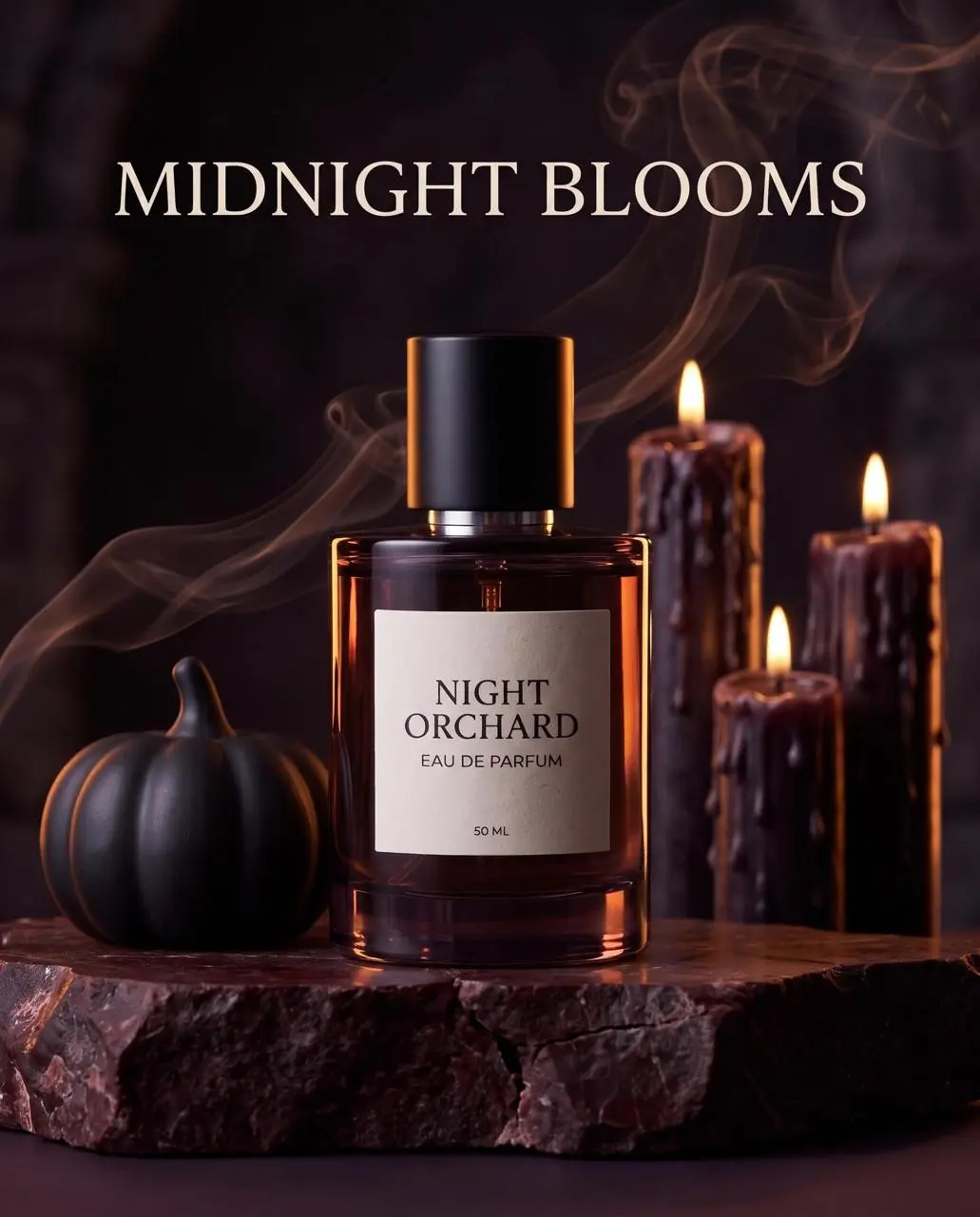
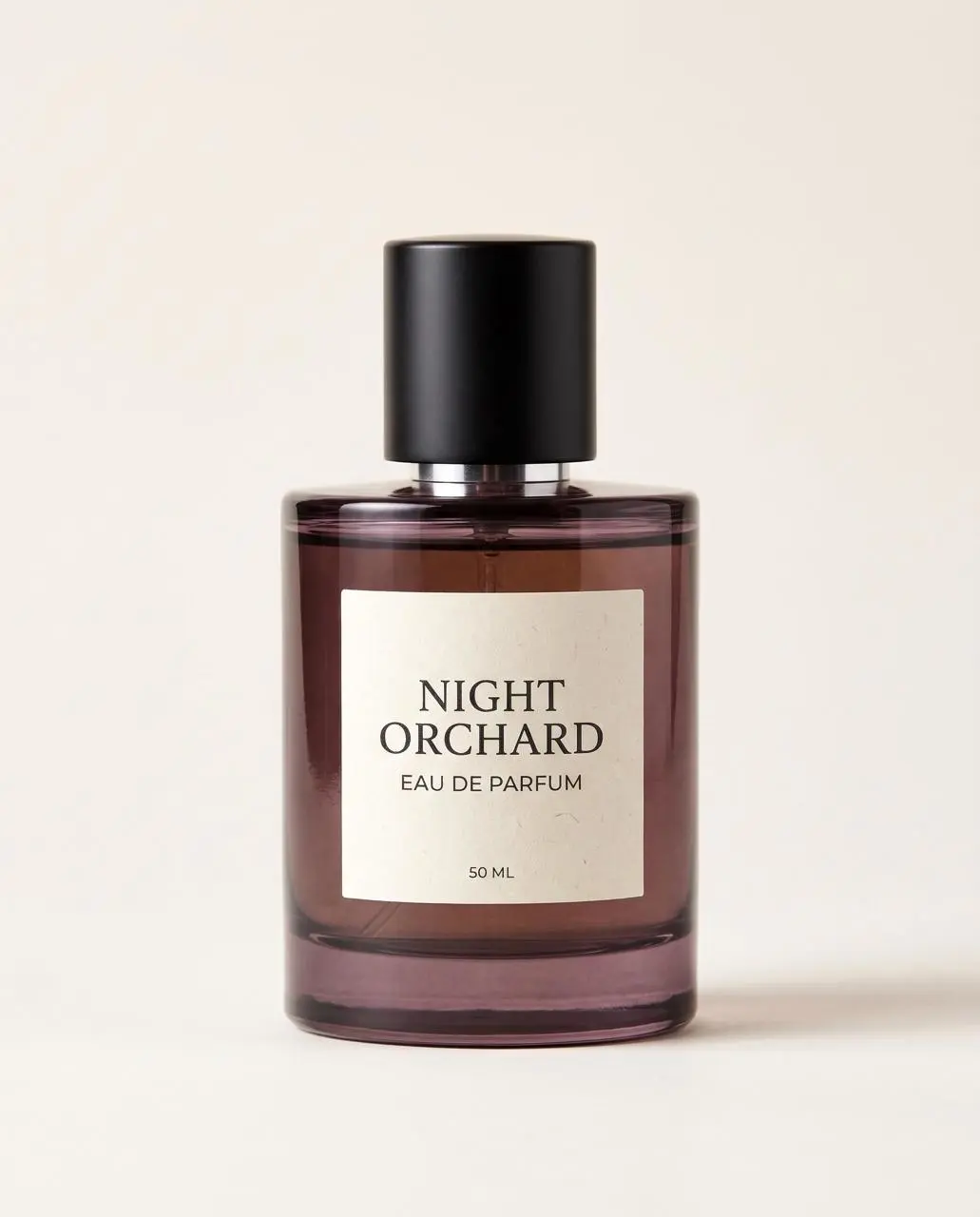
WeShop का परिणाम: "Night Orchard" परफ़्यूम की बोतल रखी हुई…
संदर्भ 1

रेफ़रेंस के आधार पर परफ़्यूम की फ़ोटो

अपलोड किए गए परफ़्यूम से प्रोडक्ट फ़ोटो बनाएँ और बोतल के विवरण तथा नया प्रस्तुतीकरण बताएँ।

Use the uploaded perfume as the exact product reference. Preserve bottle shape, smoked-plum glass, black cap and every label word. Build a premium 4:5 Halloween beauty advertisement: the single bottle stands on a dark oxblood stone pedestal, surrounded by one sculptural black pumpkin, thin curling smoke and a few wax-dripped candles kept behind the product. Warm amber rim light and cool plum shadows, polished commercial realism, label fully readable. Add only one headline in the upper third, spelled exactly: ‘MIDNIGHT BLOOMS’. No extra product, no label redesign, no bats, no clutter, no watermark.
इस संकेत का प्रयोग करें
NANO BANANA 2 के बारे में

Nano Banana 2 क्या है और किस काम आता है?

Nano Banana 2, Google का Gemini 3.1 Flash Image मॉडल है, जो कुशल इमेज जनरेशन और बातचीत के ज़रिए एडिटिंग के लिए है। Nano Banana 2 बार-बार इमेज बनाने, रेफ़रेंस के आधार पर बदलाव और डिज़ाइन लेआउट के काम आता है। कैरेक्टर शीट और परफ़्यूम के उदाहरण विषय-आधारित काम दिखाते हैं, जबकि उपलब्ध लंबे और चौड़े फ़ॉर्मैट अलग रचनाओं के काम आते हैं।

जनरेशन और बातचीत से एडिटिंग

ब्रीफ़ से नई इमेज बनाएँ या रेफ़रेंस से एडिट बताएँ। Google इस Flash मॉडल को बड़ी मात्रा में इस्तेमाल के लिए रखता है।

टेक्स्ट और डिज़ाइन लेआउट

पोस्टर या जानकारी वाले ग्राफ़िक्स में शब्द और चित्र साथ रखें। शब्दों और डिज़ाइन में उनकी जगह, दोनों जाँचें।

लंबे और चौड़े फ़ॉर्मैट

Google अतिरिक्त पैनोरामा और लंबे आस्पेक्ट रेशियो बताता है। केवल वे फ़ॉर्मैट चुनें जो WeShop फ़ॉर्म में वास्तव में उपलब्ध हैं।

बनाने के तरीके

शुरुआती इनपुट चुनें

नई इमेज के लिए टेक्स्ट दें या एडिट के लिए ज़रूरी रेफ़रेंस अपलोड करें। कैरेक्टर शीट में व्यक्ति का रेफ़रेंस बताएँ; उत्पाद के दृश्य में उत्पाद को नए परिवेश और शैली से अलग बताएँ।

अपनी संदर्भ फ़ोटो से शुरू करें

एडिट के लिए विषय या दृश्य अपलोड करें। कई इनपुट हों तो हर संदर्भ की भूमिका बताएँ और अपेक्षित बदलाव लिखें।

लिखित विवरण से बनाएँ

नया विषय, परिवेश, कंपोज़िशन और दृश्य प्रस्तुति बताएँ। इमेज में आने वाले शब्द भी शामिल करें।

प्रॉम्प्ट गाइड

Nano Banana 2 का प्रॉम्प्ट कैसे लिखें?

नीचे दिए गए Nano Banana 2 के वास्तविक प्रॉम्प्ट, उनके परिणाम और इस्तेमाल किए गए संदर्भ साथ में देखें। हर व्याख्या जाँचने योग्य एक खास निर्देश बताती है; माँगा गया असर इस बात की गारंटी नहीं कि बना हुआ हर विवरण निर्देश से मेल खाएगा।

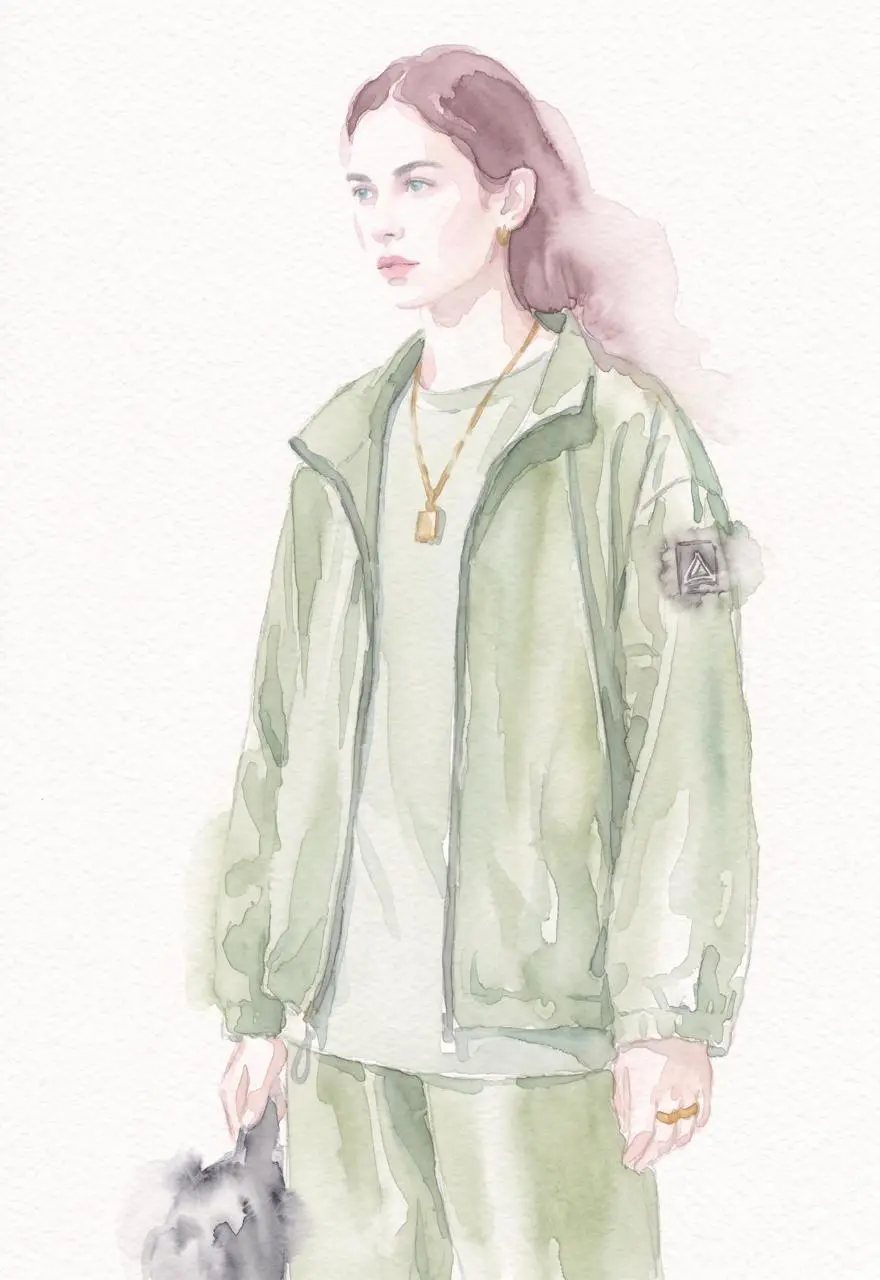
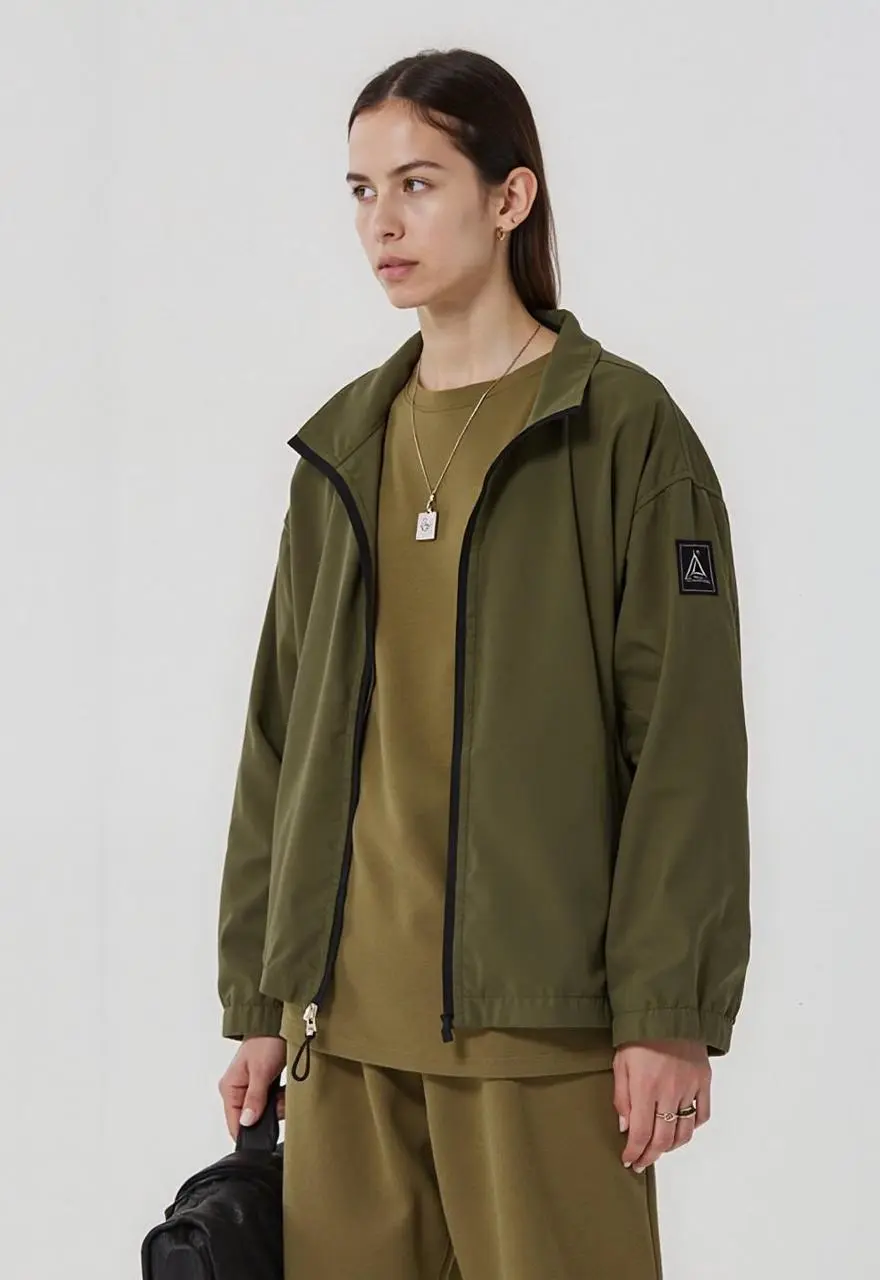
WeShop का परिणाम: हरे कपड़े पहने महिला का जलरंग चित्र…
संदर्भ 1

रेखाओं या माध्यम का विवरण दें

सिर्फ़ मूड बताने के बजाय दिखाई देने वाली शैली, जैसे ब्रश के निशान या सामग्री, बताएँ। इस मामले में: “Convert this image into a delicate watercolor painting with soft flowing edges, pastel hues, visible paper texture, and loose artistic brushwork.”

Convert this image into a delicate watercolor painting with soft flowing edges, pastel hues, visible paper texture, and loose artistic brushwork.
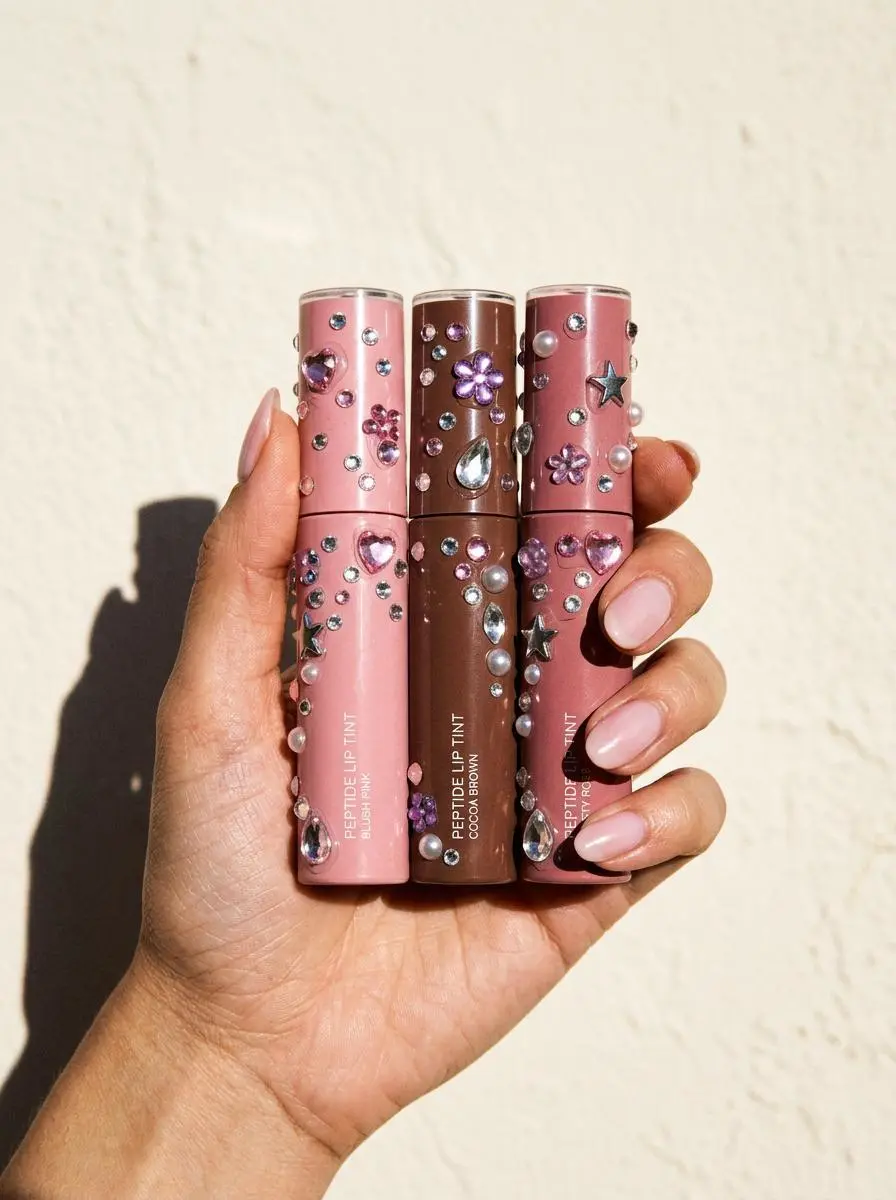
WeShop का परिणाम: रत्न जड़ी लिप टिंट की तीन ट्यूब पकड़े हुए हाथ…

दिखने वाली सामग्री बताएँ

ठोस सतह या सामग्री के विवरण से मनचाहा रूप बताएँ। इस मामले में: “Hard direct flash, sharply defined hand shadow, glossy pale-pink manicure, realistic skin texture, premium social-commerce styling, 3:4 portrait.”

Create a vertical commercial beauty photograph of a hand holding three fictional, unbranded peptide lip-tint tubes in blush pink, cocoa brown and dusty rose against a warm off-white background. Add scattered Y2K acrylic rhinestones to the tube bodies: pink hearts, clear teardrops, purple flowers, silver stars, tiny round crystals and a few pearls. Gems naturally conform to curved surfaces with transparent facets, flash highlights, tiny contact shadows and subtle adhesive traces. Keep caps, tube geometry, color blocks and minimal non-readable label structure crisp. Hard direct flash, sharply defined hand shadow, glossy pale-pink manicure, realistic skin texture, premium social-commerce styling, 3:4 portrait. No real logos, no watermark, no unrelated or legible text.
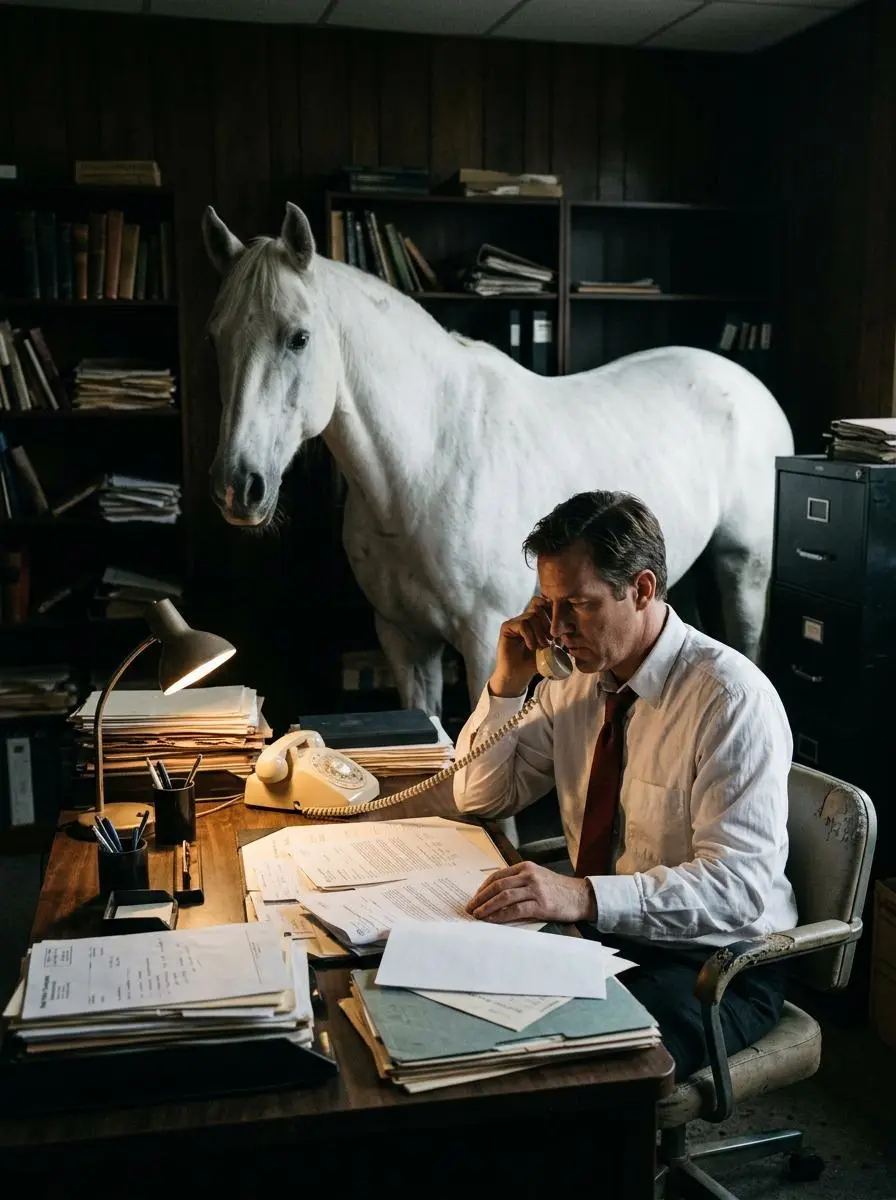
WeShop का परिणाम: दफ़्तर में मेज़ पर बैठा पुरुष…

अँधेरी पृष्ठभूमि में विषय बताएँ

प्रॉम्प्ट एक पुरुष, मेज़ और सफ़ेद घोड़े को अँधेरे, न्यूनतम दफ़्तर के दृश्य में रखता है। रोशनी के शब्द आकृतियाँ उभारते हैं और नाटकीय माहौल देते हैं, लेकिन प्रकाश स्रोत की जगह या रंगीन रोशनी की विस्तृत व्यवस्था नहीं बताते। इस खास परिणाम में कंट्रास्ट और अतियथार्थवादी रचना देखें।

This image shows a man sitting at a desk in a dimly lit office, speaking on a corded telephone. He is wearing a white dress shirt and a dark red tie, and appears serious and focused as he looks down at the papers in front of him. The desk is covered with stacks of documents, folders, and files, suggesting a busy or bureaucratic work environment. Behind the man stands a large white horse, positioned calmly inside the office. The horse’s presence is unexpected and surreal, creating a strong contrast with the formal setting. The background is dark and minimal, which draws attention to the man, the desk, and the horse. The lighting highlights their figures, giving the scene a dramatic and cinematic feel. Overall, the image presents a surreal and symbolic composition, combining ordinary office work with an unusual element. It suggests themes of absurdity, mystery, or quiet tension, as if something extraordinary is hidden within an otherwise serious workplace setting.
इस्तेमाल कैसे करें

Nano Banana 2 से अपनी पहली इमेज बनाएँ

Nano Banana 2 के चयन और नीचे बताए गए इनपुट तरीक़े से शुरू करें। सबमिट करने से पहले उपलब्ध सेटिंग और पॉइंट जाँचें।

इस मॉडल का इनपुट दें

Nano Banana 2 चुना रहने दें, फिर नई रचना बताएँ या व्यक्ति अथवा उत्पाद की इमेज अपलोड करें। इस मॉडल के आस्पेक्ट रेशियो और साइज़ विकल्प जाँचें।

उपलब्ध सेटिंग और पॉइंट जाँचें

साइज़ लेबल: 1K, 2K, 4K. आस्पेक्ट रेशियो: auto, 1:1, 2:3, 3:2, 4:3, 3:4, 4:5, 5:4, 16:9, 9:16, 21:9, 1:4, 4:1, 1:8, 8:1. ये चुनी जा सकने वाली सेटिंग हैं, तय पिक्सेल माप या फ़ाइल फ़ॉर्मैट की गारंटी नहीं। वास्तविक माप के लिए मूल आउटपुट जाँचें। सबमिट करने से पहले दिखाए गए पॉइंट और अपने प्लान में मॉडल की उपलब्धता जाँचें।

परिणाम खोलें और जाँचें

किरदार के बार-बार दिखाए रूप या उत्पाद के संकेत मूल इमेज से मिलाएँ। लेबल और मूल आउटपुट के माप जाँचें; 4K सेटिंग और छोटा वेब प्रीव्यू अलग बातें हैं।

मॉडल चुनें

कौन-सा Nano विकल्प आपके काम के लिए सही है?

Nano Banana 2, Gemini 3.1 Flash Image है, मूल Nano Banana या Pro नहीं। Pro की पेशेवर एसेट वाली भूमिका और 2.1 के दर्ज बाद के अपडेट अलग तुलना करें; साझा एडिटिंग या टेक्स्ट क्षमताएँ किसी एक संस्करण का विशेष लाभ नहीं हैं। आधिकारिक भूमिका, दर्ज WeShop कॉन्फ़िगरेशन और अभी चुना गया फ़ॉर्म अलग बातें हैं; इससे मापी हुई गुणवत्ता या गति की रैंकिंग नहीं बताई जाती।

पहलूNano BananaNano Banana ProNano Banana 2Nano Banana 2.1
मॉडल की भूमिकामूल Gemini 2.5 Flash Image से निर्माण और एडिटिंगविस्तृत डिज़ाइन और रचनात्मक नियंत्रण के लिए Gemini 3 Pro Imageकुशल निर्माण और एडिटिंग के लिए Gemini 3.1 Flash Imageलेआउट और दृश्य निरंतरता के लिए Nano Banana 2.1 अपडेट
पेज के लिए सूचीबद्ध इनपुटअपनी संदर्भ फ़ोटो से शुरू करें; लिखित विवरण से बनाएँनया डिज़ाइन बनाएँ; संदर्भ विषय इस्तेमाल करेंअपनी संदर्भ फ़ोटो से शुरू करें; लिखित विवरण से बनाएँअपनी संदर्भ फ़ोटो से शुरू करें; लिखित विवरण से बनाएँ
मौजूदा WeShop विकल्पआस्पेक्ट रेशियो: auto, 1:1, 2:3, 3:2, 4:3, 3:4, 4:5, 5:4, 16:9, 9:16, 21:9इमेज आकार: 1K, 2K, 4Kइमेज आकार: 1K, 2K, 4Kइमेज आकार: 1K, 2K, 4K
मॉडल की भूमिका
Nano Banana
मूल Gemini 2.5 Flash Image से निर्माण और एडिटिंग
Nano Banana Pro
विस्तृत डिज़ाइन और रचनात्मक नियंत्रण के लिए Gemini 3 Pro Image
Nano Banana 2
कुशल निर्माण और एडिटिंग के लिए Gemini 3.1 Flash Image
Nano Banana 2.1
लेआउट और दृश्य निरंतरता के लिए Nano Banana 2.1 अपडेट
पेज के लिए सूचीबद्ध इनपुट
Nano Banana
अपनी संदर्भ फ़ोटो से शुरू करें; लिखित विवरण से बनाएँ
Nano Banana Pro
नया डिज़ाइन बनाएँ; संदर्भ विषय इस्तेमाल करें
Nano Banana 2
अपनी संदर्भ फ़ोटो से शुरू करें; लिखित विवरण से बनाएँ
Nano Banana 2.1
अपनी संदर्भ फ़ोटो से शुरू करें; लिखित विवरण से बनाएँ
मौजूदा WeShop विकल्प
Nano Banana
आस्पेक्ट रेशियो: auto, 1:1, 2:3, 3:2, 4:3, 3:4, 4:5, 5:4, 16:9, 9:16, 21:9
Nano Banana Pro
इमेज आकार: 1K, 2K, 4K
Nano Banana 2
इमेज आकार: 1K, 2K, 4K
Nano Banana 2.1
इमेज आकार: 1K, 2K, 4K

Nano Banana 2 पर कब विचार करें?

काम के अनुसार मॉडल चुनें

बार-बार इमेज बनाने और एडिट करने के लिए Nano Banana 2 पर विचार करें। अधिक माँग वाले डिज़ाइन नियंत्रण के लिए Pro और बाद के लेआउट तथा निरंतरता अपडेट के लिए 2.1 से तुलना करें।

और इमेज मॉडल

और इमेज मॉडल देखें

संबंधित मॉडल का पेज खोलकर उसकी क्षमताएँ, उदाहरण और मौजूदा जनरेशन विकल्प देखें।

अक्सर पूछे जाने वाले प्रश्न

Nano Banana 2: आम सवाल

इस वर्शन, इसके इनपुट और शुरुआत करने के बारे में जवाब।

Nano Banana 2 क्या है?

Nano Banana 2, Google का Gemini 3.1 Flash Image मॉडल है, जो कुशल इमेज जनरेशन और बातचीत के ज़रिए एडिटिंग के लिए है।

Nano Banana 2 किस काम आता है?

Nano Banana 2 बार-बार इमेज बनाने, रेफ़रेंस के आधार पर बदलाव और डिज़ाइन लेआउट के काम आता है। कैरेक्टर शीट और परफ़्यूम के उदाहरण विषय-आधारित काम दिखाते हैं, जबकि उपलब्ध लंबे और चौड़े फ़ॉर्मैट अलग रचनाओं के काम आते हैं।

Nano Banana 2 के लिए क्या इनपुट चाहिए?

नई इमेज के लिए टेक्स्ट दें या एडिट के लिए ज़रूरी रेफ़रेंस अपलोड करें। कैरेक्टर शीट में व्यक्ति का रेफ़रेंस बताएँ; उत्पाद के दृश्य में उत्पाद को नए परिवेश और शैली से अलग बताएँ।

आकार और आस्पेक्ट रेशियो की कौन-सी सेटिंग उपलब्ध हैं?

साइज़ लेबल: 1K, 2K, 4K. आस्पेक्ट रेशियो: auto, 1:1, 2:3, 3:2, 4:3, 3:4, 4:5, 5:4, 16:9, 9:16, 21:9, 1:4, 4:1, 1:8, 8:1. ये चुनी जा सकने वाली सेटिंग हैं, तय पिक्सेल माप या फ़ाइल फ़ॉर्मैट की गारंटी नहीं। वास्तविक माप के लिए मूल आउटपुट जाँचें।

Nano Banana 2 का प्रॉम्प्ट कैसे लिखना चाहिए?

सिर्फ़ मूड बताने के बजाय दिखाई देने वाली शैली, जैसे ब्रश के निशान या सामग्री, बताएँ। इस मामले में: “Convert this image into a delicate watercolor painting with soft flowing edges, pastel hues, visible paper texture, and loose artistic brushwork.” गाइड में पूरा संबंधित प्रॉम्प्ट और वास्तविक इनपुट पढ़ें, फिर अपने काम के अनुसार बदलें।

Nano Banana 2 और संबंधित मॉडलों में क्या अंतर है?

Nano Banana 2, Gemini 3.1 Flash Image है, मूल Nano Banana या Pro नहीं। Pro की पेशेवर एसेट वाली भूमिका और 2.1 के दर्ज बाद के अपडेट अलग तुलना करें; साझा एडिटिंग या टेक्स्ट क्षमताएँ किसी एक संस्करण का विशेष लाभ नहीं हैं।

क्या Nano Banana 2 मुफ़्त है और इसका खर्च कैसे तय होता है?

WeShop का मौजूदा Pricing पेज इस मॉडल को Free Trial में सूचीबद्ध नहीं करता। चुने गए अनुरोध के लिए सशुल्क प्लान की पहुँच और पॉइंट अनुमान जाँचें। यह पेज हर अनुरोध की तय कीमत नहीं देता और दूसरे प्रदाता का सब्सक्रिप्शन कोटा WeShop पर लागू नहीं करता।

कौन-सी सीमाएँ जाँचनी चाहिए?

प्रदाता API की Google Search और Thinking क्षमताओं से यह नहीं मान सकते कि WeShop में उनके स्विच उपलब्ध हैं। किरदार के बार-बार दिखाए रूप या उत्पाद के संकेत मूल इमेज से मिलाएँ। लेबल और मूल आउटपुट के माप जाँचें; 4K सेटिंग और छोटा वेब प्रीव्यू अलग बातें हैं।

इस पेज के उदाहरणों से क्या सीख सकता हूँ?

Nano Banana 2 के सहेजे गए उदाहरण रेफ़रेंस किरदार के अलग रूप और भाव, स्कूटर वाला फ़ैशन पोर्ट्रेट, रेफ़रेंस के आधार पर परफ़्यूम की फ़ोटो दिखाते हैं। हर परिणाम को वास्तविक प्रॉम्प्ट और उपलब्ध इनपुट के साथ देखें। एक उदाहरण एक अनुरोध दिखाता है, किसी परिणाम की गारंटी या सफलता-दर का बेंचमार्क नहीं।