
I spent the entire morning playing with Seedance 2.0, and my mind is blown. For years, making a high-end product ad was a nightmare. You needed a studio, expensive lights, and a talented camera crew. If you wanted a 2K cinematic look, you had to pay thousands of dollars. Today, ByteDance has changed the game. Their new model allows anyone to create a professional commercial from a laptop. You don’t need to be a filmmaker. You just need a good product photo and a clear vision.
The launch of Seedance 2.0 marks a shift toward “precision” AI. We are moving away from random text prompts. In the past, AI video felt like a lottery. You hoped the machine would get the product right. Now, you have total control. With the “All-Round Reference” mode, you can tell the AI exactly what to follow. This is the first model that truly understands commercial aesthetics. Let’s look at how to use it for your brand.
Why Seedance 2.0 is the Ultimate Tool for Product Ads
Most AI video tools struggle with product consistency. They might change the color of your bag or the shape of your phone. Seedance 2.0 solves this with a new architecture. It respects the original image while adding professional motion. This is vital for small businesses and marketing agencies. You can now produce ten ads in the time it used to take to make one.
Native 2K Detail and Textures
In advertising, the details sell the product. Customers want to see the texture of the leather or the sparkle of the jewelry. Seedance 2.0 generates video in native 2K resolution. It doesn’t just upscale a blurry image. It calculates every pixel to show high-fidelity details. This makes your products look premium and expensive.
Perfect Motion with All-Round Reference
The “All-Round Reference” feature is the heart of this tool. It allows you to upload 1 to 5 reference files. You can combine a product photo with a motion reference video. The AI will then apply that motion to your specific product. It handles the physics of light and movement perfectly. This means your ads will have that “big budget” feel without the big budget cost.
Native Audio Synchronization
A good ad needs good sound. Seedance 2.0 generates native audio that matches the visual action. If a bottle opens, you hear the “pop.” If a car speeds by, you hear the engine roar. This synchronization makes the video feel alive. You no longer need to spend hours searching for the right sound effects. The AI does it for you.
Mastering the @Tag System for Commercial Control
To get the best results, you must learn the @tag system. This is how you communicate with the Seedance 2.0 engine. When you upload your reference files, the system labels them as @Image1, @Image2, or @Video1. You use these labels in your prompt to give specific instructions. It is like talking to a digital director.
Using @Image for Product Consistency
This is the most important step for ads. You should upload your main product photo as @Image1. In your prompt, you can say: “Use @Image1 as the main subject.” This tells the AI not to change the product’s design. You can also upload a second image for the background. By tagging them correctly, you ensure the AI keeps your brand identity intact. This is a huge win for consistency.
Using @Video for Camera Movements
Do you like a specific camera move from a famous brand’s ad? You can recreate it easily. Upload that viral video as @Video1. Then, add a line to your prompt: “Camera movement refers to @Video1.” The AI will copy the pan, zoom, or rotation. It applies those movements to your own product. This “motion imitation” is a powerful shortcut to professional quality.
Layering Multiple References
The new UI allows for complex combinations. You can use @Image1 for the start frame and @Image2 for the end frame. You can even use @Image3 to define the texture of a surface. This layering allows for incredibly detailed commercials. You aren’t just generating a clip. You are building a scene frame by frame.
Creating Your First Ad with Seedance 2.0
Let’s look at some real-world examples. Based on the latest model capabilities, here are three ways to build a high-converting ad. These examples use the exact logic found in professional storyboards.
The Luxury Fashion Storyboard
Imagine you are selling designer ribbons or accessories. You can create a multi-shot sequence in seconds. Use a prompt like this:
“0-2s: Split screen showing four colors from @Image1. 3-6s: Close-up of the magnetic clasp snapping shut. 7-12s: Quick cuts of the product on a coat collar and a bag. 13-15s: Brand logo display.”
This structure keeps the viewer engaged. It shows the product’s versatility and detail. Because of the 2K resolution, the fabric will look soft and realistic.
High-Tech Transitions for Electronics
For tech products like tablets or phones, you want dynamic motion. You can use a prompt like:
“@Image1 as the subject. Camera movement refers to @Video1. Zoom in for a screen close-up. Rotate the camera and flip the tablet to show the full body. The screen data stream keeps changing. The background turns into a sci-fi data space.”
This creates a futuristic vibe. It makes the technology look cutting-edge. The AI handles the transition from a desk to a digital space seamlessly.
E-commerce Product Displays
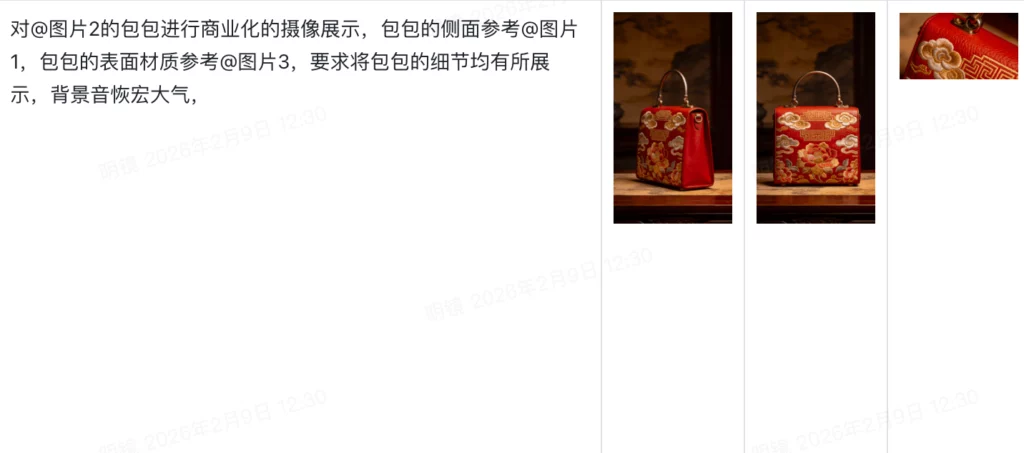
If you are selling a bag, focus on the 360-degree view. Try this prompt:
“Commercial camera display for @Image2 bag. Side view refers to @Image1. Surface texture refers to @Image3. Show all details of the stitching. Grand and epic background music. 2K cinematic quality.”
This prompt ensures the customer sees every angle. It builds trust by showing the quality of the craftsmanship. The “grand music” cue triggers the native audio engine to create a premium soundscape.
Pro Tips for High-Converting Ad Content
Even with a great tool like Seedance 2.0, you need a strategy. A pretty video is good, but a video that sells is better. Here are some tips to help you get the best ROI from your AI-generated ads.
- Start with High-Res Photos: The AI can only work with what you give it. Use a clear, well-lit photo of your product as your main reference.
- Keep Your Prompts Simple: Don’t use long, complex sentences. Use short, descriptive phrases. Focus on verbs like “rotate,” “zoom,” and “shimmer.”
- Focus on the First 3 Seconds: Social media users have short attention spans. Use a dynamic camera move at the start to grab their eyes.
- Iterate Often: Seedance 2.0 is 30% faster than other models. Don’t be afraid to run a prompt three or four times with slight changes.
- Match the Vibe: If your product is fun, use bright colors and fast cuts. If it is luxury, use slow camera moves and warm lighting.
By following these tips, you can create ads that look like they cost thousands of dollars. The ByteDance AI video model is designed to be efficient. Use that speed to test different styles for your audience.
The Future of AI Advertising is Here
We are witnessing the end of the “expensive shoot” era. Seedance 2.0 has democratized professional filmmaking. It allows anyone with a smartphone and a good idea to compete with the biggest brands. The combination of 2K resolution, native audio, and the @tag system is unmatched. It is truly the best AI video generator 2026 has to offer for commercial use.
You no longer have to settle for “good enough” AI videos. You can now aim for perfection. The control provided by the All-Round Reference mode is a game-changer. It respects your product and your brand. It gives you the tools to tell your story exactly how you imagined it.
The more you use the @tag system, the better you will get. Start with simple product displays. Then move into complex, multi-shot narratives. The AI is a partner in your creative process. It handles the technical work so you can focus on the big picture.
The era of manual editing is fading away. The era of AI directing has begun. If you haven’t tried making an ad with Seedance 2.0 yet, now is the time. Your competitors are likely already exploring these tools. Don’t get left behind. Turn your product photos into cinematic masterpieces today.