I am finally done with “blind” AI prompting. For years, we typed words and hoped for the best. We got lucky sometimes, but we mostly got glitches. Today, Seedance 2.0 changes the rules of the game. ByteDance has replaced the “magic” text box with a professional director’s console. The standout feature is the All-Round Reference mode. It lets you upload real files to guide the AI. You don’t just describe a scene anymore. You build it using your own assets.
This model doesn’t just look at your images. It understands their roles in the story. You can tell the AI exactly which image is the start of the shot. You can tell it which video contains the movement you want. In this guide, I will show you how to use the new @tag system. We will look at a library of Seedance 2.0 prompts that work every time. This is how you stop guessing and start directing.
Why Seedance 2.0 Prompts Need a Technical Edge
Most AI models guess what you want. Seedance 2.0 listens to what you say. It uses a Dual-branch Diffusion Transformer. This allows it to process visual and audio data at the same time. If your prompt is weak, your video will be weak. But if your prompt is technical, the result is cinema-grade.
Mastering the Grammar of Motion
The ByteDance AI video model understands physics. If you want a car to drift, you must describe the friction. Don’t just say “car turns.” Say “The tires smoke as the car drifts 90 degrees.” This specificity tells the AI to calculate weight and force. It makes the 2K resolution look real instead of plastic. This is a core part of any Seedance 2.0 review.
Scripting with Native Audio in Mind
Sound is no longer an afterthought. You can now prompt the “ears” of the AI. Include words like “reverb,” “muffled,” or “high-pitched.” This triggers the native audio engine. For example, “the metallic clink of a coin” will generate a specific, sharp sound. It syncs perfectly with the visual frame. This is why many call it the best AI video generator 2026.

The Power of All-Round Reference
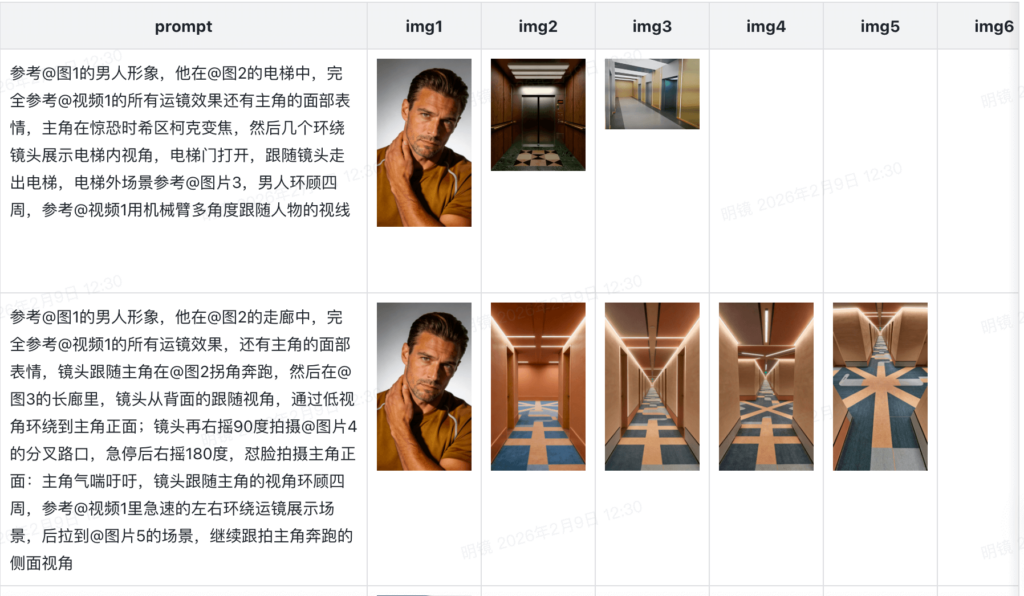
The “All-Round Reference” mode is the heart of this update. It allows you to upload between 1 and 12 reference files. These can be images, videos, or even audio tracks. The interface makes it easy to organize these inputs. You simply drag your files into the upload box. Then, you use @tags in your prompt to call them out.
How the @Tag System Works
When you upload a file, Seedance assigns it a label like @Image1 or @Video1. You then use these labels in your text prompt. For example, you might write “@Image1 as the first frame.” This tells the AI exactly where to begin. You can even combine multiple images to create a transition. If you write “@Image1 as the first frame and @Image2 as the last frame,” the AI fills in the gap. This provides a level of precision that text-only prompts can never reach.
Motion Imitation and Video Logic
This is where Seedance 2.0 really pulls ahead of the competition. You can upload a video of a specific movement, like a person dancing or a car drifting. Then, you use a prompt like “Imitate the action of @Video1”. The AI will take the character from your image and make them move like the person in the video. It tracks the physics and the timing perfectly. You are essentially “transferring” motion from one file to another. It is a game-changer for consistency.
Seedance 2.0 Prompts for Cinematic Storytelling
Storytelling requires more than one shot. Seedance 2.0 handles multi-shot narrative logic better than anyone. Use these prompts to test how it maintains character consistency.
The Epic Fantasy Quest
Prompt: A multi-shot sequence of a knight in silver armor. Shot 1: Wide shot as he enters a dark cave with a torch. Shot 2: Close-up of his nervous eyes. Shot 3: He draws his sword, which glows blue. Low-angle tracking shot, 2K resolution. Sound of crackling fire and echoing footsteps.
The Sci-Fi Noir Scene
Prompt: A three-shot sequence of a detective in a rainy futuristic city. Shot 1: Bird’s-eye view of neon streets. Shot 2: The detective lights a cigarette under a flickering light. Shot 3: He looks at a holographic photo. 2K sharpness, anamorphic lens flare. Sound of falling rain and distant sirens.
The Historical Drama
Prompt: A sequence of a Victorian tailor at work. Shot 1: Macro shot of a needle piercing silk. Shot 2: The tailor’s face in profile, focused expression. Shot 3: He hangs the finished dress. Natural sunlight, 2K textures. Sound of fabric rustling and scissors snipping.
Seedance 2.0 Prompts for Hyper-Realism
If you want to show off the 2K resolution, focus on textures. The ByteDance AI video model loves details like skin pores, wood grain, and liquid.
Macro Culinary Excellence
- The Sizzle: “Close-up of a wagyu steak hitting a hot cast-iron skillet. You can see the fat rendering and bubbles of oil. 2K resolution, shallow depth of field. Sound of loud, aggressive sizzling.”
- The Pour: “Slow-motion shot of cold milk being poured into black coffee. The white and brown liquids swirl in 2K detail. Sound of the liquid splashing and the glass clinking.”
Detailed Human Portraits
- The Elderly Artist: “Extreme close-up of an old man’s face as he laughs. Every wrinkle moves naturally. Cinematic 3-point lighting, 2K resolution. Sound of a deep, gravelly laugh.”
- The Cybernetic Eye: “Macro shot of a human eye with a digital iris. Tiny circuits move inside the pupil. 2K resolution, neon blue glow. Sound of a faint digital hum.”
Action and Physics in Seedance 2.0
Physics is where most AI fails. But in the Seedance vs Kling AI debate, Seedance wins on weight. Use these prompts to see how the model handles collisions and speed.
High-Octane Racing
- The Drift: “A red rally car racing through a forest. It hits a puddle, and water sprays toward the camera. 2K resolution, shaky-cam effect. Sound of a high-RPM engine and splashing water.”
- The Crash (Non-Violent): “A tower of colorful glass blocks being hit by a bowling ball. The blocks scatter with realistic gravity. 2K resolution, high-speed camera style. Sound of a heavy thud and glass clinking.”
Dynamic Sports Motion
- The Slam Dunk: “A basketball player jumping for a dunk. The jersey ripples in the wind. The camera follows the player from the ground up. 2K resolution, cinematic lighting. Sound of sneakers squeaking on wood and the rim rattling.”
- The Surfer: “A surfer riding a massive 20-foot wave. The spray of the ocean is captured in 2K detail. Sound of a roaring ocean and the board cutting through water.”
Mastering Sound and Lighting Layers
To truly speed-run your way to a viral video, you must layer your prompt. Don’t just describe what is happening. Describe the atmosphere.
Using Lighting Keywords
Lighting sets the mood. In Seedance 2.0, you can use terms like “God rays,” “Volumetric fog,” or “Cyberpunk neon.” The model uses these to calculate how light bounces off surfaces. This is essential for 2K quality. Without good light, the resolution doesn’t matter. Always specify if the light is “soft,” “harsh,” or “flickering.”
The Secret of Audio Adjectives
When using the ByteDance AI video model, your audio keywords should be specific. Use “muffled” for underwater scenes. Use “echoing” for large halls. Use “crunchy” for walking on gravel. The AI matches the visual vibration to these sounds. This creates a level of immersion that Sora hasn’t even shown yet. It makes the Seedance 2.0 prompts feel like real magic.
Final Thoughts on Creative Prompting
Mastering Seedance 2.0 prompts is a journey. It is about learning to speak “film.” You are no longer just an AI user. You are a writer and a director. The model provides the 2K resolution and the native audio. You provide the vision and the technical detail.
The launch today is just the beginning. As we learn the model’s “language,” our videos will become even better. Use the examples in this library as a starting point. Mix them. Change the lighting. Add new sound cues. The more you experiment, the more you will realize why this is the best AI video generator 2026.
The arrival of Seedance 2.0 marks the end of the “black box” era of AI. We are moving into a time of professional control. The @tag system and the All-Round Reference mode give us the power to build real stories. We are no longer limited by what the AI “thinks” we want. We can show it exactly what we want.
ByteDance has given us the ultimate creative tool. Now, it is up to us to tell the stories. Don’t be afraid to push the limits of the 12-file reference system too. Combined with these prompts, the possibilities are infinite.