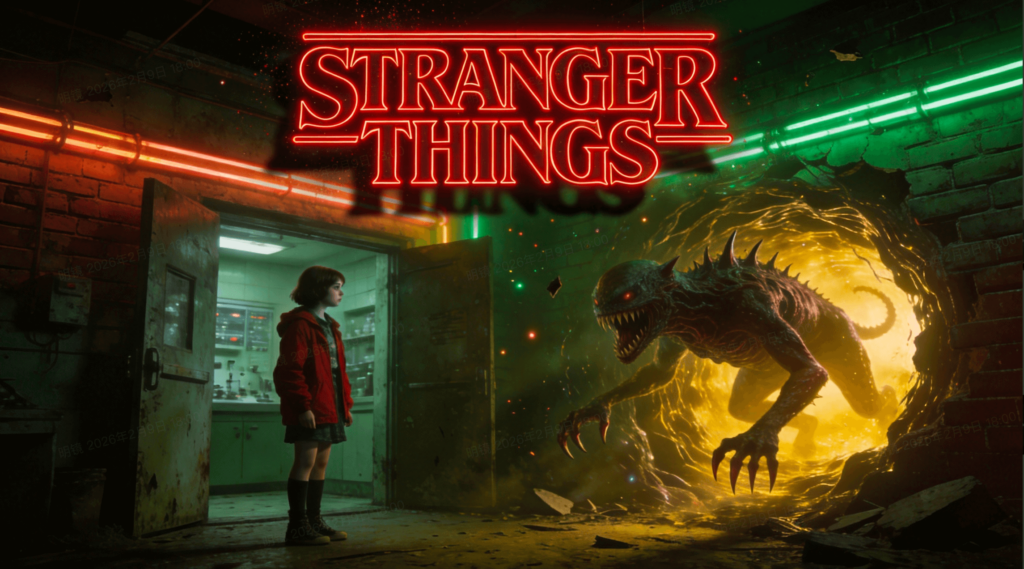
I finally stopped typing long paragraphs into AI text boxes. It never really worked the way I wanted. I would ask for a “cinematic shot,” and I would get something random. It felt like playing a slot machine, not making a film. That changed when I started using Seedance 2.0. This tool doesn’t just guess what you want. It understands the technical language of a director. It feels like having a professional camera crew inside your computer. You are no longer just a “prompter.” You are a creator with real control over the lens, the light, and the performance.
The shift from simple generation to “Native Cinematic Intelligence” is a huge leap. ByteDance built this model to follow specific technical instructions. It uses a system called All-Round Reference. This means you can show the AI exactly what you need. You upload your images. You upload your motion clips. Then, you use @tags to direct the scene. In this guide, we will explore why Seedance 2.0 is the tool that finally gives us director-level power.
The Shift from Prompting to Directing
In the old days of AI, we were limited by words. Words are great, but they are often vague. One person’s “dramatic light” is another person’s “dark shadow.” Seedance 2.0 moves past this problem. It allows you to use visual references as your primary language. This is how real directors work. They use storyboards and mood boards. Now, you can do the same with AI.
Defining the Scene with Precision
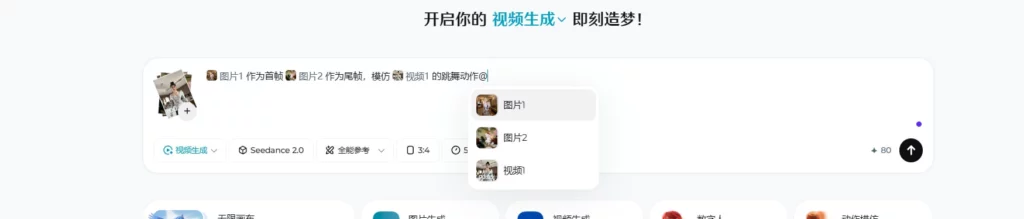
When you open the interface, you see the All-Round Reference panel. You can upload up to 5 reference files here. These aren’t just suggestions. They are the building blocks of your shot. You can tell the AI that @Image1 is your character. You can tell it that @Video1 is the motion you want to copy. This level of precision is why Seedance 2.0 is different. It respects your creative intent. It doesn’t just “hallucinate” a random video.
The Power of Multimodal Intelligence
The model uses a Dual-branch Diffusion Transformer. This sounds technical, but its effect is simple. It allows the AI to think about the image and the motion at the same time. It doesn’t treat them as separate layers. It understands how a specific character should move in a specific environment. This intelligence makes the movement look natural. It calculates the weight of the character. It understands the friction of the floor. It is “Native Intelligence” in action.
Unlocking Precise Control in Seedance 2.0
Control is the most important word for any filmmaker. Without control, you can’t tell a consistent story. The @tag system in Seedance 2.0 is the key to this power. It allows you to label your assets and call them out in your script. This is how you maintain character and style across multiple shots.
Mastering the @Tag System
Think of @tags as your actors and crew. If you upload a photo of a hero, it becomes @Image1. If you upload a background, it becomes @Image2. Your prompt might look like this: “@Image1 stands in the middle of @Image2.” The AI knows exactly what to do. You can even use tags for the first and last frames. This ensures that your clip starts and ends exactly where you want it to. No more “random starts” or “weird endings.”
Native 2K Cinematic Quality
Resolution matters in cinema. Most AI tools upscale their footage later. Seedance 2.0 generates in 2K resolution natively. This means the details are “baked in” from the start. You can see the pores on a face. You can see the individual threads in a suit. This high-fidelity output is essential for professional work. It makes the ByteDance AI video model feel like a real camera. The textures are sharp, and the colors are deep.
The Cinematic Trinity: Resolution, Motion, and Sound
A great film is a balance of three things. You need high-quality visuals. You need realistic motion. And you need immersive sound. Most AI tools only focus on one or two. Seedance 2.0 focuses on all three. This “Cinematic Trinity” is what makes it the best AI video generator 2026.
Native Audio Synchronization
Sound is 50% of the movie experience. Seedance 2.0 includes a native audio engine. It creates sounds that match the visual movement. If a glass breaks, you hear the crash. If a car zooms by, you hear the engine. The sound is synced to the frame. You don’t have to add it later in an editor. This saves hours of work. It also makes the video feel more “real” instantly.
Advanced Motion Imitation with Seedance 2.0
Motion is where most AI fails. Things often look “floaty” or “liquid.” Seedance 2.0 uses advanced motion tracking. You can upload a video of a specific movement and tell the AI to “imitate” it. The AI maps that motion onto your own character. It tracks the joints and the timing perfectly. This is perfect for complex actions like dancing, fighting, or sports. You get the performance of a pro with the look of your choice.
Mastering Light and Texture with Seedance 2.0
Lighting is the director’s brush. It sets the mood and tells the audience how to feel. In Seedance 2.0, you can direct the light with text or references. You can specify “Golden Hour,” “Neon Flicker,” or “Hard Rim Light.” The AI understands how these light sources interact with your subjects.
Realistic Physics of Light
The model understands how light bounces. If your character is wearing silk, the light will shimmer. If they are wearing wool, the light will be soft. This attention to detail is part of the “Cinematic Intelligence”. It makes the 2K resolution look even better. The reflections in eyes and on metallic surfaces are calculated in real-time. It feels like a high-end CGI render, but it happens in minutes.
Texture and Fine Details
In commercial work, texture is everything. People want to see the condensation on a cold bottle. They want to see the steam rising from food. Seedance 2.0 excels at these macro details. Because it is native 2K, it doesn’t lose the “small stuff”. You can prompt for specific textures like “leather grain” or “polished marble.” The AI will render them with incredible accuracy. This makes it a powerful tool for product ads and fashion films.
Native Audio and the Voice of AI
We often overlook audio in AI discussions. But Seedance 2.0 makes it a priority. The native audio engine doesn’t just make noise. It makes “spatial sound”. This means the sound changes based on where the camera is.
Ambient and Event-Based Sounds
The AI analyzes the scene to create ambient noise. If you are in a forest, you hear birds. If you are in a city, you hear distant traffic. It also creates “event-based” sounds. These are triggered by specific actions. A door slamming or a foot hitting the floor will create a unique sound. This level of synchronization is rare in the AI world. It creates a “closed-loop” production environment where the video and audio are born together.
Building Your Narrative with @Tags
Narrative is about the relationship between shots. Most AI tools generate one clip at a time. Seedance 2.0 allows you to plan a sequence. You can use your 12-file reference limit to store multiple shots. You can have @Image1 for Shot A and @Image2 for Shot B.
Maintaining Character Consistency
This is the “Holy Grail” of AI video. In the past, characters would change their faces between shots. With Seedance 2.0, you use a primary character reference. By tagging it as your main subject in every prompt, the AI keeps the features the same. It remembers the hair color, the eye shape, and the clothing. This allows you to cut between a wide shot and a close-up without losing your character. It is the key to making a real short film.
Planning Camera Transitions
You can direct the camera just like a cinematographer. Use terms like “Dolly Zoom,” “Handheld Shaky-cam,” or “Crane Shot.” Because you are using the ByteDance AI video model, these movements are smooth and realistic. The AI understands how the background should shift when the camera moves. It maintains the 3D space of the scene. This makes your transitions feel professional and intentional.
Wrapping Up: Why Seedance 2.0 is the Director’s Choice
The launch of Seedance 2.0 has changed my workflow. I no longer feel like I am fighting the AI. I feel like I am collaborating with it. The @tag system and All-Round Reference mode have removed the “guesswork”. I can finally see my vision on the screen with 2K clarity and native sound.
If you want to move beyond “cool clips” and start making “real films,” this is the tool. It requires a bit more thought than a simple text prompt. You have to pick your references. You have to label your tags. But the effort is worth it. The results are miles ahead of anything else on the market.
Seedance 2.0 is not just a generator. It is an intelligent production suite. It gives us the power of a studio from our homes. The “Cinematic Intelligence” is real, and it is ready for your stories. Take your seat in the director’s chair. Upload your first image. Start tagging your vision. The future of AI cinema is here, and it looks beautiful.