












Shopify AI Image Generator: Replace Product Backgrounds
Learn how to replace cluttered product photo backgrounds with polished Shopify lifestyle scenes while preserving products, models, branding, and key design details.
Shopify AI Image Generator: Replace Product Backgrounds with Premium Ecommerce Scenes
Many Shopify product images are held back by the environment rather than the product itself.
The clothing, accessory, or product may already be clearly photographed, but bookshelves, furniture, household clutter, and competing colors can distract customers from the hero subject.
Organizing another location shoot takes time and budget. A Shopify AI Image Generator offers another approach: preserve the original product and replace only its background with a cleaner, brand-aligned lifestyle scene.
This tutorial demonstrates how to transform a casual fashion photo into a premium ecommerce image suitable for Shopify product pages, collection pages, homepage banners, landing pages, and paid social campaigns.
In this fashion example, the hero subject includes:
- The adult model’s recognizable facial identity
- Blue long-sleeve top
- Burgundy dotted skirt
- Red knitted shoulder bag
- Black coat
- Light-colored shoes
- Original pose and body proportions
Only the background, surrounding environment, and corresponding scene lighting should change.
Step 1: Upload the Original Product Image
Open WeShop AI GPT Image and upload the original image.
For more reliable Shopify scene replacement, choose a photo with:
- A complete product or human subject
- Clearly visible colors and materials
- Limited motion blur
- Minimal obstruction
- Recognizable lighting direction
- Sufficient resolution
The original image in this example is a real fashion photograph taken inside a home.
The adult model and outfit are clearly visible, but the background contains a bookshelf, sofa, doors, chairs, and other household objects. The amount of visual information makes the image feel more like a personal snapshot than a focused ecommerce campaign.
The background does not need to be manually removed first. Upload the complete image and use the prompt to define what must remain unchanged.
Step 2: Define the New Shopify Lifestyle Scene
A successful scene replacement should do more than place the product in an attractive room. The environment should match the product category, brand style, and target customer.
This example replaces the original home interior with a restrained natural-minimalist setting containing:
- Warm cream walls
- Natural wooden doorway
- Rustic wooden console table
- Ceramic vessels
- Dried branches
- Soft natural daylight
- Warm neutral materials
- Clean negative space
The new environment supports the blue top and burgundy skirt without competing for attention.
Before generating a Shopify product scene, define:
| Element | What to Specify |
|---|---|
| Product category | Fashion, accessories, beauty, homeware, pet supplies, or another category |
| Brand style | Minimal, natural, premium, retro, energetic, or technological |
| Target customer | Audience, aesthetic preferences, and intended use |
| New environment | Living room, kitchen, studio, hotel, street, or outdoor setting |
| Lighting | Natural daylight, morning light, sunset, or soft studio lighting |
| Negative space | Left, right, top, or bottom |
| Content to preserve | Product, packaging, logo, person, outfit, or accessories |
| Prohibited changes | Color, structure, proportions, materials, and brand text |
Step 3: Copy the Shopify Scene Replacement Prompt
Use the uploaded product image together with the following prompt:
Create a premium Shopify scene replacement image using the uploaded product as the hero subject.

Preserve the product exactly as provided, including its shape, proportions, colors, materials, texture, logo, label, packaging, and every original design detail.

Replace only the background and surrounding environment with a realistic lifestyle scene that best matches the product category, brand style, and target customer.

The new scene should feel premium, modern, clean, and conversion-focused, suitable for Shopify product pages, collection pages, landing pages, homepage banners, and paid social ads.

Use natural lighting, realistic shadows, accurate perspective, subtle depth of field, elegant composition, and enough negative space for future copy placement.

The product must blend naturally into the scene while remaining the clear visual focus.

Do not alter the product.

Do not change branding.

Do not add fake text, pricing, promotional badges, watermarks, or unrelated objects.

Ultra realistic, premium Shopify ecommerce photography, high-resolution commercial quality.
This prompt can be used for clean product photos, lifestyle images, and fashion photography.
In a fashion image, define what the term “product” includes:
In this image, the complete hero subject includes the adult model, facial identity, hairstyle, body proportions, pose, blue long-sleeve top, burgundy dotted skirt, red knitted shoulder bag, black coat, sunglasses, and light-colored shoes.

Preserve all of these elements exactly as shown.

Replace only the background and surrounding environment.
Then describe the intended replacement scene:
Replace the original cluttered apartment background with a premium natural-minimalist interior.

Use warm cream walls, a natural wooden doorway, a rustic wooden console table, a large ceramic vase with dried branches, a shallow stone bowl, warm neutral materials, and soft natural daylight.

Keep the space clean, refined, realistic, and suitable for a premium Shopify fashion brand.

Leave subtle negative space around the model for future campaign copy.
The completed prompt should answer three questions:
- What must remain unchanged?
- What may be replaced?
- What should the new environment look like?
A vague request such as “replace the background with a premium interior” leaves too many decisions to the AI image generator. Listing the model, clothing, accessories, and pose reduces the chance of the hero subject being redesigned.
Reusable Shopify Scene Replacement Template
Create a premium Shopify scene replacement image using the uploaded [enter product category] as the hero subject.

PRODUCT TO PRESERVE:
Preserve the uploaded product exactly as provided, including:

- [Enter the required shape]
- [Enter the original colors]
- [Enter the materials]
- [Enter the logo or label]
- [Enter the packaging]
- [Enter structural and design details]
- [Enter the person, outfit, or accessories when applicable]

Do not redesign, recolor, resize, reshape, relabel, or replace the product.

NEW SCENE:
Replace only the original background and surrounding environment with:

[Describe the new lifestyle setting]

BRAND STYLE:
The new scene should feel:

[Enter a style such as premium, natural, minimalist, warm, modern, or retro]

TARGET CUSTOMER:
Design the scene for:

[Describe the target customer or use case]

LIGHTING:
Use [enter natural daylight, morning light, sunset, or soft studio lighting].

Match the lighting direction, color temperature, shadows, reflections, and perspective to the uploaded product.

COMPOSITION:
Keep the product as the clear visual focus.

Place the product in the [enter position] area of the frame.

Leave clean negative space on the [enter left, right, or top] for future Shopify copy, pricing, or campaign design.

OUTPUT USE:
The image should be suitable for Shopify product pages, collection pages, homepage banners, landing pages, email campaigns, and paid social ads.

DO NOT ADD:
Do not add fake text, altered branding, incorrect logos, promotional badges, pricing, watermarks, duplicate products, distorted anatomy, or unrelated objects.

Ultra-realistic premium ecommerce lifestyle photography, accurate perspective, realistic contact shadows, subtle depth of field, natural materials, and high-resolution commercial quality.
Step 4: Generate the Scene Replacement
Upload the original image, paste the completed prompt, and generate a vertical ecommerce image.
Recommended settings:
| Setting | Recommendation |
|---|---|
| Tool | WeShop AI GPT Image |
| Task | Reference-image generation or scene replacement |
| Aspect ratio | 3:4 or 4:5 |
| Resolution | 1K for testing; 2K or 4K for final delivery |
| Initial quantity | 1–2 images |
Before publishing the result, confirm that the hero subject remains recognizable, the product has not been redesigned, the new environment follows a consistent perspective, and no fake text, pricing, badges, or watermarks have been introduced.
If the new environment works but the model or product has changed, use this correction prompt:
Keep the approved premium interior background, natural lighting, composition, wooden doorway, console table, ceramic vase, dried branches, and neutral color palette unchanged.

Restore the complete hero subject to match the uploaded reference image more closely.

Preserve the adult model’s facial identity, hairstyle, body proportions, pose, blue top, burgundy dotted skirt, red knitted shoulder bag, black coat, sunglasses, and light-colored shoes.

Do not change the approved background.

Do not add text, logos, pricing, badges, accessories, or additional products.
Final Effect
| Original Image | Shopify AI Scene Replacement Result |
|---|---|
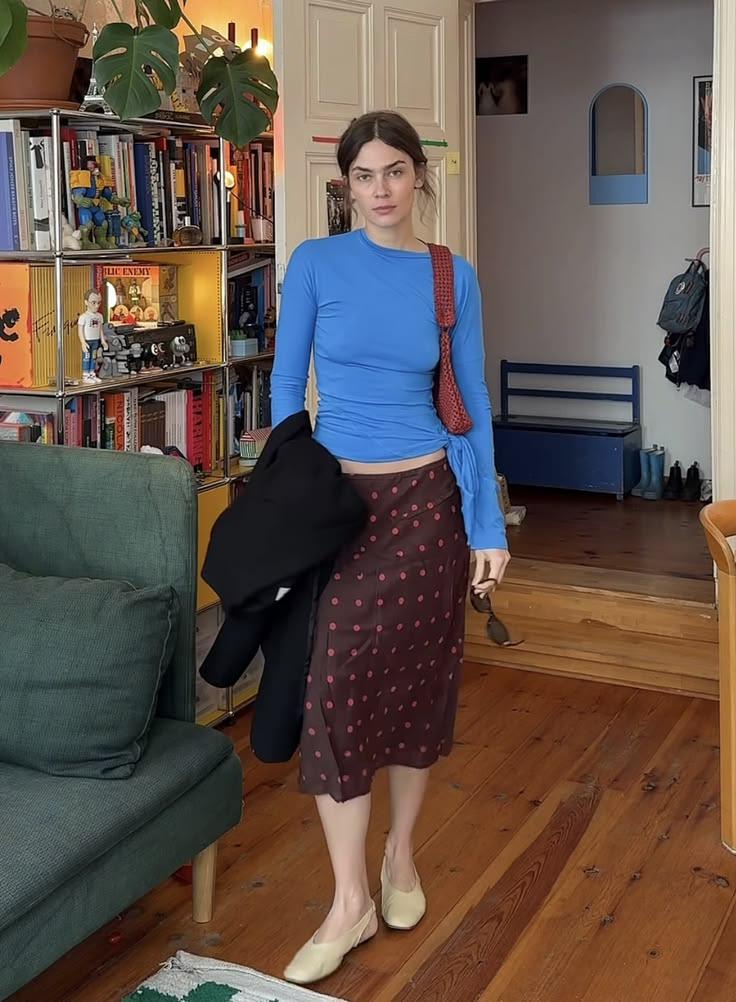 | 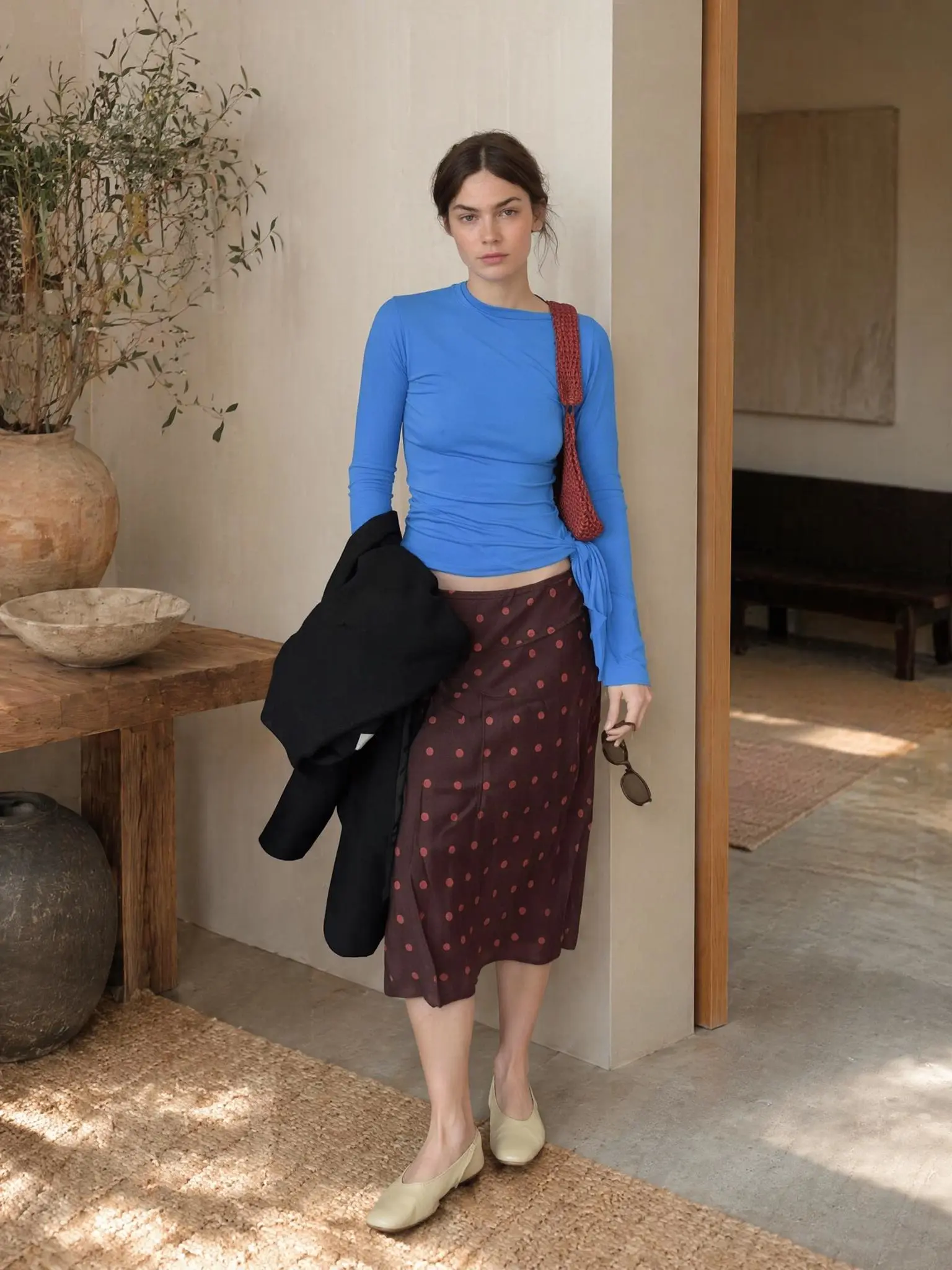 |
| The original image contains a complete fashion subject but a visually busy home environment. | The result preserves the model, outfit, accessories, and pose while replacing the background with a cleaner lifestyle setting. |
Conclusion
Shopify scene replacement is not about generating a different product. It is about moving the existing product from an unsuitable environment into a lifestyle scene that better matches its category, brand identity, and target customer.
The key is to separate the protected hero subject from the replaceable environment. The prompt should repeatedly preserve the product’s shape, color, materials, branding, packaging, and design details.
For fashion images, it should also protect the adult model’s identity, body proportions, pose, clothing, and accessories.
You can upload an original product image and try this Shopify AI Image Generator workflow with WeShop AI GPT Image.