












Seedream 5.0 Pro AI Image Generator: Create a 3D Pet Ecommerce Hero
Learn how to create a polished pet ecommerce hero concept with product cards, branding, and a layered 3D paw-to-CTA interaction using Seedream 5.0 Pro.
Seedream 5.0 Pro AI Image Generator: Create a 3D Pet Ecommerce Hero
Most pet ecommerce hero sections follow the same structure: brand messaging and products on the left, with a large pet image on the right. The layout works, but it can easily look like a standard website template.
A simple spatial interaction can make the concept more memorable. In this example, a golden retriever’s paw extends beyond the right image frame and rests directly on the “Shop Now” button.
The result combines an ecommerce interface with a playful 3D hero effect.
This tutorial explains how to use WeShop AI Seedream 5.0 Pro and a reusable text-to-image prompt template to create an ecommerce homepage concept containing a custom logo, navigation bar, product cards, CTA button, hero image, and layered interaction.
Generated Result
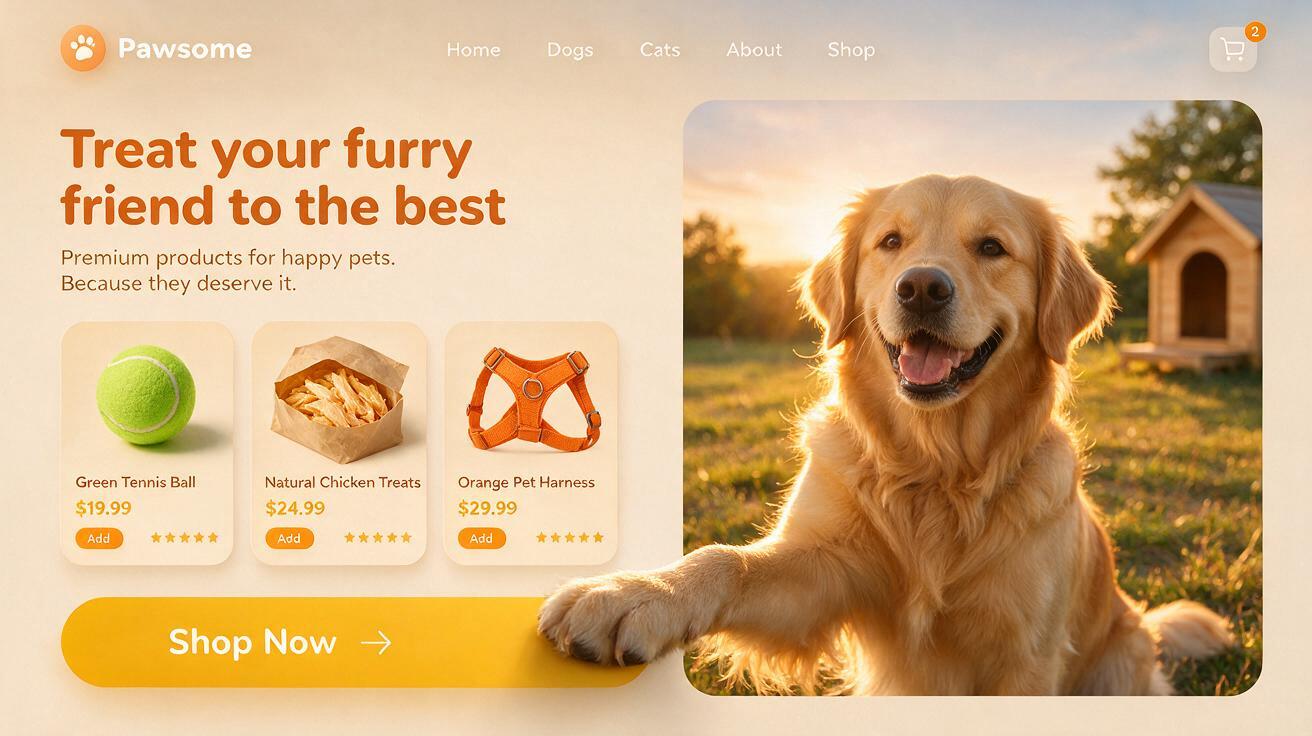
Seedream 5.0 Pro ecommerce UI concept with product cards, a call-to-action button, and a layered golden retriever interaction.
This output is an AI-generated UI concept, not a functional website or finished HTML page. Before using the design on Shopify or another ecommerce platform, rebuild the interface and manually verify its product names, prices, navigation labels, and button text.
Step 1: Define the Ecommerce Hero Structure
Divide the hero section into four simple areas:
- Top: logo, brand name, navigation, and shopping cart
- Left: headline, supporting copy, product cards, and CTA
- Right: pet, model, product, or lifestyle hero image
- Interaction layer: part of the subject crosses the image boundary and touches a button or product card
The same structure can be adapted for pet supplies, fashion, beauty, home goods, sports products, and other ecommerce categories.
The purpose of using the Seedream 5.0 Pro AI Image Generator is not to generate production-ready website code. It is to visualize the homepage composition, branding, product hierarchy, and 3D interaction before beginning formal design and development.
Step 2: Complete the Reusable Ecommerce Prompt Template
Upload your brand logo and replace every bracketed field with your own brand and product information.
Use my uploaded logo image as the official brand identity and create a 16:9 widescreen ecommerce website hero UI concept.

[BRAND INFORMATION]

Brand logo: Use the uploaded logo image. Preserve its original graphics, colors, lettering, and proportions. Do not redesign the logo or generate incorrect brand text.

Brand name: [Enter the brand name]

Brand category: [Enter the brand or store category, such as pet supplies, fashion, beauty, or home goods]

[NAVIGATION]

Create a clean navigation bar across the top.

Display the uploaded logo and brand name on the left.

Place the following navigation labels in the center:
[Navigation 1], [Navigation 2], [Navigation 3], [Navigation 4], [Navigation 5]

Place a shopping cart icon and item-count indicator on the right.

[HERO COPY]

Use a [enter background color] background in the left content area.

Main headline:
“[Enter the main headline]”

Supporting line:
“[Enter the supporting line]”

Make the headline prominent and easy to read. Keep the supporting copy concise and natural. Do not create additional paragraphs or unrelated text.

[PRODUCT CARDS]

Arrange [enter number] floating product cards with rounded corners beneath the headline.

Product card 1:
- Product name: [Enter product name]
- Product appearance: [Enter product type, color, and defining features]
- Product price: [Enter price]
- Card color: [Enter color]

Product card 2:
- Product name: [Enter product name]
- Product appearance: [Enter product type, color, and defining features]
- Product price: [Enter price]
- Card color: [Enter color]

Product card 3:
- Product name: [Enter product name]
- Product appearance: [Enter product type, color, and defining features]
- Product price: [Enter price]
- Card color: [Enter color]

Each card should contain a clear product image, short English product name, price, star rating, and small add button.

Make the product image consistent with the supplied product description. Do not add invented logos, incorrect packaging, or unrelated accessories.

[CTA BUTTON]

Place a wide pill-shaped CTA button near the bottom of the left content area.

Button text:
“[Enter the CTA, such as Shop Now, Explore More, or Buy Now]”

Button color: [Enter the button color]

Add a simple right-facing arrow to the button.

[RIGHT-SIDE HERO VISUAL]

Main subject: [Enter the subject, such as a golden retriever, fashion model, product, or lifestyle scene]

Environment: [Enter the setting, such as a sunset field, modern living room, city street, or clean studio]

Lighting and atmosphere: [Enter the lighting, such as warm sunset backlighting, soft daylight, or bright studio lighting]

Place the hero visual inside a large rounded image container on the right. Keep the subject clear, natural, and consistent with the brand style.

[LAYERED 3D INTERACTION]

Create the following layered interaction:

[Enter the body part or object that should cross the frame] extends beyond the right-side image frame, crosses the boundary between the image and left content area, and rests on or touches [enter the interaction target, such as the CTA button or a product card].

The overlapping element must appear above both the image frame and interaction target.

Use realistic contact shadows, occlusion, and subtle pressure to communicate depth and physical weight.

Do not make the overlapping element float. Do not distort the subject or create malformed limbs.

[VISUAL STYLE]

Primary color: [Enter the primary color]

Supporting colors: [Enter supporting colors]

Overall style: [Enter the visual direction, such as warm pet brand, premium minimalism, energetic sportswear, or natural lifestyle]

Use rounded cards, soft layered shadows, clear information hierarchy, and polished ecommerce UI design.

The result should look like a professional AI ecommerce website concept suitable for a Shopify store, brand website, or ecommerce landing page.

Keep the composition clean, balanced, and easy to read.

Do not add unnecessary navigation items, unrelated buttons, incorrect logos, gibberish text, watermarks, distorted products, or decorations unrelated to the brand.
Example Values Used in This Design
- Brand name: Pawsome
- Brand category: Pet supply store
- Headline: Treat your furry friend to the best
- Supporting line: Premium food, toys & care for happy, healthy pets.
- Product 1: Tennis Ball Chew Toy, green tennis-ball toy, $19.99
- Product 2: Natural Chicken Jerky, natural chicken treats, $14.99
- Product 3: Adjustable No-Pull Harness, orange pet harness, $24.99
- CTA: Shop Now
- Hero subject: Golden retriever
- Environment: Field at sunset
- Layered interaction: The dog’s front paw crosses the right image frame and rests on the CTA button
- Primary color: Cream
- Supporting colors: Orange and golden yellow
- Style: Warm, friendly, polished pet ecommerce brand
Because the template separates brand information, product content, and spatial relationships, it can be reused across different ecommerce industries by changing the logo, brand name, products, and hero subject.
Step 3: Generate the Ecommerce UI Concept
Open WeShop AI Seedream 5.0 Pro, upload your logo, paste the completed prompt, and select a 16:9 aspect ratio.
The generated concept should include:
- A recognizable logo and clear navigation
- A readable headline and supporting copy
- Structured product cards
- A prominent CTA
- A hero visual consistent with the brand
- A 3D element crossing the image boundary
In this example, the most important detail is the spatial relationship between the golden retriever’s paw and the CTA button.
Writing “the paw extends beyond the right image frame, appears above the button, and creates a realistic contact shadow” provides more control than simply requesting a “3D effect.” It defines the subject, position, layer order, and interaction target.
Why Use Seedream 5.0 Pro for Ecommerce UI Concepts?
A traditional ecommerce hero may require separate logo assets, product images, interface components, masks, shadows, and manual compositing.
An AI image generator for ecommerce can turn these requirements into a unified visual direction before the final interface is designed.
This workflow is useful for:
- Shopify pet store homepage concepts
- Pet food and pet supply landing pages
- AI website design mockups
- Ecommerce redesign proposals
- Advertising and social media concepts
- 3D website hero experiments
- Rapid AI UI mockup generation
The generated image should not replace professional web design or development. Its value is helping a team review the composition, branding, visual hierarchy, and creative direction earlier in the process.
Conclusion
A memorable ecommerce hero needs more than a neat arrangement of copy, product cards, and images. It benefits from a visual action that connects different parts of the page.
Here, the golden retriever’s paw crosses the image boundary and rests on the “Shop Now” button, directly connecting the brand character with the conversion element.
With the Seedream 5.0 Pro AI Image Generator, you can upload a logo, complete the reusable prompt template, and quickly create ecommerce UI concepts for Shopify stores, brand websites, and landing pages.
You can try this workflow with WeShop AI Seedream 5.0 Pro, then rebuild the selected concept as a responsive, production-ready interface.