












MiniMax H3 Prompt for a 10-Second Kinetic Typography Video
Learn how to turn three reference images into a 10-second vertical kinetic typography video with a tested MiniMax H3 prompt. Follow the exact uploads, settings, prompt, and quality checks to recreate the OKAY eye, urban collage, and mouth sequence in WeShop AI.
MiniMax H3 Prompt for a 10-Second Kinetic Typography Video
This MiniMax H3 prompt shows creators and creative teams how to turn three reference images into one fast, 10-second kinetic typography video. The target is specific: a vertical fashion edit where the word OKAY appears inside an eye, moves through a torn-paper portrait collage, and finishes inside the model's mouth. The workflow uses WeShop AI's MiniMax H3 Reference mode and can be reproduced directly with the assets below.
Full 28-second inspiration reel. This tutorial reproduces only its opening 10-second OKAY sequence.
The common failure with a kinetic typography prompt is not motion. It is structure. A generator may float letters over a face like a sticker, change the model between cuts, or copy unwanted words from a reference. This MiniMax H3 prompt assigns one job to each image and tells the model exactly where the typography belongs in every shot.
What This MiniMax H3 Prompt Creates
The tested result is a roughly 10-second, 9:16 video with three connected scenes:
- A macro eye shot with pink OKAY lettering embedded in the iris.
- A centered fashion portrait inside a black-and-white urban paper collage.
- An extreme mouth close-up where lips, fingers, teeth, and piercings correctly sit in front of the letters.
This makes the MiniMax H3 prompt useful for TikTok hooks, Instagram Reels, fashion campaign teasers, music visuals, and experimental brand typography. It solves one production problem: turning static reference art into a short video where text behaves like part of the photographed space.
Prepare the Three Reference Images
Use the following three images in this order. Each has a narrow role in the MiniMax H3 prompt.
| Reference 1 | Reference 2 | Reference 3 |
|---|---|---|
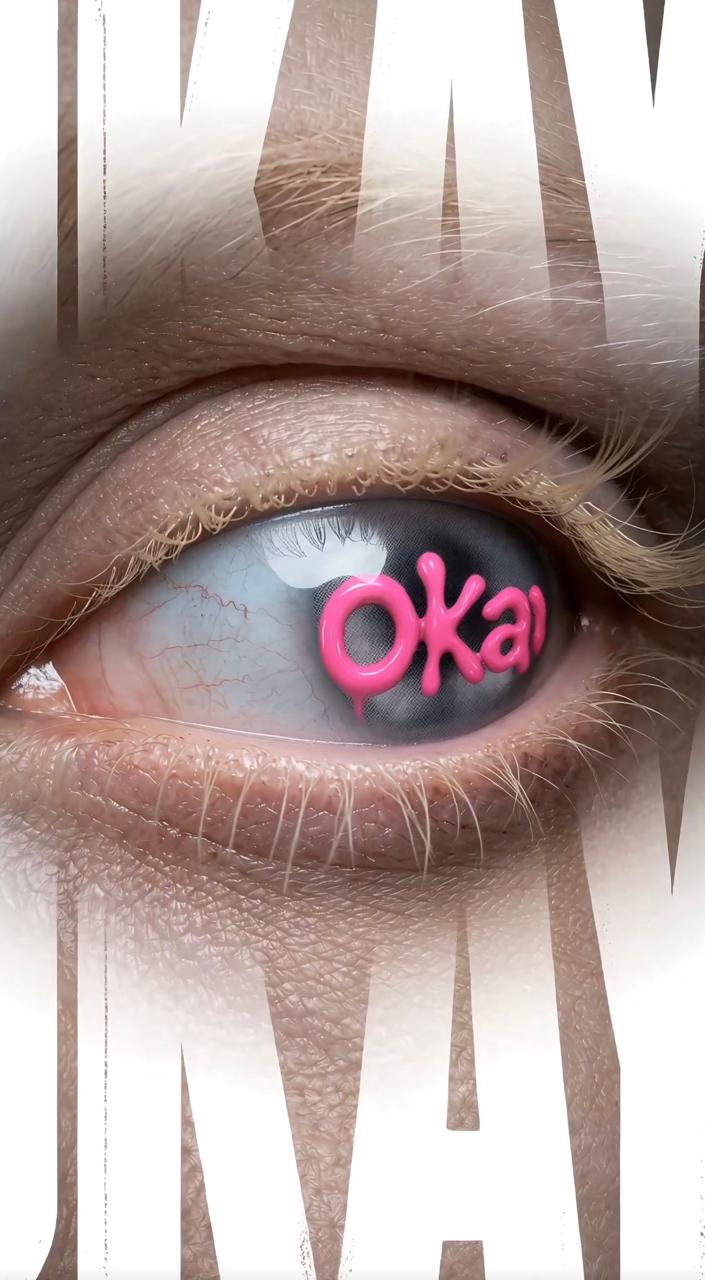 | 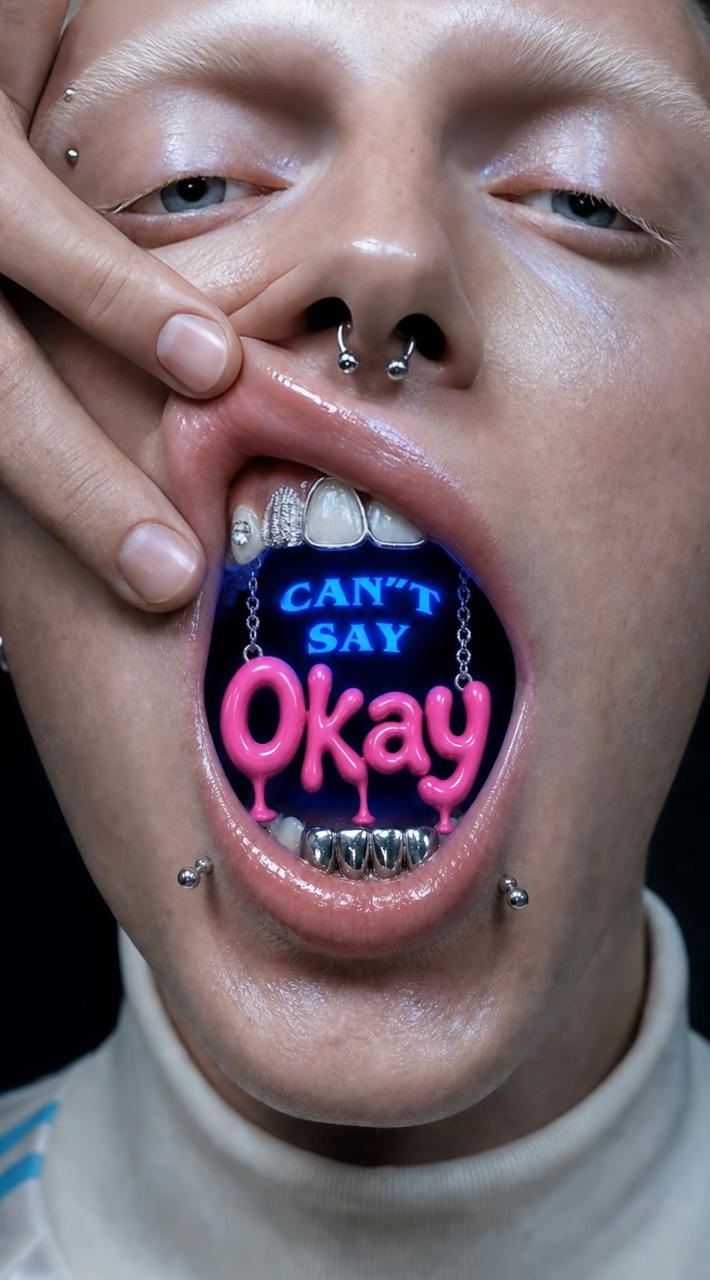 | 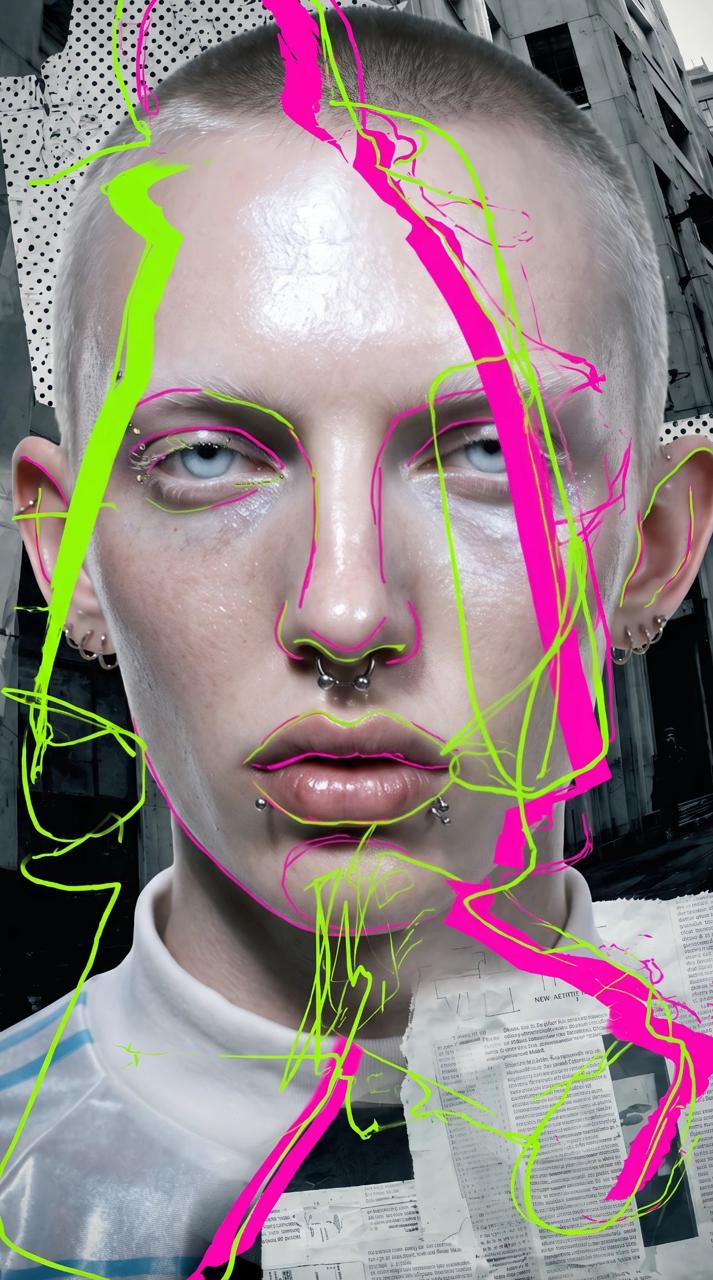 |
| Eye anatomy, lashes, iris texture, macro framing, and lettering placement. | Mouth pose, hand action, piercings, silver teeth, and pink OKAY treatment. | Model identity, white sports top, city collage, hot pink, and fluorescent lime contours. |
Keep the original portrait orientation and avoid cropping the eye, mouth, hands, or facial piercings. Clear reference roles make the MiniMax H3 prompt easier to follow and reduce accidental blending between scenes.
Why the MiniMax H3 Prompt Uses Three Images, Not Five
The wider inspiration set also contains two blue MINIMAX/H3 layouts. They demonstrate how the same art direction can expand into another color and word system.
| Additional portrait layout | Additional eye layout |
|---|---|
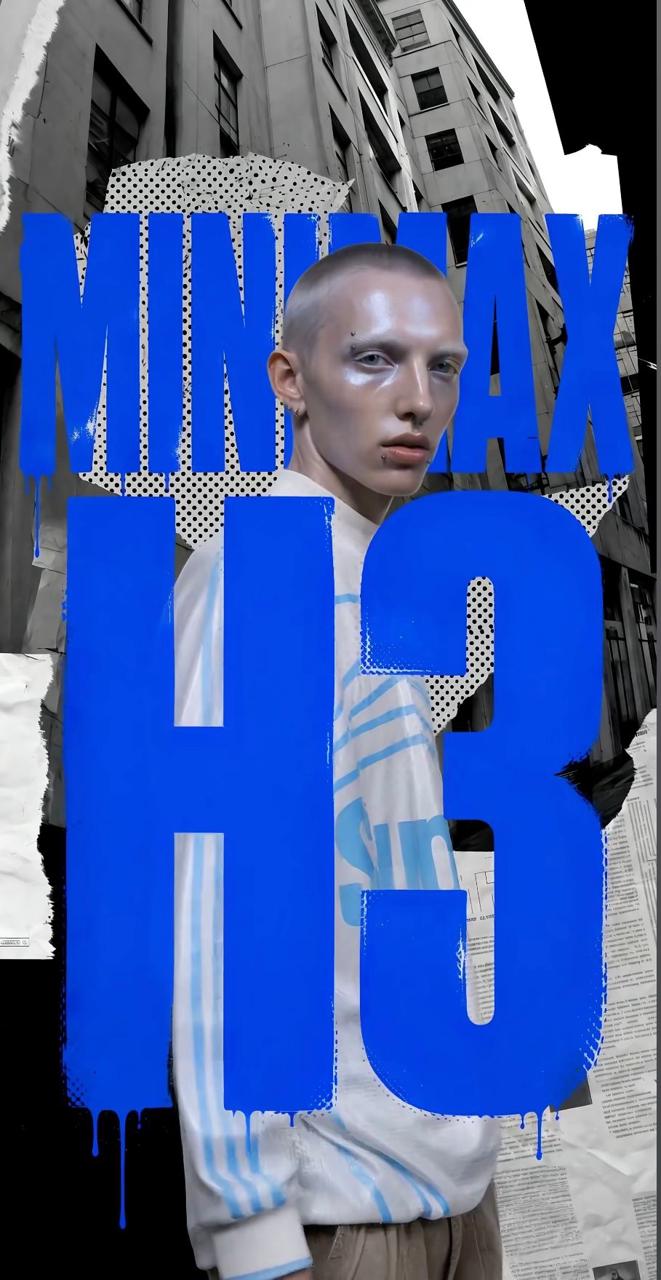 | 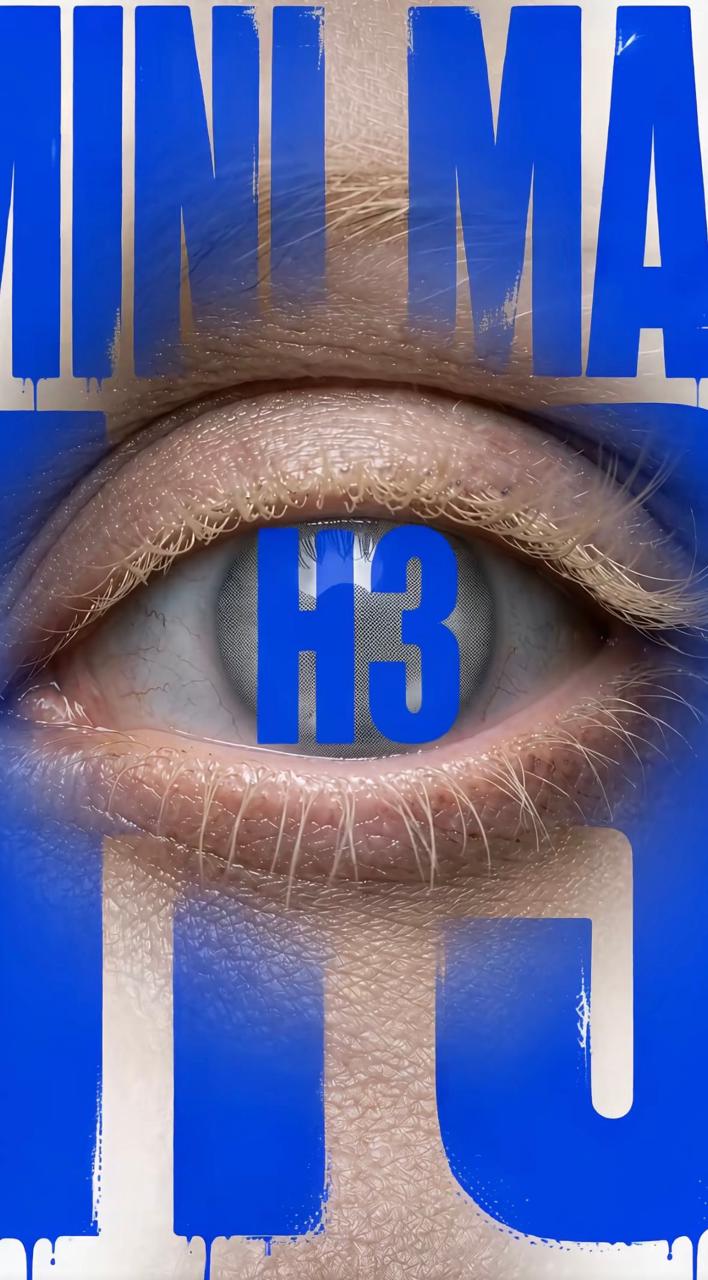 |
Do not upload these two images for this tutorial. They introduce blue typography and the words MINIMAX and H3, while the reproduction needs only pink OKAY. Excluding them keeps the MiniMax H3 prompt focused and makes the result easier to review.
Reproduce the Video in WeShop AI
Open MiniMax H3 in WeShop AI and use the shortest complete workflow below.
- Click Add and upload the three tutorial references in the order shown above.
- Select MiniMax H3 Reference as the model.
- Set Duration to 10s, Aspect Ratio to 9:16, and Quantity to 1.
- In the prompt field, type
@and select each uploaded file where the MiniMax H3 prompt refers to Reference 1, Reference 2, and Reference 3. - Paste the complete MiniMax H3 prompt below and click Generate.
Copy This Complete MiniMax H3 Prompt
Create one continuous 10-second vertical 9:16 high-fashion kinetic typography video.

REFERENCE ROLES
- Reference 1 defines the extreme macro eye anatomy, pale skin texture, eyelashes, iris detail, and the placement of pink OKAY typography inside the eye.
- Reference 2 defines the model's mouth pose, hand pulling the lips open, facial piercings, silver dental details, and glossy pink OKAY typography. Do not copy the words “CAN'T SAY.”
- Reference 3 defines the same model identity, shaved hair, pale reflective skin, white athletic top, black-and-white city collage, torn newspaper textures, hot-pink marks, and fluorescent-lime contour lines.

GLOBAL RULE
The only readable text anywhere in the video is the exact uppercase word “OKAY.” Do not generate MINIMAX, H3, CAN'T SAY, logos, captions, watermarks, or random letters. Typography must behave as physical scene geometry, with correct perspective, depth, parallax, and occlusion. It must never look like a flat interface overlay.

SHOT 1 — 0.0 TO 2.8 SECONDS
Extreme macro shot of one open eye. Preserve realistic wet reflections, iris texture, pores, eyelashes, and high-contrast skin detail from Reference 1. Place glossy hot-pink OKAY lettering inside the iris. The eyelids and eyelashes naturally pass in front of the letters during a slow blink. Add subtle photocopy grain and one beat-synced print-registration jump.

SHOT 2 — 2.8 TO 6.2 SECONDS
Use the blink as a hard torn-paper jump cut into a centered frontal portrait of the model from Reference 3. Keep the same face, shaved hair, piercings, and white sports top. Build a black-and-white city and newspaper collage behind the model. Add hot-pink and fluorescent-lime hand-drawn contour lines that track the face and shoulders. Large cropped OKAY letterforms sit behind the head and partially in front of the shoulders, creating clear foreground, subject, and background layers with fast parallax.

SHOT 3 — 6.2 TO 10.0 SECONDS
Smash cut to an extreme close-up of the same model's mouth. A hand pulls the lips open as in Reference 2. Show realistic lips, fingers, tongue, teeth, piercings, and silver dental details. Place bold hot-pink uppercase OKAY deep inside the mouth. The fingers, lips, and teeth must occlude the word correctly. Begin with a slightly glossy dimensional treatment, then compress it into a distressed flat screen-printed poster style on the final beat.

VISUAL STYLE AND EDITING
Raw fashion editorial, kinetic poster design, photocopied paper, halftone dots, screen-print ink, rough letter edges, torn-paper wipes, scan misregistration, jump-frame trails, hard rhythmic cuts, high-contrast skin, no soft beauty filter. Fast industrial electronic beat with blink, paper-rip, breath, mouth, and small metallic dental sound effects. End abruptly on a readable OKAY frame. No fade.

AVOID
No white title cards, no static portrait pasted over a background, no floating text layer, no extra people, no face changes, no soft dissolves, no illegible typography, and no additional readable words.
The prompt is detailed because each sentence protects a visible result. The timecodes control the three scenes, the reference map protects identity and style, and the negative instructions stop the unwanted text visible in the source art from entering the final video.
Check the MiniMax H3 Prompt Result
Do not judge the output only by its overall mood. Pause the result at the eye, portrait, and mouth shots and check the following:
| Check | Pass condition |
|---|---|
| Text | OKAY is readable, and no unrelated words or logos appear. |
| Identity | The same shaved-head model, piercings, pale skin, and white top remain consistent. |
| Depth | Eyelids, lips, fingers, and teeth correctly pass in front of the letters. |
| Layout | The portrait includes separate foreground, subject, and collage-background layers. |
| Format | The result is approximately 10 seconds and composed for 9:16 viewing. |
If the word changes, strengthen the “only readable text” rule before changing the visual description. If the face changes, repeat “the same model identity” in Shots 2 and 3. If the typography floats, keep the occlusion and depth instructions. These are the highest-value fixes for this MiniMax H3 prompt.
Tested result generated from the three tutorial references with the focused 10-second workflow.
The tested result follows the intended sequence and keeps the typography inside the photographed space. Small timing or letter-shape variations are normal, but the MiniMax H3 prompt has succeeded when the three reference roles, the model identity, and the spatial OKAY treatment remain recognizable.
Create Your Own Kinetic Typography Video
Once the base MiniMax H3 prompt passes review, replace OKAY with one short campaign word and update the reference images as a set. Keep the word short enough to remain readable on mobile, preserve one palette across all inputs, and test only one major change at a time. This turns the same MiniMax H3 prompt structure into a repeatable format for fashion drops, social hooks, product launches, and campaign teasers.
You can try it directly using the tool on the right.