












MiniMax H3 (Hailuo) Video to Video: Turn Live-Action Footage Into American Cartoon Animation
Learn how to use MiniMax H3 (Hailuo) video to video to restyle live-action footage as American cartoon animation while preserving motion and framing.
A person stands in front of the camera, moving through the same gestures, poses, and framing as the original live-action clip. But instead of realistic skin and photography, the scene gradually takes on thick black outlines, oversized eyes, simplified facial features, flat colors, and the exaggerated expressions of an American TV cartoon.
That is the goal of this MiniMax H3 (Hailuo) video-to-video workflow: use an existing video as the motion and composition foundation while using a prompt to redesign its visual style.
In this example, we transform a roughly 15-second vertical live-action clip into an exaggerated American adult animation look while keeping the original character count, actions, clothing relationships, composition, and camera angle recognizable.
Step 1: Prepare a Clear Source Video for MiniMax H3 (Hailuo) Video to Video
Open MiniMax H3 (Hailuo) on WeShop AI:
https://www.weshop.ai/apps/free-minimax-h3
Upload the video you want to restyle.
The source clip in this case uses a single vertical shot with one person facing the camera. The subject performs a continuous sequence of hand and body gestures while the clothing, background, and camera position remain relatively stable.
That makes it useful for evaluating two parts of a video-to-video transformation:
- whether the original motion and composition remain recognizable;
- whether the new visual style is applied successfully.
If your goal is also to preserve the performance while changing the visual treatment, choose footage where the main subject and actions are easy to see.
Make sure you have permission to upload and transform the source footage.
Step 2: Structure the Prompt Around Preserve, Transform, and Exclude
A useful MiniMax H3 (Hailuo) video-to-video prompt should do more than say, “turn this into a cartoon.”
If you want the output to remain connected to the source footage, the prompt should make three things explicit:
- what must stay the same;
- what should visually change;
- what the model should avoid.
Here is the full prompt used for this example:
Recreate this video in the style of an American adult animated sitcom, with overall reference to the cartoon visual language of shows like "Home Demotivator".

Please retain the composition, number of characters, character postures, costumes, expression directions, props, scene relationships and camera angle of the original video. Transform all characters into exaggerated American TV animation characters: thick black outlines, round and simplified facial shapes, big eyes, small noses, exaggerated mouth shapes, funny expressions, slightly stiff but comical body movements.

Use flat and bright color blocks for coloring, simple shadows, clean and clear lines, and the background is also changed to a simplified cartoon scene. The overall effect is like a frame of an American satirical animation screenshot, humorous, absurd, and exaggerated, but still recognizable with the original actions and scenes.

Do not have a realistic photo texture, do not use 3D rendering, do not use oil painting, watercolor, thick coating, complex movie lighting, do not have real skin textures, do not change the number of characters, do not add irrelevant text, logos, or watermarks.
The reusable part of this prompt is not one specific cartoon reference. It is the preserve → transform → exclude structure.
Preserve the Original Video
The first layer tells MiniMax H3 (Hailuo) which parts of the source should remain recognizable:
- composition;
- number of characters;
- character postures;
- costumes;
- expression directions;
- props;
- scene relationships;
- camera angle.
In other words, the source video provides the performance and shot structure, while the prompt defines how that footage should be visually reinterpreted.
Transform the Visual Style
The second layer describes the target rendering language in concrete terms:
- thick black outlines;
- round, simplified facial shapes;
- large eyes;
- small noses;
- exaggerated mouth shapes;
- funny expressions;
- flat, bright color blocks;
- simple shadows;
- a simplified cartoon background.
These details give the model much more direction than a broad instruction such as make it cartoon.
Instead of naming only a genre, the prompt describes the character design, line treatment, facial proportions, coloring method, and background style that should change.
Exclude Unwanted Visual Results
The final layer defines what should not appear:
- realistic photographic texture;
- 3D rendering;
- oil painting;
- watercolor;
- complex cinematic lighting;
- realistic skin texture;
- additional characters;
- irrelevant text;
- logos;
- watermarks.
Together, the three layers define the content constraints, desired style, and unwanted outcomes.
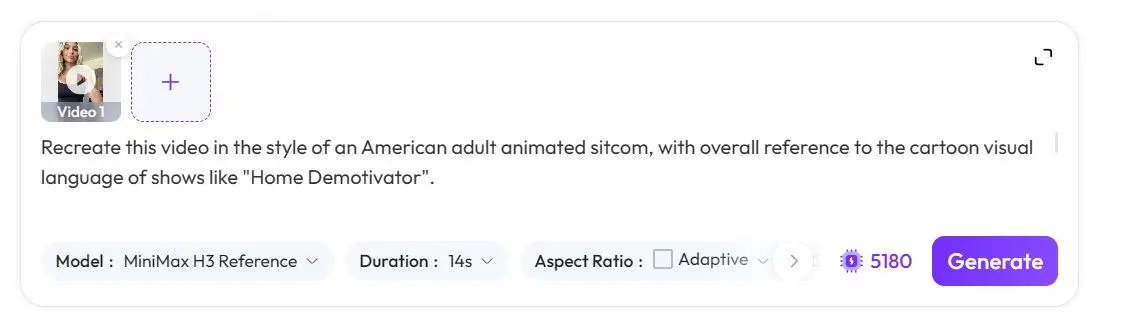
Separate preservation instructions from style instructions so each reference has a clear role.
Step 3: Generate the MiniMax H3 (Hailuo) V2V Result
Once the source video and prompt are ready, start the generation in MiniMax H3 (Hailuo).
When reviewing the output, do not look only at whether the cartoon style appears strong enough. Compare it with the source footage and check whether the important structural relationships remain recognizable:
- Is the number of characters unchanged?
- Does the subject remain in roughly the same part of the frame?
- Are the main hand and body movements still recognizable?
- Is the camera angle similar?
- Do the clothing and scene relationships still correspond to the original?
In this example, the generated clip keeps the single-character vertical composition, dark top, light shorts, general subject position, and much of the original motion relationship while shifting the character toward a simplified cartoon design with stronger outlines, exaggerated eyes, flatter colors, and less photographic texture.
You can try it directly using the tool on the right.
Step 4: Compare the Original Video With the MiniMax H3 (Hailuo) Cartoon Result
The most useful way to evaluate MiniMax H3 (Hailuo) video to video is to place the input and output next to each other.
The question is not simply whether the final frame looks attractive. The real test is whether the output changes the intended visual language without unnecessarily rebuilding the underlying performance.
| Original Video | MiniMax H3 (Hailuo) Result |
|---|---|
| The source video establishes the character position, clothing, movement, composition, and camera angle. | The MiniMax H3 (Hailuo) result transforms the rendering style while keeping the original performance and scene recognizable. |
In this case, several source-video relationships remain visible.
Preserved from the input:
- one-character composition;
- vertical framing;
- approximate subject position;
- dark top and light shorts;
- continuous hand and body gestures;
- fixed-camera relationship.
Visually transformed:
- realistic facial features become exaggerated cartoon features;
- character edges become more strongly outlined;
- photographic skin and material detail become simplified;
- colors move toward flatter animated color blocks;
- the environment becomes more visually simplified.
One useful observation from this particular result is that the cartoon treatment is not equally strong from the first frame to the last. The earlier part of the output retains more live-action characteristics, while the animation language becomes more obvious later in the clip.
If you encounter the same issue, you can strengthen the style-consistency instruction without changing the underlying motion request:
Apply the American adult TV animation style consistently from the first frame to the final frame.
Maintain thick black outlines, simplified facial features, flat colors and cartoon rendering throughout the entire video.
This adjustment targets temporal style consistency rather than asking the model to redesign the movement or shot.
Final MiniMax H3 (Hailuo) Cartoon Transformation
Starting from an existing performance means you do not need to invent a new pose sequence or camera setup from scratch. The source footage provides the movement and composition; the prompt reshapes the characters, lines, colors, facial design, and background treatment around it.
The practical lesson is simple: for controlled video restyling, describe what the model must preserve just as clearly as what it should change.
To try the same workflow with your own footage, open MiniMax H3 (Hailuo) on WeShop AI, upload your source video, and build your prompt around the same preserve → transform → exclude structure.