












MiniMax H3 (Hailuo) AI Dance: Create a Two-Person Dance Video from Reference Video and Character Images
Learn how to use MiniMax H3 with a reference dance clip and two character images to generate a locked-camera, two-person AI dance video with guided choreography.
A dancer starts close to the camera, opens her hands like a folding fan, then steps backward as a second character joins the choreography behind her. The movement, spacing, and framing come from an existing dance clip—but the dancers themselves can be replaced with your own character designs.
This MiniMax H3 AI dance workflow shows how to combine one reference video, two character reference images, and a structured prompt to create a short two-person dance video while keeping the original choreography as the motion guide.
Who This MiniMax H3 AI Dance Workflow Is For
This workflow is useful if you want to:
- create AI dance or character dance videos;
- recreate the movement structure of a reference clip with different characters;
- combine reference video and character design materials in one MiniMax H3 workflow;
- make short-form character content for social media.
The goal is not to ask the model to invent a random dance. Instead, the reference clip provides a concrete choreography and composition to follow.
What You Will Create
The target result is a short vertical two-person dance video with four clear characteristics:
- the choreography, tempo, framing, and dancer spacing follow the supplied reference video;
- the main dancer uses a custom red-and-white Lolita character design;
- the supporting dancer uses a separate male character reference;
- the scene remains inside one continuous, locked-off vertical shot.
This separation of responsibilities is important: the video defines how the characters move, while the character references define who appears in the scene.
Prepare Three Types of Input
1. Reference Dance Video
The reference video supplies the motion structure for the generation.
For this example, the approximately 13-second clip can be understood in four stages:
- Opening close-up: the main dancer begins near the camera and performs delicate hand gestures around her face.
- Step-back reveal: she moves backward until both dancers are clearly visible.
- Synchronized choreography: both characters perform coordinated wrist crosses, opening hand gestures, side pushes, wrist rotations, and arm movements.
- Final pose: both dancers face forward and finish in a controlled position.
Rather than describing the dance only as a style such as "cute choreography," identify the movements and their sequence. That gives the model more concrete information to follow.
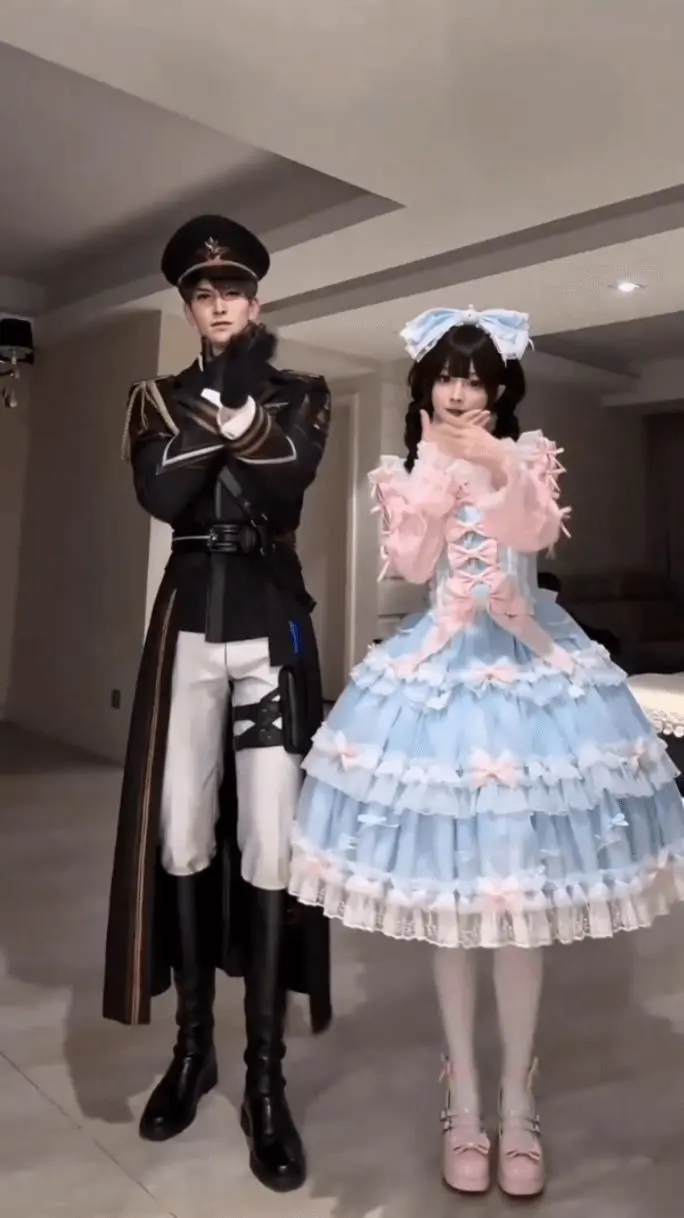
The reference clip establishes the choreography, dancer spacing, and fixed-camera composition.
2. Main Character Reference
The first character image controls the visual identity of the main dancer.
In this example, the most important recognizable features are:
- black twin braids;
- a large red-and-white bow headpiece;
- a layered red-and-white polka-dot Lolita dress;
- lace and bow details;
- white wrist accessories;
- red shoes.
A multi-view character sheet is particularly useful here because the outfit contains many details that need to remain visually coherent while the character moves.
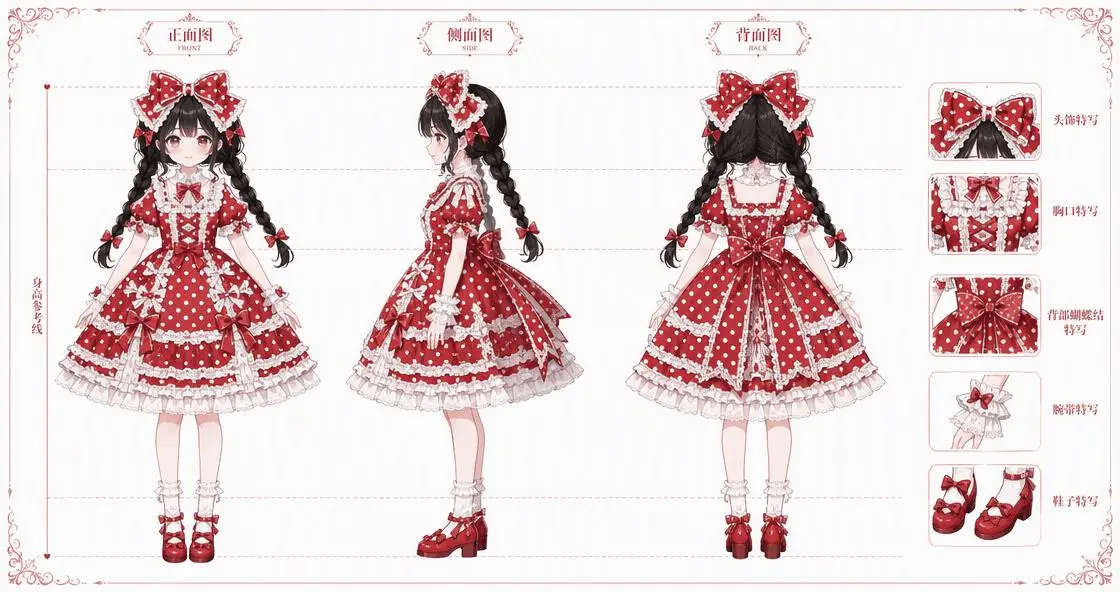
The main character reference defines the dancer's hairstyle, outfit, proportions, and recognizable visual details.
3. Supporting Dancer Reference
The second reference image controls the appearance of the supporting dancer.
For a two-person AI dance video, it helps if the two character references are visually distinct. In this case, the supporting character has a strong purple silhouette that clearly separates him from the red-and-white main dancer.
The prompt can then focus on his role in the choreography:
- stand slightly behind the main dancer;
- remain on the left side of the composition;
- mirror the choreography;
- move confidently without taking over the main position.
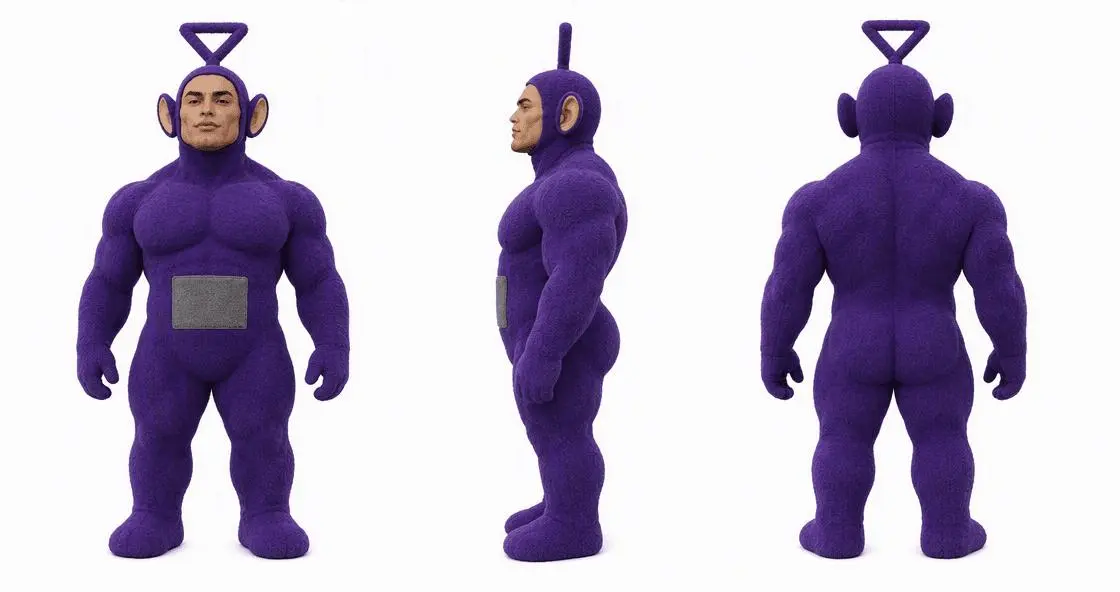
The second character reference gives the supporting dancer a separate, recognizable identity.
Set Up the Reference Materials in MiniMax H3
For this workflow, assign each input a specific job instead of forcing every instruction into the prompt.
Use:
- Reference video: the dance clip;
- Character design reference: the main dancer image and supporting dancer image;
- Prompt: the scene, character roles, action sequence, camera behavior, and quality constraints.
A useful mental model is:
- reference video = how they move
- character images = who they are
- prompt = where it happens and what must stay consistent
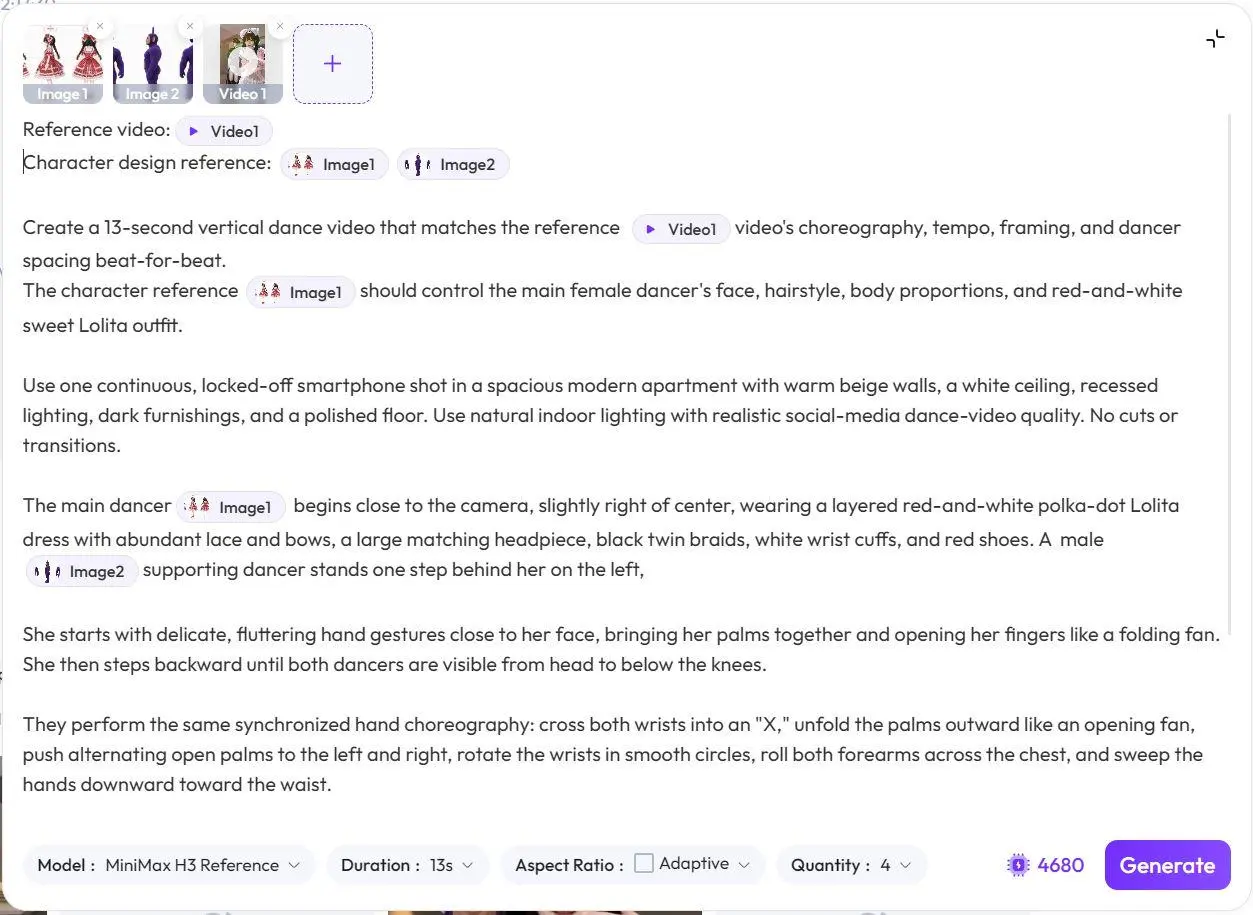
Attach the dance clip as the reference video and the two character sheets as character design references before generating.
Use a Structured Prompt for the AI Dance Video
A vague prompt such as "make these two characters dance together" leaves too many decisions open.
For better control, divide the instruction into five parts:
- overall task;
- scene and camera;
- main character;
- choreography sequence;
- consistency and anatomy constraints.
Use the following prompt as a starting point:
Reference video:@{video1}
Character design reference:@{image1} @{image2}

Create a 13-second vertical dance video that matches the reference @{video1} video's choreography, tempo, framing, and dancer spacing beat-for-beat.
The character reference @{image1} should control the main female dancer's face, hairstyle, body proportions, and red-and-white sweet Lolita outfit.

Use one continuous, locked-off smartphone shot in a spacious modern apartment with warm beige walls, a white ceiling, recessed lighting, dark furnishings, and a polished floor. Use natural indoor lighting with realistic social-media dance-video quality. No cuts or transitions.

The main dancer @{image1} begins close to the camera, slightly right of center, wearing a layered red-and-white polka-dot Lolita dress with abundant lace and bows, a large matching headpiece, black twin braids, white wrist cuffs, and red shoes. A male @{image2} supporting dancer stands one step behind her on the left.

She starts with delicate, fluttering hand gestures close to her face, bringing her palms together and opening her fingers like a folding fan. She then steps backward until both dancers are visible from head to below the knees.

They perform the same synchronized hand choreography: cross both wrists into an "X," unfold the palms outward like an opening fan, push alternating open palms to the left and right, rotate the wrists in smooth circles, roll both forearms across the chest, and sweep the hands downward toward the waist.

Repeat the cross-and-open fan gesture while shifting body weight from side to side with small steps and gentle hip sways.

The male dancer mirrors the choreography slightly behind the main dancer with confident, controlled movements. The main dancer maintains a cute, lively expression and looks toward the camera while her layered skirt bounces and sways naturally.

Finish with both dancers facing forward, one arm curved across the chest and the other lowered near the waist.

Use smooth real-time motion, accurate synchronized hand movements, consistent faces, and believable dress physics. No handheld camera movement, costume changes, duplicated fingers, extra limbs, or warped bodies.
Why This MiniMax H3 Reference Prompt Works
1. Define What the Reference Video Should Control
The first sentence identifies four specific properties:
- choreography;
- tempo;
- framing;
- dancer spacing.
That is much clearer than simply saying "follow this video." It tells the generation which parts of the reference are important to preserve.
2. Give Each Character Reference a Clear Role
The main dancer is explicitly connected to @{image1}, including her face, hairstyle, proportions, and outfit.
The supporting dancer is connected to @{image2} and given a different physical position and choreography role.
This reduces ambiguity between the two character references.
3. Lock the Camera Before Describing the Dance
The prompt specifies:
- one continuous shot;
- locked-off smartphone framing;
- no cuts;
- no transitions.
These constraints keep the video focused on the choreography instead of introducing unnecessary camera changes.
4. Describe Actions in Sequence
Concrete movement instructions are more useful than abstract descriptions.
For example:
- cross both wrists into an "X";
- open the palms outward;
- push alternating palms left and right;
- rotate the wrists;
- roll the forearms across the chest;
- sweep the hands toward the waist.
This gives the model an ordered movement path to follow while the reference video supplies the timing.
Generate the Video and Review the Result
Once the reference video, two character images, and prompt are in place, generate the clip and compare the result against the original reference.
You can try it directly using the tool on the right.
Review these five areas before deciding whether the generation is ready.
1. Check the Two-Dancer Positioning
The intended composition is:
- the main dancer begins closer to the camera and slightly right of center;
- the supporting dancer starts one step behind her on the left;
- both dancers remain visible after the main dancer steps backward.
If the supporting dancer disappears or moves to the wrong side, strengthen the spatial instructions instead of rewriting the entire prompt.
2. Inspect the Hand Choreography
Hand-heavy dance videos are especially sensitive to visual errors.
Look for:
- merged or duplicated fingers;
- distorted wrists;
- incomplete cross-and-open gestures;
- mismatched left-right movements;
- synchronization errors between the two dancers.
Focus first on the movements that define the choreography rather than minor differences that do not affect the overall dance.
3. Check Face and Hairstyle Consistency
For the main dancer, verify that the generated video keeps the same recognizable identity across the clip.
Pay attention to:
- facial consistency;
- black twin braids;
- the large bow headpiece;
- stable hair and accessory placement while the character moves.
4. Inspect the Lolita Outfit in Motion
The layered dress introduces another consistency challenge because it contains many overlapping elements.
Check whether the output retains:
- the red-and-white color identity;
- the large head bow;
- the layered skirt shape;
- visible lace and bow details;
- plausible skirt movement during steps and hip shifts.
The goal is not frame-by-frame perfection, but a costume that remains recognizable and physically believable throughout the dance.
5. Check the Final Pose
The clip should end deliberately rather than simply running out of time.
Both dancers should:
- face the camera;
- settle into the intended final position;
- finish the arm movement cleanly;
- remain visually stable at the end of the shot.
| Reference choreography | MiniMax H3 result |
|---|---|
| 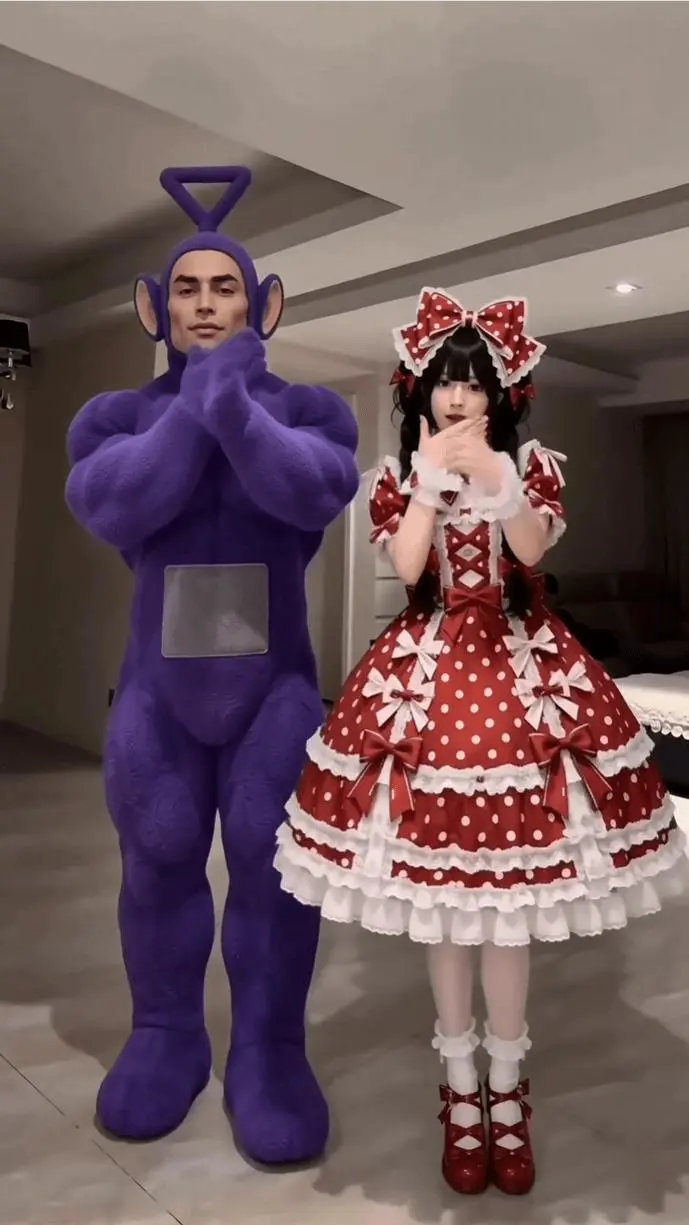 |
| Reference movement and dancer spacing. | Generated characters following the same dance structure. |
What to Adjust If the First Generation Is Unstable
If the first result needs another pass, change one category at a time.
Fix 1: The Dance Is Similar but the Choreography Is Wrong
Strengthen the action sequence.
Instead of adding more aesthetic descriptions, identify the specific gestures that are missing or occurring in the wrong order.
Fix 2: The Two Characters Get Mixed Up
Reinforce the reference assignment:
@{image1}controls the main female dancer;@{image2}controls the supporting male dancer;- the supporting dancer stays behind the main dancer;
- the supporting dancer mirrors the choreography without taking the lead position.
Fix 3: The Camera Starts Moving
Repeat the camera restrictions:
one continuous shot
locked-off smartphone shot
no cuts or transitions
This keeps the composition closer to a social-media dance recording rather than a multi-shot sequence.
Fix 4: Hands or Bodies Become Distorted
Keep concise negative constraints at the end of the prompt:
No duplicated fingers, extra limbs, warped bodies, or costume changes.
These instructions cannot guarantee perfect anatomy, but they make the intended quality boundary explicit.
Turn a Reference Dance into Your Own Character Performance
The strongest part of this MiniMax H3 AI dance workflow is the division of control: the reference video supplies the choreography, the character sheets supply the visual identities, and the prompt connects them inside one controlled scene.
Once that relationship is clear, you can reuse the same structure for different character pairs, costumes, and short-form dance concepts without rebuilding the choreography from scratch. Try the MiniMax H3 workflow on WeShop and start with one short reference clip before moving into more complex scenes.