












How to Use MiniMax-H3 to Turn One Product Image into a Viral Sales Video
Learn how to use MiniMax-H3 in WeShop AI to turn a static product image and a viral reference video into a short-form ecommerce sales video for TikTok, Instagram Reels, Shopify, and other channels.
Short-form product videos can generate massive reach and sales, but recreating a successful video is rarely easy. You may find a competitor’s viral TikTok, Douyin, or Xiaohongshu video with strong pacing, attractive camera movement, and effective product presentation, yet still be unable to reproduce it.
The traditional production process requires a model, a filming location, shot planning, camera work, editing, and repeated revisions. For smaller ecommerce businesses, producing enough videos for continuous testing can quickly become expensive.
With MiniMax-H3, the workflow becomes much simpler. You can upload one static product or model image, add one viral reference video, and ask AI to transfer the reference video’s rhythm, shot structure, composition, and selling style to your own product.
This guide explains how to use MiniMax-H3 in WeShop AI to turn two simple assets into a new short-form product video suitable for TikTok, Douyin, Instagram Reels, Shopify campaigns, and other ecommerce channels.
|
Why MiniMax-H3 Matters for Ecommerce Video Production
The biggest challenge in short-form ecommerce is not finding product ideas. It is producing enough high-quality content to test those ideas.
A merchant may already know which competitor videos are performing well but still face several production barriers:
- No suitable on-camera model
- Limited filming and directing experience
- Weak editing rhythm
- High production costs
- Slow creative testing
- Difficulty recreating complex camera movements
- Insufficient content for frequent social media publishing
MiniMax-H3 helps reduce these barriers by using reference-based AI video generation.
Instead of asking AI to create arbitrary motion, you provide a successful video as a structural reference. The model can then use that reference to understand how the subject should move, how the shots should be framed, and how the overall video should feel.
This makes MiniMax-H3 particularly useful for ecommerce brands, Shopify merchants, social media creators, photographers, creative teams, and performance marketing teams that need to create and test product videos at a lower cost.
What You Need Before Using MiniMax-H3
Prepare the following assets before starting the workflow.
| Asset | Purpose | Recommendation |
|---|---|---|
| WeShop AI account | Access the video generation tool | Log in before preparing the project |
| Product or model image | Provides the product and visual subject | Use a clear, high-resolution image |
| Viral reference video | Provides motion, pacing, and shot structure | Choose a video with clear movement |
| Prompt | Explains what elements should be transferred | Mention rhythm, composition, shots, and selling style |
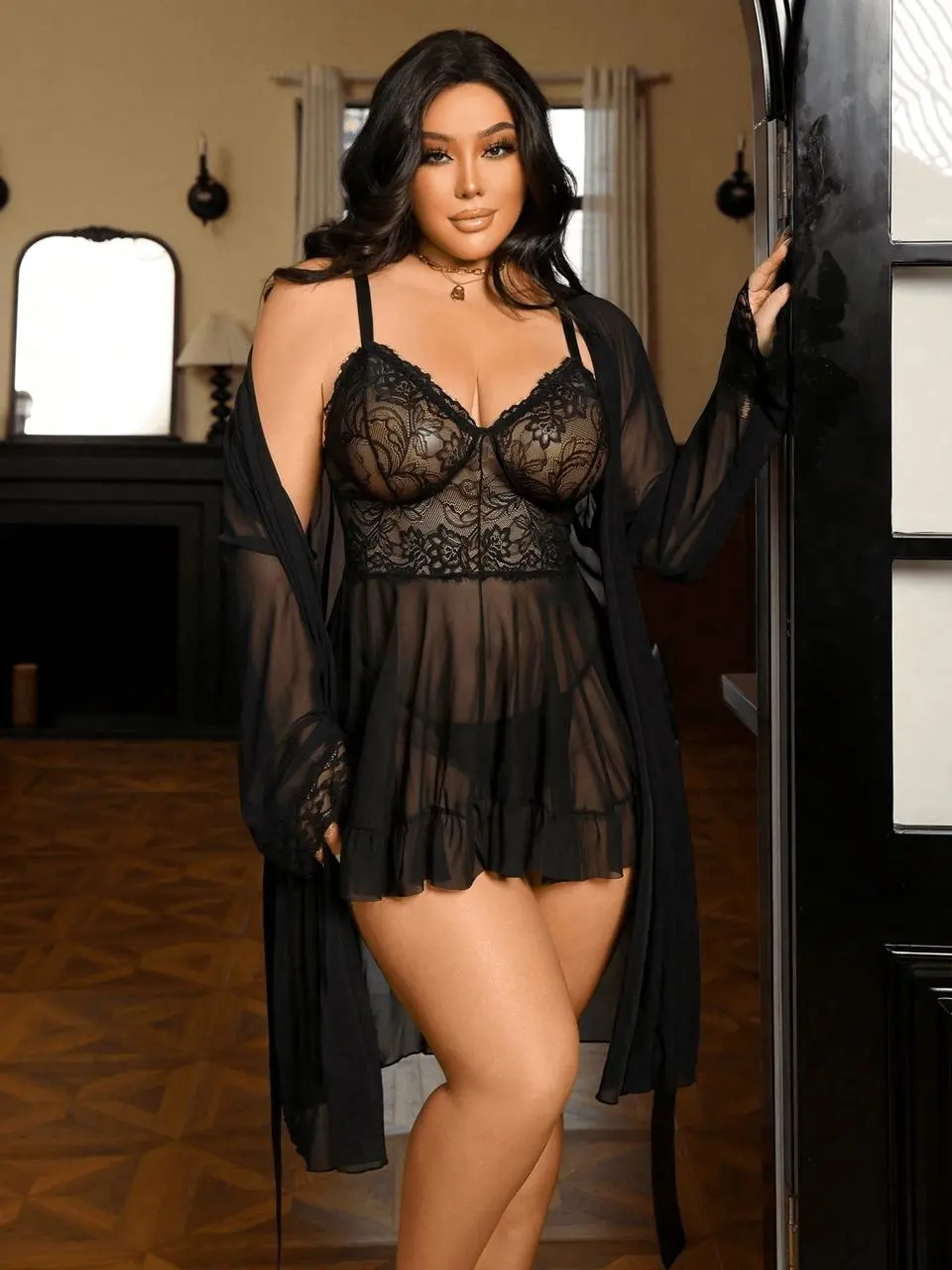
For this tutorial, the starting image is a fashion model wearing a black lace loungewear set. The reference asset is a short product-selling video with clear body movement, controlled framing, and strong commercial presentation.
The goal is to use MiniMax-H3 to transfer the successful video structure onto the static fashion image.
What Can You Create with MiniMax-H3?
A single MiniMax-H3 workflow can produce content for several commercial purposes:
- TikTok product videos
- Douyin selling videos
- Instagram Reels
- Shopify product campaigns
- Social media advertisements
- Fashion lookbook clips
- New-product launch videos
- Short product demonstrations
- Creative testing variations
- Ecommerce landing-page videos
The final result is not simply an animated product image. When the source assets are compatible, the output can inherit important characteristics from the reference video, including its pacing, composition, motion direction, and selling energy.
Step-by-Step MiniMax-H3 Tutorial
Step 1: Upload the Product Image and Reference Video
Open the WeShop AI MiniMax-H3 tool and locate the material upload area.
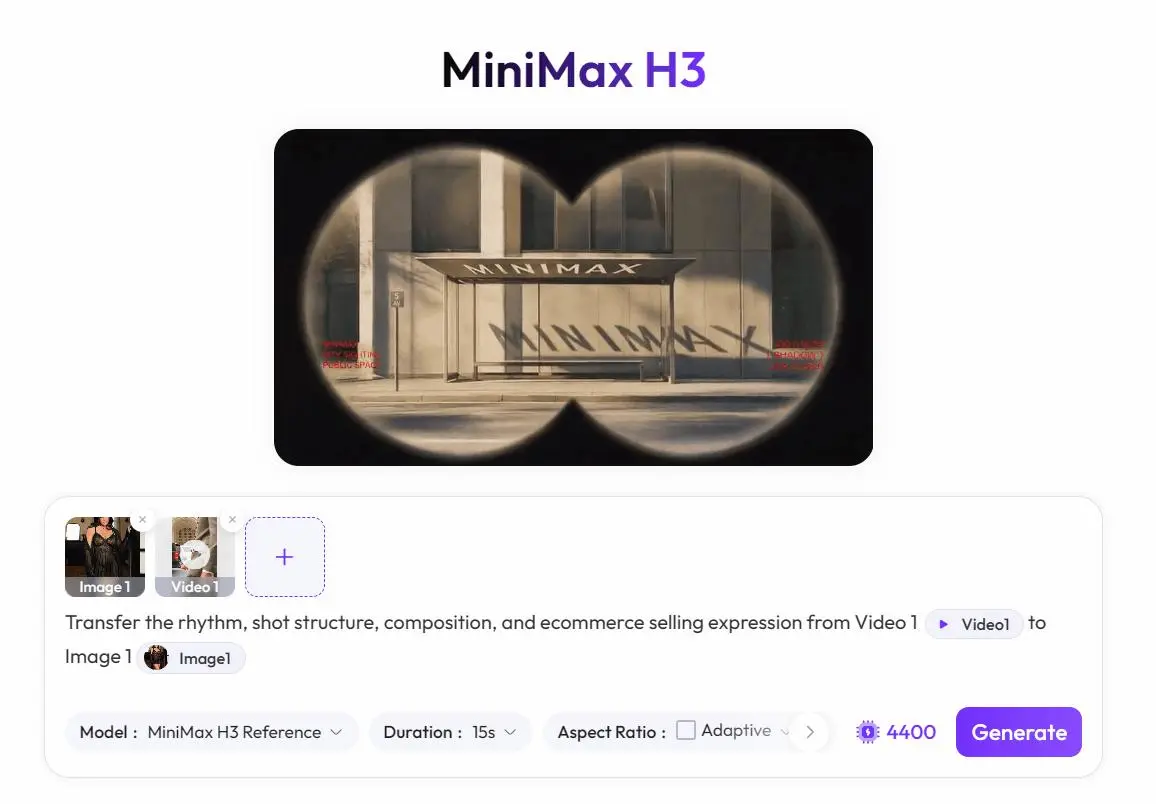
Upload your static product or model image first. The system will identify this asset as Image 1.
Then upload the viral reference video. The system will identify this asset as Video 1.
These two files perform different roles:
- Image 1 provides the product, model, clothing, and visual identity.
- Video 1 provides the movement, rhythm, composition, and video structure.
For the best results, the image and reference video should have compatible subjects and poses.
For example, a front-facing model image works better with a reference video in which the subject also faces the camera. A back-view product image may not work well with a reference video focused on front-facing expressions or lip-syncing.
Step 2: Enter the Core MiniMax-H3 Prompt
The prompt is the most important part of the workflow because it tells MiniMax-H3 exactly what to extract from the reference video.
Use this prompt:
Transfer the rhythm, shot structure, composition, and ecommerce selling expression from Video 1 to Image 1.
A more detailed version is:
Based on the viral reference video Video 1, transfer its pacing, shot structure, camera composition, subject movement, and ecommerce selling style onto Image 1. Preserve the product design, clothing details, model identity, and overall visual consistency from Image 1.
This instruction defines the key elements that should be transferred:
- Video rhythm
- Shot structure
- Camera composition
- Subject movement
- Selling expression
- Commercial presentation
Without these constraints, the AI may create random movement that looks visually interesting but does not retain the commercial strengths of the reference video.
Why This Prompt Works
A viral ecommerce video is usually successful because several elements work together. The model’s appearance alone is not enough.
The video may use:
- A strong opening pose
- Fast but readable movement
- Close-up product details
- Controlled camera distance
- Clear transitions
- A confident selling attitude
- A rhythm that maintains attention
By identifying these elements in the prompt, MiniMax-H3 receives a clearer generation objective.
Step 3: Configure the MiniMax-H3 Settings
After uploading the assets and entering the prompt, configure the video generation parameters.
Use the following settings as a starting point:
| Setting | Recommended value | Purpose |
|---|---|---|
| Model | MiniMax H3 Reference | Enables reference-based video generation |
| Duration | 15 seconds | Balances product display and visual stability |
| Aspect ratio | Adaptive | Follows the most suitable source proportions |
| Quantity | 1 | Creates one initial test result |
Model: MiniMax H3 Reference
Select MiniMax H3 Reference from the model menu.
This option is designed for workflows where the uploaded video controls the motion or visual structure of the output. It is more suitable than a general text-to-video model when you need to reproduce an existing video pattern.
Duration: 15 Seconds
Choose a duration of approximately 15 seconds.
This length is useful for ecommerce because it provides enough time to show the product while remaining short enough for social media viewing habits.
A 15-second video can include:
- An immediate visual hook
- One or two clear product poses
- A detail-focused motion
- A short ending movement or transition
Longer AI videos can be more difficult to keep visually consistent. Problems such as body distortion, clothing changes, identity drift, or illogical movement may become more noticeable later in the clip.
Aspect Ratio: Adaptive
Select Adaptive if you want the system to determine the most suitable ratio based on the uploaded image and reference video.
Most short-form selling videos use a vertical 9:16 format. However, Adaptive mode can help when the source materials have different dimensions.
When creating content specifically for TikTok, Douyin, Instagram Reels, or YouTube Shorts, confirm that the final framing works well in a vertical feed.
Quantity: 1
Generate one video for the first test.
After confirming that the reference video and prompt produce a useful direction, you can create additional variations using different images, references, or prompts.
Step 4: Generate the Video
Review the uploaded assets, prompt, and settings.
Then click Generate.
The system will process the product image and reference video together. The resulting video should preserve the main visual identity from Image 1 while borrowing the movement and commercial structure from Video 1.
Once the result is ready, review the full video rather than judging only the first frame.
Check:
- Whether the product remains recognizable
- Whether clothing details remain consistent
- Whether the model’s face stays stable
- Whether the body movement looks natural
- Whether the camera movement follows the reference
- Whether the output retains the selling energy
- Whether the video is suitable for the target platform
How to Choose the Best Reference Video for MiniMax-H3
The quality of the reference video has a major impact on the final result.
Do not choose a video only because it has many views. Choose a video that provides a structure MiniMax-H3 can realistically apply to your source image.
A good reference video usually has:
- Clear subject movement
- A visible product or outfit
- A stable main subject
- Readable camera motion
- Strong framing
- Controlled transitions
- A consistent environment
- A clear commercial focus
Avoid reference videos with:
- Extreme camera shaking
- Too many rapid cuts
- Complicated scene changes
- Multiple people entering and leaving
- Frequent outfit changes
- Heavy visual effects
- Severe body occlusion
- Motions that conflict with the source image
A simple but effective reference often produces a better commercial result than an extremely complicated viral edit.
How to Prepare a Better Source Image
Your source image must contain enough visual information for MiniMax-H3 to generate believable motion.
Use an image with:
- High resolution
- Clear facial features
- Visible clothing structure
- Natural body proportions
- Clean lighting
- A readable pose
- Minimal obstruction
- A subject large enough within the frame
For fashion videos, the clothing should be clearly separated from the background. Avoid images where the garment blends into dark shadows or is covered by hands, bags, hair, or other objects.
The source pose should also be compatible with the reference motion.
For example:
- Use a standing image for a standing or walking reference.
- Use a seated image for a seated lifestyle reference.
- Use a front-facing image for a front-facing presentation video.
- Use a full-body image when the reference contains full-body movement.
The closer the structural compatibility between Image 1 and Video 1, the easier it is for MiniMax-H3 to generate coherent motion.
Frequently Asked Questions
Why Does the Face or Clothing Become Distorted?
Distortion usually occurs when the source image and reference video contain conflicting visual information.
Common causes include:
- Different facial directions
- Incompatible body poses
- Low-resolution source images
- Hidden arms or legs
- Complex clothing details
- Extreme movement in the reference
- Large camera-angle changes
- Too many rapid transitions
Try using a simpler reference video or a source image with a pose that more closely matches the person in the reference.
You can also strengthen the prompt:
Preserve the exact face, body proportions, garment structure, fabric texture, color, lace details, and product design from Image 1 throughout the entire video. Prevent identity drift, clothing changes, body distortion, and duplicated limbs.
Why Is 15 Seconds Recommended?
Fifteen seconds is a useful balance between storytelling and stability.
It is long enough to present the product but short enough to reduce the risk of visual inconsistency. It also fits naturally into short-form social media environments where users make fast viewing decisions.
For initial testing, a shorter and more stable video is usually more valuable than a longer video with noticeable errors.
Can MiniMax-H3 Reproduce a Viral Video Exactly?
The goal should not be to create an identical copy.
Use the reference video to guide:
- Rhythm
- Shot order
- Motion style
- Framing
- Commercial expression
Your final output should still use your own product, source image, branding, and creative direction.
Instead of treating MiniMax-H3 as a duplication tool, treat it as a way to study and reuse successful content structures.
Can I Use the Same Reference Video for Multiple Products?
Yes.
Once you find a reference video structure that works well, you can test it with several compatible product images.
For example, one fashion posing video could be adapted to:
- Different dresses
- Different loungewear sets
- Seasonal color variants
- Multiple models
- Different campaign backgrounds
This is one of the most valuable benefits of the MiniMax-H3 workflow. A single successful content structure can support multiple creative variations.
MiniMax-H3 Use Cases for Ecommerce Teams
Shopify Merchants
Shopify brands can use MiniMax-H3 to turn product photography into short videos for product launches, homepage banners, paid social campaigns, and organic content.
Instead of arranging a new shoot for every product, the merchant can reuse strong reference structures across multiple SKUs.
TikTok and Instagram Creators
Creators can use one static fashion image to produce a motion-based video that feels more native to short-form platforms.
The generated result can be used as:
- A TikTok product showcase
- An Instagram Reel
- A Story advertisement
- A hook for a longer creator video
- A visual test before filming a real version
Advertising Teams
Ad teams can create multiple motion concepts from existing product assets and compare different reference styles.
For example, the same product image could be tested with:
- A fast fashion transition
- A relaxed lifestyle presentation
- A close-up product demonstration
- A confident model walk
- A direct-response selling format
This makes MiniMax-H3 useful for rapid creative experimentation.
Creative Teams and Photographers
Creative teams can use the workflow for concept development and pre-production.
Before spending money on models, locations, and filming, teams can generate sample videos to evaluate:
- Motion direction
- Shot rhythm
- Pose suitability
- Product visibility
- Platform framing
- Overall campaign style
Turn Viral Video Patterns into a Repeatable Content System
Previously, recreating a successful product video required several production stages:
- Find a suitable benchmark.
- Analyze the script and shots.
- Hire or arrange a model.
- Prepare the location.
- Film multiple takes.
- Edit the footage.
- Add music, captions, and transitions.
- Export and review the final asset.
With MiniMax-H3, the early production process can be reduced to:
- Upload a product or model image.
- Upload a strong reference video.
- Write one clear transfer prompt.
- Select the generation settings.
- Generate and review the result.
This does not remove the need for creative judgment. You still need to select a suitable reference, prepare a high-quality source image, and review the output carefully.
However, it significantly lowers the cost of producing new concepts and allows ecommerce teams to test more ideas before investing in traditional production.
Create Your First Product Video with MiniMax-H3
If you already have a product image and a viral reference clip, you have everything needed to begin.
Open WeShop AI MiniMax-H3, upload Image 1 and Video 1, and enter the following instruction:
Based on the viral reference video Video 1, transfer its pacing, shot structure, camera composition, subject movement, and ecommerce selling style onto Image 1. Preserve the product design, clothing details, model identity, and visual consistency from Image 1.
Select MiniMax H3 Reference, set the duration to approximately 15 seconds, choose Adaptive aspect ratio, and generate your first version.
A single product image no longer has to remain static. With the right reference and prompt, MiniMax-H3 can turn it into a reusable short-form selling asset for social media, ecommerce campaigns, and creative testing.