












GPT Image 2.5 AI Image Generator: Create an Instagram Explosion Effect with Text to Image
Create a surreal Instagram-style explosion effect with the GPT Image 2.5 AI image generator using a copy-ready text-to-image fashion prompt.
GPT Image 2.5 AI Image Generator: Create an Instagram Explosion Effect with Text to Image
A woman sits calmly on a picnic blanket and takes a bite of food while an enormous orange fireball fills the sky behind her.
The foreground resembles a saturated fashion campaign. The background looks like the climax of a disaster movie. A cobalt-blue outfit, red-and-white gingham, colorful candy, and orange flames turn that contradiction into a surreal Instagram-style photo effect.
This image does not require separately photographing the model, picnic, and cinematic background. A structured text-to-image prompt can define the subject, wardrobe, action, props, explosion effect, color relationship, and advertising style in one generation.
The Final Text-to-Image Result
| Generated Instagram-Style Explosion Effect |
|---|
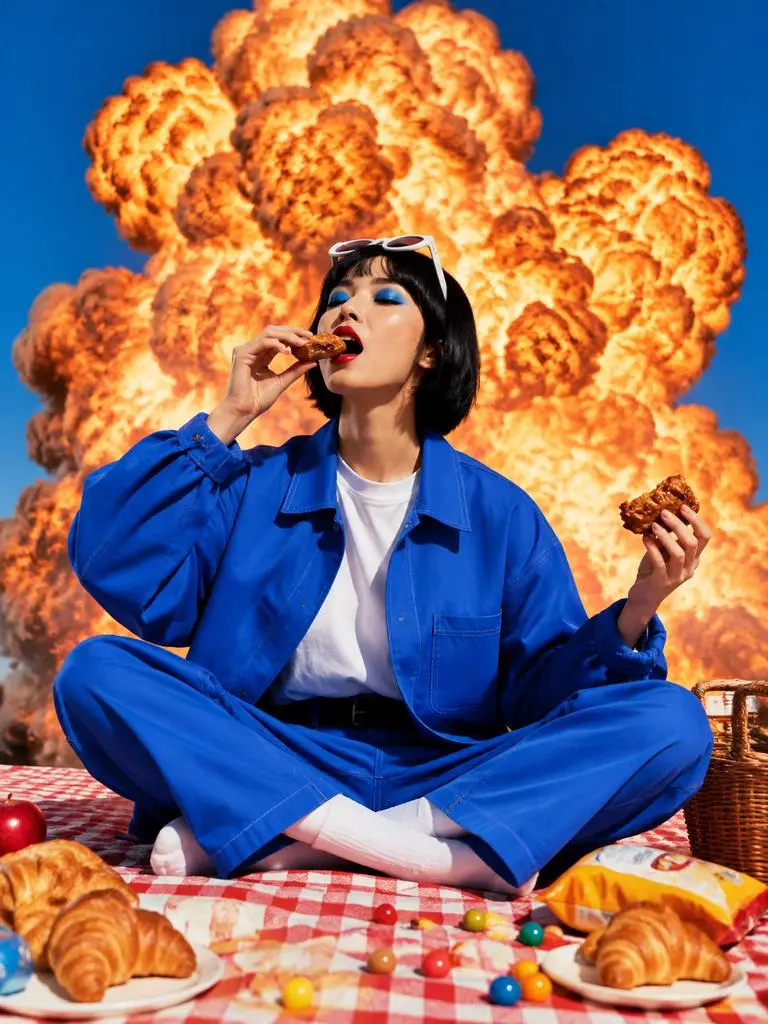 |
| The text-to-image result combines a cobalt-blue fashion look, a colorful picnic scene, and a fictional cinematic fireball for a surreal Instagram-style effect. |
The generated image contains several clear visual layers:
- A short-haired adult model wearing a cobalt-blue outfit
- A mid-bite action that creates a candid moment
- Croissants, snacks, and colorful candy in the foreground
- A red-and-white gingham picnic blanket
- A saturated clear blue sky
- An enormous fictional orange fireball behind the subject
- Hard sunlight, centered framing, and glossy campaign styling
Why a Basic Text-to-Image Prompt Is Not Enough
A short prompt such as the following communicates the general idea:
A woman having a picnic with an explosion behind her.
However, it leaves the GPT Image 2.5 AI image generator to decide:
- What the model looks like
- What she is wearing
- What she is doing
- Where the explosion appears
- How large the fireball should be
- Which picnic props are visible
- Whether the image resembles news, cinema, or fashion advertising
- Which colors and composition organize the scene
The more decisions the model must make independently, the less predictable the result becomes.
A more controlled Instagram photo effect separates the prompt into eight parts:
- Visual contrast
- Subject
- Wardrobe
- Makeup
- Pose and action
- Foreground props
- Explosion background
- Lighting, color, composition, and style
Step 1: Define the Surreal Contrast
The central idea is not simply “add an explosion.”
The image combines two situations with completely different emotional tones.
The foreground is a calm picnic:
- The model sits cross-legged.
- She casually eats a piece of food.
- Croissants, snacks, and candy surround her.
- The gingham blanket creates an ordinary outdoor setting.
The background is deliberately excessive:
- A huge fireball rises directly behind the model.
- The orange cloud occupies much of the sky.
- Its scale resembles a cinematic special effect rather than a realistic event.
The prompt describes this relationship as:
Creating a deliberately absurd contrast with the calm picnic scene.
This tells the AI image generator that the contradiction is intentional. It should preserve the calm fashion pose instead of trying to make the model react to the fictional explosion.
Step 2: Use Wardrobe Color to Hold the Visual Center
A complicated fireball background can easily overwhelm the subject.
The prompt gives the model a saturated cobalt-blue outfit:
- Oversized workwear-style jacket
- Matching loose trousers
- Clean white crew-neck shirt
- White socks
- Futuristic white sunglasses
The blue wardrobe connects the model to the sky, while the white shirt, socks, and sunglasses create small areas of contrast.
The orange fireball then acts as the complementary color behind the model. This blue-orange relationship keeps the subject readable even when the background is visually intense.
Step 3: Match the Makeup to the Pop-Art Palette
The makeup supports the same color system:
Vivid electric-blue eyeshadow and bold red lipstick.
The blue eyeshadow connects the face to the clothing and sky. The red lipstick relates to the gingham blanket and warm explosion colors.
A specific color description is more useful than a general phrase such as “editorial makeup.” It gives the text-to-image model a clearer visual relationship to follow.
Step 4: Describe an Exact Action Moment
A static seated pose could make the result feel like a conventional fashion catalog image.
Instead, the model is caught in the middle of an action:
- She sits cross-legged.
- One hand brings food toward her open mouth.
- The other hand holds a second piece of food.
- Her body remains calm and composed.
The prompt uses:
She is caught mid-bite holding a piece of fried chicken or pastry near her open mouth, while holding another piece of food in the opposite hand.
“Caught mid-bite” defines a specific moment. It is more visually useful than simply asking the model to hold food.
The casual action also strengthens the surreal joke: the subject continues her picnic even while a giant fireball fills the background.
Step 5: Build Foreground Depth with Picnic Props
Without foreground objects, the result could look like a portrait pasted onto a dramatic background.
The prompt adds:
- Croissants
- Snacks
- Colorful candy
These elements serve three practical purposes:
- They establish the picnic setting.
- They create depth across the bottom of the composition.
- Their red, yellow, and orange details connect the foreground to the fireball.
The props should appear casually scattered without covering the model’s hands, clothing, or cross-legged pose.
Step 6: Control the Explosion’s Position and Scale
A vague instruction such as “an explosion in the background” may produce a small or distant effect.
The complete prompt is more precise:
Directly behind the subject is an enormous dramatic orange fireball explosion cloud filling much of the sky.
This controls three variables:
- Position: directly behind the subject
- Scale: enormous
- Image coverage: filling much of the sky
The fireball is a fictional cinematic visual effect. It is not presented as documentary imagery or a real-world event.
The model’s head, face, arms, and blue outfit should remain clearly separated from the orange cloud.
Step 7: Lock the Lighting, Colors, and Campaign Style
The final line defines how the image should be photographed and organized:
Bright hard sunlight, crisp blue-orange complementary colors, symmetrical centered composition, surreal advertising photography, playful cinematic tension, high saturation, sharp detail, glossy fashion campaign aesthetic.
Each phrase has a specific purpose.
| Prompt element | Visual function |
|---|---|
| Bright hard sunlight | Creates crisp shadows and a bold commercial look |
| Blue-orange complementary colors | Connects the sky and outfit to the orange fireball |
| Symmetrical centered composition | Keeps the complicated scene stable and readable |
| Surreal advertising photography | Prevents the result from looking like disaster news |
| Playful cinematic tension | Maintains an absurd, stylized mood |
| High saturation | Strengthens the Instagram-style visual impact |
| Sharp detail | Preserves clothing, makeup, food, and cloud textures |
| Glossy fashion campaign aesthetic | Moves the image toward editorial advertising |
Step 8: Copy the Complete Text-to-Image Prompt
Use the following prompt with the GPT Image 2.5 AI image generator.
Create a surreal pop-art fashion photograph under a clear saturated blue sky.

A woman with a sleek short black bob sits cross-legged on a red-and-white gingham picnic blanket. She wears an oversized bright cobalt-blue workwear-style jacket and matching loose trousers over a clean white crew-neck shirt, paired with white socks and futuristic white sunglasses resting on top of her head.

Her makeup is graphic and editorial, with vivid electric-blue eyeshadow and bold red lipstick. She is caught mid-bite holding a piece of fried chicken or pastry near her open mouth, while holding another piece of food in the opposite hand.

Croissants, snacks and colorful candy are scattered casually across the picnic blanket in front of her.

Directly behind the subject is an enormous dramatic orange fireball explosion cloud filling much of the sky, creating a deliberately absurd contrast with the calm picnic scene.

Bright hard sunlight, crisp blue-orange complementary colors, symmetrical centered composition, surreal advertising photography, playful cinematic tension, high saturation, sharp detail, glossy fashion campaign aesthetic.
Use a vertical composition so the frame can include the model’s full seated pose, foreground food, and the complete fireball.
Open WeShop AI GPT Image to check the current availability of GPT Image 2.5. At the time of writing, its public page labels the feature as coming soon, so access may vary.
You can try it directly using the tool on the right.
Turn a Text Prompt into an Instagram-Style Fashion Effect
The fireball creates the initial surprise, but it is not the only reason the image works.
The calm action contrasts with the dramatic background. The cobalt outfit contrasts with the orange cloud. The centered composition organizes the complex scene, while the picnic props give the surreal image a readable story.
By defining the subject, action, foreground, effect, color system, and photography style separately, a GPT Image 2.5 text-to-image prompt can turn one absurd idea into a controlled Instagram-style fashion visual.
Create a text-to-image fashion concept with WeShop AI GPT Image