












Kling 4.0 Jensen Huang Dance: Recreate the CeilingfanCEO Look
Create a Jensen Huang ceiling-fan dance parody with Kling 4.0 Reference. Reuse the CeilingfanCEO-style video, a portrait, and the exact case prompt.
The room spins, the ceiling light stays overhead, and a silver-haired performer in a black leather jacket leans toward the camera before returning in colorful glasses. This Jensen Huang dance edit was made with Kling 4.0 Reference, using one portrait and an actual ceiling-fan dance video. The trick is to replace the performer while keeping the rotating shot and the recognizable sequence of gestures.
This is an AI-generated parody, not footage of Jensen Huang performing or endorsing the video.
AI-generated parody
Keep the CeilingfanCEO camera move, change the performer
The distinctive ceiling-fan dance effect comes from the moving viewpoint: furniture sweeps around the background, the performer passes sideways through the shot, and the overhead light remains a visual anchor. A generic “make Jensen Huang dance” prompt does not specify that sequence.
For a CeilingfanCEO-style edit, give Kling a real motion reference and tell it which parts to retain. CeilingfanCEO's public creator profile provides the creator's official social links. The example here uses the dance clip supplied in the WeShop case; the generated parody does not imply participation or approval by the creator.
The two inputs have separate jobs:
| Reference | Use it for | Keep out of the result |
|---|---|---|
@Image1: Jensen Huang portrait | Face, swept-back silver-gray hair, rectangular glasses, black shirt and leather jacket | Black photo background, stage lighting and headset microphone |
@Video1: solo ceiling-fan dance | Body turns, gestures, rotating camera, room, timing and late glasses reveal | Original performer's face, brown hair and red printed sweatshirt |
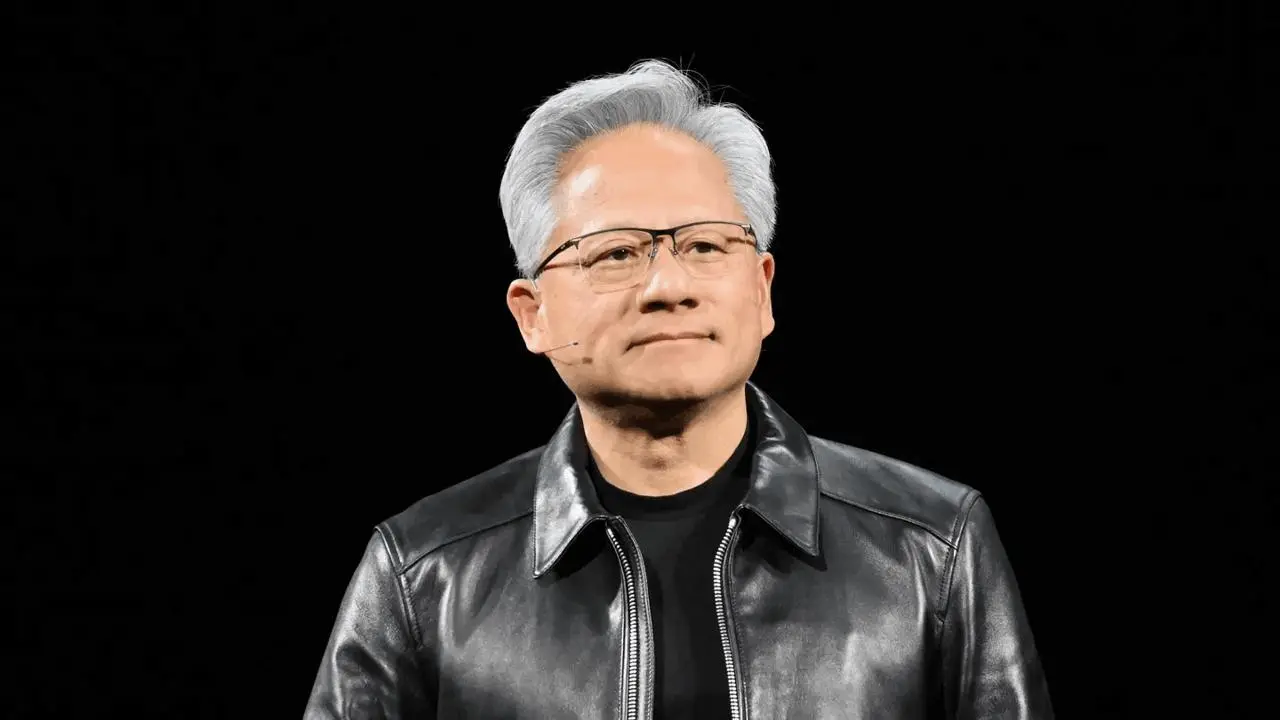
The portrait is not a first frame for a new static scene. It guides the identity and wardrobe inside the uploaded video's movement. Keep both assets attached; a written description of a spinning room is not the same input as the actual reference clip.
Load the portrait and rotating dance clip in Kling
Open Kling on WeShop and choose Kling 4.0 Reference. Upload the portrait as Image 1 and the dance clip as Video 1, then check that the prompt's @Image1 and @Video1 labels refer to those assets.
Use the recorded settings from this completed case:
| Setting | Case value |
|---|---|
| Model | Kling 4.0 Reference |
| Duration | 15s |
| Resolution | 1080p |
| Aspect ratio | 9:16 |
| Quantity | 1 |
| Inputs | One identity image and one motion-reference video |
The WeShop Kling 4.0 model page explains its Reference input route. For this workflow, select the model explicitly and check the current credit quote before generating. The settings above describe this case, rather than guaranteeing an identical output on another run.
Use a prompt that separates identity from camera motion
The original prompt does three useful things. First, it specifies one replacement performer and names the portrait details to carry across. Second, it excludes details that belong only to the source photo or original dancer. Third, it describes the movement and camera as a continuous sequence, including the temporary colored-glasses prop near the end.
Here is the exact submitted prompt:
Edit @Video1 by replacing only its single male performer with Jensen Huang as shown in @Image1. Use @Image1 as the visual identity and wardrobe reference: match the adult man's facial structure, mature facial lines, skin tone, swept-back silver-gray hair, rectangular eyeglasses, black crew-neck shirt and black leather jacket. Keep the same identity, hair, age and jacket from every angle, including profile, back view and rapid turns. Do not retain the source performer's brown hair, facial features or red printed sweatshirt. Do not copy the photo's black studio background or stage lighting. Omit the stage headset microphone.
Use @Video1 as the exact motion, timing, room and camera reference. Reproduce the full 15-second performance beat for beat: body turns, head tilts, lip movements, hand-to-chest gesture, leaning toward the camera, sideways passes, and final playful pose. Preserve the continuous ceiling-fan-mounted rotating camera path and speed, the bright ceiling light at the top, room layout, furniture, warm indoor illumination and vertical framing. Keep the performer at the same position and scale in the shot. In the late glasses reveal, use the source's large pink-purple tinted glasses as a temporary prop over his eyes, then preserve their timing and placement; keep his identity stable underneath. Make the black leather jacket follow the original body movement naturally, with realistic folds and reflections. Photorealistic appearance, natural expressions, consistent face through occlusion, realistic anatomy and hand contact. No extra people, duplicate limbs, cuts, scene changes, added text, corporate logos, animation or special effects. Keep the source soundtrack and synchronize the unchanged dance to it.
The prompt requests the source soundtrack and synchronized movement. Those lines are instructions, not independently verified audio results. Preview the generated audio and lip movement separately before sharing; this tutorial's visual comparison does not establish exact soundtrack preservation or accurate lip sync.
Compare turns, chest gestures and the glasses reveal
Dance and camera reference
Generated parody
In this result, the red sweatshirt is replaced with a black leather jacket, and the portrait guides the replacement face, silver hair and glasses. The living-room setting and broad rotating-camera sequence remain recognizable. The performer turns sideways, brings a hand to the chest, approaches the camera and appears in pink-purple glasses toward the end.
Use those events to judge your own output instead of approving it from its cover image:
| Moment to check | What should carry over |
|---|---|
| Opening movement | The performer rises into view within the same rotating-room setup |
| Side and back views | Silver hair and jacket remain plausible as the face leaves view |
| Hand-to-chest gesture | Hand placement follows the reference without merged fingers or arms |
| Close approach | Face, glasses and jacket remain recognizable at the larger scale |
| Late glasses reveal | Colored glasses appear as a timed prop, not as the permanent identity reference |
The comparison supports a recognizable recreation of the sequence. It does not demonstrate perfect likeness from every angle, identical camera geometry or flawless anatomy. Pay particular attention to rapid turns and the moment glasses cover the eyes.
Fix the reference role that went wrong
If the black portrait background replaces the room, clarify that Image 1 supplies identity and clothing only, while Video 1 supplies the room and camera. If the red sweatshirt survives, keep the clothing replacement explicit rather than requesting only a face change.
If the room stops rotating, confirm that Video 1 is attached and that its camera path is included in the instruction. If colored glasses appear too early, describe them as a temporary prop during the late reveal. These are refinement directions; inspect the next generation rather than assuming a longer prompt guarantees the fix.
For another portrait-guided dance workflow, see the Kling 4.0 Can I Ride Dance fan edit, which assigns five identities to a group dance instead of replacing this single performer.
Reuse the Jensen Huang ceiling-fan dance setup
Start with the attached portrait and rotating dance clip, keep the two reference roles separate, and review the full 15-second result. When replacing the inputs, use material you have permission to reuse and identify the output as an AI parody when sharing it. You can recreate the camera effect through the video reference without building a physical ceiling-fan filming setup.
You can try it directly using the tool on the right.