









Create a Reusable Character Asset Set with Seedream 5.5
Create a coordinated terracotta character asset sheet with Seedream 5.5. Export a real transparent PNG and separate the figures for reuse.
Four characters can belong to the same visual world without sharing the same silhouette. This Seedream 5.5 asset sheet pairs terracotta bodies, sage leaves and bead-like eyes with four distinct garden-creature shapes, leaving transparent space between them for reuse.
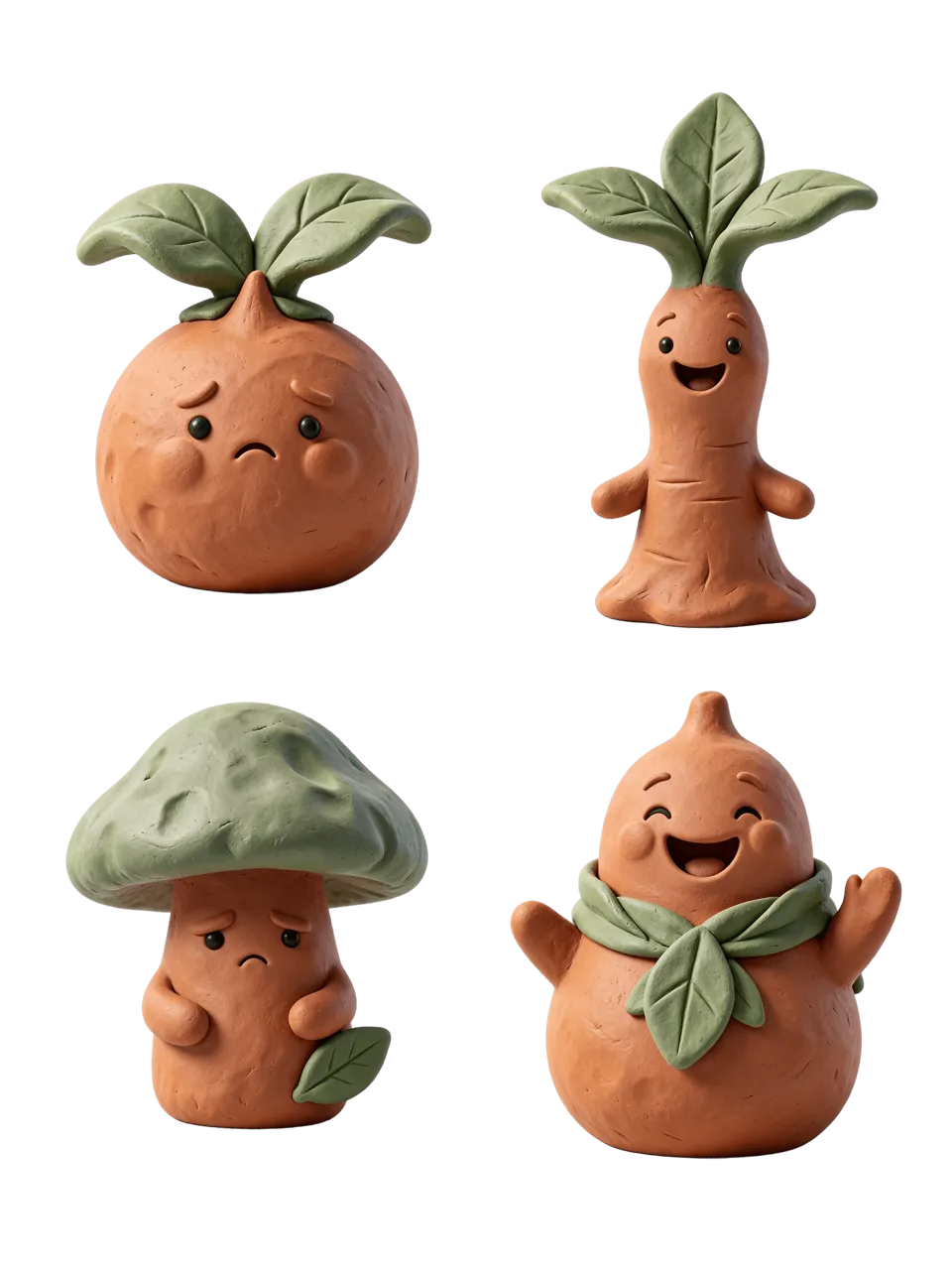
AI-generated result from the Seedream 5.5 workflow shown below.
Text-to-Image · Seedream 5.5 · PNG · 2K
Write the shared style once, then define each figure
This example starts from an original text prompt, with no character reference image. The deliverable is one transparent 2×2 asset sheet. Separate PNG files are a downstream crop/export step; the generation shown here does not return four independent files.
1. Separate common traits from individual traits
Describe matte handmade clay, rounded forms, fine surface marks and sage accessories once. Then assign a seed, sprout, mushroom and pear-shaped creature to four positions. This gives the set a common material language while keeping each figure recognizable.
2. Request space around every silhouette
Specify complete figures, no touching, no shared ground shadow and generous transparent gaps. Select Seedream 5.5, 2K, PNG, Transparent, Auto and one output. The prompt requests a portrait 3:4 canvas and a 2×2 arrangement.
3. Export the usable set
Download the original PNG, inspect its alpha channel and place it over a contrasting surface. In an image editor, crop each quadrant with padding and export each figure with transparency retained. Do not export JPEG copies if you need the background to stay transparent.
Reuse the exact generation prompt
Create four original small terracotta-clay garden creature assets on a fully transparent background, portrait 3:4 canvas, four clearly separated figures in a spacious 2 by 2 grid with no touching or shared shadows. Shared style: handmade matte clay, soft rounded shapes, tiny black bead eyes, subtle thumbprint texture, sage-green leaf accessories. Top left: a shy round seed creature with two leaves; top right: a tall smiling sprout creature with three leaves; bottom left: a sleepy mushroom-shaped clay creature with a sage cap; bottom right: a cheerful pear-shaped creature with a leaf scarf. Show each complete figure, generous clear gaps, no ground plane, no environment, no checkerboard pattern, no text. Transparent alpha outside each silhouette. Deliver one PNG asset sheet, not a mockup.When reusing the template, check Background before you generate: the saved case currently opens with Opaque, so switch it to Transparent to follow this workflow. Keep PNG selected.
Inspect the result before reusing it
The selected sheet contains four separate terracotta figures with green leaf details. The generated PNG has an alpha channel and transparent space between the silhouettes. Expressions differ: the mushroom figure reads as downcast rather than clearly sleepy, so the useful success is a coherent asset family rather than exact emotional control.
| Check | What to inspect |
|---|---|
| Shared material | Compare clay texture, highlight softness and accessory colors. |
| Separation | Ensure no figure touches another figure or the canvas boundary. |
| Export | Retain transparent pixels and enough padding in each crop. |
A shared style does not prove that a character will remain identical in future scenes. If you need to reuse one specific figure, supply its exported asset as a reference in the next task and check the result. Cropping the sheet cannot restore a missing limb or remove an attached shared shadow.
Try this workflow with your own brief
You can try it directly using the tool on the right.
Keep the prompt structure and replace the subject or exact wording with your own brief. Open the Seedream generator to select Seedream 5.5.
For extracting an existing subject, see transparent assets from photos. For a different transparent design element, try textured lettering.