












GPT Image 2.5 Text Accuracy: Flare and Sunburst Tested
Flare and Sunburst face the same museum-label brief and a single-code edit. Compare exact text, specimen layout, and preservation in four new WeShop outputs.
A catalogue code is easy to overlook: AM-204 and AM-240 use the same characters, but they identify different records. Can GPT Image 2.5 put the right labels under three specimens, then change just one code without rebuilding the display?
We tested Flare and Sunburst with a new museum-style specimen board. Both produced the requested label groups, and both made the targeted code change. Their first-pass display designs differed more clearly than their visible editing outcomes.
The brief: three specimens, three label groups
The fictional board is headed MINERAL ARCHIVE. Its left, center, and right compartments contain amber, amethyst, and pyrite illustrations, each with a name and catalogue code. These are AI-generated design mockups, not photographs or records of a real collection.
| Position | Name line | Code |
|---|---|---|
| Left | 01 AMBER | AM-103 |
| Center | 02 AMETHYST | AM-204 |
| Right | 03 PYRITE | PY-305 |
We checked text accuracy, label grouping, specimen order, and preservation of visible content during a one-code edit.
Matched settings and the shared input
The runs were made in WeShop on October 20, 2026. Each round used the identical prompt for both models and one output per model: four new outputs in total.
| Setting | Condition |
|---|---|
| Models | gpt-image-2.5-flare and gpt-image-2.5-sunburst |
| Aspect ratio | 3:2 |
| Image size / quality | 1K / high |
| Quantity | One per model per round |
| Editing input | The exact Flare board from round 1, supplied to both models |
| Returned dimensions | 1248 × 832 pixels for all four images |
One shared reference makes the editing input comparable. It does not test each model refining its own first-pass design. There were no repeated trials or controlled speed and cost measurements, so this is a small task comparison rather than a reliability benchmark.
Round 1: exact labels in a museum-style composition
| Flare: restrained display board | Sunburst: framed display cabinet |
|---|---|
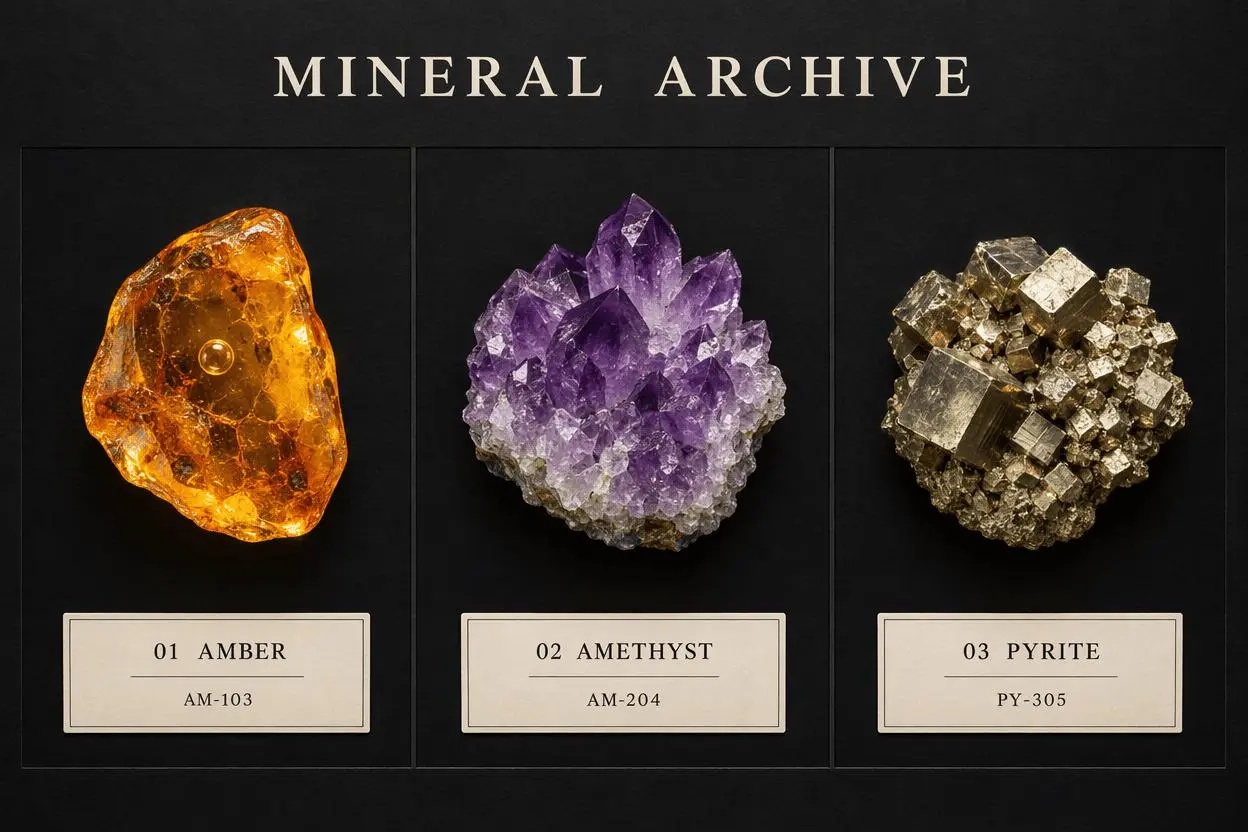 | 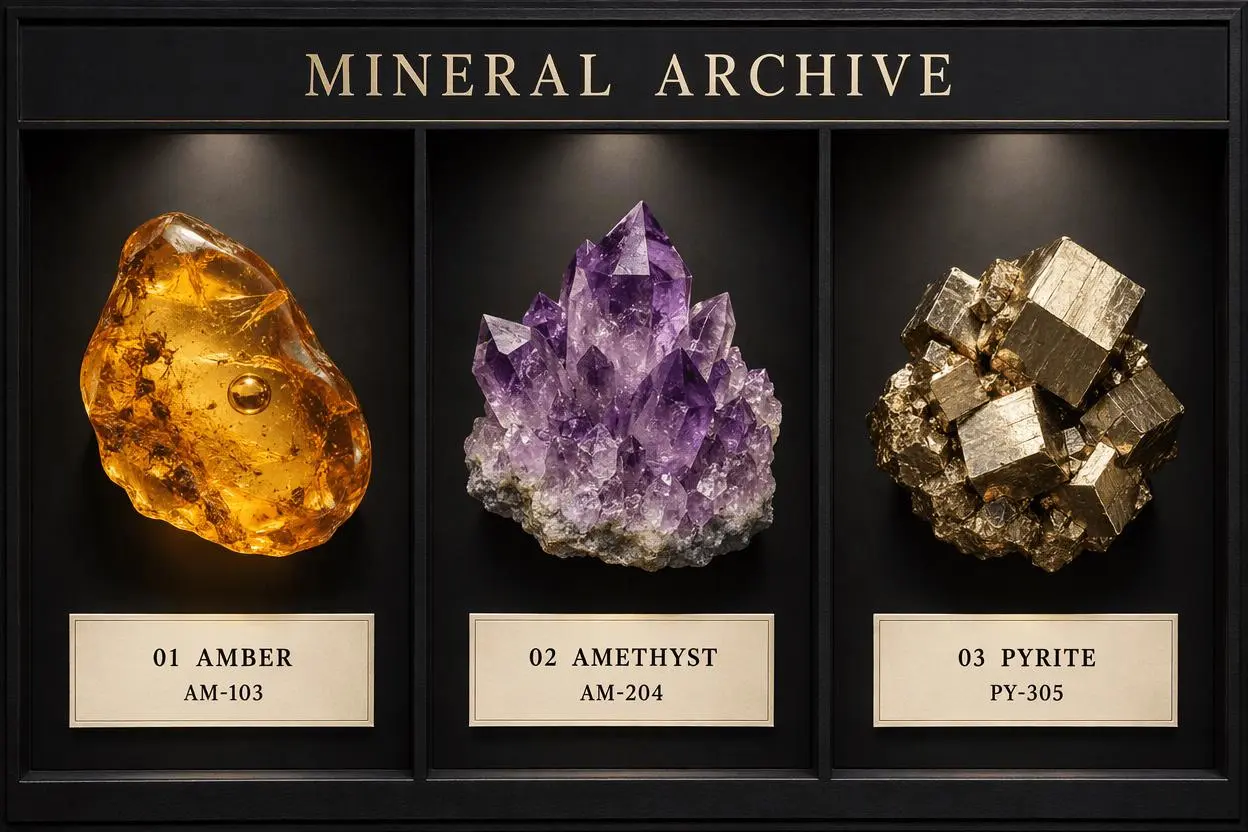 |
Both outputs place AM-103, AM-204, and PY-305 under the correct named specimens. Both retain the heading and three-column order without printing the placement instructions as extra labels.
Flare uses a relatively flat board treatment with thin compartment lines and rules inside the cream labels. Sunburst adds a substantial outer frame and overhead spotlight pools, making it look more like a display cabinet. These are different interpretations of the brief, not evidence that one model is universally more accurate.
Full generation prompt
Create a finished landscape 3:2 museum mineral specimen display board, photographed straight on. A sophisticated charcoal-black background with three equal vertical compartments arranged left to right. Each compartment contains exactly one realistic mineral specimen floating visually above its own neatly aligned cream museum label. Left: one translucent golden amber specimen with a trapped air bubble. Center: one violet amethyst crystal cluster. Right: one metallic gold pyrite cube cluster. Controlled museum spotlighting reveals distinct material textures. Strong editorial spacing, all specimens completely visible, identical label geometry, precise readable typography. This is the finished board itself, not a board hanging in a room.
Render only the following exact text, without quotation marks, extra text, or punctuation. The overall heading at the top is MINERAL ARCHIVE. Labels must be grouped under the correct specimens in this left-to-right order:
LEFT LABEL
01 AMBER
AM-103
CENTER LABEL
02 AMETHYST
AM-204
RIGHT LABEL
03 PYRITE
PY-305
The words LEFT LABEL, CENTER LABEL, and RIGHT LABEL are placement instructions only and must not appear in the image. Do not add prices, dates, logos, watermarks, extra minerals, or extra labels.
Compare the label readability at the intended display size: small codes can become difficult to read when a convincing full-size image is reduced.
Round 2: replace AM-204 with AM-240
The Flare output above is the Before image for both edits. We attached that exact image to each request, asked for one token replacement on the center label, and required the other text, specimens, lighting, and framing to remain unchanged.
| Flare edit: center code AM-240 | Sunburst edit: center code AM-240 |
|---|---|
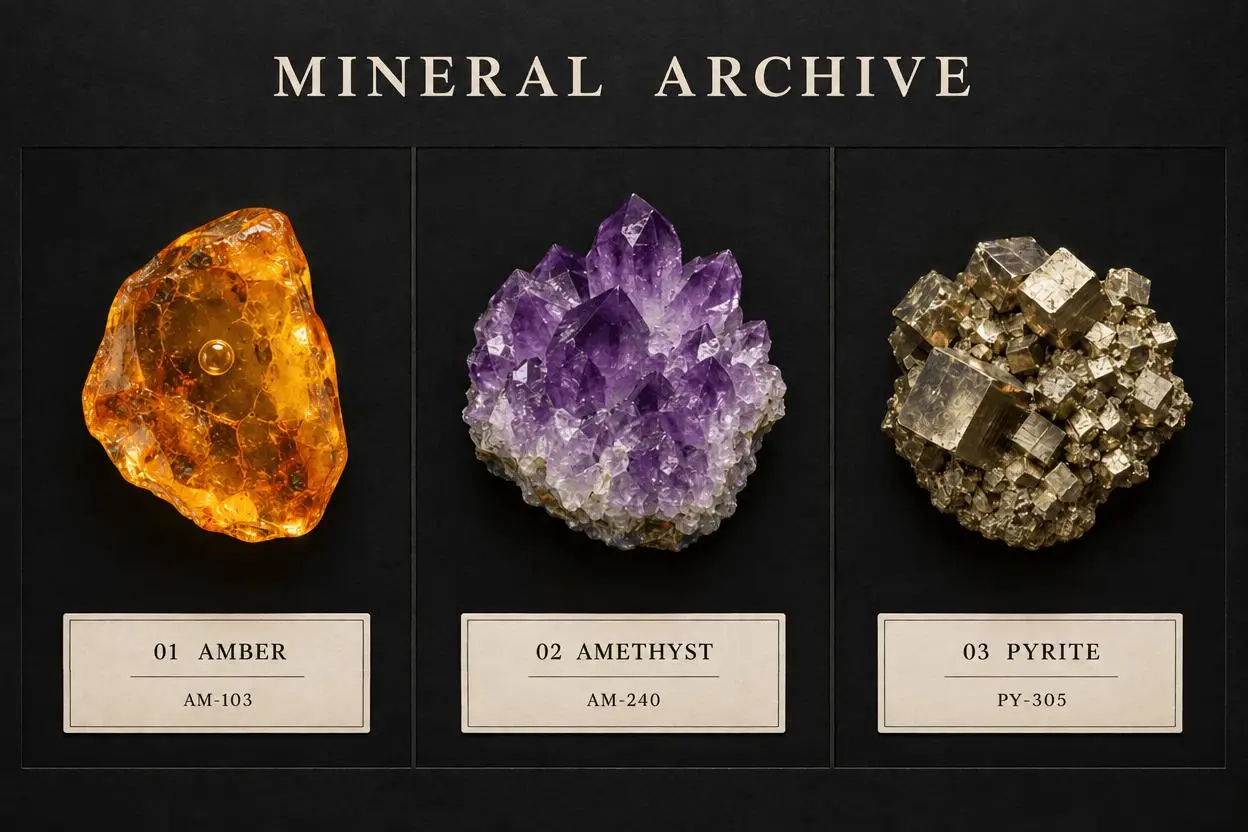 | 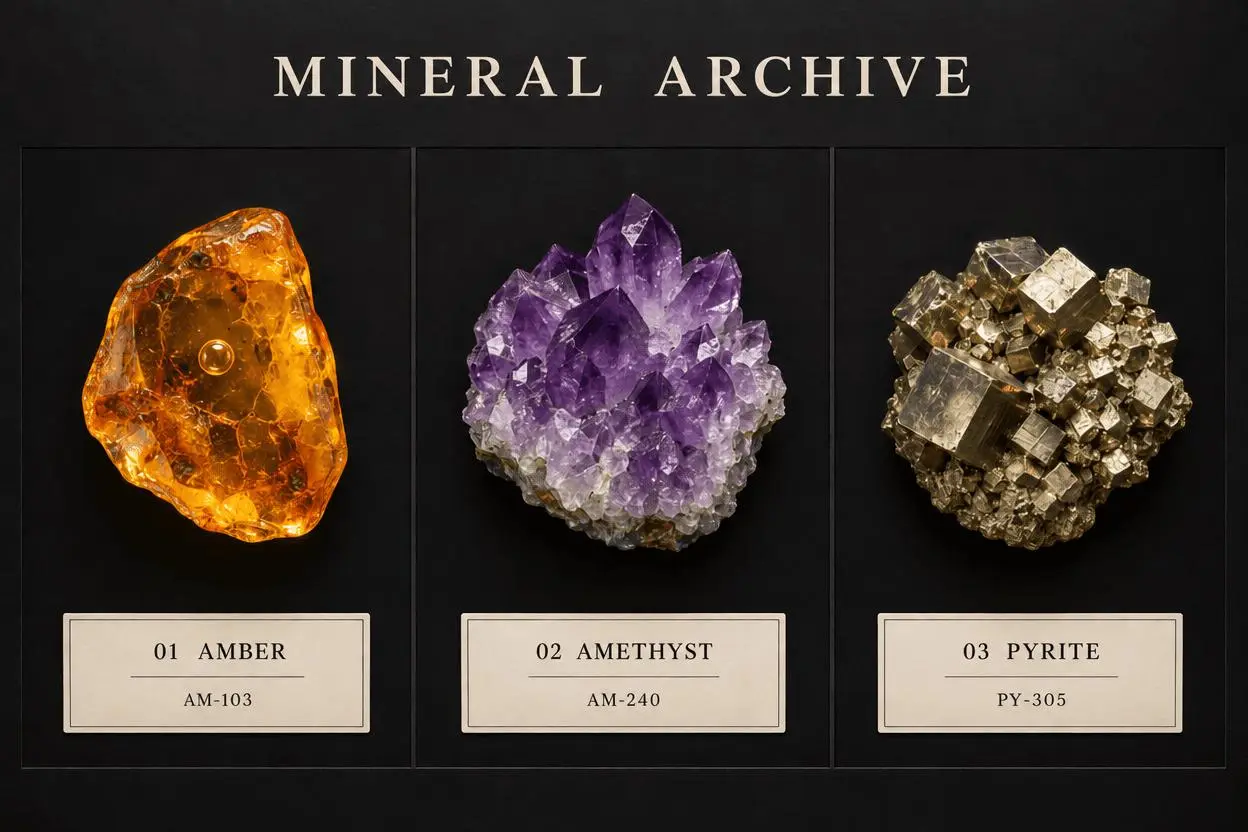 |
Both edited images show AM-240, with AM-103 and PY-305 still readable on the outer labels. The heading and specimen names remain correct, and neither output adds a full stop to the edited code.
The three-panel layout, specimen identities, and cream labels remain visually recognizable. That is a visual preservation judgment, not a guarantee of unchanged pixels: inspect crystal facets, highlights, and surface texture closely if those details matter.
Full editing prompt
Edit image 1, the MINERAL ARCHIVE specimen board. Change exactly one text token on the center amethyst label: replace AM-204 with AM-240. The final center code must be the six characters A M hyphen 2 4 0, with no full stop or other added mark. Keep the heading MINERAL ARCHIVE, the names 01 AMBER, 02 AMETHYST, and 03 PYRITE, and the other two codes AM-103 and PY-305 unchanged. Preserve the three mineral specimens, their shapes and colors, the compartment boundaries, black background, museum lighting, cream label positions, typography style, and image framing. Do not redesign the display. Do not alter any other text or add punctuation. Only the center code changes.
The interactive example uses the successful Flare editing step, with the original board loaded as its reference and the revised board shown as the result. Replace that reference with your own labeled design before adapting the instruction. You can try it directly using the tool on the right.
Which result fits this task?
| Requirement | Observation from these four outputs |
|---|---|
| Correctly grouped names and codes | Both first-pass designs met the visible text checks. |
| A restrained, flatter board | Flare's first-pass output is closer to this treatment. |
| A substantial cabinet frame and spotlights | Sunburst's first-pass output supplies these features. |
| A center-code-only revision | Both produced AM-240 and retained the other visible label text. |
| A universal editing-accuracy winner | This sample does not establish one. |
OpenAI’s image-generation guide positions Flare for everyday generation and Sunburst for editing precision. Our matched runs show that both can handle this particular label task. For broader model-selection guidance, see Flare vs Sunburst: which model should you use?.
Reproduce the test on your labeled design
Open WeShop’s GPT Image generator, choose a model explicitly, and use the matched settings above. Generate the board from the first prompt, or upload an existing design before using the editing prompt. A description of the original is not a substitute for attaching it.
Read every name and code against the brief. For an edit, compare source and result side by side, checking the target token first and every supposedly unchanged label next. Approve the result for the task it passed rather than assuming that a convincing display guarantees correct catalogue data.