












Fashion Blogger OOTD Breakdown with an AI Image Generator
Turn one full-body fashion photo into an editorial OOTD board with expression studies, garment breakdowns, material close-ups, and style-matched personal items.
Fashion Blogger OOTD Breakdown with an AI Image Generator
One full-body fashion photo can contain enough visual information to build an entire editorial character board.
In this example, a clean portrait featuring a beige trench coat, white shirt, glasses, and brown suede boots becomes a detailed fashion blogger profile. The generated board keeps the central outfit while expanding it into expression portraits, individual garments, material close-ups, personal items, and editorial labels.
The result is more than a decorated OOTD photo. It turns one reference image into a structured fashion breakdown.
From One OOTD Photo to a Complete Fashion Board
| Original OOTD Photo | Generated OOTD Breakdown Board |
|---|---|
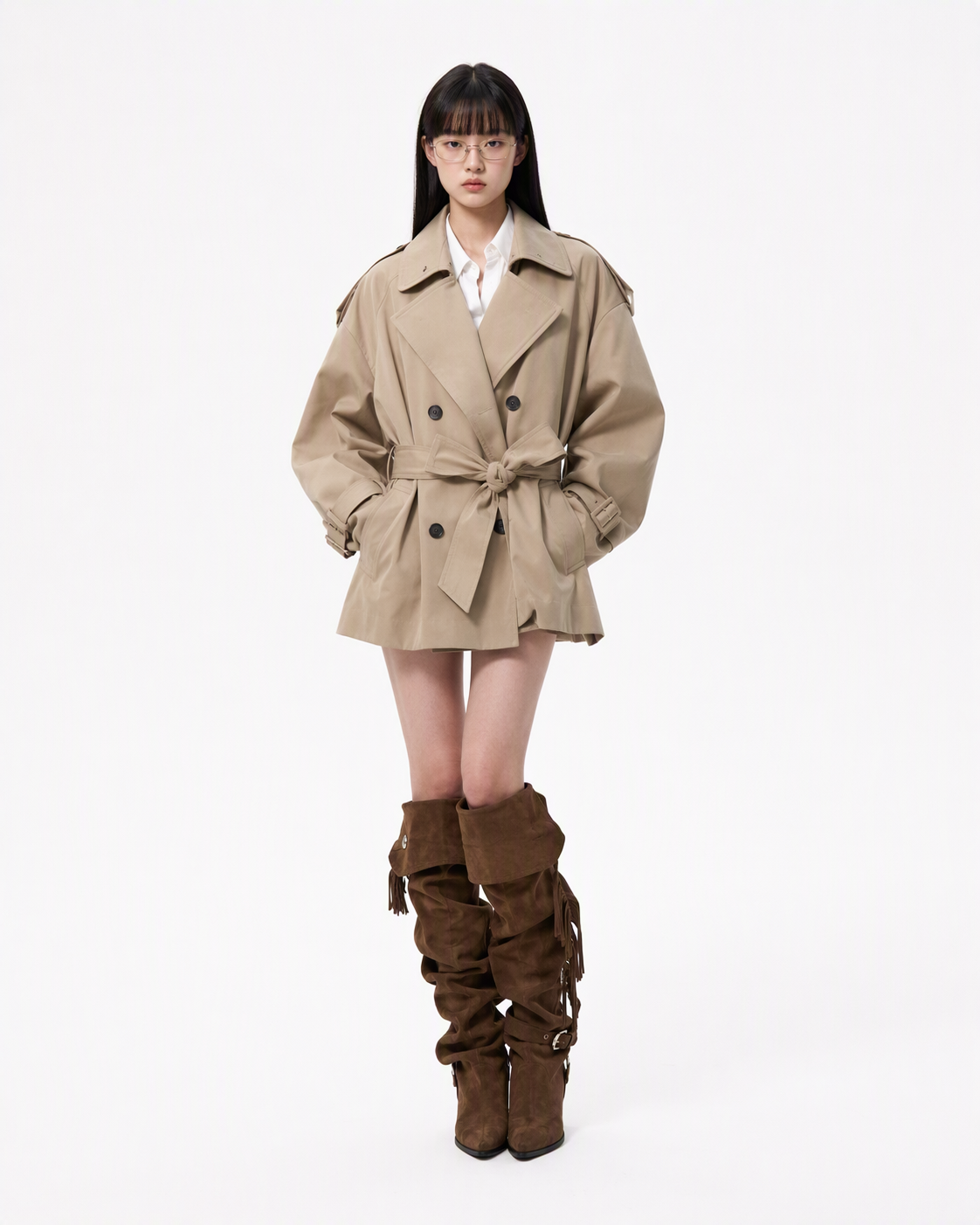 Reference: A clean full-body photo with a visible outfit, hairstyle, accessories, and silhouette. | 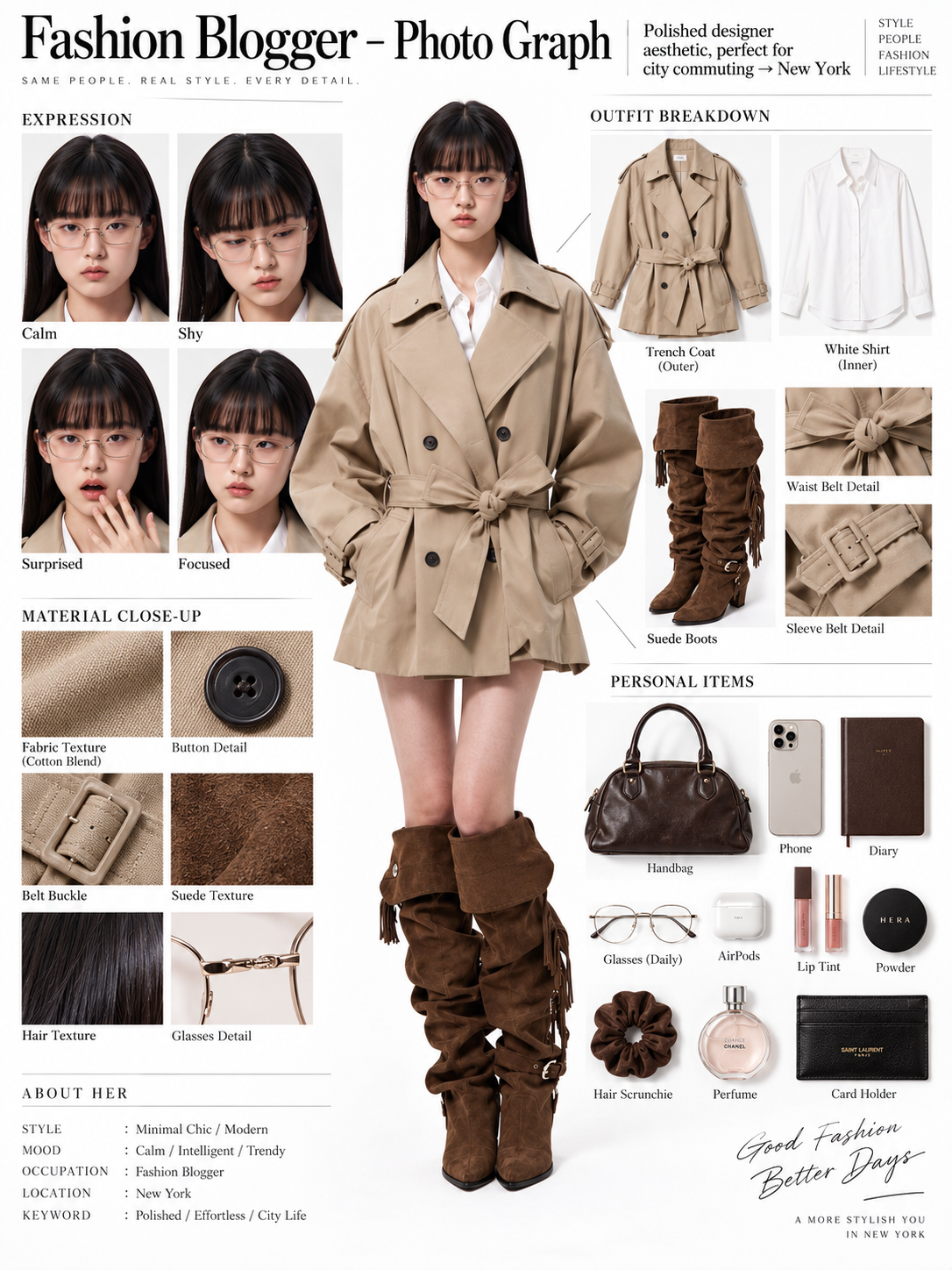 Generated result: The original look becomes a magazine-style profile with expression studies, garments, material details, and style-matched personal items. |
What the AI Extracts from the Reference
The generated board organizes the source photo into several editorial modules.
Central Full-Body Portrait
The complete person remains the visual anchor. The hairstyle, glasses, facial structure, outfit, body proportions, and overall appearance should stay as close to the uploaded reference as possible.
Expression Variations
Several close-up portraits show the same person with expressions such as:
- calm;
- shy;
- surprised;
- focused.
These portraits should change the expression without changing the person’s identity, hairstyle, glasses, skin tone, or makeup.
Outfit Breakdown
The clothing is separated into individual product-style images. In this example, the visible outfit includes:
- a beige trench coat;
- a white shirt;
- brown suede boots;
- waist-belt and sleeve-belt details.
The garment breakdown should reflect clothing that is actually visible in the source photo rather than inventing a different outfit.
Material Close-Ups
Macro-style images highlight details such as:
- trench-coat fabric;
- buttons;
- belt hardware;
- suede texture;
- hair strands;
- glasses.
These details help the result feel like a fashion analysis board instead of a simple photo collage.
Personal Items
The board may also include objects that fit the visual identity of the outfit, such as a handbag, phone, diary, glasses, cosmetics, or accessories.
These objects are creative extensions inferred from the outfit. Unless they are visible in the original image, they should not be treated as the person’s real possessions.
What You Need
Prepare a full-body fashion photo with:
- a clearly visible person;
- an unobstructed outfit;
- recognizable outerwear, inner layers, shoes, and accessories;
- a visible face and hairstyle;
- a simple or uncluttered background;
- enough resolution to show fabric and garment details.
The reference used here works well because the subject is photographed against a clean background and the coat, shirt, glasses, and boots have clear visual boundaries.
Step 1: Upload the OOTD Reference Photo
Open WeShop GPT Image and use the available image-upload or reference-image entry.
Before generating, identify the details that must remain consistent.
For this reference, the important features include:
- the person’s facial structure;
- long straight hair and bangs;
- metal-frame glasses;
- beige double-breasted trench coat;
- white shirt;
- brown suede boots;
- front-facing standing pose;
- beige, white, and dark-brown color palette.
The prompt should protect these visible details from unnecessary redesign.
Step 2: Paste the Complete Character-Sheet Prompt
Use the original English prompt below:
You are an expert in ultra-detailed, photorealistic character breakdown sheets.

Create a highly detailed character reference sheet based on the uploaded person photo. Preserve 100% of the person’s original facial features, identity, hairstyle, clothing, body proportions, and realistic textures. Do not redesign, beautify, or alter the person.

TASK:

CENTER:
Place the full-body photorealistic image of the uploaded person prominently in the center. Keep the person’s original appearance, outfit, proportions, and visual identity exactly consistent with the reference photo.

SURROUNDING ELEMENTS:

• Outfit Breakdown:
Display each clothing item separately, from outer layers to inner layers. Preserve the exact original design, silhouette, colors, materials, patterns, stitching, accessories, and fabric textures. Present each item as realistic product photography.

• Expression Variations:
Create 3–4 close-up portraits of the same person showing different natural expressions, such as calm, shy, surprised, and focused. The face, hairstyle, skin tone, makeup, and identity must remain fully consistent with the uploaded person.

• Material Close-ups:
Include realistic macro photography of key details such as fabric texture, stitching, skin texture, hair strands, accessories, buttons, hardware, and other visible materials from the original photo.

• Personal Items:
Arrange realistic everyday objects that naturally match the person’s fashion style and overall character, such as bag contents, cosmetics, diary, phone, accessories, or other appropriate personal belongings. Present them as premium editorial flat-lay photography.

VISUAL GUIDELINES:

Layout:
Use a clean white background. Position the full-body person as the main visual focus in the center. Arrange all outfit pieces, facial close-ups, material details, and personal items evenly around the central figure. Use thin, refined editorial-style lines to connect relevant details to the person.

Style:
Hyper-realistic professional photography only. Use natural studio lighting, realistic skin, authentic fabric textures, accurate material reflections, subtle shadows, and premium fashion-editorial photography quality.

Overall aesthetic:
Clean, sophisticated, modern fashion magazine character analysis board with a New York editorial atmosphere. Maintain a balanced layout, generous white space, and refined visual hierarchy.

TEXT:
Display the main title:
“Fashion Blogger – Photo Graph”

Include one short English style/persona judgment:
“Polished designer aesthetic, perfect for city commuting → New York”

STRICT RULES:

The final image MUST look like real photography.

NO illustration, anime, cartoon, sketch, painting, CGI, or obvious 3D-rendered appearance.

Preserve the uploaded person’s identity, facial structure, facial features, hairstyle, skin tone, clothing, body proportions, and overall appearance as accurately as possible.

Do not change, redesign, beautify, replace, or reinterpret the person’s original features.

Do not randomly change the clothing design, colors, materials, patterns, or accessories.

All facial close-ups must clearly represent the same person.

All clothing breakdowns and material close-ups must correspond accurately to the clothing worn by the central person.

All surrounding elements must have authentic photographic textures, realistic lighting, and consistent visual quality.

Maintain strong visual consistency between the central full-body character and every surrounding detail image.
The phrase Preserve 100% is a strong instruction to the model, not a measurable guarantee. The generated result still needs to be checked for facial consistency, garment accuracy, and altered details.
Step 3: Generate the OOTD Breakdown Board
Submit the reference image and prompt using the generation control available in the current WeShop interface.
You can try it directly using the tool on the right.
When the result appears, check the central person before reviewing the smaller surrounding elements.
The central portrait should retain:
- the same recognizable face;
- the same hairstyle and glasses;
- the same coat, shirt, and boots;
- similar body proportions;
- the original outfit colors;
- the original overall styling.
Step 4: Inspect Every Editorial Module
A polished layout is not enough on its own. Review each section for accuracy.
Check the Expression Portraits
Confirm that all expression close-ups represent the same person.
Compare:
- face shape;
- eye shape;
- eyebrows;
- nose and lips;
- glasses;
- bangs and hair length;
- skin tone and makeup.
Check the Outfit Breakdown
Each extracted garment should correspond to the central outfit.
Look for unwanted changes to:
- coat length and lapel shape;
- button placement;
- belt construction;
- shirt collar;
- boot height and material;
- colors and surface textures.
Check the Material Close-Ups
The macro images should resemble materials visible in the original photo.
A visually attractive texture is not useful if it does not correspond to the coat, boots, glasses, or other reference details.
Check the Personal Items
Personal items may be inferred from the fashion style, but they should remain visually coherent with the outfit.
Treat these items as editorial styling—not verified information about the person.
Check the Generated Text
Image generators may produce incorrect spelling, duplicated labels, invented brands, or unreadable small text.
Before publishing, inspect:
- the main title;
- section headings;
- expression labels;
- garment names;
- material labels;
- persona text;
- brand names and logos.
Short labels are generally easier to generate and review than long paragraphs.
| Generated OOTD Breakdown Board | What to Check |
|---|---|
Final board: The central OOTD is surrounded by expression studies, garment extraction, material details, and personal items. | Identity: The central portrait and expression studies should show the same person. Clothing: Extracted garments must correspond to the original outfit. Materials: Close-ups should match visible fabrics and accessories. Text: Check spelling, labels, invented brands, and persona details before publishing. |
How to Fix Common Problems
The Expression Portraits Look Like Different People
Add:
All expression portraits must use the exact same facial identity, facial proportions, glasses, hairstyle, bangs, skin tone, and makeup as the uploaded person.
The Coat or Boots Are Redesigned
Add:
Do not invent or redesign any garment. Extract only clothing visibly present in the uploaded image and preserve its original construction, color, material, buttons, belt, and proportions.
The Outfit Breakdown Includes Unrelated Clothing
Add:
Exclude any garment that is not clearly visible in the reference photo.
The personal-items section may include style-based inferences, but the outfit breakdown should stay grounded in visible garments.
The Layout Is Too Crowded
Add:
Increase the white space between sections. Use fewer but larger detail images and maintain a clean editorial grid.
The Generated Text Contains Errors
Reduce the amount of text:
Use minimal English text. Keep all headings short, correctly spelled, and easy to read.
Always review generated text before publishing, especially brand names, garment labels, and persona descriptions.
The Personal Items Do Not Match the Outfit
Narrow the visual direction:
Include only neutral fashion-blogger essentials that match the beige, white, and dark-brown outfit palette. Avoid unrelated luxury logos or visually distracting objects.
Refine One Problem at a Time
If the first result has a strong layout but an inaccurate garment, correct the garment without redesigning the entire board.
If the person is consistent but the text is unreadable, simplify the labels rather than changing the character or outfit.
A focused correction is less likely to damage parts of the image that already work.
Break Down Your Own OOTD
Upload a clear full-body fashion photo, use the complete character-sheet prompt, and inspect every expression, garment, material, and label before publishing.
Try WeShop GPT Image