Create or transform a scene with Kling O1, Kuaishou’s earlier unified multimodal video model. Choose a written scene, image references, or a frame-led workflow from the available modes.
Explore the tasks shown by these actual Kling O1 results. Copy a prompt to try in the generator, or open the linked case for its saved setup. Supply your own images or clips when the request uses references.
Group Conversation Scene
Build a scene around several characters in conversation, using their arrangement and setting to establish the shot. Event values are illustrative design content.
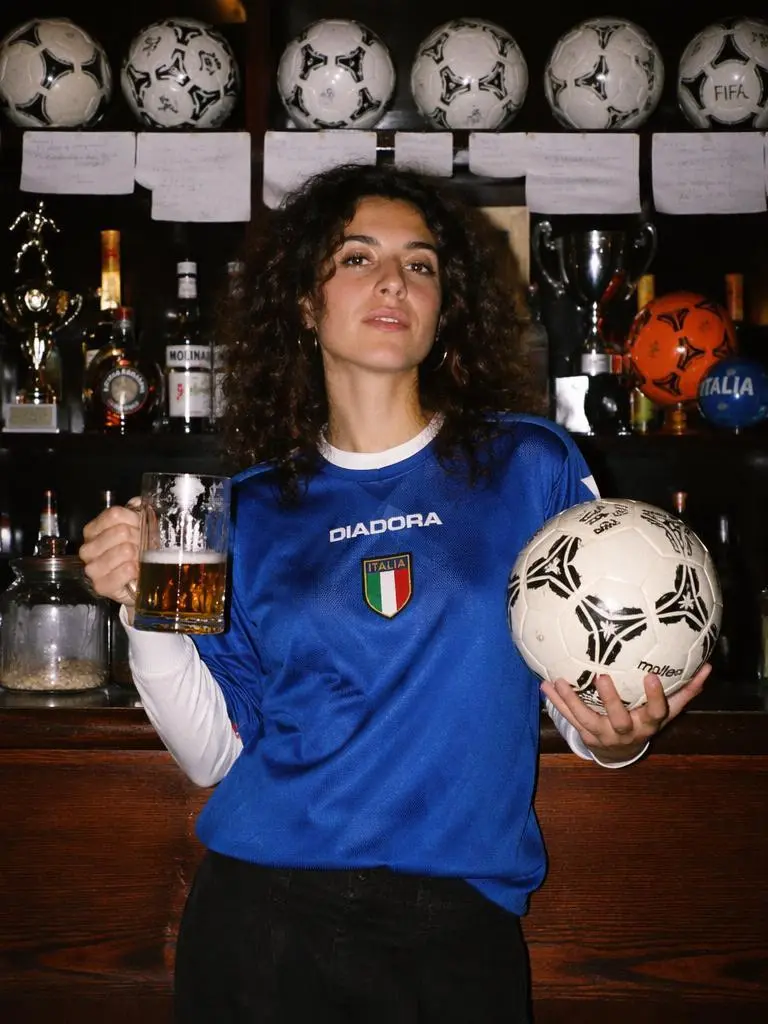
Inside a legendary football pub, a woman proudly holds a football and a glass of beer. The camera slowly pushes through rows of vintage football memorabilia. Suddenly every football on the shelves begins spinning. Historic World Cup moments appear as holographic projections across the bar. Fans from different countries gather behind her, raising glasses and cheering. The atmosphere intensifies with chants, drums and celebrations. Golden confetti rains from above as the camera rotates around her. Rich cinematic lighting, nostalgic football culture, World Cup night celebration, emotional storytelling, ultra realistic.
Develop a product-usage sequence around an uploaded item, with the product as the subject of the demonstration.
Create a premium Shopify product usage tutorial video using the uploaded product as the hero subject. Preserve the product exactly as provided, including its shape, proportions, materials, colors, branding, packaging, and every original design detail.
Begin with a clean hero shot introducing the product, followed by a clear step-by-step demonstration of how to use it correctly. Each action should be natural, easy to understand, and filmed from the best viewing angle. Alternate between medium shots showing the complete process and macro close-ups highlighting important details, interactions, and product features.
Use bright natural lighting, realistic environments, smooth camera movements, and premium commercial cinematography. The pace should feel calm, intuitive, and instructional while maintaining a high-end Shopify brand aesthetic.
No text overlays, subtitles, promotional graphics, watermarks, or exaggerated visual effects.
Ultra realistic, premium Shopify tutorial video, commercial quality, 4K.
Kling O1 is Kuaishou’s unified multimodal video model, combining text, images, subjects, and video context for creation and editing tasks.
Generation and Editing in One Model Family
O1 combines multimodal generation and editing-oriented tasks. An existing subject or visual ingredient can be part of the new request.
References for People, Products, and Scenes
Inputs can establish the visual ingredients of a shot. The clothing-transition and product examples show different reference roles.
More than One Starting Method
WeShop lists text, reference, and frame-led O1 entries. The selected entry determines which starting inputs you can supply.
WORKFLOWS
Choose Your Starting Input
Use the Kling O1 input mode that matches the material you have.
Build a Scene from Text
Describe the subject, setting, action, and camera for a new scene. Match the amount of action to the duration selected in the form.
Direct a Scene with References
Describe the scene and add reference media through the available controls. Identify what each input supplies, such as the subject, setting, motion, or sound.
Animate an Opening Image
Upload the frame that establishes the subject and scene. Describe the action, environmental movement, or camera direction that follows it.
Guide the Opening and Ending Frames
Supply both images, then describe the action or transition connecting their compositions. Choose a duration offered for this mode.
PROMPT GUIDE
How to Direct Kling O1 with a Prompt
Learn from the actual instructions behind these results. Each example keeps its complete original prompt and available inputs. For a new request, replace its subject and reference assignments with your own.
Establish the Visual Starting Point
The request defines the subject and setting. Use it to study scene description rather than treating it as evidence of a particular motion or sound control. In this case: “The model stands in a clean studio.”
The model stands in a clean studio. Around her, multiple floating clothing items hover in space like a fashion orbit. Each clothing piece gently floats and rotates. A cursor clicks one outfit. Immediately, the selected clothing flies toward the model and seamlessly becomes her outfit. Fabric naturally adapts to body shape, lighting remains consistent, identity unchanged. The surrounding clothes continue floating softly in the background.A single consistent fashion model is used throughout the entire video (identity locked). The video is a premium AI fashion transformation world where interactive elements float around the model. Each feature is triggered by subtle clicks. No software UI, no dashboard, only elegant floating interactive objects. Luxury editorial photography style, white seamless studio environment, soft lighting, high-end ecommerce campaign aesthetic. Every interaction instantly transforms reality.
Add Motion to the Environment
Identify the environmental element that moves while the composition remains recognizable. In this case: “Fresh fish are inspected, traded, carefully displayed on tiny wooden stalls, and auctioned under the first golden light of dawn.”
Long before the first fishermen arrive, seagulls secretly operate their own bustling seafood market on a quiet harbor. Fresh fish are inspected, traded, carefully displayed on tiny wooden stalls, and auctioned under the first golden light of dawn. Ocean mist, cinematic harbor atmosphere, realistic bird behavior, observational documentary style.
Give the Movement a Concrete Action
Name the movement the subject should perform within the shot. In this case: “Hidden inside the hollow of an ancient oak tree is an elegant banking institution run entirely by squirrels.”
Hidden inside the hollow of an ancient oak tree is an elegant banking institution run entirely by squirrels. Acorns are counted like gold coins, tiny vaults protect winter savings, miniature clerks stamp paperwork, and woodland customers patiently queue for seasonal loans. Hyper-detailed forest interiors, warm autumn lighting, whimsical realism, cinematic storytelling.
Give the Face a Specific Performance
Name the expression or small movement to perform rather than describing appearance alone. In this case: “A young woman receives an unexpected phone notification: "Your ex has updated your personality." At first she laughs it off, but throughout the day she unconsciously starts speaking differently, order”
A cinematic AI short drama. A young woman receives an unexpected phone notification: "Your ex has updated your personality." At first she laughs it off, but throughout the day she unconsciously starts speaking differently, ordering coffee she never liked, choosing clothes she would never wear, and repeating phrases her ex always used. She slowly realizes she's losing herself. Panicked, she opens the settings and desperately presses "Undo." The interface calmly responds: "Premium Required." The screen cuts to black. Natural acting, handheld iPhone cinematography, subtle UI overlays, realistic performances, modern fashion styling, emotionally unsettling, Black Mirror meets TikTok storytelling.
HOW TO USE
Create Your First Kling O1 Video
Start in the generator on this page. To reuse an example, click Copy Prompt, return to the description field, and adapt the prompt to your own inputs.
Provide the Scene and Inputs
Write your brief and add the reference media required by the selected mode. Explain the role of each supplied input.
Choose the Output Options
Choose an offered duration, aspect ratio, and other available output options. Check the form’s displayed points before submitting.
Generate and Review
Click Generate and review the resulting video. Check movement, framing, continuity, and any delivered audio. Adjust your prompt or references for the next attempt.
Compare the documented model roles and the inputs and options currently listed in WeShop. Model names or matching settings do not by themselves establish equal output quality or a fixed generation-time difference.
Dimension
Kling 3.0
Kling 3.0 Omni
Kling O1
Model role
Native audiovisual generation and shot direction
Unified multimodal direction and subject references
Earlier unified multimodal generation and editing model
Inputs listed for the page
Animate an Opening Image; Guide the Opening and Ending Frames
Direct a Scene with References; Build a Scene from Text
Build a Scene from Text; Direct a Scene with References; Animate an Opening Image; Guide the Opening and Ending Frames
Current WeShop options
Duration: 3–15 seconds
Duration: 3–15 seconds
Duration: 3–10 seconds
Model role
Kling 3.0
Native audiovisual generation and shot direction
Kling 3.0 Omni
Unified multimodal direction and subject references
Kling O1
Earlier unified multimodal generation and editing model
Inputs listed for the page
Kling 3.0
Animate an Opening Image; Guide the Opening and Ending Frames
Kling 3.0 Omni
Direct a Scene with References; Build a Scene from Text
Kling O1
Build a Scene from Text; Direct a Scene with References; Animate an Opening Image; Guide the Opening and Ending Frames
Current WeShop options
Kling 3.0
Duration: 3–15 seconds
Kling 3.0 Omni
Duration: 3–15 seconds
Kling O1
Duration: 3–10 seconds
When to Consider Kling O1
Match the Model to Your Task
Consider O1 when its generation or transformation workflow fits the inputs you have. Compare newer Kling entries by their documented role and actual form controls.
MORE VIDEO MODELS
Explore More Video Models
Open a related model page to review its capabilities, examples, and current generation options.
Answers about this version, its inputs, and how to get started.
What is Kling O1?
Kling O1 is Kuaishou’s unified multimodal video model, combining text, images, subjects, and video context for creation and editing tasks.
What is a good task to consider it for?
Consider O1 when its generation or transformation workflow fits the inputs you have. Compare newer Kling entries by their documented role and actual form controls.
What do I need to provide?
Build a Scene from Text. Describe the subject, setting, action, and camera for a new scene. Match the amount of action to the duration selected in the form. Direct a Scene with References. Describe the scene and add reference media through the available controls. Identify what each input supplies, such as the subject, setting, motion, or sound. Animate an Opening Image. Upload the frame that establishes the subject and scene. Describe the action, environmental movement, or camera direction that follows it. Guide the Opening and Ending Frames. Supply both images, then describe the action or transition connecting their compositions. Choose a duration offered for this mode.
Which output settings are offered here?
Duration: 3–10 seconds
How do I try an example prompt?
Click Copy Prompt, return to the generator, and paste it into the description field. Add your own required references and update their roles. Linked case previews and Use This Prompt open the saved case; they do not automatically fill this page’s form.
What should I know about this version?
O1 entries expose different modes. A capability of the model family is not evidence that every entry provides the same controls.