BILDER MIT GPT IMAGE 2 ERSTELLEN

GPT Image 2: KI-Bildgenerator

GPT Image 2 ist OpenAIs Bildgenerierungs- und Bearbeitungsmodell. Es akzeptiert Text- und Bildeingaben für neue Motive und referenzgestützte Änderungen.

gpt-image-2
GPT IMAGE 2: BEISPIELE

Bildbeispiele mit GPT Image 2

Entdecken Sie GPT Image 2 anhand dieser Beispiele: Stiltransfer zu einer Neonskulptur ; Aufschlüsselung einer Referenz in ein redaktionelles Board ; Typografisch geführtes Jazzposter. Jeder gespeicherte Fall behält seinen tatsächlichen Prompt und verfügbare Eingaben. Prüfen Sie das Ergebnis, bevor Sie eine Anfrage an Ihr Motiv anpassen.

WeShop-Ergebnis: Stiltransfer zu einer Neonskulptur
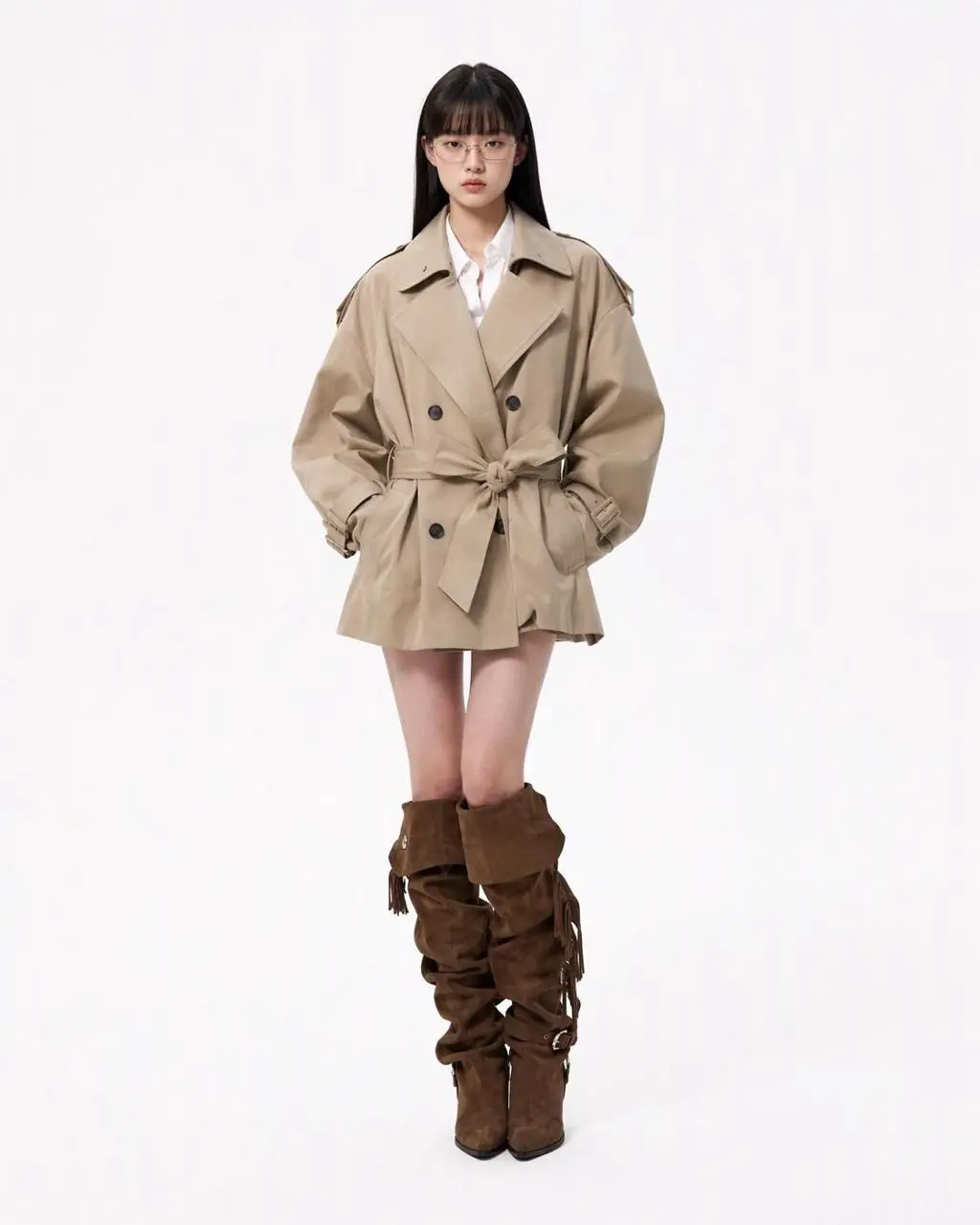
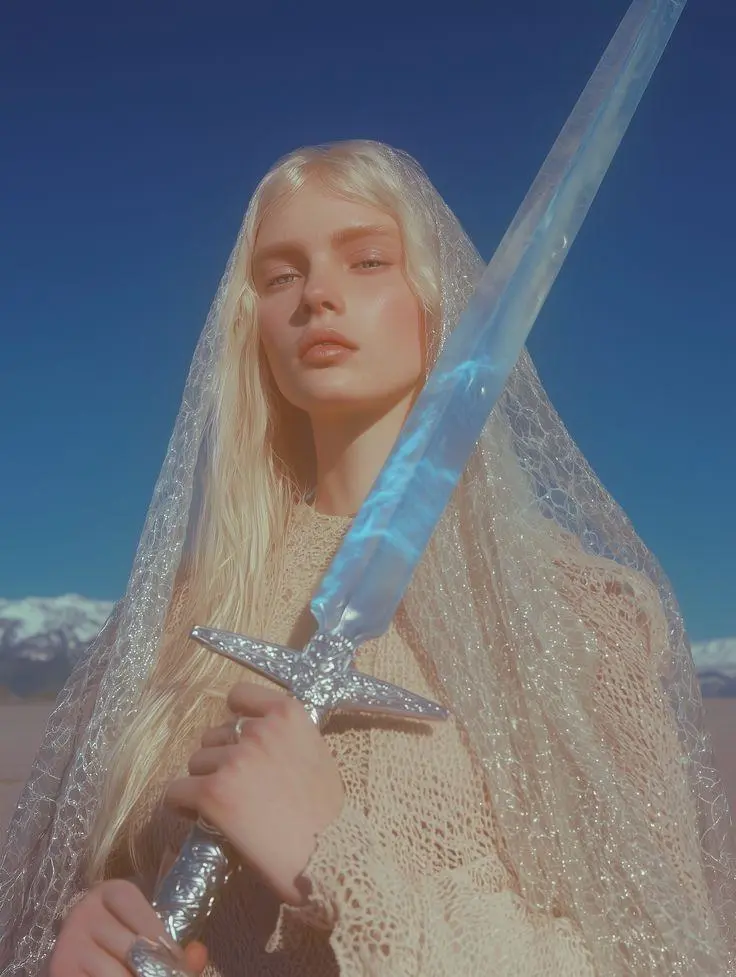
Referenz 1

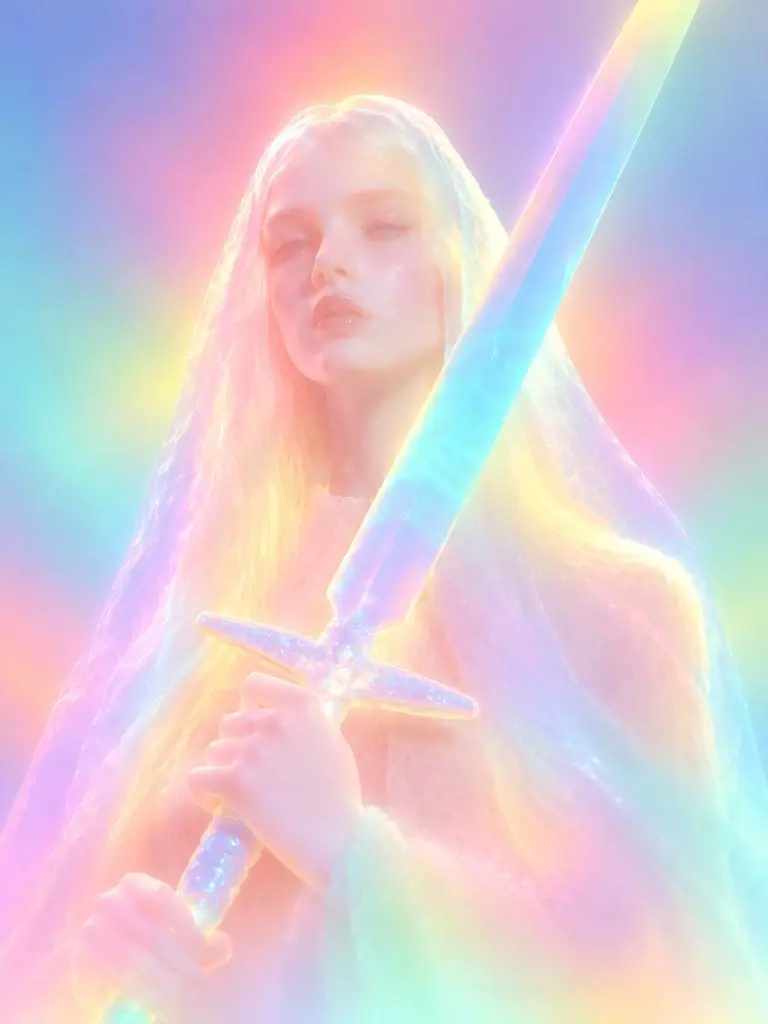
Stiltransfer zu einer Neonskulptur

Eine referenzgestützte Verwandlung in eine leuchtende Skulptur. Diffuse Neonfarben, weichere Gesichtsdetails und gerundete Materialien machen den gewünschten Stilwechsel sichtbar.

Please transform the input image into a soft focus, neon gradient sculptural style. Do not copy specific specific characters, crowds, compositions, or poses from any reference, but follow this visual language: Style & Texture: Create a soft, dreamy, surreal 3D illustration and digital sculpture. The subject should look like translucent plastic, frosted glass, glowing rubber, or soft ceramic sculpture wrapped in colored mist. Smooth rounded edges, moderately simplified details, with a hazy, low-contrast, non-realistic artistic effect. Color & Light: Use highly saturated but softly diffused neon gradients (fluorescent pink, coral orange, lemon yellow, mint green, cyan, violet, pale grayish-blue). Colors should blend seamlessly like thermal imaging, colored mist, or dream halos. Shadows must be bluish-purple, cyan, or deep magenta—NO pure black hard shadows. Use strong inner glow, backlight, rim light, and ambient color reflections to make the subject glow from within. Include soft focus, slight mist, fine grain, and gradient noise. Subject Treatment: Retain the identity, pose, proportions, and clothing outlines of the input image, but transform them into a minimalist, rounded, dreamy neon sculpture. Soften and weaken facial features to create a quiet, ethereal, detached expression. The face should look like a soft mask covered by a glowing halo. Composition: Clean background (solid color, soft gradient, misty or large color blocks). Quiet, surreal, fairytale-like but slightly alienating atmosphere with a floating feeling. Keywords: soft neon gradient, dreamy 3D illustration, translucent sculpture, frosted glass texture, glowing rubber, pastel fluorescence, diffused light, inner glow, soft focus, blurred facial features, surreal portrait, minimal details, smooth rounded forms, luminous mist, thermal color gradient, ethereal atmosphere, clean composition, high-end digital art.
Verwenden Sie diese Eingabeaufforderung
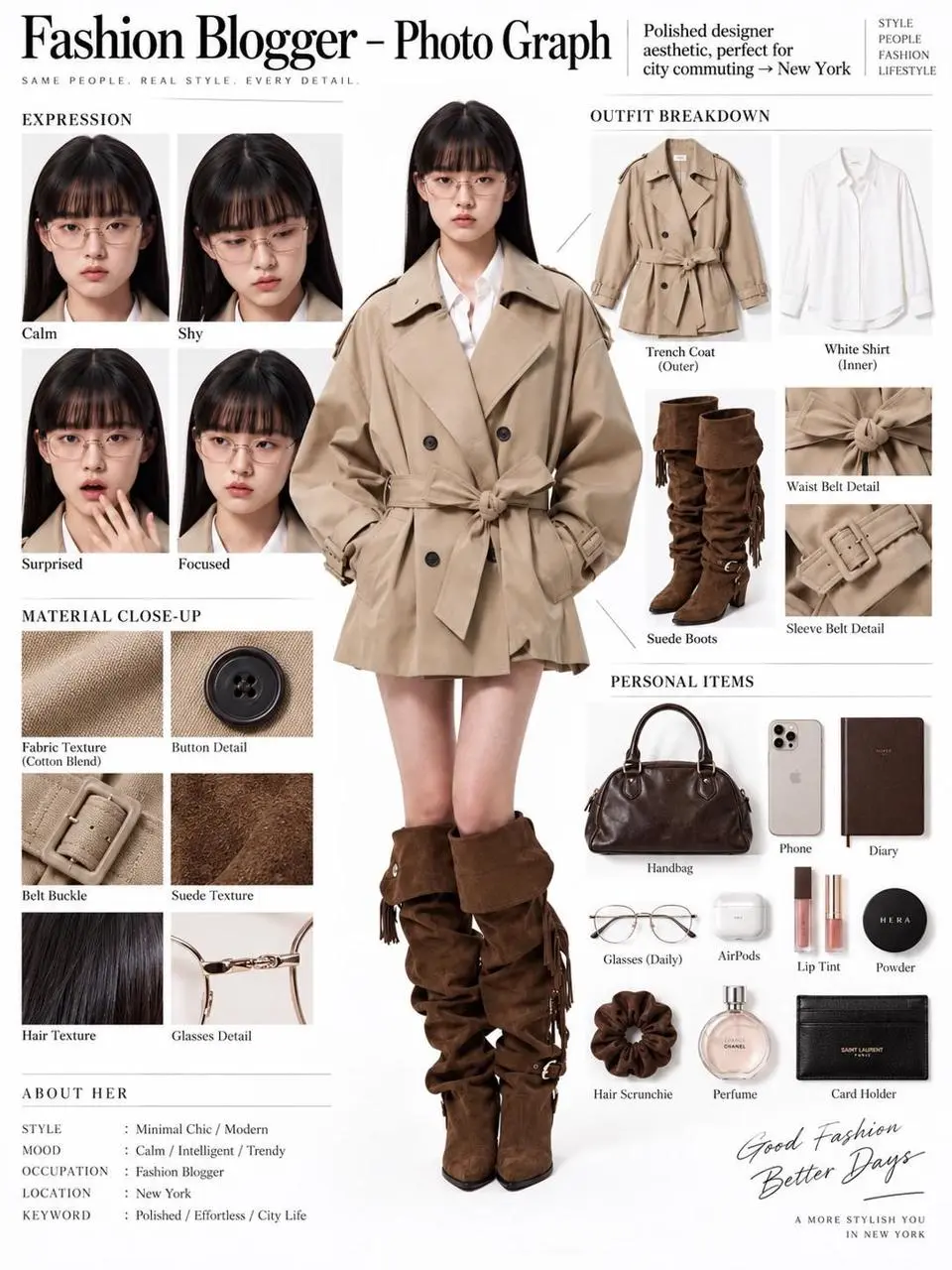
WeShop-Ergebnis: Aufschlüsselung einer Referenz in ein redaktionelles Board
Referenz 1

Aufschlüsselung einer Referenz in ein redaktionelles Board

Eine einzelne Personenreferenz wird zu einem redaktionellen Board mit Ganzkörperfigur, Outfitteilen, Gesichtsnahaufnahmen und Materialdetails. Das Ergebnis verbindet Referenzbearbeitung und strukturiertes Layout in einer Komposition.

You are an expert in ultra-detailed, photorealistic character breakdown sheets. Create a highly detailed character reference sheet based on the uploaded person photo. Preserve 100% of the person’s original facial features, identity, hairstyle, clothing, body proportions, and realistic textures. Do not redesign, beautify, or alter the person. TASK: CENTER: Place the full-body photorealistic image of the uploaded person prominently in the center. Keep the person’s original appearance, outfit, proportions, and visual identity exactly consistent with the reference photo. SURROUNDING ELEMENTS: • Outfit Breakdown: Display each clothing item separately, from outer layers to inner layers. Preserve the exact original design, silhouette, colors, materials, patterns, stitching, accessories, and fabric textures. Present each item as realistic product photography. • Expression Variations: Create 3–4 close-up portraits of the same person showing different natural expressions, such as calm, shy, surprised, and focused. The face, hairstyle, skin tone, makeup, and identity must remain fully consistent with the uploaded person. • Material Close-ups: Include realistic macro photography of key details such as fabric texture, stitching, skin texture, hair strands, accessories, buttons, hardware, and other visible materials from the original photo. • Personal Items: Arrange realistic everyday objects that naturally match the person’s fashion style and overall character, such as bag contents, cosmetics, diary, phone, accessories, or other appropriate personal belongings. Present them as premium editorial flat-lay photography. VISUAL GUIDELINES: Layout: Use a clean white background. Position the full-body person as the main visual focus in the center. Arrange all outfit pieces, facial close-ups, material details, and personal items evenly around the central figure. Use thin, refined editorial-style lines to connect relevant details to the person. Style: Hyper-realistic professional photography only. Use natural studio lighting, realistic skin, authentic fabric textures, accurate material reflections, subtle shadows, and premium fashion-editorial photography quality. Overall aesthetic: Clean, sophisticated, modern fashion magazine character analysis board with a New York editorial atmosphere. Maintain a balanced layout, generous white space, and refined visual hierarchy. TEXT: Display the main title: “Fashion Blogger – Photo Graph” Include one short English style/persona judgment: “Polished designer aesthetic, perfect for city commuting → New York” STRICT RULES: The final image MUST look like real photography. NO illustration, anime, cartoon, sketch, painting, CGI, or obvious 3D-rendered appearance. Preserve the uploaded person’s identity, facial structure, facial features, hairstyle, skin tone, clothing, body proportions, and overall appearance as accurately as possible. Do not change, redesign, beautify, replace, or reinterpret the person’s original features. Do not randomly change the clothing design, colors, materials, patterns, or accessories. All facial close-ups must clearly represent the same person. All clothing breakdowns and material close-ups must correspond accurately to the clothing worn by the central person. All surrounding elements must have authentic photographic textures, realistic lighting, and consistent visual quality. Maintain strong visual consistency between the central full-body character and every surrounding detail image.
Verwenden Sie diese Eingabeaufforderung
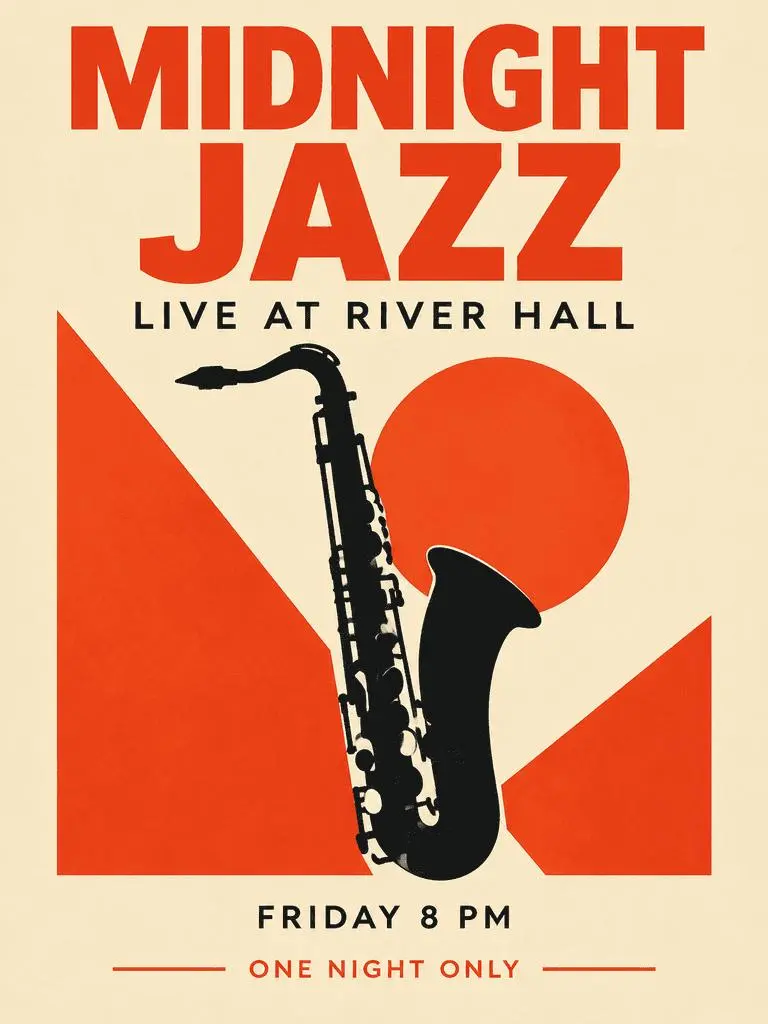
WeShop-Ergebnis: Typografisch geführtes Jazzposter

Typografisch geführtes Jazzposter

Ein fiktives Veranstaltungsposter kombiniert dominante Überschrift, ergänzende Informationen und Saxofonillustration. Prüfen Sie die vier gewünschten Textphrasen und deren Hierarchie im erzeugten Ergebnis.

Create a polished vertical 3:4 poster for a fictional jazz event. Use a warm ivory background, bold vermilion geometric shapes, a single black saxophone silhouette, and a carefully aligned editorial grid. Include exactly these four text lines, with no other words: 'MIDNIGHT JAZZ' as the largest headline, 'LIVE AT RIVER HALL' as the secondary line, 'FRIDAY 8 PM' as the small event detail, and 'ONE NIGHT ONLY' as a small bottom label. Make all four lines legible and spelled exactly. Keep a clear hierarchy between headline, illustration, details, and footer. Flat graphic design, crisp edges, restrained paper texture, no border or watermark.
Verwenden Sie diese Eingabeaufforderung
WAS IST GPT IMAGE 2?

Was ist GPT Image 2 und wofür eignet es sich?

GPT Image 2 ist OpenAIs Bildgenerierungs- und Bearbeitungsmodell. Es akzeptiert Text- und Bildeingaben für neue Motive und referenzgestützte Änderungen. Nutzen Sie GPT Image 2 für textgestützte Designs, strukturierte Kompositionen oder Referenzverwandlungen. Das Jazzposter zeigt geplante Texthierarchie, während redaktionelles Board und Neon-Neugestaltung verschiedene Nutzungen von Ausgangsbildern veranschaulichen.

Text in einem gestalteten Bild

Erstellen Sie Layouts mit Wörtern und visuellen Elementen und prüfen Sie Rechtschreibung und Anordnung im Ergebnis.

Referenzen für eine Bildbearbeitung

Nutzen Sie ein bereitgestelltes Bild zur Festlegung von Motiv oder Szene und beschreiben Sie die gewünschte Änderung.

Detaillierte visuelle Regie

Legen Sie Komposition, Materialien und Beleuchtung für das gewünschte Bild fest.

KREATIONSMODI

Mit Text oder einem Bild beginnen

Geben Sie Text für eine neue Komposition ein oder laden Sie Bilder für eine Referenzbearbeitung hoch. Erklären Sie, welche Eingabe Motiv, Umgebung oder Layout liefert und was sich ändern soll.

Mit Text beginnen

Nutzen Sie eine schriftliche Vorgabe für eine neue Szene oder Gestaltung ohne beizubehaltendes vorhandenes Bild.

Mit Referenzen beginnen

Laden Sie die für die Anfrage gewünschten Bilder hoch. Benennen Sie bei mehreren Referenzen jedes Bild anhand seiner Rolle.

PROMPT-LEITFADEN

So schreiben Sie einen Prompt für GPT Image 2

Betrachten Sie die tatsächlichen Prompts für GPT Image 2 unten zusammen mit Ergebnissen und gegebenenfalls Referenzeingaben. Jede Erklärung nennt eine bestimmte zu prüfende Anweisung; ein gewünschter Effekt garantiert nicht, dass jedes erzeugte Detail übereinstimmt.

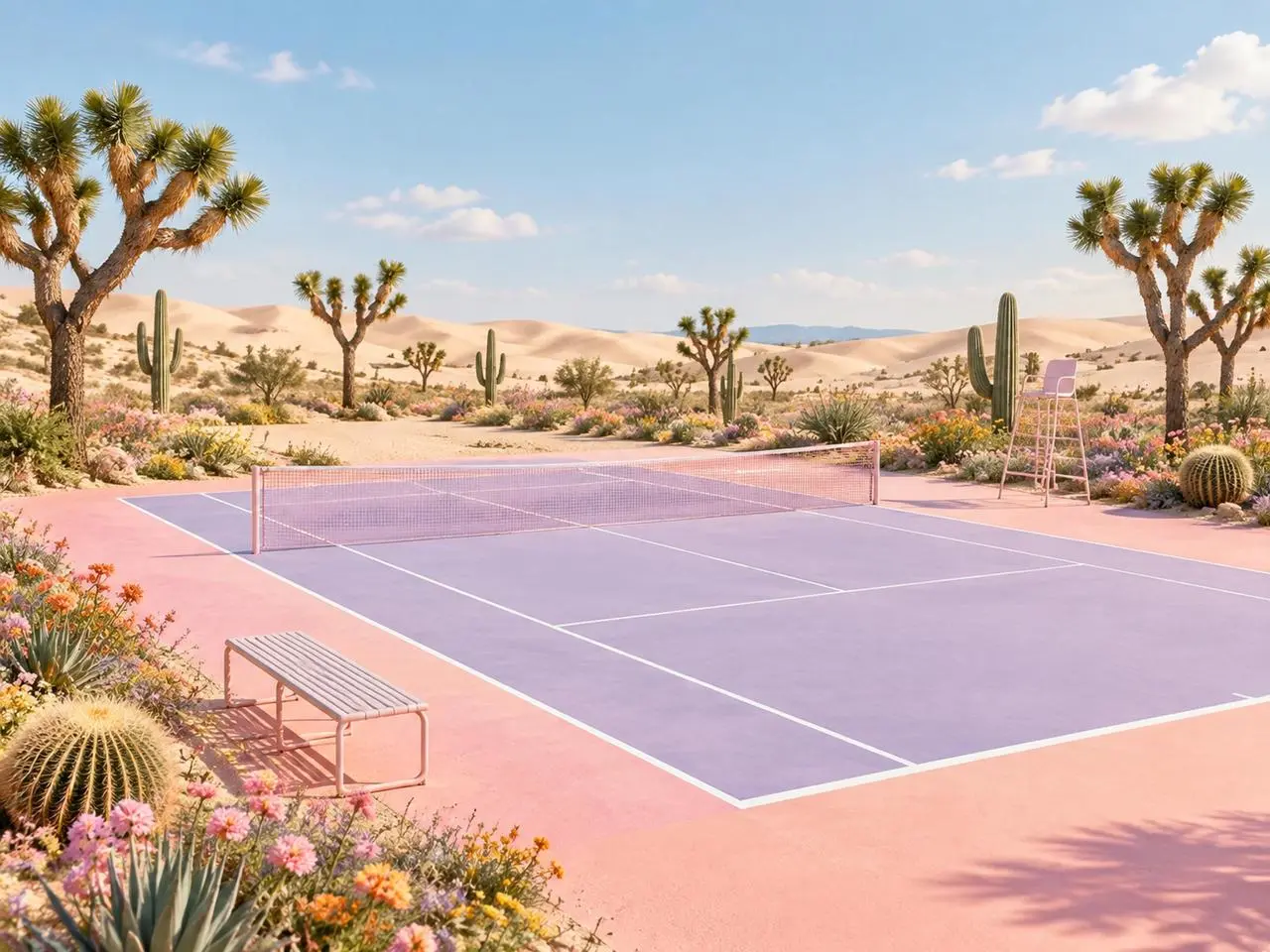
WeShop-Ergebnis: Jeder Referenz eine definierte Rolle geben
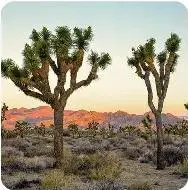
Referenz 1
Referenz 2

Jeder Referenz eine Rolle zuweisen

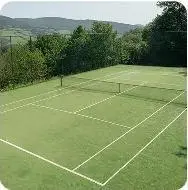
Benennen Sie den Beitrag jedes Bildes, bevor Sie die fertige Szene beschreiben. In diesem Beispiel: „Image 1 is the environment and botanical reference.“ Vergleichen Sie Wüstenpflanzen mit der ersten Referenz und Platzgeometrie mit der zweiten.

Use the two uploaded images as complementary visual references. REFERENCE ROLES: Image 1 is the environment and botanical reference. Use Image 1 to guide: - the open desert atmosphere - Joshua tree shapes and branching structure - dry natural terrain - scattered desert vegetation - spacious outdoor mood - warm arid landscape identity Image 2 is the composition and tennis-court structure reference. Use Image 2 to guide: - the camera angle - the overall court placement - court proportions - baseline and service-line geometry - the central net position - surrounding open space - the relationship between the court and the landscape Do not copy either image literally. Combine the environmental character of Image 1 with the tennis-court composition of Image 2 to create one coherent new scene. FINAL SCENE: Create a dreamy pastel tennis court located in a surreal desert landscape. The tennis court should use a refined pastel palette with: - soft blush pink outer areas - lavender and pale violet playing surfaces - clean white court lines - a subtle warm peach transition around the edges - a pale pink tennis net with realistic mesh texture Preserve believable tennis-court geometry. Keep the sidelines, baselines, service boxes, center marks, net height and court perspective visually coherent. ENVIRONMENT: Surround the court with rolling cream-colored and pale peach sand dunes. Add several Joshua trees inspired by Image 1, along with tall columnar cacti, round barrel cacti, desert succulents and small flowering plants. Scatter clusters of pink, coral, orange, yellow and lavender desert flowers around the edges of the court. Keep the central playing area clean and unobstructed. Place a simple metal bench near the foreground edge of the court and a minimal referee chair near one side of the net. The furniture should match the scene’s clean editorial styling without blocking the court. LIGHTING AND ATMOSPHERE: Use bright, soft natural daylight under a clear pale-blue sky. Add a few soft white clouds. Use gentle shadows, warm highlights and subtle atmospheric depth across the sand dunes. The mood should feel optimistic, imaginative, premium and calm. STYLE: High-end editorial landscape photography blended with polished surreal advertising art. Pastel color grading, clean commercial composition, realistic materials, precise perspective, crisp court details and refined botanical textures. The result should feel suitable for a sports-fashion campaign, lifestyle brand advertisement, social media post, website hero image or creative editorial. COMPOSITION: Use a wide landscape composition. Keep the tennis court as the central visual focus. Use desert plants and flowers to frame the foreground and side edges. Leave the sky and distant dunes relatively clean to prevent visual clutter. The scene must feel like one naturally designed environment, not a collage of two separate photographs. IMPORTANT: Do not add people or players. Do not add text, logos, signs, watermarks, brand names or promotional badges. Do not create extra tennis nets. Do not distort the court lines or perspective. Do not place cacti, flowers or furniture inside the active playing area. Do not reproduce the exact background from either reference image. Generate a new, coherent pastel desert tennis environment inspired by both references. High-resolution commercial quality, realistic lighting, precise geometry, premium AI-generated campaign visual.
WeShop-Ergebnis: Material- und Stilwechsel beschreiben
Referenz 1

Den Materialwechsel beschreiben

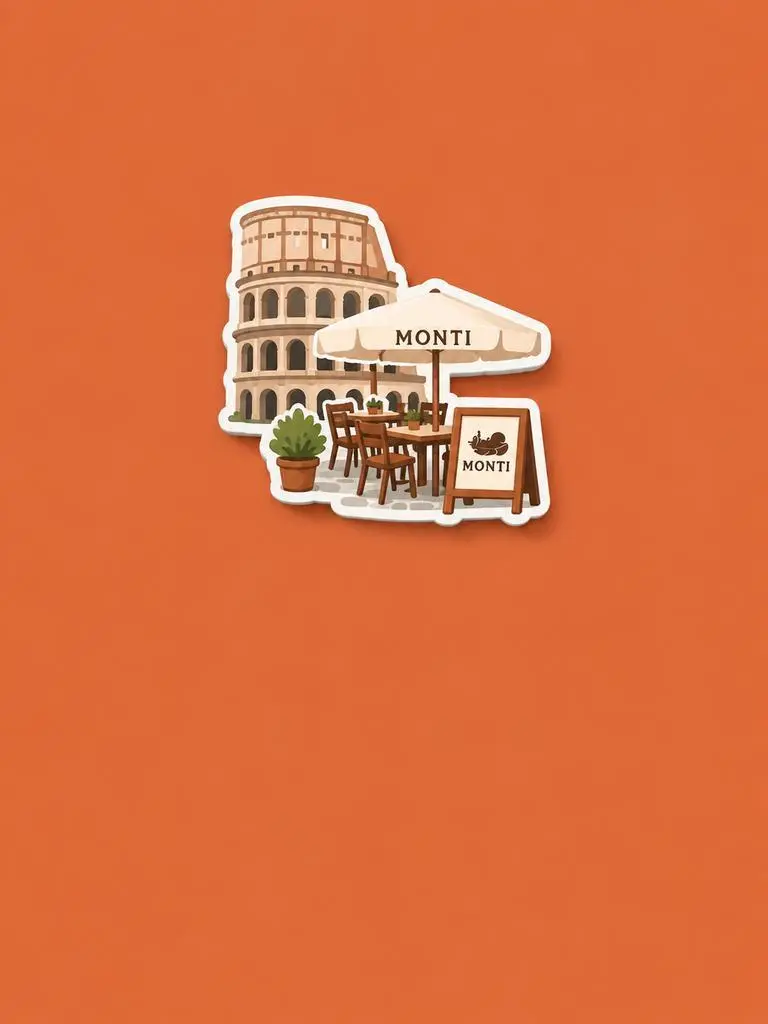
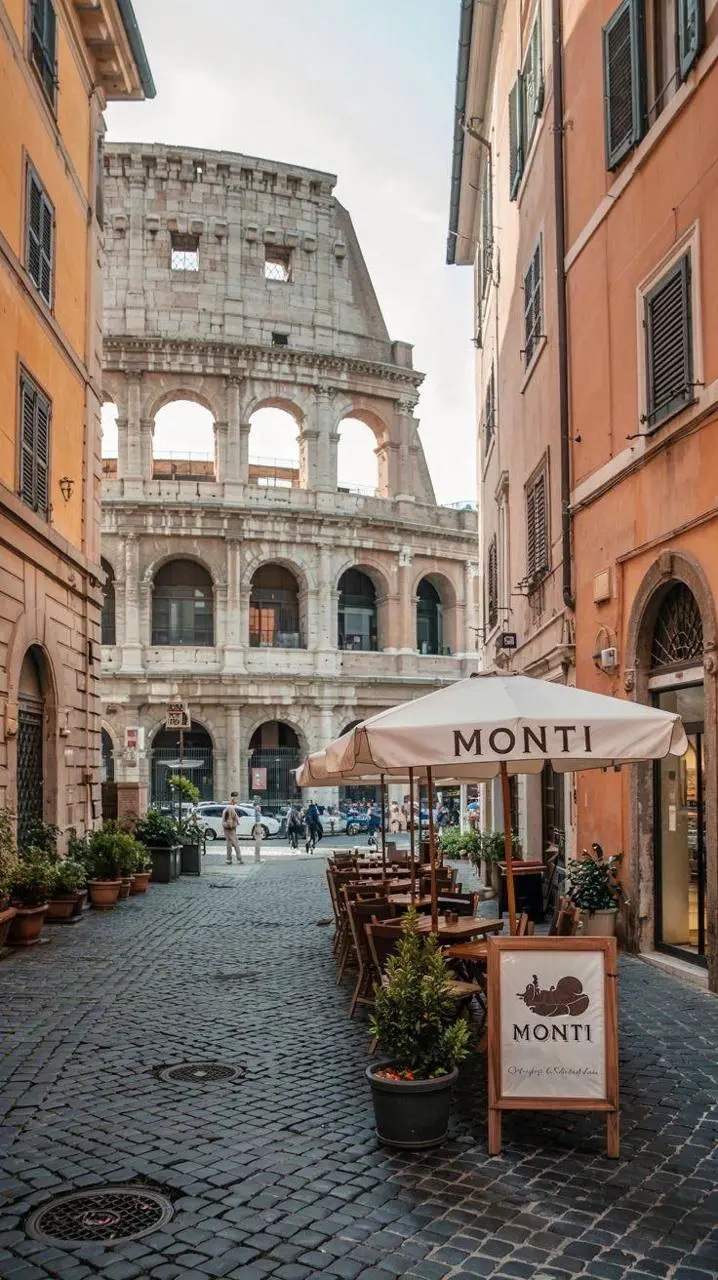
Benennen Sie neues Material oder Umsetzung und dann beizubehaltende Ausgangsmerkmale. In diesem Beispiel: „Retain the core outline and iconic features of the subject.“ Achten Sie auf erkennbares Gebäude und Sitzgelegenheiten, neu interpretiert als erhabener Souvenirmagnet.

Please generate a minimalist fridge magnet photography poster based on the real photo I provided. The overall style should reference "architectural fridge magnets" or "minimalist collage". 【Layout Structure】Horizontal composition, 3:2 ratio. Minimalist solid color background. 【Fridge Magnet Icon】Extract the most recognizable main subject from the provided photo (e.g., the dining table and chairs) and convert it into a minimalist "fridge magnet-style icon". Requirements: 1. Retain the core outline and iconic features of the subject. 2. Simple, clean shape, resembling a cute travel souvenir fridge magnet. 3. Add a slight 3D pop-up effect and a subtle drop shadow. 4. The edges must be clear, with a white or light-colored sticker-like border/stroke. 5. Moderately simplify the details; do not make the drawing too complex or hyper-realistic. 6. Place the icon in the upper center part of the image. 7. The icon should be relatively small and delicate, leaving plenty of negative space around it. 【Background Color】Extract the most prominent, memorable, and saturated color from the provided photo for the background. The background must be a solid, flat color—saturated, clean, and giving a travel postcard vibe. Do NOT use gradients, and do NOT add any complex patterns or background clutter.
WeShop-Ergebnis: Motiv vom Layout trennen
Referenz 1
Referenz 2
Referenz 3

Motiv vom Layout trennen

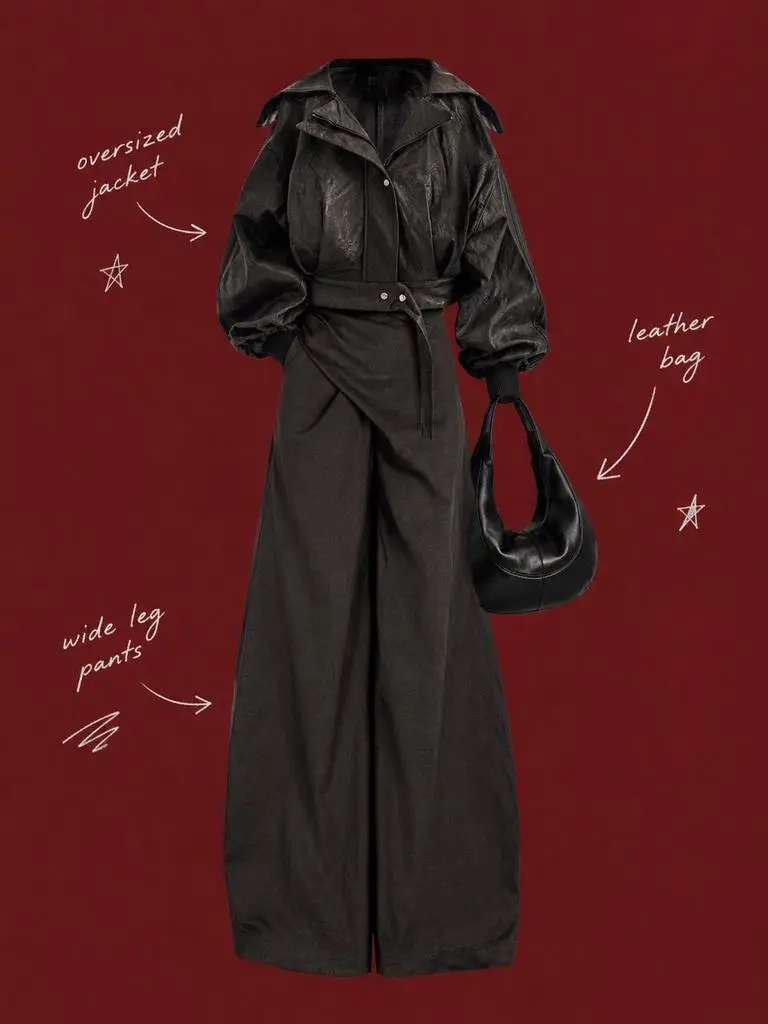
Beschreiben Sie erhaltenes Motiv und umgebendes Layout getrennt. In diesem Beispiel: „Use a solid deep burgundy, dark brick-red, or muted oxidized-red background that fills the entire canvas.“ Vergleichen Sie Outfitreferenzen mit dem zentralen freigestellten Motiv und prüfen Sie dann die locker angeordneten Beschriftungen.

Use my uploaded image as the main person or product asset to create a vertical, vintage fashion collage poster. Carefully cut out the subject and place it in the center of the composition. Preserve its recognizable clothing, pose, silhouette, proportions, colors, and important details without changing its identity. Present the subject as a clean magazine-style cutout layered directly onto the background. If the uploaded image features a person, the head may be cropped out or extend beyond the top edge so the visual focus remains on the outfit and body shape. If the subject is a product, keep it complete, clear, and easily recognizable. Use a solid deep burgundy, dark brick-red, or muted oxidized-red background that fills the entire canvas. Do not add a white border, white margins, a paper frame, or empty white space around the poster. Add only a few white handwritten English words, curved arrows, and casual fashion-sketch doodles on the left and right sides of the subject. The arrows may point toward clothing pieces, accessories, or other important details. The writing should look naturally hand-drawn, slightly irregular, and loosely arranged, like annotations in a fashion designer’s sketchbook. Keep these elements sparse and make sure they do not cover the subject. The overall visual language should resemble an independent fashion magazine, a clothing-design scrapbook, or an experimental late-20th-century fashion advertisement. Keep the layout minimal and clear, with one central cutout subject against the red background. Use an approximately 2:3 vertical aspect ratio. The subject should occupy around 75%–85% of the poster’s height and be positioned centrally, slightly toward the bottom. Keep the final image sharp and clearly defined. Do not add torn-paper edges, rough cutout edges, glue marks, tape, folds, stains, fading, film grain, scanning noise, blur, distressed textures, decorative badges, realistic scenery, complex props, modern interface elements, neon lighting, 3D rendering, or overly vivid colors.
WeShop-Ergebnis: Materialien durch Beleuchtung beschreiben

Materialien und ihre Beleuchtung benennen

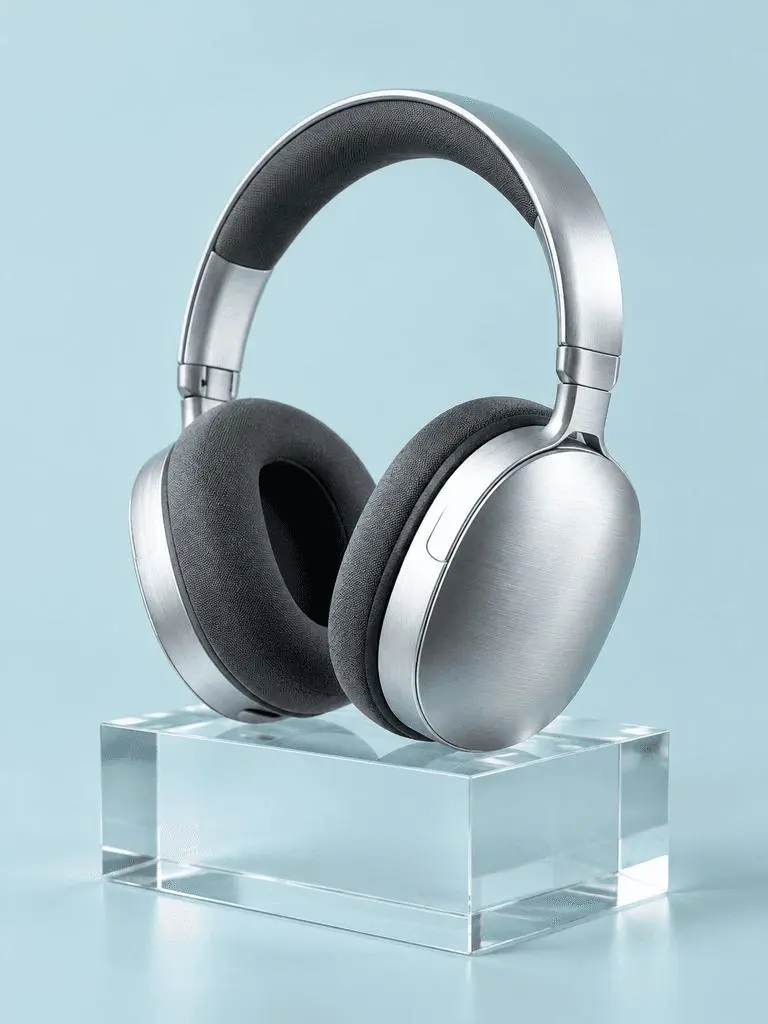
Verknüpfen Sie jede wichtige Oberfläche mit einem sichtbaren Lichthinweis. In diesem Beispiel: „a broad softbox reflection across the metal“. Prüfen Sie die gebürsteten Kopfhörer, Stoffpolster, den transparenten Block und ihre unterschiedlichen Lichtreaktionen.

A photorealistic commercial product photograph of one unbranded pair of brushed-silver wireless over-ear headphones. The headphones rest on a clear rectangular glass block against a seamless pale-cyan background. Show fine metal brushing, soft charcoal fabric ear cushions, a realistic transparent block, a clean contact shadow, and a broad softbox reflection across the metal. Use an eye-level three-quarter camera angle and a restrained monochrome palette. One pair of headphones only, no people, letters, logos, packaging, border, or watermark. Vertical 3:4 composition with the whole product visible.
WeShop-Ergebnis: Vordergrund, Hintergrund und Licht ordnen

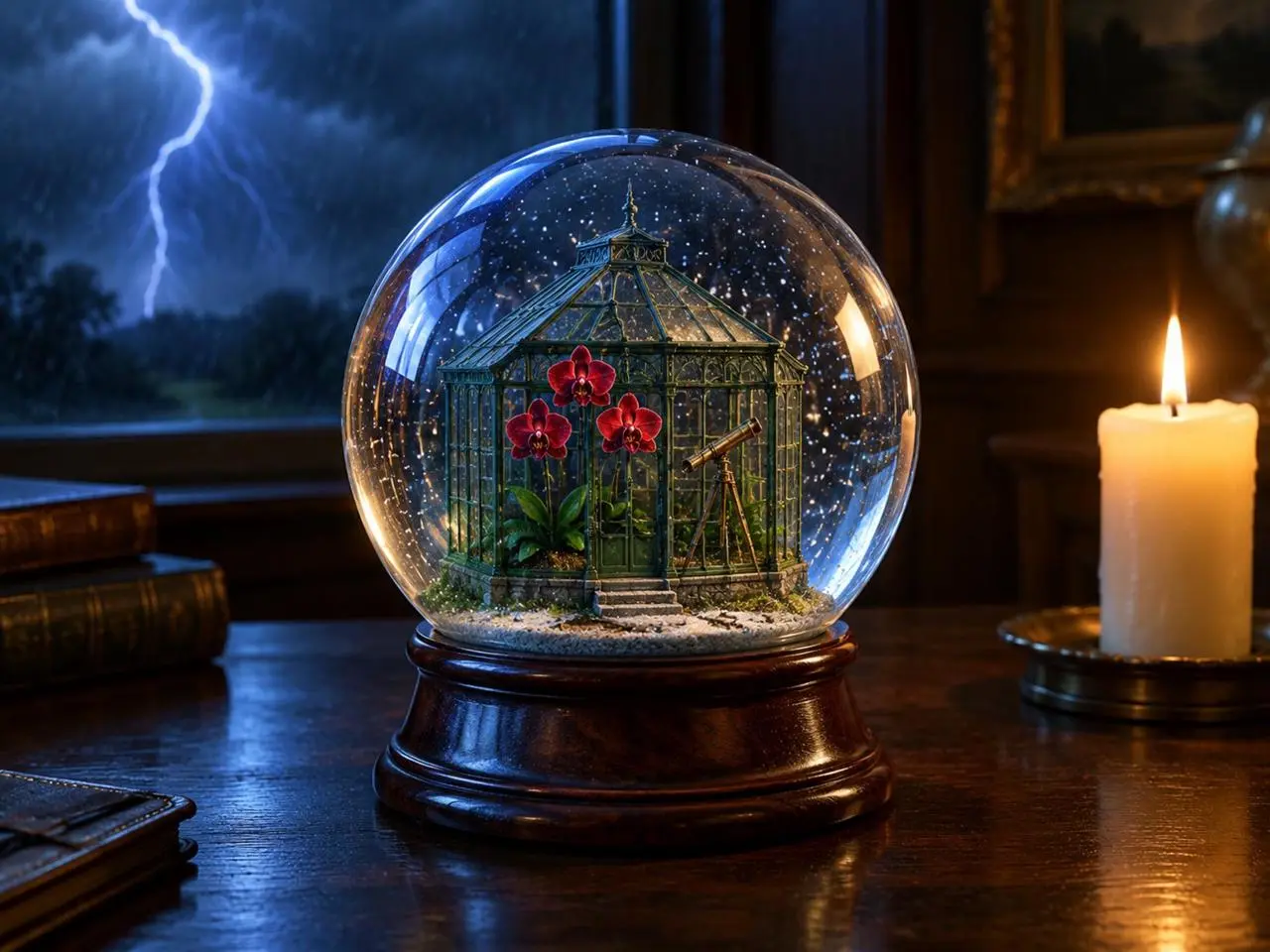
Lichtquellen platzieren

Geben Sie Hauptobjekt, Hintergrundereignis und Lichtquellen klare Positionen. In diesem Beispiel: „one lit ivory candle on the desk to the right of the globe“. Achten Sie auf Globus vorn, Blitz dahinter und warme Kerze daneben.

Create a finished 3:4 photorealistic editorial image of exactly one clear glass snow globe resting on a dark walnut desk during a thunderstorm. Inside the globe is one miniature Victorian greenhouse containing exactly three red orchids and one small brass telescope. Place a sharp lightning bolt in the upper-left background and one lit ivory candle on the desk to the right of the globe. Use realistic glass reflections and refractions, cool blue storm light from the left, warm candlelight from the right, shallow depth of field, and detailed natural materials. Keep the entire globe visible. No people, no extra flowers, no extra globes, no text, no logo, no watermark.
WeShop-Ergebnis: Panelreihenfolge und genaue Beschriftungen angeben

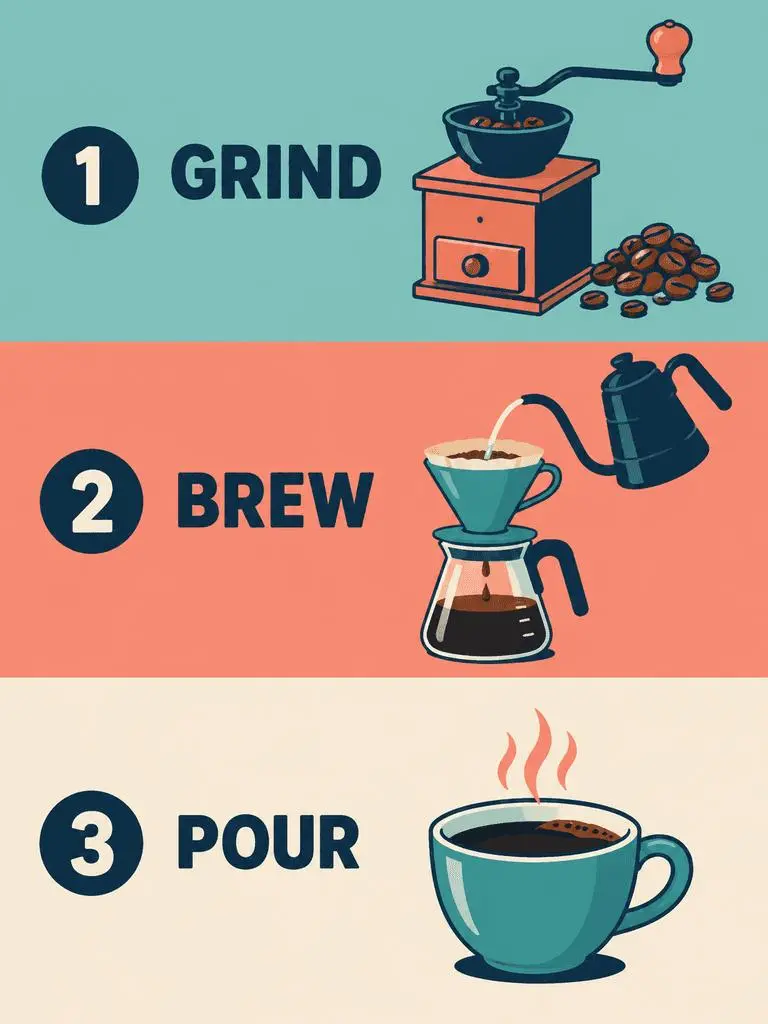
Panelreihenfolge und genauen Text festlegen

Geben Sie bei mehreren Panels deren Reihenfolge und die jeweils nötigen Wörter an. In diesem Beispiel: „Panel 1 shows a simple hand grinder and coffee beans, with the exact heading 'GRIND'.“ Prüfen Sie GRIND, BREW und POUR anhand der Illustrationen und ihrer Reihenfolge von oben nach unten.

Create a clean flat-vector educational infographic in a vertical 3:4 layout with exactly three equal horizontal panels stacked from top to bottom. Panel 1 shows a simple hand grinder and coffee beans, with the exact heading 'GRIND'. Panel 2 shows a pour-over cone over a glass server and a kettle pouring water, with the exact heading 'BREW'. Panel 3 shows a single ceramic cup filled with coffee, with the exact heading 'POUR'. Place the number 1, 2, or 3 beside each corresponding heading. Use teal, coral, cream, and dark-navy colors, consistent line weights, generous spacing, and a left-to-right illustration-and-label arrangement within every panel. Keep the three panels distinct and correctly ordered. No extra text, border, photorealistic imagery, or watermark.
ANLEITUNG

So nutzen Sie GPT Image 2 auf WeShop AI

Beginnen Sie mit der Auswahl GPT Image 2 und dem unten beschriebenen Eingabeweg. Prüfen Sie verfügbare Einstellungen und Punkte vor dem Absenden.

Die Eingabe für dieses Modell bereitstellen

Lassen Sie GPT Image 2 ausgewählt. Geben Sie für ein Poster Wortlaut und Layout vor; laden Sie für eine Bearbeitung Quellen hoch und benennen Sie deren Rollen vor der Beschreibung des fertigen Bildes.

Verfügbare Einstellungen und Punkte prüfen

Größenbezeichnungen: 1K, 2K, 4K. Qualität: niedrig, mittel, hoch. Seitenverhältnisse: auto, 1:1, 1:2, 2:1, 1:3, 3:1, 2:3, 3:2, 4:3, 3:4, 16:9, 9:16, 21:9, 9:21. Dies sind wählbare Einstellungen, keine festen Pixelabmessungen oder Dateiformatgarantien. Prüfen Sie die tatsächlichen Abmessungen der Originalausgabe. Prüfen Sie vor dem Absenden die angezeigten Punkte und den Modellzugang Ihres Tarifs.

Ergebnis öffnen und prüfen

Lesen Sie Postertext Korrektur und prüfen Sie Panelreihenfolge. Vergleichen Sie bei einer Referenzbearbeitung erhaltene Identität, Objektgeometrie und geänderte Bereiche mit der Vorlage, statt exakte Übereinstimmung vorauszusetzen.

GPT-IMAGE-MODELLE VERGLEICHEN

GPT Image 2 oder GPT Image 2.5

GPT Image 2 ist von 2.5 Flare und Sunburst getrennt. Flare ist auf schnelle Alltagserstellung ausgerichtet, Sunburst auf anspruchsvolle Generierung und Bearbeitung. Das aktuelle GPT-Image-2-Formular führt niedrig, mittel und hoch auf; die Einträge 2.5 zusätzlich XHigh und Max. Offizielle Positionierung, katalogisierte WeShop-Konfigurationen und das aktuell ausgewählte Formular sind getrennt; eine gemessene Qualitäts- oder Geschwindigkeitsrangfolge wird nicht nahegelegt.

KriteriumGPT Image 2GPT Image 2.5
ModellauswahlGPT Image 2Flare für Geschwindigkeit; Sunburst für anspruchsvolle Qualitätsanforderungen
Erstellung und BearbeitungTextprompts und bildgestützte BearbeitungTextprompts und bildgestützte Bearbeitung
BearbeitungsschwerpunktBildeingaben mit hoher Detailtreue für Generierung und BearbeitungOpenAI berichtet für beide Varianten von verbesserter präziser Bearbeitung und Motiverhaltung
Qualitätsstufen in WeShopNiedrig, mittel, hochNiedrig, mittel, hoch, XHigh, Max
Bildgrößen in WeShop1K, 2K, 4K1K, 2K, 4K
Formate 4:5 und 5:4 in WeShopIm aktuellen Formular nicht aufgeführtFür Flare und Sunburst verfügbar
Modellauswahl
GPT Image 2
GPT Image 2
GPT Image 2.5
Flare für Geschwindigkeit; Sunburst für anspruchsvolle Qualitätsanforderungen
Erstellung und Bearbeitung
GPT Image 2
Textprompts und bildgestützte Bearbeitung
GPT Image 2.5
Textprompts und bildgestützte Bearbeitung
Bearbeitungsschwerpunkt
GPT Image 2
Bildeingaben mit hoher Detailtreue für Generierung und Bearbeitung
GPT Image 2.5
OpenAI berichtet für beide Varianten von verbesserter präziser Bearbeitung und Motiverhaltung
Qualitätsstufen in WeShop
GPT Image 2
Niedrig, mittel, hoch
GPT Image 2.5
Niedrig, mittel, hoch, XHigh, Max
Bildgrößen in WeShop
GPT Image 2
1K, 2K, 4K
GPT Image 2.5
1K, 2K, 4K
Formate 4:5 und 5:4 in WeShop
GPT Image 2
Im aktuellen Formular nicht aufgeführt
GPT Image 2.5
Für Flare und Sunburst verfügbar

Wann GPT Image 2 beibehalten?

Nutzen Sie GPT Image 2 für textgestützte Designs, strukturierte Kompositionen oder Referenzbearbeitungen, wenn die Ergebnisse Ihre Vorgaben erfüllen. Sein WeShop-Formular bietet niedrige, mittlere und hohe Qualität.

Wann GPT Image 2.5 ausprobieren?

Ziehen Sie gemäß OpenAIs Positionierung Flare bei vorrangiger Generierungsgeschwindigkeit oder Sunburst für qualitätsbezogene Vorgaben in Betracht. Beide bieten im aktuellen WeShop-Formular auch XHigh und Max. Bewerten Sie dieselben repräsentativen Eingaben vor dem Wechsel eines etablierten Ablaufs.

WEITERE BILDMODELLE

Weitere Bildmodelle entdecken

Entdecken Sie weitere Modellseiten und prüfen Sie deren eigene Beispiele und verfügbare Arbeitsweisen.

FAQ

Häufige Fragen zu GPT Image 2

Was ist GPT Image 2?

GPT Image 2 ist OpenAIs Bildgenerierungs- und Bearbeitungsmodell. Es akzeptiert Text- und Bildeingaben für neue Motive und referenzgestützte Änderungen.

Wofür eignet sich GPT Image 2?

Nutzen Sie GPT Image 2 für textgestützte Designs, strukturierte Kompositionen oder Referenzverwandlungen. Das Jazzposter zeigt geplante Texthierarchie, während redaktionelles Board und Neon-Neugestaltung verschiedene Nutzungen von Ausgangsbildern veranschaulichen.

Welche Eingaben benötigt GPT Image 2?

Geben Sie Text für eine neue Komposition ein oder laden Sie Bilder für eine Referenzbearbeitung hoch. Erklären Sie, welche Eingabe Motiv, Umgebung oder Layout liefert und was sich ändern soll.

Welche Größen und Seitenverhältnisse sind einstellbar?

Größenbezeichnungen: 1K, 2K, 4K. Qualität: niedrig, mittel, hoch. Seitenverhältnisse: auto, 1:1, 1:2, 2:1, 1:3, 3:1, 2:3, 3:2, 4:3, 3:4, 16:9, 9:16, 21:9, 9:21. Dies sind wählbare Einstellungen, keine festen Pixelabmessungen oder Dateiformatgarantien. Prüfen Sie die tatsächlichen Abmessungen der Originalausgabe.

Wie schreibe ich einen Prompt für GPT Image 2?

Benennen Sie den Beitrag jedes Bildes, bevor Sie die fertige Szene beschreiben. In diesem Beispiel: „Image 1 is the environment and botanical reference.“ Vergleichen Sie Wüstenpflanzen mit der ersten Referenz und Platzgeometrie mit der zweiten. Lesen Sie den vollständigen zugeordneten Prompt und die tatsächlichen Eingaben im Leitfaden und passen Sie sie Ihrer Aufgabe an.

Wie unterscheidet sich GPT Image 2 von verwandten Modellen?

GPT Image 2 ist von 2.5 Flare und Sunburst getrennt. Flare ist auf schnelle Alltagserstellung ausgerichtet, Sunburst auf anspruchsvolle Generierung und Bearbeitung. Das aktuelle GPT-Image-2-Formular führt niedrig, mittel und hoch auf; die Einträge 2.5 zusätzlich XHigh und Max.

Ist GPT Image 2 kostenlos und wie wird die Nutzung abgerechnet?

Die aktuelle WeShop-Preisseite führt dieses Modell nicht für die kostenlose Testversion auf. Prüfen Sie kostenpflichtigen Tarifzugang und Punkteschätzung für Ihre Anfrage. Diese Seite nennt keinen festen Preis je Anfrage und überträgt keine Abonnementkontingente anderer Anbieter auf WeShop.

Welche Grenzen sollte ich prüfen?

Prüfen Sie erforderliche Wörter, Gesichtsdetails, Produktgeometrie und die Grenze jeder Bearbeitung. Eine Erhaltungsanweisung belegt für sich allein nicht, dass die Ausgabe das Detail beibehält. Lesen Sie Postertext Korrektur und prüfen Sie Panelreihenfolge. Vergleichen Sie bei einer Referenzbearbeitung erhaltene Identität, Objektgeometrie und geänderte Bereiche mit der Vorlage, statt exakte Übereinstimmung vorauszusetzen.

Was kann ich aus den Beispielen dieser Seite lernen?

Die gespeicherten Beispiele für GPT Image 2 zeigen diese Szenen: Stiltransfer zu einer Neonskulptur ; Aufschlüsselung einer Referenz in ein redaktionelles Board ; Typografisch geführtes Jazzposter. Prüfen Sie jedes Ergebnis zusammen mit tatsächlichem Prompt und verfügbaren Eingaben. Ein Fall veranschaulicht eine Anfrage, kein garantiertes Ergebnis und keine Erfolgsquote.