

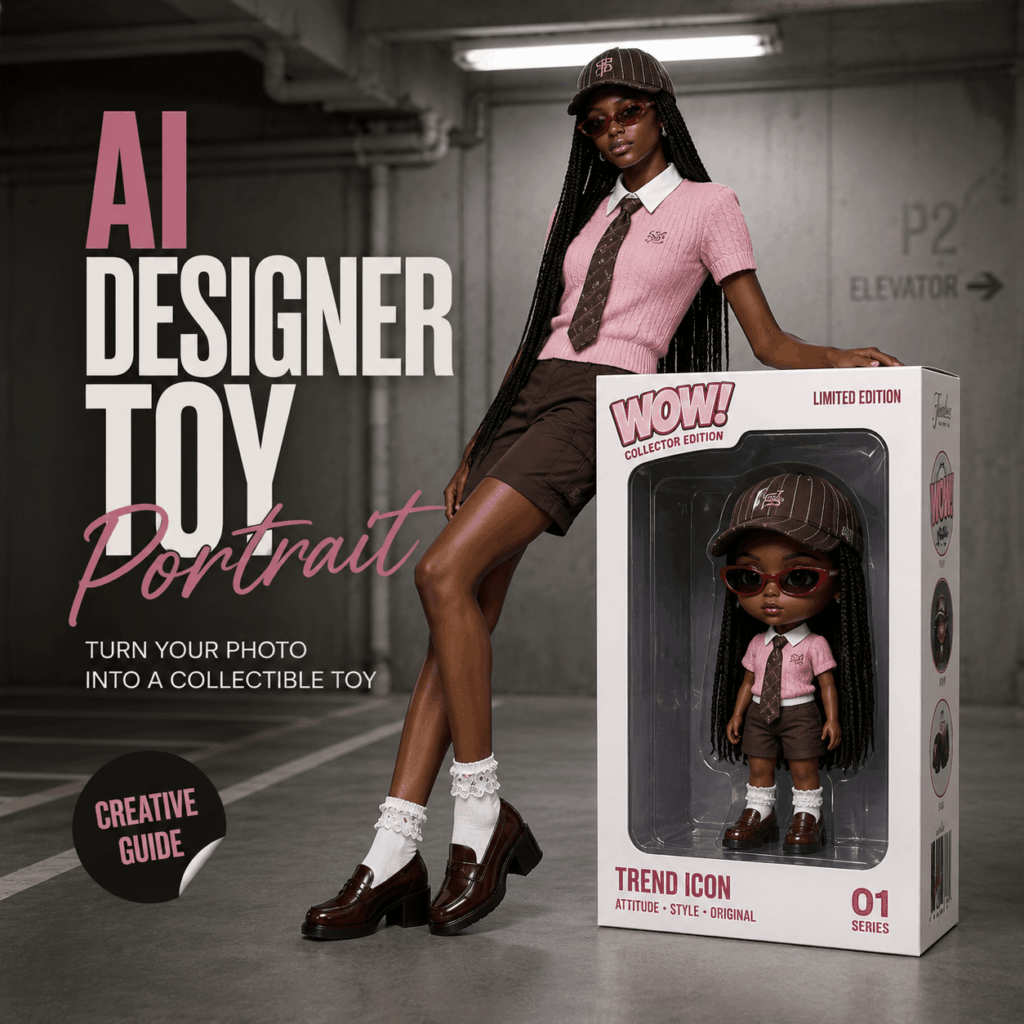
A giant toy box. A real person sitting on top. Meanwhile, a tiny chibi version of the same person appears inside. That is the magic of an AI designer toy portrait.
At first, it looks like a limited-edition toy release. However, after a second look, you realize the toy and the model are the same person.
In this guide, you will learn how to create this viral look with WeShop GPT Image. More importantly, you will learn how to make the result look realistic, stylish, and ready to share.
What Is an AI Designer Toy Portrait?
An AI designer toy portrait is a realistic AI image that turns a person into a collectible toy concept.
Usually, the image includes two versions of the same person. One is the real model. Meanwhile, the other is a small toy figure inside premium packaging.
As a result, the image feels playful and polished at the same time. In other words, it is not just a cute avatar. Instead, it looks like a fashion campaign, a toy launch poster, and an art display in one frame.
Why This Trend Is So Popular
This trend works because it creates a quick visual surprise.
First, viewers notice the oversized toy box. Then, they see the small figure inside. Finally, they realize the toy is a mini version of the real person.
Because of that little discovery, the image becomes more memorable.
In addition, the style fits perfectly with today’s visual culture. It combines AI portraits, designer toys, fashion photography, packaging design, and social media aesthetics.
Therefore, an AI designer toy portrait feels fresh without being too complicated.
Choose the Right Portrait Photo
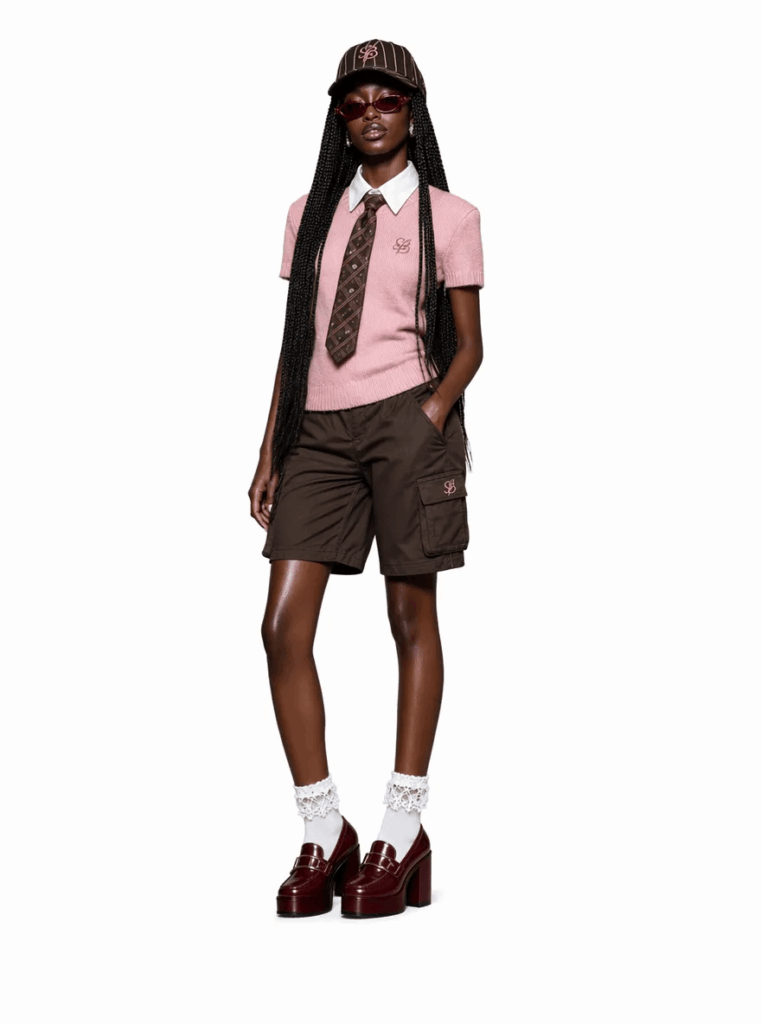
To get a better result, start with a clear photo.
A good photo should include:
- A half-body or full-body view
- A clear hairstyle
- A complete outfit
- A visible face
- A natural pose
- Distinct accessories or styling details
In general, the clearer the photo is, the stronger the final image will be. That is because the AI needs enough details to understand the person.
For example, it reads the face, hair, clothes, colors, accessories, and overall mood. Then, it uses those details to build the toy version.
However, avoid blurry selfies, heavy filters, group photos, and covered faces. Otherwise, the toy figure may not look close enough to the original person.
Step-by-Step Guide
Step 1 Build the Main Visual Idea
The biggest mistake is writing only one short line, such as “turn me into a toy.”
That sounds simple. However, it does not give the AI enough direction.
Instead, describe the full scene. For example, mention the real person, the giant toy box, the chibi figure, the matching outfit, the background, and the camera style.
By doing this, you guide the AI toward a realistic fashion image. At the same time, you keep the collectible toy feeling.
Step 2 Use a Clear Prompt Structure
A strong prompt should be split into sections.
For example, you can describe:
- The main concept
- The outfit
- The pose
- The toy box
- The environment
- The camera angle
This structure helps the AI understand each part of the image. Moreover, it makes the final AI designer toy portrait more consistent.
You can use this prompt as a starting point:
Create a highly realistic commercial fashion photograph in a 3:4 vertical composition. A young Black woman sits confidently on top of an oversized collectible toy packaging box in the center of an industrial parking garage. The core visual concept is a surreal mirror effect: a giant white toy package stands upright, and inside the transparent package is a chibi-style toy version of the same woman. The miniature figure perfectly matches the real model's appearance, hairstyle, outfit, accessories, colors, and attitude. The contrast between the life-sized woman and her toy clone creates a playful designer-toy display aesthetic.

OUTFIT:
Pink short-sleeve knit top. Crisp white collared shirt underneath. Dark brown patterned necktie. Dark brown cargo shorts. Dark brown striped baseball cap. Vintage narrow red sunglasses. White lace-trim socks. Burgundy chunky-heel loafers. Long braids draping naturally over both shoulders. Clean and sophisticated styling.

POSE:
The model sits on top of the packaging box. Back straight. Both arms extended behind her supporting her weight. Legs together hanging over the front edge. Ankles slightly pointed downward. Relaxed but powerful posture. Strong sense of balance and physical realism. The packaging visibly supports her weight.

TOY BOX:
Massive white designer toy packaging. Large transparent plastic display window. Premium collectible toy packaging design. Printed "WOW!" branding on the box. Inside the package is a perfectly matching chibi toy version of the model.

Cute proportions: large head, small body, designer vinyl toy aesthetic, high-end collectible figure appearance. Realistic plastic packaging reflections. Premium print texture. Authentic retail toy presentation.

ENVIRONMENT:
Industrial parking garage. Clean concrete floor. Cold gray-white concrete wall behind. Two long fluorescent ceiling lights overhead. White vertical fire pipe on the right side. Parking lane markings extending on the left side. Minimal environment. No clutter. Modern industrial atmosphere.

CAMERA:
Full body composition. Slight low-angle view. Eye-level perspective with subtle upward emphasis. Subject centered. Moderate depth of field. Background slightly softened. Packaging box remains sharp. Commercial editorial photography. Luxury street-fashion campaign aesthetic.
Why This Prompt Works
This prompt works because it gives the image a clear purpose.
First, it tells the AI that the image should look like a real commercial photo. Next, it explains the toy box concept. After that, it describes the outfit, pose, box, scene, and camera.
As a result, the final image feels more like a real campaign. Meanwhile, the chibi figure adds a fun collectible twist.
Also, the prompt repeats the idea that the toy and the model are the same person. Because of this, the AI has a better chance of keeping both characters consistent.
Step 3 Preview the Final Effect
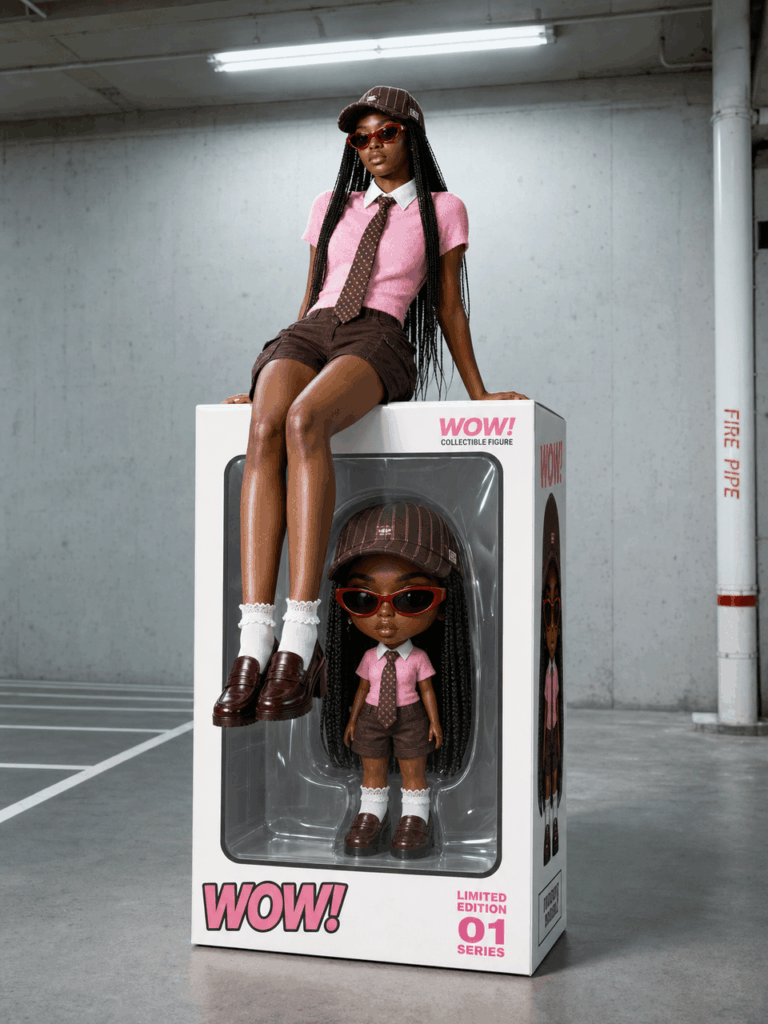
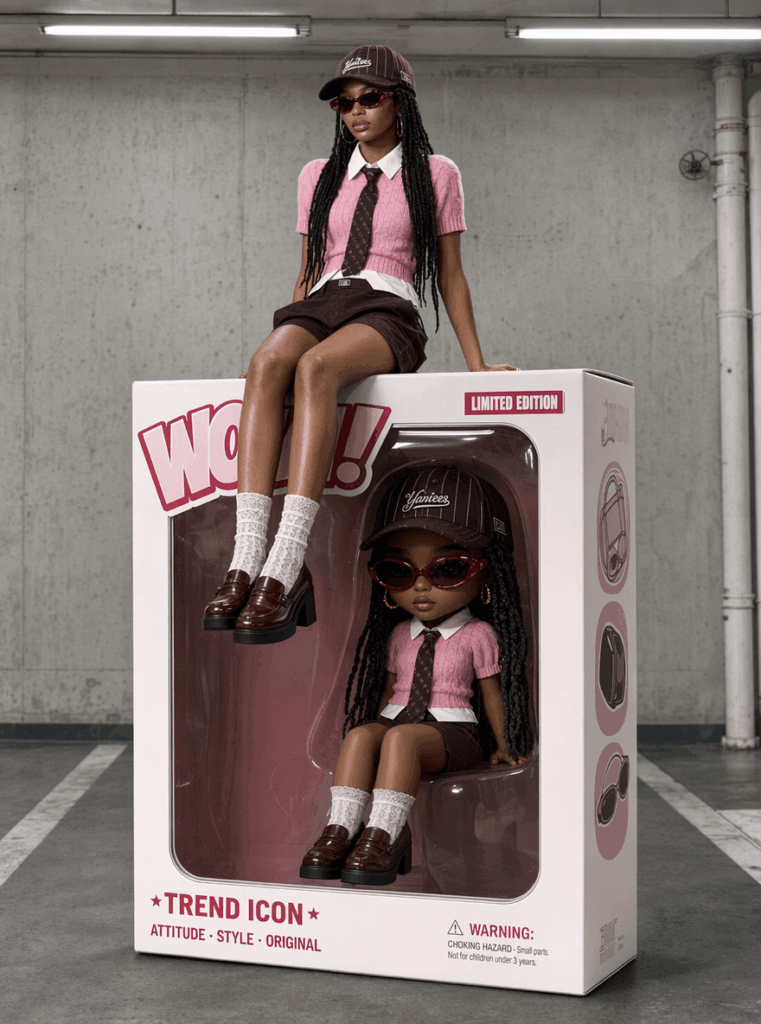
The final image should feel like a designer toy release poster.
Ideally, the real person sits on top of a large toy package. Meanwhile, the mini toy figure appears inside the box. Both versions should share the same hair, outfit, accessories, and attitude.
Because of this mirror effect, the image becomes more interesting. It is cute, but it is not childish. Likewise, it is trendy, but it still feels premium.
That balance is what makes an AI designer toy portrait so shareable.
How to Make the Image Look More Premium
Styling matters a lot.
For instance, streetwear works well. Retro outfits also look great. In addition, preppy looks, bold accessories, luxury styling, and statement hairstyles can make the image stronger.
The reason is simple. Strong styling gives the AI more details to copy.
Therefore, the toy version becomes easier to recognize. At the same time, the whole image looks more like a fashion campaign.
Advanced Tips and FAQ
Q1 Why Does the Result Look Too Cartoonish?
This usually happens when the AI reads “toy” as “cartoon.”
As a result, the image may look too flat, too cute, or too much like an anime illustration.
To fix this, add these terms:
designer vinyl toy

collectible figure

premium toy packaging
These words push the image toward a real collectible object.
On the other hand, avoid words like:
cartoon

anime

cute illustration
Those words can make the result look less realistic.
Instead, use phrases such as:
- designer vinyl toy
- collectible art figure
- realistic packaging
- commercial photography
- luxury fashion campaign
With these terms, the AI is more likely to create a premium AI designer toy portrait.
Q2 Why Does the Packaging Box Look Fake?
Sometimes, the toy box looks too plain. It may also look too flat or too digital.
To improve it, add more packaging details.
Use phrases like:
realistic plastic window

premium print texture

retail packaging realism
These details help the AI create a more believable box.
In addition, they improve the clear window, printed surface, and product display feeling.
For a stronger result, add:
transparent molded plastic shell

subtle reflections on the plastic window

authentic collectible toy box design

premium product photography
After that, the box will feel closer to a real designer toy package.
Q3 Why Does the Toy Figure Not Look Like the Real Person?
This happens when the AI sees the real person and the toy figure as two different characters.
To solve this, repeat the identity match clearly.
Add these phrases:
perfectly matching toy clone

same outfit

same hairstyle

same identity
These lines help the AI understand the relationship.
In other words, the figure inside the box should not be a random toy. Instead, it should be a mini version of the real model.
You can also add:
the toy figure is a miniature version of the real model

the toy clone shares the same facial features, hairstyle, outfit, accessories, and attitude

the real person and the toy figure represent the same character
Because of these details, the final AI designer toy portrait will look more consistent.
Q4 How Can I Make It Look More Viral?
To make the image more social-media-friendly, add a stronger visual mood.
For example, use:
Luxury fashion campaign meets designer toy exhibition.

Collectible art installation aesthetic.

Premium Xiaohongshu editorial style.

Highly shareable social media visual.
These lines make the image feel more editorial.
Moreover, they add a sense of trend, style, and polish.
You can also add:
clean composition

high-end editorial cover style

visually striking center composition

premium lifestyle photography

viral social media campaign aesthetic
Together, these phrases help the image work better as a blog cover, social post, or campaign visual.
Why This Format Feels So Shareable
The format is easy to understand. However, it still feels special.
On one side, viewers see a real person. On the other side, they see a tiny packaged version of that person. Because both versions appear together, the image feels like a story.
Also, the packaging adds value. More specifically, it makes the person look like a limited-edition product, not just a portrait subject.
That is why this trend feels more exciting than a normal AI headshot. It does not only change the background. Instead, it changes the whole concept.
Final Thoughts
An AI designer toy portrait is more than a fun AI photo idea.
It turns a person into a collectible character. It also adds fashion, packaging, and product design to the image.
Most importantly, it gives the viewer a clear reason to stop scrolling.
So, if you want a fresh AI portrait idea, try the “real person + chibi clone + designer toy packaging” formula. Start with one clear photo. Then, use a structured prompt. Finally, refine the details until the image feels like your own limited-edition toy release.
Go to WeShop AI For Exploration:





