

Tired of selfies that all look the same? You know the look. Smooth skin. Soft filters. Perfect lighting. Safe angles. It looks nice, but it does not always feel memorable. That is why the AI selfie poster trend feels so refreshing.
Instead of making your photo look “perfect,” this style makes it look expressive, funny, and full of personality. It mixes chaotic festival selfies, internet meme culture, scrapbook doodles, flash photography, and indie magazine cover design.
Even better, the final image can still look like you. It does not have to turn you into a generic AI influencer face.
In this guide, you will learn how to use Weshop GPT-Image to turn a normal portrait into a bold, ultra-wide fisheye selfie poster. The final result will include direct flash, playful doodles, handwritten text, and a strong social-media-ready look.
Let’s get started.
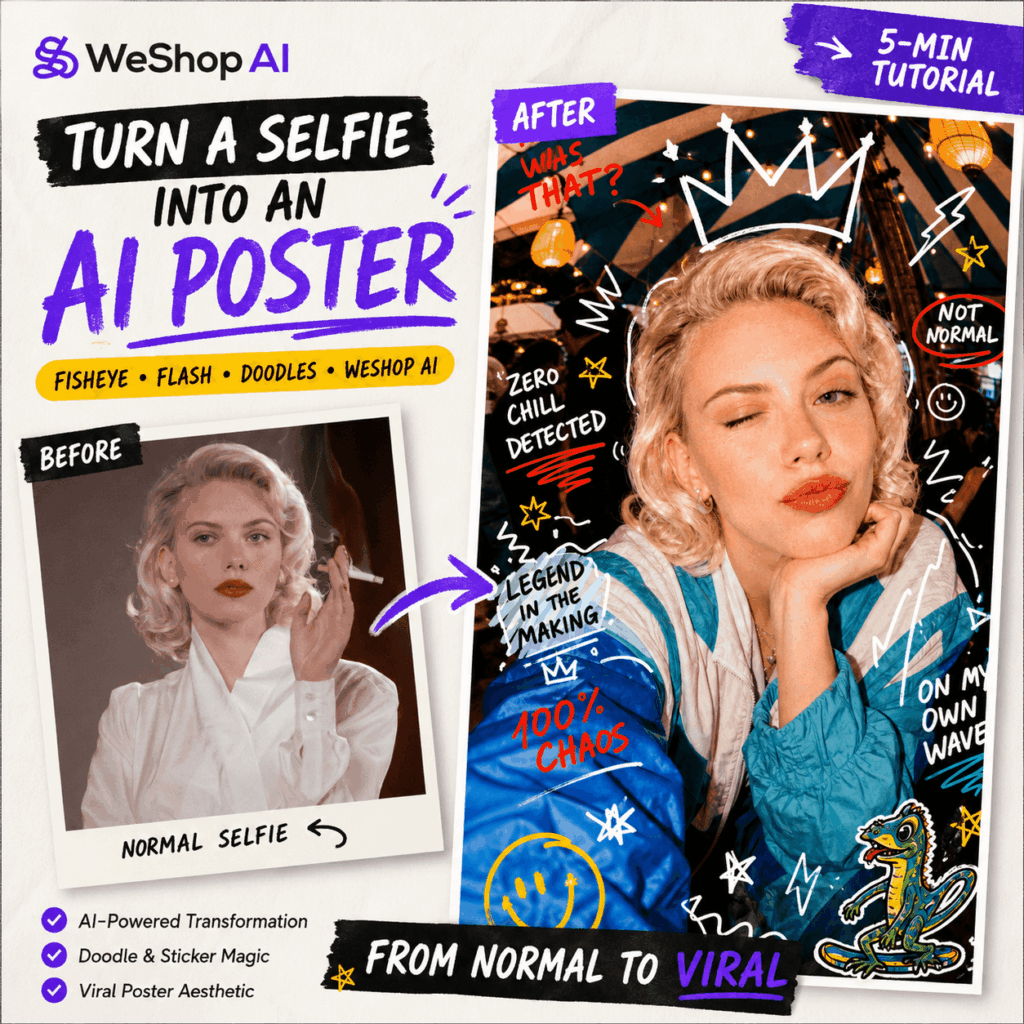
What You Need Before You Start
Before you generate your image, prepare three simple things.
First, open Weshop GPT-Image. This is the AI image tool we will use in this tutorial.
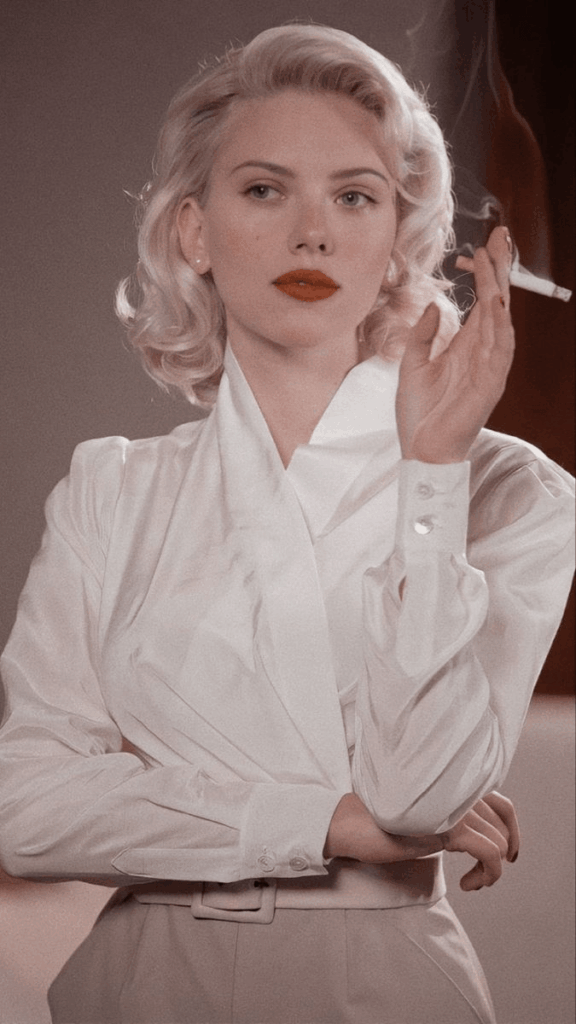
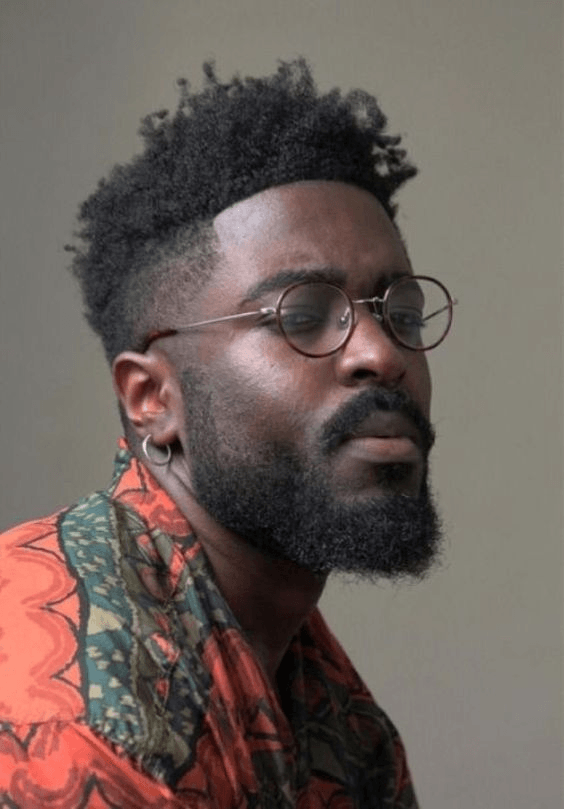
Next, choose a clear reference photo. Ideally, use a front-facing or near-front-facing portrait. Your face should be easy to see. Also, try to avoid large sunglasses, masks, heavy shadows, or strong beauty filters.
Finally, copy the full prompt in this article. You can paste it directly into Weshop GPT-Image.
How to Choose a Better Reference Photo
A good reference image makes a big difference.
For the best result, choose a photo with clear facial details, even lighting, and a natural expression. In addition, your hairstyle, face shape, and main features should be visible.
This helps the AI keep your identity consistent. At the same time, it gives the model enough room to add the fisheye effect, doodles, and flash-photo mood.
Step 1: Upload Your Reference Image
First, open the Weshop GPT-Image tool page.
Then, upload your chosen portrait in the image upload area. This photo will work as the Reference Image. In other words, the AI will use it as the main guide for the person in the final image.
For better results, use a photo with:
- Clear facial details
- Even lighting
- A natural expression
- Minimal face obstruction
- Little to no heavy beauty filter
This step is important. If the reference photo is too dark or heavily edited, the final poster may not look enough like you.
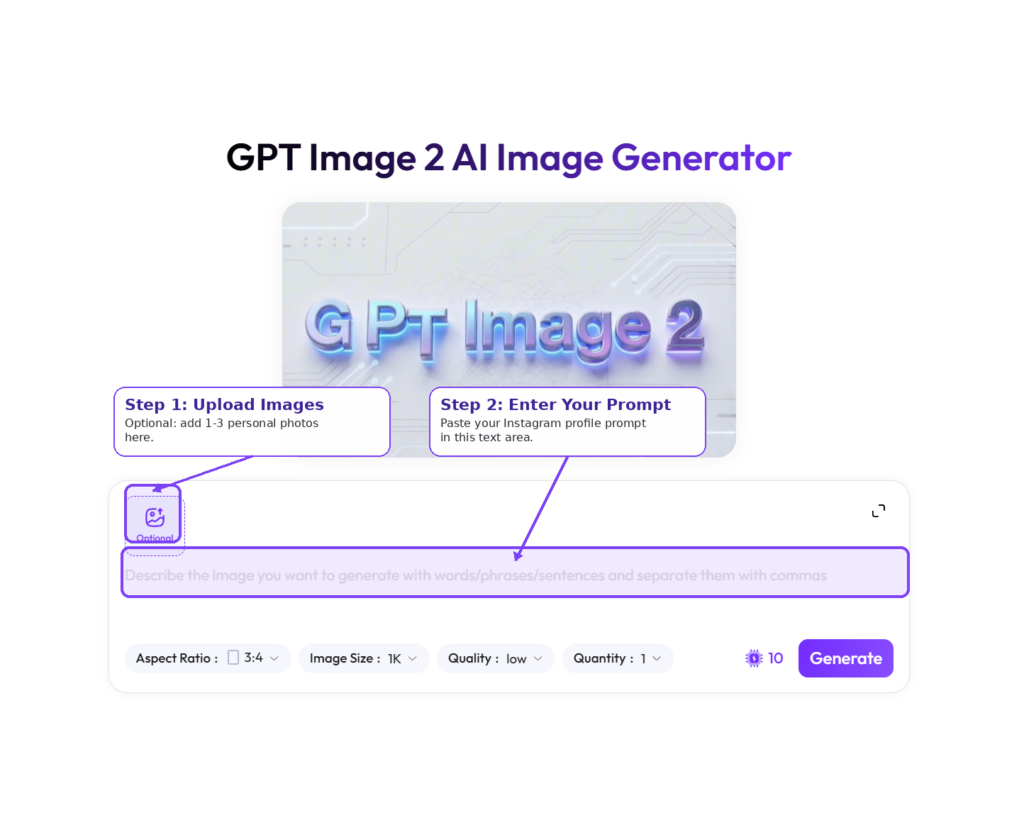
Step 2: Copy and Paste the AI Selfie Poster Prompt
Next, copy the full prompt below.
This prompt is designed to control the main parts of the image. For example, it helps preserve the face, create the fisheye selfie angle, add a playful expression, build the festival background, and place doodles around the subject.
After copying it, paste it into the Weshop GPT-Image prompt box.
Use the uploaded reference image as the primary subject reference. Transform the person in the reference image into a hyper-realistic internet-culture editorial poster inspired by chaotic festival selfies, scrapbook doodles, candid flash photography, and modern meme culture.

Main Goal: Create a viral-looking ultra-wide smartphone selfie poster while preserving the person’s recognizable identity, facial structure, hairstyle, skin tone, and overall character from the uploaded image. The final image should feel like a spontaneous funny selfie transformed into a premium indie magazine cover.

Subject Preservation: Keep the same person from the reference image. Preserve their key facial features, face shape, hairstyle, approximate age, expression style, and natural individuality. Do not make the person look like a different model. Do not over-beautify or turn them into a luxury fashion editorial subject. Keep the result realistic, candid, expressive, and believable.

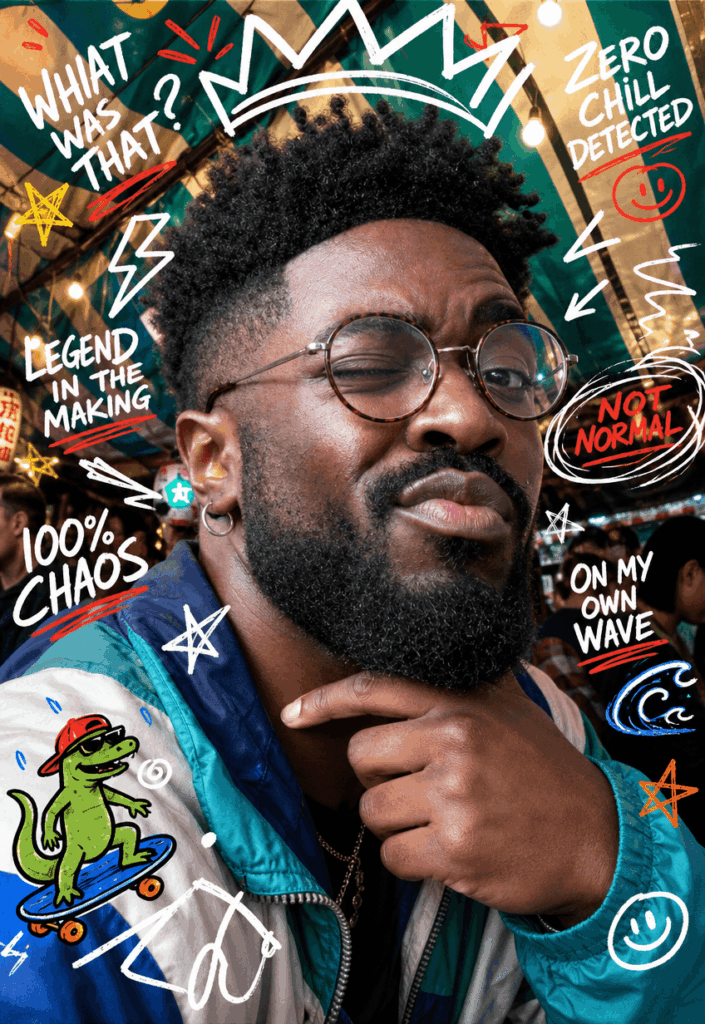
Selfie Transformation: Reframe the subject as if they are taking an absurdly close smartphone selfie from arm’s length using an ultra-wide fisheye lens. The face should occupy approximately 70–80% of the frame. Use realistic fisheye distortion, especially around the nose, cheeks, lips, and forehead, while keeping the person recognizable and natural. Add a slight camera tilt for spontaneous social-media energy. Use a vertical magazine-cover composition.

Pose & Expression: Create a photogenic but playful candid pose: One hand resting lightly beneath the chin, head tilted slightly toward the camera, one shoulder subtly raised toward the face. Direct engagement with the camera. Create a playful split-second reaction: One eye closed in an exaggerated wink, slightly raised eyebrow on the opposite side, soft duck-face pout mixed with a playful smirk. Cheeks slightly lifted.

Wardrobe & Environment: Keep the original outfit recognizable if visible, but stylize it toward authentic youth-culture street style (Oversized retro windbreaker, Teal/cobalt blue/turquoise/white color-block design, simple hoop earrings). Place the subject beneath a vibrant outdoor market or festival canopy (Teal and cream striped canopy, hanging lanterns, string lights). Blurred crowd activity in the background.

Doodle Layer & Typography: Add playful marker-style illustrations around the portrait: Oversized doodled crown above the head, white lightning bolts, hand-drawn stars, smiley faces, sparkles, squiggly energy lines, cartoon lizard riding a skateboard near one edge. Add imperfect handwritten marker text around the subject: “WHAT WAS THAT?”, “ZERO CHILL DETECTED”, “LEGEND IN THE MAKING”, “100% CHAOS”, “NOT NORMAL”, “ON MY OWN WAVE”. Uneven sizes, different angles, natural marker texture.

Lighting & Style: Use strong direct smartphone flash. Bright flash highlights, slightly overexposed hotspots, natural skin texture, visible pores. Mild digital grain, high contrast. Hyper-realistic photography, viral selfie aesthetic, internet-core, scrapbook collage.
Step 3: Understand What the Prompt Does
Before you click generate, it helps to understand the prompt.
This way, you can adjust it later. Also, you will know which part to edit if you want a different mood.
Subject Preservation
This section tells the AI to keep the same person from the reference image.
It focuses on facial features, face shape, hairstyle, skin tone, age impression, and natural individuality. As a result, the final image should still feel connected to the original photo.
This is especially useful because creative AI portraits can sometimes become too polished. In some cases, they may even look like a different person.
Here, the goal is different. We want the image to feel realistic, candid, and personal.
Selfie Transformation
This is where the poster gets its main visual impact.
The prompt asks for an ultra-wide fisheye lens effect. It should look as if the subject is holding a phone very close to their face.
Also, the prompt asks for the face to take up about 70–80% of the frame. Because of this, the image feels bold, close, and slightly absurd in a fun way.
You may see some distortion around the nose, cheeks, lips, and forehead. However, the person should still remain recognizable.
That balance is what makes the image interesting.
Pose and Expression
Instead of a normal portrait pose, the prompt asks for a playful candid reaction.
The subject places one hand under the chin, tilts the head slightly, raises one shoulder, and looks directly at the camera. In addition, the expression includes a wink, a raised eyebrow, and a soft duck-face smirk.
Because of these details, the image feels more like a funny selfie caught at the perfect second. It feels less staged and more alive.
Doodles and Typography
This part turns the image into a real poster.
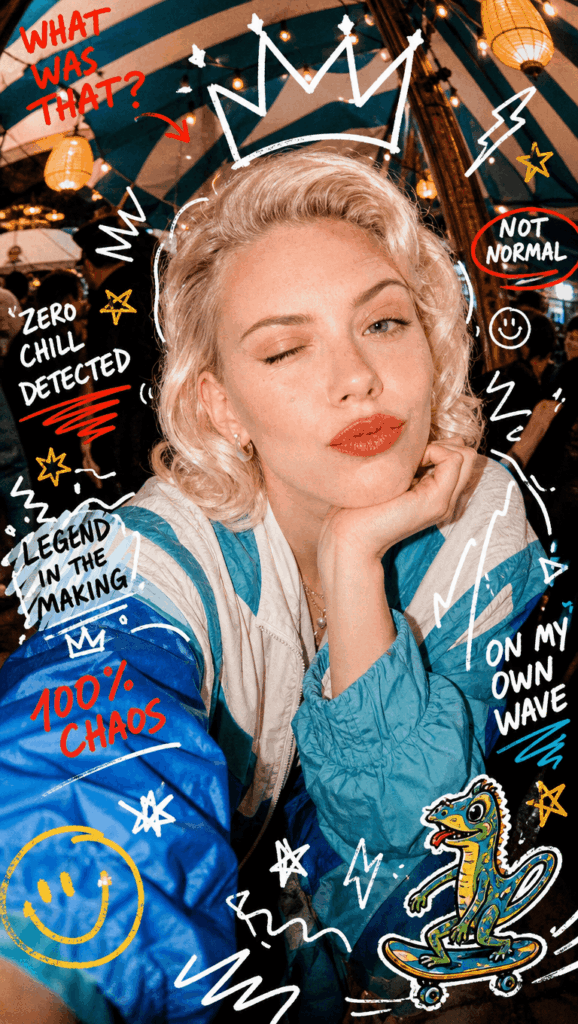
The prompt adds marker-style doodles around the face. These include a crown, lightning bolts, stars, smiley faces, sparkles, squiggly lines, and a cartoon lizard riding a skateboard.
It also adds short handwritten phrases, such as:
- “WHAT WAS THAT?”
- “ZERO CHILL DETECTED”
- “LEGEND IN THE MAKING”
- “100% CHAOS”
- “NOT NORMAL”
- “ON MY OWN WAVE”
These phrases are short on purpose. They feel like stickers, memes, and zine-style notes. Therefore, they help create a more casual and internet-native look.
Lighting and Style
Finally, the prompt uses strong direct smartphone flash.
This gives the image bright highlights, high contrast, visible skin texture, and slight overexposure. It may also add mild digital grain.
Together, these details create a raw party-photo mood. The result feels spontaneous, energetic, and very shareable.
Step 4: Generate Your AI Selfie Poster
Once the prompt is ready, click the generate button.
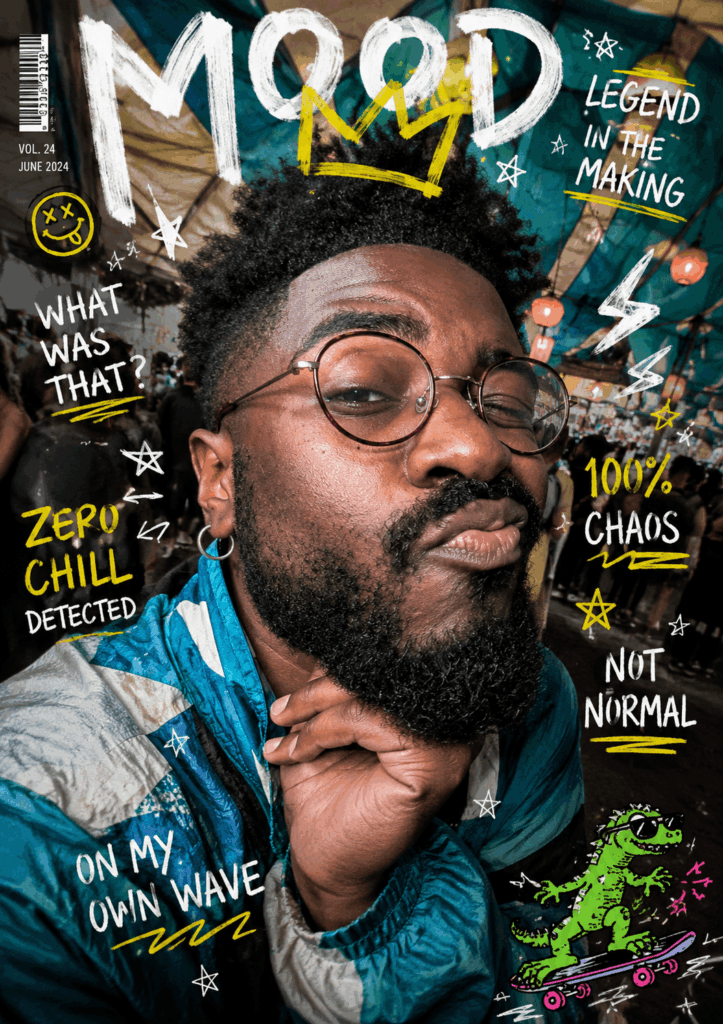
After a short wait, Weshop GPT-Image will create your AI selfie poster. The result should have a close-up fisheye selfie look, strong flash, playful doodles, and a magazine-cover feel.
However, do not judge the first result too quickly.
Creative image generation often has some randomness. For example, the doodles may move around. The expression may change slightly. The text placement may also look different each time.
How to Pick the Best Result
When reviewing the image, look at a few key details.
First, check whether the face still looks like the reference person. Then, look at the expression. It should feel playful, but not too forced.
Next, check the doodles. They should add energy without covering the main facial features. After that, look at the handwritten text. It does not need to be perfect, but it should feel intentional.
Finally, check the overall composition. The image should feel like a poster, not just a simple filter.
If the first version is not strong enough, generate again. Often, the second or third version will have a better layout, a funnier expression, or a cleaner balance between face, text, and doodles.
Advanced Tips and FAQ
Q1: Why does the generated image not look enough like me?
Start by checking your reference image.
If the original photo has uneven lighting, heavy shadows, a strong side angle, or too much beauty filtering, the AI may not preserve your features well.
For better results, use a clear front-facing photo with natural lighting. Also, make sure your facial details are easy to see.
A little distortion is normal because this style uses a fisheye lens effect. However, if the result looks like a completely different person, try again with a cleaner reference photo.
Q2: Can I change the background to a cyberpunk city?
Yes, you can.
Find the Wardrobe & Environment section in the prompt. Then, replace the original scene description with a new one.
For example, you can change:
outdoor market or festival canopyto:
neon-lit cyberpunk city street at night, glowing holographic signsThis will shift the image from a festival selfie mood to a neon city poster mood.
You can also try other scenes, such as a late-night convenience store, a crowded subway platform, a beach party at sunset, a retro Y2K bedroom, a carnival, or a backstage music festival area.
The core style will stay similar. However, the background will quickly change the whole mood.
Q3: What if the handwritten English text comes out wrong?
This can happen with AI-generated text.
It is especially common when the image includes many words at once. Therefore, short uppercase phrases usually work better than long sentences.
To improve the result, try these fixes:
- Generate a few more versions
- Reduce the number of text phrases
- Use shorter words
- Keep only 3–4 main phrases
- Clean up small mistakes with a photo editor afterward
For this style, the text does not need to look perfectly typeset. In fact, a slightly imperfect marker look can make the poster feel more natural.
Final Thoughts
This AI selfie poster style works because it breaks away from the usual perfect portrait formula.
Instead of chasing flawless beauty, it leans into personality. The fisheye lens makes the face feel close and expressive. The flash adds energy. The doodles bring humor. Meanwhile, the handwritten text gives the image a meme-like rhythm.
Most importantly, the result feels easy to share.
It can work as a profile image, a social post, a playlist cover, an event poster, or just a fun version of your own selfie.
So, open Weshop GPT-Image, upload your photo, paste the prompt, and generate your first AI selfie poster.
And if you create a version with even better doodles, we definitely want to see it.
Go to WeShop AI For Exploration:





