

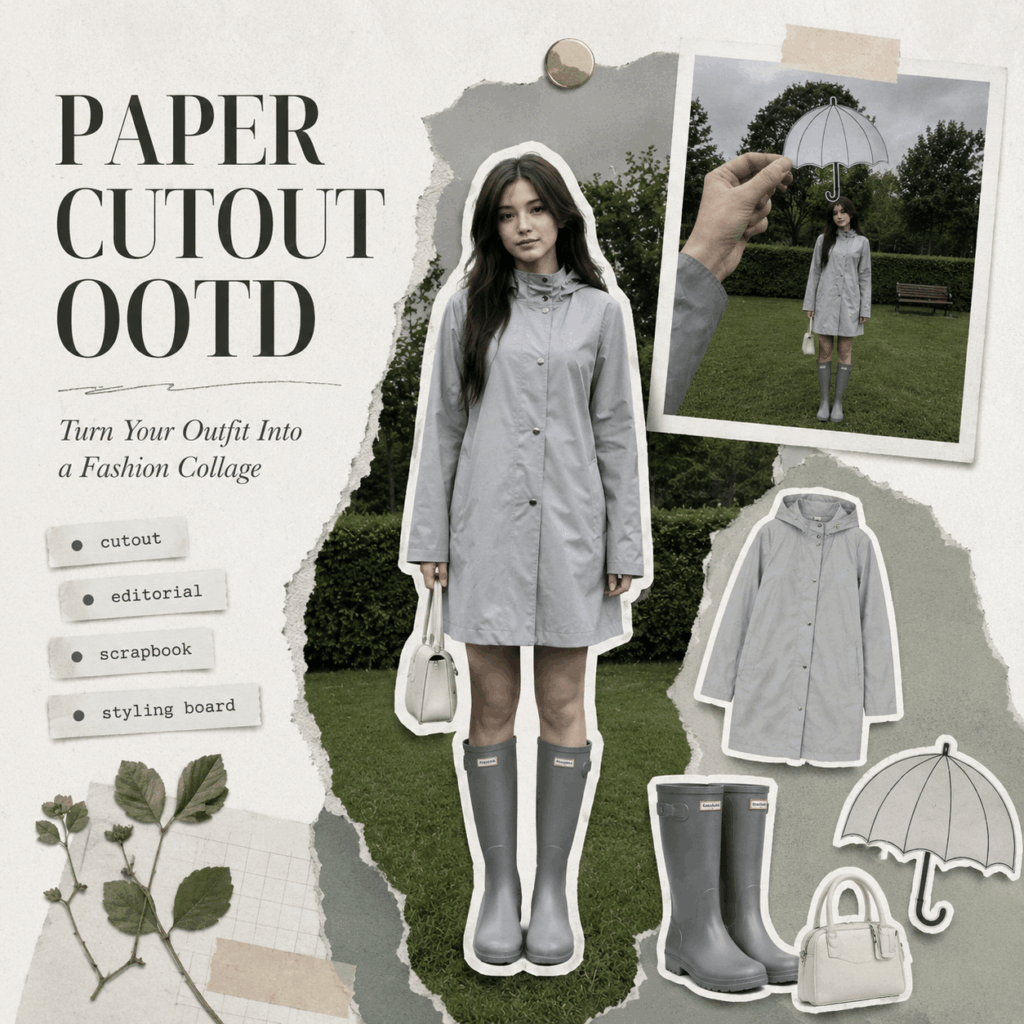
If you have been seeing outfit posts that look like magazine cutouts, scrapbook pages, or Pinterest styling boards, you have probably noticed the rise of Paper Cutout OOTD. In simple terms, Paper Cutout OOTD turns a regular outfit photo into a save-worthy fashion collage. As a result, one simple look can feel more creative, more useful, and more shareable.
Instead of posting another basic mirror selfie, many creators now turn their outfits into visual style pages. Therefore, the outfit does not only show what someone wore. It also shows how the pieces work together.
Meanwhile, this format feels fresh because it combines fashion content with collage design. While Receipt OOTD turns an outfit into a shopping-list-style layout, Paper Cutout OOTD takes a more visual route. First, it breaks the outfit into paper-like pieces. Then, it rebuilds the look into a clean fashion collage.
The final result feels like a mix of:
Fashion editorial × Scrapbook collage × Pinterest moodboard
Because of this, the format works especially well on visual platforms. After all, people do not only want to see a nice outfit. They also want ideas they can save, copy, and revisit later.
Right now, this format is growing fast on:
- TikTok
- Xiaohongshu
- Fashion blogs
In addition, it is especially useful for:
- OOTD creators
- Fashion brands
- Capsule wardrobe accounts
- Outfit breakdown content
- Independent designers
- Styling accounts
- Sneaker and jersey creators
- Bag and accessory brands
Most importantly, Paper Cutout OOTD gives the viewer more than a photo. Instead, it turns the outfit into a mini styling guide. Therefore, the content feels more helpful and more collectible.
What Is Paper Cutout OOTD?
The idea behind Paper Cutout OOTD is simple.
First, you take a complete outfit photo. Then, you cut out the person, separate the key fashion items, and arrange everything like a page from a style journal. After that, you add paper texture, white borders, short labels, and clean spacing.
In this way, the person becomes a cutout.
Meanwhile, the jacket becomes a cutout.
Also, the shoes, bag, and accessories become separate visual elements.
After that, all the pieces are placed back together in a more creative layout. Because of this, the final image feels less like a normal outfit post and more like a curated fashion board.
A typical Paper Cutout OOTD may include:
- A cutout of the full-body outfit
- Separate clothing items
- Shoes, bags, jewelry, or accessories
- White die-cut borders
- Paper texture
- Magazine-style labels
- Scrapbook-inspired layout
- Clean white space
- Small styling notes
As a result, the image becomes more useful for outfit inspiration. In addition, it can work well for product display, lookbook pages, social media covers, and Pinterest-style moodboards.
Why Paper Cutout OOTD Works So Well
At first glance, this trend may look like a simple design effect. However, the reason it performs well is deeper than that.
First, it creates a strong visual hook. Because the layout looks different from a normal outfit post, people are more likely to stop scrolling.
Second, it adds more information to one image. For example, viewers can see the full look, the key items, and the way each piece works together.
Third, it feels like a moodboard. Therefore, users are more likely to save it for future outfit ideas.
For creators, this means higher content value. Meanwhile, for brands, it means a better way to show products in context.
In addition, the format makes styling feel more intentional. Instead of showing clothing as separate products, it presents every item as part of a complete fashion story.
Tools and Materials You Need
You only need a few simple materials to create a Paper Cutout OOTD. Therefore, the whole process is easier than it looks.
1. WeShop AI
Tool link:
WeShop AI:
https://www.weshop.ai/?from=nav
After entering WeShop AI, you can use GPT Image to process your outfit photo and create the paper-cutout collage effect.
If you want to turn the final image into a short video, you can also use Kling inside WeShop AI to add motion. For example, you can create a subtle camera move, a paper-layer animation, or a short social media video based on the finished collage.
In this way, one OOTD photo can become both a blog image and a video-ready fashion visual.
2. One Complete OOTD Photo
Choose a clear full-body outfit photo. Ideally, the person, clothing, shoes, and accessories should all be visible.
A good photo should have:
- Full-body framing
- A complete outfit
- Clear clothing details
- Visible shoes and bag
- A clean background
As a result, GPT Image can understand the outfit better and create a cleaner Paper Cutout OOTD effect.
3. Simple Outfit Details
You can also prepare a few item names, such as:
- Jacket
- Pants
- Sneakers
- Bag
These labels can be added to the final collage. Therefore, the image will look more like a styling board and feel more useful for readers.
Step-by-Step Guide
Step 1: Create the Paper Cutout Main Visual
First, you need to build the main paper-cutout effect.
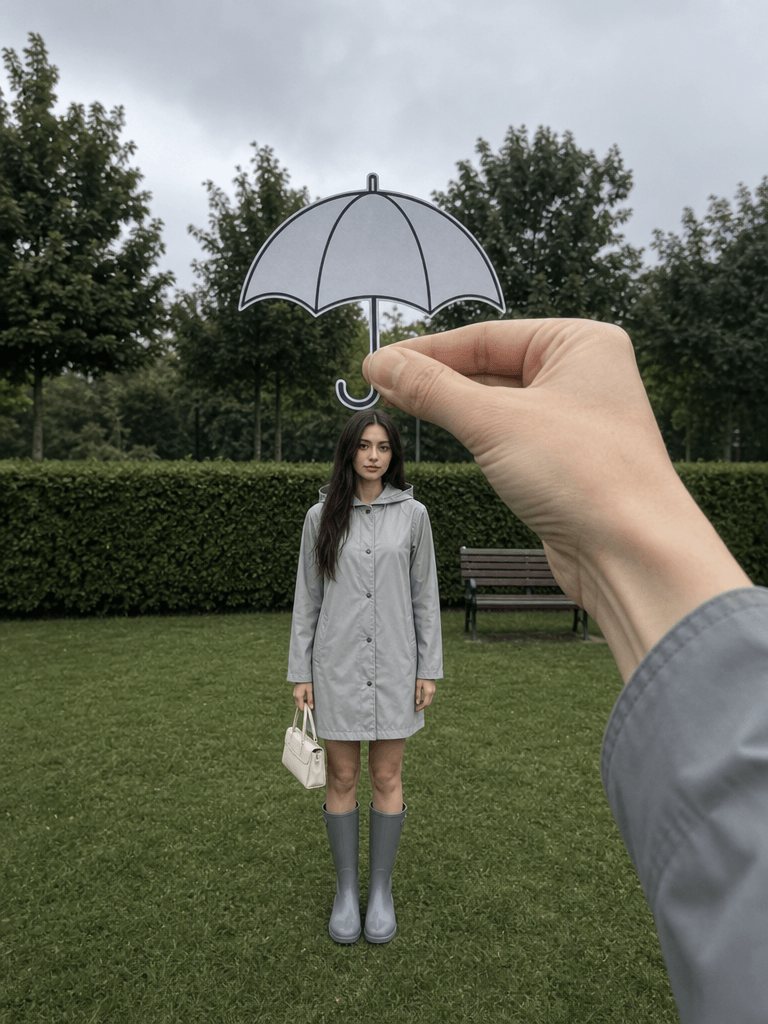
Upload your original image, then use the prompt below. You can also adjust the outfit, scene, model description, or visual details based on your own content.
{
  "image_settings": {
    "aspect_ratio": "3:4",
    "resolution": "1080/1440"
  },
  "prompt": {
    "scene_and_composition": {
      "visual_hook": "Forced perspective optical illusion using a hand-held paper cutout of a bubble umbrella aligned perfectly over a standing woman's head.",
      "camera_angle": "Eye-level, centered, static smartphone photography.",
      "framing_and_depth": "Medium full shot; deep focus with subtle background blur; clear foreground-to-background spatial separation.",
      "medium_physics": "Casual mobile photography aesthetic, slight digital noise, overcast daylight color profile, high-contrast silhouette against the blurred park greenery."
    },
    "subject_content": {
      "identity_features": "Caucasian woman, early 20s, slim athletic build, oval face shape, straight dark hair, neutral facial expression.",
      "overall_pose": "Standing perfectly upright, centered in the frame, arms at sides, legs together.",
      "limb_articulation": "Left hand gripping a small handbag; right hand at side; foreground hand (right) extended toward the lens, thumb and index finger pinching a paper cutout of an umbrella.",
      "pose_dynamics": "Static, balanced center of gravity, minimalist posture.",
      "makeup_look": "Natural skin texture, clean-girl aesthetic, minimal makeup, subtle skin sheen from ambient humidity.",
      "emotional_vibe": "Whimsical, composed, detached, high-fashion social media aesthetic.",
      "main_object/apparel": "Mid-length light grey raincoat, matte button-down front, smooth synthetic fabric; matching grey high-calf rain boots; small rectangular light-colored purse.",
      "hair_and_styling": "Hair parted centrally, smooth sleek finish, natural fall.",
      "interaction_with_environment": "Standing on manicured lawn; foreground hand interacts with the optical illusion plane."
    },
    "environment": {
      "visual_depth_stack": "Foreground: 1 right hand pinching 1 paper umbrella cutout. Midground: 1 woman standing on grass, 1 small purse. Background: 1 wooden garden bench, 1 row of trimmed hedges, 3 mature trees, overcast sky.",
      "lighting_atmosphere": "Key: diffuse overcast natural light from above; Ambient: soft, cool-toned shadows; Interaction: even light distribution on subject, no sharp nose or chin shadows, paper cutout casting slight shadow on the hand."
    },
    "realism_rules": [
      "Forced perspective alignment must be precise",
      "Natural overcast daylight balance",
      "Mobile-shot digital texture with slight grain",
      "Maintain authentic skin texture with no airbrushing",
      "Uniform color palette emphasizing grey and forest green"
    ]
  },
  "negative_prompt": [
    "3D render",
    "cartoon",
    "painting",
    "studio glam",
    "over-smoothing",
    "stiff posing",
    "obvious AI look",
    "floating subject",
    "subject cut out from background",
    "vague object counts",
    "no focal point",
    "flat lighting",
    "distorted hand anatomy"
  ]
}
What to Check in This Step
The goal of this step is not to make the image look overly perfect. Instead, you want it to feel like a real fashion collage.
So, pay attention to three things:
- The cutout edge should be visible.
- The person and background should have clear depth.
- The final image should not look like a 3D render or a studio ad.
If the result looks too smooth, too plastic, or too obviously AI-generated, add these keywords:
mobile-shot digital texture
slight grain
natural daylight
paper cutout
die-cut edge
white border
paper texture
These details help make the image feel more like a real scrapbook-style fashion page. In addition, they reduce the polished AI look that can make the result feel less authentic.
However, do not add too many effects at once. Otherwise, the image may start to look busy. Instead, adjust one or two keywords at a time and compare the results.
Step 2: Recreate the Same Paper Cutout OOTD Style
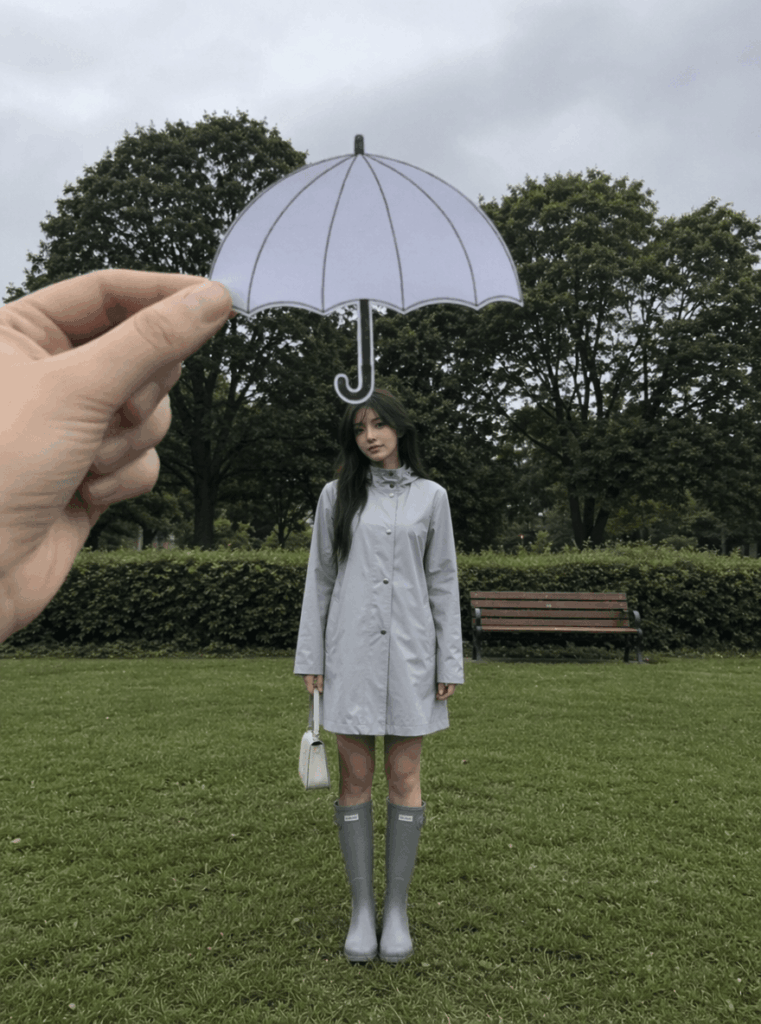
If you do not want to build the style from scratch, you can also start from a reference case.
Reference link:
https://www.weshop.ai/bestexamples?id=6a3197e39dea320ff3fc5665
This approach is great when you want to recreate the same visual direction faster. Moreover, it is useful when you need to create several posts with a consistent style.
It works especially well for:
- Outfit breakdowns
- Fashion layouts
- Product display
- Magazine-style visuals
- Social media content batches
- Lookbook pages
- Pinterest pins
You can upload your own OOTD photo. Then, adjust the outfit, pose, background, product labels, and styling details.
For fashion brands, this type of Paper Cutout OOTD can be used as:
- New arrival visuals
- Lookbook covers
- Styling guide images
- Instagram posts
- Pinterest traffic images
- Xiaohongshu cover images
- Ad creatives
- Product education content
Compared with a standard product photo, it has more personality. Meanwhile, compared with a normal model photo, it gives viewers more styling information.
Therefore, this format is easier to save and easier to reuse as style inspiration. Also, it can help a brand create a stronger visual memory across different posts.
Advanced Tips and FAQ
Q1: Why Does My Image Not Look Like a Magazine Page?
If your image still feels like a normal photo, it may need more editorial direction.
Try adding these words:
editorial layout

fashion magazine page

styling board
You can also add:
clean layout
visual hierarchy
fashion editorial
magazine cutout
These phrases help the image look more structured. In addition, they guide the AI toward a cleaner layout with stronger visual focus.
For a stronger Paper Cutout OOTD result, avoid making the page too crowded. After all, a magazine-inspired layout usually needs breathing room.
Also, keep the text short. Otherwise, the image may look more like a poster than a fashion moodboard.
Q2: Why Does It Not Look Like Paper?
If the person or items do not look like real cutouts, the paper effect may not be clear enough.
Add these keywords:
paper cutout

die-cut edge

paper texture

white border
The most important words are:
- paper cutout
- die-cut edge
- white border
Together, these words make the “cut from paper” effect much stronger.
If you want a more handmade feeling, you can also add:
scrapbook collage
handmade collage
paper shadow
slightly raised paper edge
This helps the layout feel less flat. Also, it makes the image look more like a real collage page.
However, keep the paper effect balanced. If the texture becomes too heavy, the outfit may lose detail.
Q3: Why Does the Layout Look Too Messy?
A good Paper Cutout OOTD is not about adding every possible item to the canvas. Instead, it is about helping people understand the outfit quickly.
If the layout looks messy, reduce:
- The number of clothing items
- The number of text labels
- The number of stickers
- The number of decorative elements
- The background details
A clean structure is usually better. For example, a safe layout formula is:
- 1 main outfit cutout
- 3 to 5 key fashion items
- 2 to 4 short text labels
- A few small decorative elements
- Plenty of white space
This is especially important for brands. If you show too many products at once, the image may start to look like a sale poster. However, if you focus on one styling story, it feels more premium.
Therefore, the best layout is usually simple but intentional. In other words, every element should have a reason to be there.
Q4: Which Accounts Should Try Paper Cutout OOTD?
Paper Cutout OOTD works especially well for accounts that need both visual impact and styling value.
It is a strong fit for:
- Outfit creators
- Fashion brands
- Independent designers
- Jersey accounts
- Capsule wardrobe accounts
- Shoe brands
- Bag brands
- Accessory brands
- Stylists
- Buyer shops
- Pinterest inspiration accounts
- Xiaohongshu fashion accounts
It is also perfect for creators who feel tired of posting the same mirror selfies or street-style shots.
With this format, you are not just changing the filter. Instead, you are changing the way the outfit is presented.
As a result, the same outfit can feel more designed, more editorial, and more valuable to the viewer.
Q5: Why Can Paper Cutout OOTD Improve Saves?
The reason is simple. This format gives the viewer more value.
First, it has a strong visual hook. Because the image looks different from a normal outfit post, people are more likely to stop scrolling.
Second, it has more information. For example, viewers can see the full outfit, the key items, and the styling relationship between them.
Third, it works like a moodboard. Therefore, people can save it for future styling ideas, shopping inspiration, or content references.
As a result, Paper Cutout OOTD is not just pretty. It is useful.
That is the real reason this trend can drive higher saves. Moreover, it gives creators a repeatable format they can use again and again.
Final Thoughts: Turn a Simple Outfit Into a Save-Worthy Style Page
If your regular OOTD posts are starting to feel repetitive, try turning them into a Paper Cutout OOTD.
The formula is simple:
Paper Cutout × Fashion Editorial × Scrapbook
This style gives your outfit content a stronger visual identity. It also makes the post easier to save, easier to share, and easier to remember.
For creators, it is a fresh way to present personal style.
For brands, meanwhile, it is a smart way to turn products into styling stories.
For viewers, finally, it feels less like an ad and more like a page from a fashion notebook.
So, your next high-save outfit post might not come from a new outfit. Instead, it might come from cutting up the one you already have.
Go to WeShop AI For Exploration:





