

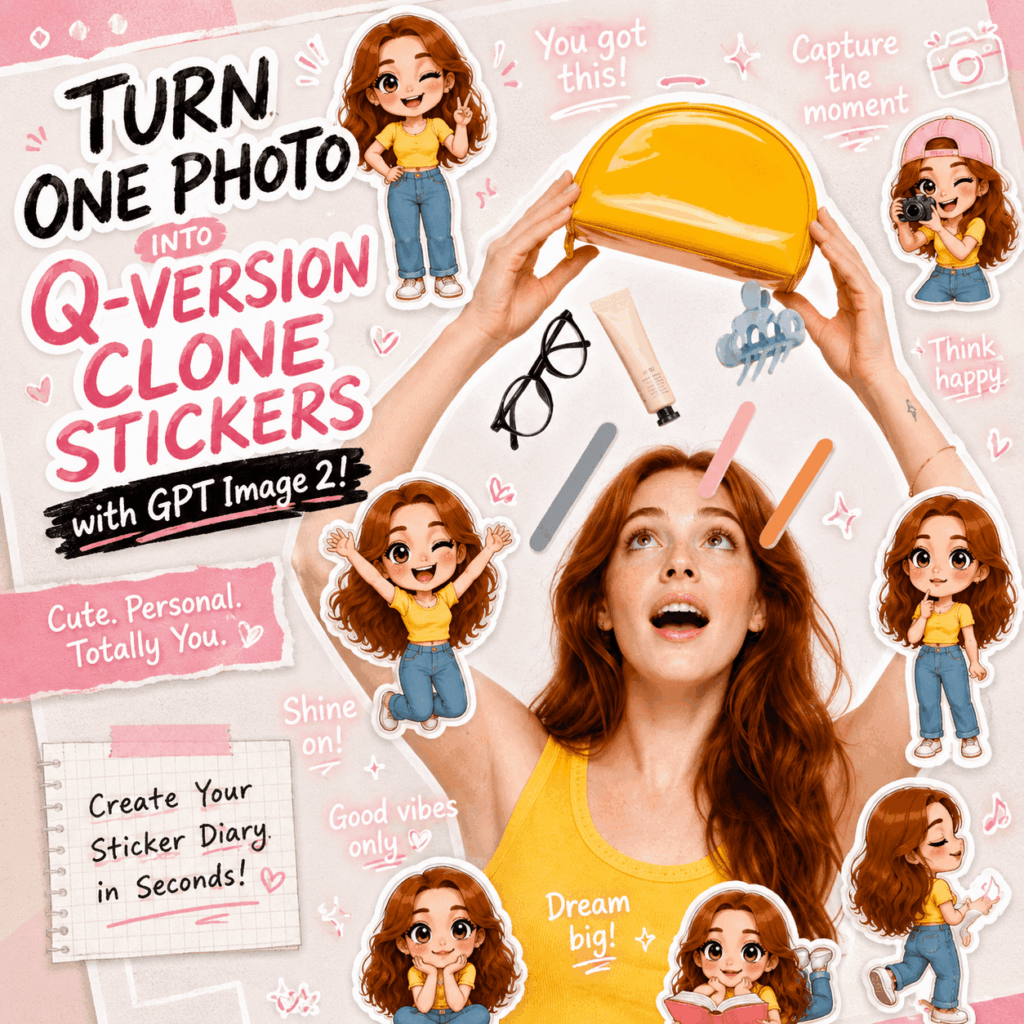
Want to turn a simple selfie into a cute sticker diary image? With GPT Image 2, you can transform one portrait into a playful social media cover filled with Q-version clone stickers, hand-drawn doodles, and short handwritten phrases.
This trend works so well because it does more than make a photo look cute. It keeps the real person as the main subject, then adds several mini chibi-style versions around them. These small Q-version clones usually have big heads, tiny bodies, expressive eyes, and clean sticker outlines.
The final image feels like a page from a lifestyle scrapbook. It is bright, personal, and easy to use across social platforms.
You can use this style for:
- Xiaohongshu cover images
- Instagram Stories
- profile backgrounds
- lifestyle vlog covers
- WeChat Moments posts
- personal branding visuals
Most importantly, you only need one clear portrait and a detailed prompt.
What You Need Before You Start
Before generating your image, prepare the following items.
1. WeShop AI GPT Image 2
This is the main tool used to generate the Q-version clone sticker diary image.
2. A Clear Portrait Photo
Choose a photo where the person’s face, hairstyle, outfit, and overall vibe are easy to recognize. This matters because GPT Image 2 needs these details to create mini clone stickers that actually look like the person in the original photo.
A front-facing portrait, half-body shot, or full-body lifestyle photo usually works best.
3. A Complete Q-Version Sticker Prompt
The prompt tells AI what to create. In this case, it should describe the real person, the Q-version clone stickers, the doodles, the text style, and the final layout.
A vague prompt may still generate something cute. However, a detailed prompt gives you a much cleaner and more consistent result.
4. A Clear Visual Style
For this look, useful keywords include:
- cute
- Q-version
- chibi sticker
- sticker diary
- scrapbook style
- social media lifestyle post
- pink and white color palette
- playful and polished
- clean but visually rich
These words help guide the image toward a soft, trendy, social-media-ready style.
5. A Clear Use Case
Think about where you want to post the final image. For example, a Xiaohongshu cover may need a vertical layout, while a profile background may need the subject centered.
Knowing the use case helps you choose the right aspect ratio and composition.
Step-by-Step Guide
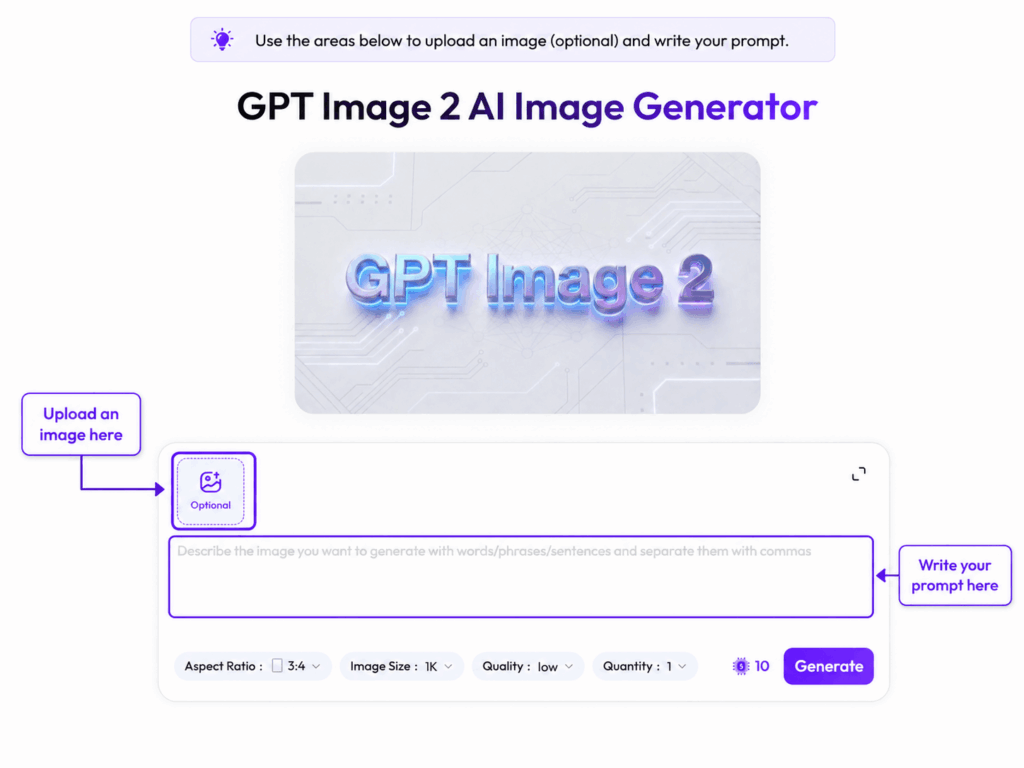
Step 1: Open the WeShop AI GPT Image 2 Tool
First, go to the WeShop AI GPT Image 2 page. Once you are inside the tool, find the image upload or image generation area.
You will usually see settings such as:
- Aspect Ratio
- Image Size
- Quality
- Quantity
If this is your first time trying the effect, you can start with these settings:
- Aspect Ratio: 3:4
- Image Size: 1K
- Quality: High
- Quantity: 4
This gives you several versions to compare. After that, you can choose the best one and refine it
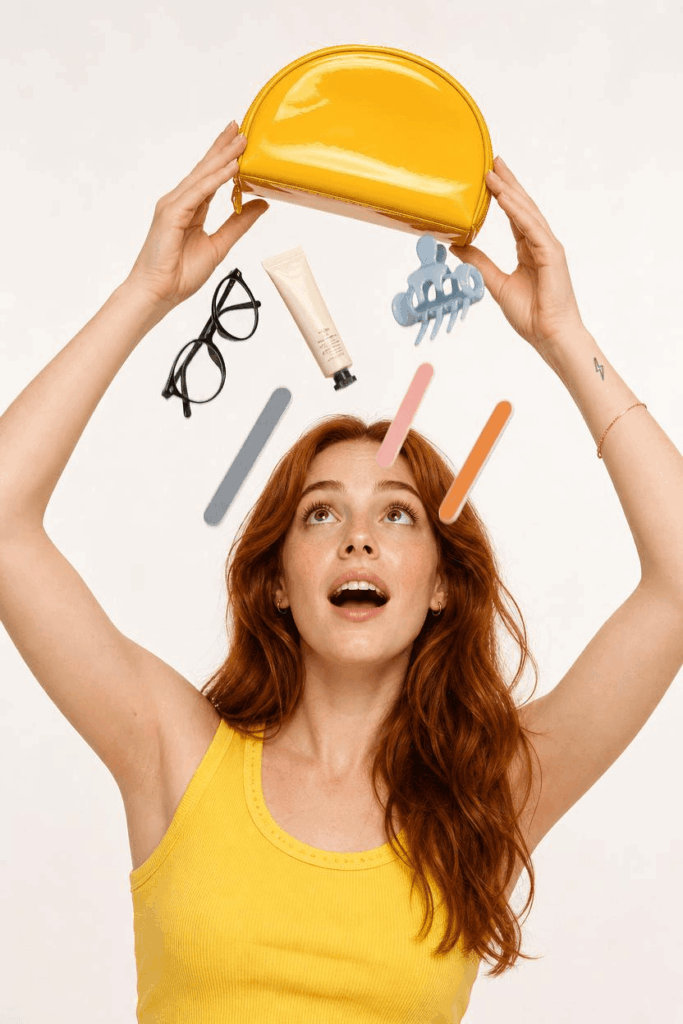
Step 2: Upload a Suitable Portrait Photo
Next, upload a clean portrait photo.
The better your original image is, the better the Q-version clone stickers will look. GPT Image 2 needs to understand the person’s facial features, hairstyle, outfit color, and pose before it can create accurate mini versions.
Recommended Photo Types
Use photos with:
- a clear half-body or full-body subject
- an unobstructed face
- visible outfit colors
- a clean lifestyle background
- natural lighting
- sharp image quality
Photos to Avoid
Try not to use:
- group photos
- photos where the face is covered by sunglasses, masks, hats, or heavy shadows
- heavily filtered or over-beautified images
- photos where the person is too small
- photos with messy or distracting backgrounds
Quick Tip
This effect depends heavily on similarity. So, the more obvious the hairstyle, outfit color, and personal vibe are in the original photo, the more recognizable the Q-version clones will be.
In short: a clear photo makes the final image feel more like “you.”
Step 3: Copy and Paste the Full Prompt
Now paste the following prompt into the prompt box.
Based on the uploaded photo, generate a high-quality “Q-version clone sticker diary photo.”

【Main Subject】
Use the real person in the uploaded photo as the central subject. Create a high-resolution social media lifestyle diary image. The overall image should look playful, polished, balanced, visually rich, but not cluttered. Preserve the person’s facial features, hairstyle, outfit colors, and overall vibe.

【Q-Version Clone Design】
Add 5–8 Q-version mini clone characters around the main subject. Use a cute sticker style with a big head, small body, large expressive eyes, and a clean digital illustration look. Each clone must closely resemble the real person. Keep the hairstyle, outfit, and colors as consistent as possible. However, give each clone a different pose and expression, such as hands on hips, wearing a hat, jumping, facing backward, sitting, lying down, making a heart gesture, or waving. All poses should fit a lifestyle diary or casual photo-shoot scene.

【Visual Effect】
Each Q-version character should look like a sticker, with a white outline, soft shadow, and a slight floating effect. Arrange the stickers around the real person and near the edges of the image. Do not cover the person’s face, facial features, upper body, or important body areas.

【Doodle Elements】
Add light hand-drawn doodles, including hearts, sparkles, arrows, motion lines, circles, and small stars. Use mostly white lines with soft pink accents. Keep the doodles simple and scrapbook-like, so they blend naturally with the whole image.

【Text Design】
Add 5–8 short handwritten English phrases that match the mood of the photo. The text should feel cute, energetic, and uplifting. Use mostly white lettering with soft pink highlights and small decorative details, such as stars, wavy lines, or underlines. Place the text carefully so it works with the doodles and does not block the real person.

Suggested English phrases:
Enjoy the little things
Good vibes only
You got this
Smile, sparkle, shine
Make today amazing
Be your own sunshine
Keep going
Take it easy

【Composition】
Place the real person in the center. Arrange the Q-version stickers and doodle elements in a radial layout around the subject. The final image should feel balanced, with the main person clearly standing out. The overall style should be a polished, playful, high-resolution social media lifestyle diary image that is visually rich but clean and organized.
If you want the final image to look more like a Xiaohongshu cover, add this sentence at the end:
Make the final image suitable for a Xiaohongshu cover: bright, cute, polished, and full of lifestyle blogger diary vibes.
You can also add this combined style prompt:
The overall effect should be suitable for a viral Xiaohongshu cover, with a bright and clean look, a pink-and-white scrapbook sticker style, a prominent real-person subject, Q-version stickers surrounding the subject, a playful polished mood, and a visually rich but not cluttered composition.
Why This Prompt Works
This prompt works because it gives GPT Image 2 clear instructions in several areas.
It explains:
- who the main subject is
- how the Q-version clone stickers should look
- where the stickers should be placed
- what kind of doodles to add
- how the English text should appear
- what the final composition should feel like
As a result, the AI is not just guessing. It has a full creative direction to follow.
Step 4: Review the Generated Results
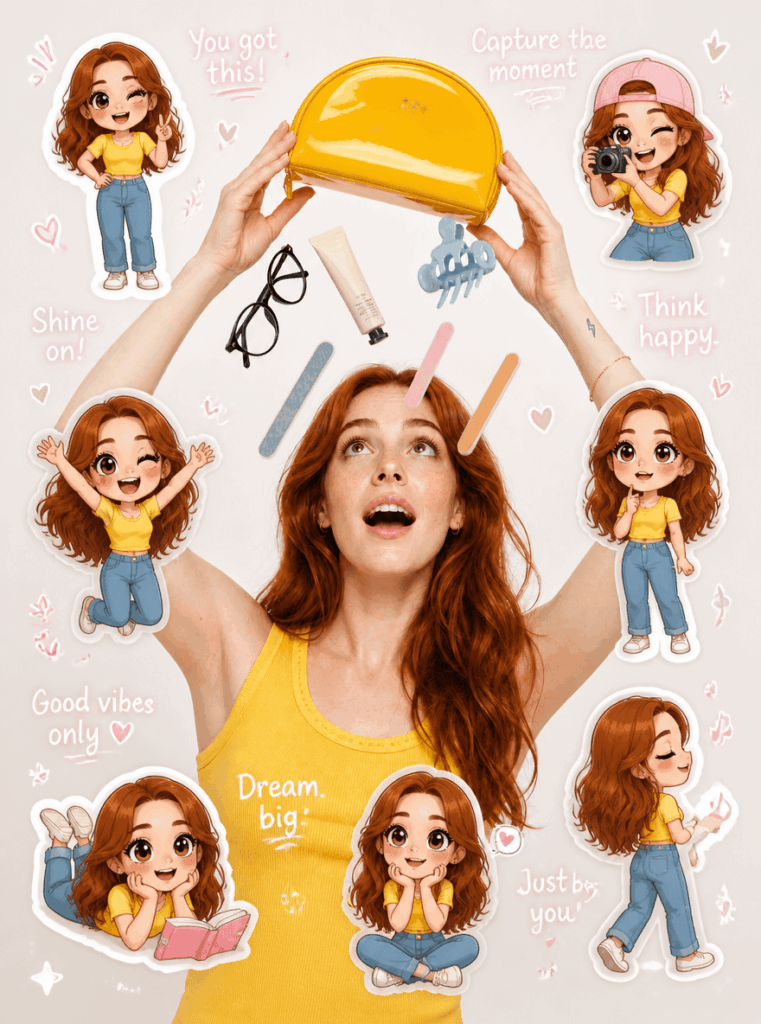
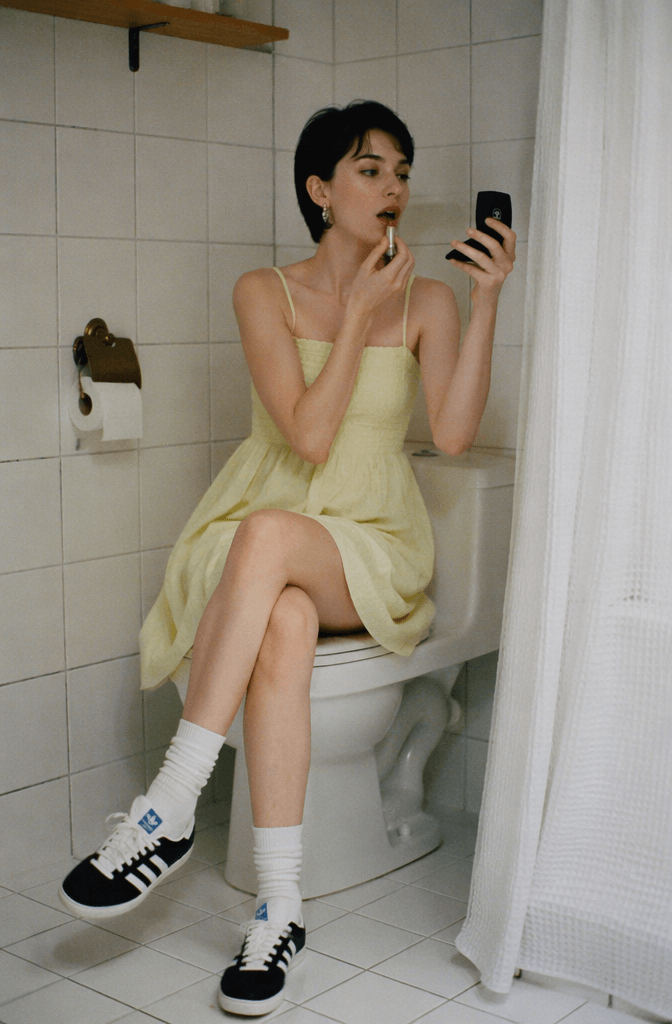
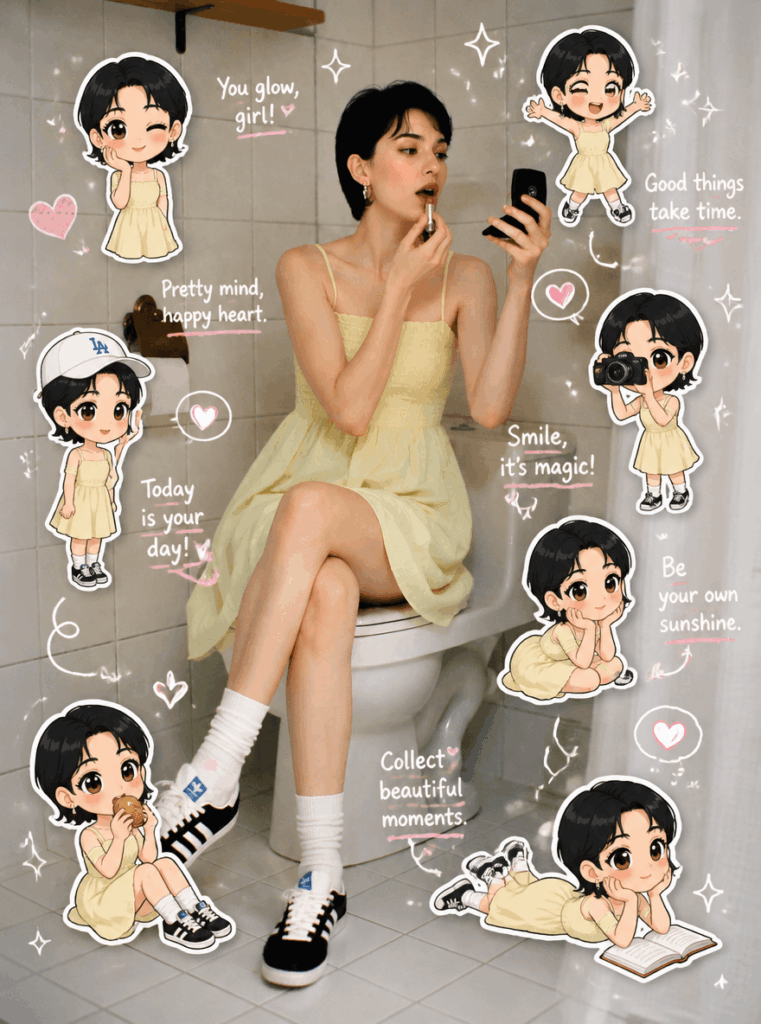
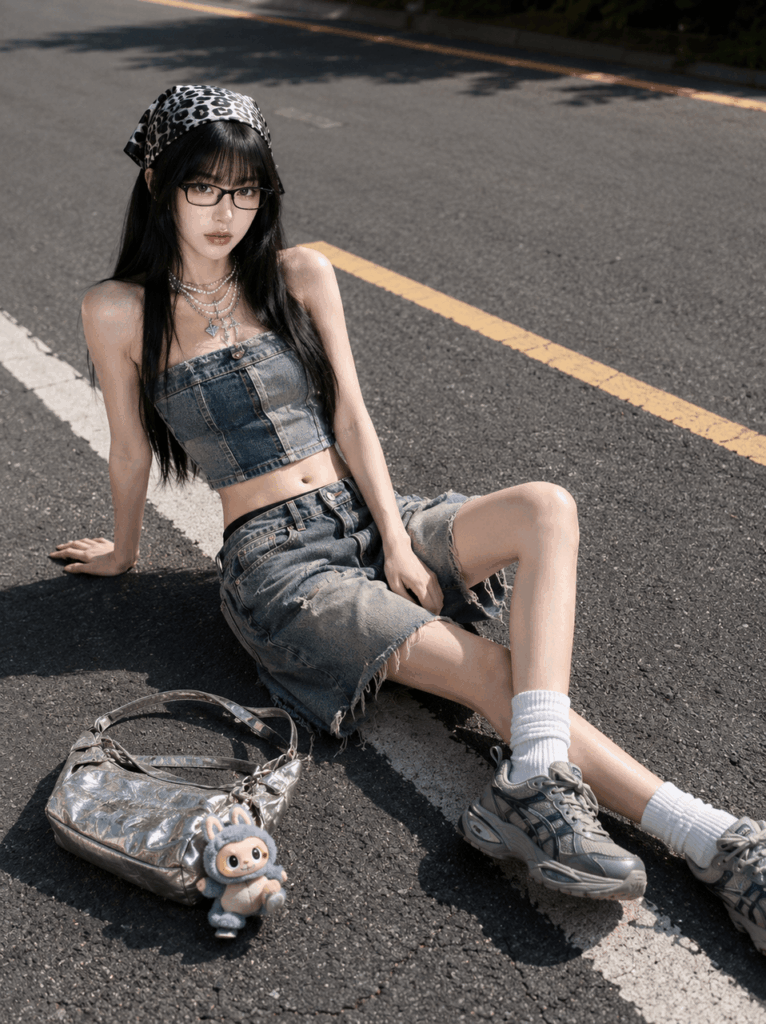
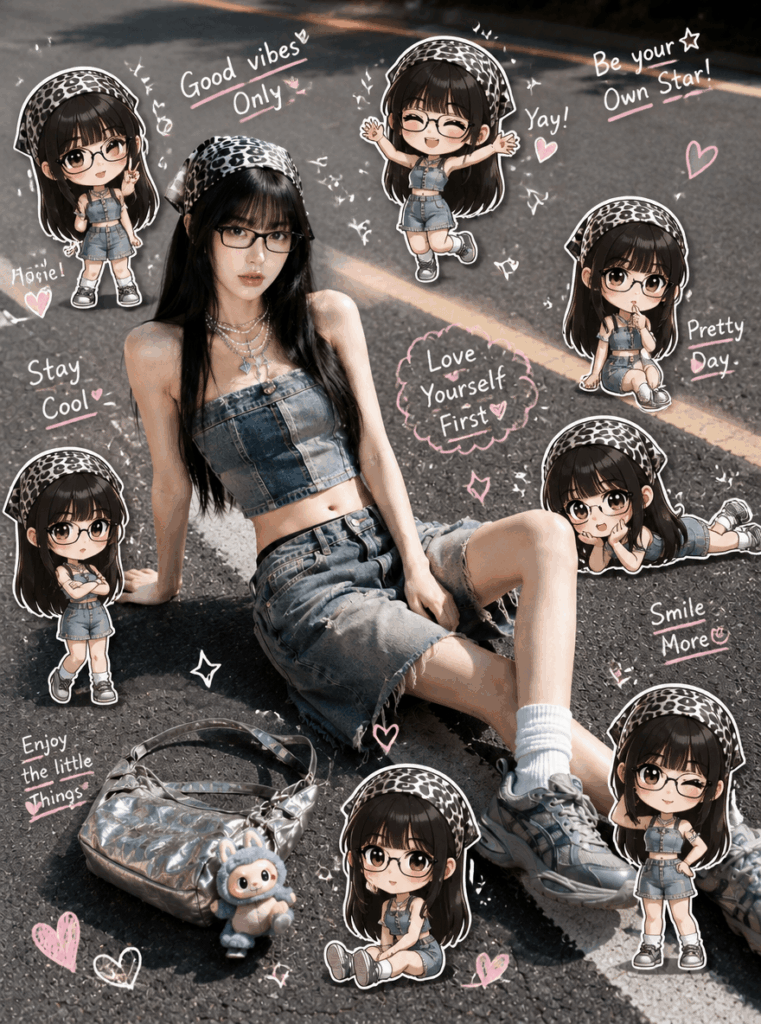
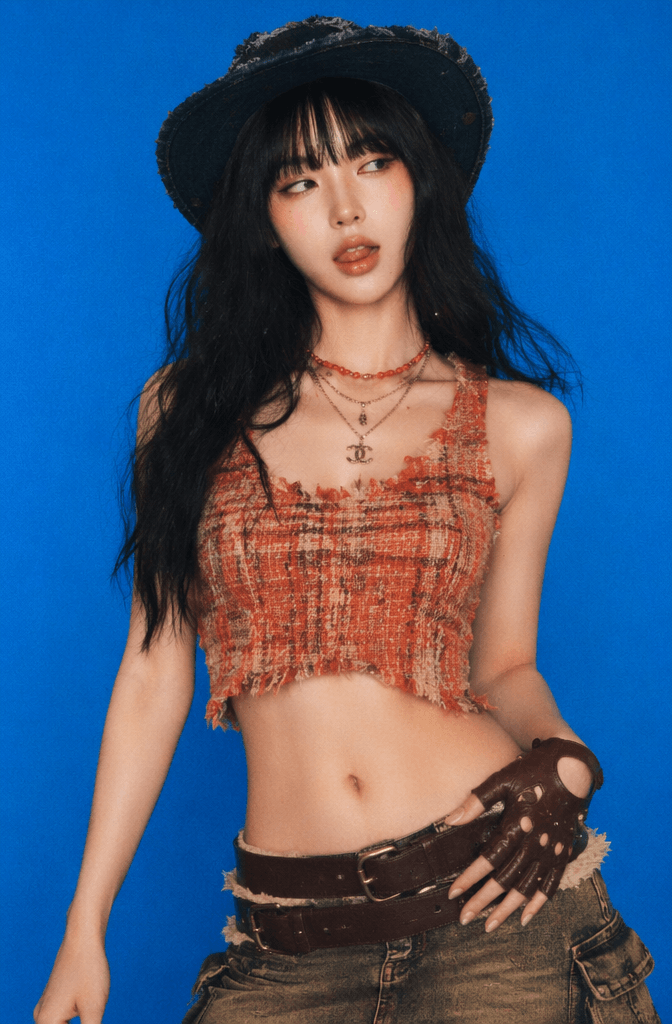
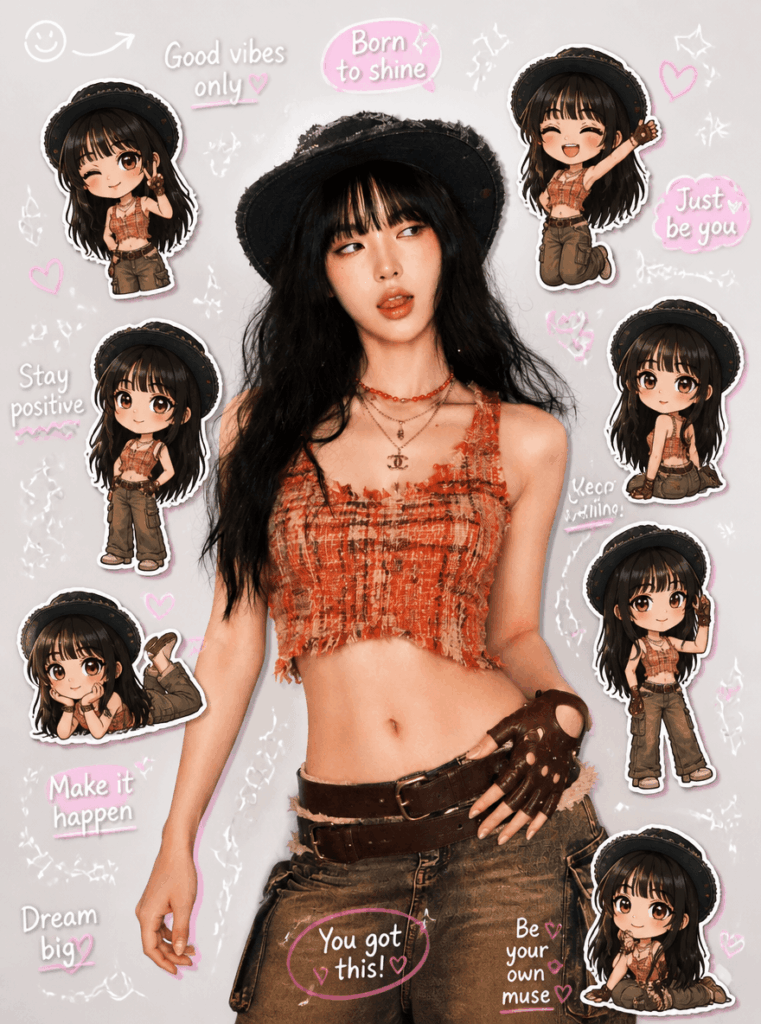
After generating the image, you will usually get several versions. Do not save the first one immediately. Instead, compare them carefully.
Here are the key things to check.
1. Do the Q-Version Clones Look Like the Real Person?
Look at the hairstyle, face shape, outfit color, and overall personality. The mini clones do not need to be exact portraits, but they should clearly feel like the same person.
2. Does the Image Feel Like a Sticker Diary?
A good result should include:
- white sticker outlines
- soft shadows
- cute doodles
- short handwritten phrases
- a scrapbook-style layout
- a light and playful mood
If it feels like a regular collage, the prompt may need more emphasis on “sticker diary” and “scrapbook style.”
3. Is the Layout Balanced?
The real person should stay as the center of attention. The Q-version stickers and doodles should support the subject, not overpower it.
A strong result usually has:
- a clear central subject
- stickers arranged around the person
- enough white space
- no messy overlapping
- a fun but organized layout
4. Is the Text Readable?
AI-generated text can sometimes be blurry or misspelled. So, always check the short English phrases.
Make sure:
- the words are readable
- the spelling is correct
- the text is not too crowded
- the text does not cover the face or body
If the result checks all these boxes, you already have a strong image for social media.
Step 5: Refine the Prompt Based on the Result
If the first result is not perfect, do not worry. This style often improves quickly with small prompt adjustments.
Use the following correction prompts based on the issue you see.
If the Q-Version Clones Do Not Look Like the Real Person
Make all Q-version clone stickers look more like the real person in the uploaded photo. Please preserve the hairstyle, bangs, outfit color, face shape, and overall vibe.
If the Image Looks Too Crowded
Reduce the number of doodles and text elements. Keep the image clean, leave enough breathing space between elements, and avoid overlapping stickers.
If Stickers Cover the Face
Do not let any Q-version stickers, doodles, or text cover the real person’s face, eyes, mouth, or main body areas.
If the English Text Is Not Clear
Reduce the number of English phrases. Keep only 4–6 short phrases, and make sure the handwriting is clear, readable, and correctly spelled.
Extra Refinement Tips
If you want the image to look more like a trendy Xiaohongshu cover, add:
high-resolution cover image, bright and clean, pink-and-white scrapbook sticker style, playful and polished, lifestyle blogger diary mood
If you want the person to stand out more, add:
Keep the real person as the most prominent subject. All stickers, doodles, and text should only decorate the background and edges.
If you want the image to feel more premium, add:
balanced layout, clean negative space, delicate sticker details, visually rich but not messy
The best approach is to refine step by step. Instead of changing the entire prompt, adjust only the part that needs improvement.
Step 6: Save the Image and Use It on Social Platforms
Once you are happy with the result, save the image. Then choose the best version based on where you want to post it.
Suggested Formats
- Xiaohongshu cover: vertical image or 3:4 ratio
- WeChat Moments: 1:1 or 4:5 ratio
- Instagram Story: 9:16 vertical ratio
- profile background: subject-centered version
- vlog cover: version with clearer doodles and text
Caption Ideas
You can post the image with a caption like:
I used GPT Image 2 to turn my selfie into a Q-version sticker diary image, and it looks so cute.
One photo can create 5–8 mini clone stickers. It feels like putting myself into a scrapbook page.
Or try something more casual:
Just turned a simple portrait into a cute sticker diary image with GPT Image 2. The mini Q-version clones are way too adorable.
For a Xiaohongshu-style caption, you could write:
Today I turned my portrait into a Q-version sticker diary cover. It feels like a cute scrapbook page made just for me.Advanced Tips and FAQ
Q1: Why Do the Q-Version Clones Not Look Like the Real Person?
This usually happens when the original photo is not clear enough. It can also happen when the prompt does not strongly mention similarity.
To improve the result, add these instructions:
- preserve the real person’s facial features
- keep the hairstyle, outfit, and colors consistent
- make all Q-version clones look like the same person
- do not generate random characters
Also, choose a photo where the face shape, hairstyle, and outfit are easy to see.
If similarity is your top priority, avoid blurry or overly filtered images. A simple, clear portrait will often perform better than a dramatic but low-detail photo.
Q2: Why Does the Image Look Too Full or Messy?
This style includes many elements at once: the real person, several Q-version clone stickers, doodles, and handwritten text. Because of that, the image can become crowded if there are too many details.
To fix this, reduce the number of elements.
Try the following:
- reduce Q-version clones from 8 to 5
- reduce English phrases from 8 to 4–6
- keep only simple doodles, such as hearts, stars, and arrows
- ask for more negative space
- emphasize a balanced layout
A good rule is simple: when you look at the image, your eyes should notice the real person first. The stickers and doodles should add charm, not steal the spotlight.
Q3: How Can I Make the Result Look More Like a Viral Xiaohongshu Cover?
To make the image feel more like a Xiaohongshu cover, add keywords that describe both the mood and the layout.
Useful keywords include:
- Xiaohongshu lifestyle diary style
- high-resolution cover image
- pink-and-white scrapbook sticker style
- playful and polished
- bright and clean
- visually rich but not cluttered
- prominent real-person subject
- Q-version stickers surrounding the subject
You can use this combined prompt:
The overall effect should be suitable for a viral Xiaohongshu cover, with a bright and clean look, a pink-and-white scrapbook sticker style, a prominent real-person subject, Q-version stickers surrounding the subject, a playful polished mood, and a visually rich but not cluttered composition.
For a stronger cover-style result, remember this: the goal is not to add as many cute elements as possible. The goal is to create a finished image that feels clear, personal, and easy to stop scrolling for.
Final Thoughts
The GPT Image 2 sticker diary image trend is not just about making a photo look cute. It is about turning one portrait into a full social media lifestyle visual.
By combining a real-person subject, Q-version clone stickers, hand-drawn doodles, and short handwritten phrases, you can create a playful image that feels personal and polished at the same time.
For the best result, start with a clear photo. Then use a detailed prompt. After that, refine the image based on three things:
- Do the Q-version clones look like the person?
- Is the layout clean and balanced?
- Is the text readable?
Once these details are right, you will have a cute, high-quality sticker diary image that works well for Xiaohongshu, Instagram, WeChat Moments, and lifestyle content covers.
Go to WeShop AI For Exploration:





