

The visual style of modern 3A game cinematics is becoming one of the biggest trends in AI-generated art. Across TikTok, X, and Instagram, creators are transforming ordinary portraits into dark fantasy 3A game failure screens filled with cinematic fog, cold blue lighting, dramatic UI overlays, and emotional game character aesthetics. Inspired by legendary 3A game titles like Dark Souls, Sekiro, NieR, and Death Stranding, this style turns a normal selfie into something that feels like a high-budget game cutscene or a mysterious “Game Over” menu screen. With GPT image tools and the right prompt structure, anyone can now create immersive 3A game visuals without needing advanced Photoshop or CGI skills.
Recently, a highly “fateful” AIGC visual style has begun to gain popularity on X, TikTok, and Instagram:
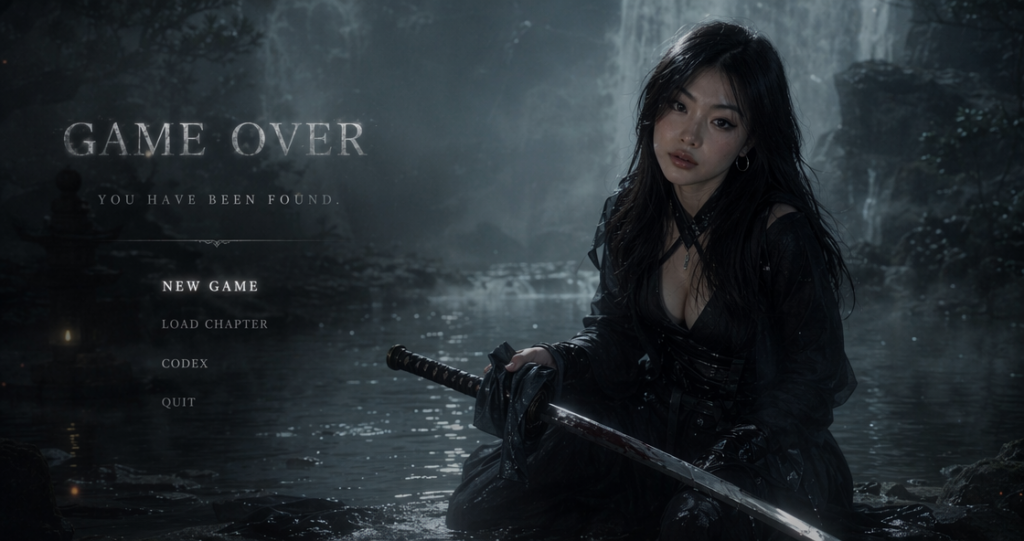
Turn real-life photos into Japanese-style dark fantasy game interface (Game Over Screen).
Gray-blue cool tones, misty waterfalls, damp rocks, low-saturation cinematic feel, paired with:
- GAME OVER
- YOU HAVE BEEN FOUND.
- NEW GAME
- LOAD CHAPTER
With such classic game UI copy, the entire screen will instantly transform into a failure results screen like those of high-budget 3A games such as <em>NieR</em>, <em> Sekiro: Shadows Die Twice </em>, <em>Death Stranding</em>, and <em>Dark Souls</em>.
The highlight of this type of content lies in:
- Extremely strong sense of atmosphere
- AI Gamification Portrait
- Advanced Aesthetics
- Strong social media spreadability
- Perfect for avatars, covers, or video transitions
This tutorial will teach you how to use
GPT Image 2: https://www.weshop.ai/apps/gpt-image
Quickly generate your own “Dark Game Character Image”.
If you want to continue making dynamic videos, you can also pair it with:
Kling 3.0: https://www.weshop.ai/apps/kling
Expand static images into movie-level game CG videos.
Preparatory Work / Required Tools
Essential Tools
- GPT Image 2: https://www.weshop.ai/apps/gpt-image
- A clear portrait photo
- Recommended Usage:
- Half-length photo
- Profile photo
- Photos with strong emotional appeal
- The effect is better in dim light
Recommended Photo Types
To obtain a stronger sense of “game character,” it is recommended to upload:
- Black outfit
- Japanese style
- Cool makeup and styling
- Portrait with negative space composition
- Non-intense commercial studio shooting
Detailed Step-by-Step Guide
Step 1: Open the GPT Image tool of WeShop AI
Enter:
GPT Image 2: https://www.weshop.ai/apps/gpt-image
Upload your portrait photo:
[Place a screenshot of the WeShop AI web operation interface here, highlighting the locations for uploading images and entering text with a red box]
Suggestion:
- Use high-definition original image
- Don’t over-beautify
- Preserve the real facial contour
- Keep the face as clear as possible
Because the most important aspect of this style is:
“Retain real identity characteristics while enhancing the atmosphere of game characters.”
Step 2: Enter the core Prompt
Below is the most core Prompt template for this type of “game over screen”.
You can directly copy and use it.
Transform the portrait photo I uploaded into an image with the style of a Japanese dark fantasy game menu interface.
Keep my identity features and make me the main subject of the picture.
The overall tone should be cold and grayish blue, with a damp misty film-like atmosphere, creating a depressing, quiet and fateful visual mood.
The scene is set by a waterfall pool shrouded in mist, with layers of waterfall rocks, water reflections and forest shadows in the background.
The environment is ethereal and quiet, with a hint of eeriness.
The character is dressed in black minimalist clothing with a touch of Japanese battle fashion, dark fashion, or Chinese mechanical maiden style.
He is kneeling by the water or on a stone platform, wiping a samurai sword, with a calm and restrained side face and a cold and melancholy expression.
The composition of the picture is like a game over menu interface.
On the left or top of the picture, add a large area of English UI text including:
GAME OVER
YOU HAVE BEEN FOUND.
Below are UI options with the text:
NEW GAME
LOAD CHAPTER
CODEX
QUIT
All these words should be displayed in capital letters.
The text should use a retro serif font or game menu font, with semi-transparent glow, blending naturally with the scene.
The overall effect should have cinematic lighting and shadows, low saturation, soft volume fog, slight steam, surreal but realistic game cutscene feel, like a high-budget 3A action game’s failure settlement screen.
The composition should be exquisite, with the character on the right and the text on the left, leaving enough negative space.
High-end, mysterious, coldly beautiful, cinematic.
Step 3: Adjust the “role sense” keyword
What is most important about this type of graph is not actually “AI-generated”, but rather:
Character Identity Setting (Character Identity)
You can replace keywords according to different styles.
Japanese battle-damaged style
Join:
- battle damaged
- worn armor
- blood stains
- rain soaked clothing
The effect will be more like:
- Sekiro
- “Ronin Rising”
- Onimusha
Ex Machina Style
Join:
- biomechanical details
- cybernetic ornaments
- mechanical maiden
- futuristic kimono
will be more inclined to:
- NieR: Automata
- Cyber Oriental Style
Dark Souls-style sense of oppression
Join:
- abandoned ruins
- ancient cursed atmosphere
- dark souls aesthetic
- hopeless mood
The picture will show stronger:
- Apocalyptic feeling
- Sense of Fate
- Game failure atmosphere
The Sky Islands Version of Zelda: Tears of the Kingdom
💡 Tip:
If the AI-generated result is too “commercial poster”, it indicates:
- The UI feel is insufficient
- The fog is insufficient
- Insufficient white space
- Game menu elements are too weak
At this point, it can be strengthened:
- cinematic game menu
- failure screen
- game UI overlay
- loading interface aesthetic
Step 4: Strengthen “cinematic lighting”
Many people generate something that looks like an ordinary Cosplay poster.
The problem is:
Missing “volumetric fog” and “cinematic lens feel”.
Suggest adding:
- volumetric fog
- cinematic shadows
- soft bloom lighting
- mist diffusion
- wet reflective rocks
- realistic water reflections
These words will make:
- The air is more humid
- Softer light
- Overall, it resembles movie CG more
Step 5: Create Dynamic Game CG (Advanced Gameplay)
If you want to further create:
- Game opening animation
- Character Debut Video
- Short video transition
- AI Concept Trailer
You can upload the generated image to:
Kling 3.0: https://www.weshop.ai/apps/kling
Recommended Video Prompt
Slow cinematic camera movement.
The fog drifts softly around the waterfall rocks.
Water reflection ripples naturally.
The character slowly wipes the samurai sword while lowering the head slightly.
Soft wind moves the clothes and hair.
Game menu UI flickers subtly.
Dark fantasy atmosphere, cinematic lighting, realistic volumetric fog, 3A game cutscene feeling.
The video generated in this way will be very similar to:
- Game CG
- Steam Trailer
- Game Loading Animation
is extremely suitable for X and TikTok.
Effect Preview:
Conclusion & CTA
Today’s AIGC is no longer just about “face swapping” or “animation.”
What truly breaks into other demographic is:
Visual packaging of “worldview level”.
When you turn yourself into:
- Game Character
- Movie protagonist
- Characters in the Dark Fantasy World
The sophistication of the entire content will instantly elevate.
And the “Game Over Failure Settlement Interface” is precisely one of the AI visual styles that is currently most likely to break into other demographic.
Go to WeShop AI For Exploration:





