

Have you ever seen those clean, minimalist palm reading reports on social media and wondered how people make them?
You know the kind. A simple hand photo turns into a polished visual guide. Main palm lines are neatly traced. The layout feels elegant. The text sounds personal, mysterious, and a little bit luxurious.
These days, this type of visual is becoming a small AI trend. Instead of visiting someone in person for a palm reading, you can now create your own AI palm reading guide at home in just a few minutes. Even better, the result can look like a modern design poster rather than a random fortune-telling image.
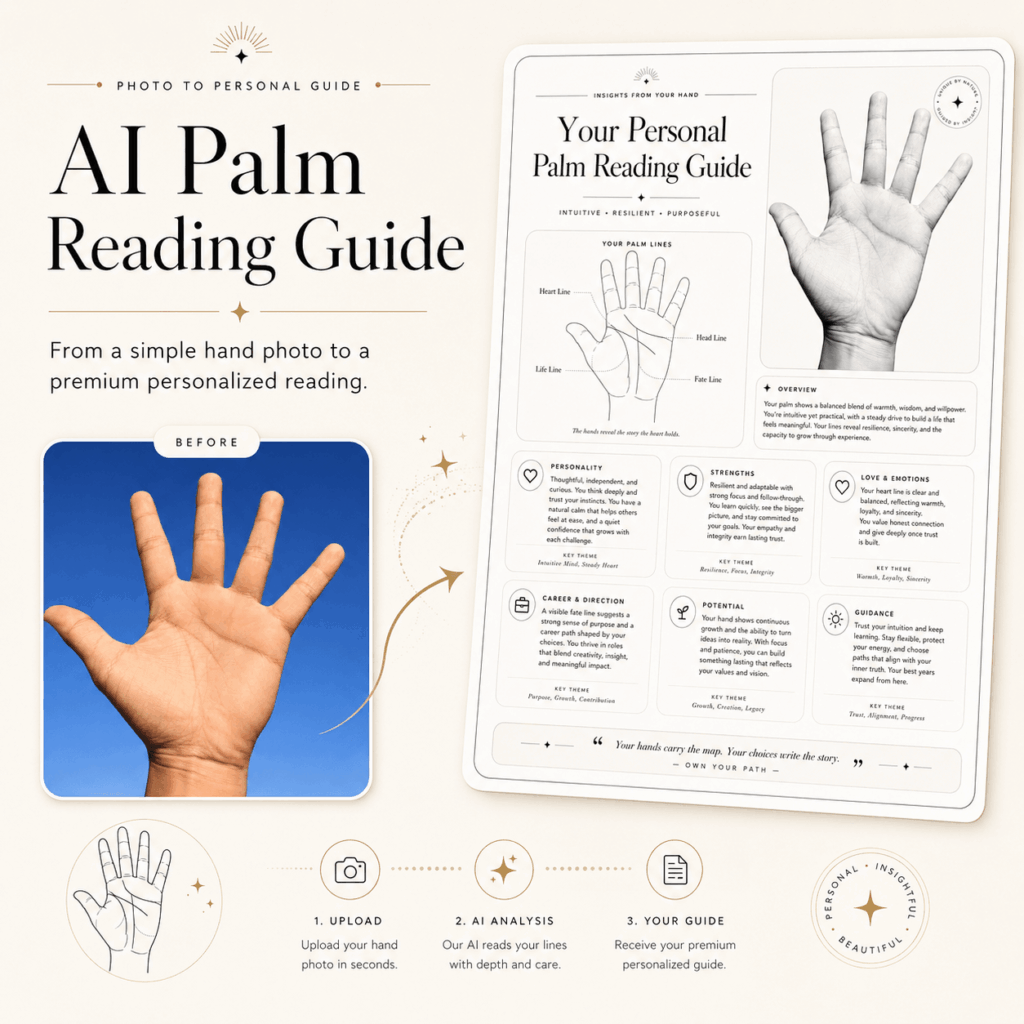
In this tutorial, I’ll show you how to use Weshop AI to turn a regular photo of your hand into a stylish AI palm reading guide. The final image can include palm line analysis, clean black-and-white contours, rounded cards, and a simple editorial-style layout.
More importantly, the process is beginner-friendly. You do not need design skills. You do not need photo editing experience either. All you need is one clear hand photo and a good prompt.
Of course, AI palm reading should be treated as entertainment and creative self-expression. It can be fun, beautiful, and surprisingly personal. However, your real future is still shaped by your choices, not by a generated image.
Now, let’s create your own AI palm reading guide step by step.
What You Need Before You Start
Before opening the tool, prepare a few simple things.
- A smartphone
This will be used to take a clear photo of your palm. - A clean palm photo
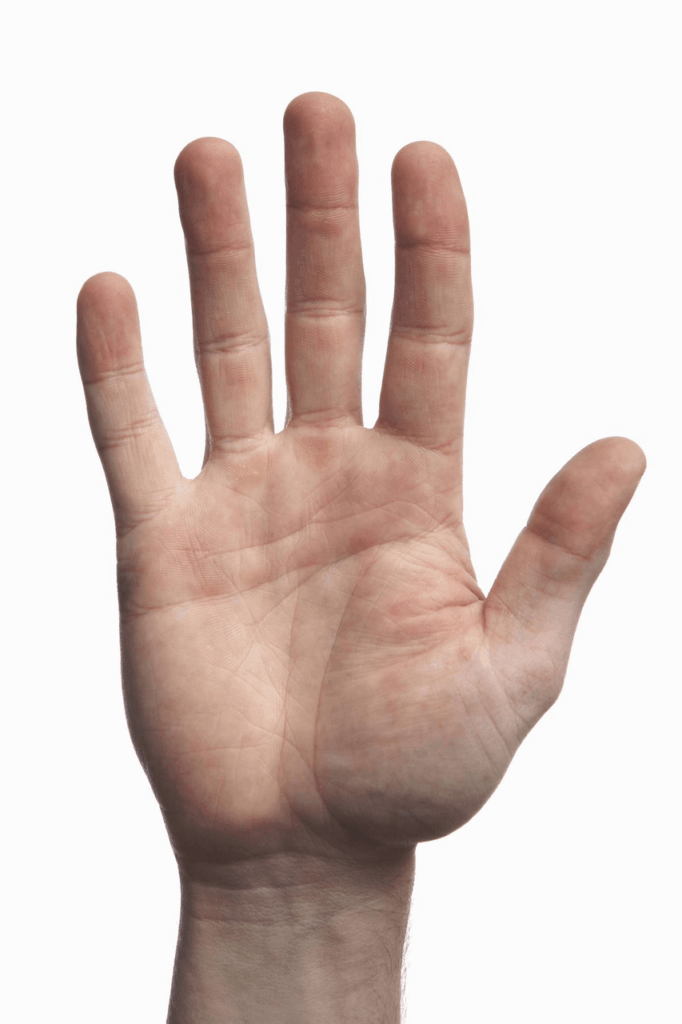
Make sure the lighting is good and your palm lines are visible. Ideally, the life line, head line, and heart line should be easy to see. - Weshop AI image tool
This is the main tool we’ll use to analyze your image and create the final visual. - Tool link
https://www.weshop.ai/apps/gpt-image - A ready-to-use English prompt
You can copy and paste the prompt in this article directly into the tool.
Overall, the setup is simple. There are no complicated design settings to adjust. Once your photo is ready, you only need to upload it, paste the prompt, and let AI handle the creative part.
Step-by-Step Guide
Step 1: Take a Clear Palm Photo
A good result starts with a good photo.
Although AI can do a lot, it still needs clear visual details to work with. If your photo is blurry, too dark, or over-edited, the final palm lines may look inaccurate or messy. Therefore, before generating anything, take a few extra seconds to shoot a clean base image.
Here is how to do it:
- Find a place with soft natural light. A spot near a window during the day usually works well.
- Avoid direct flashlight or harsh sunlight. Strong light can create glare and hide the fine lines on your palm.
- Open your hand naturally. Keep your fingers slightly apart, but do not stretch them too much.
- Choose a clean background. A white wall, plain desk, or simple fabric works best.
- Keep your phone parallel to your palm. This helps avoid distortion.
- Tap to focus on the center of your palm before taking the photo.
As a result, the AI will have a much better chance of identifying your real palm lines. The clearer your photo is, the more polished your AI palm reading guide will look.
Image suggestion: Insert a sample photo showing a clean palm image with clear lines and a plain background.
Tip: Do not use beauty filters or skin-smoothing effects. These filters can erase the small lines on your palm. As a result, AI may miss important details or create lines that do not match your hand.
Step 2: Upload Your Photo to Weshop AI
Once your photo is ready, go to the Weshop AI image tool(See the button above).
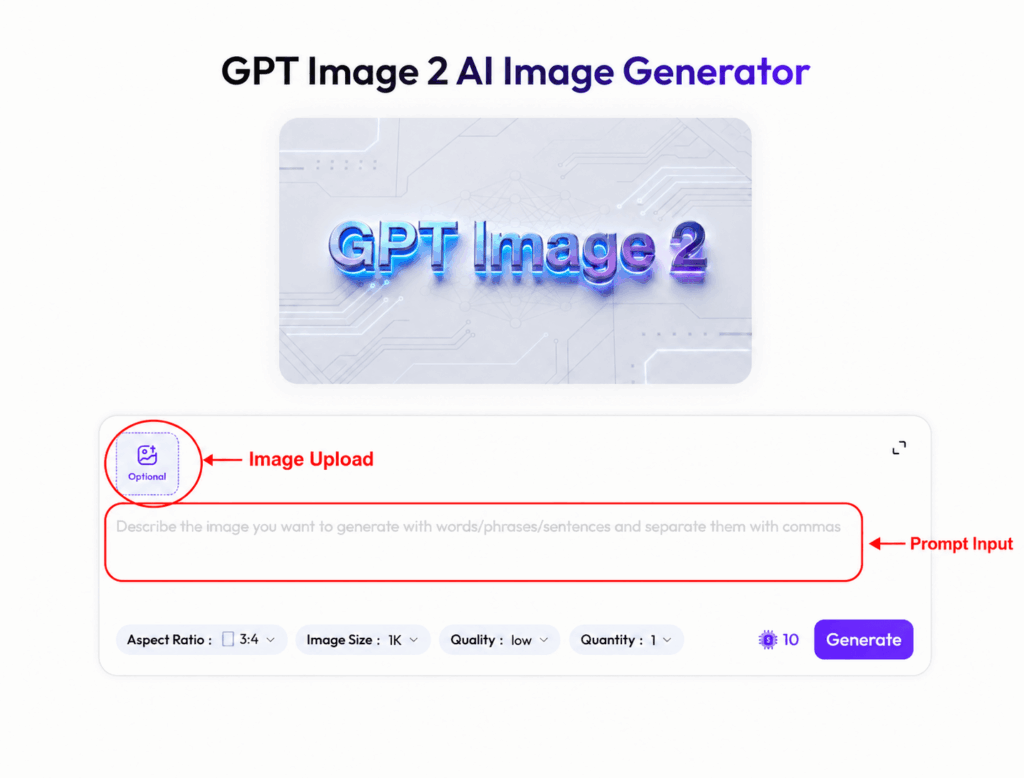
After entering the page, you will see an upload area. Click Upload Image, then select the palm photo you just took. Alternatively, you can drag and drop your image into the upload box if the page supports it.
Next, wait for the image to finish uploading. Then check whether the photo appears correctly on the page.
At this point, AI has your visual input. However, the image alone is not enough. To create a refined AI palm reading guide, you also need to tell the tool what style and structure you want.
Step 3: Copy and Paste the AI Palm Reading Prompt
This is the most important step.
A prompt is the instruction you give to AI. It tells the tool what to analyze, what style to use, and how the final image should look. Without a clear prompt, the result may feel random. With a specific prompt, however, the final design can look much more polished.
For this AI palm reading guide, copy and paste the prompt below:
Based on my hand I want you to make a complete palm reading guide. Analyze the palm, the style of the guide should be clean and minimal, thin lines, rounded cards, overall very expensive looking. Focus on the palm reading, create a simple black on white contour of my main lines, as a little artwork. Do your best.
This prompt works well for several reasons.
First, it tells AI to create the guide based on your own hand. Therefore, the result is connected to your uploaded palm photo instead of being completely random.
Second, it asks for a complete palm reading guide. In other words, the final image should not be just a hand outline. It should also include visual structure and short palm reading insights.
Third, the prompt defines the style clearly. Words like “clean,” “minimal,” “thin lines,” “rounded cards,” and “expensive looking” guide the AI toward a refined, modern layout.
Finally, the phrase “black on white contour” helps create a clean line-art effect. This makes the palm lines easier to read and gives the final image a simple, gallery-like feel.
If you want a darker and more mysterious version, you can add this line to the prompt:
Use gold lines on a dark background, with a mystical and elegant tarot-inspired style.
By adding this, your AI palm reading guide may look more like a luxury tarot card or astrology poster. It is a great option if you prefer a moodier visual style.
Step 4: Generate, Save, and Share
After uploading your palm photo and pasting the prompt, click Generate or Send.
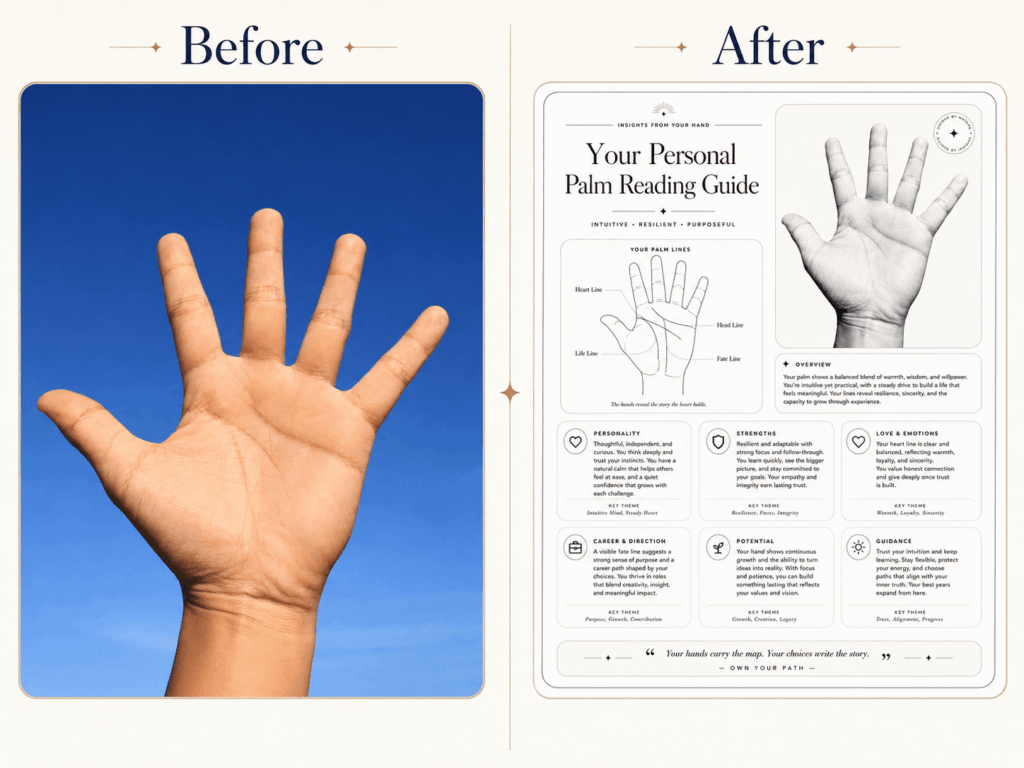
Then wait for a few seconds while Weshop AI creates your palm reading design. During this step, the tool will analyze your image, extract the main visual features, and turn them into a designed layout.
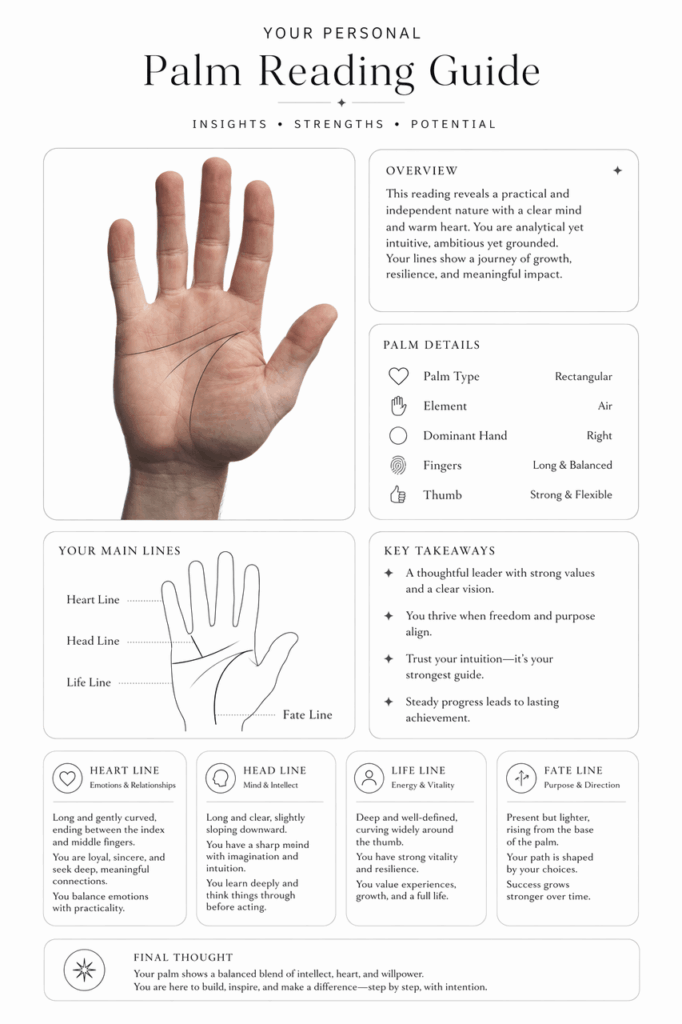
The final image may include:
- A clean outline of your palm.
- The main palm lines, such as the life line, head line, and heart line.
- A short English palm reading analysis.
- A minimal black-and-white layout.
- Rounded cards, thin lines, and a polished visual style.
Once the image is ready, review the result carefully. If you like it, save it to your device. On desktop, you can usually right-click the image to save it. On mobile, press and hold the image.
Sometimes, the first version may not be perfect. That is completely normal. Since AI results can vary, try generating again. In many cases, the second or third version looks cleaner, sharper, or more balanced.
In addition, you can adjust the prompt slightly to improve the result.
For a cleaner image, add:
Keep the design more minimal and make the palm lines sharper.
For more personality-based content, add:
Include more personality insights, strengths, and potential.
For a more premium layout, add:
Make the layout feel like a luxury magazine page.
Small prompt changes can make a big difference. Therefore, feel free to test a few versions until your AI palm reading guide matches your style.
Advanced Tips and FAQ
Q1: Why are the lines unclear or different from my real palm lines?
This usually happens when the original photo is not clear enough.
For example, the lighting may be too weak. The palm may be blurry. There may also be glare on the skin. In some cases, a busy background can make it harder for AI to focus on your hand.
To fix this, take a new photo in natural light. Before shooting, clean your phone lens. Then keep your hand steady and make sure the palm lines are sharp.
Also, avoid cropping the hand too tightly. Leave enough space around your palm and fingers so AI can understand the full hand shape. As a result, the final AI palm reading guide will look more accurate and organized.
Q2: Can I change the visual style of the final palm reading guide?
Yes. In fact, this is one of the best parts of using AI.
You can change the mood by adjusting the words in your prompt. For example, if you want a simple and elegant style, keep these words:
clean and minimal, thin lines, black on white contour
If you want a more mystical style, add:
gold lines on dark background, mystical tarot style, elegant and luxurious
For an editorial look, try:
luxury magazine layout, elegant typography, clean editorial design
To make the guide feel more personal, add:
include personality insights, emotional traits, strengths, and future potential
Meanwhile, you can also combine different styles. For example, a black-and-white minimalist design can still include soft mystical details. Just keep the prompt clear and avoid adding too many conflicting style words at once.
Q3: Is AI palm reading actually accurate?
AI palm reading should be treated as a fun visual experience, not a serious prediction tool.
The AI can identify visual patterns from your palm photo. It can trace major lines and create a reading based on common palmistry ideas. However, it does not truly know your future.
That said, the result can still feel personal and enjoyable. Think of an AI palm reading guide as a creative digital keepsake. It is stylish, easy to share, and fun to compare with friends.
In short, enjoy the mystery, but keep your power. Your palm can inspire the artwork, but your choices still shape the story.
Q4: What should I do if the generated image does not look good?
You can improve the result in two ways: improve the photo or improve the prompt.
If the palm lines look wrong, start with the photo. Take a brighter and sharper image. Use a plain background. Make sure your palm is not covered by shadows.
On the other hand, if the layout looks too messy, adjust the prompt. You can add:
Make the design cleaner, more minimal, and easier to read.
If the text feels too long, add:
Keep the text short, organized, and visually balanced.
If the palm lines are not clear enough, add:
Make the palm lines sharp, accurate, and easy to identify.
Overall, the more specific you are, the easier it is for AI to understand your goal. With a few small edits, your AI palm reading guide can quickly become more polished.
Q5: Where can I share this kind of AI palm reading image?
This kind of image is perfect for social media.
You can post it on Instagram, TikTok, Pinterest, Xiaohongshu, Facebook, or anywhere you usually share creative visuals. It works well because it combines three things people love: AI, self-discovery, and beautiful design.
For example, you can pair it with a caption like:
I asked AI to read my palm, and it turned into a whole personality report.
Or:
My palm lines, but make it luxury editorial.
Or:
Tried an AI palm reading guide today. Not sure if it knows my future, but it definitely knows my aesthetic.
Because the topic feels personal, it naturally invites interaction. Friends may ask how you made it. Some may want to try it too. Others may compare their own palm lines with yours.
That makes it a fun and shareable AI trend.
Final Thoughts: Turn Your Palm Into a Personal AI Artwork
AI palm reading is where old-school mysticism meets modern visual design.
With Weshop AI, you can take a simple palm photo and turn it into a polished AI palm reading guide in minutes. The process is quick, beginner-friendly, and surprisingly fun.
More importantly, you do not need editing skills. You do not need a design background either. A clear photo, a strong prompt, and a few minutes are enough to create something personal and visually appealing.
Whether you believe in palmistry or not, seeing your hand transformed into a clean, elegant artwork feels special. It is personal. It is aesthetic. And it makes a great social media post.
So grab your phone, take a clear photo of your palm, open Weshop AI, and try creating your own AI palm reading guide today.
What hidden talent does your palm reveal? Share your result, compare it with friends, and see what your AI-generated guide has to say.



