

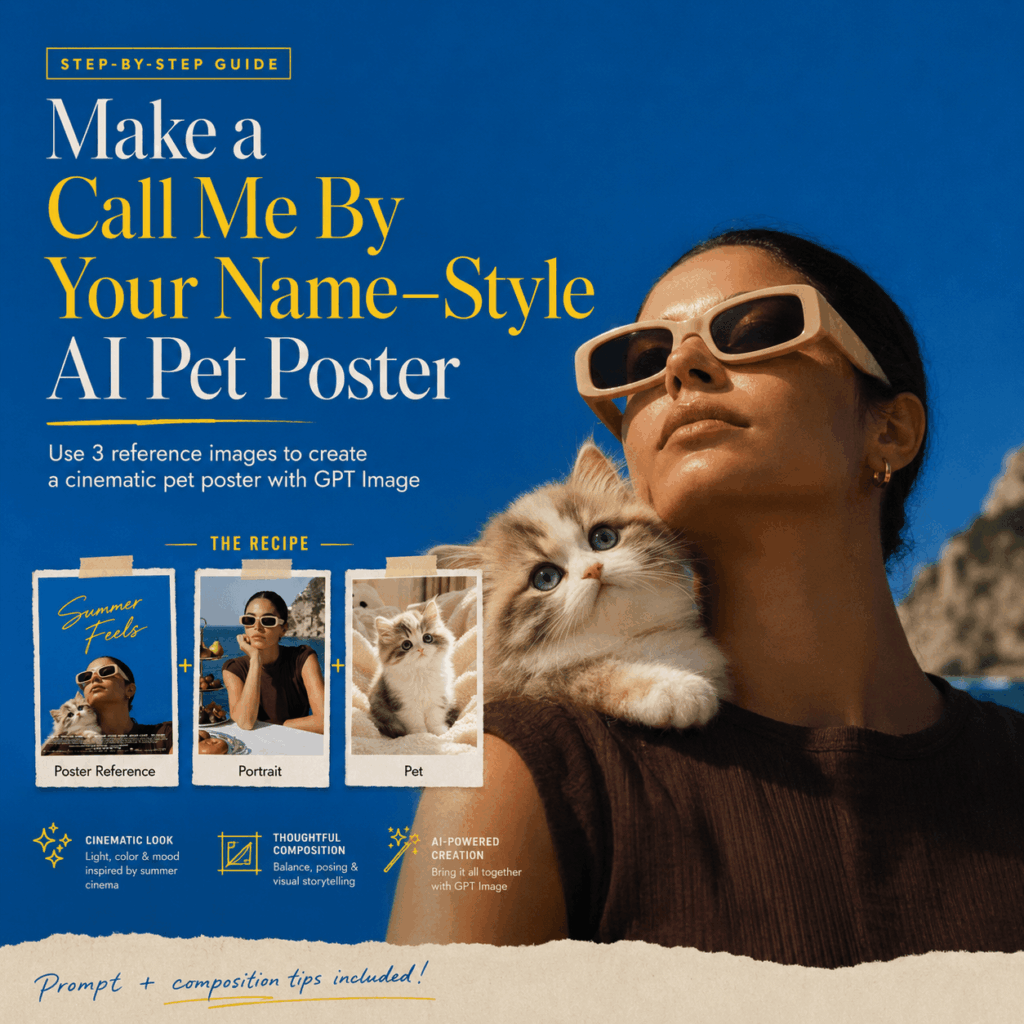
There is a new AI photo trend taking over Instagram, Pinterest, and Xiaohongshu: the AI pet movie poster.
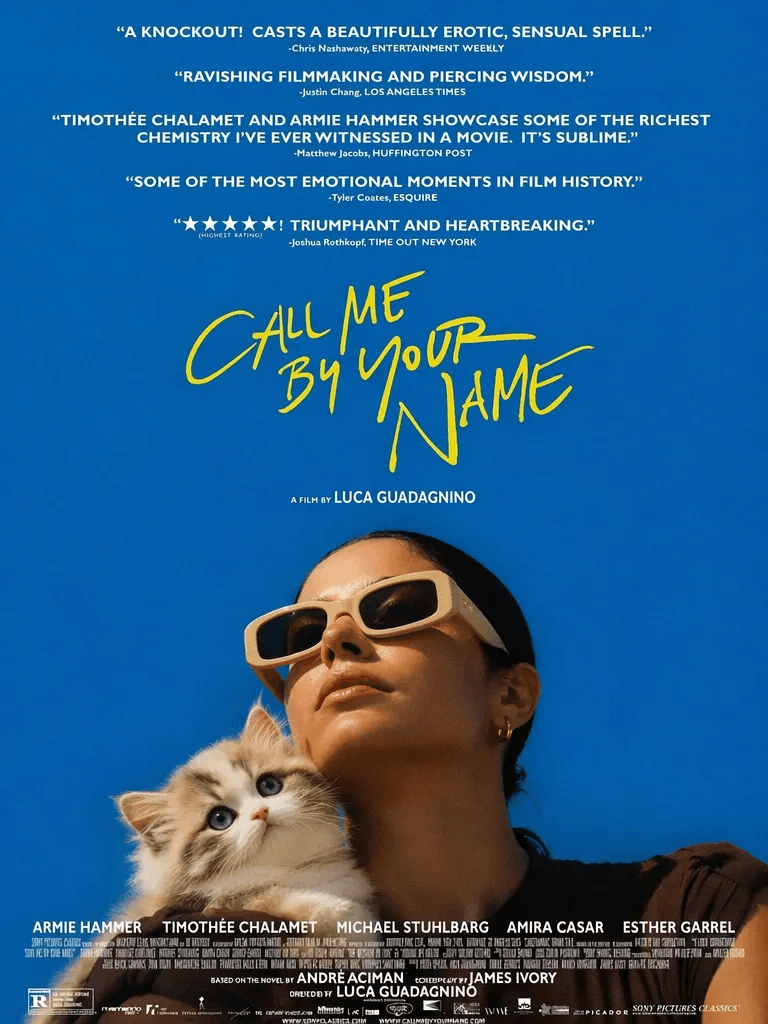
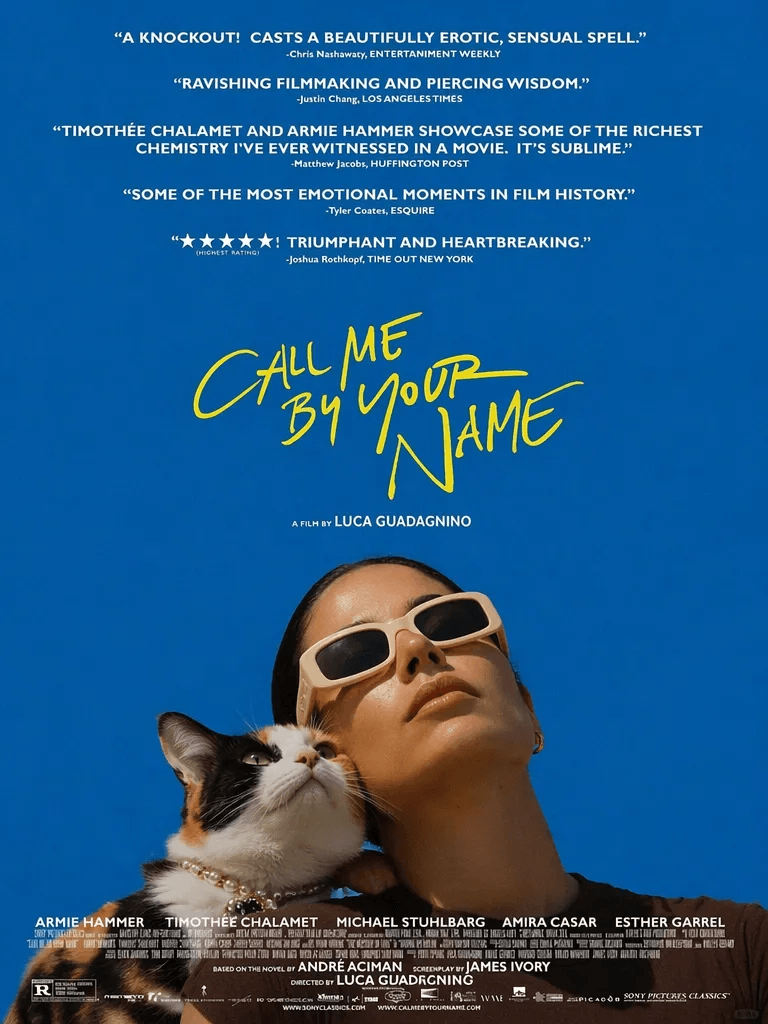
Instead of creating a regular pet portrait, this trend turns you and your pet into the main characters of a soft, emotional, cinematic poster. The mood is inspired by the warm summer feeling of Call Me By Your Name: blue sky, natural light, quiet intimacy, and a gentle sense of companionship.
What makes this style so touching is not how complicated the image looks. In fact, the idea is very simple. A person looks upward, while a pet gently rests near their shoulder. The scene feels calm, nostalgic, and deeply personal. It looks less like a staged photo and more like a still frame from a coming-of-age film.
In this tutorial, you will learn how to create your own AI pet movie poster using WeShop AI GPT Image. With the right reference images and a clear prompt, you can turn a simple pet photo into a cinematic poster that feels warm, emotional, and believable.
Preparation / Tools You Need
Before you start, prepare the following materials.
WeShop AI GPT Image
Best for:
- Image recreation
- Character replacement
- Pet replacement
- Style transfer
- Movie poster recreation
- Cinematic human-pet portrait generation
The key to this look is not just “putting a person and a pet into one image.” Instead, you need to help the AI understand three things clearly: the original poster composition, the person’s identity, and the pet’s appearance.
Once these three parts are well controlled, the final result will look much closer to a real AI pet movie poster, rather than a random AI collage.
Three Reference Images
To get a more stable result, prepare three reference images.
Image 1
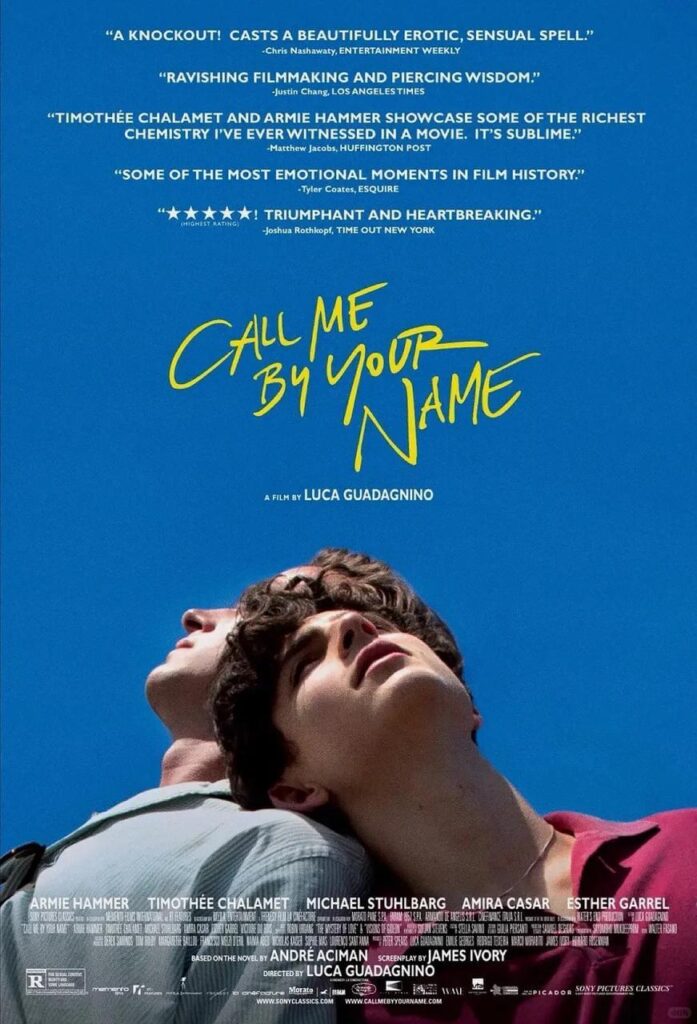
Use this as the composition reference.
It should preserve:
- Background
- Lighting
- Color tone
- Pose
- Composition
- Movie poster atmosphere
Image 1 works best when it has a clear cinematic layout. You can use the original Call Me By Your Name poster as inspiration, or choose a similar movie-style image with blue sky, natural sunlight, a summer mood, and a strong upward-facing pose.
This image does not need to provide the person’s identity. Its main job is to tell the AI what the final image should look like: the camera angle, the framing, the background, and the overall emotional direction.
Image 2
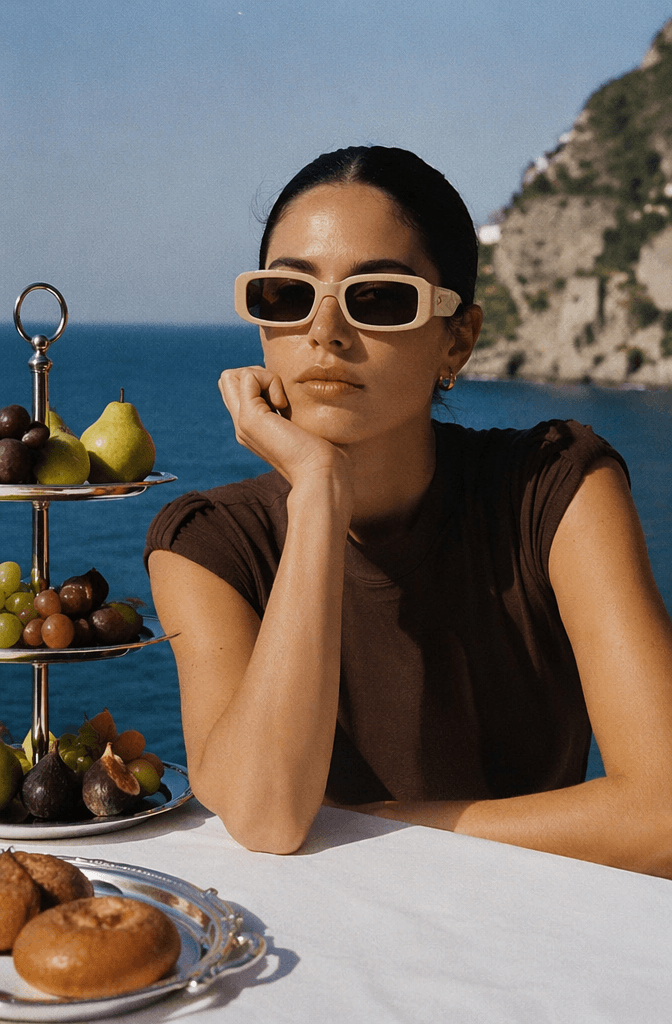
Use this as the person reference.
It should preserve:
- Facial features
- Face shape
- Hairstyle
- Personal vibe
- Recognizable identity
For Image 2, choose a clear portrait. A front-facing or slightly angled photo usually works best. The face should not be covered by sunglasses, heavy shadows, or hair. Also, make sure the shoulders are visible, because the final poster needs the pet to interact naturally with the person’s shoulder area.
The clearer the person reference is, the easier it is for the AI to keep the identity consistent.
Image 3
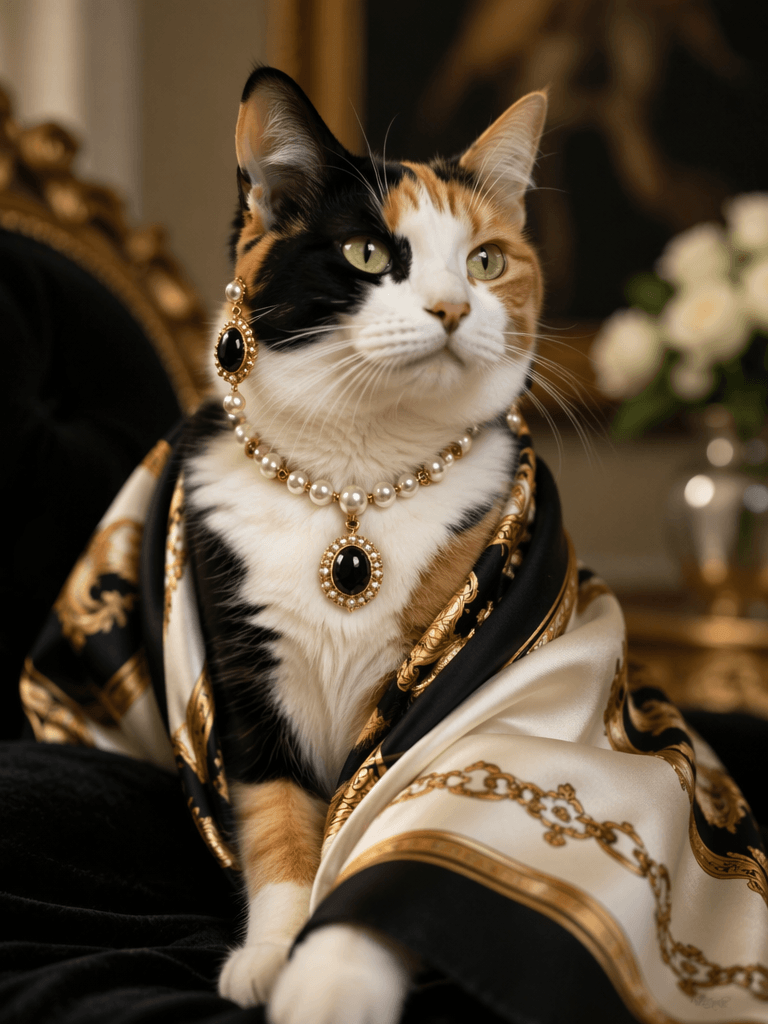
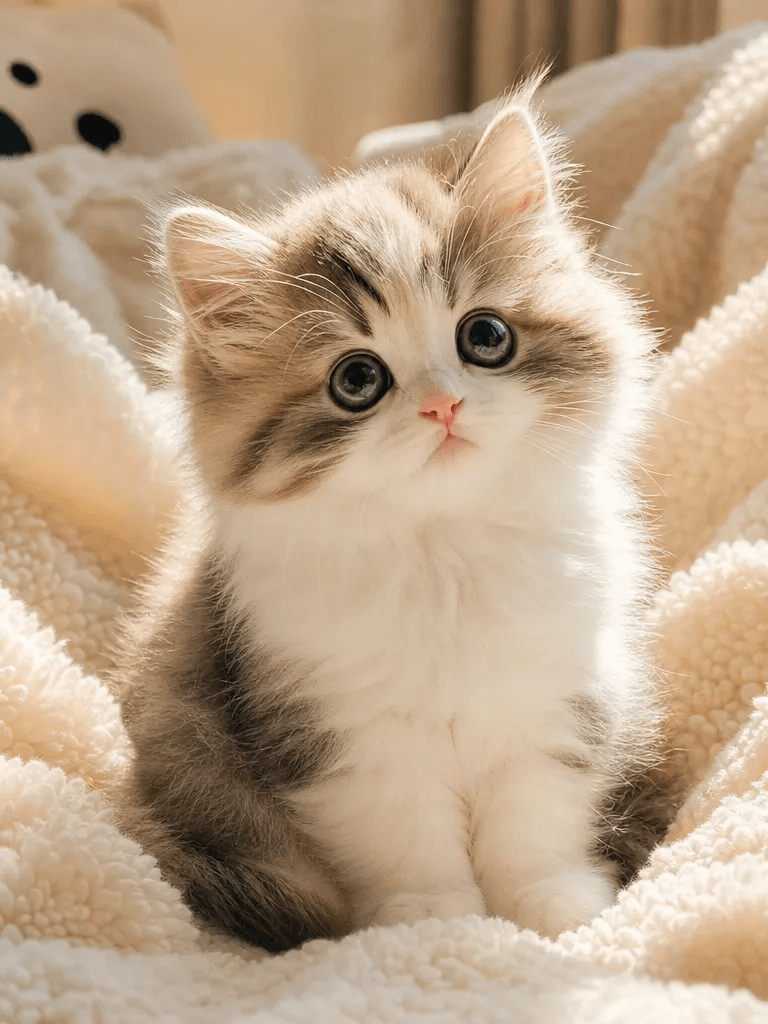
Use this as the pet reference.
It should preserve:
- Breed
- Fur color
- Expression
- Body features
- Facial details
For Image 3, choose a photo where your pet’s face is easy to see. A calm expression usually works better than a very active or blurry pose. If the eyes, nose, fur pattern, and head shape are clear, the final result will feel much more personal.
This AI pet movie poster style works especially well when the pet has a gentle or expressive face, because the emotional connection is the main focus of the image.
Step-by-Step Guide
Step 1: Lock the Composition of Image 1
This is one of the most important steps.
When AI generates a new image, it often tries to redesign the scene. It may change the background, adjust the camera angle, or create a completely new layout. However, for this trend, you want the final image to stay close to the original movie poster structure.
So, the first instruction in your prompt should be:
Keep the original composition exactly the same.
Then, add these lines:
Do not change the background.
Do not change the lighting.
Do not change the camera angle.
These instructions help GPT Image keep the most important parts of the reference image:
- Environment
- Color
- Lighting
- Mood
- Camera angle
- Poster-like framing
In other words, Image 1 gives your AI pet movie poster its visual foundation. The more clearly you protect the composition, the more cinematic the final result will feel.
Step 2: Replace the Subjects with the Person and Pet
Now, you need to tell AI what should be replaced.
The main idea is simple: replace the person in Image 1 with the person from Image 2, and add or replace the animal with the pet from Image 3.
Person
Replace the original person with the person from Image 2.
Preserve:
- Face shape
- Hairstyle
- Facial features
- Personal vibe
- Recognizable identity
The person should:
- Show the full face
- Show the shoulders
- Not be blocked too much by the pet
- Not be cropped too tightly
Add this line to your prompt:
Preserve the facial features, hairstyle and recognizable identity from Image 2.
You can also add:
The person should show their full face and shoulders.
This helps prevent the AI from changing the person too much or hiding the face in the final image.
Pet
Replace the animal with the pet from Image 3.
Preserve:
- Fur color
- Breed
- Facial features
- Expression
- Body characteristics
Only show:
Upper Body
The pet does not need to appear in full body.
This matters because the poster should feel intimate and cinematic. If the full body of the pet appears, the image may become too crowded. It can also lose the clean, emotional poster layout.
Use this line:
The animal should only show its upper body.
Then add:
Preserve the appearance, fur color and facial features from Image 3.
This makes the pet look more like your real pet, instead of a random similar-looking animal.
Step 3: Match the Pose from Image 1
This step is also very important.
AI often changes the person’s pose when it recreates an image. For example, it may make the person look straight at the camera, smile, turn sideways, or lower their head. These changes can ruin the original movie poster mood.
To avoid that, use this instruction:
Match the pose from Image 1 as closely as possible.
This includes:
- Head angle
- Shoulder direction
- Body direction
- Upward-facing pose
- Cropping style
When the pose stays close to Image 1, the final result feels more like a real AI pet movie poster. It keeps that quiet, sunlit, emotional feeling that makes the trend so popular.
Step 4: Let the Pet Rest on the Shoulder
This is the most emotional part of the whole image.
Use this line:
The animal rests its head gently on the person's shoulder.
Then add:
A sense of trust and emotional connection.
And:
The animal appears calm and dependent.
These lines help the AI understand the relationship between the person and the pet. You are not just asking for two subjects in one frame. You are asking for a small emotional moment.
When the pet gently leans on the person’s shoulder, the image becomes more than a cute portrait. It starts to feel like a memory. That is why this AI pet movie poster style is so appealing.
If the pet does not lean on the shoulder in the first result, add:
The animal leans its head against the shoulder.
You can also add:
Affectionate body language.
This usually improves the interaction a lot.
Step 5: Keep the Cinematic Lighting
For this type of image, avoid making the prompt too polished or too commercial.
Do not overuse words like:
- High saturation
- Sharp
- HDR
- Commercial photography
- Ultra-detailed studio lighting
These words can make the image look like a pet advertisement or a studio portrait. That is not the goal here.
Instead, focus on:
Natural Cinema Lighting
Use these keywords:
soft natural light

warm tones

film still

cinematic atmosphere

emotional portrait
This will make the result feel closer to:
A movie still.
Not a pet photoshoot.
A good AI pet movie poster should not look overly perfect. It should feel natural, warm, and slightly nostalgic. The image should look like it belongs to a story.
Recommended GPT Image Prompt
You can copy and paste the prompt below.
Replace the person in Image 1 with the person from Image 2 and the animal from Image 3.

Keep the original composition exactly the same.

Do not change the background.

Do not change the lighting.

Do not change the camera angle.

Do not change the color grading.

Only replace the subjects.

Match the pose from Image 1 as closely as possible.

The person should show their full face and shoulders.

Preserve the facial features, hairstyle and recognizable identity from Image 2.

The animal should only show its upper body.

Preserve the appearance, fur color and facial features from Image 3.

The animal gently rests its head on the person's shoulder in a trusting and dependent manner.

Strong emotional connection between human and animal.

Soft cinematic lighting.

Warm natural tones.

Film still aesthetic.

Photorealistic.

Looks like a frame from Call Me By Your Name.

Highly emotional.

Natural and believable.
If the person does not look enough like Image 2, add:
Preserve recognizable identity from Image 2.

same face

same hairstyle

same person
If the pet does not lean naturally on the shoulder, add:
The animal leans its head against the shoulder.

affectionate body language
If the final image does not look cinematic enough, reduce:
- HDR
- Over-sharpening
- Commercial photography
- Over-retouching
- Strong saturation
Then add:
film still

cinematic portrait

natural grain

soft lighting
Advanced Tips / FAQ
Q1: Why does the person not look like Image 2?
Add this line:
Preserve recognizable identity from Image 2.
Then emphasize:
same face
same hairstyle
same person
Usually, this happens when the face in Image 2 is not clear enough. For better results, use a photo with natural lighting, a visible face, and minimal obstruction.
Avoid reference photos with heavy sunglasses, extreme angles, strong shadows, or too much hair covering the face. These details make it harder for AI to preserve the person’s identity.
Q2: Why does the pet refuse to lean on the shoulder?
Add:
the animal leans its head against the shoulder
And:
affectionate body language
This usually helps a lot.
The reason is simple: AI may treat the pet as a separate subject, instead of part of the person-pet interaction. So you need to describe the physical connection clearly.
You can also add:
close physical contact between the person and the animal
This makes the pet feel more naturally connected to the person.
Q3: Why does the image not look like a movie poster?
Reduce:
- HDR
- Over-sharpening
- Commercial photography
- High-contrast studio lighting
- Heavy retouching
- Overly bright fill light
Add:
film still

cinematic portrait

natural grain

soft lighting
A cinematic poster does not need to be extremely sharp or perfect. In fact, it often looks better when it feels a little softer and more natural. Focus on mood, light, color, and emotion.
That is what makes an AI pet movie poster look like a real movie moment instead of a regular AI image.
Q4: What pets work best for this style?
This style works especially well with:
- Cats
- Dogs
- Rabbits
- Alpacas
- Spitz-type dogs
Pets with expressive faces usually work best. Cats and small dogs are especially suitable because their heads can rest naturally near the shoulder.
For larger dogs, it is better to show only the head and upper body. This keeps the composition balanced and prevents the image from becoming too crowded.
Q5: How should I choose the best reference images?
For Image 1, choose a poster or film still with a clear composition, strong lighting, and a recognizable pose.
For Image 2, choose a portrait where the face, hairstyle, and shoulders are clearly visible.
For Image 3, choose a pet photo with a clear face, natural expression, and visible fur details.
Each image has a different job:
- Image 1 controls the composition and cinematic mood
- Image 2 controls the person’s identity
- Image 3 controls the pet’s appearance
Do not try to put all the information into one image. The clearer the role of each reference image, the better your final AI pet movie poster will look.
Final Thoughts
The reason this Call Me By Your Name inspired AI pet movie poster trend feels so special is not because the composition is complicated. It is because the emotion is easy to understand.
A pet gently resting on someone’s shoulder says a lot without saying anything. It shows trust, comfort, and quiet companionship. With warm light, soft colors, and a cinematic frame, the image becomes more than a pet portrait. It feels like a scene from a film about your bond.
So, if you have a pet you love, try this GPT Image prompt. Your next favorite poster may come from one of the simplest feelings in the world: being together.
Go to WeShop AI For Exploration:





