

Many GPT Image 2 prompts are easy to admire and hard to use. They describe a mood, add a few glossy adjectives, and leave the important decisions to chance. As a result, the image may look polished but still fail as a product card, campaign asset, or editable design.
GPT Image 2 works better when the request reads like a compact creative brief. State the job first. Then define the subject, framing, light, text, and limits. You do not need a wall of camera jargon. However, you do need to say what success looks like.
The 100 GPT Image 2 prompts below are organized by production task. Each one is specific enough to run as written. You can also replace the product, color, copy, or setting without rebuilding the prompt.
The One-Minute Brief Behind Better GPT Image 2 Prompts
Before copying a prompt, decide what the image must do. A marketplace thumbnail needs clear product edges. By contrast, a campaign image may need atmosphere and room for copy. These are different jobs, even when the same product appears in both.
Use this brief to remove ambiguity:
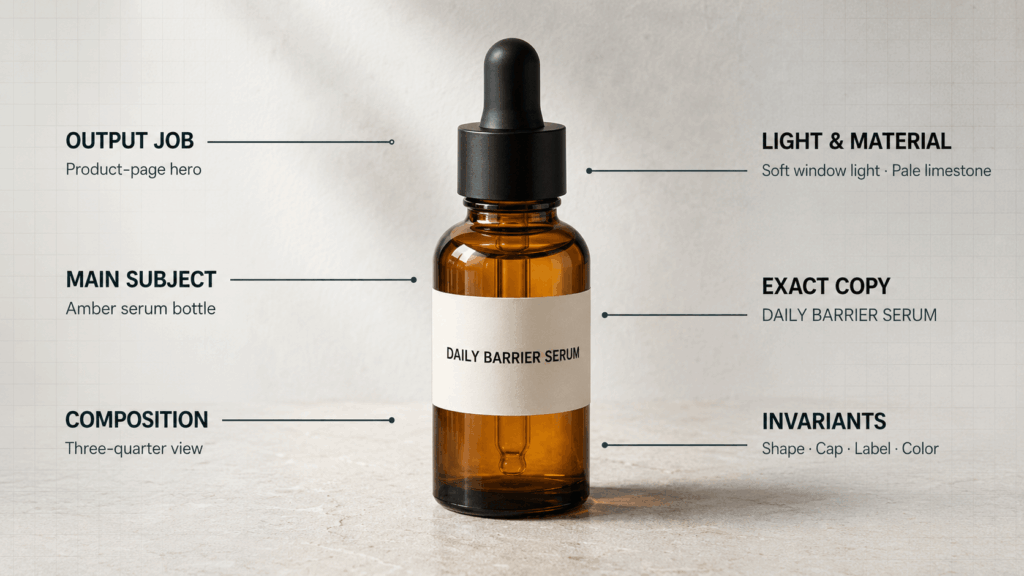
| Decision | What to specify | Practical example |
|---|---|---|
| Output job | Where the image will be used | Product detail page hero |
| Main subject | What must attract attention first | One amber serum bottle |
| Composition | Angle, crop, placement, and empty space | Three-quarter view, centered, open space on the left |
| Scene logic | Setting, light, surfaces, and materials | Soft window light on pale limestone |
| Exact copy | Literal words and their placement | Show “DAILY BARRIER SERUM” on the label |
| Guardrails | What must stay unchanged or must not appear | Preserve bottle shape; no hands, fruit, or extra text |
A useful prompt can therefore be short without being vague:
Create a product-page hero for one amber glass serum bottle labeled “DAILY BARRIER SERUM.” Place it in a three-quarter view on pale limestone under soft window light. Keep the bottle shape, cap, label spelling, and amber color unchanged. Leave clean negative space on the left. Do not add hands, flowers, fruit, or extra text.
The prompt gives the model a hierarchy. It also separates creative choices from fixed requirements. That distinction matters even more when you edit a reference image.
How to Use This Prompt Library Without Overprompting
First, choose the prompt that matches the output job rather than the closest aesthetic. Next, change only the details that belong to your project. For example, you may replace the bottle with a candle, yet keep the same framing and negative-space instruction.
For a new image, begin with one clear version. Then request one meaningful adjustment at a time. A follow-up such as “Keep everything else unchanged and move the headline 10% lower” is easier to evaluate than a complete rewrite.
For an edit, upload the reference and name the invariants. Say which face, garment, package, label, colors, or proportions must stay the same. In addition, specify the only area that may change. This reduces accidental redesigns.
Finally, treat generated text as artwork that still needs review. Check every letter, number, logo, product claim, and legal line before publishing.
100 GPT Image 2 Prompts for Commerce and Content
GPT Image 2 Prompts 1–10 for Clean Product Photography
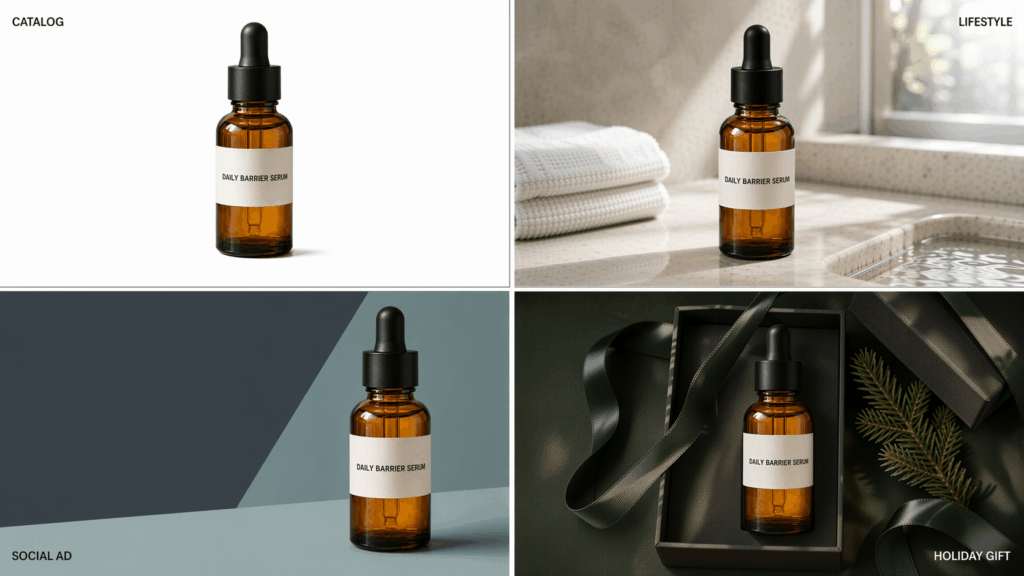
- Create a square product-page hero for one amber glass face-serum bottle on warm limestone. Use soft light from the upper left. Then keep the label sharp, the edges clean, and the background free of props.
- Photograph a white mineral-sunscreen tube upright against a seamless pale-blue studio background. Add a short natural shadow. Meanwhile, leave open space above the tube for website copy.
- Show one cream leather sneaker in a three-quarter side view on a light-gray sweep. Use crisp studio light so the stitching, sole texture, and silhouette remain clear. Do not add a foot or a second shoe.
- Create a catalog image of a brushed-steel water bottle on pure white. Keep the bottle vertical and centered. Also preserve the lid shape, metallic grain, and clean outline.
- Photograph a ribbed ceramic candle on dark walnut at dusk. Let the flame create a warm reflection, while the label remains readable and neutral in color.
- Create a macro product image of a plain gold hoop earring on folded ivory silk. Keep the metal color accurate. Meanwhile, avoid gems, engraved marks, and extra jewelry.
- Show a matte stand-up coffee pouch on a muted terracotta surface. Place a few coffee beans behind it, so they support the scene without covering the package.
- Arrange three unbranded makeup items in a tidy diagonal flat lay on blush paper. Use soft overhead light. Also, keep every item separate, complete, and easy to crop.
- Create a close product shot of black over-ear headphones on charcoal acrylic. Use narrow rim light to define the ear cups. However, keep the logo area blank.
- Photograph a structured burgundy handbag at eye level on a cream plinth. Show the full handles and hardware. Finally, leave enough space around the bag for a marketplace crop.
Lifestyle and Ecommerce Scenes 11–20
- Create a morning bathroom scene with a person holding one amber serum bottle near the sink. Focus on the product, while the face stays softly out of focus. Use natural window light and realistic skin texture.
- Show a commuter carrying a reusable coffee tumbler outside a modern train station. Use a waist-up crop and overcast daylight. However, keep the tumbler fully visible and the background signage unreadable.
- Create a lifestyle photo of a runner tying one blue running shoe on a park bench. Frame the shoe and hands clearly. Then keep the clothing simple and free of logos.
- Style a folded linen bedding set in a bright bedroom with morning shadows. Include one loosely draped sheet. Still, keep the textile weave and true off-white color easy to inspect.
- Show a ceramic pan in use on a clean home stove with vegetables cooking inside. Use a three-quarter overhead angle. Therefore, keep the handle, rim, and cooking surface unobstructed.
- Create a practical desk scene for a wireless keyboard and mouse. Add a notebook and a small plant for scale. However, keep both products fully visible and parallel to the desk edge.
- Photograph a dog resting beside a simple orthopedic pet bed in a sunlit living room. Make the bed the main subject, while the dog provides scale and warmth.
- Create a picnic scene with one snack pouch standing upright on a checked blanket. Add fruit and a water glass behind it. However, do not cover the package or invent label text.
- Show a compact carry-on suitcase beside a traveler at an airport window. Use a full-height vertical composition. Also, keep the wheels, handle, and front pocket visible.
- Create a holiday gift scene with a home-fragrance set inside an open kraft box. Use soft evening light and restrained greenery. Finally, keep each product label facing the camera.
GPT Image 2 Prompts 21–30 for Fashion and Portraits
- Create a head-to-toe studio lookbook image of one model wearing a navy tailored suit and white sneakers. Use an eye-level camera and a warm-gray backdrop. Also, keep both hands and both shoes visible.
- Make a close beauty portrait in soft daylight with natural pores, subtle makeup, and flyaway hair. Keep the expression relaxed. However, avoid plastic skin, heavy contouring, and jewelry.
- Photograph three adult models in coordinated neutral knitwear against a plain sand backdrop. Give each person a distinct pose, while keeping every garment front clearly visible.
- Create an editorial profile portrait of a creative professional at a worktable. Include paper sketches and one desk lamp. However, keep the face sharp and the background quiet.
- Show an adult streetwear model crossing a wet city street in early evening. Use slight motion in the coat hem, yet keep the face, shoes, and outfit construction clear.
- Create a shoulder-up portrait for a small pendant necklace. Use side lighting that defines the metal without clipping highlights. Meanwhile, keep hair away from the pendant.
- Photograph an adult model in a dark green evening dress inside a vintage hotel corridor. Use a full-length vertical frame. Finally, leave the dress hem visible and the hallway softly detailed.
- Create a clean business headshot with a light stone background, soft frontal light, and a natural expression. Keep facial proportions realistic. However, do not add office props or text.
- Capture an adult tennis player serving on an outdoor court at golden hour. Freeze the racket and hands. Meanwhile, allow slight movement in the shirt and background.
- Create a candid editorial portrait of an adult reading beside a café window. Use a chest-up crop and natural reflections. Meanwhile, keep the eyes, fingers, and book edges believable.
Paid Social and Campaign Concepts 31–40
- Design a square launch ad for a coral running shoe. Then place the shoe large on the right and the exact headline “MOVE LIGHT” on the left. Use bold black type and no other text.
- Create a vertical story ad for a clear facial mist bottle with floating water droplets. Put “MIDDAY RESET” at the top. Then leave a clean lower area for a platform button.
- Design a bright citrus drink ad with one plain silver can, a sliced orange, and a controlled splash. Show the exact line “BRIGHT BY NATURE.” However, avoid small print and extra cans.
- Create a soft blue skincare campaign with three matching bottles on translucent blocks. Use diffused light and gentle shadows. Finally, add only the headline “CALM STARTS HERE.”
- Make a product-retargeting ad for one burgundy handbag on cream. Use a clear product-first layout. Add “STILL THINKING?” above the bag and “TAKE ANOTHER LOOK” below it.
- Create a winter gift ad for a candle and hand-cream set wrapped with dark green ribbon. Use warm tabletop light. Meanwhile, keep the exact headline “A QUIET GIFT” in the upper-left corner.
- Design a vertical app-launch image with one phone showing a simple habit tracker. Also, use three readable cards labeled “WATER,” “WALK,” and “READ.” Keep the background clean and the interface uncluttered.
- Create a fitness campaign image of an adult lifting a kettlebell in a bright studio. Place the person on the left. Therefore, reserve the right third for the headline “BUILD YOUR BASE.”
- Design a square café promotion with an iced coffee and a croissant on a small table. Add the exact copy “COFFEE + CROISSANT” and “WEEKDAYS UNTIL 11.” Finally, do not add prices.
- Create a split-layout performance ad for a stain remover. Show a stained white shirt on the left and the same clean shirt on the right. Then add only “BEFORE” and “AFTER.”
GPT Image 2 Prompts 41–50 for Text, Posters, and Packaging
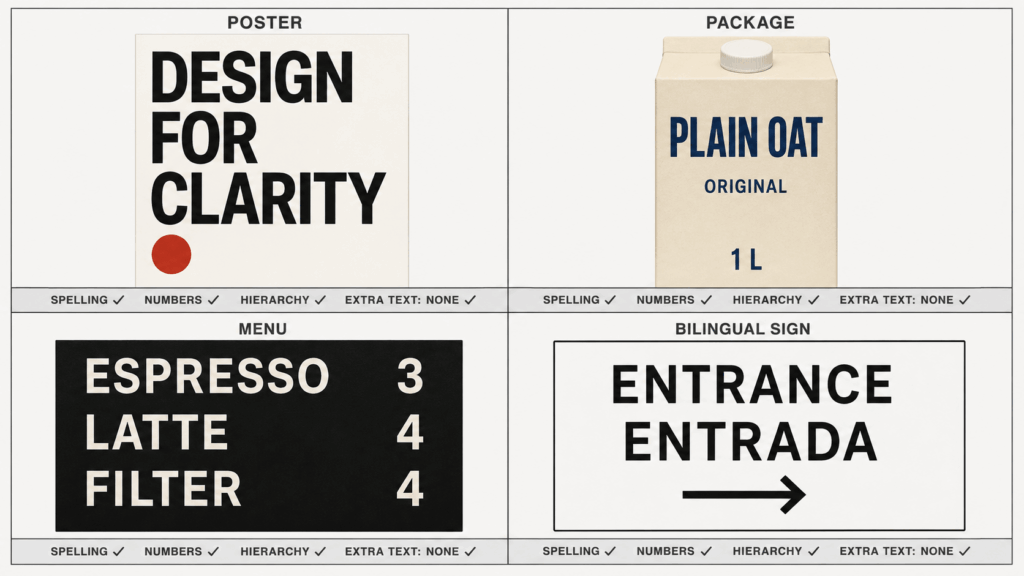
- Design a vertical Swiss-inspired poster on off-white paper. Use black geometric type for “DESIGN FOR CLARITY” and a single red circle. Finally, keep the words exactly as written and add no footer text.
- Create a modern event flyer with the exact lines “MAKER NIGHT,” “12 SEPTEMBER,” “7 PM,” and “HALL B.” Use a strict grid, high contrast, and generous spacing. However, do not add logos.
- Make a square quote card with the exact sentence “SMALL SYSTEMS MAKE BIG DAYS EASIER.” Use dark green serif type on warm cream. Also, keep all words on no more than four lines.
- Design the front of a minimal oat-milk carton. Show only “PLAIN OAT,” “ORIGINAL,” and “1 L.” Use navy text on pale beige, while leaving all other package areas free of copy.
- Create a realistic storefront mockup with the sign “NORTH & PINE” in cream uppercase letters on dark green fascia. Show the sign straight-on. Meanwhile, avoid pedestrians and competing text.
- Design a three-item café menu board. Use only “ESPRESSO 3,” “LATTE 4,” and “FILTER 4.” Also, keep the type large, aligned, and readable from a distance.
- Create a simple infographic titled “A BETTER PRODUCT PHOTO.” Show four labeled parts: “SUBJECT,” “LIGHT,” “ANGLE,” and “SPACE.” Finally, use clear icons and no extra data.
- Design a paperback cover titled “THE USEFUL PAUSE” with the author name “MARA LIN.” Use one empty chair, a pale blue wall, and quiet editorial typography. Meanwhile, keep the spine out of view.
- Create a vertical conference poster with “BUILDING WITH AI,” “BERLIN,” and “OCTOBER 18.” Use a modular black-and-cobalt layout. However, do not invent sponsors, speakers, or QR codes.
- Make a bilingual direction sign with “ENTRANCE” and “ENTRADA” in equal-size type. Add one right-pointing arrow. Also, use black on white and keep the layout accessible and uncluttered.
Blog, YouTube, and Editorial Assets 51–60
- Create a wide blog hero about practical AI image prompting. Show a plain product photo transforming into a structured campaign layout. However, leave the left third calm for a headline and do not render text.
- Make a wide ecommerce-guide hero with a packing table, one open shipping box, and three neatly arranged products. Use daylight and a documentary feel. Meanwhile, keep the center clear for cropping.
- Design a 16:9 YouTube thumbnail with one surprised creator on the right and a clean generated poster on the left. Finally, add only the large words “PROMPTS THAT WORK.”
- Create a 16:9 before-and-after thumbnail for a room redesign. Keep the same camera angle in both halves. Then label the halves “BEFORE” and “AFTER,” with no extra text.
- Make a newsletter header about better creative briefs. Show sticky notes becoming one clean image layout. Meanwhile, use a horizontal composition and reserve space for a separate HTML headline.
- Design a square podcast cover titled “WORK IN PROGRESS.” Use one microphone, cobalt blue, and large cream type. Also, keep the title readable at thumbnail size.
- Create an editorial illustration about rising return rates in ecommerce. Show an overflowing return box beside a simplified upward chart. However, do not show percentages or unsupported claims.
- Make a four-panel visual explaining how to photograph a small product: place it, light it, frame it, and review it. Meanwhile, use the same bottle and camera angle in every panel.
- Design a vertical carousel cover with the exact title “5 WAYS TO BRIEF AN IMAGE.” Finally, use a bold number 5, a restrained grid, and no decorative filler copy.
- Create a wide recipe-blog hero with a bowl of tomato soup, bread, and a linen napkin. Use a top-down crop. Then leave uncluttered space on the right for the article title.
GPT Image 2 Prompts 61–70 for Interfaces and Information Design
- Create a polished mobile budgeting screen with three cards labeled “SPENT,” “SAVED,” and “LEFT.” Also, show one simple bar chart. Keep all figures fictional and clearly marked as sample data.
- Design a desktop SaaS dashboard for project tracking. Include “IN PROGRESS,” “BLOCKED,” and “DONE” columns with short sample task names. Also, use a clean hierarchy and readable type.
- Create a mobile checkout screen with product summary, delivery address, payment method, and one “PLACE ORDER” button. Keep the layout realistic. However, do not use real card numbers or customer data.
- Design three onboarding screens for a reading app. Use the headings “CHOOSE,” “SAVE,” and “READ.” Maintain one visual system, while giving each screen a distinct illustration.
- Create a horizontal customer-journey diagram with five stages: “DISCOVER,” “COMPARE,” “BUY,” “RECEIVE,” and “RETURN.” Then use arrows, short labels, and no unsupported metrics.
- Make a simple supply-chain diagram from factory to warehouse to store to customer. Label each stage clearly. Then use one color per stage and avoid decorative 3D effects.
- Design a comparison card for “PLAN A” and “PLAN B.” Include three rows labeled “PRICE,” “STORAGE,” and “SUPPORT.” Also, use placeholder values and make the two columns easy to scan.
- Create a timeline titled “LAUNCH WEEK” with five days from Monday to Friday. Add one short task per day. Finally, keep the schedule fictional, readable, and evenly spaced.
- Make a four-step coffee-brewing diagram labeled “GRIND,” “POUR,” “WAIT,” and “SERVE.” Use simple top-down illustrations. However, keep the arrows and sequence unmistakable.
- Create a low-fidelity mobile wireframe for a product-detail page. Show image gallery, title, price, variants, and an add-to-cart button. Then use grayscale blocks and no brand identity.
Rooms, Architecture, and Hospitality 71–80
- Create a wide image of a small Japandi living room with one low sofa, oak shelving, and a paper lamp. Use soft afternoon light. Meanwhile, keep walking paths realistic and the styling restrained.
- Redesign a compact studio apartment with a bed, desk, and dining area in one frame. Use an eye-level wide view. Finally, ensure each zone is usable rather than merely decorative.
- Show a neighborhood café with twelve seats, warm wood, and a visible service counter. Use morning daylight. Leave all menus blank so no invented text appears.
- Create a boutique hotel room with a dark green headboard, brass reading lights, and crisp white bedding. Keep the lens perspective natural and the room proportions believable.
- Design a temporary skincare pop-up inside a small mall unit. Include one testing counter, wall shelving, and a checkout point. Keep all package fronts unbranded.
- Visualize a narrow kitchen remodel with pale cabinets, dark stone counters, and integrated appliances. Use a straight-on view. Keep doors, drawers, and circulation space functional.
- Create a bright coworking lounge with six desks, acoustic panels, and two small meeting booths. Use realistic daylight. Also keep chairs and walkways correctly scaled.
- Show a compact city backyard with raised planters, a small table, and warm string lights. Use early evening light. Avoid an oversized pool or impossible landscape features.
- Create a quiet contemporary gallery with one large abstract sculpture and three visitors for scale. Use soft ceiling light. Keep the architecture simple and the artwork original.
- Visualize a two-story brick townhouse on an overcast day. Use a street-level view with natural vertical lines. Keep doors, windows, gutters, and steps structurally consistent.
GPT Image 2 Prompts 81–90 for Reference-Based Editing
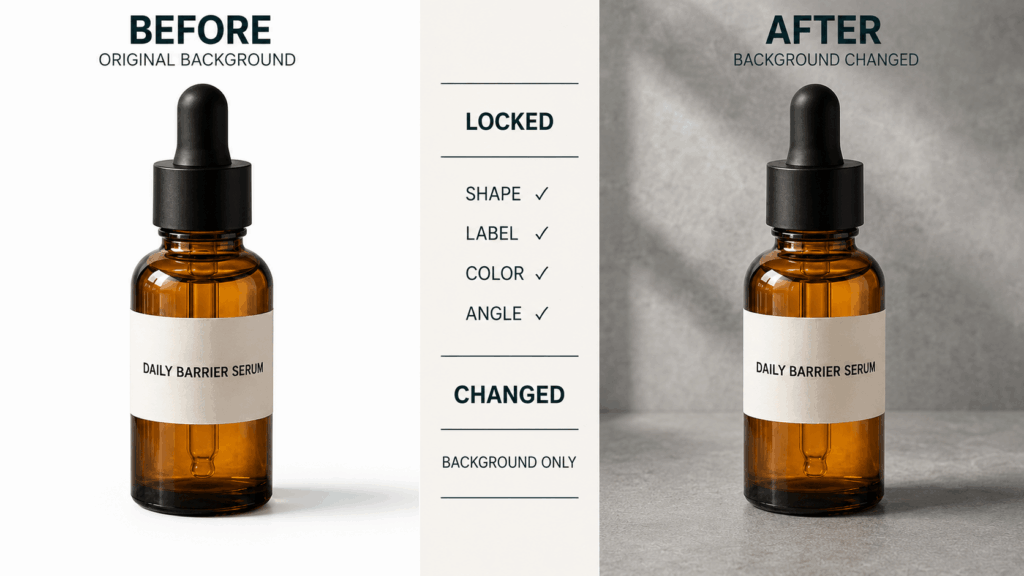
- Replace only the background of the uploaded product photo with a pale-gray studio sweep. Preserve the product’s exact shape, label, cap, colors, reflections, and camera angle. Add no props.
- Relight the uploaded portrait with soft window light from the left. Keep the person’s identity, expression, hairstyle, clothing, crop, and background unchanged. Do not smooth the skin.
- Change only the uploaded jacket from black to deep forest green. Preserve its fabric texture, seams, fit, shadows, model, pose, and entire scene. Do not recolor other objects.
- Remove the paper cup from the uploaded table photo. Reconstruct the wood grain and shadow naturally. Keep every remaining item in its original position.
- Extend the uploaded landscape image to the right for a wide banner. Continue the same sky, terrain, light direction, and lens perspective. Do not stretch or move the original subject.
- Replace only the headline on the uploaded poster with “AUTUMN STUDIO SALE.” Match the existing type weight, alignment, color, and spacing. Preserve all other text and graphics exactly.
- Use uploaded image 1 as the product reference and image 2 as the location reference. Place the exact product on the table in image 2. Preserve its label, shape, color, and scale.
- Turn the uploaded product scene into a winter version by adding restrained snow outside the window and one pine branch. Keep the product, room, composition, and indoor light unchanged.
- Repair only the malformed hand in the uploaded fashion image. Match the existing pose, skin tone, light, and camera focus. Preserve the face, clothing, body position, and background.
- Change the uploaded sign from “WELCOME” to “BIENVENIDOS.” Preserve the sign material, letter style, perspective, scene, and lighting. Do not add a translation elsewhere.
Imaginative Scenes with Production Controls 91–100
- Create a library floating above a calm cloud layer at sunrise. Use believable stone weight, soft atmospheric depth, and one small reading terrace. Keep the composition quiet rather than crowded.
- Show a miniature city growing inside an open toolbox. Turn screws into towers and measuring tape into roads. However, keep every object recognizable and the lighting physically consistent.
- Create a surreal perfume campaign with one clear bottle casting a shadow shaped like a flower. Use a cream studio set and precise hard light. Add no literal flowers or text.
- Show a friendly service robot eating alone at a roadside diner after midnight. Use warm booth light and rain outside. Keep the scene observational, with no neon city clichés.
- Create an underwater greenhouse with glass walls, green plants, and small fish outside. Use filtered blue daylight. Make the interior dry and structurally believable.
- Design a paper-cut solar system for a classroom poster. Use layered colored paper, eight clearly separated planets, and a dark navy background. Add no labels or fictional moons.
- Create an impossible staircase inside a quiet concrete museum. Use one consistent material and soft skylight. Even though the geometry loops, keep each stair edge crisp and uncluttered.
- Illustrate a small fox delivering bread through a rainy village in an original picture-book style. Use warm windows and simple shapes. Do not imitate a named artist or existing character.
- Create a remote research station on a frozen moon. Show functional modules, one rover, and a distant ringed planet. Use cold daylight and realistic scale rather than fantasy ornament.
- Visualize creative focus as one sharply lit worktable inside a vast dark room. Place a pencil, blank paper, and a single red thread on the table. Keep the metaphor simple and text-free.
A Prompt Repair Clinic for Predictable Failures
When an output misses the brief, do not add ten more adjectives. Instead, diagnose the failure and revise only the weak instruction.
| If the output fails here | Add this kind of instruction | Avoid this reaction |
| Subject hierarchy | “The bottle is the largest and sharpest object.” | Adding more mood words |
| Composition | “Place the subject on the right and leave the left third empty.” | Asking for a completely new scene |
| Text accuracy | Quote the exact copy and say “no other text.” | Requesting a dense paragraph in one pass |
| Product fidelity | List the shape, label, cap, color, and angle as invariants. | Saying only “keep it similar” |
| Human details | Name the visible hands, feet, gaze, and crop. | Hiding every difficult area |
| Overstyling | Keep one lighting idea, one material language, and one mood. | Mixing five unrelated aesthetics |
For example, suppose the headline is correct but too small. The next request can be: “Keep the image unchanged. Increase only the headline size by 20% and preserve its wording, font style, color, and position.” Because the change is isolated, you can judge it clearly.
Similarly, if an edited product starts drifting, repeat the preserve list. A good revision names both sides of the boundary: what changes and what stays fixed.
What to Check Before You Publish
A visually appealing output is not automatically production-ready. Therefore, review the image at full size and at its final display size.
- Read every word, number, date, price, unit, and label.
- Compare reference-based products against the original silhouette and packaging.
- Inspect hands, feet, jewelry, straps, handles, and object intersections.
- Confirm that shadows follow the same light source.
- Check whether negative space still works after the final crop.
- Remove invented claims, logos, badges, data, or legal copy.
- Ask a human reviewer to approve identity, brand, and commercial use.
If an image fails one check, repair that issue alone. On the other hand, if the concept itself is wrong, return to the output job and composition before polishing details.
Put These GPT Image 2 Prompts to Work in WeShop AI
The best prompt is not the most poetic one. It is the brief that gives an image a clear job and gives you a clear way to review the result.
Open GPT Image 2 in WeShop AI when you want to create a new visual or work from a reference. Start with one prompt from the relevant group. Then adjust one variable at a time and keep your non-negotiable details visible in every edit request.
That approach turns GPT Image 2 prompts into a repeatable creative system. More importantly, it helps you produce images that can survive a real crop, a real label check, and a real campaign review.
Go to WeShop AI For Exploration:





