






Turn One Packshot Into an Expectation vs Reality Product Post
Preserve one approved product while generating a polished campaign image and a relatable behind-the-scenes production setup.
Highly polished product photography attracts attention, but audiences also enjoy seeing how the image was actually made. That is why “Expectation vs Reality” remains useful for brands: the first frame delivers aspiration, while the second makes the process relatable. A November 2026 scan of current TikTok formats classified the structure as peaking and tracked a leading example at 4.3 million views.
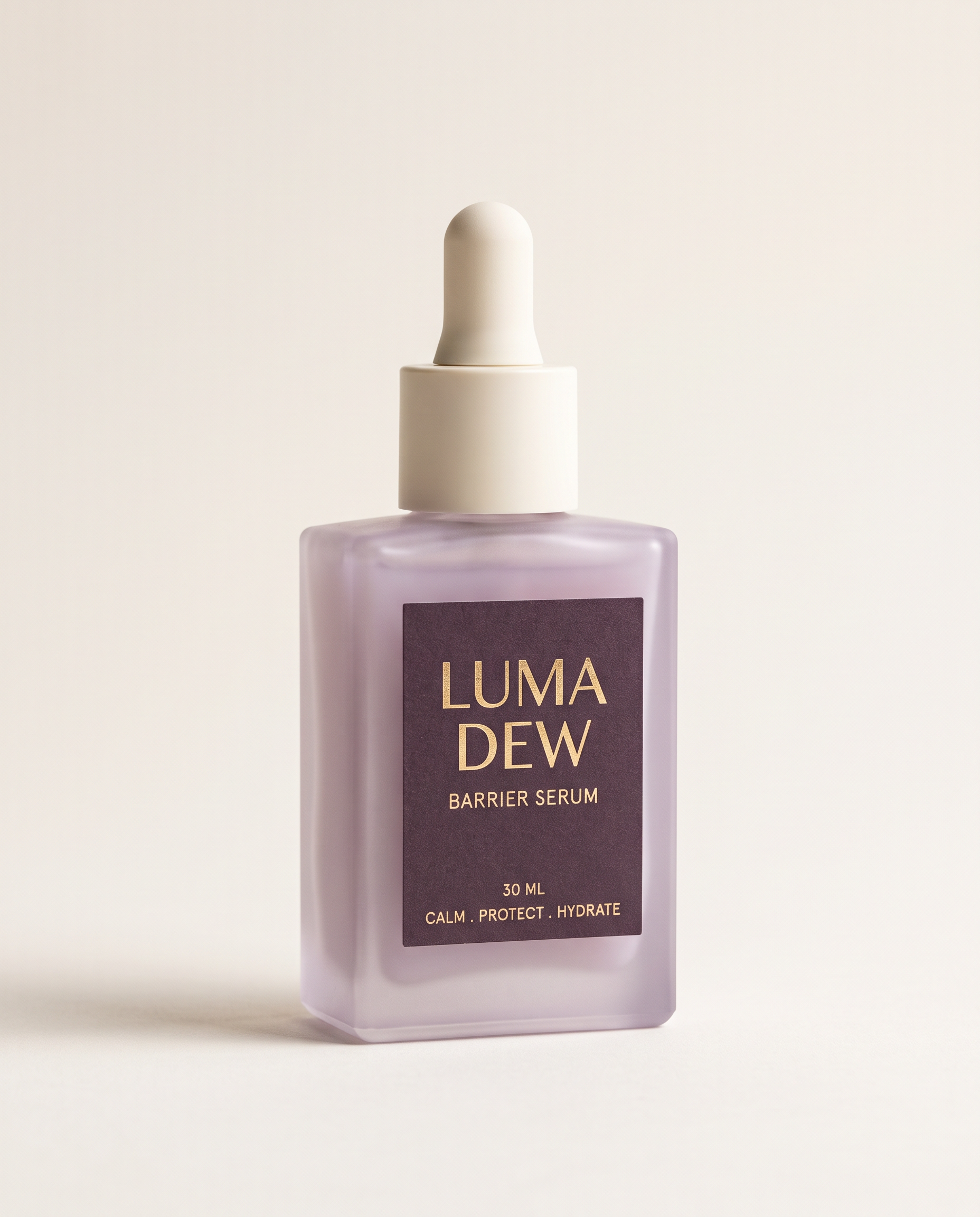
For an ecommerce team, the challenge is preserving the SKU in both halves. The studio campaign and the behind-the-scenes setup can look completely different, but the bottle shape, label, color, cap, and scale still need to match.
The result
| Approved product reference | Social-ready comparison |
|---|---|
 |  |
Build the joke around production, not product failure
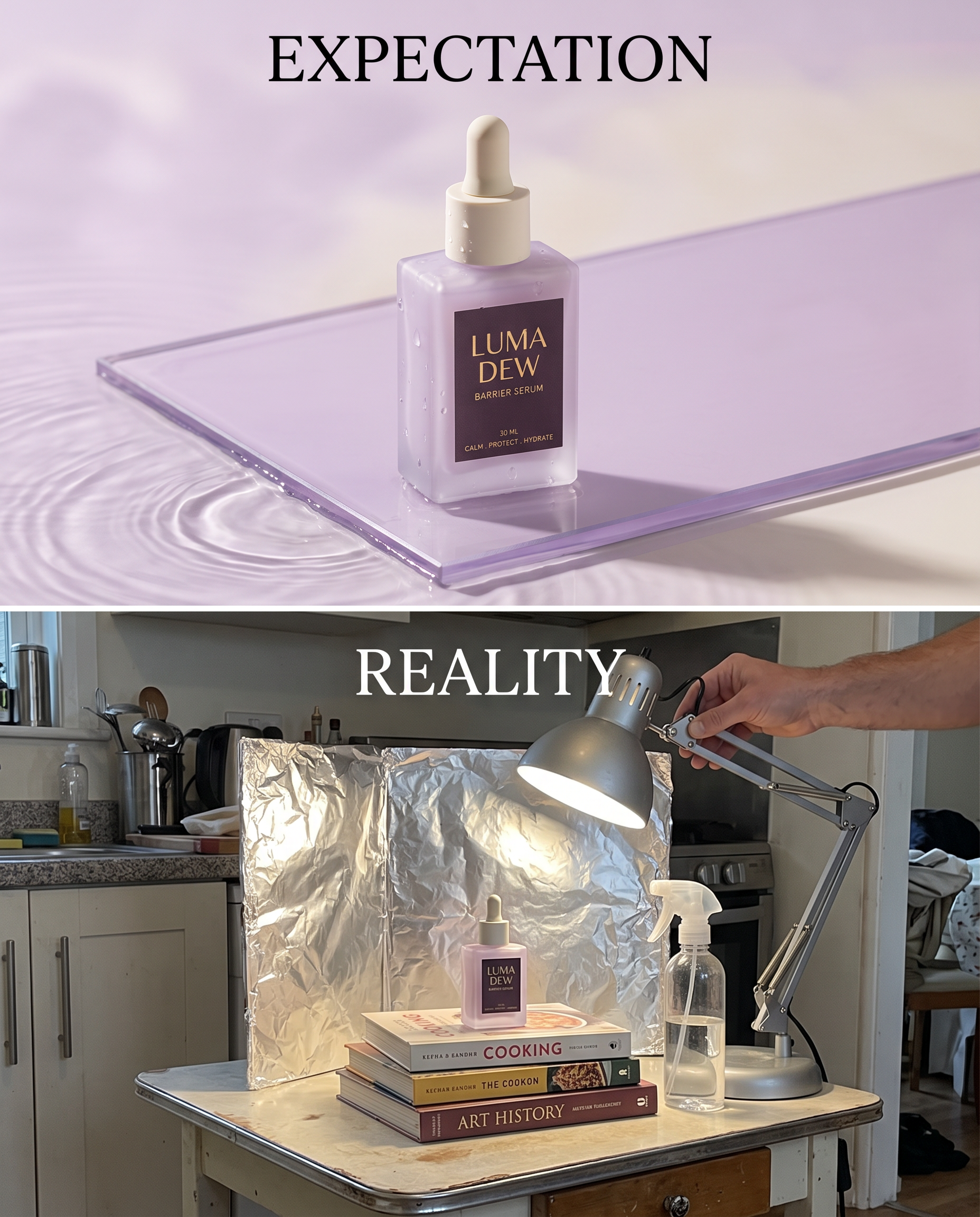
The “reality” panel should reveal ingenuity: books become risers, foil becomes a reflector, and a desk lamp becomes a key light. Avoid making the product dirty, broken, unsafe, or disappointing. The audience should laugh at the resourceful setup and still want the item.
Preserve these product details
| Element | What must remain unchanged |
|---|---|
| Bottle | Rectangular frosted pale-lilac glass |
| Closure | Matte ivory dropper cap |
| Front label | LUMA DEW, BARRIER SERUM, 30 ML |
| Color relationship | Pale lilac bottle with dark-plum label |
| Quantity | One bottle in each scene |
A three-step workflow
Step 1 — Start from a clean packshot. Use a centered, readable image with the full package visible. If the source label is not legible, the comparison will amplify the problem.
Step 2 — Direct two different production worlds. The expectation panel uses translucent acrylic, controlled ripples, and precise light. The reality panel uses an ordinary table, books, foil, a lamp, and a spray bottle.
Step 3 — Add only the essential copy. “EXPECTATION” and “REALITY” should be the only added headlines. Add campaign claims, price, and the final call to action later in your approved design workflow.
Nano Banana 2 prompt
Prompt: Use the uploaded LUMA DEW serum as the exact product reference. Create one vertical split-screen social image with two equal stacked scenes. Top scene labeled exactly “EXPECTATION”: a polished luxury beauty campaign with the serum centered on translucent lilac glass, soft water ripples, precise studio highlights, immaculate composition. Bottom scene labeled exactly “REALITY”: a charming behind-the-scenes phone photo showing the same single bottle on a small kitchen table, propped up by books, with a desk lamp, silver foil reflector, water spray bottle, and one adult hand adjusting the setup. Preserve the bottle geometry, frosted lilac glass, ivory dropper, label text, and scale in both scenes. The contrast should be funny but competent, not messy or unsafe. No real brand, no extra bottle, no watermark, no text beyond the two labels and the product label.
Where brands can adapt it
- Show a premium food photograph beside the tabletop lighting setup.
- Compare a jewelry hero image with the reflector cards used to make it.
- Reveal how a small team produced a polished launch visual.
- Turn a marketplace thumbnail into an approachable creator story.
The strongest version keeps the product desirable in both panels. The production setup is the punchline; the SKU is still the hero.
You can try it directly using the tool on the right.