












Z-Image AI Image Generator Use Case: Create a Realistic Asian Fashion Campaign
Learn how to turn a text brief into a realistic Asian fashion campaign concept with Z-Image, including a ready-to-copy prompt, layout guidance, and review tips.
A fashion campaign often needs a clear visual direction before samples, models, and locations are ready. Without those assets, a written concept can be difficult to evaluate—and a generic moodboard may not show how the model, garment, cultural details, and advertising layout should work together.
This Z-Image AI image generator use case turns one text brief into a realistic Asian fashion campaign concept. The goal is not to replace the final photoshoot or reproduce an existing SKU. It is to create a concrete visual for campaign planning, internal approval, social ad layout tests, or landing-page mockups.
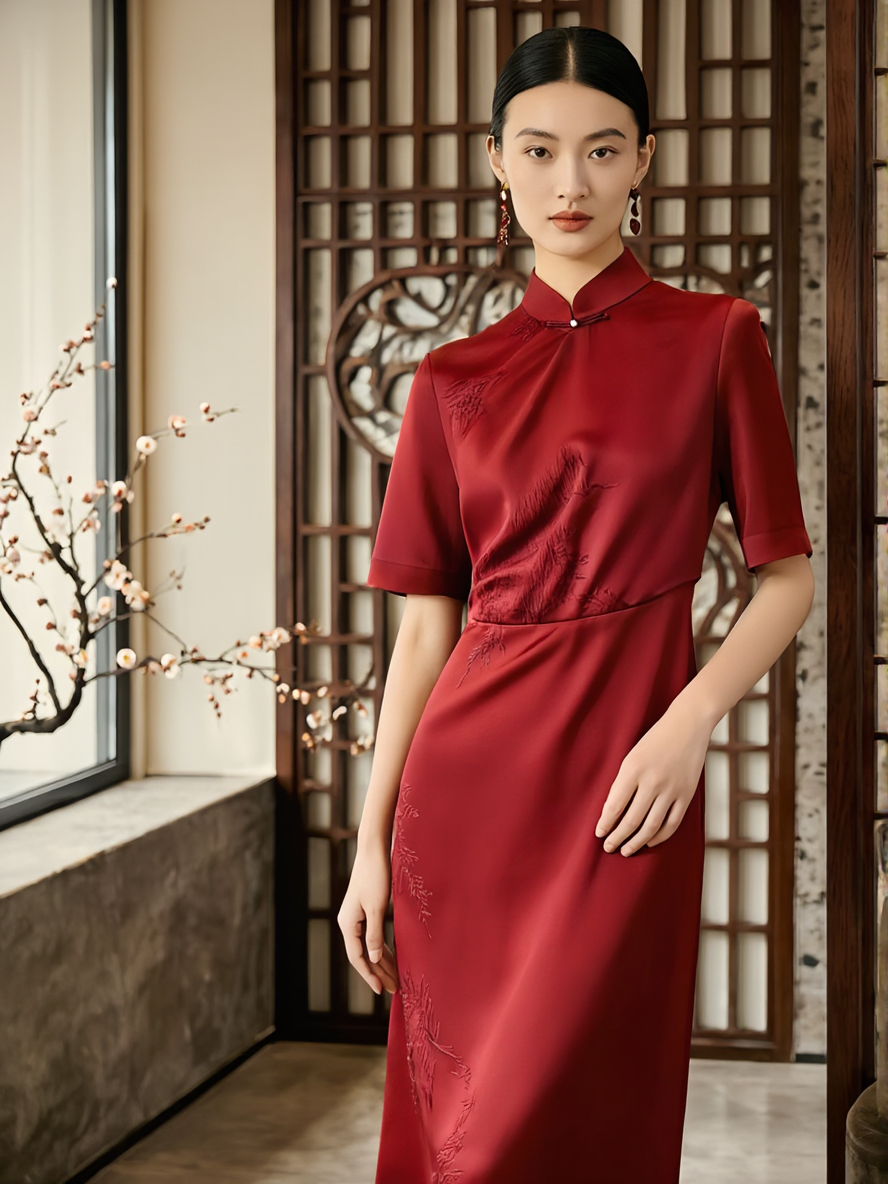
Generated result: The final Z-Image concept created from the exact campaign prompt below.
The Business Problem This AI Image Generator Use Case Solves
Fashion teams often need to present a campaign direction while the real garment, casting, set, or photography schedule is still being prepared. The concept image must communicate more than a general mood. It should answer practical questions:
- Does the model match the intended audience and brand tone?
- Does the garment feel contemporary rather than theatrical?
- Are the Chinese cultural details recognizable without overpowering the fashion?
- Is there enough clean space for campaign copy?
The intended deliverable is one vertical hero visual featuring an adult East Asian model in a contemporary red silk dress, photographed in a refined interior with restrained Chinese design cues and space for an advertising headline.
Why the Z-Image AI Image Generator Fits an Early Campaign Workflow
Z-Image in WeShop is a text-to-image model. It can build the model, garment, environment, lighting, and composition from a written brief, so this workflow does not require a reference image.
That makes it useful during concept development, when a team wants to explore an Asian fashion direction or Chinese cultural aesthetic before committing to production. The creative team can describe the intended model, tailoring, materials, set design, camera position, and copy space in one prompt.
The limitation is equally important: without a product reference image, this workflow should not be used to promise an exact recreation of a real garment SKU, print, logo, packaging design, or named person's identity. It establishes a campaign direction; it does not replace product-accurate photography.
Use Case Goal
Create a realistic 3:4 Asian fashion campaign concept for internal review, ad-layout testing, or a landing-page mockup.
Campaign Brief
| Element | Requirement |
|---|---|
| Business use | Social ad concept, campaign proposal, or landing-page hero mockup |
| Subject | One adult East Asian female model |
| Garment | Contemporary red silk dress with restrained Chinese tailoring cues |
| Environment | Premium modern interior with subtle Chinese architectural details |
| Composition | Full-body vertical image; model on the right; copy space in the upper left |
| Visual style | Photorealistic commercial fashion photography |
| Exclude | Logos, watermarks, readable text, crowds, and oversized festival props |
Ready-to-Copy Z-Image Prompt
Open Z-Image AI Image Generator in WeShop and use this prompt:
A photorealistic luxury fashion campaign featuring one adult East Asian female model wearing a contemporary red silk dress inspired by modern Chinese tailoring, with a clean sculptural silhouette, subtle stand collar, refined fabric draping, and minimal tonal embroidery. She stands confidently in an elegant modern interior with restrained Chinese architectural details: dark walnut lattice panels, warm stone flooring, a single plum blossom branch, and soft diffused daylight entering from the left. Full-body editorial composition, the model positioned slightly to the right, generous clean negative space in the upper-left area for advertising copy, natural facial features, realistic skin texture, anatomically natural hands, accurate fabric folds, premium commercial fashion photography, 50mm lens, eye-level camera, soft warm key light, controlled shadows, muted red and warm neutral color palette, vertical 3:4 composition, sophisticated and contemporary, no crowd, no extra person, no costume-drama styling, no oversized festival decorations, no logo, no watermark, no readable text.
The prompt defines the subject, garment boundaries, cultural cues, lighting, lens, composition, and unwanted elements. This makes the result easier to evaluate against a campaign brief than a short prompt such as “an Asian model in a red dress.”
Generate the Campaign Concept
Paste the full prompt into Z-Image and generate the first concept. If the current interface includes an aspect-ratio control, choose a vertical 3:4 format; otherwise, keep the prompt's vertical-composition instruction and use the available default.
You can try it directly using the tool on the right.
After generation, save the original output together with the exact prompt. Do not replace the image with a result from another model, because the image is the evidence for this specific Z-Image use case.
Evaluate the Result for Campaign Use
Do not judge the image only by whether it looks attractive. Review it against the intended business use.
1. Check the Model's Realism and Brand Fit
Inspect facial features, hands, posture, and body proportions. The image should read as contemporary commercial fashion photography rather than costume drama, fantasy art, or character cosplay.
2. Keep the Garment Contemporary
Look at the stand collar, fabric drape, silhouette, and embroidery. If the dress appears overly historical or decorative, strengthen terms such as contemporary, minimal tailoring, and no theatrical styling.
3. Restrain the Cultural Details
Dark wood latticework, one plum blossom branch, and a red garment are enough to establish the visual context. Too many lanterns, palace elements, fans, or gold decorations can turn a premium fashion concept into a generic festival poster.
4. Protect the Advertising Space
Confirm that the model remains on the right and that the upper-left area is clean, continuous, and visually calm. This space should support a future headline without covering the subject or a busy background.
Refine One Campaign Variable at a Time
Keep the parts that already work and adjust only the most obvious problem in each new generation.
| If the result has this problem | Add or strengthen this instruction |
|---|---|
| The garment looks like historical costume | modern luxury fashion, minimal tailoring, no historical costume, no theatrical styling |
| The set contains too many cultural props | restrained cultural details, minimalist interior, no lanterns, no palace background |
| The model fills the entire frame | model positioned on the right third, generous negative space on the left |
| The image looks illustrated | photorealistic commercial fashion photography, realistic skin and fabric texture |
| The hands look unnatural | anatomically natural hands, relaxed fingers, hands clearly visible |
| The background competes with the model | quiet warm-neutral background, low visual clutter, shallow depth of field |
For an early social-ad mockup, prioritize the model, fashion direction, cultural tone, and usable copy space. Before using the visual in a public campaign, review garment construction, brand consistency, typography, usage rights, and any AI-generated-content disclosure your publishing context requires.
Where This Z-Image AI Image Generator Use Case Fits
| Good fit | Not a good fit |
|---|---|
| Early campaign concept art | Exact reproduction of a real garment SKU |
| Asian fashion moodboards | Preserving a specific person's identity |
| Social ad layout previews | Generating an exact brand logo |
| Landing-page hero mockups | Producing guaranteed-accurate packaging text |
| Chinese cultural visual exploration | Replacing final commercial photography and human review |
Turn the Concept into the Next Creative Decision
Once the model, garment mood, cultural details, and copy space match the brief, use the image for an internal proposal or layout test. If the next stage requires a real product, move to a workflow that uses actual product photography and preserves SKU details instead of continuing with pure text-to-image generation.
Open Z-Image AI Image Generator, paste the campaign prompt, and generate the first concept for your team to review.