












Seedance 2.5: Recreate a Viral Product Video with the Same Camera Moves and Editing Rhythm
Learn how to use a reference video and product image in Seedance 2.5 to create a new product ad with similar camera movement, pacing, transitions, and shot rhythm.
A viral product video is rarely memorable because of one single shot. What usually makes it work is the rhythm behind the edit: when the camera pushes forward, when the product gets a close-up, when the scene opens into a wide shot, and how each transition carries momentum into the next moment.
Rebuilding that structure from scratch can take far longer than choosing the product itself.
With Seedance 2.5, you can use a reference video to guide the camera movement, editing rhythm, and transitions while using your own product image to define what appears in the new ad. In other words, the reference video tells the model how to shoot, while your product image tells it what to shoot.
In this example, we will recreate the visual structure of an existing commercial and turn it into a new ad for a pair of silver over-ear headphones.
Who This Workflow Is For
This workflow is useful for:
- Ecommerce teams adapting proven video concepts to new products
- Brand teams creating multiple product ads from a successful reference
- Social media teams producing short-form creative variations
- Creators who already have a strong reference video and do not want to storyboard every shot from scratch
What You Will Create
You will use:
- One complete reference video
- One product image
- One prompt
The output is a new product ad that follows the visual rhythm of the reference while replacing the original subject with your own product.
The goal is not to copy every frame literally. The goal is to transfer the parts that make the reference effective:
- Camera movement
- Shot scale
- Editing rhythm
- Transition timing
- Overall visual progression
Watch the Viral Reference Video First
Before writing the prompt, watch the reference video from beginning to end.
Do not focus only on individual frames. Pay attention to how the entire sequence moves: how long each shot lasts, when the camera changes scale, how one environment transitions into another, and how the edit keeps momentum from beginning to end.
When watching the reference, focus on the directing logic rather than the literal subject matter.
Identify What Makes the Viral Reference Work
A reference video may contain people, locations, props, lighting, movement, and editing all at once. If you simply ask the model to “make something like this,” it may inherit too much from the source.
Instead, isolate the visual structure you actually want to reuse.
1. The Video Opens Wide Before Moving Toward the Subject
The reference begins by establishing a larger environment before narrowing attention toward the featured subject.
That creates a reusable progression:
wide environment → movement into the scene → subject introduction
For the headphone version, the same city or characters do not need to appear.
What matters is the directing pattern: establish the visual world first, create forward momentum, then bring the product into focus.
2. The Edit Alternates Between Product-Level Detail and Larger Environments
The reference does not stay at one visual scale.
Across the complete sequence, the edit moves between more intimate subject-focused moments and wider lifestyle or environmental shots.
That gives the commercial a useful rhythm:
environment → detail → lifestyle context → wider visual payoff
For the headphone version, the literal locations can change while this shot-scale progression remains.
3. Motion Connects the Cuts
The reference also uses camera movement and motion during transitions to maintain energy across cuts.
That means the prompt should describe more than what appears in the scene.
It should also specify:
- When the product receives a close-up
- When the video expands into a wider environment
- How fast the camera should move
- How transitions should behave
- How the momentum should continue across shots
This is why watching the complete video is more useful than studying isolated frames.
Prepare the Two Main References
The easiest way to control this kind of multimodal workflow is to give every input a clear responsibility.
Product Image: Define What the Video Should Feature
The headphone image provides multiple views of the same silver over-ear product.
It communicates:
- Overall silhouette
- Metallic earcups
- Headband shape
- Ear cushion structure
- Major product details
Its job is to establish the product identity.
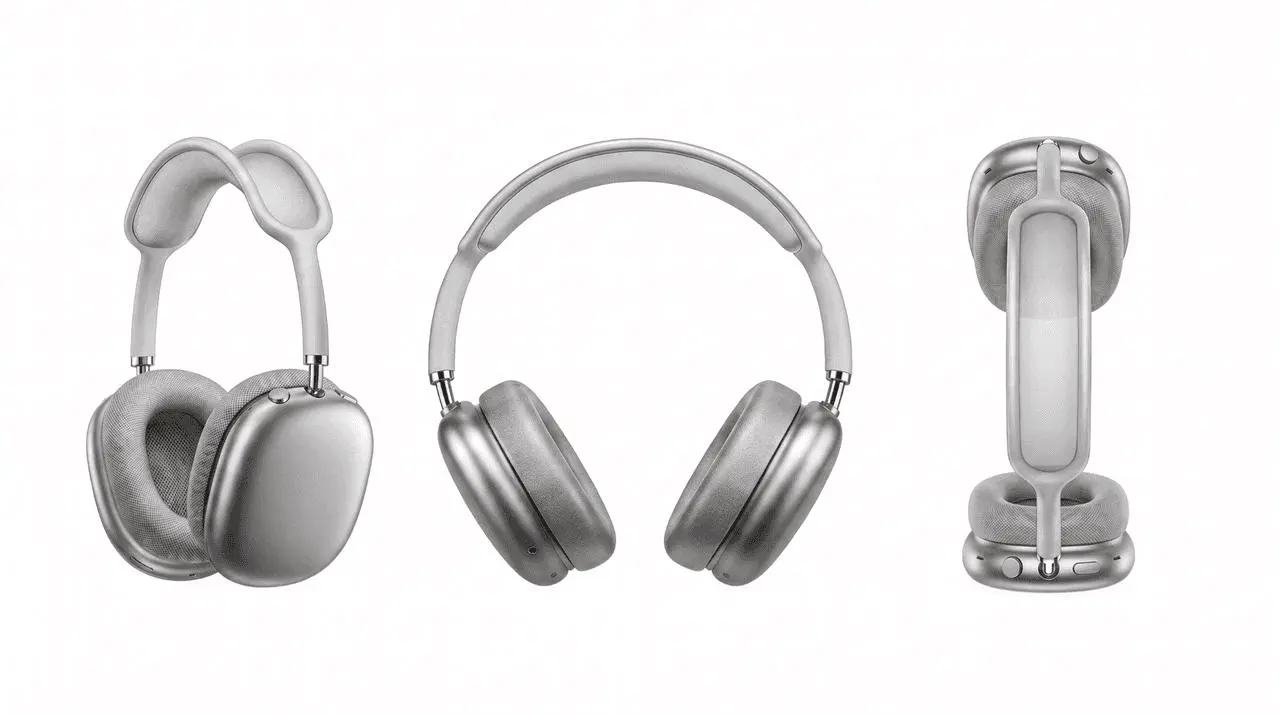
Use a clear product reference to anchor the headphone shape, material, color, and major design details.
Reference Video: Define How the Product Should Be Shot
The complete video reference has a different job.
Use it to guide:
- Camera movement
- Editing rhythm
- Shot progression
- Transition style
- Close-up-to-wide-shot timing
A simple way to think about the workflow is:
The product image defines the subject. The reference video defines the visual grammar.
Build the Workflow in Seedance 2.5
Open Seedance 2.5 in WeShop:
https://www.weshop.ai/apps/seedance-2.5
Seedance 2.5 supports multimodal references across images and videos, allowing different assets to guide the subject, movement, scene direction, and broader creative structure of a generated video.
Step 1: Start a New Seedance 2.5 Video Task
Open the Seedance 2.5 tool and create a new video generation task.
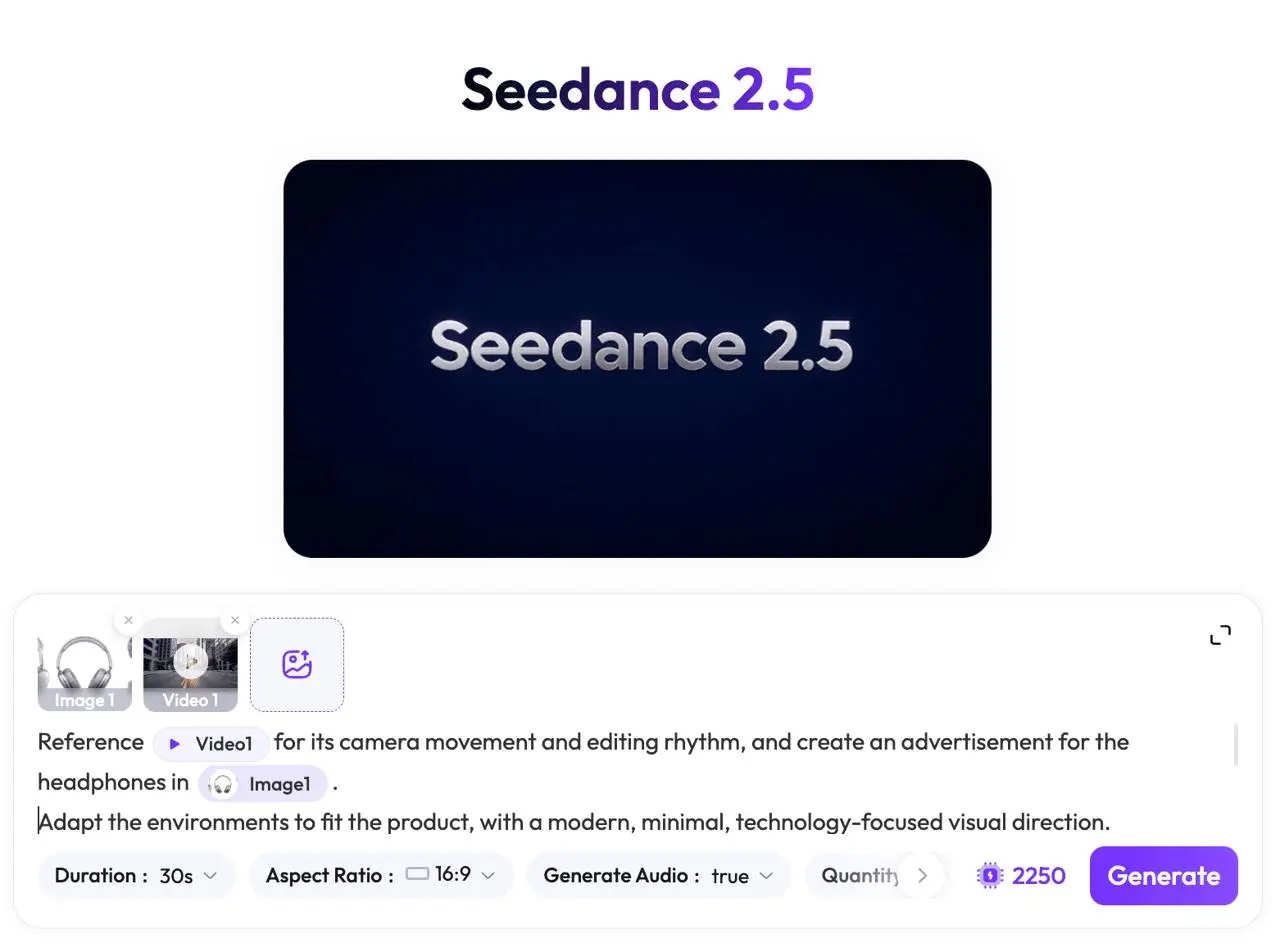
Add the product image, complete reference video, and prompt in the same Seedance 2.5 workflow.
Step 2: Upload the Headphone Product Image
Add the headphone image as the product reference.
The purpose of this reference is simple: the generated ad should feature this product instead of the original featured subject.
If you have more clean product views, you can add them as additional references to give the model more information about the product from different angles.
For this example, the supplied multi-angle image provides the main product reference.
Step 3: Upload the Complete Viral Reference Video
Next, upload the complete reference commercial.
Do not crop it into individual screenshots or extract isolated keyframes for this workflow.
The model needs the video itself because the information you want to reuse is dynamic:
- How the camera moves
- How long each shot lasts
- When the edit changes scale
- How transitions connect shots
- How the pacing develops through the complete sequence
The goal is not to reproduce the exact cast or locations.
The goal is to reuse the directing pattern that makes the original video work.
Step 4: Write a Prompt That Separates What Stays From What Changes
Avoid a vague prompt such as:
Make a headphone ad like this video.
That does not clearly tell the model what to preserve.
Instead, tell Seedance 2.5 which input should control which part of the result.
Use this prompt as a starting point:
Reference @Video1 for its camera movement and editing rhythm, and create an advertisement for the headphones in @Image1.

Adapt the environments to fit the product, with a modern, minimal, technology-focused visual direction.

Keep the timing of the transitions between product close-ups and wide environmental shots aligned with the reference video. Follow a similar movement speed and transition style.

Replace the original featured subject with the silver over-ear headphones. Emphasize the metallic finish, ear cushion details, product silhouette, and premium wearing experience.

Use settings such as a modern city, a minimal interior lifestyle space, and an open outdoor environment where appropriate, while keeping the overall visual direction clean, restrained, and technology-focused.

Keep the headphone appearance consistent across shots. Preserve its silver color, overall structure, silhouette, and key product details.
This prompt separates the task into three layers.
What the Reference Video Controls
- Camera movement
- Editing rhythm
- Transitions
- Shot progression
What the Product Image Controls
- Product identity
- Product color
- Shape
- Structural details
What the Prompt Controls
- New environments
- Overall creative direction
- Product emphasis
- Which elements should stay consistent
Four Things to Control When Recreating a Viral Video
Using the same reference video and product image can still produce very different results.
These four variables usually have the biggest impact.
1. Recreate the Camera Language, Not Every Object
The reference is useful because of its directing structure.
If the prompt is too broad, the model may carry unnecessary people, props, or scene elements into the new video.
State clearly that the complete video is being referenced for:
- Camera movement
- Editing rhythm
- Shot timing
- Transitions
The headphones should become the new visual focus.
2. Keep the New Environments Product-Relevant
The silver headphones have a clean, premium, technology-oriented visual identity.
Suitable environments could include:
- Modern city spaces
- Minimal interiors
- Clean lifestyle scenes
- Open environments with simple compositions
The environment should support the product, not compete with it.
3. Preserve the Close-Up and Wide-Shot Rhythm
A successful recreation is not just a collection of attractive headphone shots.
The important part is how the complete video changes scale over time.
For example:
wide opening → closer product moment → lifestyle scene → larger environmental shot
This structure can make the result feel much closer to the reference even when the actual environments are different.
4. Keep the Motion Speed and Transition Style Consistent
One of the most important instructions in the original prompt is to preserve a similar movement speed and transition style.
Without that direction, the model may generate visually appealing individual shots while losing the kinetic rhythm of the reference.
That is often the difference between a video that simply looks good and one that genuinely carries over the structure of the viral reference.
Review the Generated Version Against the Full Reference
Once the first generation is ready, do not judge it only by asking whether it looks polished.
Play the complete reference video and generated video and compare how both sequences develop from beginning to end.
You can try it directly using the tool on the right.
1. Does the Opening Create Similar Momentum?
Compare the first few seconds of both videos.
Check whether the generated version also establishes an environment and sense of movement before focusing heavily on the product.
If it begins as a static catalog-style product shot, an important part of the reference structure may have been lost.
2. Does the Headphone Stay Consistent?
Compare the product across the entire generated sequence.
Check:
- Silver color
- Headband shape
- Ear cushion form
- Overall silhouette
- Major design details
If those change noticeably, strengthen the product-preservation language or provide additional clean product references.
3. Does the Generated Video Change Scale Like the Reference?
Watch both complete videos and compare the timing of:
- Wide scenes
- Closer subject or product moments
- Lifestyle shots
- Larger environmental payoffs
The new video does not need to duplicate every original shot.
It should reproduce the same kind of visual rhythm.
4. Do the Transitions Carry Similar Energy?
Look at how both videos move from one scene into the next.
Ask:
- Is the camera still moving around the cut?
- Does the next shot continue that momentum?
- Do transitions feel connected?
- Does the pacing accelerate or slow in similar places?
This is much easier to judge from two complete videos than from isolated frames.
5. Does the Product Stay More Important Than the Background?
A product ad can still contain visually rich scenes, but the environment should never become the main subject.
If the generated locations are more memorable than the headphones, simplify the scene direction and strengthen the product emphasis.
Before publishing commercial content, also confirm that you have appropriate rights to use the uploaded product images, reference video, audio, logos, and other campaign assets.
Refine the Result One Problem at a Time
If the first version is close, do not immediately rewrite the entire prompt.
Identify what failed and strengthen only that variable.
If the Product Looks Right but the Viral Editing Rhythm Is Missing
Make the structure more explicit:
Follow the overall shot progression and pacing of @Video1.

Begin with a wide environmental establishing shot.

Move into a closer product-focused shot.

Transition into a lifestyle environment.

Later expand into a wider visual scene.

Keep the same general movement speed, shot-change timing, and transition rhythm as @Video1.
This gives the model a clearer interpretation of the full reference sequence.
If the Rhythm Works but the Headphones Change Between Shots
Strengthen the product constraints:
Keep the same silver headphone design across every shot.

Preserve the headband shape, earcup structure, cushion form, metallic finish, and overall silhouette.

Do not redesign or recolor the product between scenes.
You can also provide additional clean product images if available.
If the Video Looks Cinematic but Does Not Feel Like a Product Ad
Reduce broad style language and return to a focused commercial direction:
Modern.
Minimal.
Premium.
Technology-focused.
Product-first.
The scenes should frame the headphones rather than become the main attraction.
Recreate the Viral Structure, Then Make It Yours
The most valuable part of a viral product video is often not the exact location, actor, or prop.
It is the invisible structure underneath:
- The opening movement
- The first product close-up
- The timing of each cut
- The shift from product detail to lifestyle context
- The wider payoff
- The transitions that keep the viewer moving forward
That structure only becomes clear when you look at the complete video, not individual frames.
Seedance 2.5 lets you use that full reference video as the visual grammar while using your own product image to establish a new subject.
The result should not be a frame-by-frame copy. The better goal is to transfer the camera movement, editing rhythm, transitions, and shot progression that made the original work, then rebuild the creative around your own product.
Once the structure works, you can reuse the same workflow for another product by changing the product reference and adapting the environments while keeping the proven visual rhythm.