












Seedance 2.5 Product Ad: Turn One Sofa Image Into a 30-Second Home Commercial
Learn how to turn one sofa reference image into a 30-second AI furniture commercial, combining studio product shots with a warm family lifestyle scene.
For the first 15 seconds, the sofa stands alone in a seamless white studio. The camera slowly pushes in, moves across the front, shifts toward the side, and gives the viewer time to understand the shape, proportions, and modular construction.
Then the room changes.
Warm evening light fills a living room. A woman sits on the same sofa reading, a cat jumps up beside her, and a child comes in and rests against her shoulder. By the final frame, the product is no longer just furniture on display—it has become the center of a quiet family moment.
This tutorial shows how to structure that transformation as one 30-second Seedance 2.5 product ad, using a single sofa image as the main visual reference.
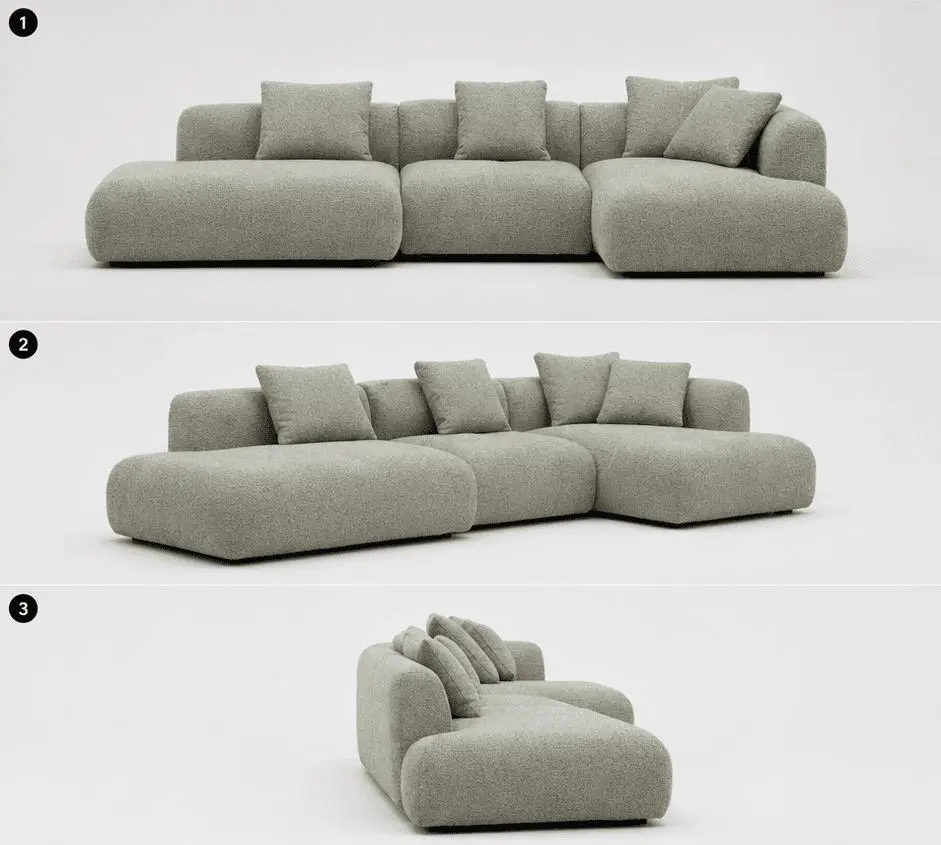
The sofa reference used to guide the product shape, proportions, color, and overall visual identity.
Structure the 30-Second Seedance 2.5 Product Ad as Two Clear Jobs
Instead of asking the model to create a vague “warm furniture commercial,” divide the video into two distinct sections:
| Time | Visual job | Main focus |
|---|---|---|
| 0–15 seconds | Clean studio product presentation | Shape, silhouette, modular structure, proportions |
| 15–30 seconds | Warm lifestyle scene | Comfort, family atmosphere, emotional context |
The first half answers:
What does the product look like?
The second half answers:
What does life around this product feel like?
This division gives the prompt a clear timeline and prevents the lifestyle story from overwhelming the product itself.
WeShop positions Seedance 2.5 for native 30-second single-segment generation, which makes this type of longer product narrative especially suitable for one continuous prompt rather than several disconnected clips.
Step 1: Start With One Clear Sofa Reference Image
The reference image in this example shows a light sage-gray modular sectional sofa with several visible characteristics:
- a low, rounded silhouette;
- large modular seat sections;
- wide armrests;
- an extended chaise section;
- multiple matching cushions;
- a soft, textured upholstery appearance.
These visible details should remain the visual anchor for the generated video.
The goal is not to redesign the sofa through text.
Instead, let the image define the product while the prompt defines:
- camera movement;
- studio setup;
- lighting;
- environment;
- character actions;
- pacing;
- final framing.
This keeps the written instructions focused on what needs to happen around the product.
Step 2: Use the First 15 Seconds for Product Presentation
The opening section should behave like a controlled furniture campaign shoot.
Use a seamless white studio with soft, even lighting and minimal visual distraction.
The camera sequence can be described in four movements:
- slowly push toward the sofa;
- move horizontally across the front;
- shift laterally toward the side;
- pull back and finish on a full product view.
These movements are intentionally restrained.
The purpose is not to create a fast-paced montage. It is to give the viewer enough time to read the sofa's volume, depth, modular layout, and rounded silhouette.
It also helps to include explicit exclusions.
For this example:
No sweeping light effects. No white flashes.
Those instructions reinforce the calm visual direction and reduce the chance of the sequence becoming overly stylized.
Step 3: Use the Final 15 Seconds for Lifestyle Storytelling
At the halfway point, move from the white studio into a warm living room at dusk.
Now the product remains important, but the visual task changes.
A woman wearing an off-white knitted lounge outfit sits on the sofa reading. An off-white throw rests across her legs. She gently puts down a coffee cup.
Then:
- a cat jumps onto the sofa;
- a child runs into the room;
- the child leans against her shoulder;
- she looks down and smiles;
- a floor lamp turns on as the room grows darker;
- the family settles quietly together.
These are small actions, but together they turn the sofa from an isolated object into a lived-in space.
The restrained palette also matters.
Off-white clothing, a neutral throw, warm lighting, and the muted green-gray sofa stay visually close to one another, helping the product remain the dominant element in the scene.
Step 4: Write the Full 30-Second Prompt
Use a time-ordered prompt instead of mixing every visual instruction into one paragraph.
Here is the complete prompt for this example:
Create a 30-second vertical home furniture advertisement. The main product is a light sage-gray modular sectional sofa.

For the first 15 seconds, show the sofa in a seamless white studio. Present the full sofa clearly. The camera slowly pushes in, moves horizontally across the front, then shifts laterally toward the side to show its silhouette and form. Finish by pulling back to a complete wide product view. Use soft, even studio lighting and a clean pure-white background. No sweeping light effects and no white flashes.

For the final 15 seconds, transition into a warmly lit living room at dusk. A woman wearing an off-white knitted lounge outfit sits on the sofa reading, with an off-white throw across her legs. She gently puts down a coffee cup. A cat jumps onto the sofa. A child runs into the room and leans against her shoulder, and the woman looks down and smiles.

As evening becomes night, a floor lamp turns on. The family settles quietly together on the sofa. Slowly pull the camera back for the final frame and leave clean negative space for the brand logo.

Keep the overall visual style restrained, warm, clean, realistic, and natural.
The important part is the structure:
Video format
↓
Main product
↓
0–15 second studio sequence
↓
Camera movement
↓
Lighting and negative constraints
↓
15–30 second lifestyle sequence
↓
Character actions
↓
Final camera move
↓
Brand space
↓
Overall visual style
For longer AI video prompts, this chronological structure makes it easier to control what happens and when.
Step 5: Generate the Video in WeShop Seedance 2.5
Open WeShop Seedance 2.5.
Seedance 2.5 is designed for native 30-second single-segment video generation and supports reference-driven workflows, making it suitable for a prompt that moves from a product studio setup into a lifestyle scene without manually stitching several short clips together.
Use the shortest workflow:
- upload the sofa reference image;
- choose a vertical output format;
- set the generation length to 30 seconds when the option is available;
- paste the complete prompt;
- generate the video.
After generation, review the result in this order.
Check Product Consistency
Look first at the sofa rather than the people.
Compare:
- armrest shape;
- seat proportions;
- chaise placement;
- cushion layout;
- overall modular structure.
The generated product does not need to reproduce every pixel of the reference, but it should remain recognizably consistent throughout the ad.
Check the Midpoint Transition
Around the middle of the video, the visual language should clearly move from:
white studio → warm living room
If those environments begin blending too early, strengthen the time boundary in the prompt.
Check the Visual Hierarchy
People, pets, and lifestyle actions should support the sofa rather than replace it as the visual subject.
The family scene should still read as a furniture advertisement.
Step 6: Review the Final 30-Second Product Ad
A successful result should have a simple narrative arc:
product presentation → lifestyle transformation → brand-ready ending
The final shot deserves special attention.
Instead of ending with a generic “warm family moment,” the prompt explicitly asks for:
Slowly pull the camera back for the final frame and leave clean negative space for the brand logo.
That gives the generated clip a deliberate commercial ending and creates room for a logo, slogan, campaign line, or other brand treatment in post-production.
You can try it directly using the tool on the right.
Turn a Static Product Image Into a Brand Moment
The most important change in this 30-second sequence is not simply the transition from a white studio to a warm living room.
It is the shift in meaning.
At the beginning, the viewer sees the sofa as a product. By the end, the same sofa has become a place where a family reads, rests, and spends time together.
That is what makes the longer format useful: it gives the product enough time to move from appearance to experience within one coherent piece of creative.
Create your own 30-second product video with WeShop Seedance 2.5