












How to Create Identity-Consistent AI Character 360° Views with Nano Banana 2.1
Learn how to create consistent front, side, and back AI character views with Nano Banana 2.1 using identity locks, reference images, and multi-turn editing.
How to Create Identity-Consistent AI Character 360° Views with Nano Banana 2.1
A character looking correct from the front does not mean the same identity will survive a change in camera angle.
When the viewpoint changes, the model may alter the face shape, remove the glasses, change the hair length, or redesign clothing details. For AI comic dramas, storyboards, games, and character development, these inconsistencies can affect every scene that follows.
Nano Banana 2.1 supports reference-image generation and multi-turn image editing. By preparing a clear identity reference and defining exactly which attributes must not change, you can gradually create front, side, and back views of the same character.
Character Consistency Example
| Original Character | Right-Side Profile | Front View |
|---|---|---|
 | 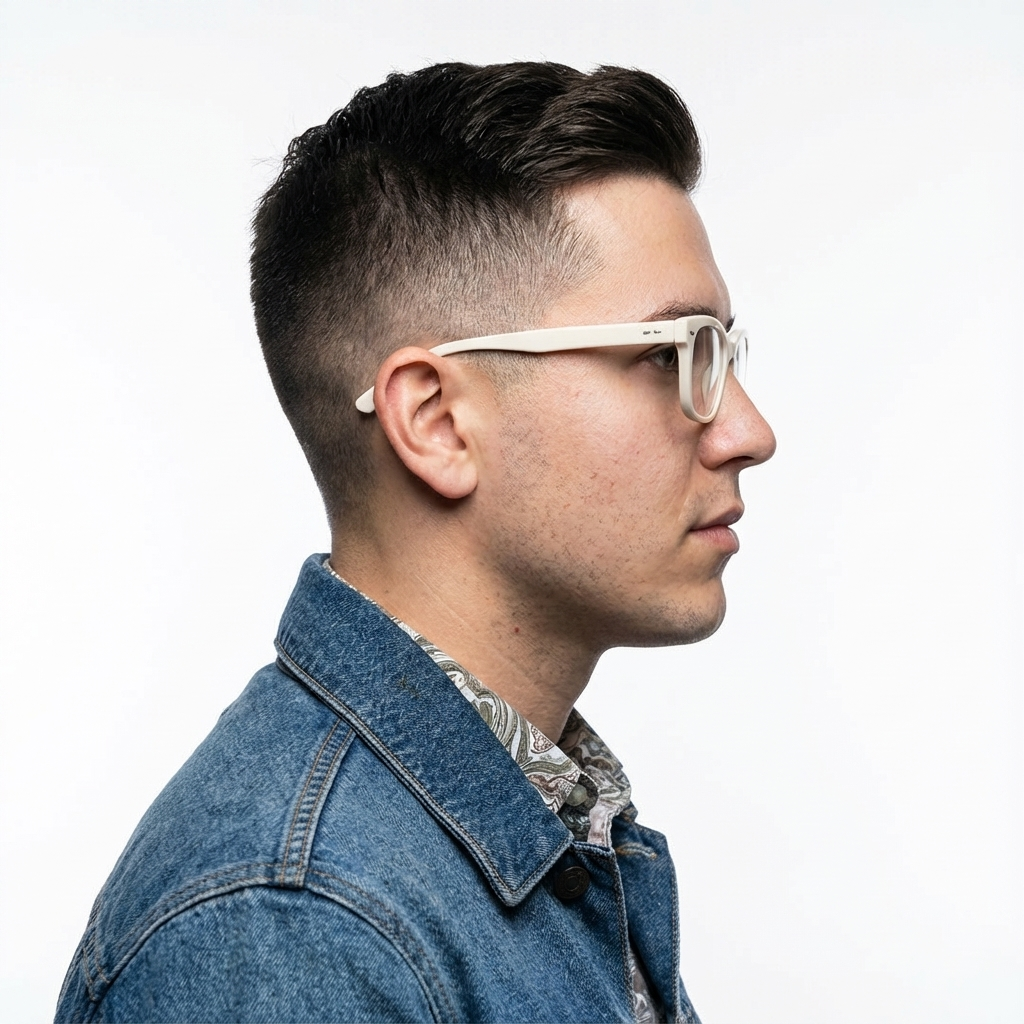 |  |
| Original identity reference | Side view retaining the glasses, hair, clothing, and facial identity | Front view of the same character |
The goal is not to generate three people who look similar. Every image should represent the same character, with only the requested camera angle changing.
What Will This Workflow Create?
This workflow can produce a basic character-reference set containing:
- One primary identity reference
- One front view
- One side view
- One optional back view
- Controlled expressions or poses
- A reusable identity-lock instruction
For an AI comic drama, these images can become reference assets for generating the character in later scenes.
What Do You Need?
Before starting, prepare:
- One clear image of an adult character
- A Gemini API key
- The Google GenAI SDK
- A description of the character’s permanent attributes
- The angle or pose you want to generate
- Pose references for complex actions
- A checklist for identity, clothing, and anatomy
A suitable reference image should have:
- A clearly visible face
- Sufficient image resolution
- Clear or neutral lighting
- No severe facial obstruction
- A recognizable hairstyle and outfit
- A pose that does not conceal important identity features
Step 1: Create a Character Identity Lock
Before generating additional angles, list every attribute that must not change.
| Identity Area | Details to Lock |
|---|---|
| Face | Face shape, eyes, nose, lips, jawline, and skin tone |
| Hair | Color, style, length, parting, texture, and volume |
| Accessories | Glasses, earrings, hair accessories, and other identifiers |
| Clothing | Type, color, fabric, silhouette, and construction |
| Body | Perceived height, shoulder width, build, and proportions |
| Image style | Photography or illustration style, lighting, background, and color treatment |
Convert those details into a preservation instruction:
Preserve the exact same facial identity, facial structure, eye shape,
nose, lips, jawline, skin tone, hairstyle, hair length, white glasses,
clothing, body proportions, lighting, background, and photographic style.
Do not rely only on the phrase “same person.” Listing the attributes individually gives the model clearer boundaries.
Step 2: Input the Original Character Image
The following Python structure sends one image and one editing instruction to Nano Banana 2.1:
from google import genai
import base64

client = genai.Client()

with open("character_reference.png", "rb") as image_file:
    image_bytes = image_file.read()

interaction = client.interactions.create(
    model="gemini-nano-banana-2.1",
    input=[
        {
            "type": "text",
            "text": """
            Create a right-side profile view of the same exact adult man.

            Preserve his facial identity, facial structure, white glasses,
            hairstyle, skin tone, clothing, body proportions, photographic
            style, background, and lighting.

            Only change the camera angle. Do not redesign, replace,
            beautify, or reinterpret the person.
            """
        },
        {
            "type": "image",
            "data": base64.b64encode(image_bytes).decode("utf-8"),
            "mime_type": "image/png"
        }
    ],
    response_format={
        "type": "image",
        "aspect_ratio": "1:1",
        "image_size": "1K",
    },
)

with open("character_right_profile.png", "wb") as output_file:
    output_file.write(
        base64.b64decode(interaction.output_image.data)
    )
This request contains only one controlled change:
Front or three-quarter identity reference → right-side profile
Everything else is explicitly preserved.
Step 3: Generate the Front View
Use the original reference again and change only the requested angle:
Create a straight-on front view of the same exact adult man.

He must look directly toward the camera with a neutral expression.

Preserve the exact same facial identity, facial structure, white glasses,
hairstyle, skin tone, clothing, body proportions, photographic style,
background, and lighting.

Only change the viewing angle. Do not redesign, beautify, or replace
any identity or clothing detail.
Even if the original image is already close to a front view, inspect the new result carefully. A small angle change can still alter the jawline, eye spacing, hairline, or glasses.
Step 4: Generate the Back View
A back view contains less facial information, making hairstyle and clothing construction more important.
Use a prompt such as:
Create a complete back view of the same exact adult man.

The camera is directly behind him. Preserve the exact hairstyle,
hair length, hair texture, head shape, ears, white glasses as visible
from behind, clothing design, garment color, fabric, collar, seams,
body proportions, background, lighting, and photographic style.

Do not show a different outfit. Do not redesign the hairstyle.
Only change the camera angle to a direct back view.
If the source image does not show the back of the clothing or hairstyle, the generated result cannot be described as an exact reconstruction. It should instead be treated as the model’s interpretation of details that were not visible in the original.
Step 5: Reuse Approved Views as References
Google recommends including previously generated images in later prompts to improve continuity.
When generating the back view, for example, you can provide:
- The original identity reference
- The approved front view
- The approved side view
- An optional pose reference
from google import genai
import base64

client = genai.Client()

def encode_image(path):
    with open(path, "rb") as image_file:
        return base64.b64encode(
            image_file.read()
        ).decode("utf-8")

interaction = client.interactions.create(
    model="gemini-nano-banana-2.1",
    input=[
        {
            "type": "text",
            "text": """
            Using all supplied images as references for one single
            adult character, create a direct back view.

            Preserve the same identity, head shape, hairstyle,
            white glasses, clothing, body proportions, background,
            lighting, and photographic style.

            The references show different views of the same person.
            Do not combine them into multiple people.
            """
        },
        {
            "type": "image",
            "data": encode_image("character_original.png"),
            "mime_type": "image/png"
        },
        {
            "type": "image",
            "data": encode_image("character_front.png"),
            "mime_type": "image/png"
        },
        {
            "type": "image",
            "data": encode_image("character_right_profile.png"),
            "mime_type": "image/png"
        }
    ],
    generation_config={
        "thinking_level": "high"
    },
    response_format={
        "type": "image",
        "aspect_ratio": "1:1",
        "image_size": "2K",
    },
)

with open("character_back.png", "wb") as output_file:
    output_file.write(
        base64.b64decode(interaction.output_image.data)
    )
Step 6: Use Multiple Character References Carefully
Nano Banana 2.1 supports up to four character images for maintaining character similarity within one workflow.
It also supports up to ten object reference images, for a total of up to fourteen reference images.
If an AI comic drama contains several recurring characters:
- Give each character a clearly defined reference position
- Name each character in the prompt
- Describe every character’s permanent attributes separately
- Specify where each character should appear in the composition
- Avoid vague phrases such as “another person”
- Inspect each person’s face, hair, clothing, and body proportions separately
Example:
Create one cinematic scene featuring the three supplied adult characters.

Character A is the woman from reference image 1.
Character B is the man from reference image 2.
Character C is the woman from reference image 3.

Preserve each character's exact facial identity, hairstyle, skin tone,
clothing, and body proportions. Do not exchange facial features,
hairstyles, outfits, or accessories between the characters.

Character A stands on the left, Character B stands in the center,
and Character C stands on the right.
The documented maximum is not a guarantee of stable results. Run repeated tests before using the workflow for a long sequence of connected scenes.
Step 7: Continue with Multi-Turn Editing
Once a result has been accepted, use previous_interaction_id to make a controlled modification instead of regenerating everything from the beginning.
refined_result = client.interactions.create(
    model="gemini-nano-banana-2.1",
    input="""
    Keep the same exact person, face, hairstyle, white glasses,
    clothing, proportions, background, lighting, and camera angle.

    Only change the expression from neutral to slightly concerned.
    Do not change any other element.
    """,
    previous_interaction_id=interaction.id,
    response_format={
        "type": "image",
        "aspect_ratio": "1:1",
        "image_size": "2K",
    },
)
The editing instruction should state separately:
- What needs to change
- What must remain unchanged
For example:
Only change the facial expression.
Keep the identity, pose, outfit, camera, lighting, and background unchanged.
Step 8: Assemble a Four-View Character Sheet
After generating and approving the individual views, combine them into one character reference sheet.
Recommended order:
- Head-and-shoulders close-up
- Full-body front view
- Full-body side view
- Full-body back view
Prompt template:
Create a clean four-view character reference sheet using the supplied
approved images of the same adult character.

Arrange the views from left to right:
1. Head-and-shoulders close-up
2. Full-body front view
3. Full-body right-side profile
4. Full-body back view

Preserve the exact identity, facial structure, hairstyle, accessories,
clothing, body proportions, and photographic style shown in the references.

Use a seamless neutral background. Keep every view separate and evenly
spaced. Show each full-body figure completely from head to feet.
Do not overlap, crop, redesign, or beautify the character.
Generating each view separately before assembling the final sheet allows you to reject incorrect views before they enter the final character board.
Step 9: Check Character Consistency
| Check | Details That Must Remain Consistent |
|---|---|
| Facial structure | Face shape, jawline, nose, lips, eyes, and spacing |
| Hair | Color, length, parting, texture, and volume |
| Accessories | Shape, color, size, and position |
| Clothing | Design, color, neckline, sleeves, stitching, and fabric |
| Body | Perceived height, build, shoulder width, and limb proportions |
| Photography | Camera style, background, lighting, and color treatment |
| Anatomy | Hands, ears, feet, joints, and side-profile structure |
| Angle accuracy | Clear distinction between front, side, and back views |
An image can look attractive and still be unsuitable as a character reference. For a character sheet, identity consistency is more important than the visual appeal of one isolated image.
Common Problems
The Side View Looks Like a Different Person
Strengthen the facial identity lock:
Preserve the exact face shape, eye position, nose bridge, nose tip,
lip shape, jawline, chin, skin tone, and hairline.
Supply both the original identity reference and the approved front view.
The Shape of the Glasses Changes
Describe the glasses explicitly:
Preserve the same white rectangular glasses, including the frame
thickness, lens size, bridge, temples, and exact position on the face.
The Hairstyle Changes in the Back View
Lock the following details:
- Hair length
- Parting
- Texture
- Volume
- Hairline
- Hair silhouette around the back of the head
If the reference does not show the back, acknowledge that the model is interpreting an unseen area.
Clothing Changes Between Angles
Do not describe only the garment color. Lock its construction:
Preserve the exact jacket silhouette, collar width, lapels, buttons,
pocket placement, sleeve length, fabric texture, and black color.
Multiple Characters Exchange Facial Features or Clothing
Name every character, assign each person a fixed position, and explicitly prohibit exchanging faces, hairstyles, outfits, and accessories.
Practical Limitations
- Consistency may still vary between separate generations
- One successful result does not prove that the workflow is reliably repeatable
- Unseen clothing and hair details may be interpreted by the model
- Complex poses work better with a dedicated pose reference
- More characters create more details that must be checked
- The model may still alter areas that were supposed to remain unchanged
- All generated images include SynthID
- Production use requires repeated testing and human review
Final Result
A more reliable character-development workflow moves forward gradually:
Select one identity reference
→ Lock the permanent visual attributes
→ Generate one controlled angle
→ Inspect and approve the result
→ Reuse approved results as references
→ Generate the next angle
→ Combine approved views into a character sheet
For an AI comic drama, this reference set provides a more stable visual foundation than regenerating the character from text alone in every scene.
Start with one character and two controlled angles. Expand the set only after the identity, hairstyle, clothing, and proportions remain reasonably stable.