












GPT Image 2 Tutorial: Create a Realistic F1 AI Portrait from One Selfie
Learn how to use WeShop AI's GPT Image Generator to create hyper-realistic F1 pit garage live-broadcast screenshots, with a complete prompt you can copy and refine.
GPT Image 2 can transform an ordinary selfie into a professional motorsport portrait that looks like a frame captured from a live Formula 1 broadcast. Instead of posing against a simple studio background, you can appear inside a busy racing garage wearing a McLaren-inspired team uniform, surrounded by engineers, race equipment, data screens, and broadcast graphics.
This workflow is useful for automotive professionals, motorsport creators, photographers, social media teams, racing fans, and creative marketers who need a more distinctive visual identity. The finished image can be used for an Instagram post, LinkedIn banner, creator profile, event poster, campaign concept, editorial feature, or automotive presentation.
Producing a real photograph inside an F1 garage would normally require restricted paddock access, a professional photography team, specialist equipment, a team uniform, and an active racing environment. With GPT Image 2 on WeShop AI, the same visual concept can be created from one clear portrait and a detailed prompt.
In this tutorial, we will use a front-facing portrait as the identity reference and turn it into a realistic McLaren-style garage scene.
Case assets
- Input: One clear front-facing portrait
- Output: A realistic F1 garage broadcast-style portrait
- Primary tool: WeShop AI GPT Image 2
- Recommended format:
9:16for vertical social content or16:9for a television screenshot effect
Original portrait
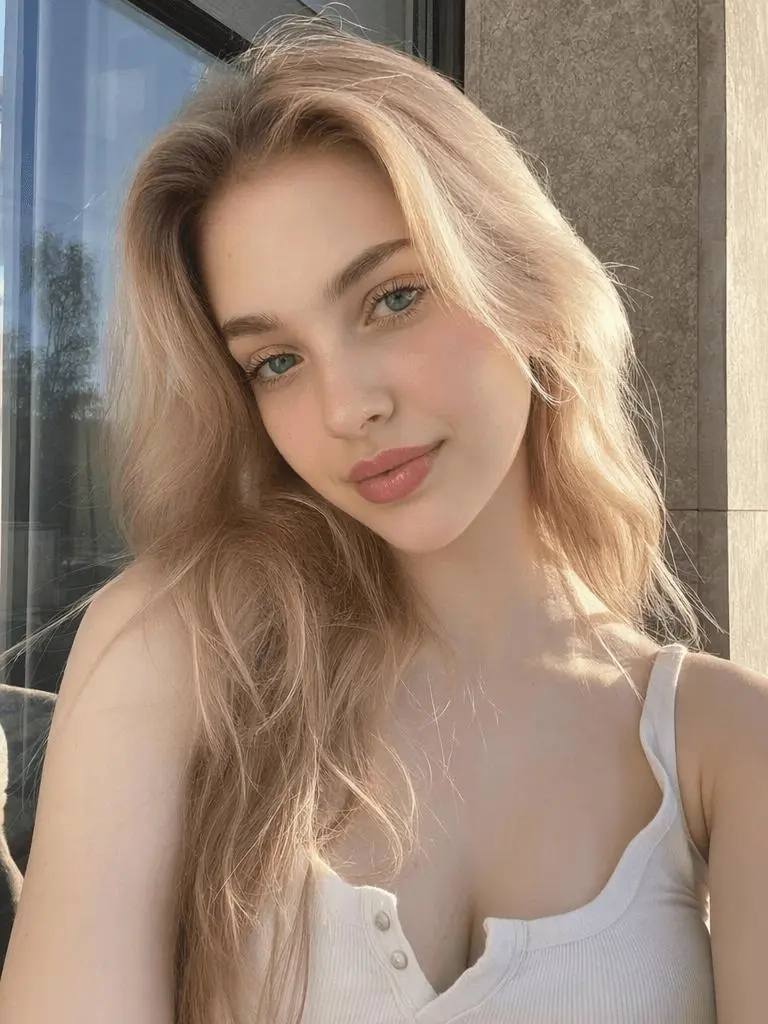
|
GPT Image 2 result
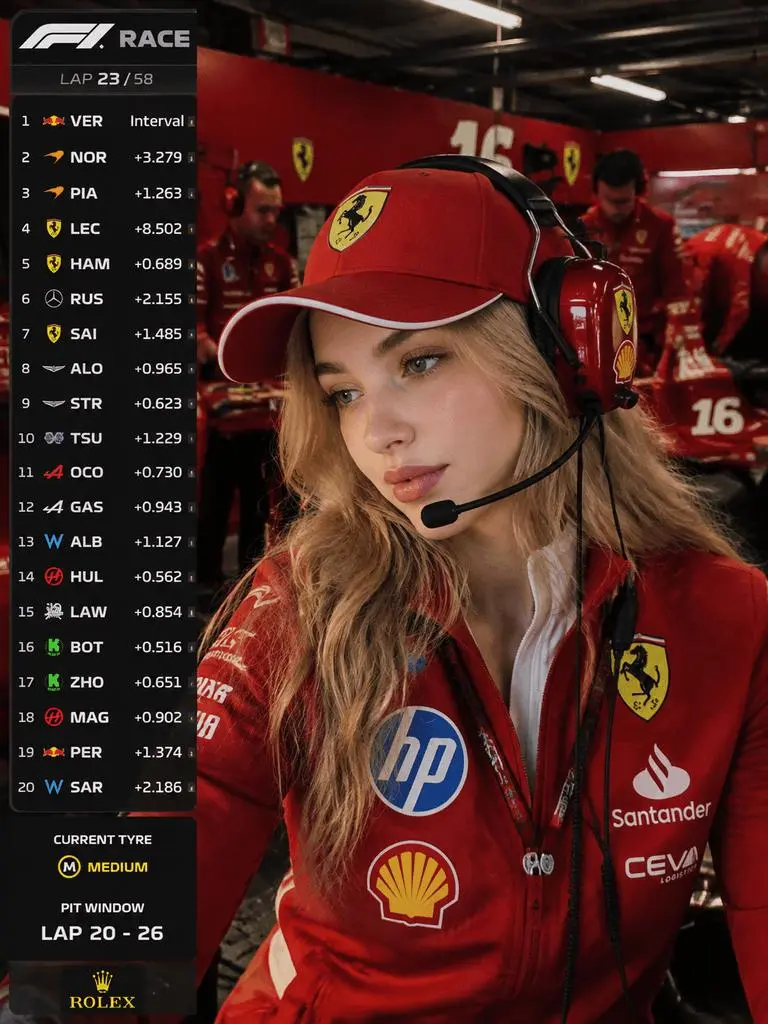
|
Why Use GPT Image 2 for an F1 AI Portrait?
A standard AI headshot usually combines formal clothing, flattering light, and a simple studio or office background. An F1 portrait requires a much more complex composition.
The model must preserve the subject’s identity while generating:
- A believable motorsport uniform
- A professional communication headset
- Several background mechanics
- Race equipment and vehicle components
- Industrial garage lighting
- Data monitors and broadcast graphics
- Realistic depth, reflections, and motion
This makes the concept a useful test of GPT Image 2 because the image needs more than an attractive subject. The person, clothing, environment, lighting, and graphic interface must all feel like parts of the same photograph.
The finished visual can support several commercial and creative use cases:
- Automotive company team profiles
- Motorsport event promotions
- Racing-themed creator content
- Sports marketing concepts
- Personal branding for automotive professionals
- Instagram and TikTok campaign visuals
- Editorial articles about racing culture
- Presentation covers and campaign mood boards
The objective is not simply to place a racing jacket over an existing portrait. A successful result should make the person look naturally present inside a working Formula 1 garage.
What You Need Before Using GPT Image 2
Treat the uploaded portrait as an identity reference rather than the final composition. The model will use it to preserve recognizable facial features while changing the clothing, environment, lighting, pose, camera treatment, and surrounding activity.
| Asset or setting | Recommendation |
|---|---|
| Portrait reference | Clear front-facing or slightly angled photograph |
| Minimum image size | At least 500 × 500 px |
| Facial visibility | No sunglasses, masks, hands, or heavy hair obstruction |
| Lighting | Soft, even light across the face |
| Expression | Neutral, focused, or slightly serious |
| Optional second reference | Motorsport uniform or F1 garage image |
| Output ratio | 9:16, 4:5, or 16:9 |
Avoid heavily filtered selfies. Strong beauty filters may remove skin texture or alter the proportions of the eyes, nose, lips, and jaw. These changes make identity preservation more difficult.
A front-facing smartphone portrait taken near a window usually provides a better input than a dark nightlife photograph, a low-resolution screenshot, or an image with aggressive skin smoothing.
How to Use GPT Image 2 to Create an F1 Portrait
Step 1: Upload a Clear Identity Reference
Open the WeShop AI GPT Image 2 generator and upload the original portrait shown in this case, or replace it with your own photograph.
Choose an image where:
- The entire face is visible.
- The eyes are open and clearly defined.
- The skin retains natural texture.
- The face occupies a meaningful area of the image.
- The direction of the original light is easy to understand.
Use one portrait as the primary identity reference. Uploading several photographs with very different makeup, angles, hairstyles, or lighting can introduce conflicting facial information.
Step 2: Choose the Output Format
Select an aspect ratio based on the final publishing channel.
| Platform or use | Recommended ratio |
|---|---|
| Instagram Story | 9:16 |
| TikTok cover | 9:16 |
| Instagram feed | 4:5 |
| LinkedIn post | 4:5 or 1:1 |
| Website hero image | 16:9 |
| Television broadcast effect | 16:9 |
Use 16:9 when the goal is to imitate a paused television broadcast. Choose 9:16 when the portrait will be published as a Story, Reel cover, or TikTok visual.
Step 3: Enter the GPT Image 2 Prompt
The prompt should describe more than the subject’s clothing. It should control the identity, environment, staff activity, camera, lighting, graphic overlay, and unwanted artifacts.
Create an ultra-realistic Formula racing garage portrait using the uploaded portrait as the strict facial identity reference.

The subject is a young East Asian woman standing inside a busy McLaren-inspired racing garage during a qualifying session. Preserve her original face shape, eye distance, eye shape, nose structure, lips, jawline, cheek volume, skin tone, natural facial asymmetry, and recognizable identity. Do not beautify or transform her into a different person.

She wears a professional papaya-orange and black motorsport team uniform made from structured technical fabric. Include realistic seams, collar panels, fabric folds, team-inspired patches, and professional communication equipment. Add a racing headset with the microphone positioned naturally near her mouth.

Use a half-body medium close-up at eye level. Position the subject near the center of the frame. She looks calmly toward a race data monitor located beside the camera. Her expression is focused, composed, and professional.

The garage is active and crowded. Include several distinct mechanics and engineers performing different tasks: checking data screens, adjusting racing equipment, communicating through headsets, carrying tires, and working beside partially visible race car components.

Add realistic computer monitors, tire blankets, cables, tools, equipment cases, technical panels, and industrial garage details. Every background person must have a different face, height, hairstyle, body shape, posture, and task. Do not create cloned workers or repeated faces.

Use uneven industrial ceiling lighting, cool white overhead illumination, subtle papaya-orange environmental reflections, realistic headset shadows, television compression texture, fine sensor grain, and restrained motion blur in the background.

Add a clean motorsport broadcast-inspired interface with a driver ranking panel, small race data elements, and a lower information card displaying [YOUR NAME], team name [YOUR TEAM], and car number [YOUR NUMBER].

Keep the subject, uniform, headset, environment, reflections, shadows, camera perspective, and light direction physically consistent.

No illustration, no 3D rendering, no plastic skin, no excessive beauty filter, no obvious cutout effect, no duplicated mechanics, no repeated faces, no deformed headset, no distorted hands, no floating equipment, and no large blocks of unreadable random text.

Aspect ratio: 16:9.
Replace [YOUR NAME], [YOUR TEAM], and [YOUR NUMBER] before generating.
Step 4: Improve Identity Consistency
If the first result does not closely resemble the uploaded subject, add a stricter instruction:
The uploaded portrait is the only facial identity reference. Preserve the exact recognizable person, including facial proportions, eye shape, eye distance, nose width, lip shape, jaw structure, cheek volume, skin tone, and natural facial asymmetry.
Remove any prompt instructions that contradict the person’s real appearance. For example, requesting extremely large eyes, an unusually sharp jawline, or a much narrower nose may reduce identity consistency.
Step 5: Upload a Uniform Reference
GPT Image 2 can generate a racing uniform from a written description, but a second reference image can provide better control over its color blocking, collar design, fabric construction, and patch placement.
Upload the clothing image as the second reference and add:
The uniform design, papaya-orange color, black panels, collar construction, technical fabric, seams, proportions, and patch placement must strictly reference uploaded image 2.
Use a team-inspired uniform for commercial campaigns when exact trademark reproduction is unnecessary. Generated logos, sponsor names, small lettering, and branded graphics should always be reviewed before publication.
Step 6: Generate Several Variations
Do not depend on the first output. Generate several versions and compare them based on:
- Facial resemblance
- Uniform structure
- Headset placement
- Hand anatomy
- Background staff variety
- Lighting consistency
- Garage realism
- Broadcast composition
- Text and information-panel clarity
The second image in this article demonstrates the intended transformation: the original portrait remains recognizable while the environment, clothing, styling, and narrative are replaced.
Keep the strongest image and use it as a new reference when creating more poses or platform-specific variations.
GPT Image 2 Optimization Tips
Prevent Repeated Mechanics
Complex scenes with several background figures may produce repeated workers. Add:
Every mechanic must be a unique individual with a different face, hairstyle, height, body type, posture, and working task. No repeated faces, cloned workers, mirrored people, or duplicated poses.
Reducing the number of people can also improve quality. Three convincing workers often produce a more realistic image than ten poorly defined figures.
Simplify the Broadcast Interface
Although GPT Image 2 supports text-rich visual creation, names, numbers, tiny labels, and dense data panels should still be inspected carefully before commercial use. WeShop presents text rendering, photorealism, reference control, and product-visual workflows as major use cases for its GPT Image 2 generator.
Keep the interface focused on a few recognizable components:
- Driver ranking panel
- Lap or session indicator
- Lower-third driver card
- Small timing elements
- Team-color accents
Do not request several paragraphs of tiny text. Generate the visual structure first, then manually correct any critical names or numbers when exact accuracy is required.
Repair Localized Problems
If the overall image is strong but one hand, cable, headset, or uniform patch is incorrect, avoid regenerating the entire scene immediately.
Use an editing or localized repair workflow to remove or reconstruct the damaged area. A final enhancement pass can also improve edge quality, facial texture, fabric definition, and output resolution.
Match the Subject to the Garage Lighting
The face should not look as though it was photographed separately and pasted into the environment.
Include these lighting directions:
- Cool industrial overhead light
- Uneven illumination across the garage
- Subtle reflections from team-colored walls and clothing
- Realistic shadows produced by the headset
- Controlled background motion
- Moderate broadcast compression
- Natural, unfiltered skin texture
These details help the GPT Image 2 result feel captured in-camera rather than assembled from unrelated elements.
Commercial Uses for GPT Image 2 Motorsport Visuals
Automotive brands can adapt this workflow for employee spotlights, recruitment campaigns, racing partnerships, event promotions, social content, branded editorials, and presentation concepts.
Photographers and creative teams can use the generated image as a pre-production mockup before organizing a real automotive shoot. Social media teams can create several variants using different team colors, staff layouts, driver names, events, camera crops, and platform dimensions.
One finished image can be repurposed into:
- Instagram carousel covers
- TikTok opening frames
- Motorsport event posters
- Creator profile banners
- LinkedIn interest posts
- Automotive campaign mood boards
- Editorial thumbnails
- Racing-themed short videos
The case shown above can also become an image-to-video input. Use restrained movement such as blinking data screens, mechanics walking in the background, subtle breathing, small head movements, and natural broadcast camera vibration.
Avoid excessive character movement. The image should continue to feel like an authentic motorsport broadcast rather than a dramatic action animation.
Create Your First Image with GPT Image 2
You do not need access to a real racing garage to create a convincing motorsport portrait. Start with one clear selfie, define the uniform and environment, control the broadcast composition, and review the result for facial identity, lighting consistency, staff variety, and interface accuracy.
Open the WeShop AI GPT Image 2 generator, upload your portrait, paste the prompt from this guide, and create your first racing-garage visual.
The example in this article begins with a standard front-facing portrait and transforms it into a complete motorsport scene. Follow the same GPT Image 2 workflow with your own face, team colors, name, driver number, and publishing format.