












How to Create an Epic AI Graduation Poster with GPT Image 2
Create a cinematic silhouette double-exposure graduation poster with AI in 5 minutes. This step-by-step guide covers required tools, a copy-paste English prompt, customization tips, and FAQ troubleshooting—no Photoshop skills needed.
Graduation photos do not have to be limited to traditional cap-and-gown portraits. With GPT Image 2, you can transform a simple side-profile photo into an epic graduation poster filled with campus architecture, personal memories, cinematic atmosphere, and watercolor-style storytelling.
This silhouette-fill poster style has become popular on social media because it combines several striking visual techniques: double exposure, cinematic scale, dreamy watercolor textures, negative space, and a recognizable human profile.
The result feels less like a standard graduation photo and more like a collector’s-edition movie poster about your university years.
In this tutorial, you will learn how to create an AI graduation poster with GPT Image 2 using one portrait photo and a reusable English prompt. No Photoshop experience, professional photography studio, or complex design software is required.
WeShop AI provides an online GPT Image 2 workflow for generating and editing images from text and visual references. The model is particularly suited to poster concepts because it supports detailed instructions, reference-image editing, structured layouts, artistic styles, and text-rich visual content.
Graduation Poster Examples Created with GPT Image 2
The examples below demonstrate the type of silhouette-fill graduation poster you can create.
| Graduation poster example 1 | Graduation poster example 2 |
|---|---|
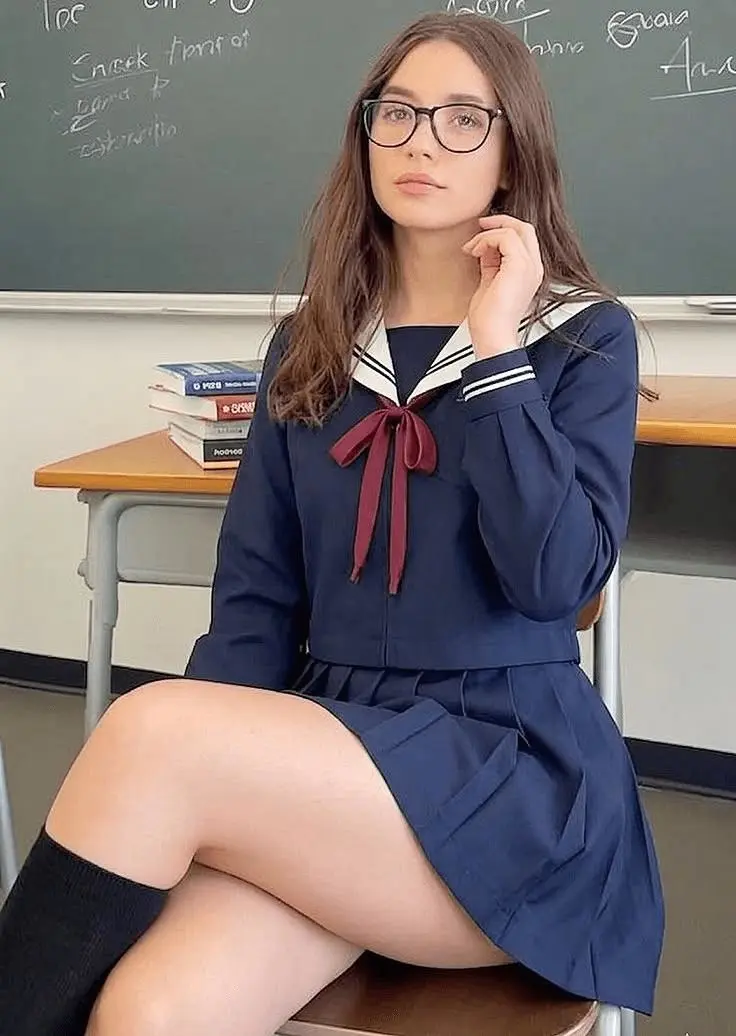 | 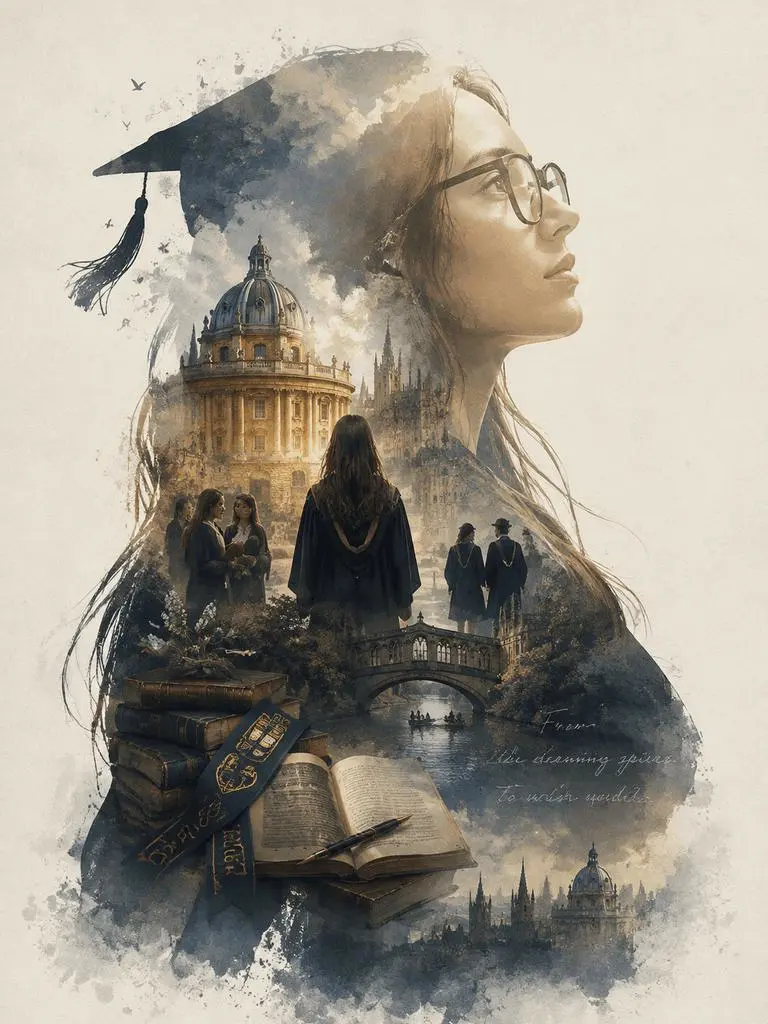 |
Both images use a large side-profile silhouette as the main composition. Inside the silhouette, campus scenes, graduation symbols, architecture, and atmospheric details form a complete visual narrative.
Instead of looking like separate images pasted together, the elements blend into one unified poster.
Why Use GPT Image 2 for a Graduation Poster?
A professional graduation poster normally requires several stages of production:
- Portrait photography
- Background removal
- Image compositing
- Watercolor treatment
- Color grading
- Typography
- Layout design
- Manual retouching
With GPT Image 2, much of this process can be controlled through a single prompt.
The tool can interpret both your uploaded portrait and your written art direction. This makes it possible to preserve the person’s side-profile silhouette while generating an entirely new visual world inside it.
The workflow is useful for:
- Bachelor’s graduation portraits
- Master’s graduation commemorative posters
- PhD graduation announcements
- Alumni social media posts
- University club posters
- Graduation party invitations
- Personal portfolio covers
- Instagram and TikTok content
- Printed graduation gifts
Because the design is based on your own portrait, university, and memories, each result can feel more personal than a generic graduation template.
What You Need Before Using GPT Image 2
Before generating your poster, prepare the following materials.
1. A Clear Side-Profile Portrait
The silhouette is the foundation of the entire design, so your portrait should have a clearly recognizable outer contour.
Choose a photo with:
- A complete side profile
- A clearly visible forehead, nose, lips, and chin
- Minimal hair covering the face
- A clean or simple background
- Even lighting
- High image clarity
- No obvious motion blur
- A head-and-shoulders or half-body composition
A portrait taken against a plain wall usually works better than a photo taken in a crowded environment.
Avoid group photos, heavily filtered selfies, dark images, or portraits where the face occupies only a small part of the frame.
2. Your University’s English Name
Prepare the official English name of your university.
For example:
University of Oxford
Tsinghua University
New York University
Using the university name helps GPT Image 2 create campus-related architectural styles, colors, cultural references, and graduation details.
However, the model may interpret the university artistically rather than reproduce every building with exact architectural accuracy.
3. An Optional Campus Landmark Image
For more specific results, you can also prepare a reference image of:
- A school gate
- A university auditorium
- A library
- A clock tower
- A campus sculpture
- A recognizable graduation venue
Upload the portrait as the primary identity reference and the campus image as an additional environment reference.
4. The WeShop AI GPT Image Tool
Open the following tool in your browser:
Open the WeShop AI GPT Image 2 Generator
No desktop installation is required.
How to Create a Graduation Poster with GPT Image 2
Step 1: Upload Your Side-Profile Photo
Open the WeShop AI image generator and locate the image upload area.
Upload the side-profile portrait you prepared.
Before continuing, check that:
- The face is not blocked by hair, hands, or clothing.
- The nose, lips, and chin form a clear contour.
- The portrait is not overexposed or underexposed.
- The subject is large enough to be recognized.
- The image does not contain several people.
The uploaded photo will guide the outer silhouette of the final poster.
Step 2: Select a Vertical Poster Ratio
For a graduation poster, a vertical format usually provides the strongest composition.
Recommended aspect ratios include:
| Use | Recommended aspect ratio |
|---|---|
| Instagram feed | 4:5 |
| Instagram Story | 9:16 |
| TikTok post | 9:16 |
| Printed poster | 2:3 or 3:4 |
| Phone wallpaper | 9:16 |
A 3:4 or 4:5 ratio works well when you want the portrait silhouette to occupy most of the frame while leaving space for atmosphere and typography.
Step 3: Paste the GPT Image 2 Graduation Prompt
Copy the following prompt into the prompt box.
Replace [YOUR UNIVERSITY NAME] and [LANDMARK NAME] with your own information.
Create a collector's-edition epic narrative graduation poster based on my uploaded portrait.

Use the side profile of the person in the uploaded image as the large outer silhouette. Preserve the recognizable forehead, nose bridge, lips, chin, hairstyle outline, and natural facial proportions of the reference person.

Inside the silhouette, create a complete visual narrative inspired by university graduation. Include a harmonious combination of campus architecture, graduation memories, academic symbols, students walking through the campus, books, graduation caps, diploma details, trees, pathways, soft clouds, and subtle celebratory elements.

The interior scenes must grow naturally within the silhouette rather than appearing as separate images pasted together. Create an elegant silhouette-fill composition with sophisticated double-exposure transitions.

The overall visual style should combine a cinematic movie poster with a dreamy watercolor illustration. Use soft atmospheric perspective, delicate mist, subtle paper grain, dry-brush edges, organic watercolor transitions, restrained details, and large areas of negative space.

The mood should feel quiet, grand, sacred, nostalgic, poetic, emotional, and legendary. It should communicate the feeling of completing an important chapter of life and beginning a new journey.

Use a premium vertical editorial poster layout with dramatic scale contrast, subtle film grain, clear visual hierarchy, balanced composition, and a restrained color palette.

The visual elements must be strongly connected to graduation and university life. Avoid random fantasy objects, forced collage effects, generic template backgrounds, or unrelated decorative materials.

My university is [YOUR UNIVERSITY NAME].

Include visual inspiration from the iconic [LANDMARK NAME], but integrate the landmark naturally into the internal silhouette scene rather than placing it as a separate background object.

If text appears, use clean and minimal English typography. Do not generate large amounts of small text. Leave suitable negative space for a graduation year, name, degree, or short message to be added later.

Aspect ratio: 4:5 vertical poster.
For example:
My university is Tsinghua University.

Include visual inspiration from the iconic Tsinghua University Auditorium.
If you do not need a specific landmark, delete the landmark instruction entirely.
Step 4: Generate Several Variations
Click Generate after confirming that:
- Your portrait has been uploaded.
- The prompt has been pasted.
- The university name has been replaced.
- The landmark instruction has been updated or removed.
- The correct aspect ratio has been selected.
Do not judge the entire workflow from only one generation.
Create several versions and compare:
- Silhouette accuracy
- Facial resemblance
- Campus atmosphere
- Internal scene organization
- Watercolor transitions
- Negative-space balance
- Poster hierarchy
- Landmark recognizability
One result may preserve the face better, while another may have a stronger campus composition. Select the version with the best overall balance.
Step 5: Review and Refine the Poster
Before downloading the result, zoom in and inspect the image carefully.
Check whether:
- The profile still resembles the uploaded person.
- The silhouette edge is clean and recognizable.
- The internal scenes blend naturally.
- Campus elements are not duplicated.
- Graduation caps and books are correctly formed.
- Architecture does not contain obvious distortions.
- Generated text is readable.
- The composition leaves enough room for your name or graduation year.
GPT Image 2 offers improved support for text-rich layouts and graphic structure, but critical names, degree titles, university names, dates, and small typography should still be reviewed and manually corrected when exact accuracy matters.
How to Improve Your GPT Image 2 Graduation Poster
Make the Silhouette More Natural
If the result looks like a forced collage, the portrait may not provide a clean enough outer contour.
Try another photo with:
- A simpler background
- Stronger contrast between the face and background
- A more complete side profile
- Less hair covering the nose and chin
- Better lighting around the face
- Higher image resolution
You can also add this instruction:
The interior campus scenes must merge organically with the portrait silhouette through soft double-exposure transitions. Do not create rectangular image fragments, visible cutout edges, separate photo panels, or a scrapbook collage.
Improve Facial Resemblance
If the poster does not look enough like you, strengthen the identity instruction:
Use the uploaded portrait as the only facial identity reference. Preserve the exact recognizable profile, including forehead shape, nose bridge, lip projection, chin structure, jawline, hairstyle contour, and natural facial proportions. Do not beautify the person into a different identity.
Avoid adding facial descriptions that conflict with your actual appearance.
For example, do not ask for a sharper nose, narrower jaw, or different hairstyle unless you intentionally want those changes.
Add a More Recognizable Campus Landmark
If GPT Image 2 produces a general campus atmosphere instead of a specific building, upload a clear image of the landmark and add:
Use uploaded image 2 as the architectural reference for the university landmark. Preserve its recognizable roof shape, facade structure, columns, windows, proportions, and surrounding landscape while adapting it into the watercolor double-exposure composition.
A landmark reference usually provides more visual guidance than the university name alone.
Make It Look More Cinematic
Add the following section to the prompt:
Use a cinematic vertical poster composition with dramatic scale contrast, soft volumetric light, subtle film grain, museum-quality visual hierarchy, elegant editorial spacing, atmospheric depth, and a restrained color palette inspired by premium independent film posters.
This can improve:
- Visual hierarchy
- Atmospheric depth
- Scale contrast
- Editorial spacing
- Film-poster character
- Overall premium quality
Leave Space for Accurate Text
Instead of asking the model to create a complete block of graduation information, request negative space:
Leave a clean area near the bottom of the poster for manually adding the graduate's name, degree, university, graduation year, and a short message. Do not fill this area with decorative objects or random text.
You can then add the final text in Canva, Photoshop, Figma, or another layout tool.
This is especially useful when the university name, student name, degree, and graduation date must be completely accurate.
Other Poster Themes You Can Create with GPT Image 2
The same silhouette-fill method can be adapted beyond graduation.
Replace:
Theme: University graduation
with another theme, such as:
Theme: Personal growth journey
Theme: Cyberpunk city
Theme: Enchanted forest
Theme: Space exploration
Theme: Travel memories
Theme: Career journey
You can use GPT Image 2 to create:
- Personal biography posters
- Career milestone posters
- Anniversary gifts
- Travel memory artwork
- Brand founder stories
- Employee spotlight visuals
- Film-style social media portraits
- Event invitation covers
- Creative portfolio artwork
For commercial teams, the workflow can also be adapted into campaign posters, creator collaborations, event graphics, and personalized social media content.
Frequently Asked Questions About GPT Image 2 Graduation Posters
Can I Use a Front-Facing Portrait?
You can, but a side-profile image usually creates a clearer silhouette-fill composition.
A front-facing portrait may produce a symmetrical double-exposure effect rather than the large cinematic profile shown in this tutorial.
Does the Poster Need a Graduation Cap?
No.
A clean side-profile portrait without a graduation cap may provide a more recognizable facial outline. You can ask the model to add subtle graduation elements inside the silhouette instead.
If you upload a photo wearing a graduation cap, make sure the cap does not cover too much of the forehead or face.
Can GPT Image 2 Add My Name and Degree?
It can attempt to generate the text, especially when the requested text is short and clearly specified. However, you should inspect spelling, punctuation, capitalization, and degree details before publishing.
For important commemorative prints, leaving space and adding the final text manually is the safer workflow.
What Should I Do If the First Result Is Not Good?
Try one change at a time:
- Upload a clearer portrait.
- Simplify the prompt.
- Reduce the number of internal scenes.
- Add a campus landmark reference.
- Strengthen the identity-preservation instruction.
- Generate another variation with the same setup.
Changing every instruction at once makes it difficult to identify what improved or weakened the result.
Create Your Graduation Poster with GPT Image 2
You do not need an expensive photography studio or advanced Photoshop skills to create a meaningful graduation visual.
With one clear side-profile portrait, your university name, and a structured prompt, GPT Image 2 can turn an ordinary photo into a cinematic graduation poster filled with campus memories, symbolic scenes, and watercolor atmosphere.
The two examples in this guide show how the same silhouette-fill concept can produce different compositions while maintaining the emotional theme of graduation.
Open the WeShop AI GPT Image 2 Generator, upload your portrait, customize the prompt, and create a poster that represents your own university journey.
Your graduation is more than a photograph. It is the conclusion of one story and the beginning of the next.