












AI Product Video Generator for Spatial Product Ads
Create a cinematic product-only advertisement from two reference images. This workflow explains camera movement, spatial transitions, hero framing, product consistency, and optional animated commercial text.
Create Spatial Product Ads with an AI Product Video Generator
This solution shows ecommerce teams how to use an AI product video generator to turn a product reference and one environment image into a focused commercial. The product remains recognizable while the camera distance, viewing angle, perspective, and surrounding space change. It is designed for product-only advertising, so no human model is required.
Base headphone result: a single product, one continuous environment, and changing camera perspectives.
Many generated clips move without communicating. The product stays centered while the background changes without purpose. This workflow gives each moment a job: establish the environment, reveal details, expand the space, and finish with a stable hero shot. Short commercial copy can then be added as a second layer.
What This AI Product Video Generator Solution Creates
The deliverable is a short commercial built from a small reference set. An AI product video generator handles the motion, while the references and prompt define the structure.
The workflow creates:
- A clear product entrance and purposeful detail shots
- Perspective changes inside one continuous environment
- Stable product color, silhouette, and materials
- A final hero composition with optional commercial typography
The same AI product video generator workflow can support Shopify pages, Amazon brand content, TikTok ads, Instagram Reels, and campaign concept tests.
Prepare Two References Before You Generate
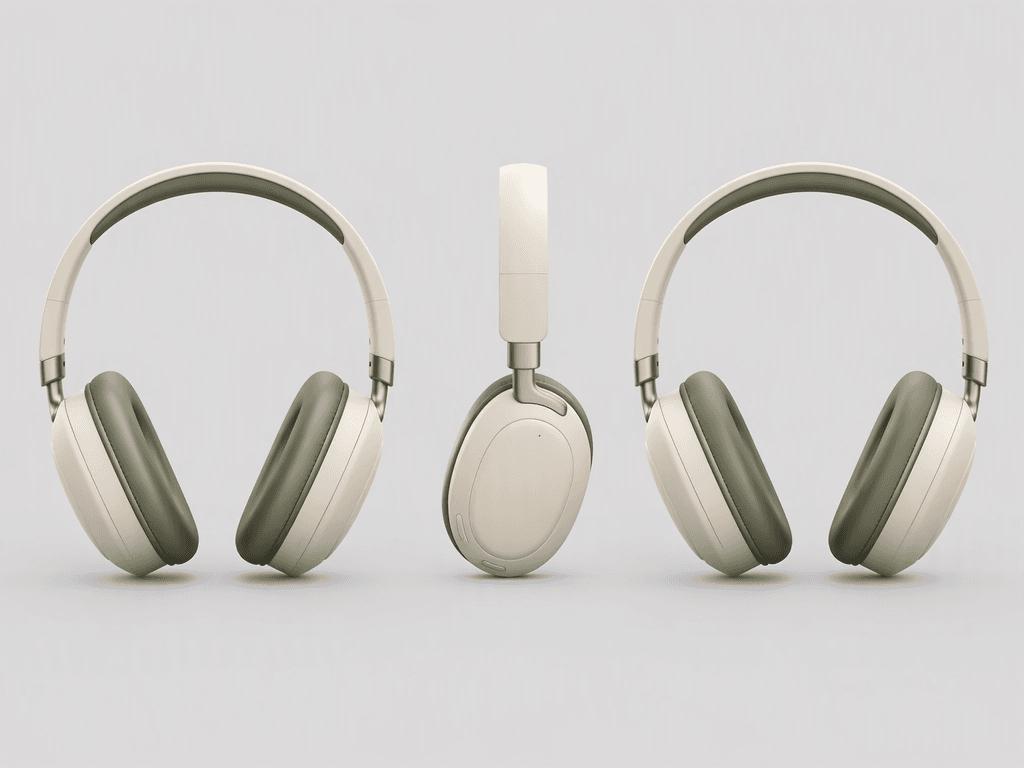
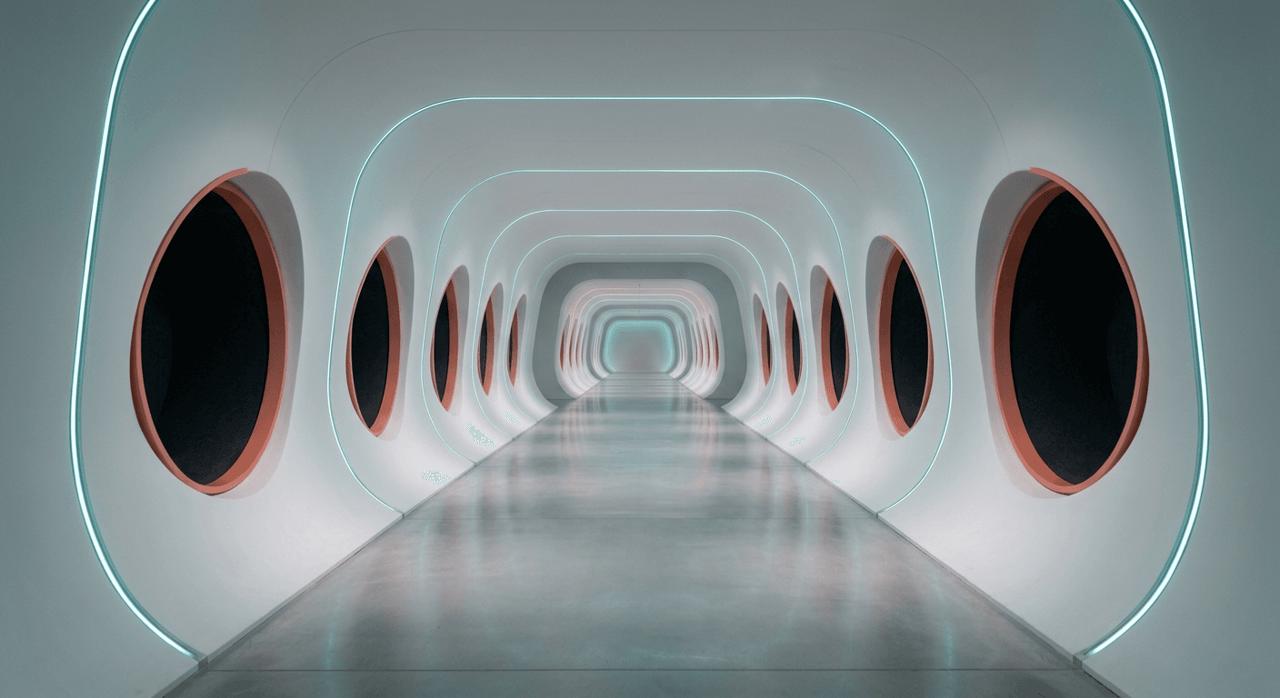
Use one product reference for construction and one environment reference for the first frame, palette, lighting, and vanishing point.
| Product reference: three product views | Environment reference: first frame |
|---|---|
 |  |
Keep the product large and unobstructed. Leave open space in the first frame for the entrance and later camera movement.
Prompt 1: Product Reference
Create a clean three-view product reference sheet of the same over-ear headphones: front view, side view, and rear three-quarter view. Preserve the warm ivory shells, champagne metal hinges, deep sage ear cushions, slim curved headband, proportions, and material details. Use a neutral light-gray studio background with consistent lighting and scale. Show only the headphones. No person, hands, props, text, or logo.
Prompt 2: Background First Frame
Create a wide 16:9 empty architectural corridor for a premium technology advertisement. Use repeating rounded frames, a centered vanishing point, a dark graphite floor, soft ivory walls, and restrained teal edge lighting. Keep the composition symmetrical, spacious, and realistic. No product, person, furniture, text, or logo.
Prompt 3: AI Product Video Generator Motion
Create a premium product film using the uploaded headphone reference and first-frame environment. Keep the same headphones consistent in every shot. Begin with the empty corridor, reveal one headphone through a forward camera move, cut to two short product-detail views, widen the space through controlled perspective changes, and end on a centered three-quarter hero shot. Keep one continuous graphite, ivory, and muted-teal environment. Use clean transitions, realistic materials, controlled reflections, and clear product visibility. No people or text.
The third prompt stays concise. It defines the shot order, continuity, and ending without giving the AI product video generator competing camera commands.
Build the AI Product Video Generator Workflow
- Prepare the product reference. Use a clean image or three-view sheet. Check shape, color, and materials.
- Prepare the first frame. Leave negative space for the product reveal.
- Upload both references. Add them to WeShop AI Video Generator when the chosen workflow supports image references.
- Paste the motion prompt. Use the sequence: establish, reveal, inspect, expand, and finish.
- Generate and review. Check product consistency before making variants. You can try it directly using the tool on the right.
- Check the ending. The final frame should also work as a campaign still.
Ready to create your own spatial product video?
Try Seedance 2.5 in WeShop AI →
Give every shot one purpose. A macro view should reveal construction, while a wide shot should show scale. The AI product video generator should clarify the product rather than add random movement.
Review the Result as a Shot Sequence
Capture three frames and check whether the visual story remains clear without playback.
| Opening space | Product-detail moment | Final composition |
|---|---|---|
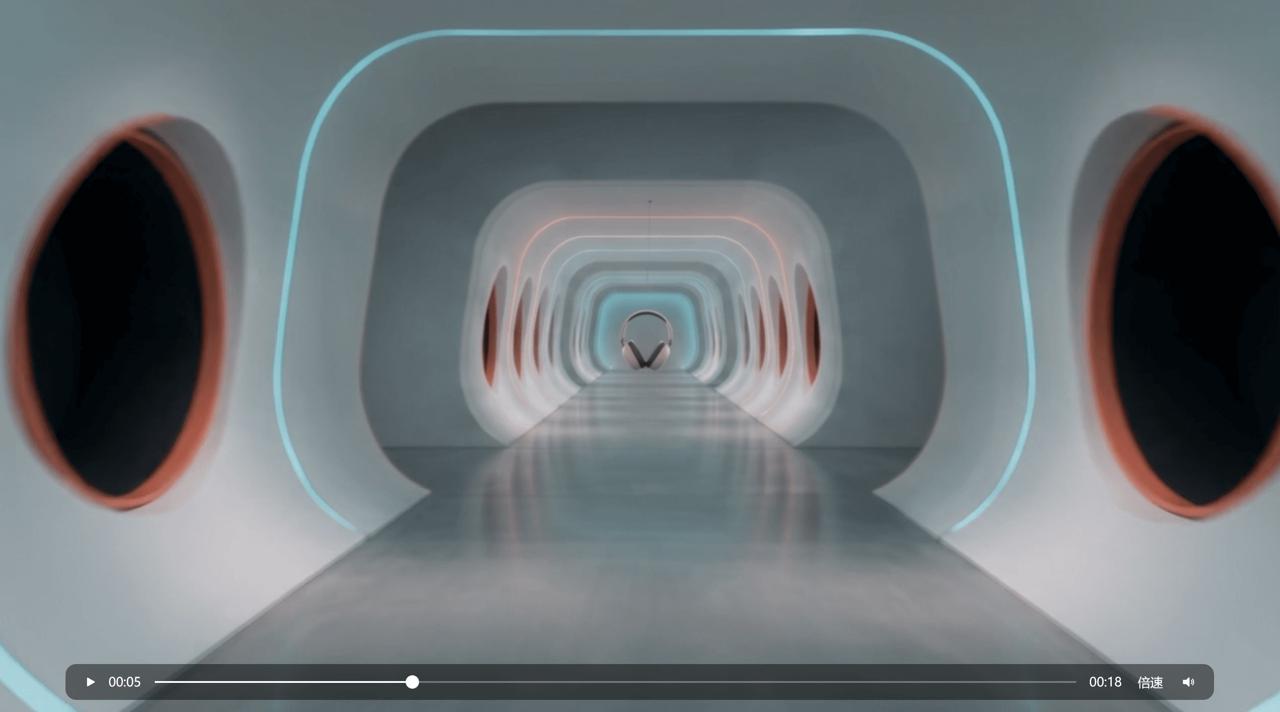 | 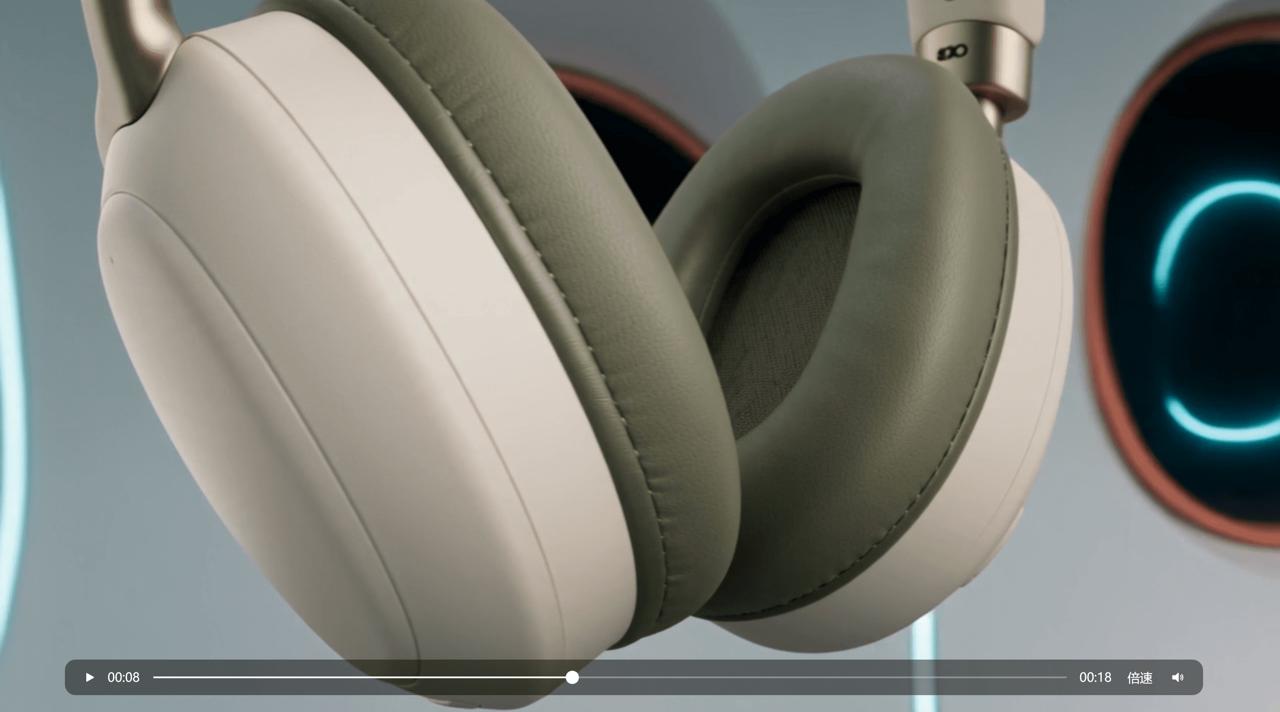 | 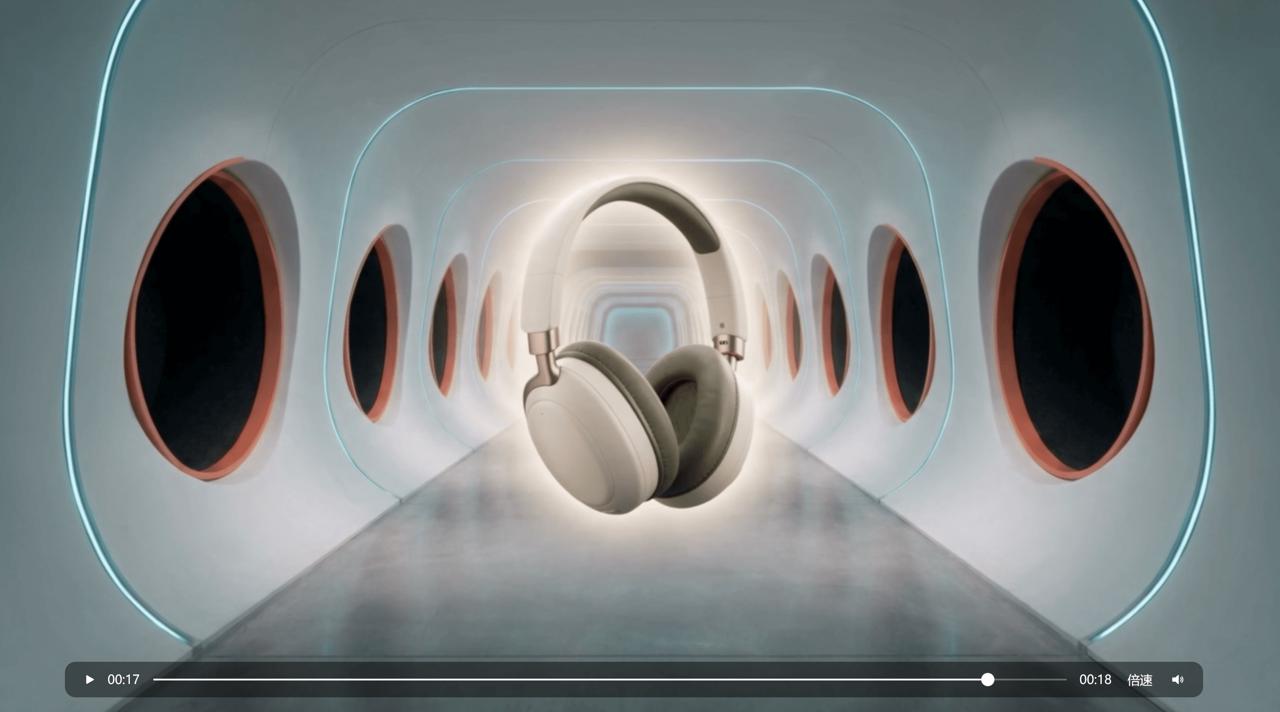 |
These frames show whether the AI product video generator created a sequence rather than one composition that keeps changing. The product should enter, receive a closer inspection, and finish in a stable hero position.
Add Commercial Text After the Motion Works
Once the motion is stable, add short text as a second pass. The motion model can focus on product fidelity first. Then spelling, size, timing, and placement are easier to control.
Enhanced version: the same spatial product film with timed commercial typography.
The text pass uses four messages: “A WORLD OF YOUR OWN,” “IMMERSIVE SOUND,” “COMFORT, REFINED,” and “ENTER YOUR SOUND.” A restrained edge glow, brief position shift, letter-spacing animation, and fast fade integrate the copy. This makes the AI product video generator result clearer in a paid ad or muted social feed. Keep the copy short to reduce spelling and layout errors.
Short Test: Use the AI Product Video Generator for Running Shoes
To test the structure on another category, use one clean running-shoe reference and one dark architectural first frame. Keep the shoe as the only subject, then direct the camera and floor perspective.
Create a short running-shoe product film from the uploaded shoe and environment references. Keep one shoe design consistent. Begin with a low frontal reveal, move into a side detail, compress the floor into a narrow track, expand it into stepped planes, and end with a clean three-quarter hero view. Keep one continuous dark-gray setting, strong depth, quick perspective shifts, realistic materials, and clear product visibility. No people or text.
The category changes, yet the AI product video generator follows the same logic: entrance, focused detail, spatial expansion, and final hero framing.
Quality Controls for an AI Product Video Generator
Before publishing, review the following points:
- Product fidelity: Check shape, color, materials, patterns, and proportions.
- Background continuity: Keep one visual system. Changes should feel spatial, not like unrelated locations.
- Shot purpose: Remove movements that do not reveal a feature or improve the ending.
- Light: Check reflections, contact shadows, and flicker.
- Typography: Review every word, margin, font size, contrast, entrance, and exit.
- Framing: Match the destination ratio and protect essential details from crop zones.
Run the AI product video generator again only after identifying one problem. Change one variable, such as the entrance, macro timing, or final angle.
Where This Workflow Fits
Use the base version when the visuals should stay clean. Use the text-enhanced version when a feature or campaign message must appear quickly. For product launches, the AI product video generator can also supply a hero clip, short cutdowns, and still frames from the same visual system.
Create Your Next Product Ad
Start with one accurate product reference and one environment that supports the product. Give the AI product video generator a clear shot sequence, review three key frames, and add commercial text only after the motion is stable.
You can try it directly using the tool on the right.