












AI Hairstyle Test Tutorial: Generate 12 Custom Hairstyle Analysis Cards from a Single Photo
Learn how to use WeShop AI to upload a front-facing photo and generate a professional hairstyle analysis infographic with 12 different hairstyles. Step-by-step guide with prompt and parameter tips.
Every time you go to the hair salon wanting a new hairstyle, are you always worried about a "disaster"?
Instead of listening to your stylist describe it out of thin air, why not first do an accurate "hairstyle test" yourself! Now, with powerful AI image tools, you only need a front-facing selfie to instantly generate a "Hairstyle Analysis Card" just like one from a professional styling consultant.
This tutorial will walk you through how to use a professional AI tool to visually compare the effect of 12 different hairstyles—like long hair, short hair, and curly hair—on yourself while preserving your true facial features and face shape. It helps you quickly find the "most face-flattering" signature hairstyle at a glance!
Whether you want to change your style or get a reference before heading to the salon, this super-detailed tutorial will solve your hairstyle selection problems.
Preparation / Required Tools
Before you start, make sure you have the following two essentials ready.
1. AI Image Generation Tool
This tutorial will use WeShop AI, an advanced AI tool that supports image-to-image generation.
- 🌐 Visit link: WeShop AI - GPT Image Tool
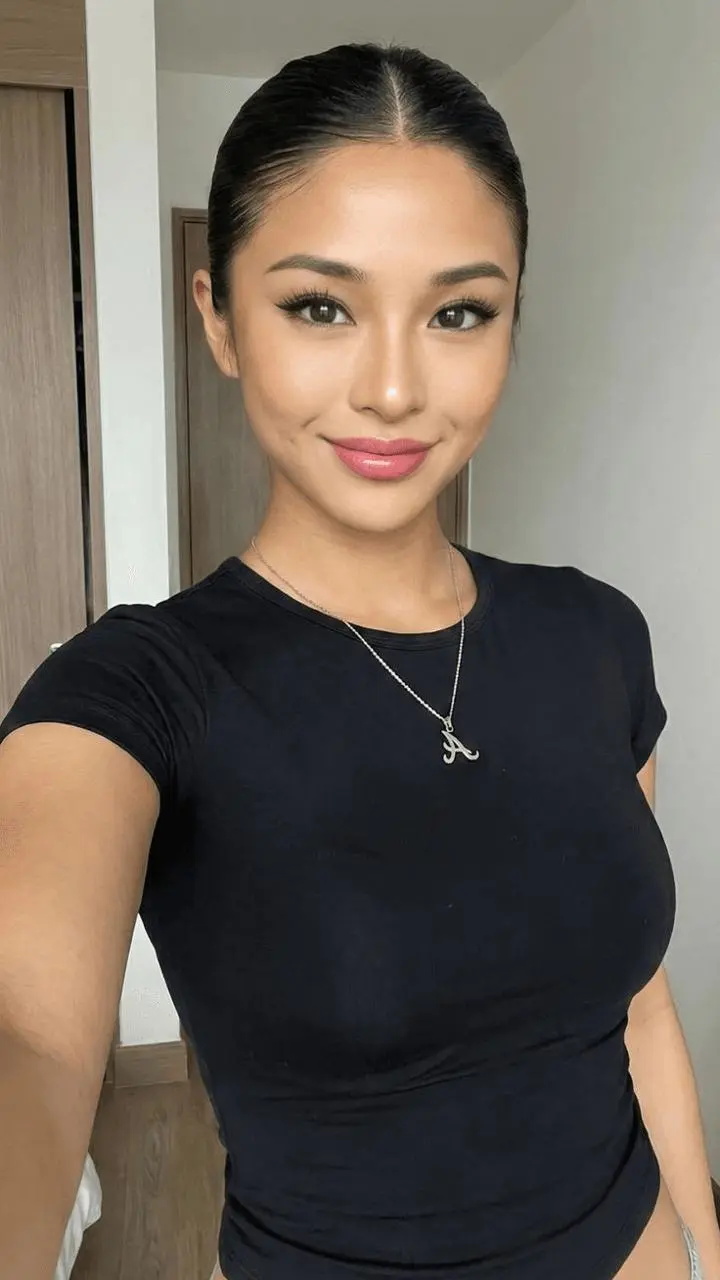
2. A High-Quality Front-Facing Photo of Yourself
It is recommended that the photo you upload meets the following requirements:
- Bright lighting: No obvious shadows on the face.
- Clear facial features: Preferably facing the camera directly, without sunglasses or oversized hats.
- Hair pulled back: If possible, tie your hair back or tuck it behind your ears to reveal the full facial contour. This way, the AI will blend the new hairstyle more naturally.
Detailed Step-by-Step Guide
Step 1: Enter the WeShop AI Platform and Upload Your Photo
- Open your browser and go to the WeShop AI GPT-Image Workspace.
- Find the image upload area on the page—usually showing "Upload Image" or a gallery icon.
- Select your prepared clear front-facing photo and upload it.
- Wait for the image to finish loading.
Step 2: Enter the Core Magic Command (Prompt)
Chinese descriptions can sometimes be ambiguous in AI image tools. To achieve higher quality generation results and keep the person's facial features as consistent as possible, we've compiled the requirements into a more precise English command.
Please directly copy the following English prompt and paste it into the tool's text input area, i.e., the Prompt area.
Copy & Paste
Please create a high-quality personal hairstyle analysis infographic based on the portrait photo I uploaded. Retain the subject's original facial features, face shape, and authentic characteristics exactly. Use a grid layout to show the effects of different hairstyles applied to the subject. Clearly categorize the hairstyles into "Most Suitable", "Average", and "Not Recommended", allowing viewers to see at a glance which hairstyles best frame the face and elevate the overall aura.

Requirements:

1. Character Consistency:
All hairstyles must be based on the exact same face. Do not alter the facial features; only change the hairstyle, hair volume, length, and styling method.

2. Hairstyle Variety:
Generate a high-end magazine-style infographic featuring 12 distinctly different real hairstyles, not just minor variations. The hairstyles must include long hair, mid-length hair, short hair, curly hair, straight hair, updos, ponytails, and different types of bangs.

3. Distinct Styles:
Each of the 12 hairstyles must have a clearly different visual style, such as French, professional, sweet, elegant, sophisticated, or capable.

4. Layout:
Use a clean and stylish layout resembling a professional styling consultant's report. Focus primarily on visual presentation and use only short text labels. High resolution, with no long paragraphs of text.
💡 Tip / Pitfall Guide
If you have a specific hairstyle you want to test, such as a mullet, you can add
mulletto the second requirement; if you want to test a bob, addbob haircut.
Step 3: Adjust Parameters and Generate with One Click
-
Check the similarity or redraw strength parameters on the tool panel, for example:
Image WeightDenoising Strength
-
It is recommended to keep the similarity at a relatively high level, e.g., 0.7~0.8.
-
A higher similarity can preserve real facial features and face shape as much as possible while changing the hair.
-
After confirming the parameters are correct, click the "Generate" button.
-
Wait for the AI to finish rendering, and you will get a professional-quality multi-grid hairstyle comparison image.
Step 4: View the Report, Save, and Share
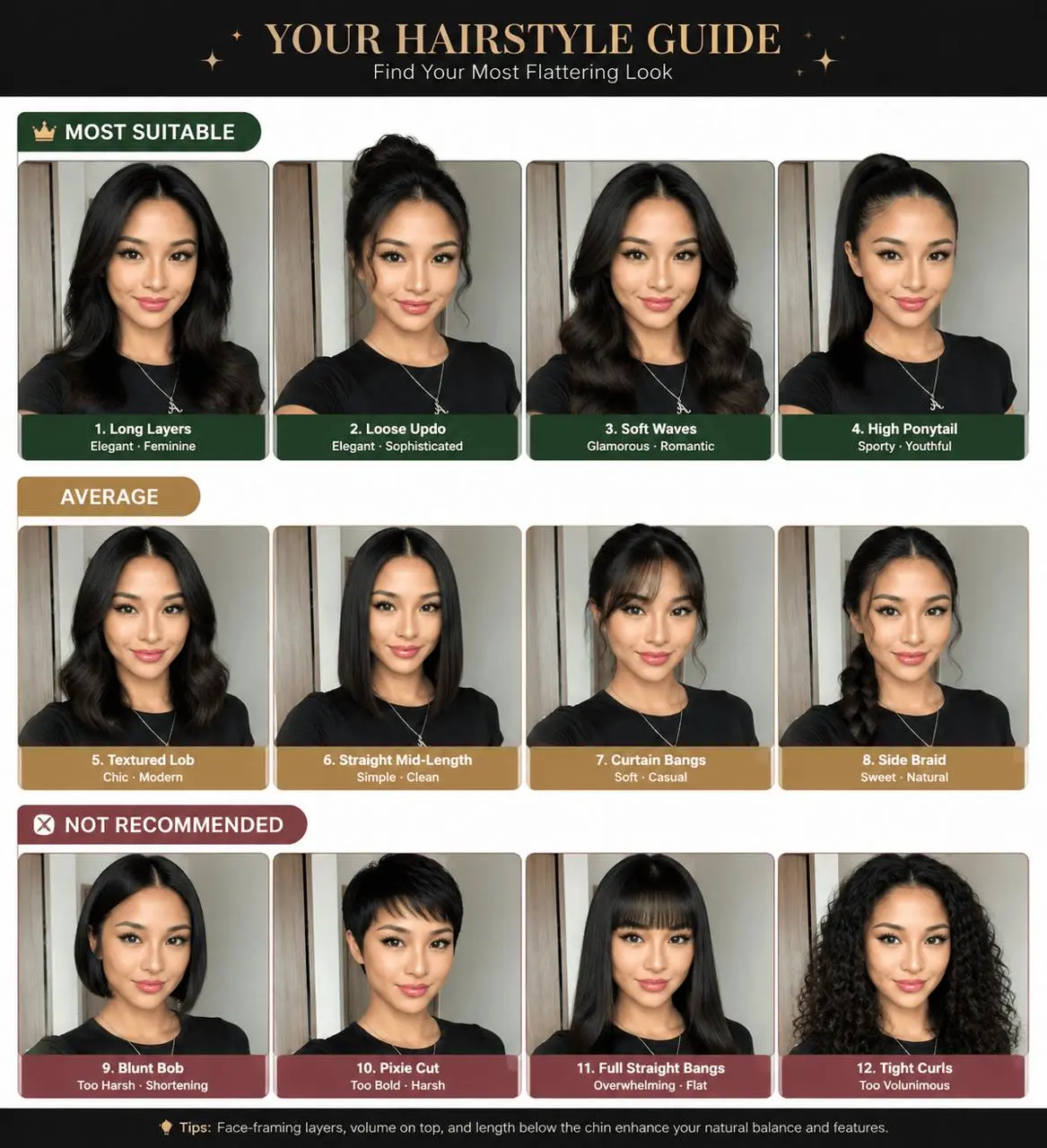
Once the generation progress is complete, your exclusive custom-made hairstyle test report is ready!
You can intuitively see the effect of 12 different hairstyles on your face in the image, for example:
- Sleek short hair
- French big waves
- Professional straight hair
- Mid-length layered hair
- High ponytail
- Low updo
- Blunt bangs
- Airy bangs
|
|
You can download and save the high-resolution image. Not only can you post it on Xiaohongshu or social media to discuss with friends, but next time you go to the salon, you can also show the image directly to your stylist, doubling communication efficiency.
Advanced Tips / Frequently Asked Questions (FAQ)
Q1: Why doesn't the generated photo look like me?
When AI generates hair, it sometimes makes slight adjustments to the edges of the face. You can try the following methods:
- Upload a higher resolution, clearer original photo.
- Increase the reference image weight in WeShop, i.e.,
Image Weight. - Make sure the face in the original photo is not heavily covered by bangs or hair.
- Further emphasize in the prompt:
Do not alter the facial features, face shape, eyes, nose, mouth, skin tone, or facial proportions.
Q2: Can I test different hair colors at the same time?
Of course.
You just need to add hair color requirements to the English prompt. For example, after the hairstyle types, add the following:
Include different hair colors such as warm brown, ash blonde, burgundy, natural black, and dark chocolate brown.
This sentence means:
Include different hair colors such as warm brown, ash blonde, burgundy, natural black, and dark chocolate brown.
Note that changing both hairstyle and hair color at the same time may reduce some character consistency. If you mainly want to test which hairstyle suits you better, it is recommended to keep your original hair color in the first round; after deciding on the hairstyle, generate separate versions with different hair colors.
Q3: What if the text labels on the image are garbled?
Currently, most AI image generation tools occasionally encounter spelling errors, gibberish, or incomplete text when processing typography in images.
The core purpose of the hairstyle test image is to see the visual effect of different hairstyles, so you can prioritize focusing on the person and the hairstyle itself.
If you want the final image to be more refined, you can import the generated image into the following tools for secondary editing:
- Canva
- Meitu
- Photoshop
- Figma
You can use the eraser, healing tool, or content-aware fill to delete the incorrectly generated AI text, then re-add simple Chinese labels, for example:
- Most Recommended
- Suitable
- Average
- Not Recommended
- Makes Face Look Smaller
- Makes You Look Mature
- Contours Cheekbones
- Not Suitable for Round Faces
Q4: How to test specific hairstyles I choose?
You can directly list the specific hairstyle names you want to test in the prompt.
For example:
The 12 hairstyles must include a French bob, wolf cut, long wavy hair, shoulder-length layered hair, pixie cut, blunt bob, high ponytail, low ponytail, elegant updo, curtain bangs, airy bangs, and slicked-back straight hair.
Summary
With WeShop AI, you don't need to actually cut your hair or just rely on imagination; you can preview the real effect of different hairstyles on your face in advance.
The entire process only requires four steps:
- Prepare a clear front-facing photo.
- Upload it to WeShop AI.
- Copy and paste the hairstyle test prompt.
- Generate and compare 12 different hairstyles.
Go ahead and try it now!
If you encounter any issues modifying the prompt or can't find the corresponding features during the process, feel free to leave a comment. If you successfully generate a satisfying hairstyle card, don't forget to share your "amazing transformation"!